-
-
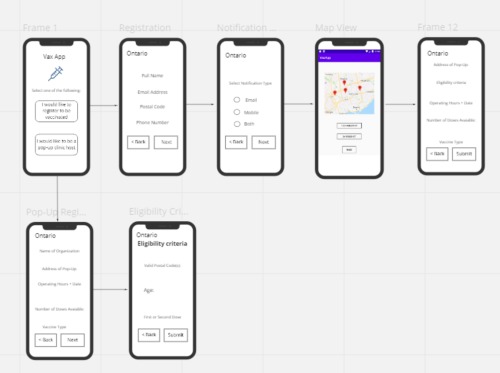
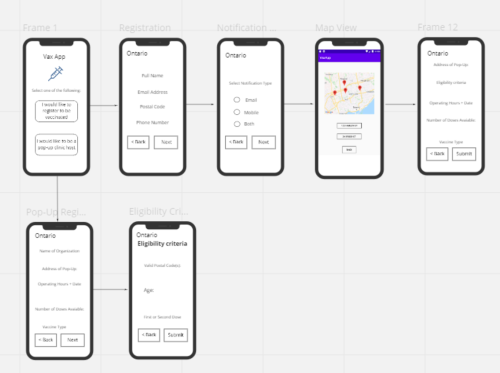
Rough Map of the App Plan
Inspiration:
People having to stand in long line ups outside of Covid-19 pop-up vaccine clinics, without being certain that they would receive the vaccine during their visit
- Having large crowds of people outside these clinics also poses a risk to the spread of covid-19
What it does:
For people looking to get a vaccine:
- Gives the opportunity for people to register to receive notifications from the app when pop-up clinics have opened in their area
- Users can also use the map feature (uses the Google Maps API) to find pop-up vaccine clinics in their local area and register to receive a dose at clinics registered in the app
For organizations hosting pop-up clinics:
- Register their clinic in the app (By filling in the required information such as location, hours of operation, eligibility criteria..etc) and get app users to register to receive a dose of the vaccine from the clinic
For organizations hosting pop-up clinics:
- Register their clinic in the app (By filling in the required information such as location, hours of operation, eligibility criteria..etc) and get app users to register to receive a dose of the vaccine from the clinic
How we built it:
- Using Java in Android Studio
- The Google Maps API was implemented by importing the API package for Android Studio (with reference to the Documentation on Google Maps SDK for Android)
Challenges we ran into:
- Android Studio was taking more time than we anticipated to build and run our code (we ran into 1-2 hour periods of repetitively solving build errors and waiting for our code to run in the emulator tool)
- API implementation created unforeseen conflicts between the API libraries and the current code that was implemented
- The issue above also compounded when our team tried to merge individual parts of the code together and there were many configuration conflicts in Android Studio
- Achieving a fully functional Google Maps feature, that can especially take any postal code and convert it to longitude and latitude to display on correctly on the map
- Difficulty implementing the Google Cloud Translation API as its implementation started to cause dependency conflicts with the project configuration in Android Studio
Accomplishments that we're proud of
- For two of our team members, this is their first hackathon project
- Developing a mobile app in Android Studio where only half of the team was familiar with using it
- Learning more about how to implement Google Maps API and Google Cloud Translation API into an Android Studio project
- Working on a project that helps solve a problem we see in the current state of the Covid-19 pandemic
What we learned:
- How to use Android Studio to create a mobile app
- How to implement a Google Maps API in an Android Studio project
- An understanding of how to implement Google’s Cloud Translation API in an Android Studio Project
What's next for VaxApp:
- Expanding to areas outside of Ontario (other provinces/areas in Canada)
- Catering our application to iOS platforms (with potentially updating to the React Native platform)
- Creating a menu in the app with an news page for users to keep up with pop-up clinics opening (could be implemented using the Twitter API)

Log in or sign up for Devpost to join the conversation.