-
-
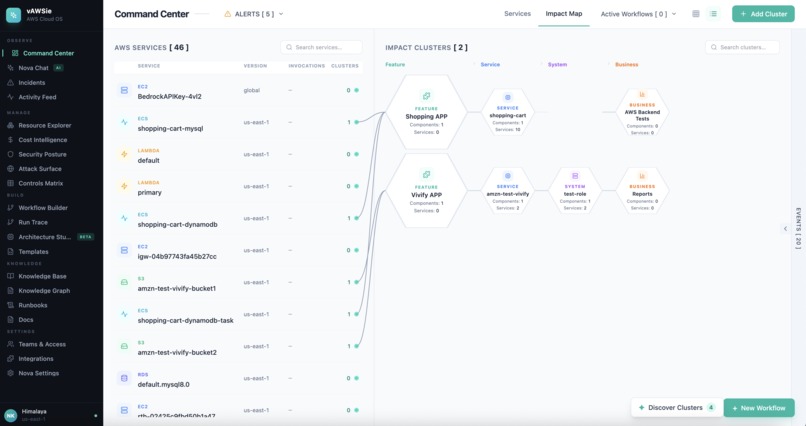
App View
-
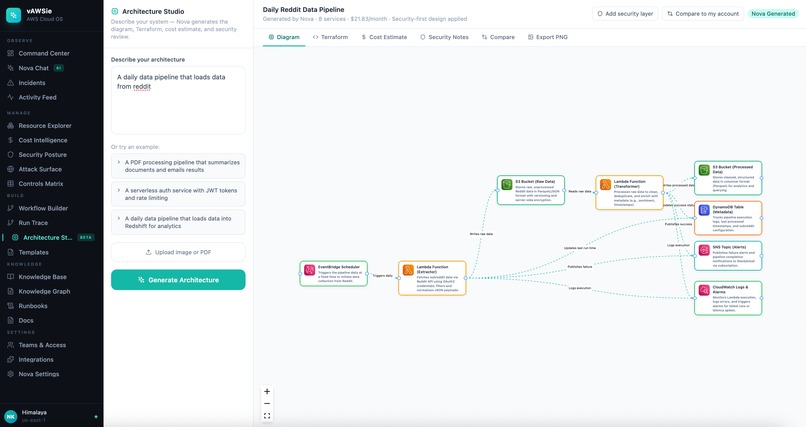
Live Architecture to IaC Builder
-
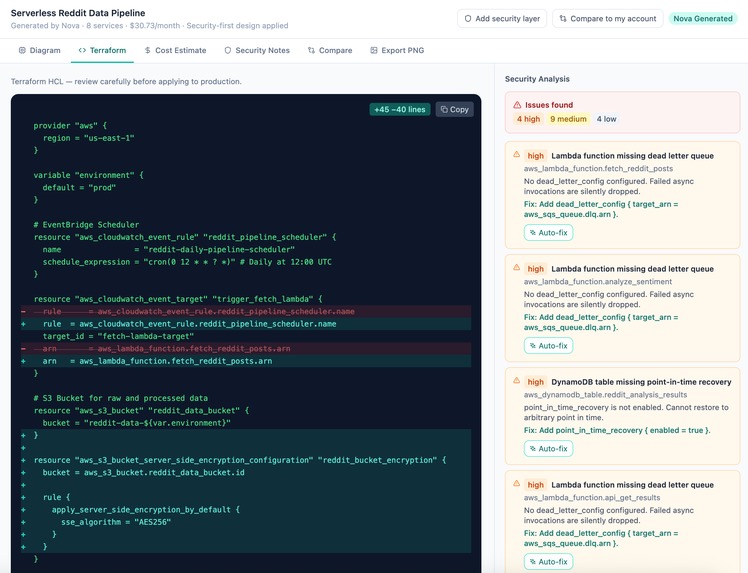
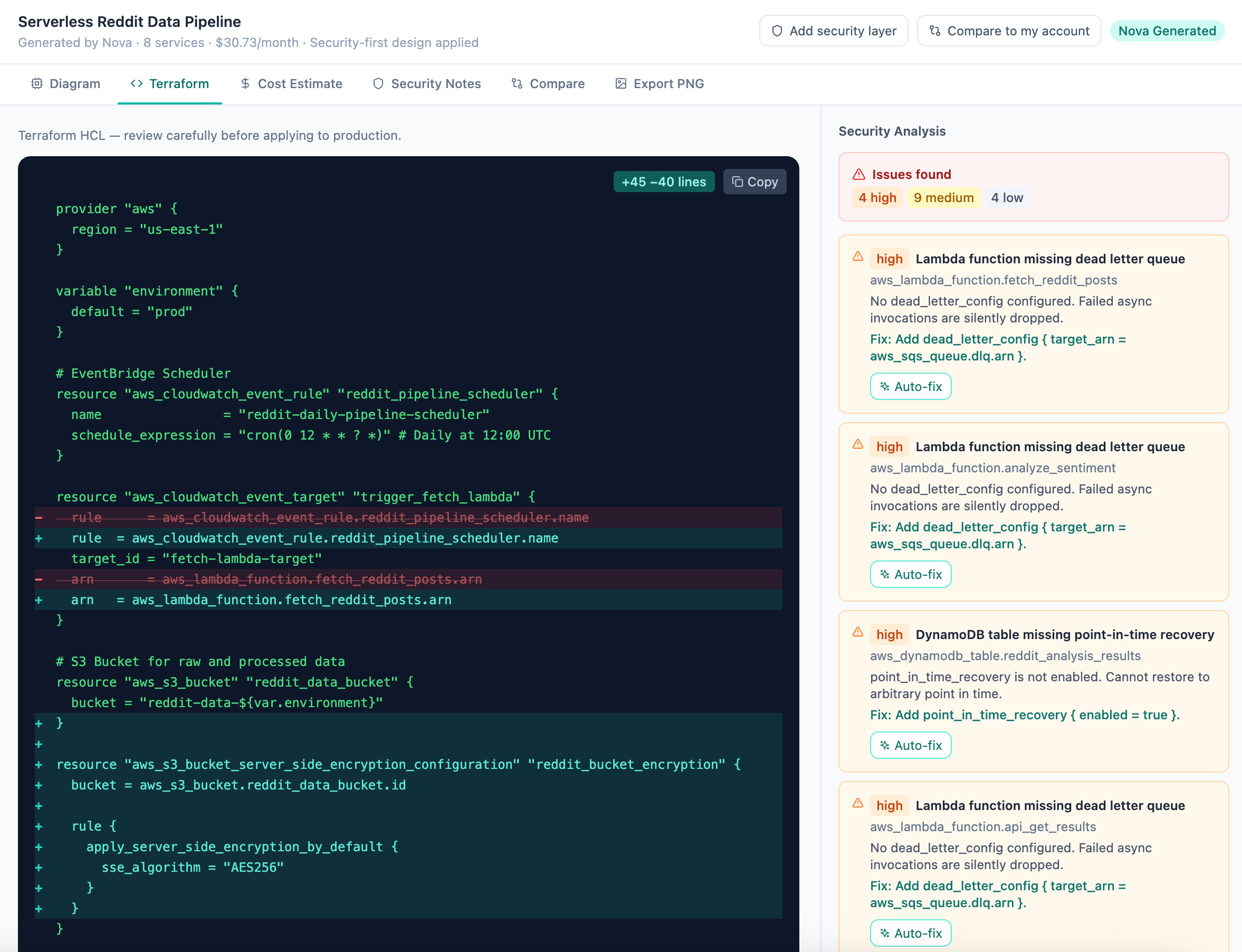
Architecture Studio - IaC Security Validation
-
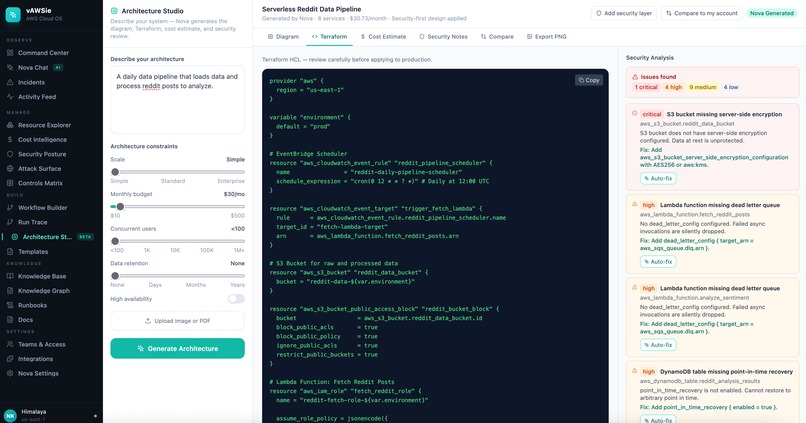
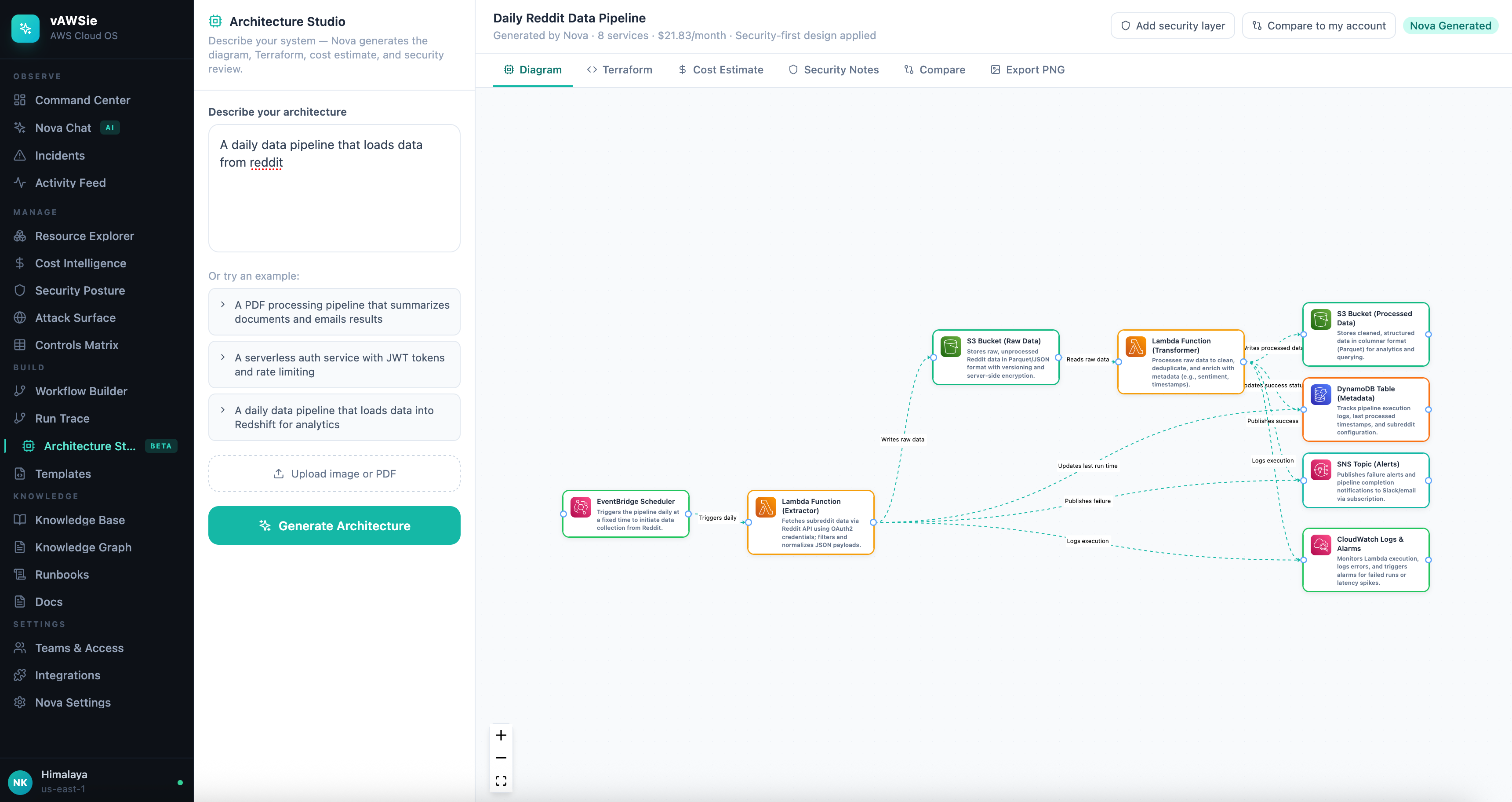
Architecture Studio - Diagram to IaC
-
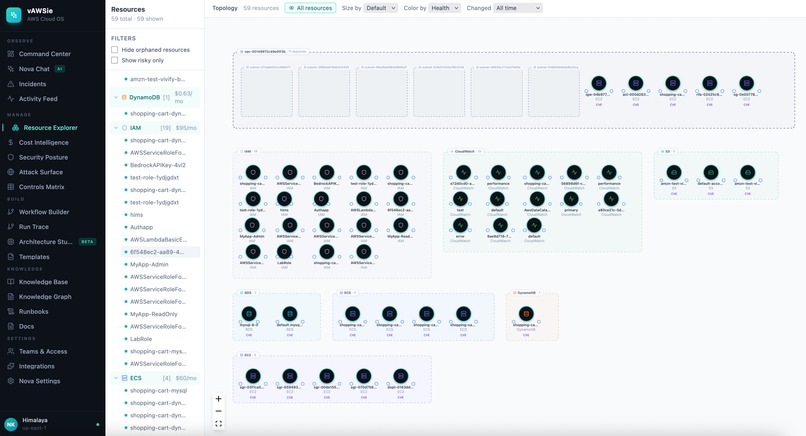
Resource Explorer
-
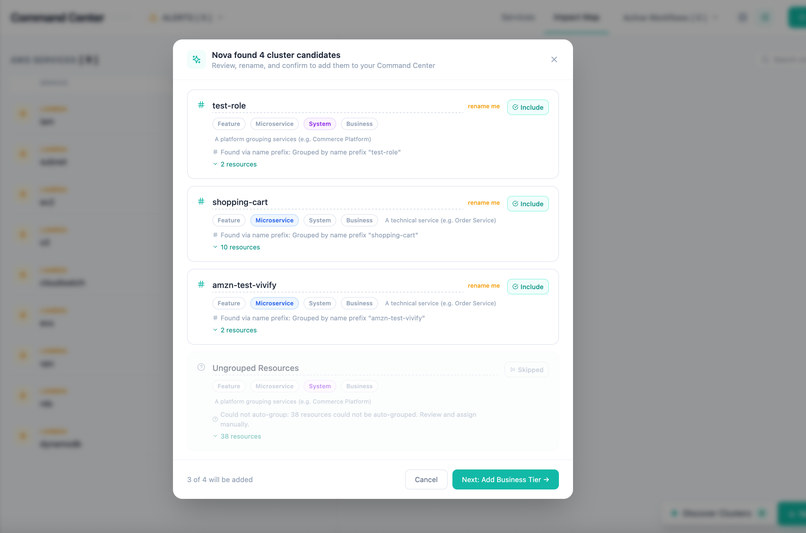
Business Clusters Discovery
-
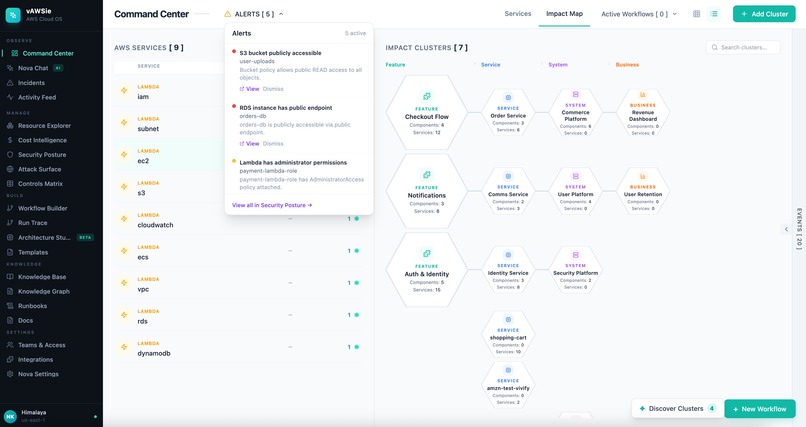
Alerts
-
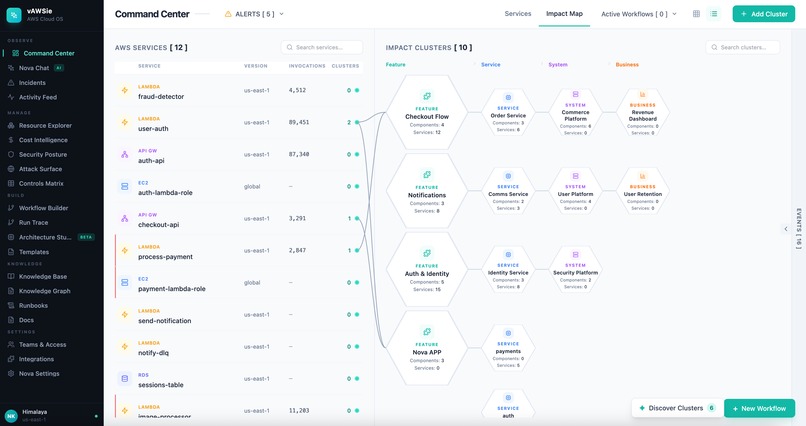
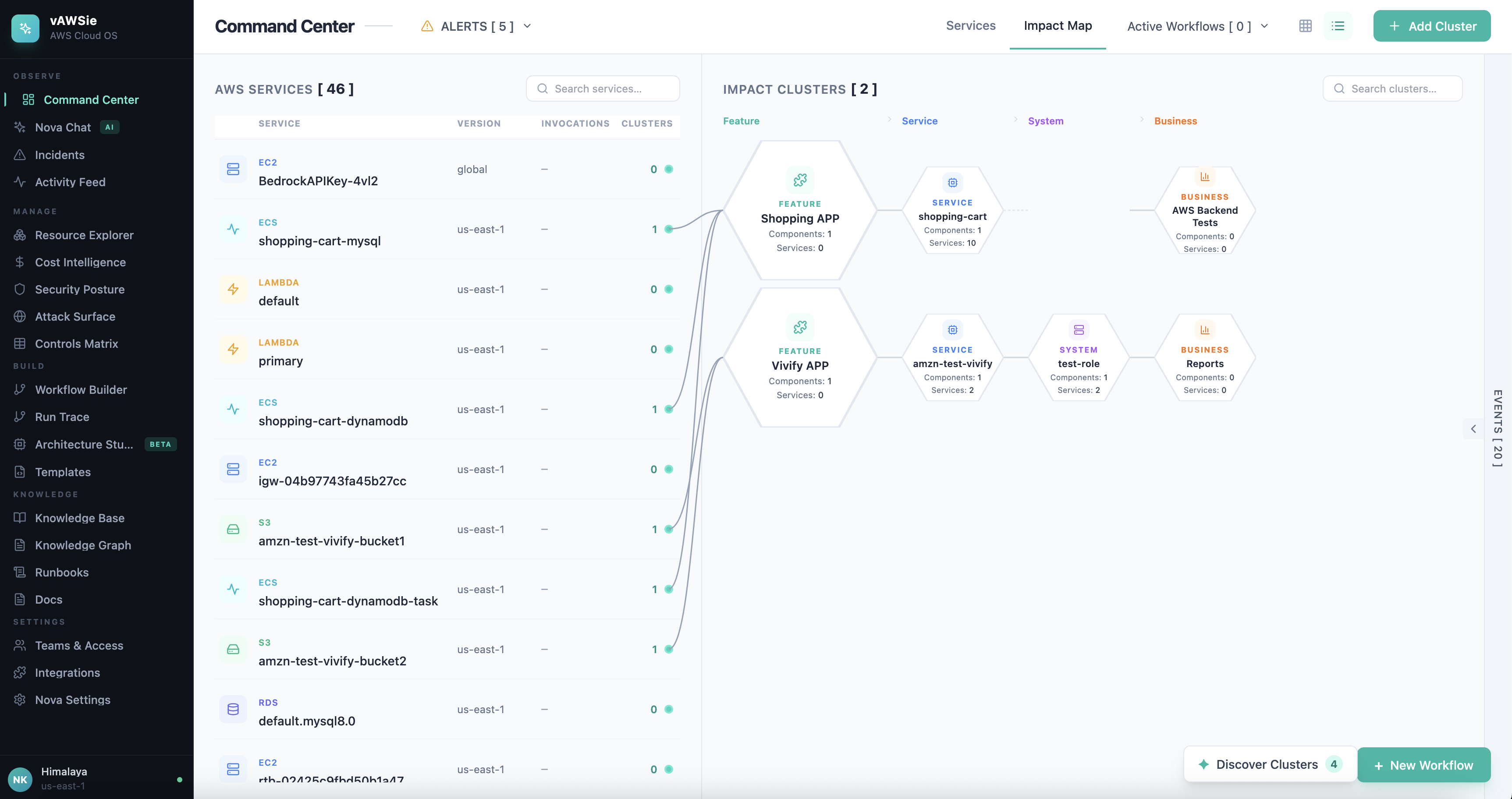
Command Center
-
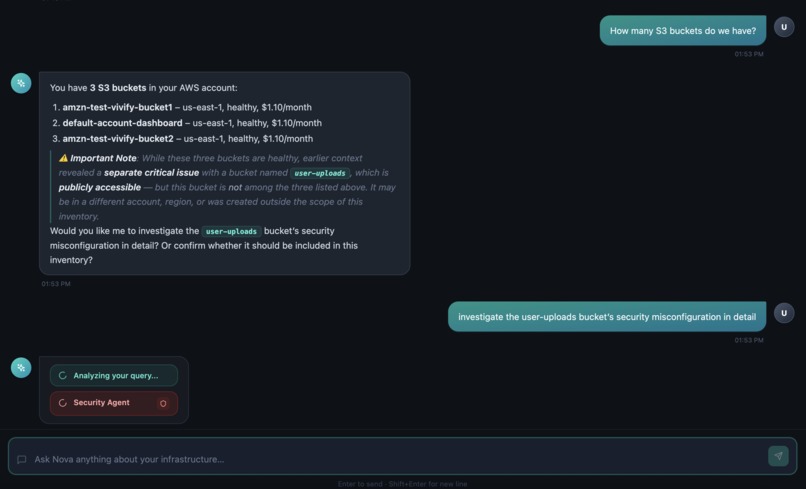
Nova Chat
Inspiration
I’m an AI researcher at Northeastern University and work with a lot of tech students as a teaching assistant. One thing I kept seeing: people get frustrated with the AWS console very quickly. It’s not that the console is bad at what it does, it’s built around services and APIs, but it doesn’t match how we actually think about our cloud. We don’t wake up asking “what’s my Lambda quota?” We ask “why is checkout slow?” or “what’s costing us so much?” or “what broke last night?” That gap between how AWS organizes the world and how students (and teams) reason about it was the real issue.
That gap, between how AWS organizes the world and how teams reason about it, inspired vAWSie. We wanted an interface that speaks in intent and impact: your services, your costs, your incidents, and your workflows, all in one place, with an AI that understands your account and can answer in plain language.
The other spark was tools like Cursor: an AI-native experience that’s woven into the whole product, not bolted on. We asked: what if your entire AWS environment was that fluent? Not a chatbot next to a dashboard, but one system where every section is “the AI looking at your account from a different angle.” That’s the vision we’re chasing.
Step by Step details of how I built this: https://thebigdataguy.substack.com/p/vawsie-an-ai-native-cloud-operating
What it does
vAWSie is an AI-native cloud operating system for AWS. It reorganizes infrastructure around what you want to do, not around service names.
Visit Github for more information about the features.
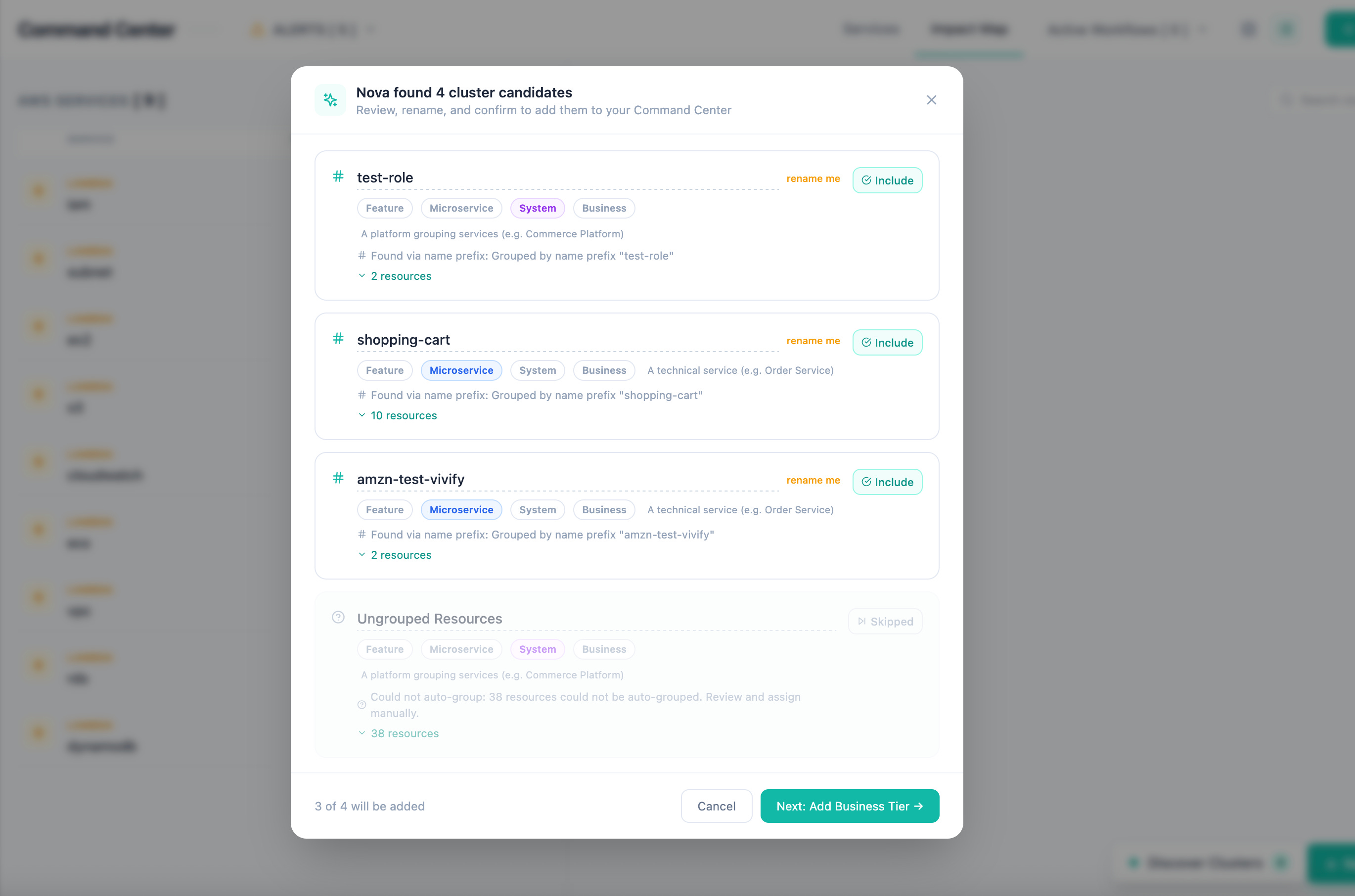
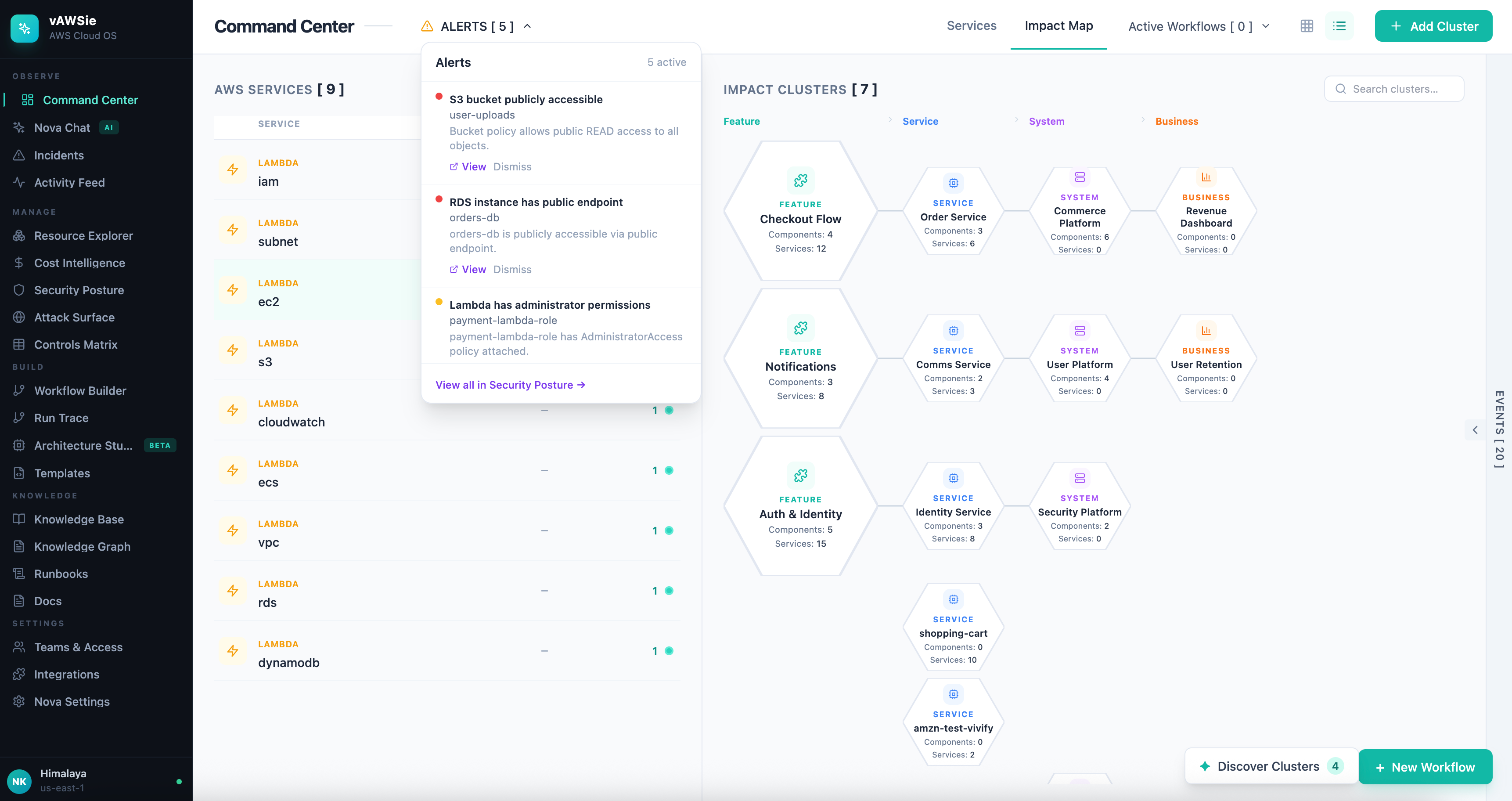
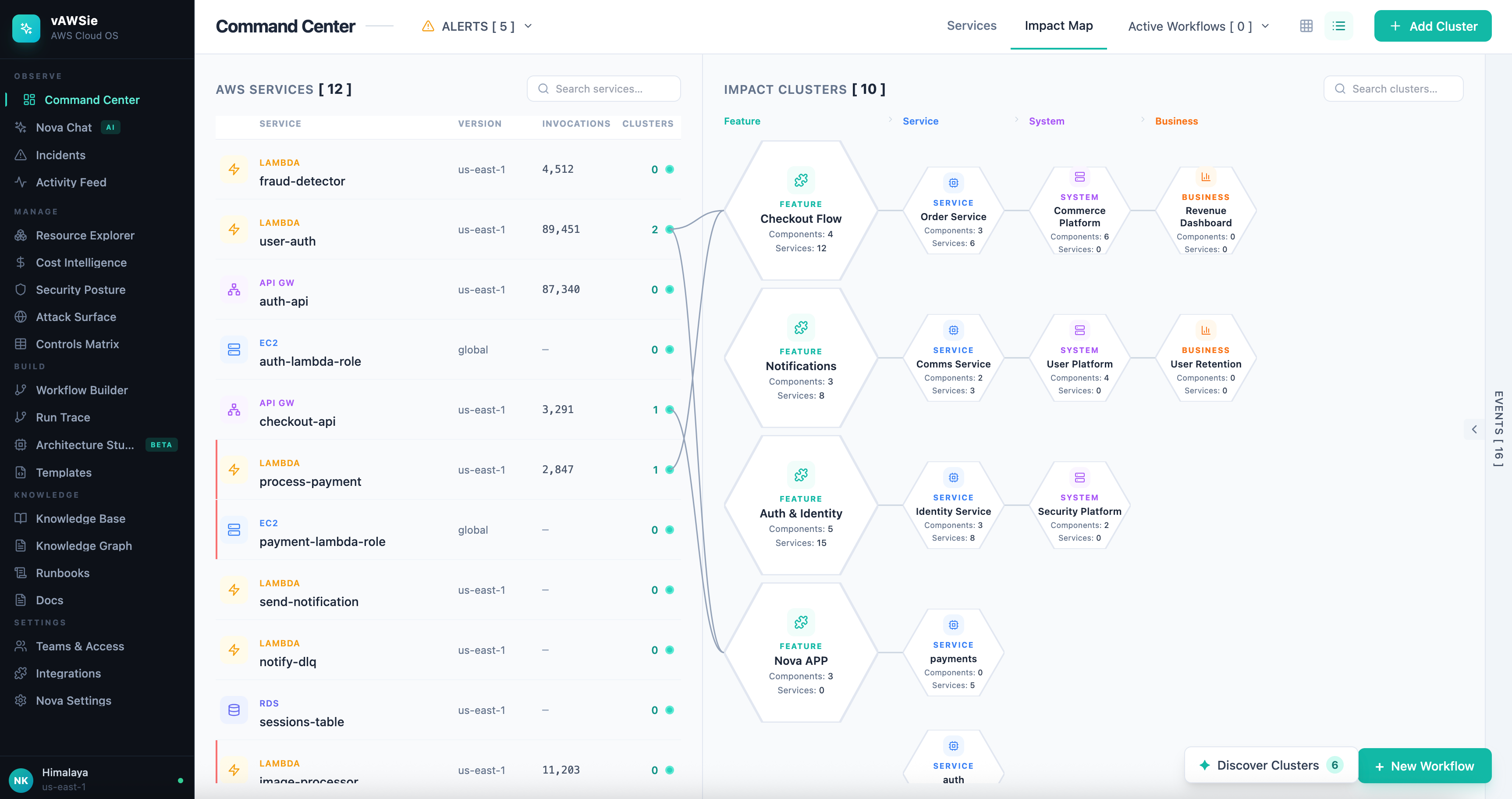
Command Center , A living map of your account: services on one side, impact clusters (Feature → Service → System → Business) on the other, connected by lines that show “if this breaks, what’s affected?” You can discover clusters from your real AWS data (tags and naming) and confirm or rename them so the map reflects how your team thinks.
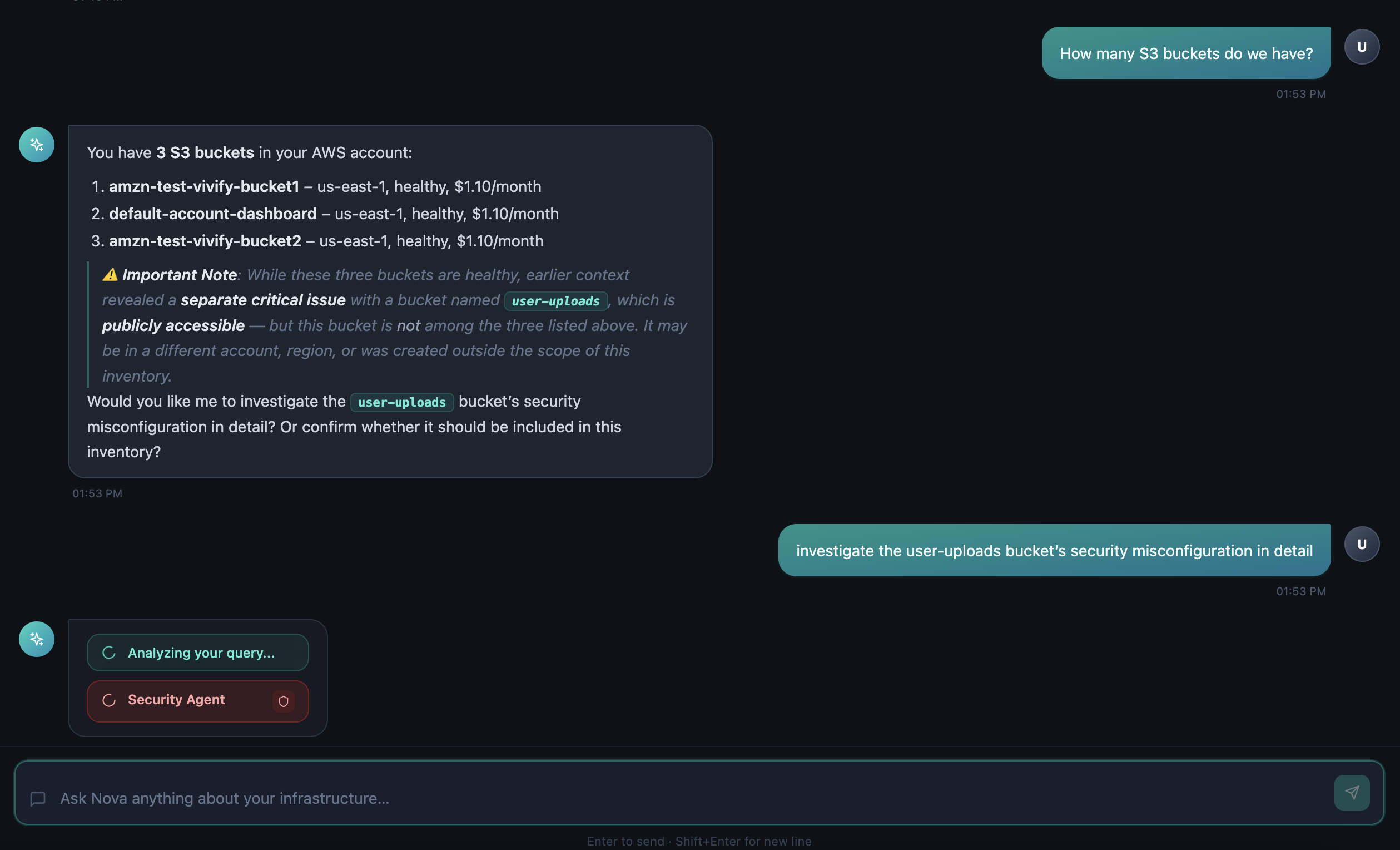
Nova Chat , A cloud co-pilot that knows your resources, costs, security, and incidents. You ask in plain English; it reasons, calls the right data (live or stored), and answers with text and structured cards (tables, cost summaries, security alerts). It can suggest workflows you can open in the builder. Multi-session, with a visible trace of what it’s doing (thinking, tool calls, results).
Workflow Builder , A visual canvas where you design automations by connecting AWS building blocks (triggers, compute, data, messaging, integrations). An AI assistant can generate flows from a description and suggest pre-built patterns. Before publish, workflows are linted for security and best practices.
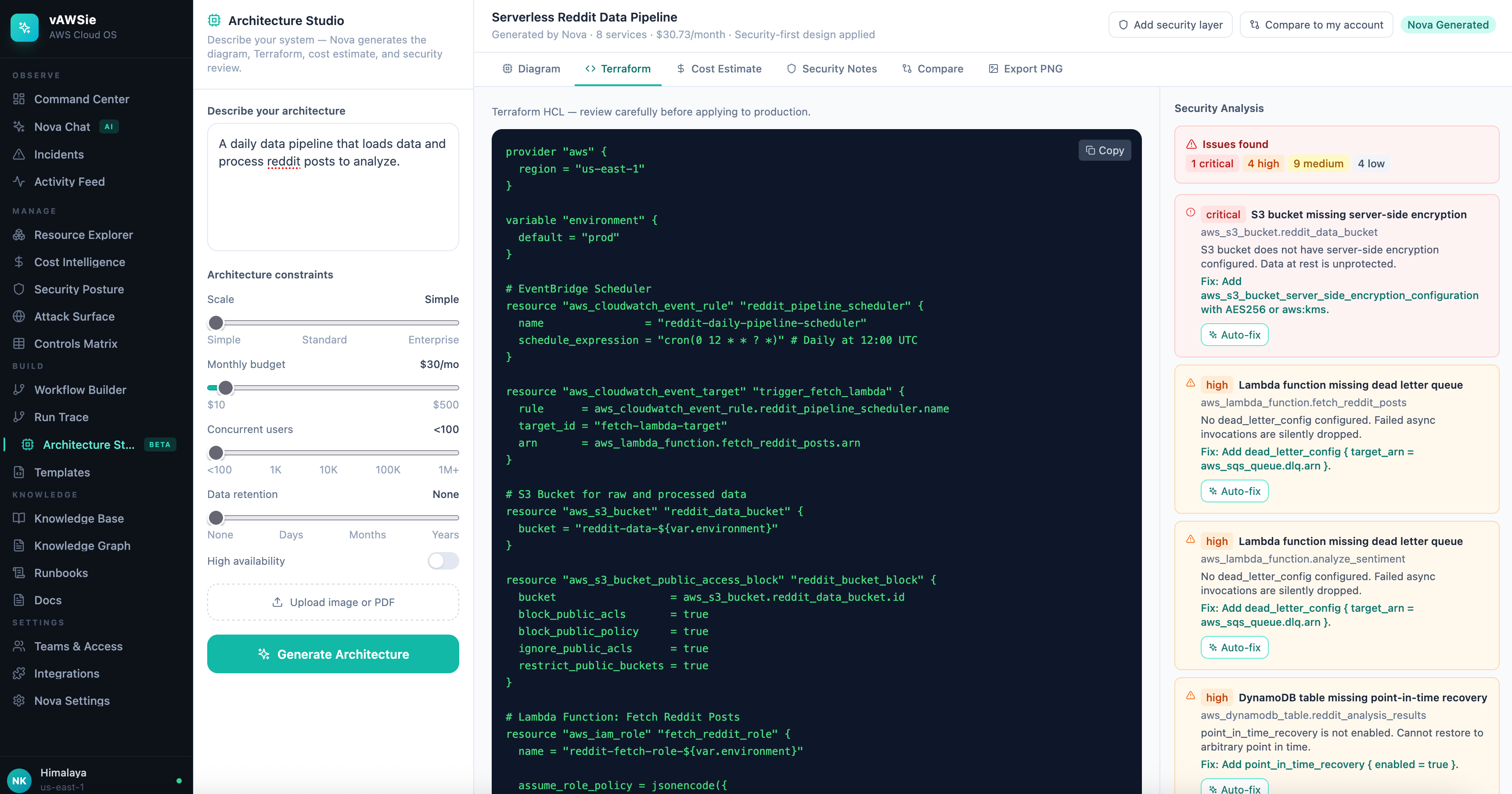
Architecture Studio , Describe what you want in words (or upload a diagram); the system proposes an architecture with a diagram, Terraform, cost estimate, and security notes. You can add a security layer on top and compare the design to what’s actually running.
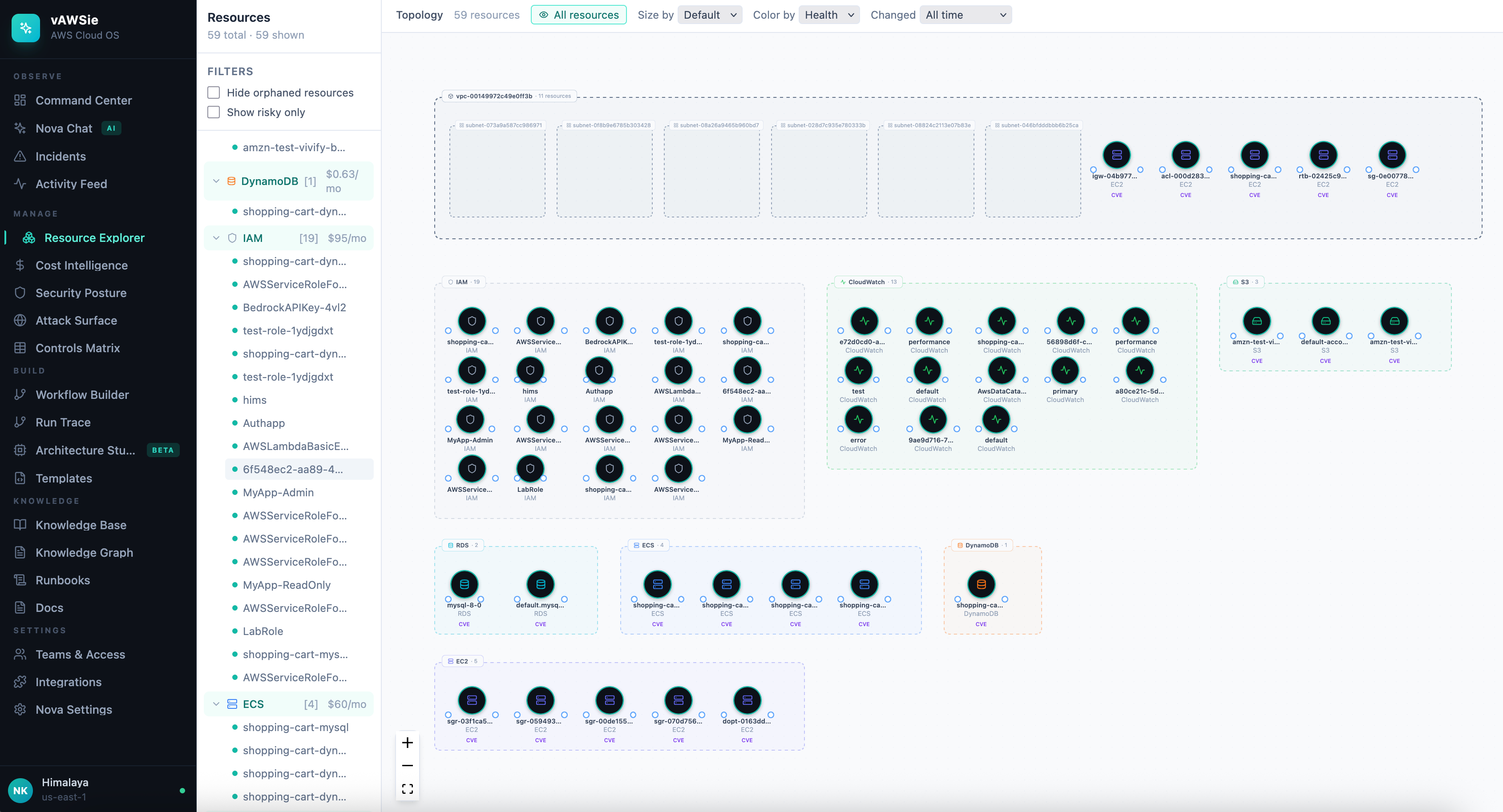
Resource Explorer , A topology view of your account: resources as nodes, relationships as edges, with grouping (e.g. by VPC or service). You can size or color by cost or risk and open details and relationships for any resource.
Cost, Security, Incidents, Knowledge , Cost intelligence (spend, waste, budgets), security posture and findings, incident DAGs with replay and root-cause help, and a knowledge base that Nova can search and cite in chat.
Across all of this, the idea is the same: your cloud, finally fluent. One place to observe, manage, build, and learn, with an AI that has context and can act on it.
How we built it
We started from a clear principle: organize by user intent, not by AWS taxonomy. So we defined sections (Observe, Manage, Build, Knowledge) and features (Command Center, Chat, Workflows, Architecture, Resources, Cost, Security, Incidents) around the questions teams actually ask.
For the Command Center we adopted a three-zone language: a list of primitives (e.g. services), connection lines between them and clusters, and clusters in a hierarchy (Feature → Service → System → Business). That way “this Lambda → this feature → this system → this business outcome” is visible at a glance. We added cluster discovery from real AWS data (tags, name prefixes) and let users confirm and name clusters so the map stays meaningful.
For Nova Chat we wanted a single assistant that can query resources, costs, security, incidents, and knowledge, so we gave it tools (list resources, get costs, get security findings, get incidents, describe resource, generate workflow, query knowledge base, etc.) and a multi-agent layer that can route to specialized sub-agents (cost, security, resources, architecture) when that fits the question. We use an agent runtime (Strands) with a model fallback chain (e.g. Nova Premier → Nova Pro → Nova 2 Lite → Nova Lite → NVIDIA → OpenAI) and cooldowns so we don’t hammer a rate-limited model. Chat sessions and messages are persisted so history and context survive reloads.
The Workflow Builder is a React Flow canvas with a node library (triggers, compute, data, messaging, logic, integrations, security, observe), config panels per node, and an AI assistant that can suggest or generate flows. We run a lint step (security and best-practice rules) before publish. The Architecture Studio uses the same model chain to generate diagrams and Terraform from descriptions or uploads, with optional security hardening and drift comparison.
We integrated live AWS where it mattered: resource discovery and relationships (e.g. VPC/subnet/security groups), costs, security findings, incidents. We kept file-based and API-based stores so the app works in demo mode without full AWS setup, and we added persistence for chat and for things like confirmed clusters so the product feels stateful and reliable.
Challenges we ran into
Making the Command Center map real. We had a clear visual design (list ↔ connections ↔ clusters) but AWS doesn’t give you “features” or “business impact.” We had to define how to go from raw resources (and tags/names) to clusters, and where to stop: e.g. infer Feature/Service/System from tags and naming, but leave Business to the user. Getting discovery (tags → name prefixes → ungrouped) and “confirm + persist” right took several iterations.
Chat that actually uses your account. We wanted Nova to answer from live data (resources, costs, security, incidents), not generic text. That meant wiring tools into the agent, making sure the right tools were called for each question, and surfacing the results in the UI (tables, summaries, alerts). We also hit rate limits on primary models; we had to implement a fallback chain and cooldowns so we don’t retry a failing model for hours.
One layout, many pages. We had two layout roots (Dashboard vs rest of app), which led to navigation bugs when moving from the Command Center to other pages. Unifying under a single layout and fixing the sidebar/outlet structure fixed it. We also ran into an infinite re-render in the cluster view (position callbacks updating state every frame); we fixed it by stabilizing callbacks and using refs so we didn’t retrigger on every paint.
Architecture and chat sharing the same “brain.” We wanted Architecture Studio and Nova Chat to use the same model chain and fallback behavior. At first, the architecture flow only retried the same model; we had to change it to walk the full chain (Nova → NVIDIA → OpenAI) so that when one model was rate-limited, the next one was used instead of failing.
Accomplishments that we're proud of
A single, intent-based home. Command Center, Chat, Workflows, Architecture, Resources, Cost, Security, and Incidents live in one product, organized by what you’re trying to do, not by AWS service menus. That’s the core promise and we’ve made it concrete.
Nova as the thread. The same AI shows up in chat (with tools and sub-agents), in the Workflow Builder (suggestions and generation), and in the Architecture Studio (generation and security layer). One assistant, many surfaces, and we’ve kept model fallback and cooldowns consistent so it stays usable when quotas bite.
Command Center that learns from your account. Discovery from tags and name prefixes, plus “confirm and name clusters,” means the map isn’t static demo data, it reflects your real services and how you label them. The three-zone language (list ↔ connections ↔ clusters) makes “what depends on what” and “what’s the impact” visible without opening five consoles.
Chat that’s grounded in your cloud. Nova doesn’t just answer generally; it can list resources, summarize costs, pull security findings, fetch incidents, and query the knowledge base, then show the answer with structure (tables, cards) and a trace so you see how it got there. Sessions and history persist so you can pick up where you left off.
Security and compliance in the loop. Workflow lint before publish, security notes in Architecture Studio, and optional “add security layer” show we care about safe-by-default design, not just features.
What we learned
Intent-first design is hard but worth it. Turning “list of services” and “list of clusters” into “this service supports this feature, which supports this business outcome” forces you to invent mapping and discovery. But once users see their own clusters and names on the map, the value is obvious.
AI needs guardrails and fallbacks. Rate limits and model availability are real. A single-model setup breaks in production. Fallback chains and cooldowns (e.g. “don’t retry this model for 5 hours”) made the product reliable. We also learned to persist chat and clusters so the product feels stable across reloads.
One layout, one navigation. Having two layout roots (Dashboard vs rest) caused subtle bugs. One shell, one sidebar, one outlet for all main pages made behavior predictable and fixed the “URL changes but screen doesn’t” issue.
Discovery + human confirmation beats full automation. We can infer clusters from tags and names, but we can’t infer “Revenue” or “Cart Conversion.” Letting the system propose clusters and the user confirm, rename, and add Business tier gave us the right split between automation and control.
What's next for vAWSie - AI Native OS for AWS Cloud
Smarter incident story. Today we use alarms and basic correlation. We want dependency-aware incident grouping (e.g. from a resource graph or X-Ray) and a timeline built from real state changes, not just alarm timestamps, so the DAG and replay reflect how failures actually propagated.
Richer multi-turn chat. Deeper use of conversation history and memory so Nova can refer back to earlier messages and decisions (e.g. “like we discussed last week”) and optionally persist preferences (e.g. “always show cost in USD”).
Command Center that grows with you. Better suggestions for cluster names and types from resource composition, and optional integration with IaC (e.g. Terraform/CDK) so the map can reflect “what’s in code” as well as “what’s in the account.”
Workflows that run for real. Today we have a builder and lint; we want execution against real AWS (Lambda, Step Functions, etc.) with trace and logs in the UI, and optional approval steps for sensitive actions.
Knowledge that stays in sync. Auto-update docs and runbooks when resources or workflows change, and tighter links from Nova’s answers to the right articles and runbooks in the Knowledge Base.
Trust and transparency. Expand the trace and trust indicators (e.g. PII, policy checks) so teams can see what Nova did and why, and so compliance and auditing are straightforward.
We’re building toward a single place where you observe, manage, build, and learn from your AWS environment, with an AI that speaks your language and respects your data. That’s what’s next for vAWSie.
Built With
- amazon-bedrock-(nova-premier
- aws-sdk-(bedrock
- chart.js
- cloudtrail
- cloudwatch
- cost-explorer
- ec2
- ecs
- express.js
- lambda
- mcp
- node.js
- nova-2-lite
- nova-lite)
- nova-pro
- nvidia-nim
- openai-api
- rds
- react
- react-flow
- react-router
- resource-explorer
- s3
- security-hub
- server-sent-events-(sse)
- step-functions)
- strands-agents-sdk
- supabase
- tailwind-css
- typescript
- vite
- zod

Log in or sign up for Devpost to join the conversation.