Inspiration
I was using ChatGPT on my phone and I wanted to share a screenshot of the chat to my LinkedIn feed but I felt like the image was ugly and cluttered and unclear so I waited until I was at my laptop to take a screenshot and edit it. I checked to see if there were mobile apps that could do this and they were all kind of clunky and ugly or for desktop only so I thought I'd make one specifically for iPhones.
What it does
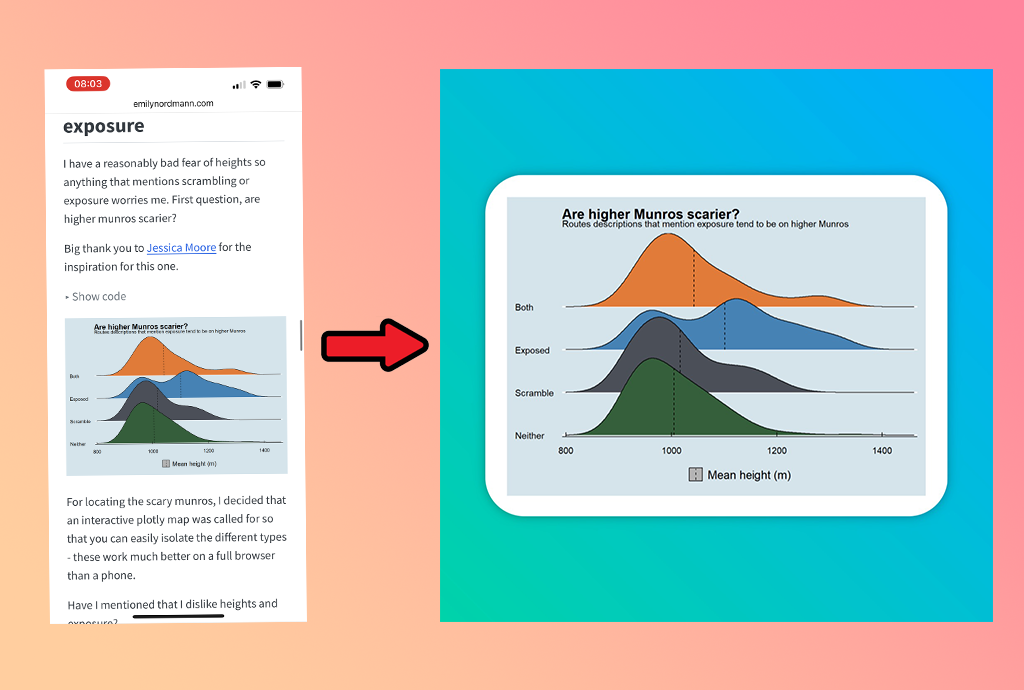
Load in your screenshot and Vanta will apply some styling to the screenshot automatically, such as rounding corners, adding a shadow and giving it a background colour. Then the user can go in and crop the content, change any of the styles and set the export size before saving the image for posting later.
How I built it
It is built using swift as it is specifically an iPhone app. The image generation logic was build using Claude Sonnet's help but the UI and UX was designed and built by me.
Challenges I ran into
Understanding how different libraries handle images was a difficulty. It meant I was getting inconsistent results when cropping and exporting images, and one fix would break another thing, so eventually I started again from scratch with a better understanding of what I wanted to happen and now the cropping and exporting works well!
Accomplishments that I'm proud of
I'm proud of how I kept the app clean and simple to use, which is something a lot of the competitors have not done. There are lots of options that the user might want to change but I have focused on just a few and given clear places to apply those edits
What I learned
I learned that making a good app is not just the technical implementation but is a lot about the user feel, their flow through the app and how easy it is to use certain features. So making sure I was using the app myself as I went was critical for this.
What's next for Vanta
The plan is to add in a few more features for exporting the images to different sizes for different social media platforms but still trying to keep the app clean and simple
Built With
- revenuecat
- swift

Log in or sign up for Devpost to join the conversation.