Inspiration
Meet Meenakshi.
She's 26, works in Chennai, and her wedding is 31 days away. The muhurtham is at 6:40 in the morning, inside a temple hall, in a peacock-blue Kanjeevaram silk her grandmother picked.
Between work and wedding errands, she has no time to go shade-matching in shops. So, like millions of us, she shops online.
Week 1. She orders a foundation labelled "Medium Beige." On her screen, it looked perfect. On her skin, it's grey. Returned.
Week 2. She tries again, one shade warmer, and gets the colour right. But at her pre-wedding shoot, the photographer's flash makes her forehead glow white and her lipstick disappears. Nobody told her makeup behaves differently under camera flash.
Week 3. Her cousin sends a "trending bridal look" with a coral lip. Meenakshi holds the lipstick up against the peacock-blue silk. It clashes. Another order, another return.
Week 4. Stressed, sleeping five hours a night, she finally sees the dark circles she should have started treating a month ago. Now it's too late.
Four weeks, three returns, ₹4,000 wasted, and one question nobody could answer:
"Will this work on **me, in **this saree, under **those lights, on **that day?"
Meenakshi's story isn't unusual. Every wedding season, Indian shoppers buy beauty products online by guessing. Shades come back wrong. Looks clash with outfits. Photos look flat. And the prep that should have started weeks earlier doesn't start until it's too late.
We built Vanakkam so the next Meenakshi gets it right the first time.
What it does
Here is the same story, with Vanakkam.
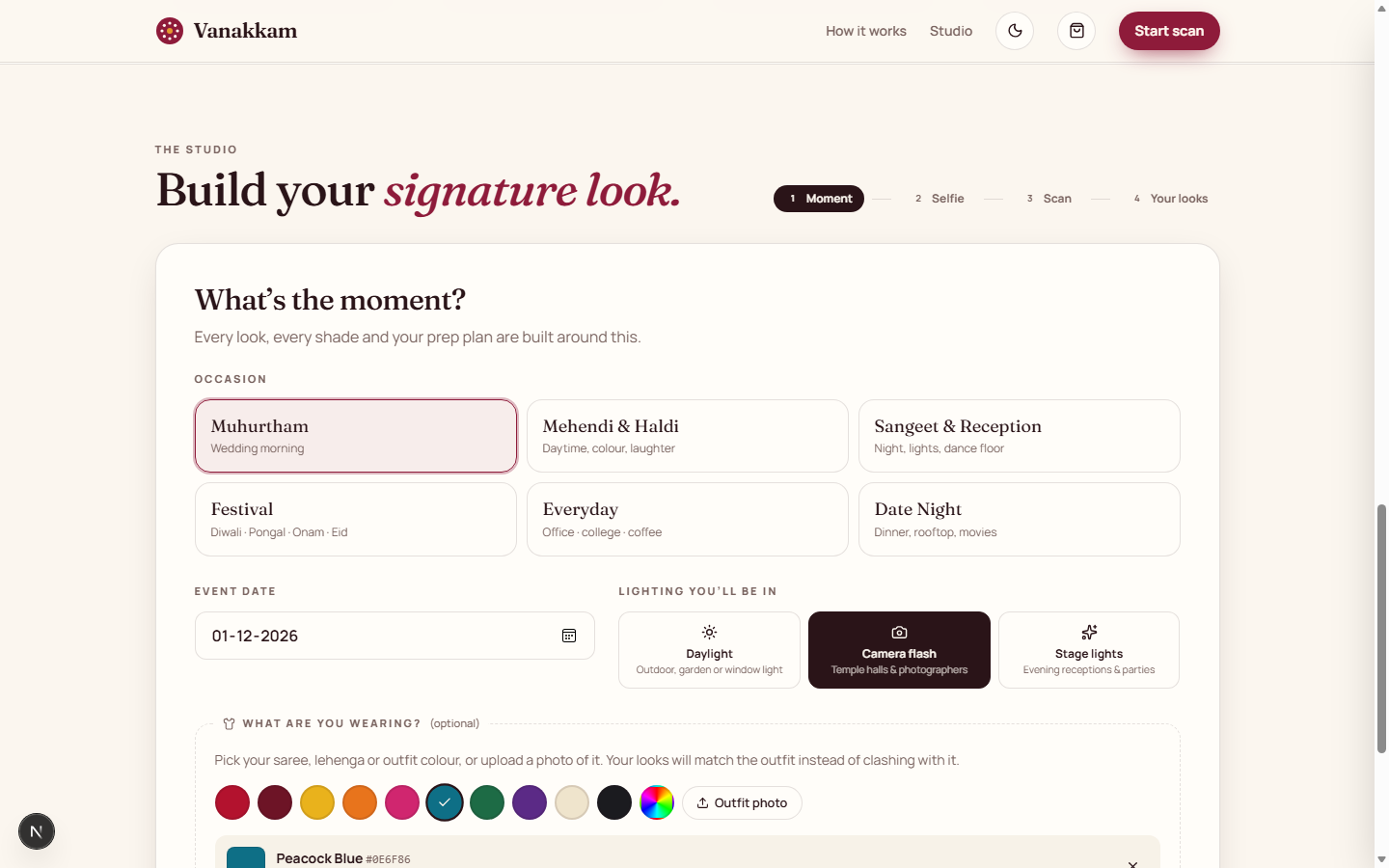
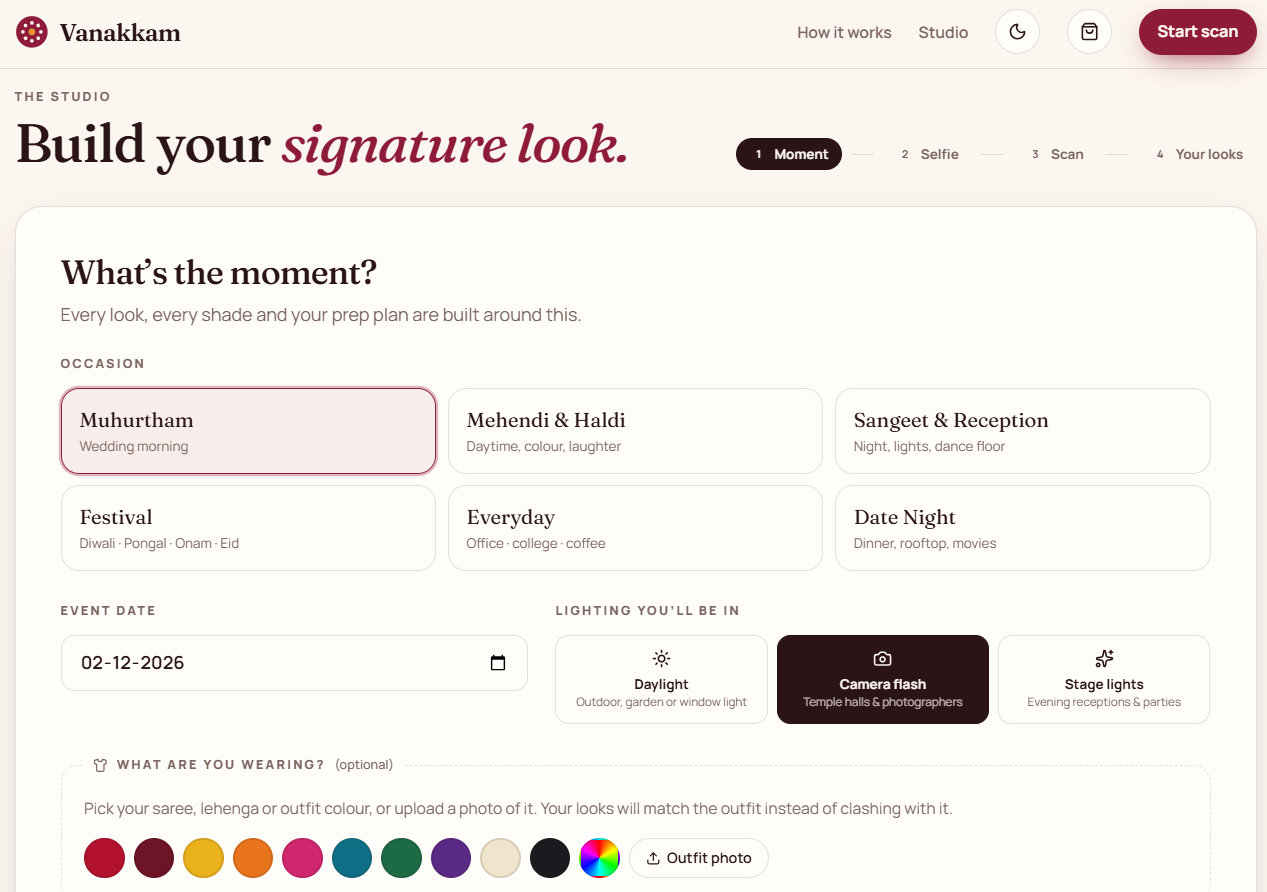
① She tells it about the moment. Muhurtham, wedding date, camera-flash lighting, and she uploads a photo of her peacock-blue saree. Vanakkam pulls the fabric colour straight from the photo.
② One selfie becomes her Beauty DNA. An oval guide frames her face properly, then two YouCam AIs read it at once:
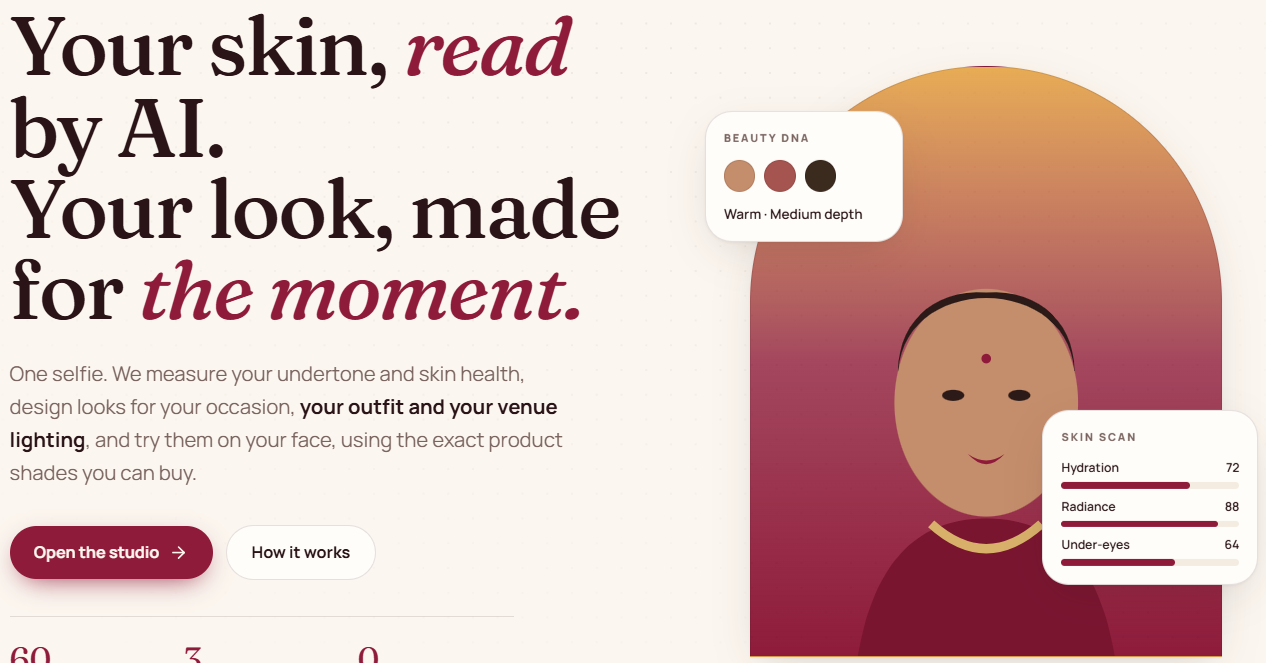
- AI Skin Tone Analysis: her exact skin, lip and brow colours. Warm undertone, medium depth.
- AI Skin Analysis: 9 skin scores, skin age and skin type. Under-eyes: 79. Hydration: 82.
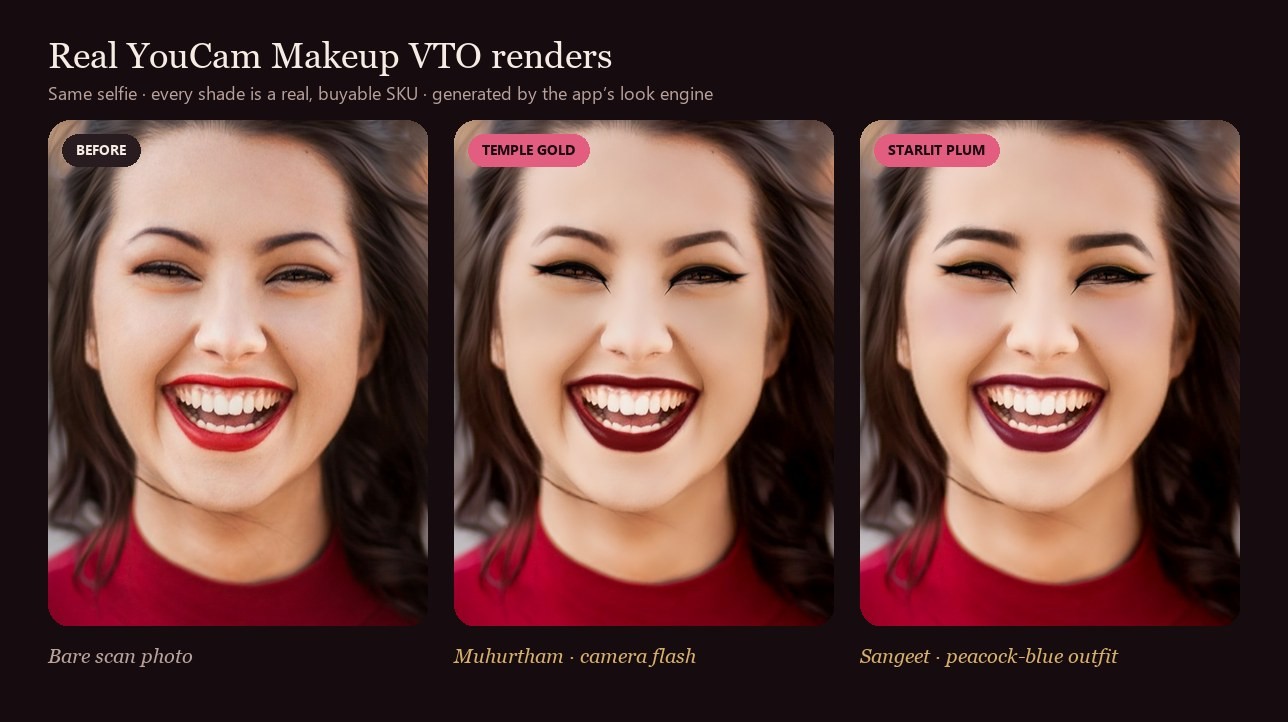
③ Three bridal looks appear on her own face, rendered by AI Makeup VTO: foundation, blush, eye shadow, brows, lips and liner in one render. Each one is designed for her day:
- 📸 Under flash: richer lips and blush and less shine, so no white forehead in photos.
- 👗 For her saree: the coral lip that clashed is swapped for one that suits peacock blue, and her eyelids pick up a hint of the saree.
- 🔬 For her skin: coverage and glow are tuned to her actual skin scores.
She drags the before/after slider and finally sees it.
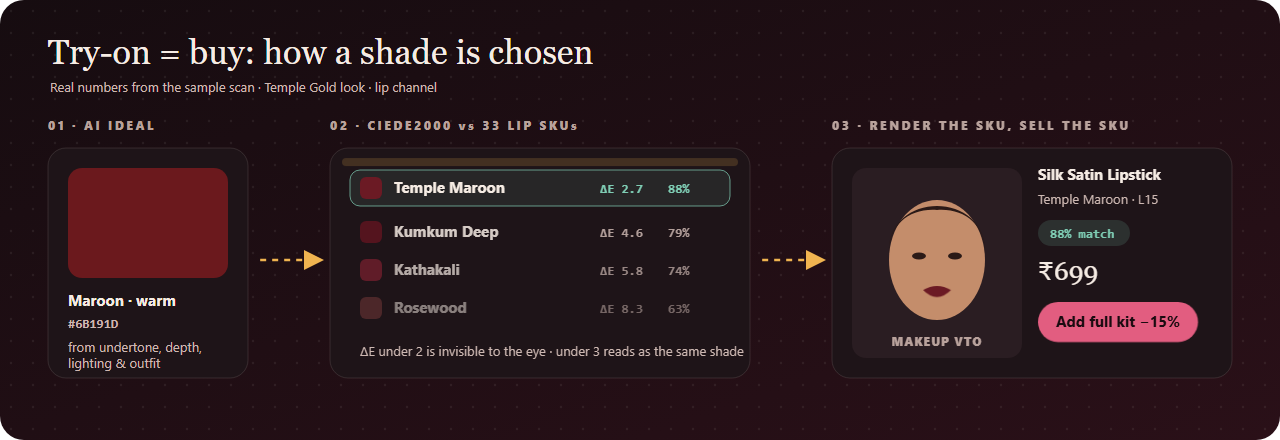
④ What she sees is exactly what she buys. Every shade in the try-on is a real product shade, matched to her using CIEDE2000, the colour-difference standard the cosmetics industry uses. Her foundation shows "28N · 89% match", plus a runner-up shade in case she's between two. No more guessing "Medium Beige."
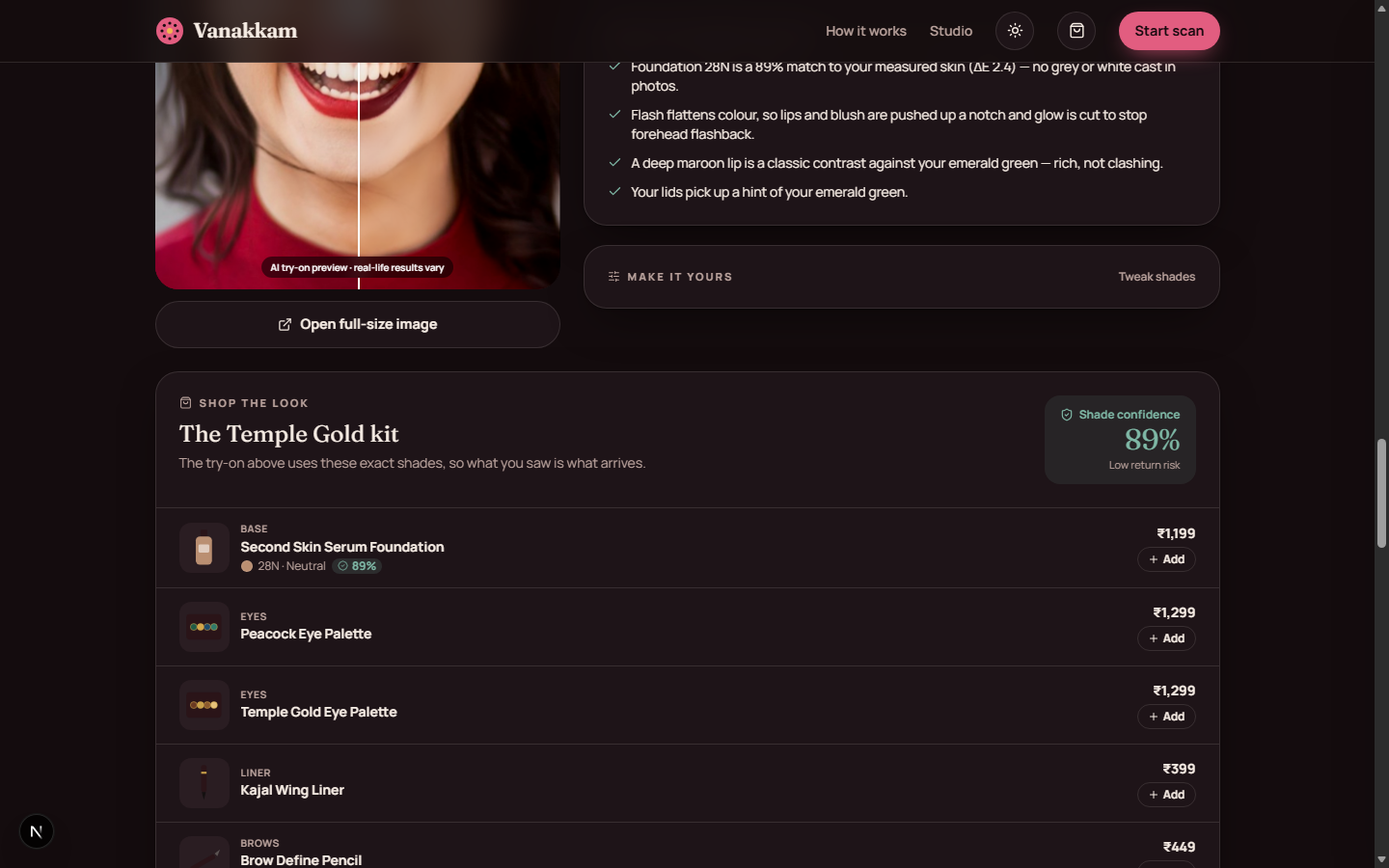
⑤ One tap buys the whole look, at a bundle price. At checkout, Vanakkam checks the delivery date against her wedding date.
⑥ Her dark circles get a head start. Her three lowest skin scores become a skincare kit with order-by dates, plus a day-by-day countdown from 4 weeks out to the morning of, synced to her calendar. It even warns her: "skip zinc-based sunscreen under flash."
One selfie. Zero returns. A plan for the big day.
How we built it
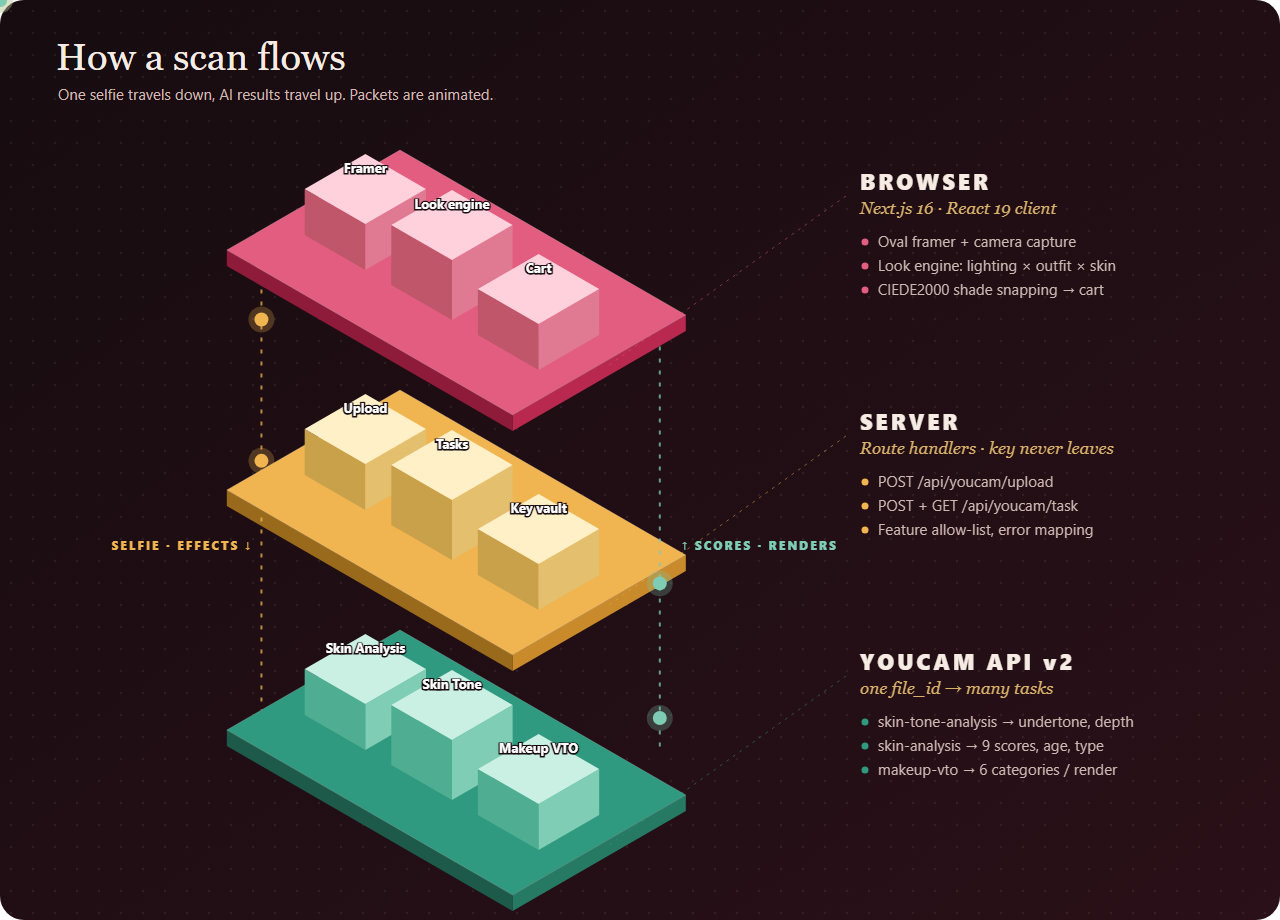
- Stack: Next.js 16 (App Router), React 19, Tailwind CSS 4, TypeScript throughout.
- YouCam API v2, one upload for many tasks:
POST /fileplus a signedPUTgives a singlefile_id. That ID is reused forskin-tone-analysis,skin-analysisand everymakeup-vtorender.- Server route handlers keep the API key off the client and only allow these three features.
- The browser polls for results with backoff, and YouCam error codes become friendly instructions ("zoom in so your face fills the oval").
- The look engine combines occasion recipes, lighting rules, skin scores and the outfit colour into a complete 6-category Makeup VTO request.
- Colour science, written from scratch:
- Undertone comes from her measured skin colour in CIE Lab: \( b^/a^ > 1.6 \) is warm, below \( 1.15 \) is cool, otherwise neutral.
- Product shades are compared with CIEDE2000:
$$\Delta E_{00}=\sqrt{\left(\frac{\Delta L'}{k_L S_L}\right)^2+\left(\frac{\Delta C'}{k_C S_C}\right)^2+\left(\frac{\Delta H'}{k_H S_H}\right)^2+R_T\,\frac{\Delta C'}{k_C S_C}\,\frac{\Delta H'}{k_H S_H}}$$
- A difference under 2 is invisible to the human eye. Shoppers see \( \text{match} = \max(50,\ 100 - 4.5\,\Delta E_{00}) \).
- The saree colour is pulled from the photo itself, weighted toward saturated colours so the fabric wins over the background.
Challenges we ran into
- The face-size rule. Our very first scan failed:
error_src_face_too_small. Skin analysis needs the face to fill more than 60% of the frame width. Real people don't take selfies like that, so we built the oval framer, and now every photo passes first time. - Docs vs reality. Some fields in the docs didn't match the live API (
results.urlvsdownload_url, valid liner patterns). We tested every combination live before building on it. - Real skin isn't a colour chart. YouCam's measured skin colours were less saturated than typical foundation charts, so early matches were only around 80%. We rebuilt a 60-shade range (20 depths × warm, neutral and cool) until real scans hit 85–94%.
- Speed. Three looks render in parallel and repeated renders are skipped, so switching lighting or outfit only re-renders the look you're viewing.

Log in or sign up for Devpost to join the conversation.