-
-
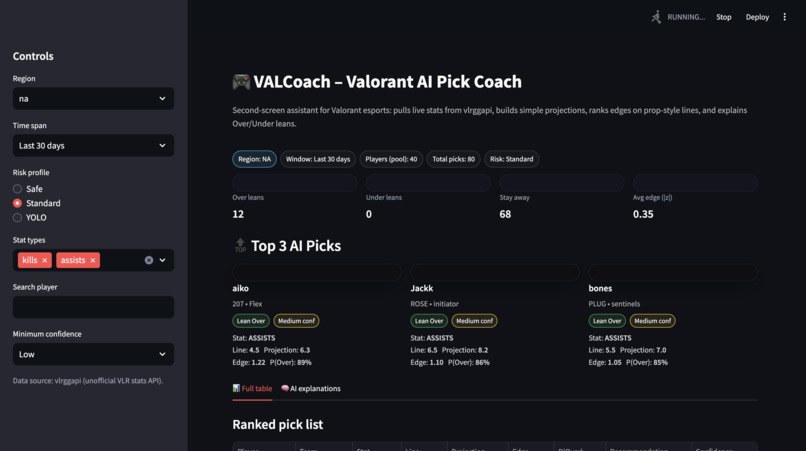
Dashboard
Inspiration
We’re all into Valorant and live stats, but most tools feel either:
- too raw (just numbers), or
- too shallow (just “21.5 kills” with no why).
For this hackathon, we asked:
“What if you had an AI coach next to you while you watch a match,
that explains why a line looks good or risky in simple terms?”
That idea became VALCoach.
What it does
VALCoach is a simple web app that:
- Pulls Valorant pro stats from the (unofficial) vlrggapi API.
- Turns per-round stats into per-map expectations for kills and assists.
- Creates a fake prop-style line for each player (like
21.5 kills). - Compares our projection to the line and calculates:
- how strong the edge is,
- a rough chance to go over,
- and a call:
Lean Over,Lean Under, orStay Away.
- Labels each pick as Low / Medium / High confidence.
- Infers simple roles (Duelist, Initiator, etc.) from the agents they play.
- Lets you filter by region, time window, risk profile (Safe / Standard / YOLO), stat type, confidence, and player name.
- Has an AI chat where you can ask things like:
- “Why do you like TenZ kills over?”
- “What does edge mean?”
and it explains the pick in plain language.
- “Why do you like TenZ kills over?”
How we built it
Data layer
- Used vlrggapi to grab player stats (kills/assists per round, rating, KAST, etc.).
- Cleaned up messy values (like
"72%"→0.72). - Turned per-round numbers into per-map numbers using a typical map length.
- Looked at the agents a player uses and mapped them to a simple role.
Model layer
- Started from each player’s per-map kills/assists.
- Gave small bumps based on how strong and consistent they are (rating + KAST).
- Built a line around their average.
- Measured how far our projection is from the line and turned that into an edge.
- Turned edge into:
- a rough probability of going over,
- a recommendation (Over / Under / Stay Away),
- and a confidence label.
UI & AI layer
- Used Streamlit for the dashboard: sidebar filters, top picks, and a full table.
- Added a tab with:
- static explanations for each pick, and
- a chat powered by the OpenAI API.
- The chat gets the actual numbers (line, projection, edge, probability, role) and explains them like a coach, instead of making things up.
Challenges we ran into
Unpredictable data
- Using an unofficial API meant:
- some fields were missing,
- some formats were weird.
- We had to write a lot of “be safe and don’t crash” code.
Time vs realism
- In a weekend, we couldn’t:
- pull real betting lines,
- model every map/matchup detail,
- or train a big ML model.
- We chose a simple, honest model we could explain clearly.
Making it feel like a coach
- A basic table was easy.
- Making it feel like a coach meant:
- designing top pick cards,
- writing explanations that sound like a caster,
- building a chat that stays grounded in real stats.
Using the LLM correctly
- We had to:
- feed it the numbers we compute,
- keep it from inventing stats,
- and handle API issues without breaking the app.
Accomplishments that we're proud of
- We built a full pipeline in a weekend:
- stats → model → edges → UI → AI explanations.
- The app actually feels like a second screen you’d use while watching a match.
- We used a language model as an explanation layer, not as a black box:
- all the numbers come from our own logic,
- the AI just helps explain them.
- We added little Valorant touches:
- roles from agents,
- Valorant-style wording,
- filters that match how fans think about players.
What we learned
- Simple math + good UX can be more powerful than a complex model nobody understands.
- Data cleaning and clear assumptions (“we assume ~22 rounds per map”, “Safe mode needs a bigger edge”) matter a lot in the story.
- Generative AI is great at turning hard numbers into human explanations.
- Splitting roles helped:
- one person focused on math,
- one on data/model code,
- one on UI and UX, and it let us move fast.
What's next for VALCoach
If we had more time, we’d love to:
- Plug in real PrizePicks lines instead of fake ones.
- Add match context:
- specific upcoming games,
- opponent strength,
- recent form.
- Improve the model:
- better uncertainty,
- different behavior by role and map.
- Let users build simple multi-pick combos and show a rough chance they all hit.
- Deploy it properly so anyone can open a link, pick a match, and chat with VALCoach while they watch.


Log in or sign up for Devpost to join the conversation.