-
-
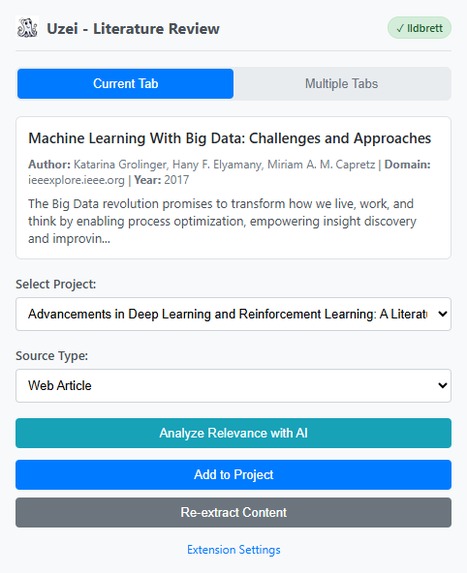
Extension Panel
-
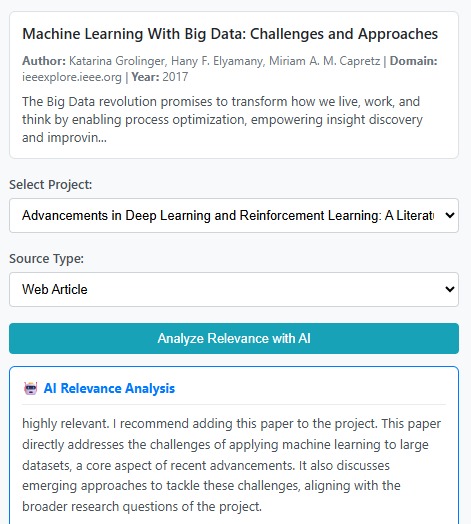
Relevance Analysis
Inspiration
Our team is composed of researchers who regularly deal with large volumes of academic literature. To make our research workflow more efficient, we first developed a WebApp for AI-powered academic article management. The WebApp allows users to import papers, have AI analyze their relevance to specific research topics, organize collections, share them with collaborators, and even generate mini surveys – concise summaries of existing literature within a project.
However, as we continued using the WebApp in real research settings, we noticed a critical workflow gap. Picture this: you're deep into research, you've opened tens of browser tabs of potentially relevant papers, and you're facing a dilemma with every single tab:
"Should I add this paper to my collection, or will it just clutter my research database?"
The problem was that we could only get AI relevance analysis after importing papers into our WebApp. This meant researchers had to either:
- Add everything and deal with cluttered collections later
- Manually read abstracts and guess relevance (time-consuming and error-prone)
- Use our WebApp's cloud-based AI, but that required downloading, uploading, and waiting
This challenge inspired us to rethink the entire workflow. What if AI could live right where researchers make decisions – in their browser, at the moment they're evaluating papers? When we discovered Chrome's Built-in AI capabilities with Gemini Nano, we realized we could create something fundamentally new: instant, proactive AI assistance at decision time, with zero cost or latency barriers.
By integrating the Prompt API directly into our browser extension, we enable a research pattern that was never possible before – getting intelligent recommendations before taking actions, not after. And because it's built-in AI, we can offer this analysis on every paper without worrying about API costs, server quotas, or network delays.
What it does
Uzei Literature Review Extension transforms how researchers interact with academic content by bringing AI-powered decision support directly into the browser workflow. Here's what makes it revolutionary:
🤖 Instant AI-Powered Decision Support (Chrome Built-in AI / Prompt API)
- Analyzes paper relevance in real-time as you browse – no upload, no wait, no API limits
- Provides actionable recommendations at the exact moment you need them: "Should I add this paper or skip it?"
- Delivers clear assessments: highly relevant, moderately relevant, marginally relevant, or not relevant
- Explains reasoning based on your project context (Project Overview, Research Strategy, Review Questions)
- Works instantly with Gemini Nano – zero latency, zero server round-trips, zero cost per analysis
- Enables a proactive AI pattern: check relevance on tens of papers in minutes without worrying about quotas
Why This Matters: Traditional cloud-based AI would make offering analysis on every paper prohibitively expensive. Chrome's Built-in AI enables unlimited, instant relevance checking – fundamentally changing how researchers interact with literature.
🔍 Smart Content Extraction
- Automatically detects and extracts article content, metadata, authors, and publication dates from web pages
- Handles diverse academic publishers (IEEE, ACM, Springer, ScienceDirect, etc.) with publisher-specific extraction strategies
- Processes PDF documents opened in the browser with server-side text extraction
- Shows validation badges indicating which tabs contain extractable content
📊 Batch Processing for Research Efficiency
- Process tens of browser tabs simultaneously – perfect for researchers who open dozens of papers at once
- Combined with Built-in AI, enables bulk relevance screening impossible with cloud APIs
- "Valid Only" button auto-selects tabs with extractable content
- Real-time progress tracking during batch operations
- Optional auto-close of successfully processed tabs to keep workspace organized
🔄 Seamless WebApp Integration
- One-click addition of papers to your literature review projects
- Automatic synchronization with the WebApp for deeper AI analysis, organization, and collaboration
- Session management that keeps the extension in sync with your login status
- Direct integration with project collections and research workflows
How we built it
Architecture Overview:
┌─────────────────┐
│   Content.js    │ ← Extracts article content, metadata, authors
│  (Injected on   │   Handles PDF URL detection
│   every page)   │   Publisher-specific parsing
└────────┬────────┘
         │
         ↓
┌─────────────────┐
│  Background.js  │ ← Orchestrates tab management
│  (Service       │   Handles badge updates
│   Worker)       │   Manages session state
└────────┬────────┘
         │
         ↓
┌─────────────────┐
│    Popup.js     │ ← User interface logic
│  (Extension UI) │   AI relevance analysis
└────────┬────────┘
         │
         ├──────────────────
         ↓                  ↓
┌─────────────────┐  ┌──────────────────┐
│  Prompt API     │  │  Web Application │
│ (Gemini Nano)   │  │    Backend       │
│  - Instant      │  │  - PDF extraction│
│  - Unlimited    │  │  - Data storage  │
│  - On-device    │  │  - Project mgmt  │
└─────────────────┘  └──────────────────┘
Technology Stack:
- Chrome Extension (Manifest V3) for modern extension architecture
- Chrome Prompt API for instant on-device AI with Gemini Nano
- Chrome Extension APIs (
chrome.tabs,chrome.storage,chrome.scripting,chrome.action) - JavaScript (ES6+) with async/await patterns for clean asynchronous code
- REST API integration with our existing WebApp backend
Key Implementation Details:
Content Extraction System: Built a robust extraction hierarchy that handles diverse HTML structures with publisher-specific selectors, generic article selectors, full-text extraction, and metadata-only fallbacks.
AI Integration with Prompt API:
// Simplified example of our AI relevance analysis
const session = await ai.languageModel.create({
  systemPrompt: `You are an expert research assistant analyzing
                 academic papers for relevance to a literature review project.`
});

const prompt = `
Project Context:
- Overview: ${projectContext.overview}
- Research Questions: ${projectContext.questions}

Paper to Analyze:
- Title: ${paper.title}
- Abstract: ${paper.abstract}
- Authors: ${paper.authors}

Analyze this paper's relevance and provide:
1. Relevance rating (highly/moderately/marginally/not relevant)
2. Clear recommendation (add/skip)
3. Reasoning
`;

const result = await session.prompt(prompt);
Batch Processing Pipeline: Implemented concurrent processing with proper state management, progress tracking, and graceful error handling across tens of tabs. The instant nature of Built-in AI makes batch analysis viable – processing tens of papers takes minutes, not hours.
Message Passing Architecture: Built a robust communication system between content scripts, background service workers, and popup UI that handles async operations cleanly.
Challenges we ran into
Challenge 1: Enabling Proactive AI Patterns Without Cost Constraints
- Problem: Traditional cloud-based AI would make offering relevance analysis on every paper economically infeasible (tens of papers × tens of projects = high costs)
- Solution: Chrome's Built-in AI eliminated cost concerns entirely, allowing us to offer unlimited instant analysis and enabling a genuinely new workflow pattern
Challenge 2: PDF Content Extraction in Browser Extensions
- Problem: Chrome extensions cannot directly extract text from PDFs opened in the browser due to security restrictions
- Solution: Implemented a hybrid approach where the extension detects PDF URLs and sends them to our WebApp backend for server-side extraction, then receives the extracted text for instant AI analysis
Challenge 3: Context Window Limitations
- Problem: Full research papers can be thousands of words long, exceeding the Prompt API's context limits
- Solution: Developed smart content truncation that prioritizes the most relevant sections (title, abstract, introduction, conclusions) while staying within limits
Challenge 4: Async State Management Across Extension Components
- Problem: Managing state across content scripts, background service workers, and popup UI with async AI calls created timing and synchronization issues
- Solution: Built a comprehensive message-passing architecture with proper error boundaries, loading states, and retry logic
Challenge 5: Extreme Variability in Web Content Structure
- Problem: Academic publishers use wildly different HTML structures, CSS classes, and metadata formats
- Solution: Developed a fallback extraction hierarchy with publisher-specific strategies, tested across dozens of major academic sources
Challenge 6: First-Time AI Model Download Experience
- Problem: Users need to wait for Gemini Nano to download on first use, which could be confusing
- Solution: Created comprehensive setup documentation (PromptAPISetupGuide.md) with clear UI feedback about download status and graceful fallbacks
Challenge 7: Bridging WebApp and Extension Ecosystems
- Problem: Maintaining session state, project context, and user authentication across the extension and WebApp
- Solution: Implemented cookie-based session management and real-time project fetching to keep both systems in sync
Accomplishments that we're proud of
🎯 Unlocking a New Research Workflow: We built something that genuinely wasn't possible before. The ability to get instant AI recommendations on every paper – without cost, quota, or latency concerns – fundamentally changes how researchers interact with literature.
⚡ Instant Feedback at Decision Time: Our extension delivers AI insights at the exact moment researchers need them – when deciding whether to add a paper. This "proactive AI pattern" represents a new way of thinking about AI assistance.
💡 Zero-Cost Unlimited Analysis: By leveraging Chrome's Built-in AI, we can offer relevance analysis on unlimited papers without any server costs or API quotas. This creative freedom enabled features that would be economically impossible with cloud-based AI.
🌐 Publisher-Agnostic Extraction: Building a content extraction system that works reliably across IEEE, ACM, Springer, ScienceDirect, Nature, PLOS, and dozens of other publishers was technically challenging but crucial for real-world usability.
📊 Batch Processing at Scale: Our multi-tab processing feature combined with instant Built-in AI makes screening tens of papers in minutes realistic. What used to take hours now takes minutes.
🔄 Seamless Ecosystem Integration: We successfully bridged the gap between web browsing and literature management, creating a truly integrated research workflow that feels natural and effortless.
📚 Comprehensive Documentation: We created detailed guides (README.md, PromptAPISetupGuide.md) that make it easy for other researchers to install and use the extension, including troubleshooting for common issues.
🎨 Prompt Engineering Success: We crafted prompts that reliably generate structured, actionable relevance assessments that researchers can trust for making decisions about their literature collections.
What we learned
1. Built-in AI Enables Fundamentally New Interaction Patterns Chrome's Prompt API taught us that on-device AI isn't just an alternative to cloud AI – it enables entirely new workflows. The combination of zero cost, zero latency, and unlimited usage lets us offer proactive AI assistance at every decision point. This is a new paradigm: AI that helps you decide before you act, not after.
2. Creative Freedom Changes Everything When API costs and quotas disappear, you can reimagine features completely. We can now:
- Analyze every paper a researcher encounters
- Enable bulk screening workflows
- Offer instant recommendations without worrying about usage limits
- Build features that would be economically unfeasible with cloud APIs
3. Instant Feedback Loops Transform User Experience Zero-latency AI responses create fundamentally different interactions. Users can:
- Rapidly iterate through dozens of papers
- Get immediate validation of their decisions
- Maintain flow state without waiting for server responses
- Work offline or on unstable networks without degradation
4. Prompt Engineering is an Iterative Art Crafting effective prompts for the Prompt API required extensive experimentation. We learned to:
- Provide rich, structured context
- Request specific output formats for parsing
- Balance detail with token limits
- Test across diverse paper types and disciplines
5. Browser Extension Architecture is Complex Managing state across content scripts (injected per-page), background service workers (persistent), and popup UI (ephemeral) required careful architectural thinking. We learned the importance of:
- Robust message-passing protocols
- Proper error boundaries at each layer
- Graceful degradation when components fail
- Clear separation of concerns
6. Real-World Content is Messy Academic publishers' websites are incredibly diverse. We learned to build resilient extraction systems with fallback strategies rather than assuming any specific structure. The 80/20 rule applies: 80% of cases work with generic selectors, but the last 20% requires publisher-specific handling.
7. Building for Researchers Requires Understanding Research Workflows As researchers ourselves, we learned that technical excellence isn't enough – the tool must fit naturally into existing workflows. Features like batch processing and instant AI feedback weren't afterthoughts; they emerged directly from observing how we actually conduct literature reviews.
What's next for Uzei Literature Review Extension
🔮 Near-Term Enhancements
Multi-Modal AI Analysis: Leverage the Prompt API's multimodal capabilities to analyze figures, tables, and diagrams within papers for even more comprehensive instant relevance assessment.
Smart Citation Network Mapping: Automatically extract and visualize citation relationships between papers in a collection, helping researchers identify seminal works and research trends in real-time.
Additional Chrome AI APIs Integration:
- Summarizer API: Generate instant concise summaries of long papers directly in the extension for quick screening
- Translator API: Enable instant relevance analysis of non-English literature
- Writer API: Help researchers craft better research questions based on papers they're finding relevant
Proactive Research Suggestions: Use Built-in AI to suggest related papers or identify gaps in literature coverage as researchers browse.
🚀 Long-Term Vision
Intelligent Research Question Refinement: Help researchers evolve their research questions over time by analyzing patterns in which papers they find most relevant, with instant AI-powered suggestions.
Cross-Project Insights: Use on-device AI to identify connections between different research projects and suggest relevant papers across a researcher's entire portfolio.
Collaborative Intelligence: Enable team members to share AI-analyzed relevance assessments and build collective knowledge about literature quality.
🎓 Community & Open Source
We plan to actively engage with the research community to:
- Gather feedback from diverse research disciplines
- Open-source specific extraction modules for community contribution
- Publish our findings on how instant, cost-free AI changes research workflows
- Partner with university libraries and research groups for broader adoption
💡 Research Applications Beyond Literature Reviews
The instant AI feedback pattern we've pioneered has potential applications in:
- Systematic Reviews: Real-time relevance screening meeting stringent protocol requirements
- Meta-Analysis: Instant identification of suitable papers for quantitative synthesis
- Interdisciplinary Research: Immediate analysis bridging terminology gaps when researchers explore unfamiliar fields
- Grant Writing: Quick validation of literature coverage for research proposals
The future of research is intelligent, instant, and seamlessly integrated into the browser. With Chrome's Built-in AI, we're enabling proactive AI assistance at every decision point – and we're just getting started.


Log in or sign up for Devpost to join the conversation.