-
-
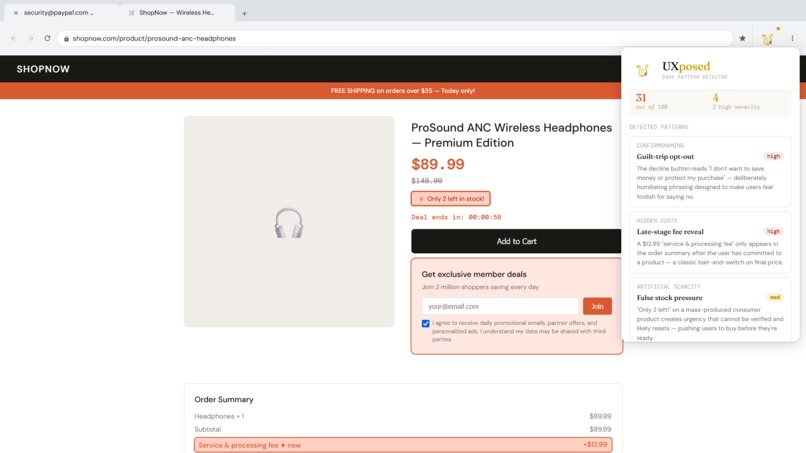
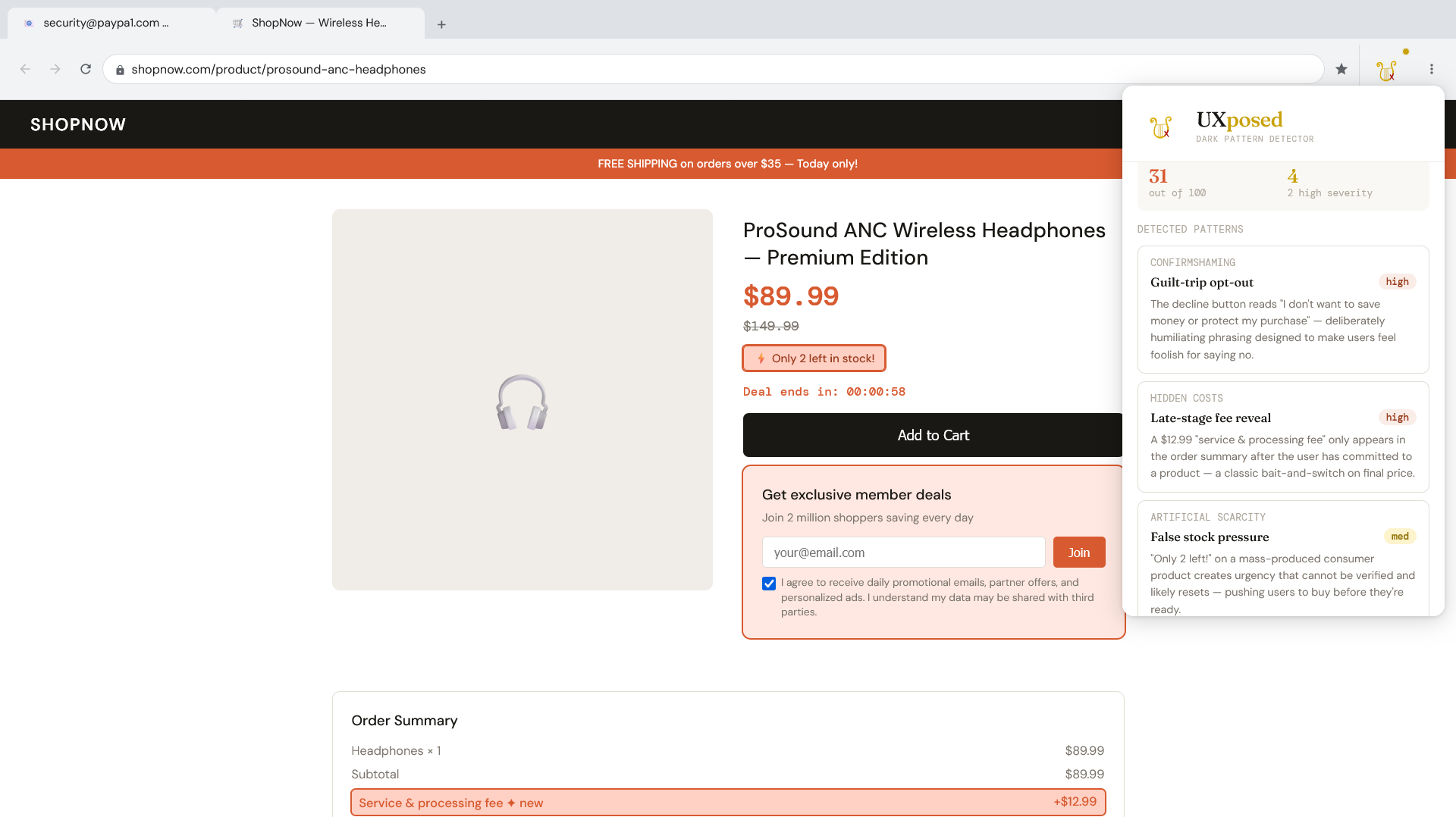
Shopping website "analyze" feature
-
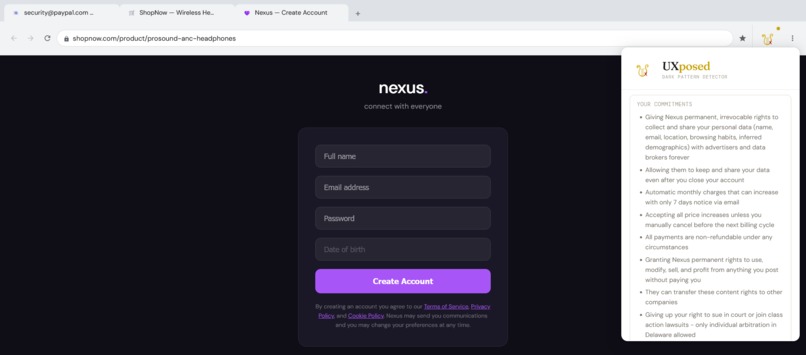
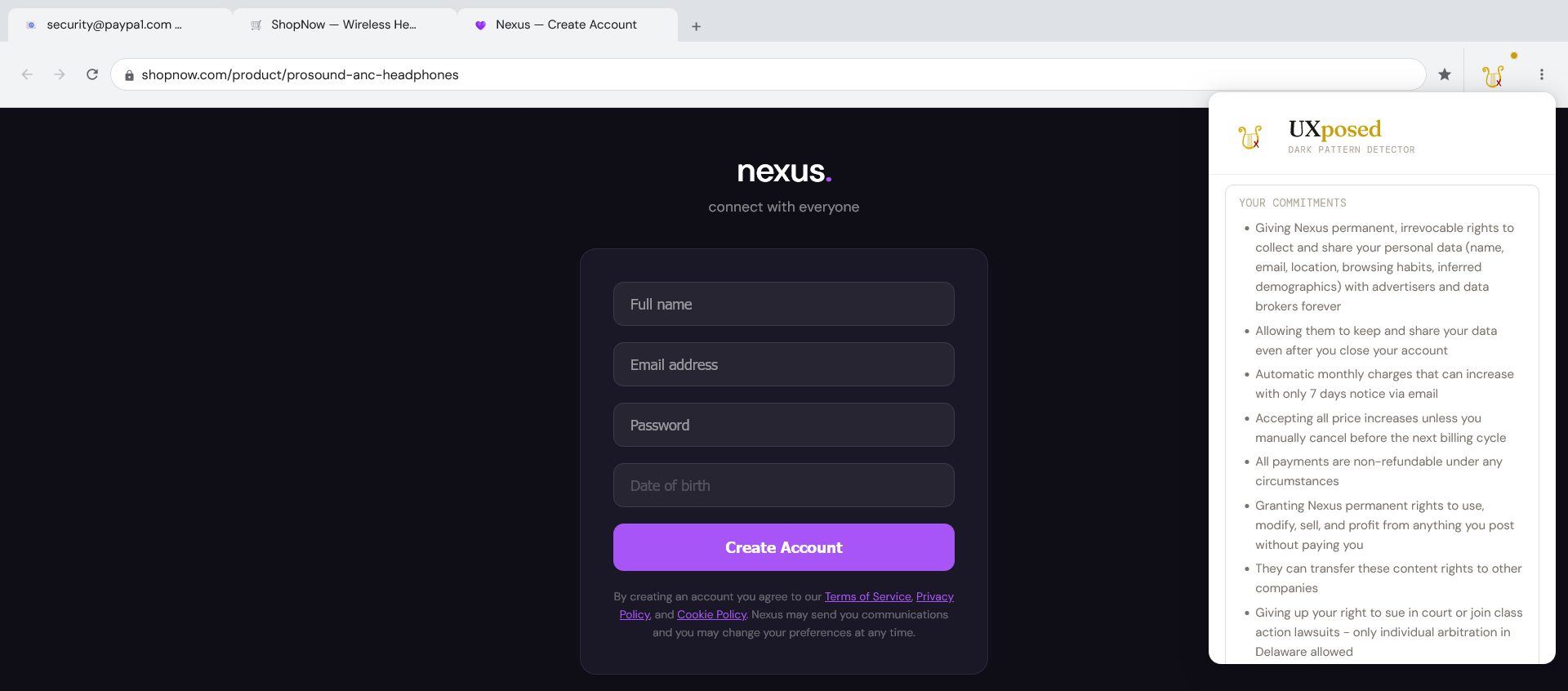
Terms of Service "translate" feature
-
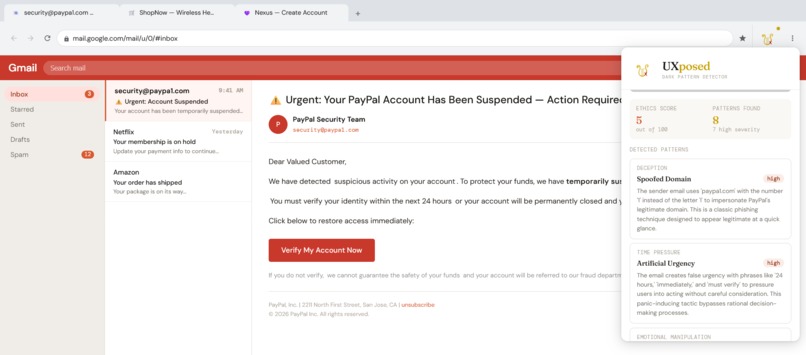
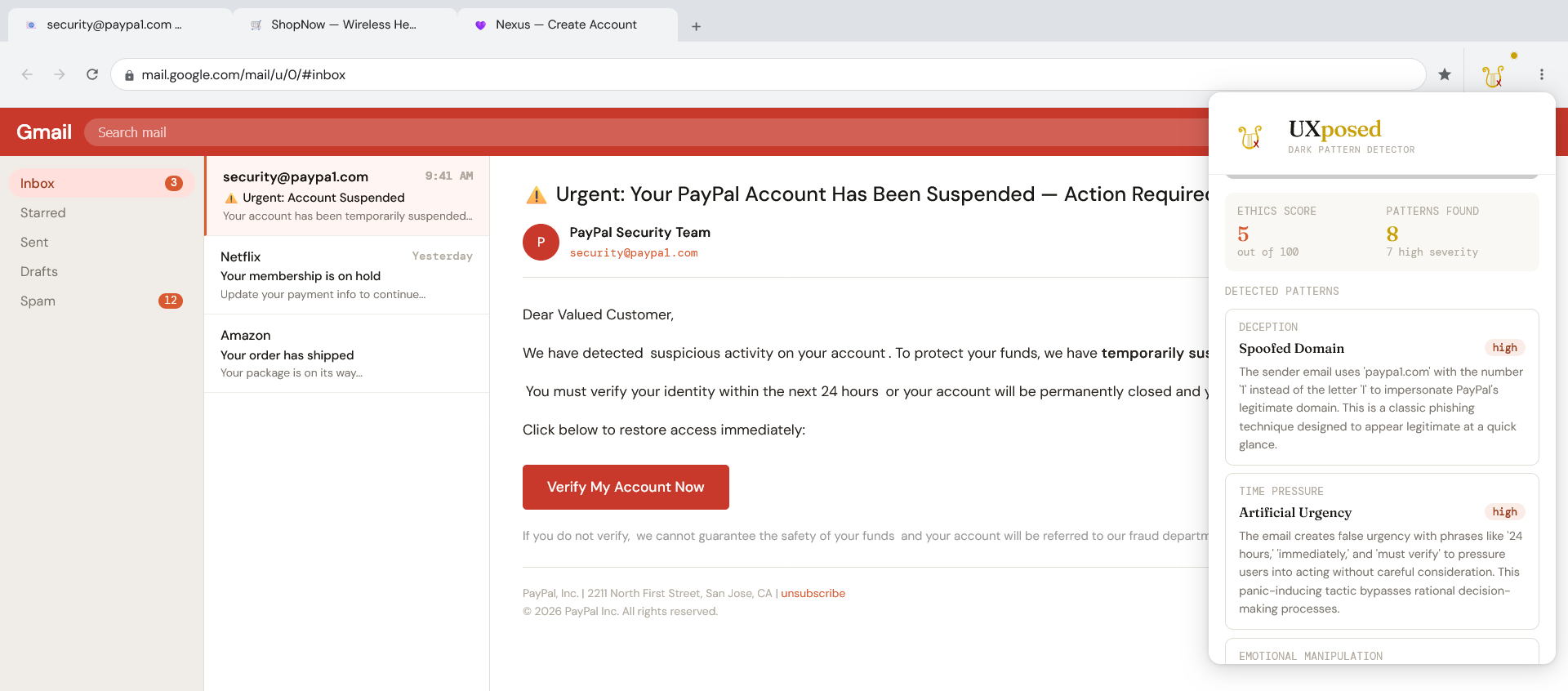
Fake email "analyze" feature
-
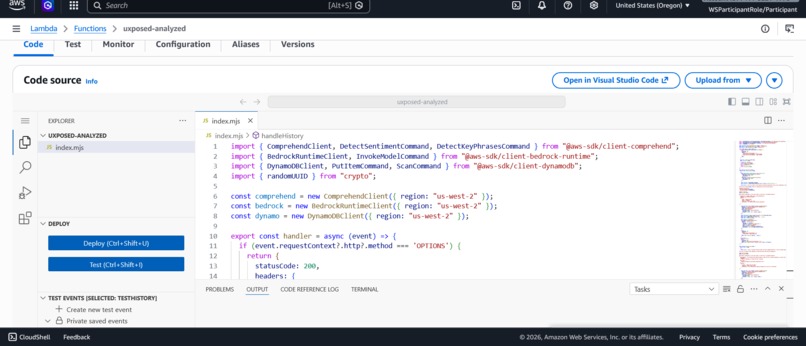
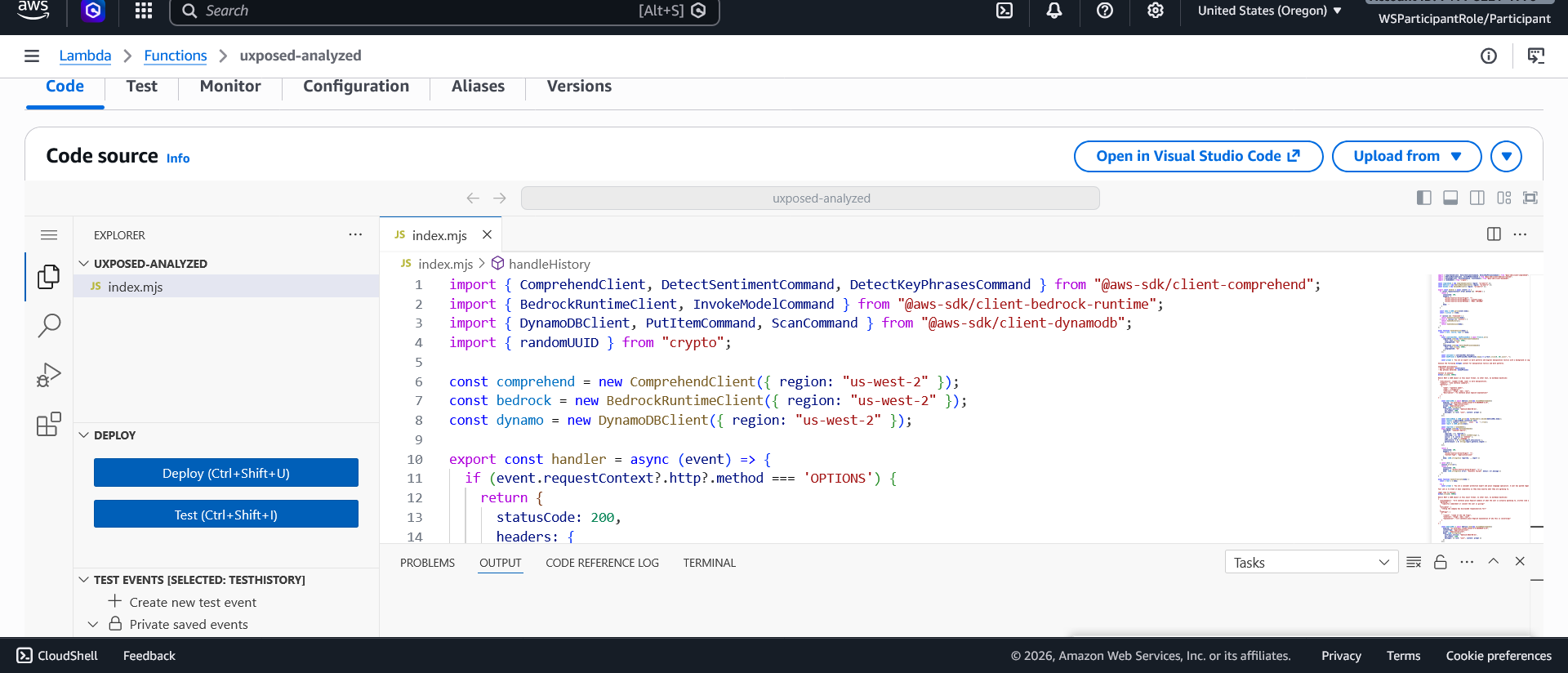
Lambda function powering the backend
-
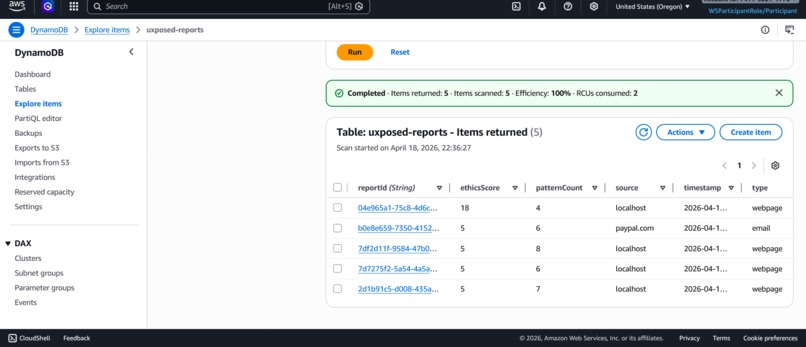
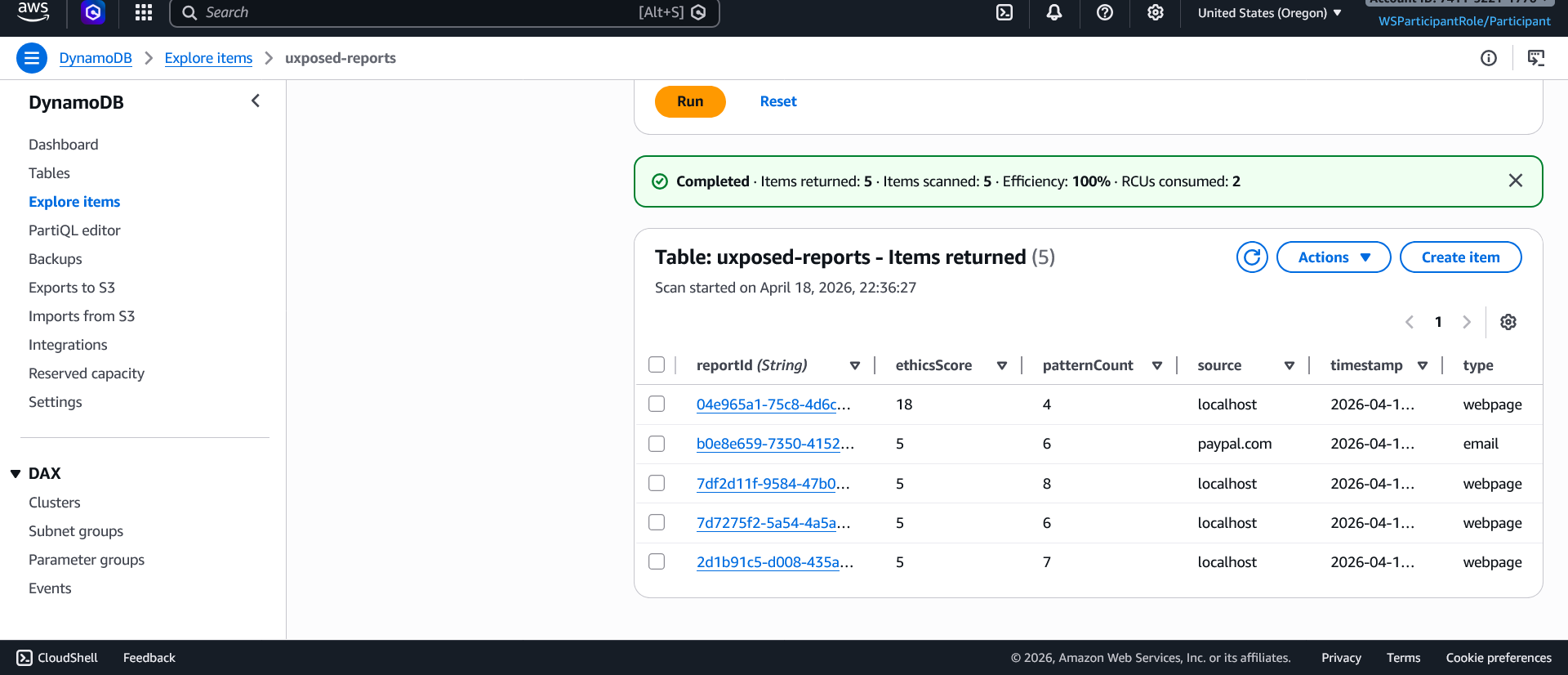
Persistent scan history in DynamoDB
-

UXposed logo

Inspiration
You've probably clicked 'I agree' without reading, felt weirdly guilty for canceling a subscription, or almost fallen for an email scam that looked real. These aren't just accidents, these moments were intentionally created to work exactly the way they did on you. Dark patterns work because they're designed to skip your rational thinking entirely. Urgency, guilt, and confusion are engineered to get you to act before you can think. UXposed doesn't stop those tactics from existing. It just breaks that blind automatic process long enough to surface what's actually going on, so you're responding to reality instead of reacting to whatever someone designed you to feel.
What it does
UXposed is a browser extension that scans webpages and emails for dark patterns and phishing tactics. It analyzes the content you're looking at, identifies manipulation techniques, and explains the specific psychological bias each one is designed to exploit. Using the analyze feature, UXposed detects patterns like guilt-trip opt-out buttons, artificial scarcity claims, pre-checked data sharing consent, spoofed sender addresses, and urgency-based threats. Each detected pattern gets an easy explanation and a severity rating so you know what you're dealing with and how serious it is. Using the translate feature, UXposed scans the page for terms and conditions, cookie consent copy, and fine print. It breaks that language down into what you're actually agreeing to, what the company isn't liable for, and which specific clauses are designed to obscure meaning or trap you into something you didn't intend to sign up for. Every scan is saved to a personal history so you can track patterns across the sites you visit over time.
How we built it
UXposed is built as a browser extension paired with a GitHub Pages web demo, both powered by the same AWS backend. When a user clicks analyze, the extension reads the live page DOM or Gmail email body directly and sends that text to an API Gateway endpoint which triggers a Lambda function in the cloud. Inside Lambda, the text first runs through Amazon Comprehend, which pre-analyzes it for overall sentiment and extracts the most loaded key phrases. That output gets packaged alongside the raw text and sent to Amazon Bedrock, which does the actual reasoning. Bedrock cross-references the content against a dark pattern taxonomy grounded in cognitive science research, identifying not just what the pattern is but which specific cognitive bias it exploits and why it works. It returns a structured report with pattern names, severity ratings, and plain English explanations. The translate feature follows the same pipeline. The extension automatically scans the page for terms, consent copy, and fine print, runs it through Comprehend for pre-analysis, then sends it to Bedrock which breaks it down into plain English across four sections: what you're agreeing to, your specific commitments, what the company isn't liable for, and red flag clauses. Every analysis is saved to Amazon DynamoDB, giving users a persistent history of every site they've scanned, including the source, ethics score, pattern count, and timestamp. That history is surfaced directly in the extension so users can track manipulation patterns across the sites they visit over time. API Gateway sits in front of the entire backend, routing requests from both the extension and the web app to Lambda while keeping credentials safely server side.
Challenges we ran into
The biggest challenges were getting the analysis results to display correctly across all three demo tabs, and connecting the report history to DynamoDB. Each tab had different content structures that required different text extraction logic, and the history feature ran into persistent CORS issues between the frontend and API Gateway that took several rounds of debugging to resolve.
Accomplishments that we're proud of
Honestly just getting the full pipeline working end to end. Comprehend feeding into Bedrock, Bedrock returning structured JSON, Lambda saving to DynamoDB, all triggered by a single button click. I'm also proud of the translator feature because it goes beyond detection into something genuinely useful: breaking down legal jargon that most people never read into language that actually makes sense. Also the demo itself came together in a way that I think tells a clear story without needing much explanation
What we learned
This was my first time actually working hands on with AWS services and building a real cloud backend from scratch. I learned how to set up and connect multiple AWS services together into one working flow: Lambda, API Gateway, Bedrock, Comprehend, and DynamoDB all talking to each other. Getting them to actually communicate correctly, handling permissions, CORS, and response formatting across services, was the steepest learning curve but also the most valuable thing I took away from this.
What's next for UXposed
I think it would be cool to add a weekly digest feature powered by Amazon EventBridge and SES. Every week the system would automatically query your scan history from DynamoDB, use Bedrock to summarize the manipulation patterns and phishing emails you encountered most, and send an easy to understand report straight to your inbox without you having to do anything

Log in or sign up for Devpost to join the conversation.