-
-
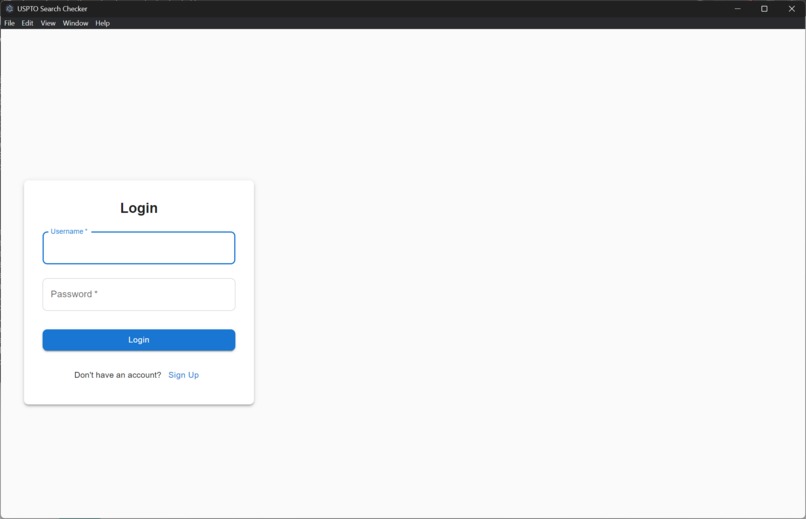
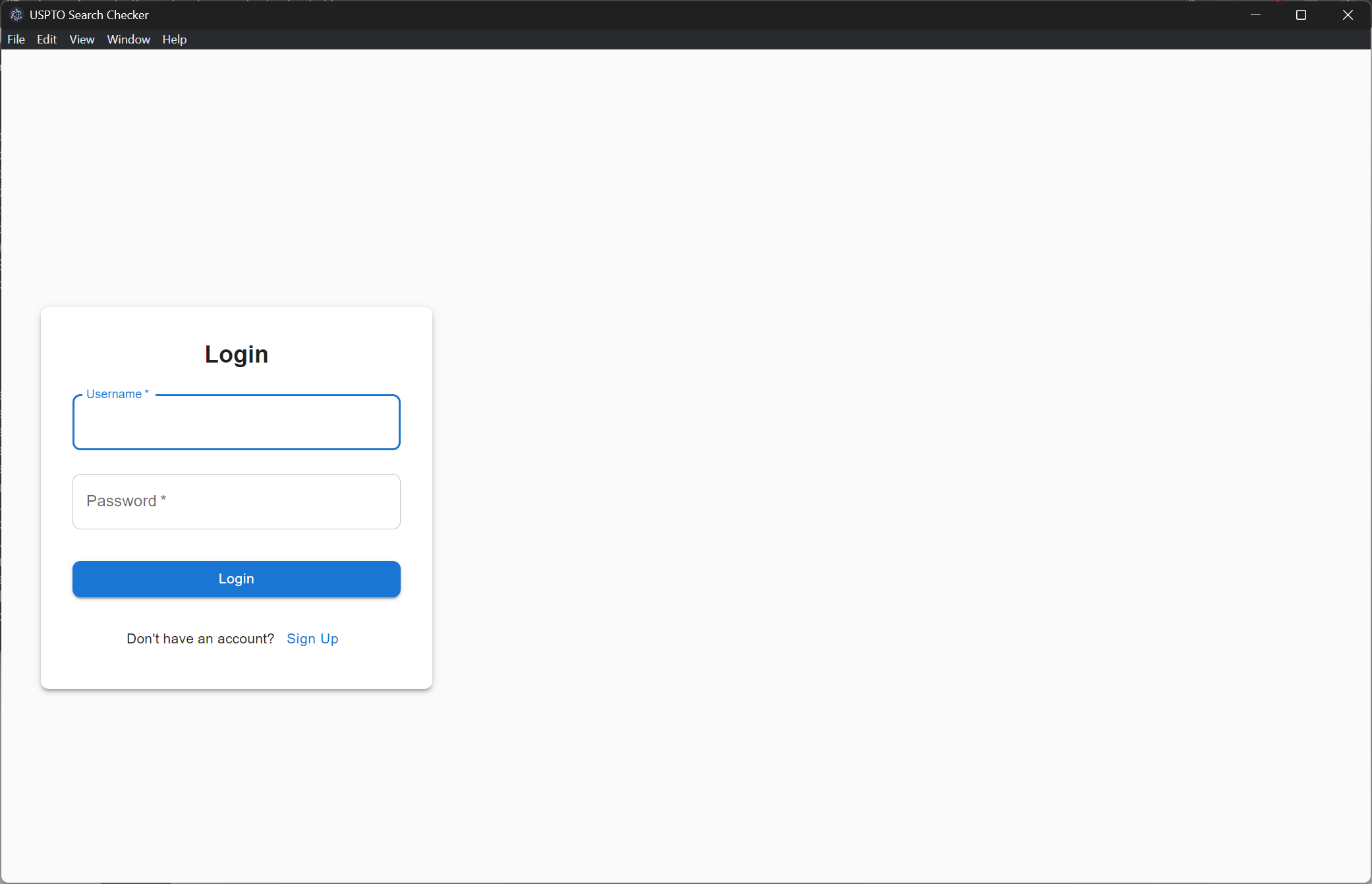
Version 2: Login page
-
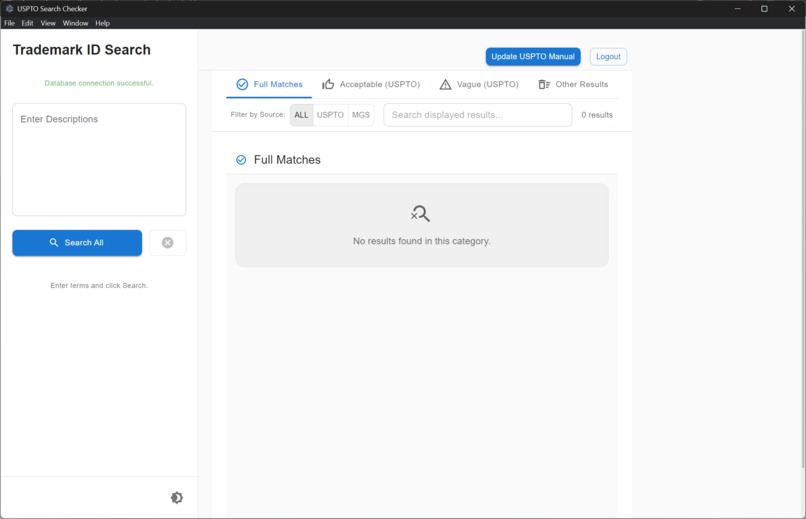
Version 2: Interface
-
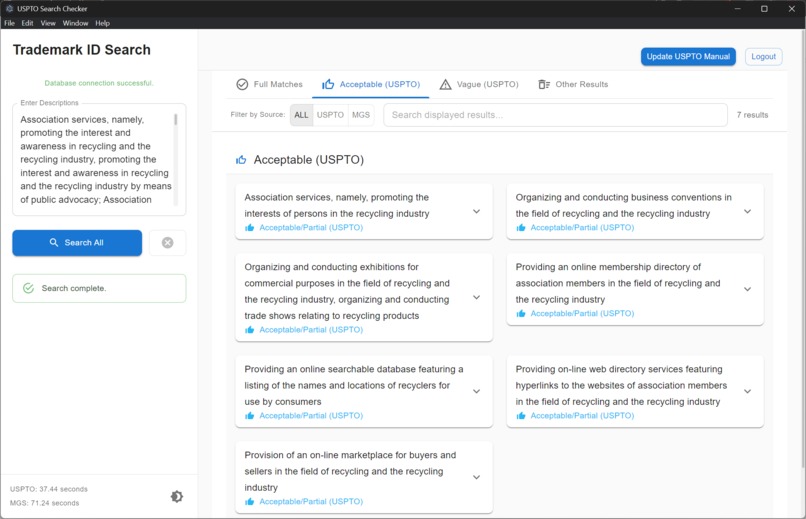
Version 2: Results page
-
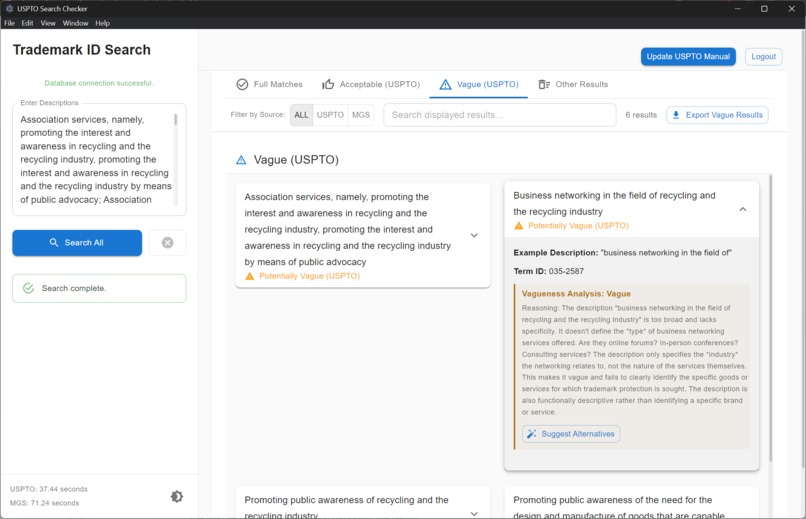
Version 2: Results page with AI analysis
-
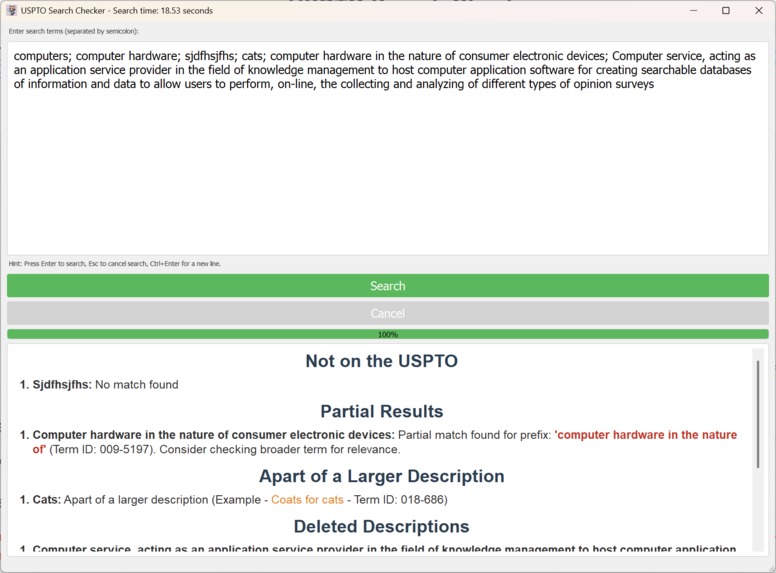
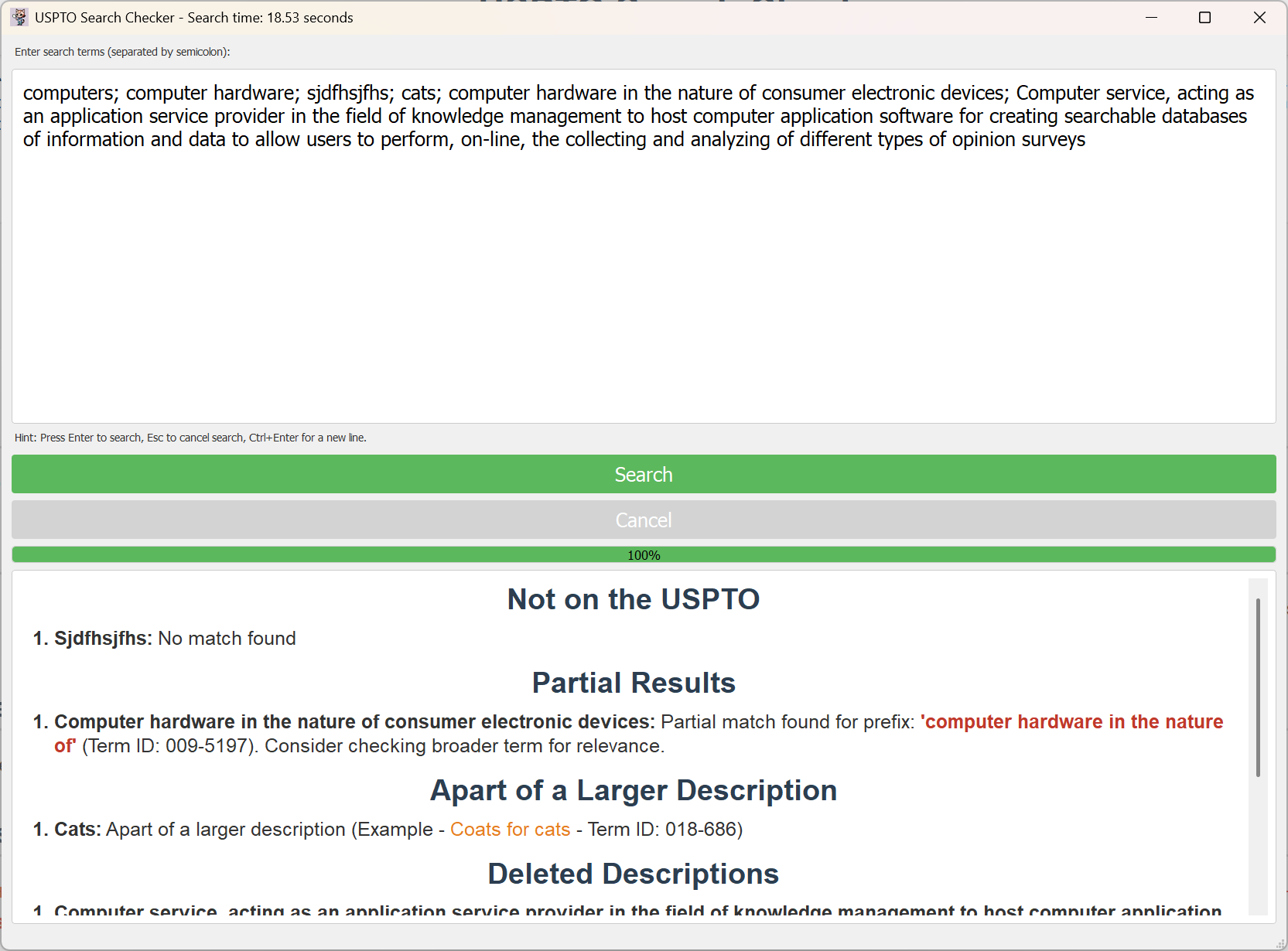
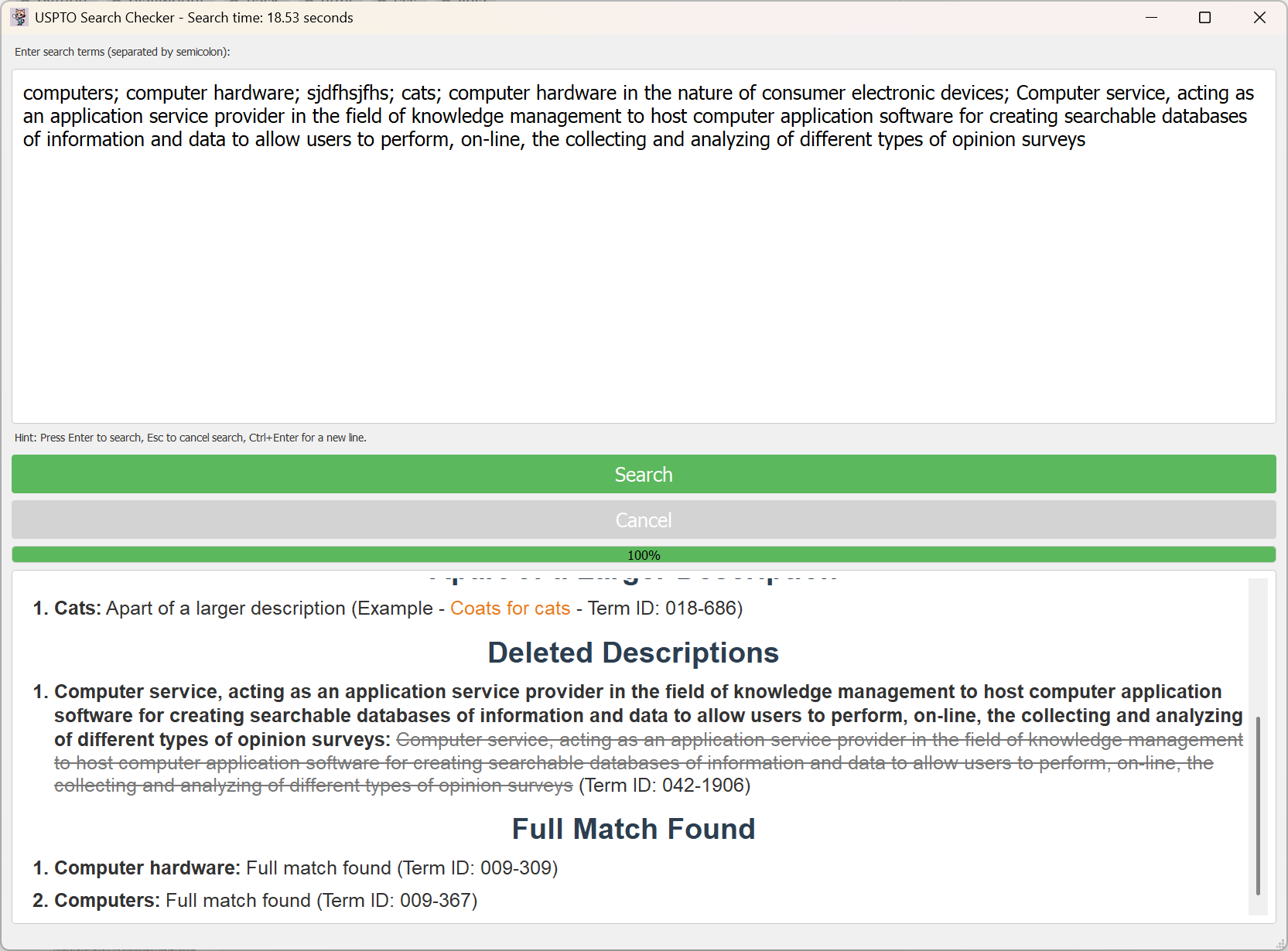
Version 1: The desktop version of the application displaying the results
-
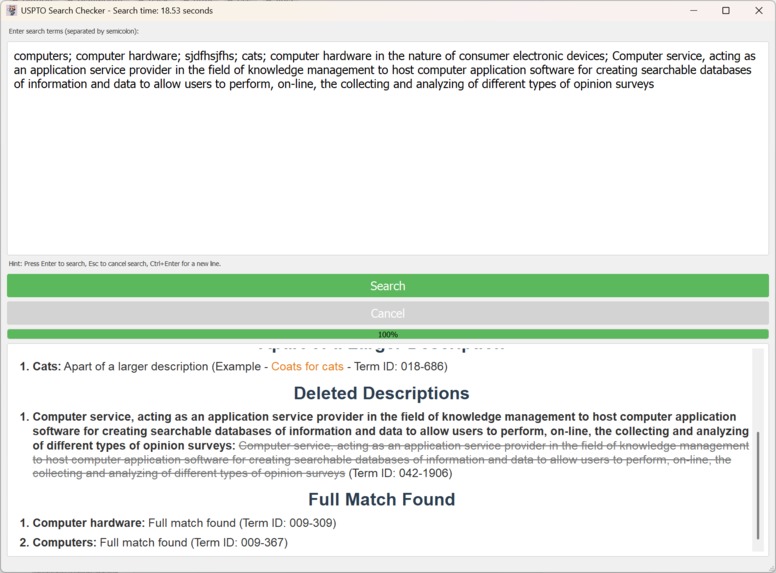
Version 1: The desktop version of the application displaying the results
-
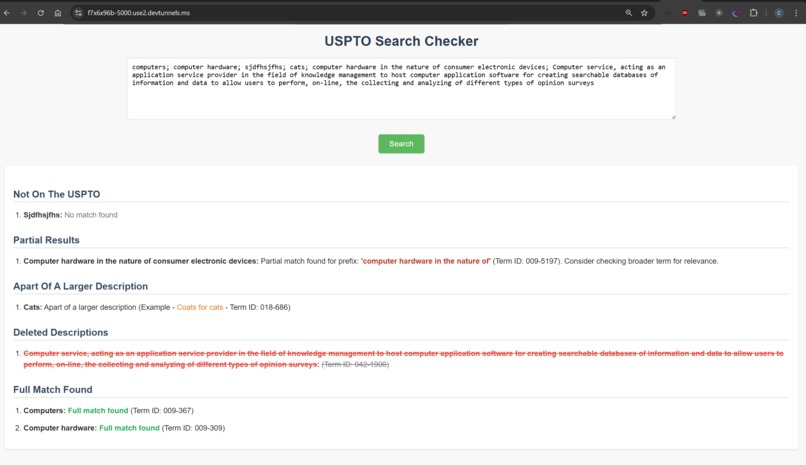
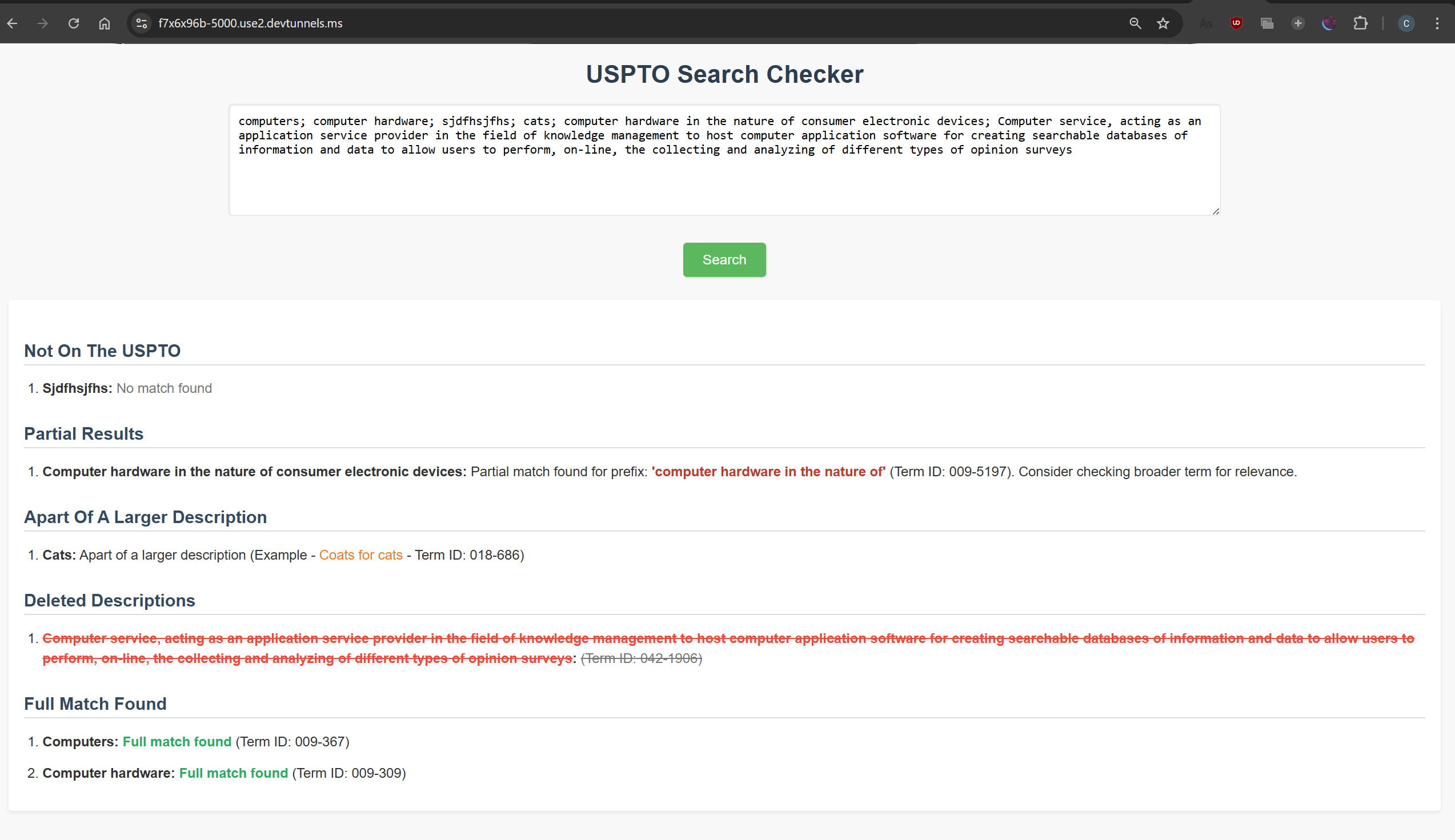
Version 1: The web version of the application displaying the results
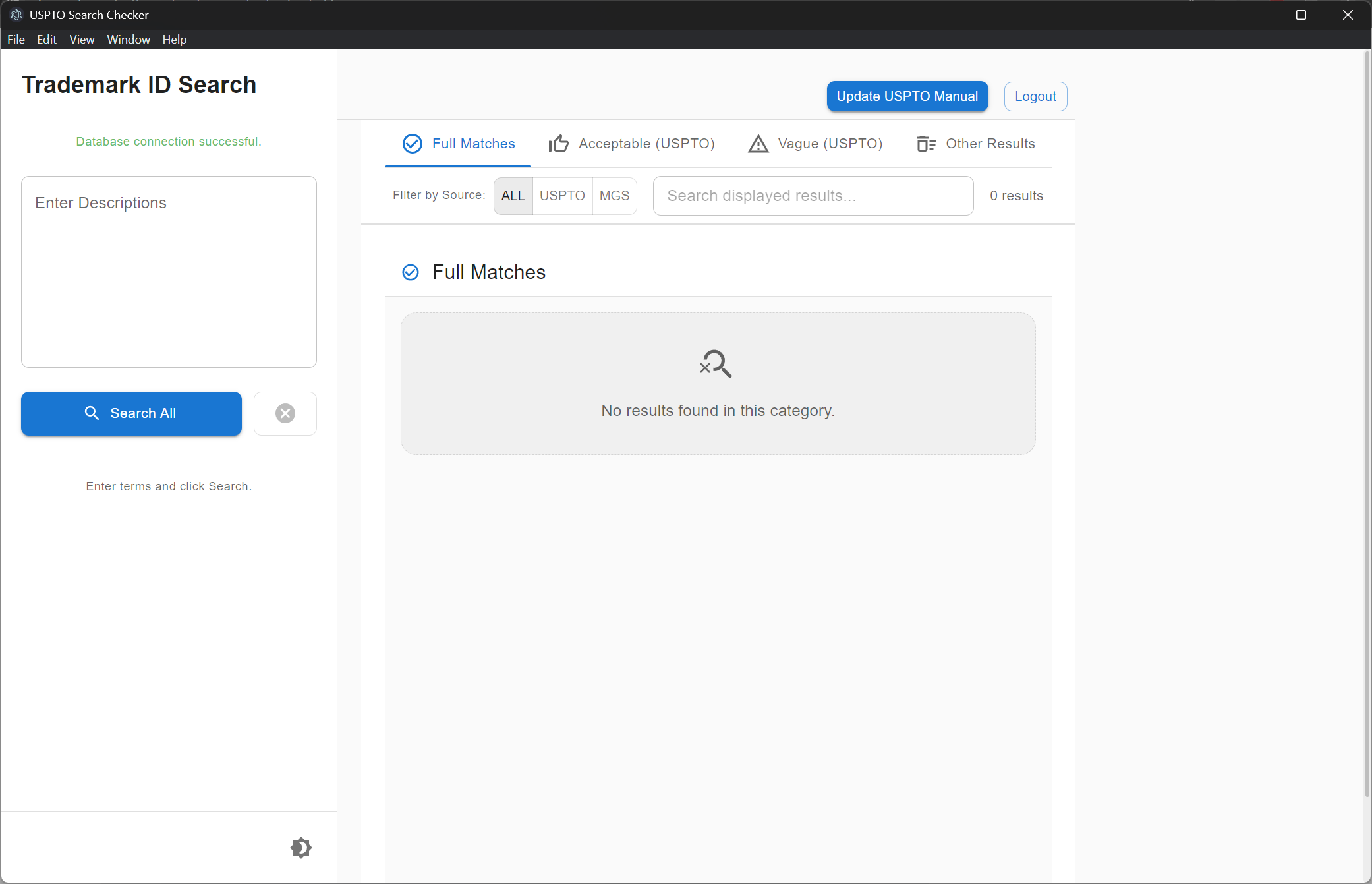
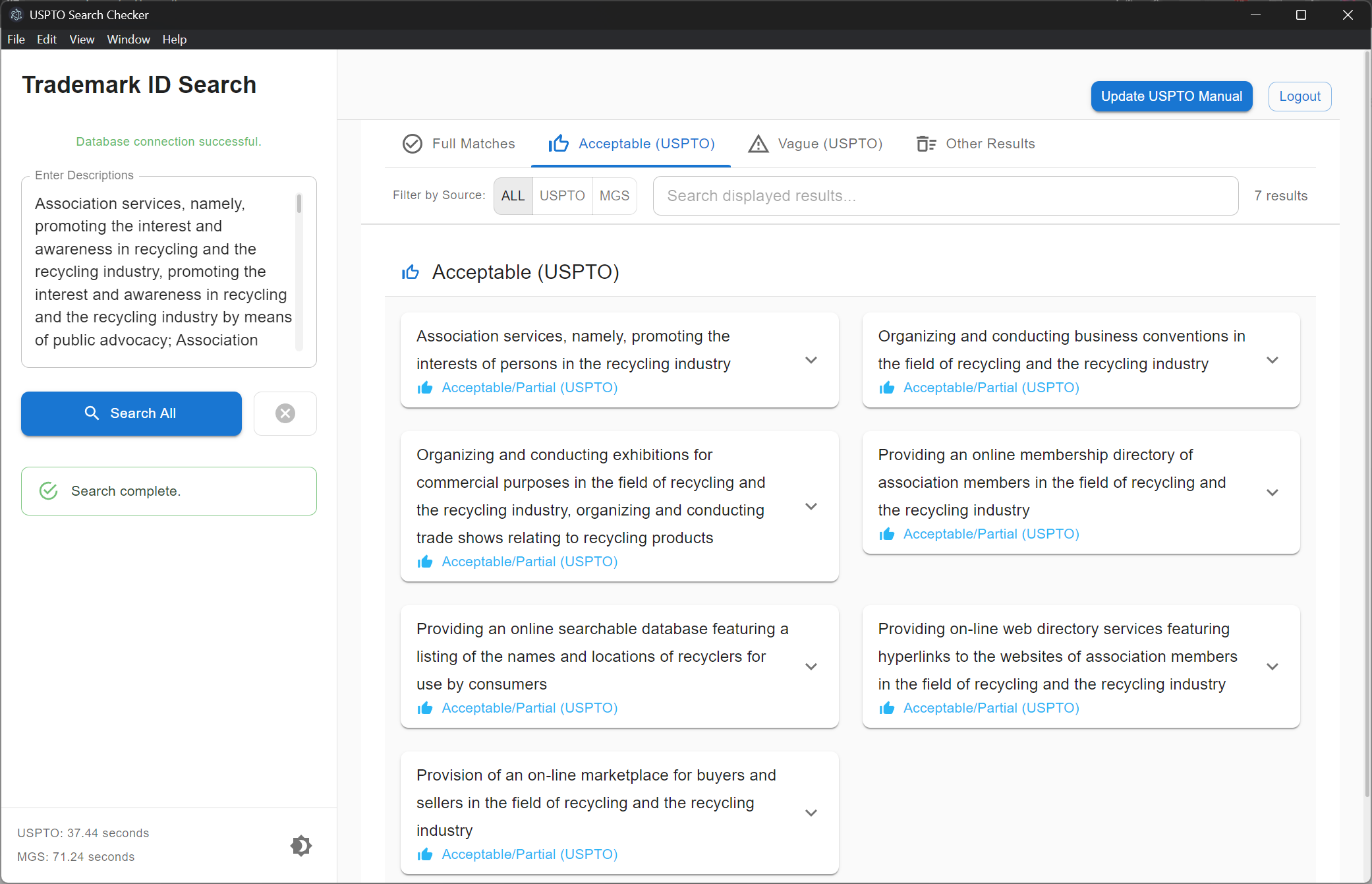
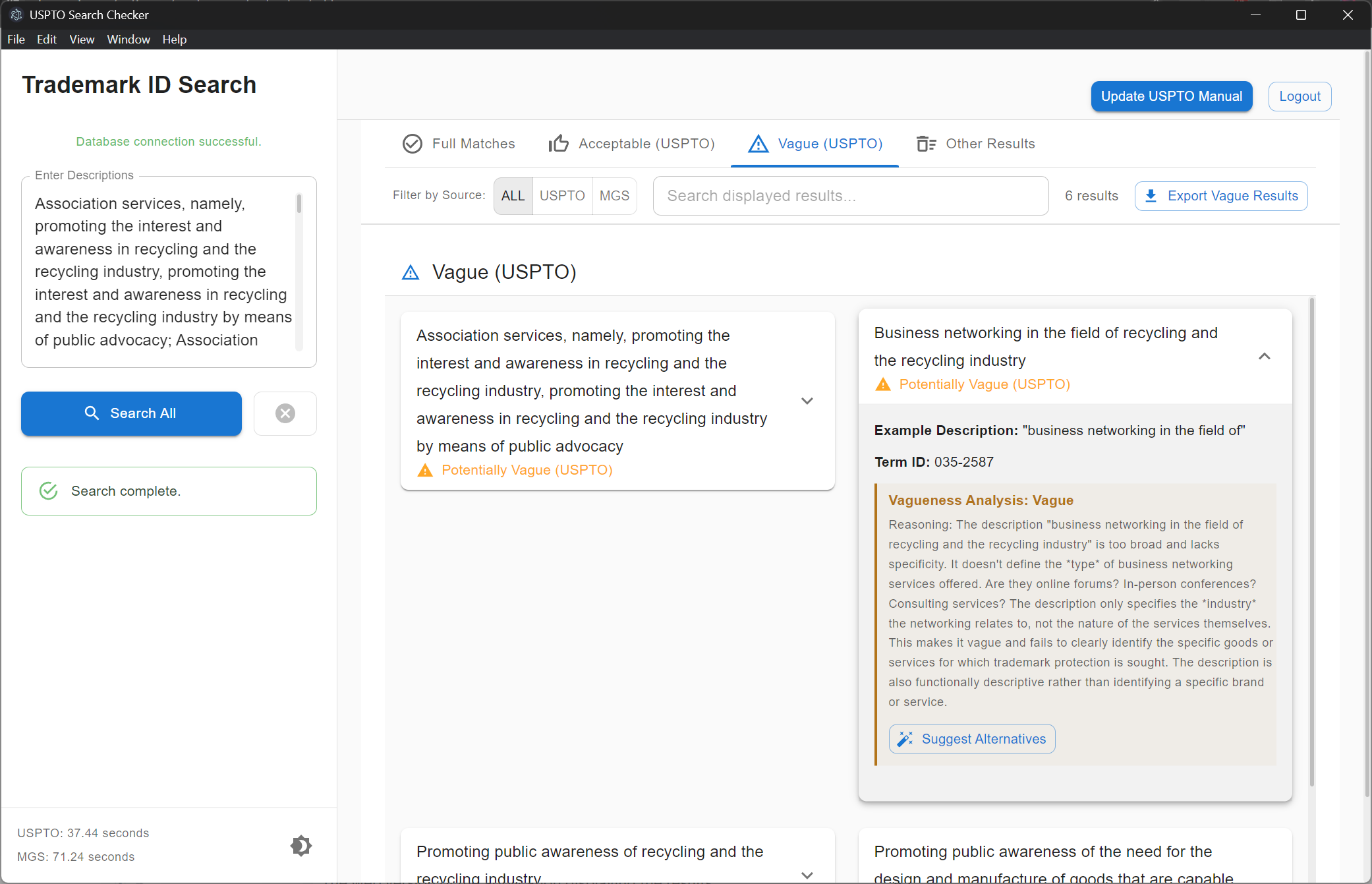
Update
Check the updates tab to see a more up-to-date explanation of the project. There have been some significant overhauls. The information below will be left for posterity purposes.
Inspiration
The fundamental inspiration for both the desktop and web versions of the Automated Trade Mark examination is to alleviate the burden on Trademark Examiners caused by the time-consuming and repetitive task of reviewing goods and services descriptions against the USPTO ID Manual and the Madrid Goods & Services Manager. The core motivation is to automate a tedious process, freeing up examiner time for more substantive and complex aspects of trademark examination.
However, the inspiration also diverges slightly based on the platform:
Desktop Version: Primarily focused on efficiency and providing a dedicated tool directly to individual examiners. The goal was to create a powerful, locally installed application that could streamline their daily workflow and boost individual productivity.
Web Version: While still aiming for efficiency, the web version's inspiration expands to accessibility, ease of deployment, and broader organizational impact. The web platform aims to make the tool more widely available, simplify updates and maintenance, and potentially facilitate future collaborative features.
What it does
Both versions of the Automated Trade Mark examination share the same core functionality: automating the search and categorization of goods and services descriptions against the USPTO ID Manual. They both aim to:
Automate USPTO ID Manual Searches: Eliminate manual searching by programmatically querying the ID Manual website.
Categorize Search Results: Classify results into meaningful categories like Full Match, Partial Match, Part of a Larger Description, Deleted Description, and No Match.
Present Categorized Results: Display the categorized results in a clear and organized format for easy review and assessment of term acceptability.
Improve Examination Efficiency: Reduce the time spent on initial term review, allowing examiners to focus on other critical aspects of their work.
The key difference lies in the user interface and accessibility:
Desktop Version: Provides a native graphical user interface (GUI) built with PyQt5, offering a dedicated application window for inputting terms, viewing results, and interacting with the tool. It's designed for individual, local use.
Web Version: Offers a web-based user interface accessible through any web browser. Users interact with the tool through a web form and view categorized results directly within the browser. This makes it platform-independent and easier to deploy and access across an organization.
How we built it
Both versions leverage Python for their core logic and Playwright for web scraping, but differ significantly in their presentation layer and overall architecture:
Common Core (Both Versions):
Python: Serves as the primary programming language for backend logic, including search automation, result processing, and categorization algorithms.
Playwright: The browser automation library is the engine for web scraping in both versions, enabling interaction with the USPTO ID Manual website.
asyncio: Used for asynchronous programming to handle concurrent searches efficiently and prevent blocking.
Regular Expressions (re): For text processing and parsing of web page content.
Binary Search Algorithm: Implemented for efficient partial match finding.
Caching (search_cache): A shared caching mechanism to improve performance by storing and reusing previous search results.
Desktop Version Specifics:
PyQt5: Used to build the graphical user interface (GUI), providing widgets, layout management, and event handling for a desktop application experience.
QThread: PyQt5's threading capabilities are used to run searches in the background, preventing the GUI from freezing and ensuring responsiveness.
Web Version Specifics:
Flask: The web framework used to build the web application, handling routing, request-response cycles, and server-side logic.
HTML, CSS, Jinja2: Used for the frontend web interface. HTML for structure, CSS for styling, and Jinja2 as a templating engine to dynamically generate HTML and display results.
In essence, the desktop version is a standalone GUI application, while the web version follows a client-server architecture with a Python/Flask backend and a web browser-based frontend.
Challenges we ran into
Both versions encountered some common challenges related to web scraping and result analysis, but also faced unique challenges based on their respective platforms:
Common Challenges (Both Versions):
Web Scraping Robustness: Dealing with potential website changes in the USPTO ID Manual that could break scraping logic.
Handling Dynamic Web Pages: Managing JavaScript-heavy dynamic content on the ID Manual website using Playwright's features.
Partial Matching Logic Complexity: Developing accurate and efficient algorithms for partial match identification.
Concurrency and Rate Limiting (Potential): Balancing concurrent searches with the need to avoid overloading the USPTO website and potential rate limiting.
Error Handling: Implementing robust error handling for network issues, website errors, and unexpected data.
Desktop Version Specific Challenges:
GUI Development Complexity (PyQt5): Learning and effectively using PyQt5 for GUI creation, especially with asynchronous operations and threading.
Desktop Application Distribution: Considerations for packaging and distributing a desktop application for different operating systems if wider distribution was intended.
Web Version Specific Challenges:
Web UI Design and User Experience: Creating a user-friendly and efficient web interface using HTML, CSS, and potentially JavaScript.
Web Deployment and Hosting: Setting up and configuring a web server environment to host the Flask application proved to be a significant challenge for a quick demo setup. For demonstration purposes, we utilized development tunnels (like ngrok or similar services) to expose the local Flask application to the web, bypassing the complexities of full server deployment. This was a pragmatic solution for a demo but not a sustainable approach for production.
Real-time Updates in Web UI (Limited): Achieving real-time feedback in the web UI, which is more naturally handled in a desktop GUI, required different approaches or was simplified in the basic web version.
Accomplishments that we're proud of
Both versions represent significant accomplishments in automating and streamlining the USPTO ID Manual search process:
Common Accomplishments (Both Versions):
Functional Automation of ID Manual Search: Successfully automated the core task of searching and categorizing goods and services, meeting the primary objective.
Intelligent Partial Matching: Developed effective partial matching logic to improve result relevance.
Concurrent and Efficient Searching: Implemented concurrency to significantly reduce processing time.
Categorized Output: Provided clear and organized categorized results, making it easier to review findings.
Caching for Performance: Integrated caching to enhance performance for repeated searches.
Desktop Version Specific Accomplishments:
User-Friendly Desktop GUI: Created a clean and intuitive PyQt5-based desktop application.
Cancellation Feature: Implemented a user-initiated search cancellation option.
Web Version Specific Accomplishments:
Web Accessibility: Made the tool accessible via any web browser, increasing its reach and ease of use.
Functional Web Interface: Developed a working web interface using Flask, Jinja2, HTML, and CSS.
Backend Search Logic Ported to Web: Successfully migrated core Python logic to a web backend.
Categorized HTML Output in Browser: Achieved browser-based display of categorized results in HTML format.
What we learned
Developing both versions offered distinct but complementary learning experiences:
Common Learning (Both Versions):
Web Scraping Expertise (Playwright): Gained practical skills in web scraping, handling dynamic content, and website variations.
Asynchronous Programming (asyncio): Deepened understanding of asynchronous programming in Python and its benefits for I/O-bound tasks.
Algorithm Design (Partial Matching): Developed and refined algorithms for partial match identification.
Importance of Error Handling: Reinforced the need for robust error handling in automation and web-facing applications.
Desktop Version Specific Learning:
GUI Development with PyQt5: Mastered aspects of PyQt5 for desktop application development, including widgets, layouts, threading, and signals/slots.
Desktop Application Design Principles: Learned about principles of desktop application design and user interaction.
Web Version Specific Learning:
Web Frameworks (Flask): Gained practical experience with Flask for web application development, routing, templating, and request handling.
Frontend Web Technologies (HTML, CSS, Jinja2): Learned or enhanced skills in HTML structure, CSS styling, and Jinja2 templating for web interfaces.
Web Application Architecture: Understood client-server architecture, web request cycles, and basic web application design.
Web Deployment Awareness: Gained initial exposure to web deployment considerations.
What's next for the Automated Trade Mark examination
Future development for both versions could converge and diverge, focusing on enhancements relevant to each platform while potentially sharing core improvements:
Shared Future Directions (Applicable to Both Versions):
Enhanced Partial Matching: Further improve partial matching logic using more advanced techniques like NLP or fuzzy matching.
More Detailed Result Information: Extract and display more comprehensive data from the ID Manual results, such as class information, notes, and restrictions.
User Feedback Integration: Actively solicit and incorporate user feedback to guide future development.
Desktop Version Specific Future Directions:
Advanced GUI Features: Add more advanced GUI features and customization options based on user needs.
Local Data Storage/Offline Capabilities (Potentially Limited): Explore limited offline capabilities or local data storage for cached data (while respecting copyright and data usage policies).
Improved Desktop Application Packaging and Distribution: Streamline the process of packaging and distributing the desktop application for wider use.
Web Version Specific Future Directions:
Enhanced Web UI/UX (JavaScript Frameworks): Rebuild or enhance the web interface with modern JavaScript frameworks (React, Vue, Angular) for a more dynamic and interactive experience.
Real-time Updates in Web UI (WebSockets): Implement real-time updates for search progress and results using WebSockets.
User Accounts and Session Management: Add user accounts, session management, and potentially personalized settings.
REST API for Programmatic Access: Expose the search functionality as a REST API for integration with other systems.
Cloud Deployment and Scalability: Deploy to a cloud platform for scalability, reliability, and broader access.
Web Application Security Enhancements: Implement more robust security measures for a web environment.
Ultimately, the future direction will depend on user needs, available resources, and the strategic goals for the Automated Trade Mark examination – whether it remains primarily a powerful desktop tool for individual examiners or evolves into a more broadly accessible and integrated web-based platform.

Log in or sign up for Devpost to join the conversation.