🎮 2048 Autoplay AI: A Vibe-Coding Showcase
“What if you could build a thinking AI that plays 2048… while you sip coffee?”
🌟 Inspiration [I]
I was inspired by two things:
- The magic of 2048 — a deceptively simple puzzle game that hides deep strategy and emergent behavior.
- The power of vibe coding — building fast, iterating visually, and letting intuition guide logic — not just writing code line-by-line.
Instead of manually playing 2048, we asked: “What if an AI could play it for us — and even learn from its own games?” This became our playground to explore how vibe coding can turn abstract ideas into working systems — quickly, joyfully, and without getting lost in syntax.
🧩 What It Does [II]
This is not just a 2048 game — it’s a self-playing AI simulator with analytics.
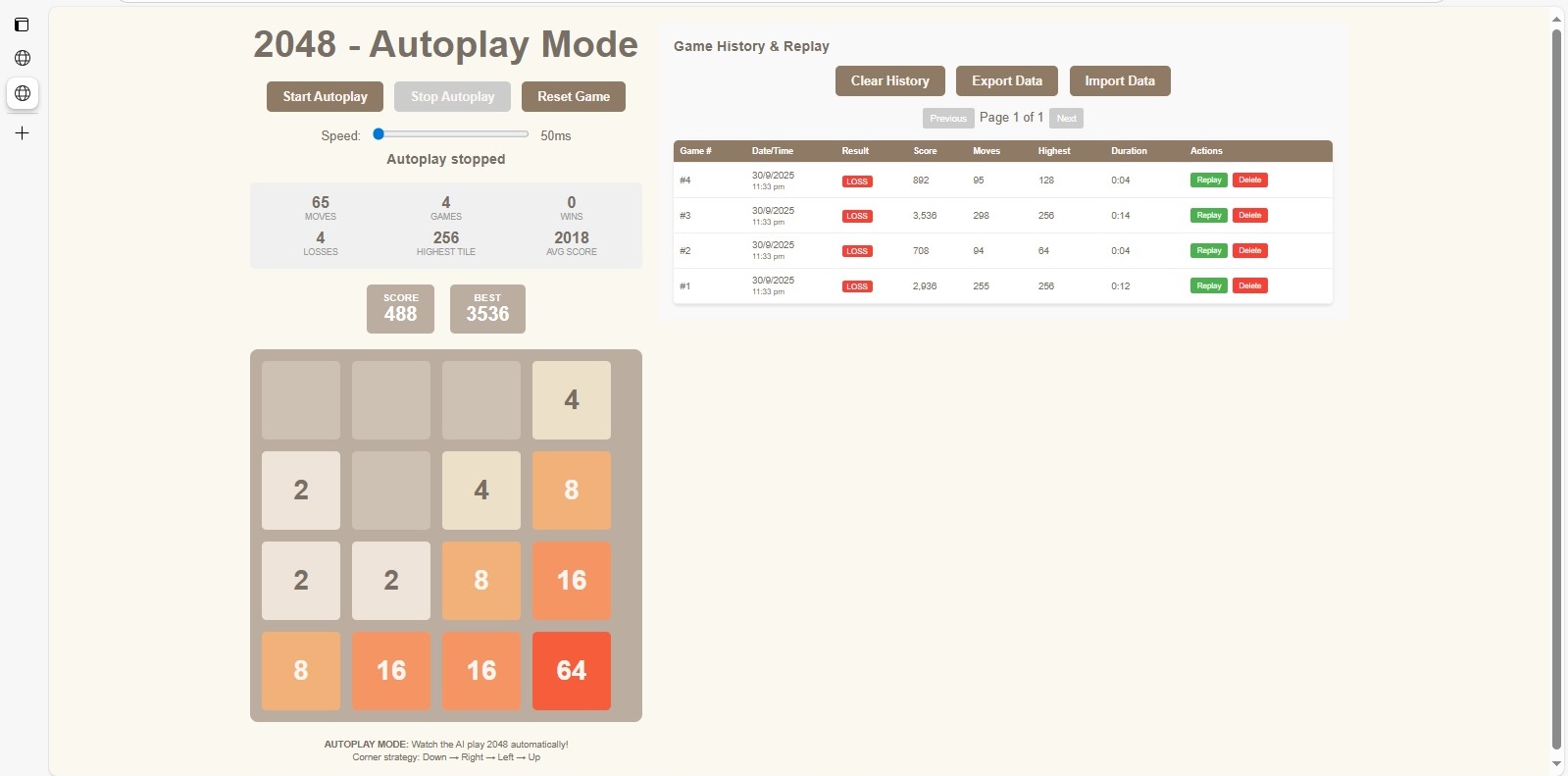
✅ Autoplay Mode: An AI plays 2048 automatically using a simple but effective “corner strategy” (Down → Right → Left → Up). You watch it evolve in real time.
📊 Game History & Replay: Every game is logged — score, moves, highest tile, duration, and result (Win/Loss). You can replay any game step-by-step.
📈 Performance Dashboard: See stats like:
- Total games played
- Wins vs losses
- Highest tile achieved
- Average score
- Speed control (adjust how fast the AI plays)
💾 Export/Import Data: Save your AI’s gameplay history and share or reload it later — perfect for comparing strategies or teaching others.
🎯 Goal: To demonstrate how an AI can learn through repetition — even with no machine learning — just smart rules + data tracking.
🛠️ How We Built It (Vibe Coding Style) [III]
I didn’t write hundreds of lines of code. I vibed it into existence.
Core Philosophy: “Build the experience first. Let the system show you what’s missing.”
Key Steps:
- Visual Layout First: We started by dragging UI components — buttons, sliders, grids, tables — onto the canvas. No boilerplate. Just arrange what you want to see.
- Connect Logic Visually
Used Kiro’s node-based or event-driven logic to wire up:
- Game board updates
- Tile merging rules
- AI decision flow (which direction to move next)
- Score calculation
- Game-over detection
- Add Analytics as You Go Every time the AI made a move or ended a game, we recorded it — then instantly displayed it in a table. No backend setup. Real-time logging.
- Iterate by Watching Ran autoplay, saw where the AI got stuck, tweaked the strategy, re-ran — all within minutes. No compile cycles. No server restarts.
- Polish with Personality Added color-coded tiles, smooth transitions, tooltips, and a playful footer explaining the AI’s strategy.
💡 Vibe Coding = Build → Observe → Tweak → Repeat
⚠️ Challenges We Ran Into [IV]
Even with vibe coding, I hit bumps — but they were fun to solve:
🔹 AI Strategy Was Too Dumb at First The initial “random move” AI lost every game. I asked a predictable pattern "corner strategy" that actually worked.
🔹 Observation During Autoplay Default speed is too slow for each autoplay and performed the game review. At the fastest 50ms speed, I can observe the autoplay results more rapidly and observed whether history and replay functions are working.
🔹 Duplicated Results in History Table Early version repeating the same results over 10 times. I reported this issue and then fixed automatically.
🔹 Design Confusion: “Why it is only autoplay?” Original, the game is developed for manually play. In order to speed up for testing the vibe coding. I have changed from manual to autoplay. And then added more functions, like history and replay functions. Making it side-by-side to view the autoplay and also updated results together for observation the AI's behavior better.
🏆 Accomplishments We’re Proud Of [V]
✔️ Built a functional AI player in under a day — no prior game dev experience needed.
✔️ Real-time analytics dashboard — showing wins, losses, scores, and replayability — all connected live.
✔️ No traditional coding required — everything was wired visually, iterated rapidly, and tested immediately.
✔️ Teachable moment: The AI doesn’t “learn” via ML — it follows rules. Yet it still feels intelligent.
✔️ Exportable game history — lets users share their AI’s journey or compare strategies across sessions.
This project proves that you don’t need to be a coder to build intelligent, interactive systems — just a curious explorer.
📚 What We Learned [VI]
🧠 Vibe coding accelerates iteration — seeing your logic execute visually helps you debug faster than reading logs.
🎮 Game mechanics are great for testing logic — 2048’s simple rules expose flaws in strategy quickly.
📊 Data visualization drives insight — even basic stats (like “avg score”) reveal patterns you wouldn’t notice otherwise.
🤖 Simple rules > complex algorithms — the corner-strategy AI beat random moves consistently. Sometimes less is more.
🔁 Feedback loops matter — watching the AI play, tweaking, and re-running created a powerful learning loop — for both the AI and me.
🔮 What’s Next For This Project [VII]
🚀 Strategy Explorer — Let users swap AI strategies (e.g., “Edge Priority”, “Maximize Empty Cells”) and compare performance.
🧠 Basic Learning Mode — Add a “memory” feature where the AI remembers which moves led to higher scores and adjusts over time.
🌐 Multiplayer AI Arena — Pit different AI strategies against each other in tournaments.
📱 Mobile Responsive Version — Make it playable on phones/tablets — because everyone loves 2048 on the go.
📚 Vibe Coding Tutorial Series — Turn this project into a step-by-step guide for beginners: “Build Your First AI in 1 Hour”.
💬 Final Thought [VIII]
This isn’t just about 2048.
It’s about democratizing creation — letting anyone, regardless of coding background, build intelligent, interactive experiences through intuition, visuals, and rapid feedback.
“If you can imagine it, you can vibe it into reality.”
Built With
- kiro

Log in or sign up for Devpost to join the conversation.