-
-
Transforming Urban Chaos into Data-Driven Clarity
Inspiration
Urban residents often lack access to timely, location-specific information about environmental hazards such as air pollution spikes, noise hot spots, and heatwaves. These factors adversely affect health (e.g. respiratory issues, stress) but existing tools (standard weather apps or news alerts) typically do not integrate multi-dimensional environmental data in real time. There is a need for a unified system that continuously ingests diverse sensor and API data streams (e.g. air quality, weather, traffic noise) and makes this information transparently available to citizens. By raising situational awareness and predicting hazardous conditions, individuals and city planners can make better decisions (e.g. avoid polluted routes, take heat precautions) to improve public health and safety.
What it does
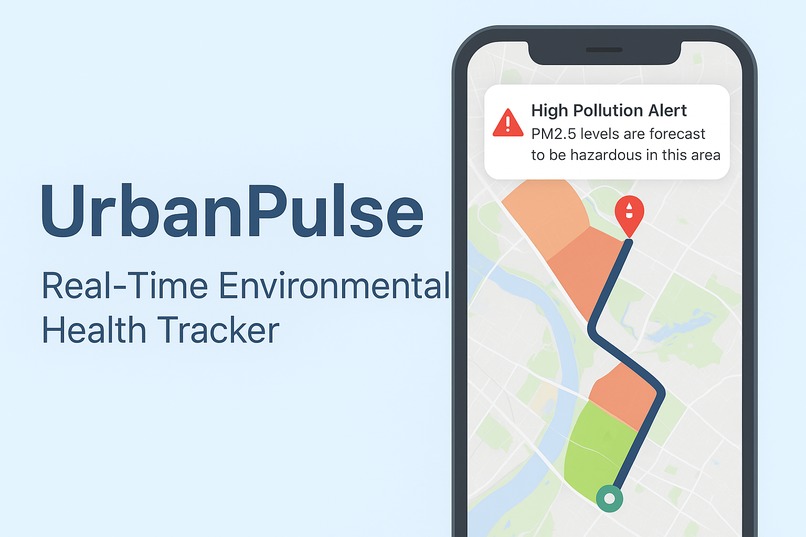
UrbanPulse addresses this gap by building a cross-platform environmental health tracker that collects live data from open sources, runs predictive analytics, and delivers alerts and routing guidance. The system aggregates real-time data via public APIs such as OpenWeatherMap for weather and alerts openweathermap.org and OpenAQ for air quality openaq.org . Machine learning models process these time-series data to forecast pollution or heat risk in different neighborhoods and to detect anomalies or sudden spikes (e.g. a pollution event or abnormal noise level). Users access UrbanPulse through a Progressive Web App (PWA) or native iOS/Android app. The interface features interactive maps and notifications to warn users of high-risk areas or predicted hazards. For example, if particulate matter (PM2.5) is forecast to exceed safe limits in an area, the app will generate an alert and suggest alternative routes that avoid the worst pollution zones (inspired by exposure-optimized routing approaches openresearchsoftware.metajnl.com ). Through this integrated approach, UrbanPulse empowers city dwellers with proactive, actionable environmental intelligence.
How we built it
UrbanPulse is designed with a scalable microservices architecture. Key components include:
Data Ingestion & Pipeline: Backend services regularly fetch data from public APIs. For example, OpenAQ provides an open API aggregating global air quality data openaq.org , and OpenWeatherMap offers current weather and alerts (combining models, satellite, and station data openweathermap.org ). These services run on a schedule or in response to streams (e.g. Kafka or cloud scheduler). Data is preprocessed (unit conversions, geolocation tagging) and stored in a database optimized for time-series (e.g. InfluxDB, TimescaleDB) or NoSQL.
Machine Learning Modules: Historical time-series data trains forecasting models. Classical models like ARIMA (AutoRegressive Integrated Moving Average) will be used for linear trends machinelearningmastery.com , and deep learning models (LSTM RNNs) capture complex temporal dependencies machinelearningmastery.com . For anomaly detection, an Isolation Forest or autoencoder flags unusual spikes in any data stream chrisyandata.medium.com . These ML components can be built in Python using libraries like TensorFlow/Keras or scikit-learn. Models can run batch predictions or be served via APIs for real-time inference.
API Layer & Backend: A dedicated API layer (e.g. Python Flask/FastAPI or Node.js/Express) exposes endpoints for the frontend. An API Gateway pattern will be implemented to optimize responses for different clients microservices.io . This gateway routes requests from the PWA and mobile apps to the appropriate services, aggregating data as needed. The gateway also handles authentication and rate limiting. Data caching (e.g. Redis) ensures performance for frequent queries (like updating a map).
Frontend (PWA & Mobile): The user interface is built with a modern JavaScript framework (e.g. React for PWA; React Native or Flutter for native apps) to enable code reuse. The PWA uses service workers for offline caching and background updates (as per PWA best practices). Geolocation APIs allow mapping user position, and push APIs enable alert notifications. Map visualization uses a mapping library/SDK (Google Maps or Mapbox) with custom overlays. For example, heatmaps or colored zones represent pollution levels.
Notifications & Alerts: We will use Firebase Cloud Messaging (FCM) or a similar service to deliver push notifications. The backend triggers notifications when ML models predict a hazard or when anomalies are detected.
Infrastructure & DevOps: The system can deploy on cloud platforms (AWS, GCP, or Azure). Services are containerized (Docker) and orchestrated (Kubernetes or serverless FaaS). Continuous integration pipelines automate testing and deployment.
This architecture, with an API Gateway as the single entry point, decouples frontend clients from backend complexity and reduces round-trips microservices.io . It supports growth; for example, we can later add more data sources or ML models without altering the client interface.
Challenges we ran into
Data Quality and Coverage: Open APIs may have missing data or delays. To mitigate, we will incorporate multiple data sources (e.g. fallback from nearby stations or alternative APIs). Caching recent data reduces gaps, and interpolation can smooth irregular time-series. We will also monitor API quotas and switch to alternative sources if needed.
Real-Time Performance: Continuous data fetching and model computation may strain resources. We mitigate by scheduling ML predictions (e.g. every few hours) and caching results. An API gateway reduces redundant calls microservices.io . WebSocket or push notifications can deliver updates only when necessary to reduce client polling.
Model Accuracy: Forecasting environmental data is complex. We will handle seasonality and external factors by incorporating exogenous inputs (e.g. weather conditions) into models. We can ensemble different model types (statistical and deep learning) and compare their performance. Continuous retraining with new data will adapt to changes.
Cross-Platform Complexity: Maintaining both PWA and native codebases can be challenging. Using a shared tech stack (e.g. React/React Native) helps reuse components. Automated testing and strict UI guidelines ensure consistency across devices.
Privacy & Permissions: Location-based services require user permission. We will use location only to enhance user experience (e.g. centering maps) and not store personal identifiers. Privacy policy and opt-in alerts ensure compliance.
User Experience Under Load: Displaying too much data (e.g. dense map overlays) could overwhelm users. We will design intuitive legends (e.g. color-coded hazard levels) and allow toggling layers. The API gateway also helps by only sending needed data to minimize bandwidth.
Scalability and Reliability: To handle many users and large data volume, we design services stateless and scalable. Auto-scaling on cloud infrastructure, along with a fault-tolerant database (multi-region if needed), will keep the system responsive.
Accomplishments that we're proud of
Real-Time Monitoring: Continuously ingest data from multiple open APIs (e.g. weather, air quality, noise) to display current conditions.
Predictive Alerts: Use time-series forecasting (e.g. ARIMA, LSTM neural networks) to predict short-term pollution or heatwave events and warn users before they occur machinelearningmastery.com machinelearningmastery.com .
Anomaly Detection: Apply unsupervised methods (e.g. Isolation Forest) to detect sudden spikes or outliers in environmental data (e.g. an unexpected pollution surge) chrisyandata.medium.com .
Smart Routing: Provide map-based route planning that minimizes exposure. This is similar to the “Green Paths” exposure-optimized routing concept openresearchsoftware.metajnl.com . The app highlights “safe routes” through areas with lower predicted hazards.
Multi-Platform Access: Deploy as a Progressive Web App (for broad browser support) and as native mobile apps (iOS/Android). This ensures offline-capable functionality (via service workers) and native features like push notifications and location services.
User Alerts & Notifications: Push or in-app notifications for approaching hazards or anomalous events. Users can subscribe to custom alerts (e.g. “notify me of any PM2.5 spike > X µg/m³ in my area”).
Personalization & Settings: Users can specify preferences (home/work location, hazard thresholds) and choose which hazards to monitor (air quality, heat index, noise, etc.).
Data Visualization: Interactive charts or heatmaps showing historical trends, current indices (AQI, noise dB, heat index), and confidence of predictions.
What we learned
Our development plan follows agile, iterative phases:
Prototype Backend & Data Flow: Set up core data ingestion services. Implement API calls to OpenWeatherMap and OpenAQ (using their free tiers) to fetch baseline data. Store sample data in a database.
Basic Web UI and Map: Develop a simple PWA interface to display live data (e.g. a map with current air quality markers). Use React (or Vue/Angular) with map components. Confirm map integration and data overlay functionality.
Machine Learning Proof-of-Concept: Train initial forecasting models on historical data. For example, use ARIMA on past PM2.5 readings to forecast the next day, and test an LSTM model for multi-hour prediction. Similarly, test Isolation Forest on known datasets to identify anomalies. Integrate these models into the backend (e.g. as a Python service).
Alerts & Routing: Create logic for generating alerts from forecasts and anomalies. Implement a basic routing algorithm that uses exposure weights: for instance, when plotting a route, add cost penalties for high-pollution segments (inspired by Green Paths openresearchsoftware.metajnl.com ). Use Google Directions API or an open routing engine to compute alternatives and apply these custom weights.
Native Mobile Apps: While the web PWA stabilizes, build mobile versions. Using React Native or Flutter allows sharing code with the web. Implement the same views (map, alerts) and ensure native-specific features (push notifications, offline storage).
Testing & Refinement: Perform functional and performance testing. Validate ML forecasts against held-out data. Optimize UI flows (e.g. quick map load, smooth UI transitions). Ensure cross-platform consistency.
Deployment: Containerize services and deploy to cloud. Set up monitoring (e.g. logs, dashboards) and ensure continuous data updates. Prepare documentation for app stores and user guides.
Throughout, we prioritize features by value and feasibility (core data+map first, advanced ML later). Regular hackathon milestones (e.g. weekly sprints) allow demoing a working prototype early.
What's next for UrbanPulse
Looking ahead, UrbanPulse can expand in several ways:
Additional Hazards: Incorporate more environmental data (e.g. UV index, pollen counts, water quality alerts).
Crowdsourced Sensing: Allow users to contribute data (e.g. upload noise level readings from the phone microphone, or own IoT sensor feeds) to enrich the dataset.
Advanced ML Techniques: Explore spatio-temporal models (e.g. Graph Neural Networks) to capture spatial correlations between neighborhoods. Use transfer learning to adapt forecasts to new cities with limited historical data.
Integration with City Systems: Provide an API or dashboard for urban planners and emergency services to access aggregated hazard data and statistics.
Gamification and Community: Add features like safety badges for choosing clean routes or community challenges to raise awareness (e.g. “reduce pollution exposure this month”).
Localization and Accessibility: Support multiple languages and ensure UI meets accessibility standards (colorblind-friendly palettes, screen-reader support).
Enhanced UI Features: Augmented reality (AR) overlays for hazards, personalized voice alerts, or smartwatch integration for real-time feedback.
Built With
- fastapi
- gcp
- maps
- matplotlib
- numpy
- openaq
- openweathermap
- pandas
- postgresql
- python
- redis
- scikit-learn
- tensorflow


Log in or sign up for Devpost to join the conversation.