-
-
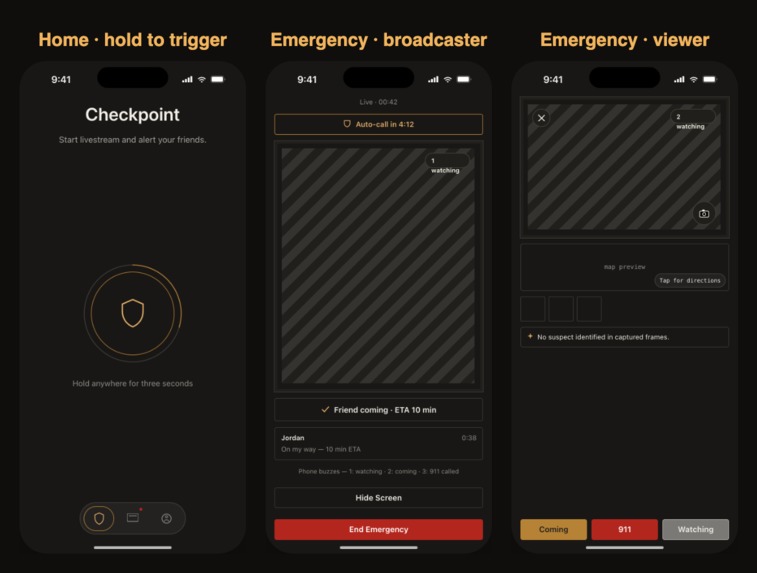
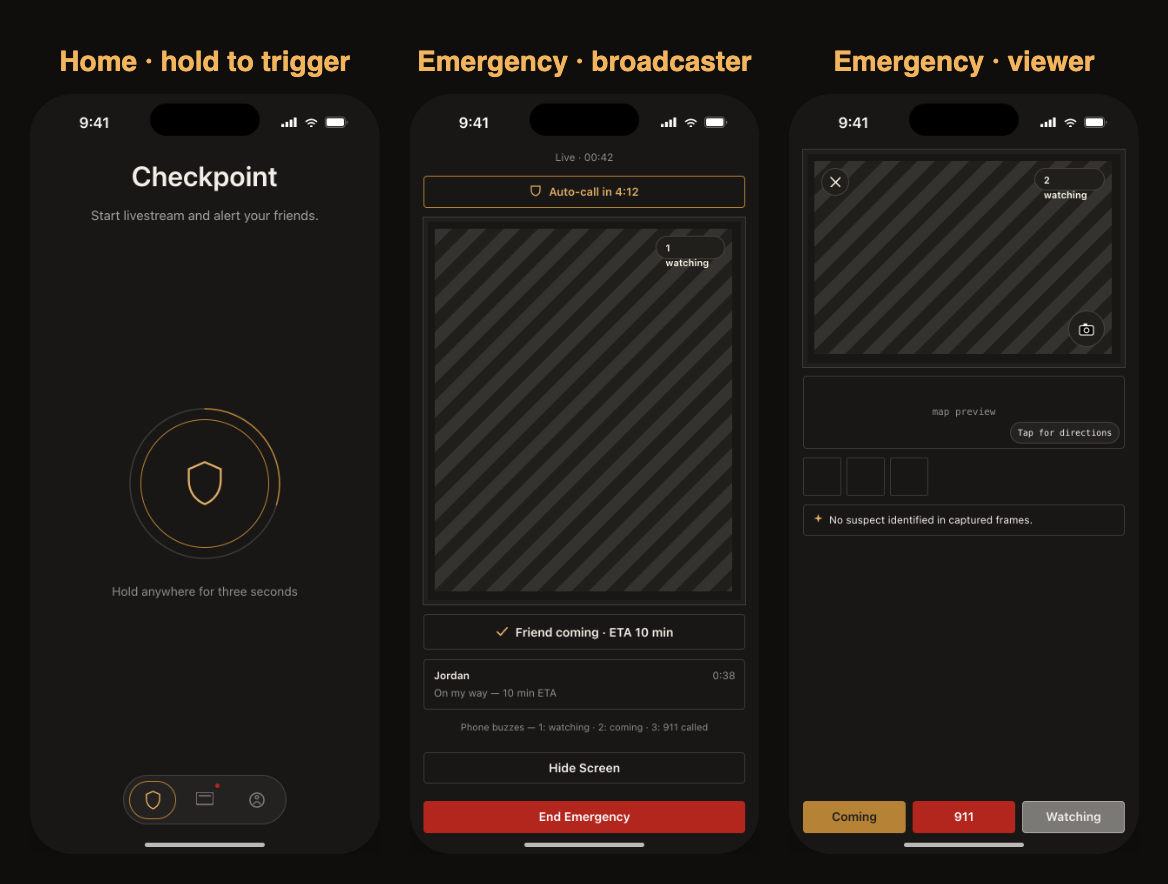
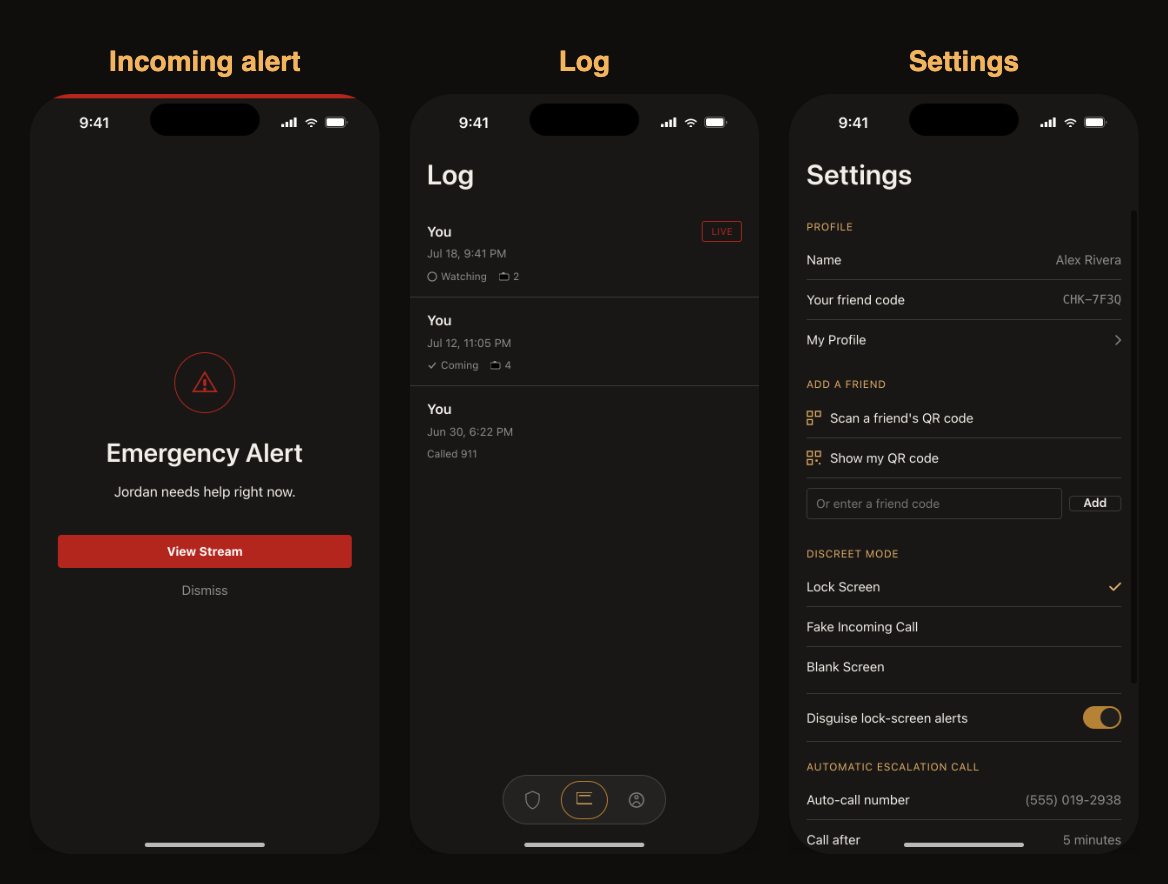
UI [See demo video for implementation] (1/2)
-
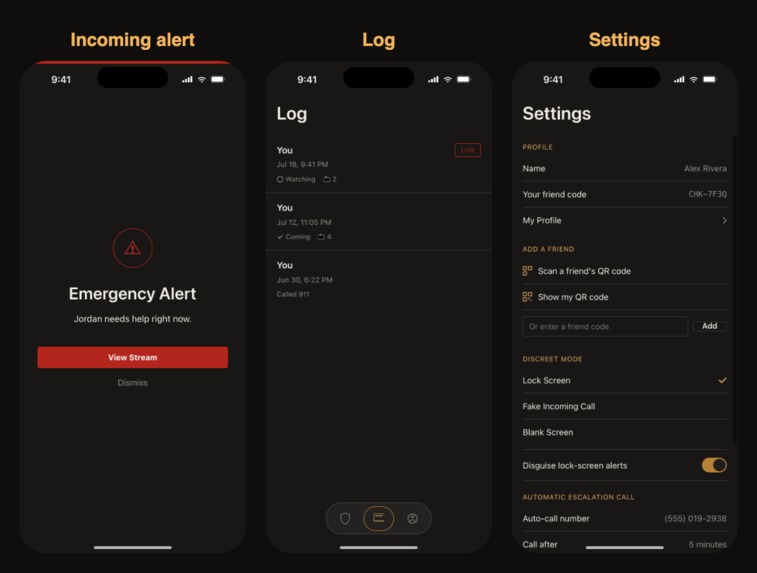
UI [See demo video for implementation] (2/2)
-
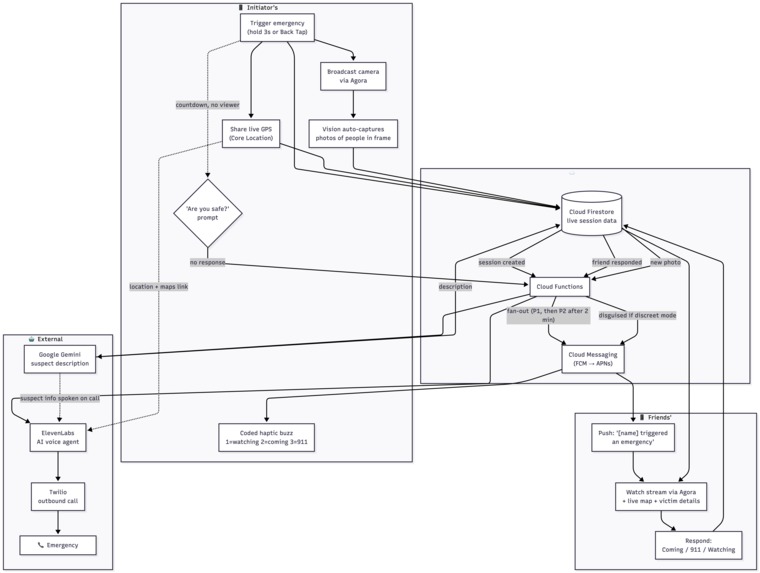
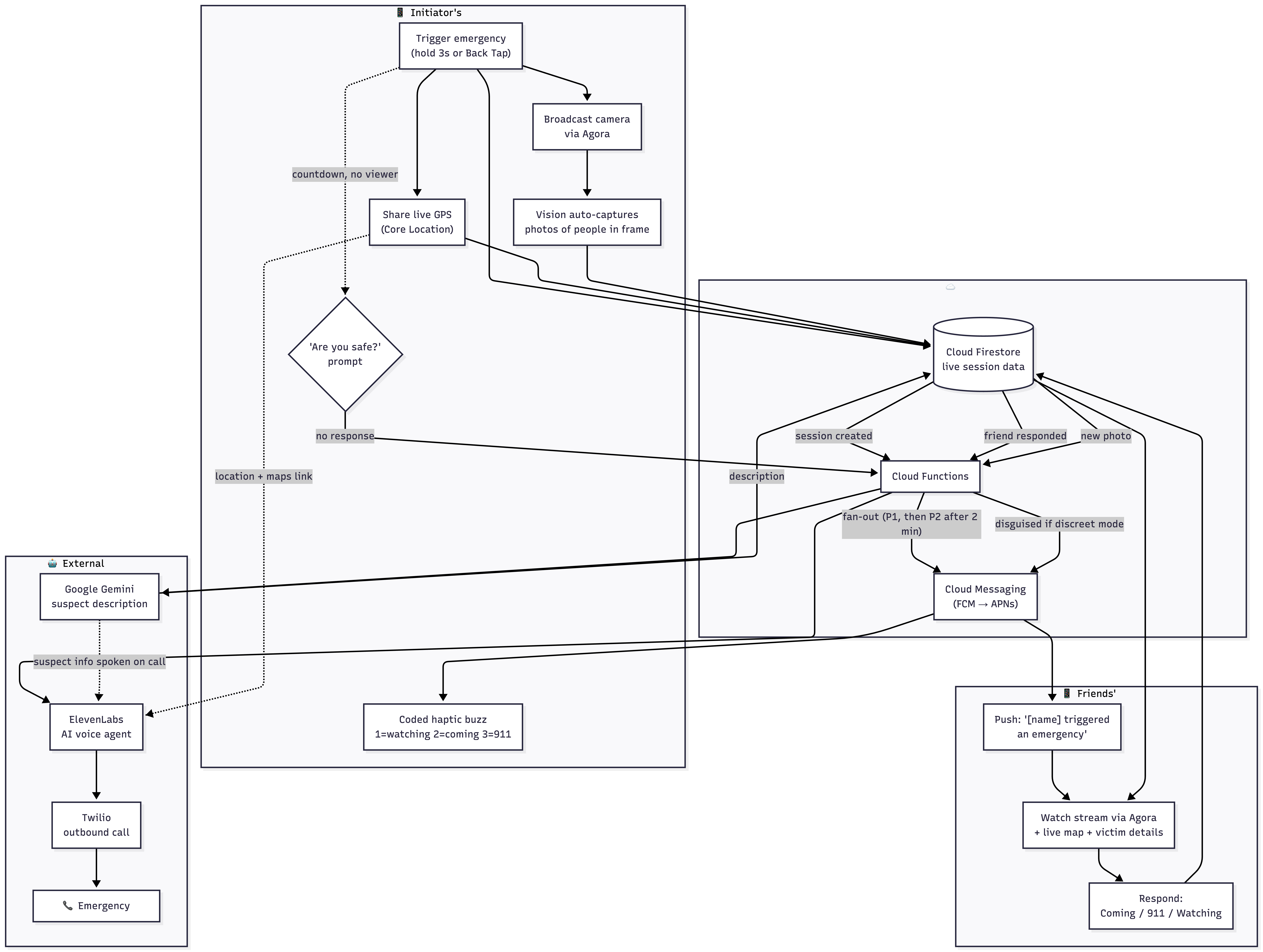
Flowchart for the technology
-
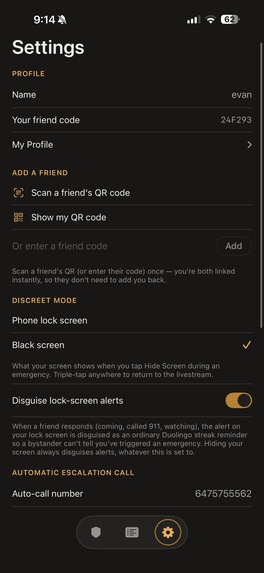
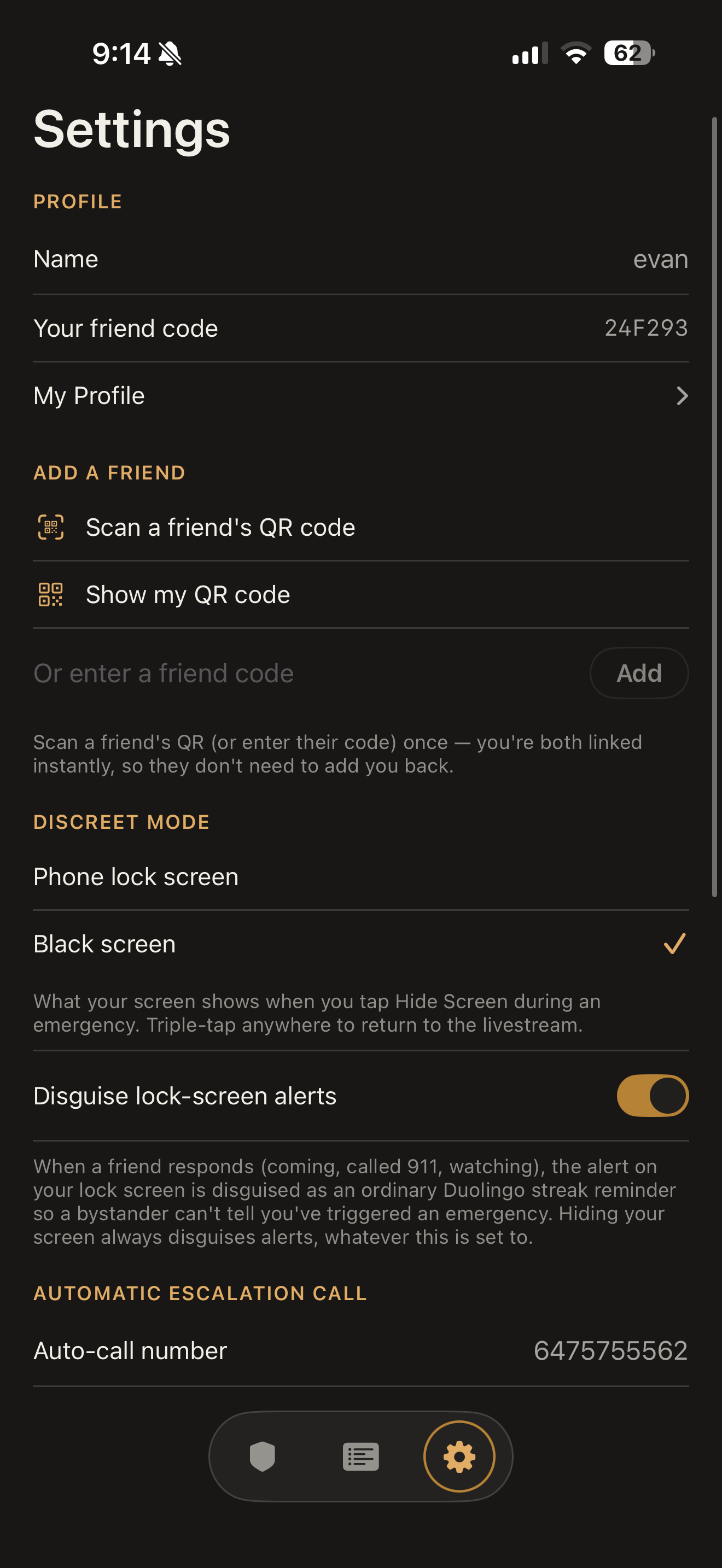
Settings (1/3)
-
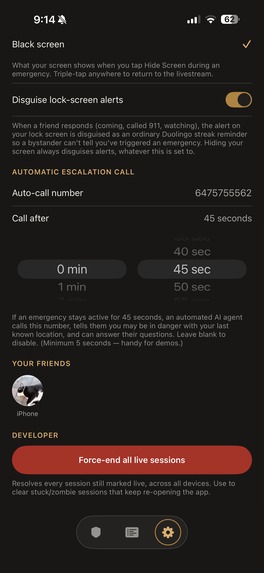
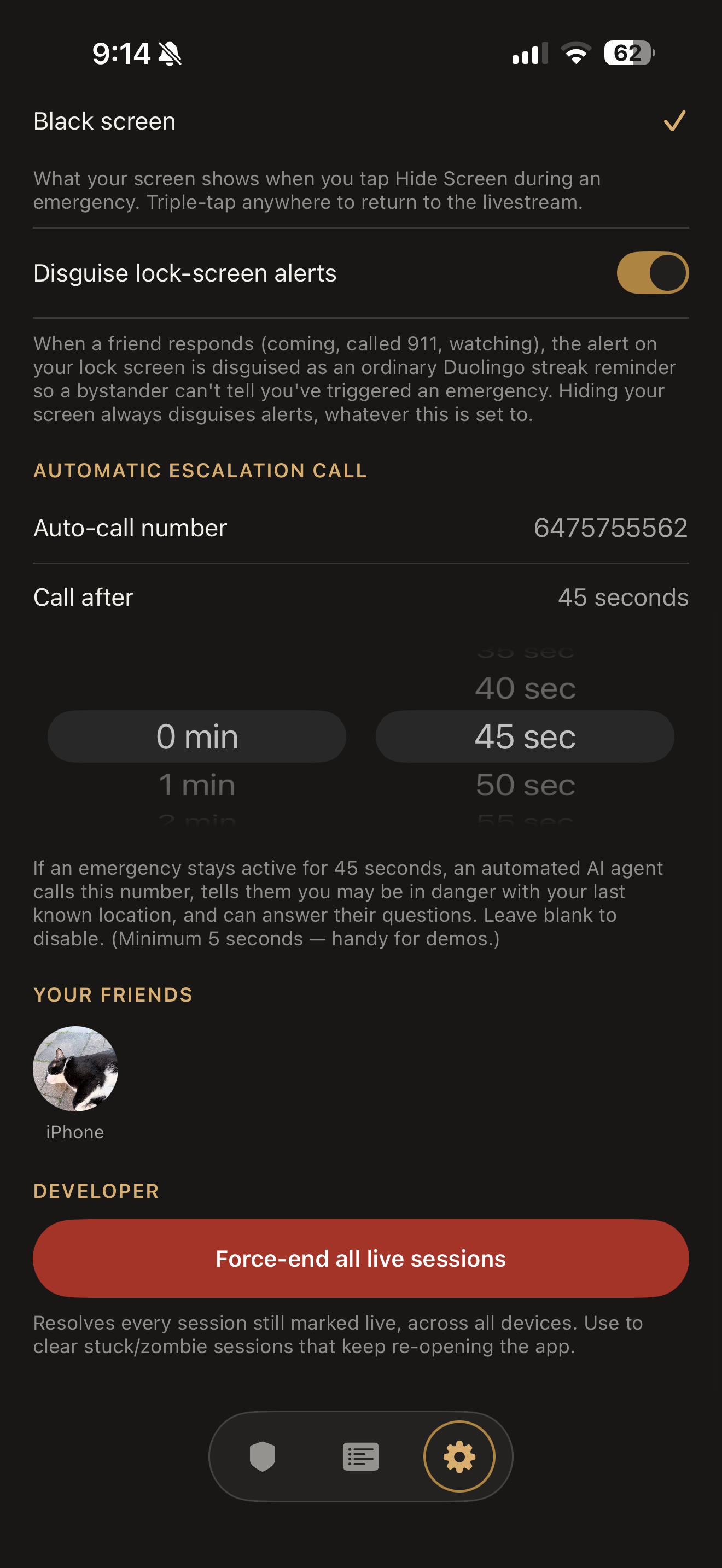
Settings (2/3)
-
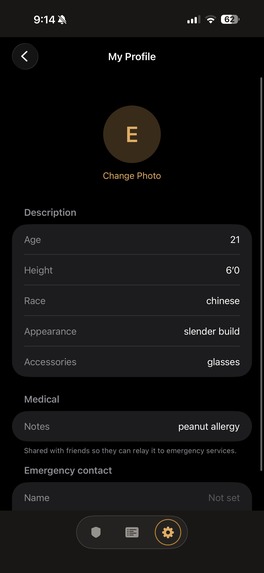
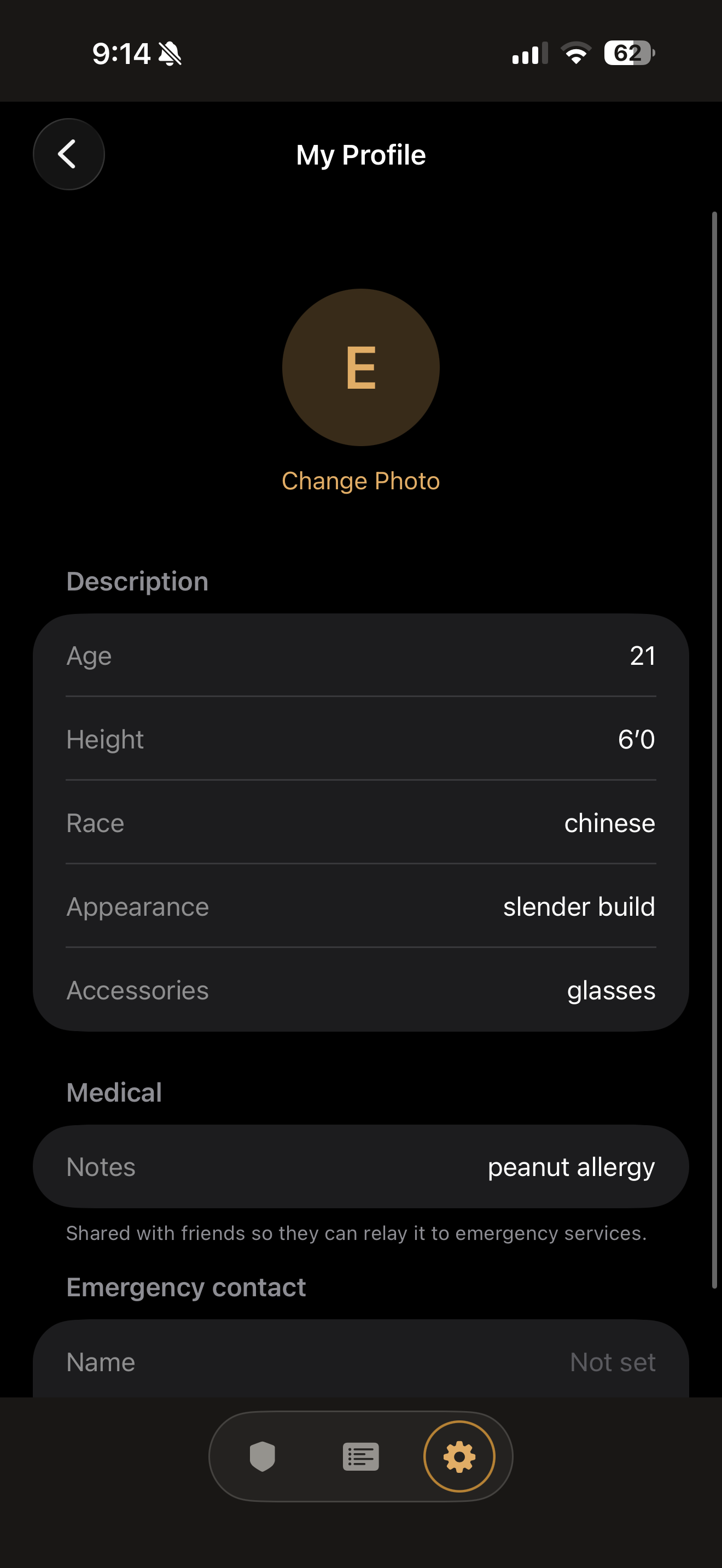
Settings - Profile (3/3)
Inspiration
About 32% of women and 13% of men report feeling unsafe or uncomfortable in public areas. 50% of assault cases reported to the police result in dropped charges due to lack of evidence. In most cases, a lack of communication and evidence lead to unresolved cases, no accountability, and survivors not getting justice. With Checkpoint, your phone turns into a call, monitor and response device to mitigate vulnerability and document what happens when it matters most.
What it does
An all-in-one safety app that tracks location and video while making communication discreet and simple between viewers and the initiator. Please see our demo video for a quicker overview of all these features!
If you’re in danger…
- Once the “Distress” button is pressed, it will alert your contacts and begin a livestream with your camera for viewers to join.
- Point camera discreetly towards the perpetrator, as automatic pictures will be taken using face detection.
- You’ll receive notifications of the actions that the viewers make based on the buttons available.
- Turn into discreet mode to draw less suspicion to the perpetrator. You can still receive notifications in discreet mode, and they will be disguised as a Duolingo notification.
If your friend is in danger…
- You will receive a notification when a friend is in distress. Click on “button” to join the livestream.
- Once you’re in the livestream, you have three messages you can send to the initiator:
- Calling 911: alert the initiator that you are calling 911
- On my way: alert the initiator that you are calling 911
- Watching: alert the initiator that you are watching the stream
- Calling 911: alert the initiator that you are calling 911
- Take screenshots of the livestream if needed
- Access the initiator’s background information with the “i” button on the livestream to view their full profile.
What if no one picks up?
- If no viewers join after a specific amount of time (adjustable in settings), an automatic call to 911 is made by an ElevenLabs agent.
- The agent can share information about physical features, location and medical history (information that you’ve inputted in the app).
- The agent can also analyze the concurrent screenshots made and let the 911 operator know of the threat or perpetrator through the photos. It can give updated information on your location.
You can see the previous logs, screenshots taken, the location, and an AI-generated summary of the perpetrator’s physical description.
And finally, everything is configurable within the settings. You can configure your physical description, how long you want the countdown duration for automatic escalation to 911, discreet mode backgrounds, and more. All to help the user tweak the app to feel as safe to themself as possible.
How we built it
- Client: The app itself is a native iOS app built in SwiftUI.
- Backend & Database is run on Firebase where Firestore stores everything live such as the emergency sessions, friends lists, responder actions, captured evidence, photos, locations so that everything syncs between devices.
- Cloud Functions (in Node.js) reacts to changes made to the Firestore and handles the server side logic like how the friends responses are sent back to the victim, where AI photo analysis is ran, etc.
- Live Video: Our real-time video streaming is run on Agora.
- Phone Calling: Twilio was used to secure a phone number and place outbound calls.
- AI Features:
- Apple Vision: Facial detection to auto-capture evidence during livestream
- Gemini used for photo analysis and suspect descriptions.
- ElevenLabs Agents used for automated voice agent for the escalation call to 911.
- Flowchart is available in the photo gallery for a better idea of the general flow.
Challenges we ran into
- Technical: Making every action feel instant. A lot of main features of the app rely on length API calls like triggering an emergency which opens a livestream is an extremely variable length call due to the quality of your wifi and many other variables. Another would be our gemini providing a visual summary of photo evidence. We had to focus on having all these calls run asynchronously and utilize loading bars and skeleton UI so it feels as responsive as possible to the users.
- Non-Technical: Making the user feel in control. For an app that focuses on safety and also has serious escalation protocols like dialing 911, every part of our interface had to be well thought out. For example, we didn’t want users or our automation to accidentally call 911 because they didn’t understand how our app worked so we added guard-rails (If a friend joins the stream, the auto-countdown to call 911 pauses, and if the timer does hit 0, the user has a brief moment to disable the call). Little details like that were crucial to how safe our app can feel to the user. Our entire goal is to have safety features be easily accessible AND discrete. Any confusion in our UI/UX will diminish the value of what we are trying to accomplish.
Accomplishments that we're proud of
- THIS IS SELENA’S FIRST HACKATHON!
- Both of us are working on iOS for the first time. We did it.
- Coming up with an app that we would actually use when in a concerning situation.
- Getting all our dependencies to work together. (Gemini -> Firebase -> Twilio -> ElevenLabs)
- Despite how frustrated we were, we stayed resilient throughout our Hack the 6ix journey and overcame every obstacle we encountered this weekend!
What we learned
- User Experience: We learned that our features should not be clunky or difficult to find, especially since our top priority is to allow for accessible communication. We put buttons in areas that are close to where fingers typically are when holding your phone. All text is large enough text for both the viewer and initiator to read.
- Thinking of it all: The last thing we want is for our users, especially initiators, to not have a button for their needs when in distress. We learned that, in order to make it accessible for every situation, we needed to think of every possibility that could occur, and then think of ways to optimize and simplify the communication needed for all possibilities.
What's next for checkpoint
- Silent Lyft/Uber API integration to discretely call a ride to your location for quick getaways.
- Approval with 911 dispatchers; For our case of automated escalation, we understand that AI sounding voices sent to dispatchers may not always be taken seriously. A heads-up and approval from 911 dispatchers would ensure these calls don’t go missed and ignored.
- Pitch to the government: this app isn’t meant to be profitable at all, but we believe it can be integrated and funded within governmental services in order to be maintained and help better the safety of our country.
- Apple App Store Approval
Built With
- agora
- elevenlabs
- firebase
- gemini
- javascript
- node.js
- swift
- swiftui


Log in or sign up for Devpost to join the conversation.