-
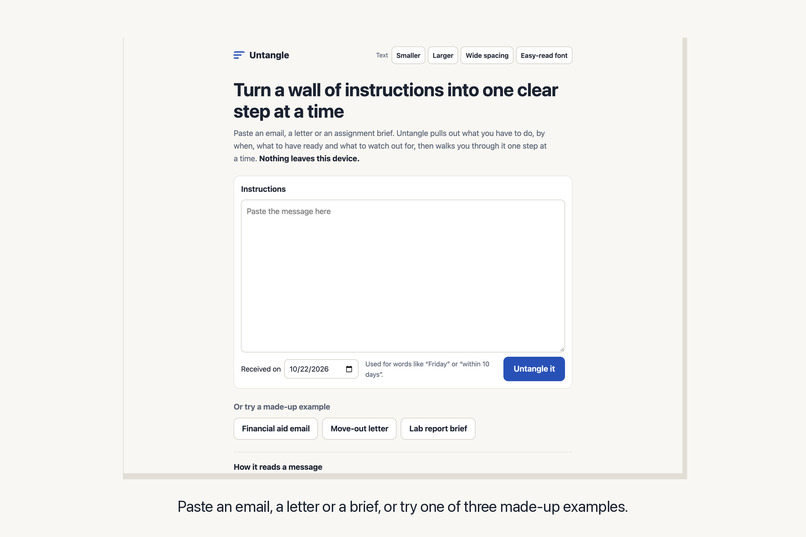
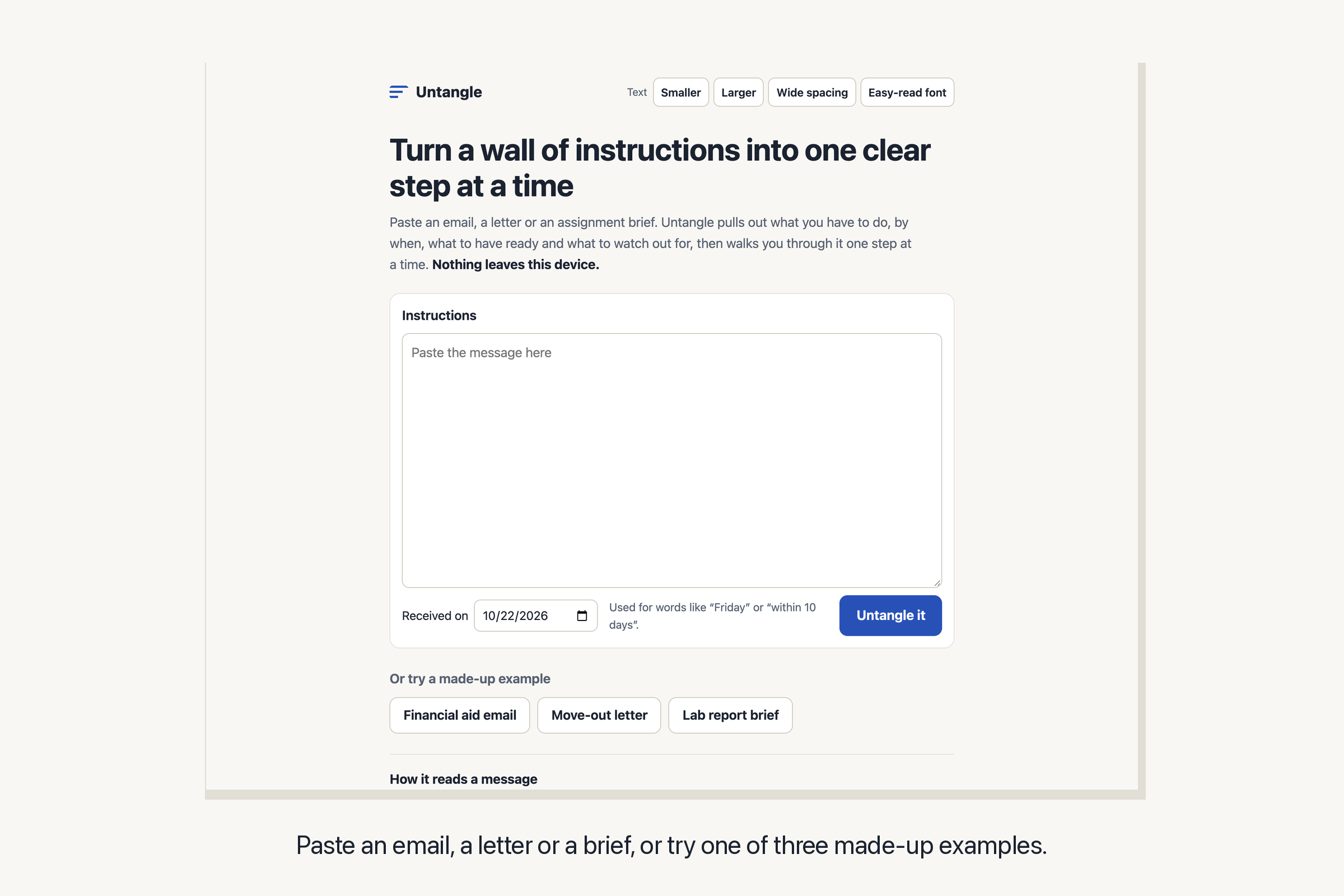
Paste an email, a letter or a brief, or try one of three made-up examples.
-
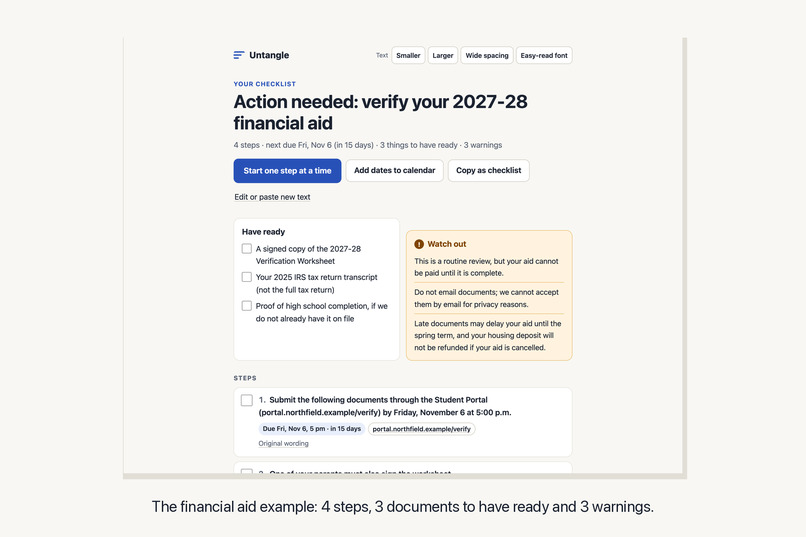
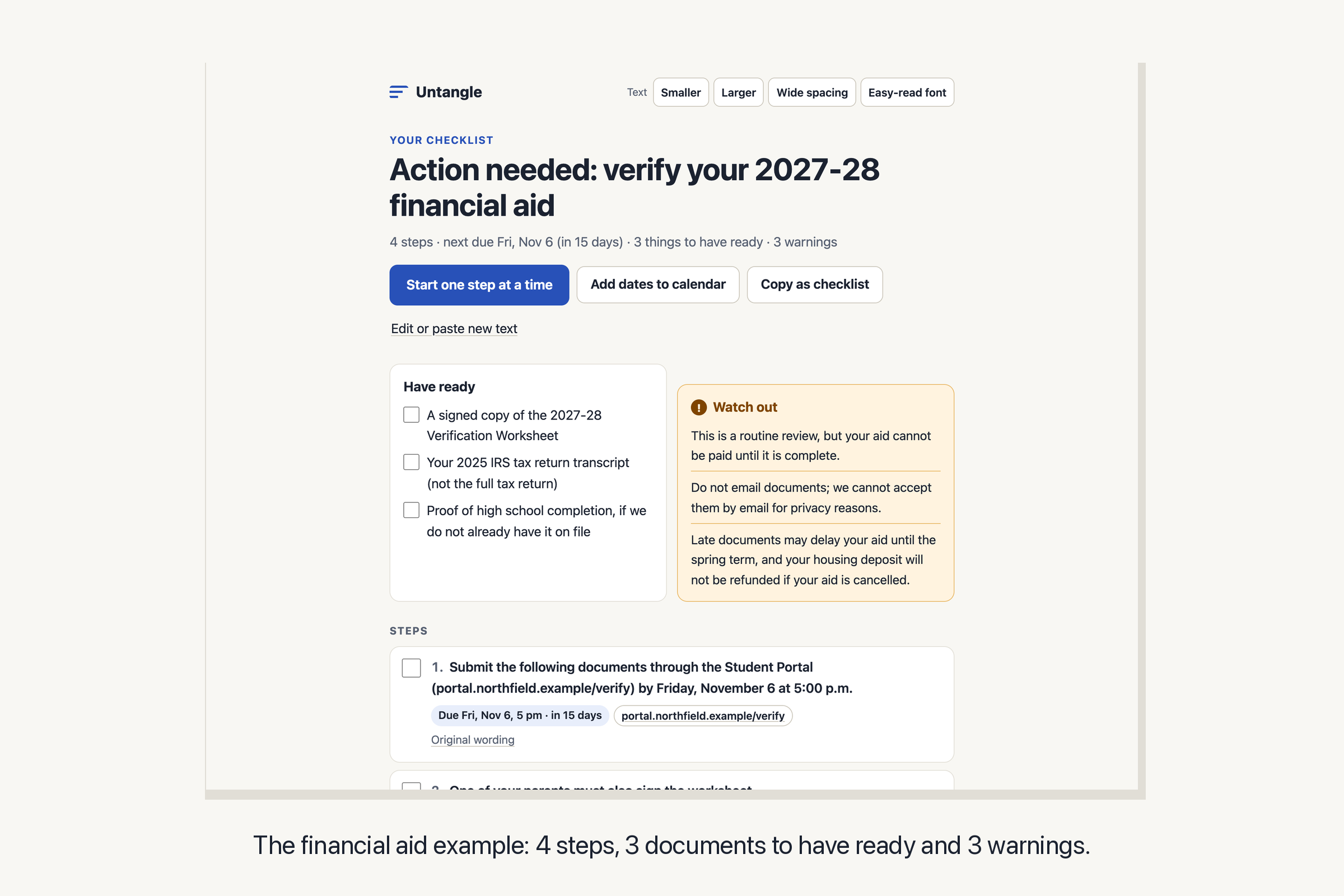
The financial aid example: 4 steps, 3 documents to have ready and 3 warnings.
-
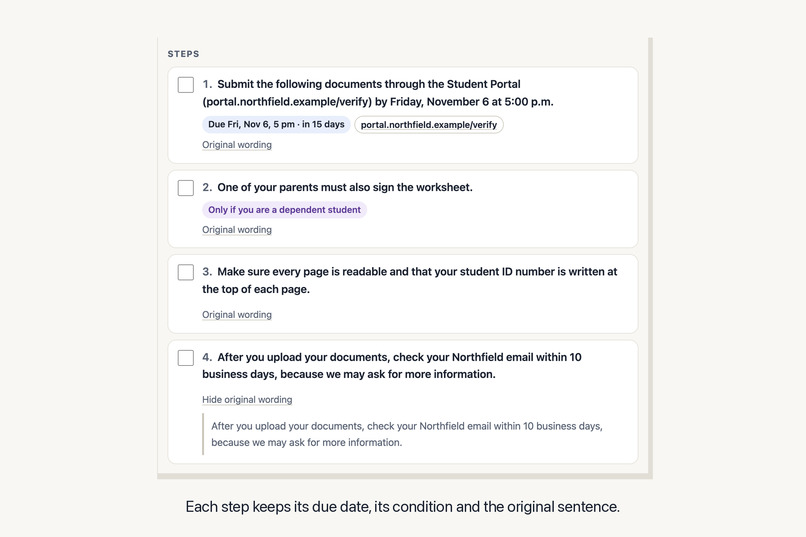
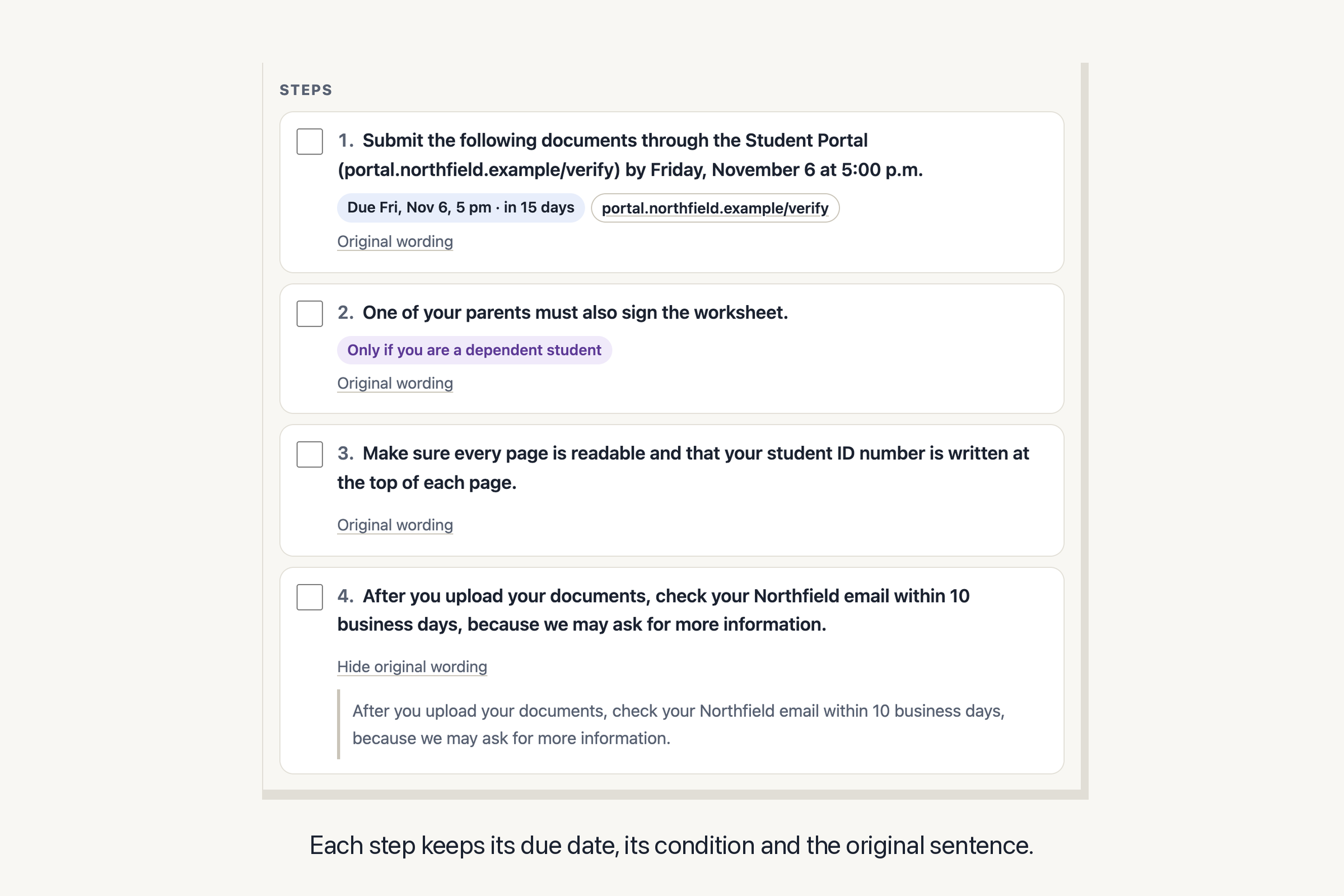
Each step keeps its due date, its condition and the original sentence.
-
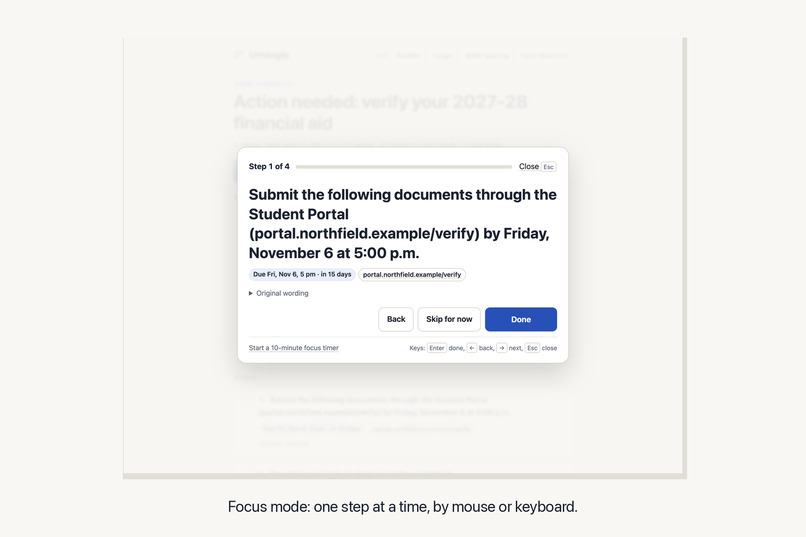
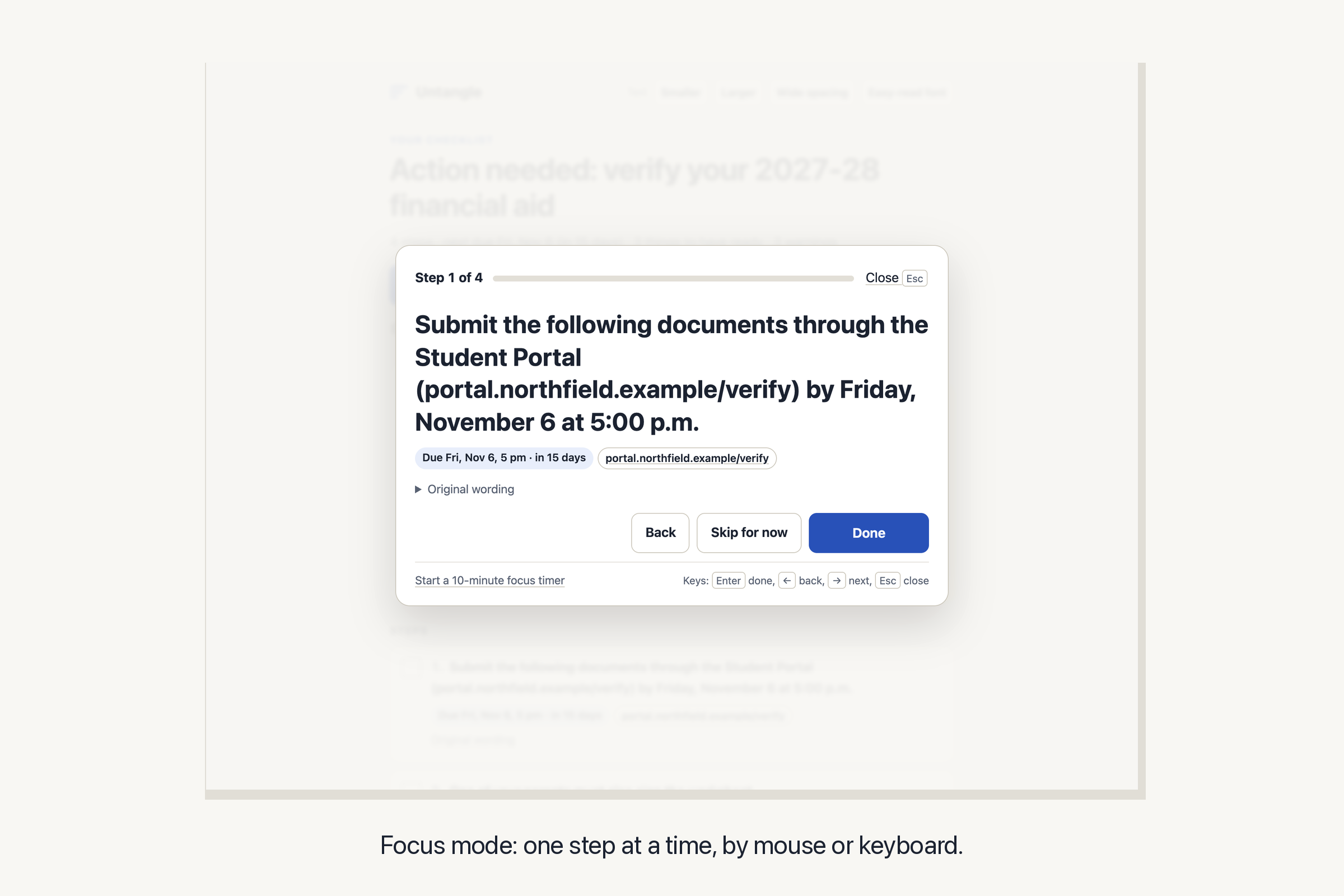
Focus mode: one step at a time, by mouse or keyboard.
-
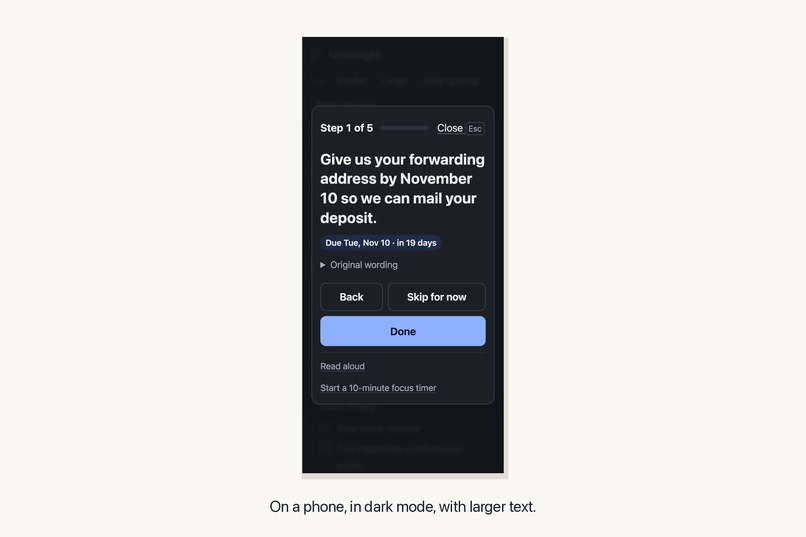
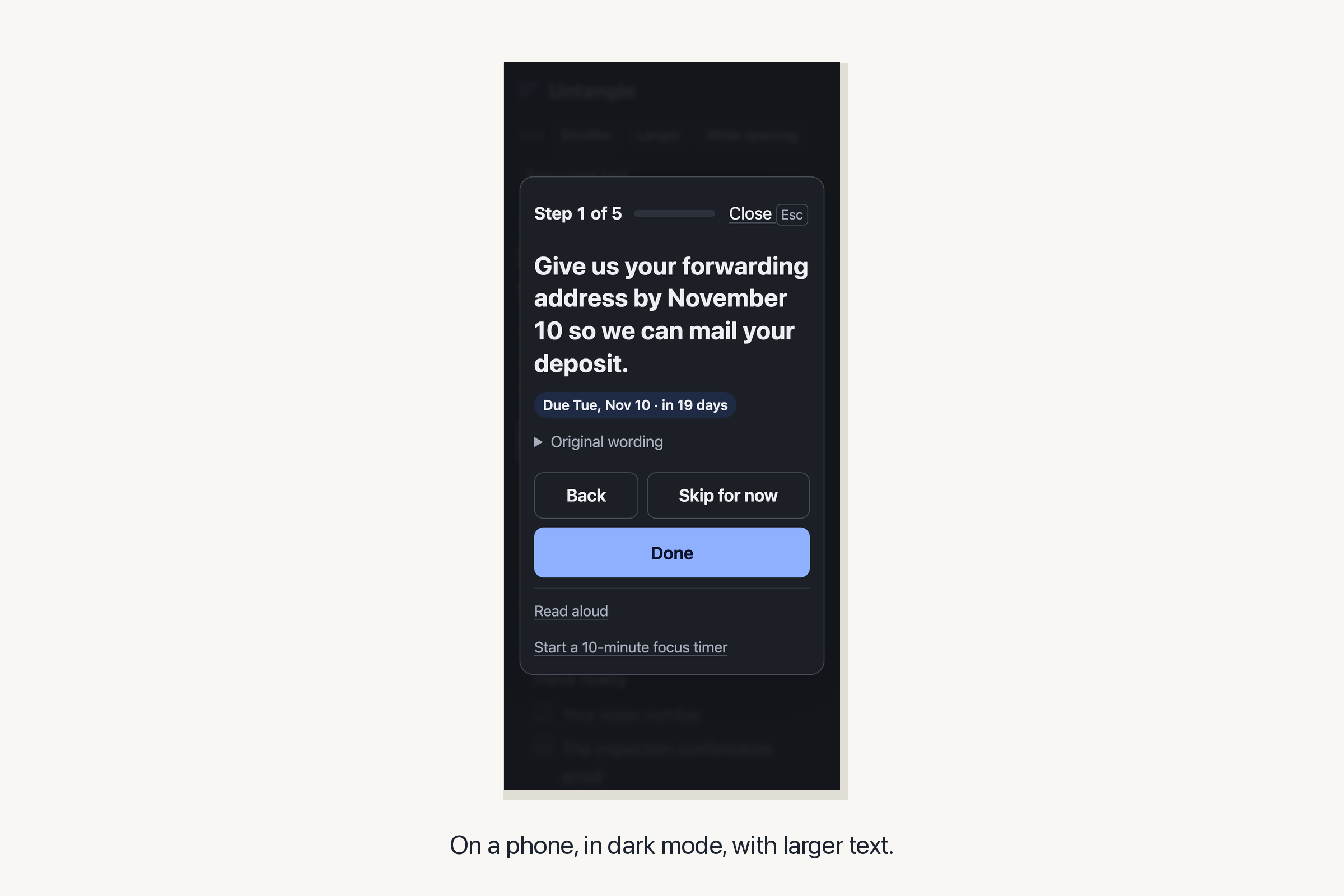
On a phone, in dark mode, with larger text.
Inspiration
Important instructions often arrive as one dense message: a financial aid office asking for documents, a landlord's move-out letter, an assignment brief, a first-day email from a new job. The steps, the deadline, the documents to gather and the "do not" warnings sit in the same paragraphs, sometimes in the same sentence.
In Jakob Nielsen's study of web reading, 79% of participants scanned a new page and 16% read it word for word (Nielsen Norman Group, 1997). This is a reason to make instructions easier to scan; the study did not test Untangle.
The user and the barrier
The user: consider a student opening an email titled "Action needed: verify your financial aid" and trying to work out what to do first. Untangle is designed for people who find dense instructions difficult to follow, including people with ADHD or dyslexia, readers working in a second language, and screen-reader users. These are intended users; the project has not been tested with those groups.
The barrier: actions, conditions, deadlines and background information can be scattered throughout a message. The reader has to assemble a plan before starting.
The change: paste the message into Untangle and the same content comes back as a checklist: what to do, by when, what to have ready and what to watch out for, with the original sentence one click away. Then focus mode shows one step per screen until you are done.
What it does
- Untangles the message. You get:
- Steps: sentences that ask you to do something ("Submit…", "You must…", "Make sure…") and numbered or bulleted items, rewritten as short instructions. "You will need to submit the documents by Friday" becomes "Submit the documents by Friday". Conditions stay attached ("If you are a dependent student"). A condition in a task-list heading also follows its items into focus mode, read-aloud and calendar reminders.
- Due dates: "by Friday, November 6 at 5:00 p.m.", "within 10 business days" or "before October 22" become dates, counted from the day the message arrived, with "in 11 days" next to each. A window that starts with something you have not done yet ("After you upload your documents, … within 10 business days") keeps its wording instead of a guessed date, and opening hours are not read as dates.
- Have ready: items from "You will need:" lists, "Bring…" sentences and lists of documents.
- Watch out: sentences with "do not", "late", "will not be accepted", "not allowed" and similar.
- Contacts and links, the dates the parser identifies, and the rest of the message, folded away.
- One step at a time. Focus mode starts with a "before you start" card (things to have ready, warnings), then shows one step per screen in large text with its due date. Done, Skip for now and Back, or Enter and the arrow keys. At the end it lists what is left. There is an optional 10-minute focus timer and read-aloud that only uses voices installed on the device.
- Keeps track. Tick off steps and documents; your checklist is saved in this browser when storage is available. Editing background text keeps completed steps checked, while changing a step or its condition resets that step. Made-up examples open separately and leave your own instructions intact. Add dated steps to a calendar (an
.icsfile with reminders) or copy the checklist as text. - Reads comfortably. Larger text, wider spacing and an easy-read font for the whole page.
Before and after, from the built-in example: a financial aid email of 13 sentences and a bulleted list becomes 4 steps (one due at 5 pm on a Friday, and one to do within 10 business days after the upload), 3 documents to have ready, 3 warnings, and the office's contact details. The greeting and the background sentences are folded away.
How we built it
A single static page in React, TypeScript and Vite. Parsing runs locally with rules; it needs no server or language model.
- Reading the text (
src/parse.ts): the text is split into list items and sentences without breaking on "e.g.", "a.m." or "Dr.". A list keeps the sentence that introduced it, so "You will need to submit the following documents:" turns its bullets into documents to have ready, while "Before your first day, please complete the following:" turns them into steps and passes its date on to them. A sentence is a step when it starts with one of about 190 instruction verbs (after lead-ins such as "please" or "next"; a timing clause such as "after you upload your documents," stays at the front of the step), when it says what you or someone else must, should or need to do, or when it states that something "is due". Questions, greetings and "read this message" lines are not steps. - Dates (
src/dates.ts):November 6,6 November,11/6,Friday,tomorrow,within 10 business days,end of the month, with times like5:00 p.m.ornoon. A date reads as a deadline when "by", "before", "due" or "no later than" comes right before it, so "by courier on Friday" does not count. - Recovery (
src/storage.ts): saved fields are checked before they reach the interface. Damaged data stays untouched until the reader chooses to save the recovered checklist, with the original available to download. A failed save is visible and can be retried; when storage is blocked, a text download keeps the instructions and checklist available. - Accessibility: real headings, lists and checkboxes; focus mode is a modal dialog that keeps keyboard focus inside and moves it to each new step; announcements through a live region; visible focus rings; reduced motion respected.
- Privacy: the deployed page carries a Content Security Policy with
connect-src 'none', which blocks fetch, XMLHttpRequest and WebSocket connections. Read-aloud uses only on-device voices (localService), so the text is not sent to an online speech service.
How we checked it
- 41 unit tests: dates (relative words, business days, times, deadline versus appointment, opening hours and windows that start later), sentence splitting, list handling, rewriting obligations, contacts, the three examples, an onboarding email, and the calendar and text exports. Regression cases cover inherited conditions, prohibitions in lists, multiple times in one sentence, invalid clock values, and damaged saved data.
- 11 browser tests with Playwright on the production build: the financial aid example end to end, including focus mode by keyboard and the calendar download (and a second one from the move-out letter); an axe accessibility scan with no violations; no console errors; no network requests; pasting your own text; reading settings and progress kept across a reload; and phone width. A conditional-list case checks the condition badges, skipped steps and exported reminders, including a 375-pixel-wide focus view. Recovery cases check damaged JSON and fields, original-copy downloads, blocked storage, failed saves and retry, editing completed steps, example previews, reload and clearing text. Recovery controls were checked at 375 pixels with large text, wide spacing and dark mode.
- The calendar downloaded for the move-out letter was parsed again with the Python
icalendarlibrary, an independent implementation: one timed event with a reminder an hour before, one all-day event with a 9 am reminder, no duplicate UIDs. A second export containing two conditional timed tasks also passed the independent parser.
Challenges we ran into
- Telling a step from background without a language model. "One of your parents must also sign the worksheet" is a step for the student even though the subject is someone else, and "by courier on Friday" contains "by" and a day but is not a deadline.
- Lists mean different things depending on the sentence above them: a list of documents is something to gather, a list after "please complete the following" is a list of steps.
- Example dates: fixed dates in the examples would look overdue a month from now, so the examples are dated relative to the day you open them.
- Relative dates need a starting point. "Within 10 business days" counts from the day the email arrived only when nothing else starts the clock; after "After you upload your documents", the honest answer is no date at all, so that step keeps its words and stays out of the calendar.
What we learned
Shortening a step can change who it applies to. The original wording helps a reader check the result, but the condition also needs to stay with the step when it is spoken aloud or exported to a calendar.
Limitations
- English only, and rule-based: an unusually phrased step can be missed, or a background sentence picked up. That is why every step shows its original wording and the full message stays one click away.
- It does not understand the content and is not advice; it only reorganises what the message says.
- Each sentence or list item gets one main date. An explicit deadline takes priority over a reference date, and a time is attached only when it sits directly beside the date. Multiple appointments or deadlines in one sentence need checking.
- Slash dates use month/day order. A month and day without a year use the current year unless that date is more than a week before the reference day. A weekday means its next occurrence after the reference day. Calendar times use the local time zone of the calendar that opens them.
What's next
Pasting a PDF or a photo of a letter, more languages, sharing a checklist with a helper (a parent, a support worker) without a server, and reminders that come back to skipped steps.
Try it
- Live demo: https://hyunsikparker.github.io/untangle/ (three made-up examples on the first screen)
- Video walkthrough (1 min 8 s, captions and transcript): https://hyunsikparker.github.io/untangle/demo.html. It is recorded with the financial aid example; the narration is a synthetic voice.
- Source: https://github.com/HyunsikParker/untangle (MIT). Run locally with
npm installandnpm run dev; tests withnpm testandnpm run test:e2e.
Credits and disclosure
- Built during Taskforge 2026 (started October 22, 2026). The date handling and calendar line folding follow the approach of my own Crunchmap project, built the same day for another hackathon; no other pre-existing code.
- AI assistance: Claude (Anthropic) wrote the initial code, tests and text. OpenAI Codex assisted with the October 24 parsing and recovery fixes, regression tests and documentation updates.
- Libraries: React, Vite, TypeScript; Vitest, Testing Library, Playwright and axe-core for tests; the Python icalendar library for the calendar check.
- The example messages, people, addresses, phone numbers and the university are made up. The reading statistic is from the linked Nielsen Norman Group article.
Built With
- axe-core
- github
- playwright
- react
- typescript
- vite
- vitest

Log in or sign up for Devpost to join the conversation.