Inspiration
The original goal was to use dynamic hand gestures to control actions that the user would specify. These actions could be anything, including smart home device control such as blinds or lights, sending notification alerts, and more similar to IFTT or Zapier, where you can connect to an unlimited number of actions. To keep the project within the realm of possibility and our current knowledge, we modified the idea to identify clap sounds using popular methods for audio classification to trigger smart home devices via a SmartThings smart home integration in which you could control any device that supports the on/off capability.
What it does
Sound Conductor allows users to interact with their IoT devices by enabling them to associate specific sounds with various actions. Users can create custom integrations that link a particular sound to perform actions such as opening blinds, turning on lights, and much more. Leveraging artificial intelligence, we have developed a Tensorflow model based on YamNET that classifies different sounds generated by users, including distinguishing between single and double claps. Users can effortlessly trigger a wide range of actions tailored to their preferences by simply clapping. The seamless synchronization between our front-end app and our robust backend server allows for real-time communication with the backend database, ensuring the prompt and accurate execution of the desired actions.
How we built it
Client
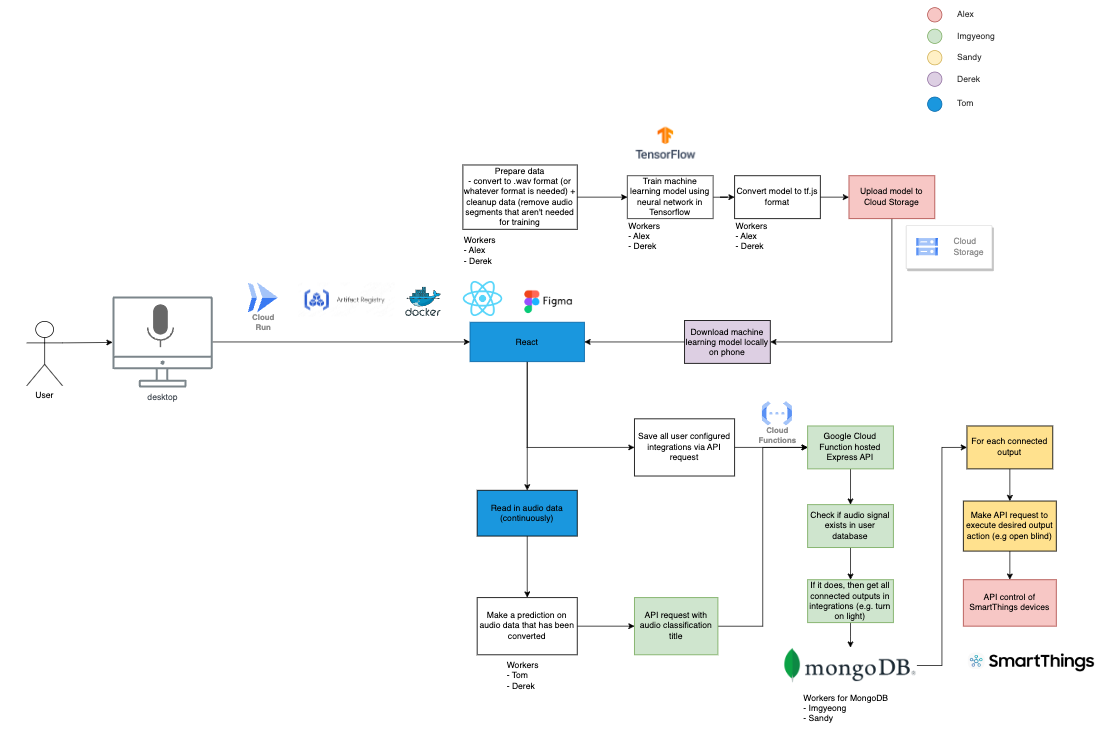
The web app is the primary entry point of Sound Conductor. We built the client using the popular library for building user interfaces, React. To ease crafting a simple yet intuitive application, our team applied DaisyUI and TailwindCSS, which made crafting semantic, accessible, and good-looking React components easy as ever. To handle our complex state, we utilized Redux, specifically Redux Toolkit, providing a low-boilerplate solution for client state management. To achieve strong types across the front-end client, TypeScript was our language of choice. Building the client from the bottom up gave us more time to focus on the bigger picture of our application. We packaged the front-end as a Docker image, uploaded it to Google Artifact Registry, and hosted it on Google Cloud Run.
Machine Learning
Our app uses AI to detect different sounds and trigger the appropriate actions. To detect sounds, we built a machine-learning model based on YamNET. We used this guide to build our sound classifier model. We used transfer learning to train a model to distinguish between sounds, like double or single claps. We collected examples of these sounds to train our model. Once that was complete, we wrote code to generate CSV files for the data and a script to convert the model from ProtoBuf to JSON format, which is the format we need to use the model in the web app. The combination of data collection, preprocessing, and training allowed us to create a robust model that forms the backbone of our sound-based IoT control system.
Database and Backend
For our backend, we used MongoDB Atlas, a cloud-hosted version of regular MongoDB. We implemented two collections; users and integrations. The user's collection is for storing users' SmartThings tokens. SmartThings is the home automation system we choose to integrate into our app. The other collection - integrations - stores information that the user configured about what devices to activate when a specific sound is heard. Our application captures and analyzes continuous sound data, using an AI model to recognize specific sound patterns. It then retrieves the corresponding action associated with the recognized sound and executes the action based. The user can set their own desired actions in the app with integrations. To access our database and the SmartThings API, we created our REST API using Express and hosted it on the cloud using Google Cloud Functions.
Challenges we ran into
Machine Learning
- We had no experience building ML models, so we had to do extensive research. At first, we investigated using VGGish to create this model, but we found it outdated and not easy to use. Next, we found that we could build a model from YAMNet using transfer learning.
- As our project evolved, we had to modify how we built our model to be in the correct format for the target platform. Initially, we wanted to run a mobile app that could have used TensorFlow Lite, but when we switched to a Web App, we had to convert our model to a JSON-based format. We had challenges getting the correct versions of libraries for this conversion but ultimately resolved those issues.
- Our model takes a spectrogram as input and uses TensorFlow libraries to convert a WAV file to that spectrogram, making it difficult to react to sounds in real time.
Backend
- We encountered difficulties deploying our API functions with Node.js and Express from local to Google Cloud Functions. In the local environment, we needed to open the server using the
app.listen()statement. However, we did not know that we needed to remove this line when deploying our Express application to Google Cloud Functions for it to function correctly.
Frontend
- When we initially started, our application was a mobile application using React Native. This brought challenges when building novel features such as real-time sound classification, audio streaming, and global state management. This pioneered our switch to a React-based web application.
- As SoundConductor began to grow in size, optimizing for performance became both crucial and challenging. With many moving parts, asynchronous data fetching, and client-side state, we had to find and eliminate performance bottlenecks. Things such as unmemoized components and states, excessive re-renders, and unnecessary data fetching all posed significant challenges in finding and eliminating.
- To our surprise, we found many of the open-source libraries used to integrate custom ML models in our web app to be outdated, unmaintained, and littered with breaking changes. This extended to React Native, where the lack of maturity with the framework enhanced the need to "reinvent the wheel" when needing any custom/extended functionality.
Accomplishments that we're proud of
In our journey to create this app, we have achieved several accomplishments that we are proud of. Firstly, we successfully trained a customized Tensorflow model based on YamNET to classify user-generated sounds accurately. This involved research, data collection, preprocessing, and training to ensure the model's accuracy.
Additionally, we built a backend database using MongoDB, allowing seamless management of user actions and integrations. The backend implementation ensures efficient data storage, retrieval, and synchronization, enabling smooth communication between the front-end and back-end.
For our front-end, we developed an elegant and intuitive front-end interface using React, providing users with an enjoyable experience while interacting with their IoT devices. Initially, we aimed to build a mobile app for our front-end development. Still, due to compatibility issues and the unavailability of up-to-date libraries for our specific requirements, we quickly adapted and pivoted to an alternative solution.
We are proud of our ability to be flexible and adaptable as a team, enabling us to overcome challenges and deliver results. Our accomplishments in model training, back-end database construction, and front-end development reflect our commitment to growing our skillsets and delivering a solution for sound-based IoT control.
What we learned
Machine Learning
- Learned how to use Tensorflow 2.0 for audio classification
- Convert Tensorflow ML model into tf.js for live continuous audio classification
- How to serve tf.js converted ML model on Google Cloud Storage for public download access
Frontend
- Learned how to use Redux Toolkit, more specifically, AsyncThunk with TypeScript
- How to make impactful performance optimizations and avoid common React.js bottlenecks
- Sometimes, building your own novel solution is better when existing libraries have gaping issues
Backend
- Learned how to integrate with SmartThings API for device control
- Learned how to deploy Node.JS Express API onto Google Cloud Function with a public URL endpoint
- Learned how to create a database schema in MongoDB and interact with data using a Node.JS wrapper
What's next for Sound Conductor
- Allow user to train their own sound classifications in addition to the default clap sounds provided
- Will be sent to Google Cloud for data storage and trigger an ML retraining process for the specific user (think of this process like how training Google Home to recognize your voice works)
- Allow integrations to include more SmartThings devices than just ones that support the on/off capability
- Add more smart home integrations in addition to SmartThings
- Add more integrations other than smart home
Testing instructions
You can use this token for testing: 49c9f3b0-6ed1-4921-8cc3-65d2d2bd19a8

Log in or sign up for Devpost to join the conversation.