-
-
Text-to-speech technology allows the user to use Jira and Confluence more efficiently.
-
Be Unstoppable with Auto Image Captioning in Confluence and Jira
-
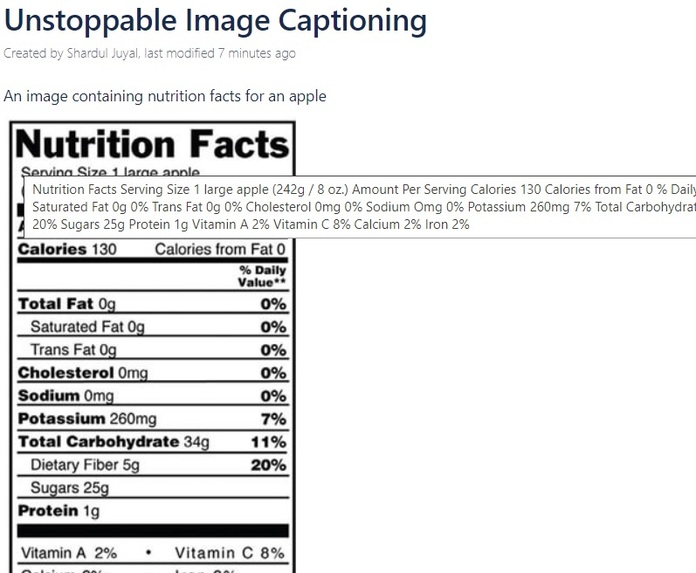
Unstoppable image caption allows users to auto-generate caption even when the users have not entered any captions
Inspiration
We developed Unstoppable because the development of accessible products requires accessible tools and with the Unstoppable tool we are making Jira and Confluence accessible for users. In Jira and Confluence, companies across industries use images for a lot of use cases. Accessible users were able to access the text but due to lack of image description, they were not 100% productive hence this idea of image captioning was originated and developed.
What it does
There is a famous adage that says, "A picture is worth a thousand words." If this is true, is it true for any modern-day documentation and collaboration workspaces like Confluence or work management tools like Jira? That's where Unstoppable comes into play.
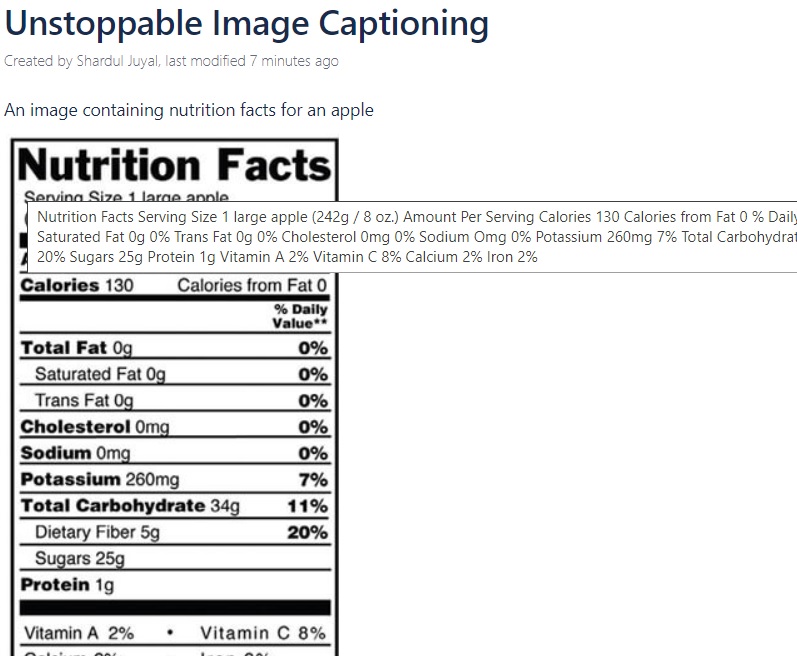
Unstoppable auto-generates captions for images on Jira issues and Confluence pages. These captions are then read out loud by screen readers that assist accessibility users in understanding the context and content of the images. The image captions are split into two categories:
- Description of the persons, objects, and their activity in the image. E.g. "A girl is dancing wearing a blue dress," "Two kids are playing," and "A cycle on the road."
- Description of the text and shapes(graphs, charts etc) in the image. E.g. "Nutritional Facts", "Company Growth Chart" etc
This is done in two steps.
- We fetch the normal caption for each image as denoted in the first category above.
- If we find the image requires the caption of the second category, as stated above, then we fetch the OCR caption as well.
The typical process works like this:
- On page load, identify the image, find its URL.
- Pass the image URL to an API that checks if the caption is present in DB already.
- If the caption is present, we return it to the frontend in the API response.
- If the caption is not present in DB then we go and fetch it through Azure Computer Vision API and save it in the DB for the next call and we return it to the frontend in the API response.
- Frontend appends the caption to the image that is readable by Screen Readers.
- If the caption is of OCR Type, along with normal caption we show a button to users if they want to fetch more details.
- If they click on that button, we fetch the OCR description and save it in the DB for the next call and we return it to the frontend in the API response.
- Frontend informs the user that caption is fetched and appended to the image that is read by Screen Reader.
How we built it
Where does one start with one of these? For us, we started with our Unstoppable for Jira and Confluence app. Unstoppable was already using text-to-speech technology that reads out attributes to the accessibility users for them to take action. This product allowed accessibility users to work more efficiently and effectively within Jira and Confluence. As we were already dealing with text within an and issue and a page, images were a massive gap that we had to fill.
First, we worked internally with one of our visually impaired cohorts to figure out what requirements were needed. We brainstormed together on what made sense from a solution standpoint and a design/user experience standpoint. After going through numerous iterations of that we landed on something that seemed to work. After developing a proof of concept we ran into some issues, which can be read about below, that required us to re-evaluate to get an even better product out the door.
The main product is using Javascript/HTML/CSS on the frontend and Java Spring Framework on the backend integration within the Atlassian SDK.
Then we use the Azure Computer Vision APIs for the actual captioning process of the product.
Challenges we ran into
As always, no plan survives first contact with the enemy. Initially, we tried to implement the solution by passing image URLs to the Azure Computer Vision APIs. It initially worked in our proof of concept with unauthorized images...however, as soon as we integrated with Jira and Confluence it began to fail. We learned this was because the images were authenticated and Azure had no clue about the authentication. Basically, it expected the images to be publicly available.
We looked at what we had done and decided to take a step back and change our approach. Instead of passing the images through the Azure Computer Vision APIs, we decided to download the image and convert it into a byte array, which is supported by the Azure Computer Vision APIs, and then send it off to the APIs.
The challenge now was how to download the image on the backend. To do that we would need authentication tokens to be passed. To overcome this we used a JSESSIONID for our server apps and a JSESSIONID and Seraph token for our Data Center apps to download the image.
After that hurdle was overcome we had a fully functioning app.
What we learned
They say that knowledge is power and this was a huge learning experience. Throughout our process, we learned a number of different things.
- The first big thing was how fast and reliable the Azure Computer Vision APIs are. It truly is a great tool. The captions are predominately accurate most of the time and the Azure Computer Vision client library helps abstract the complex logic of the integration.
- The next thing we learned was around all that Image Authentication stuff. When we started this project there were no specific solutions available to the Atlassian community to solve this issue. As this was a new approach we implemented all this through trial and error. *Azure doesn't store any of the images it processes so there are no security concerns.
Accomplishments that we're proud of
- A lot of fortune 500's are able to create an accessible product with accessible tools.
- Unstoppable Alexa integration was picked by Atlassian for Shipit Live and presented to over 3 thousand people in attendance.
- 4 out of Top 25 banks of the world use Unstoppable.
- A visually impaired Scientist at NASA uses Unstoppable for daily activities.
What's next for Unstoppable Auto-caption
- Adding captions into a custom field in Jira to allow the JQL search of issues based on the images.
- We plan to expand Unstoppable to the source control tools like Bitbucket, Github, Gitlab.
- The next natural progression is to provide almost real-time feedback to the developer at the time of development to improve accessibility.
Built With
- atlassian
- azure
- computervision
- confluence
- java
- javascript
- jira


Log in or sign up for Devpost to join the conversation.