-
-

icon-1024
-
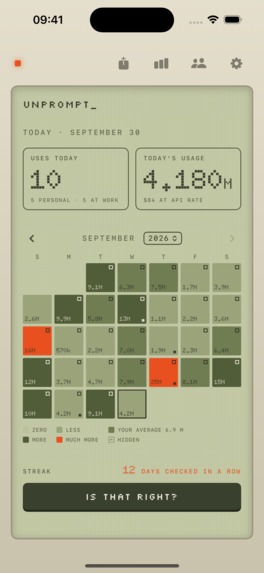
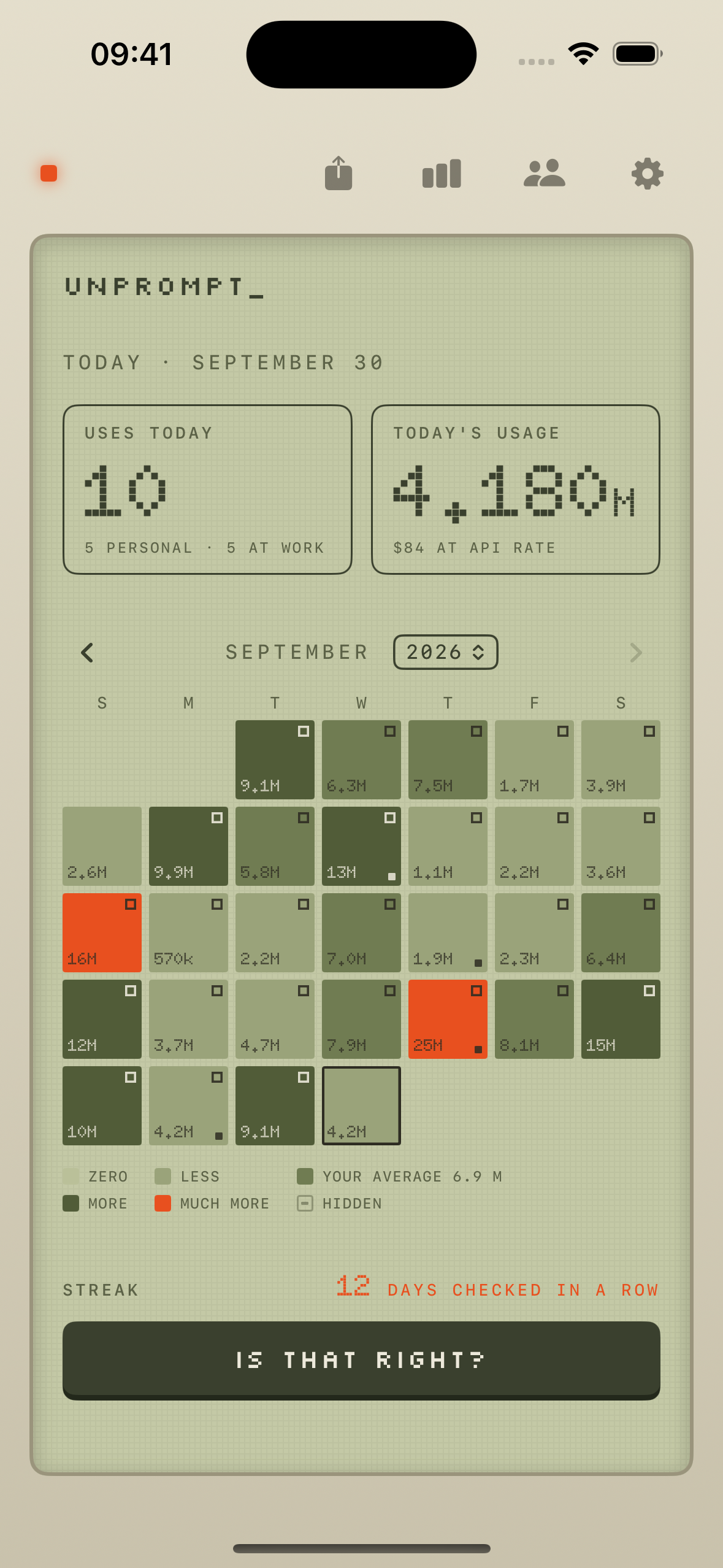
Today's uses next to today's tokens and their API-rate cost. Each day colored against your own 30-day average, never a goal.
-
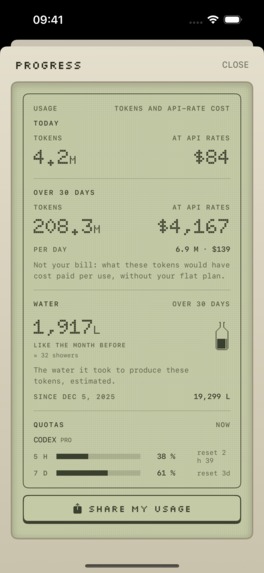
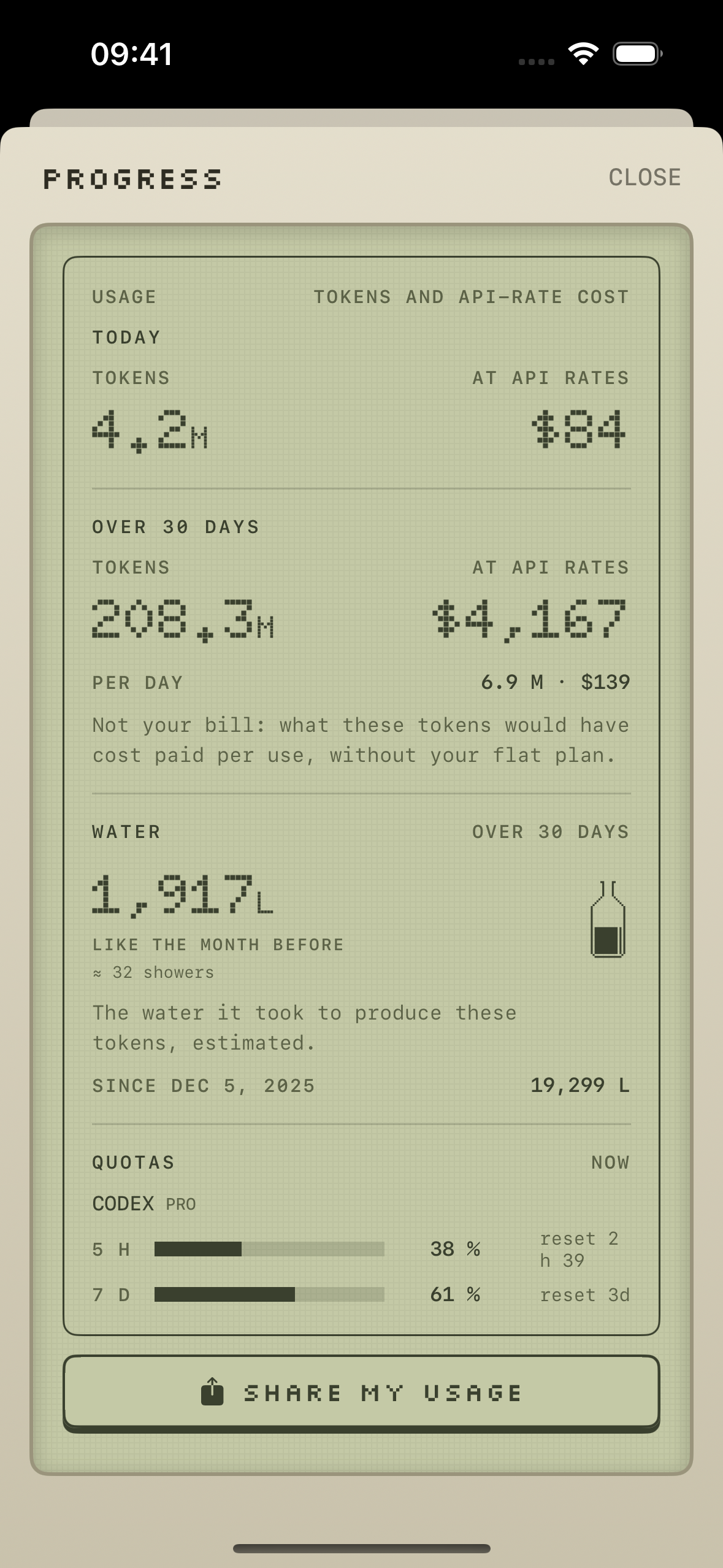
Tokens, their cost at API rates, the water it took, and live plan quotas. The bottle fills relative to your own history.
-
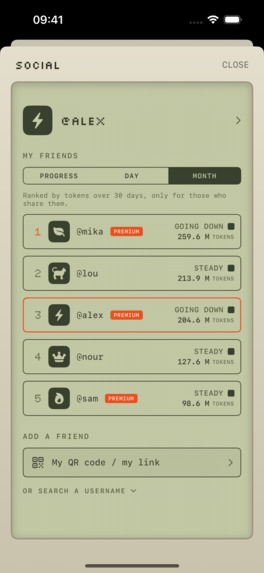
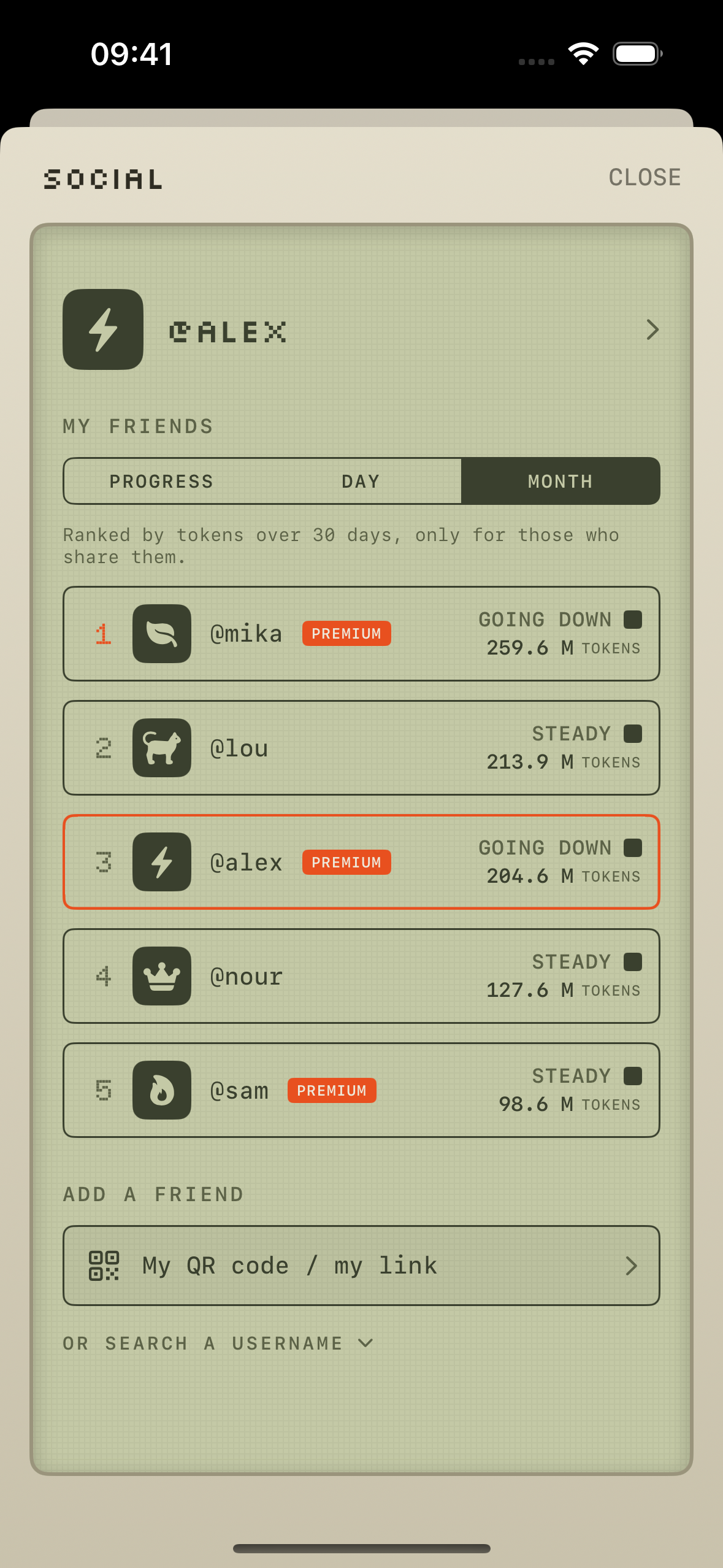
Friends ranked by the tokens they choose to share, over the day or the month. Added by QR code, no account.

Why I built this I used to be able to watch a film. The whole thing, one screen, start to finish. I noticed that I can't anymore. There is always a second thing in my hands, and when there isn't, I go looking for one.
Somewhere in the last couple of years, asking a model stopped being what I do when I am stuck and became the first thing I do. What bothered me most was not knowing the scale. Not a rough figure, not even a range. I could not have told you whether I turn to AI five times a day or fifty, or how many tokens I burn in a working day. Nobody can, which is strange for something you do constantly.
So I built the instrument I wanted. Then I rebuilt it twice, because its first users told me what it really was.
What I got wrong, twice The first version was a counter. A big retro +1 button you tapped every time you turned to AI. I was its first user and I did not use it: asking someone to declare their AI use is asking them to do admin at the exact moment they are trying to get something done, and the number is written by the same person who is fooling themselves about it. So two days before the App Store accepted the app, I swapped the roles. The app measures. The human only confirms.
The second correction came from outside. The first people who picked the app up were not trying to use less AI. They were developers and heavy users who use a lot of it on purpose and simply wanted to see it clearly and compare. An app named around cutting down was telling them they were doing something wrong. So the promise changed to four words: Measured, never judged. The app says how much, never whether it is too much. Every day is compared to your own average, never to a goal.
What it does It measures, quietly. On iPhone, Screen Time reports which two-hour windows saw AI app usage: one button to turn on, Apple's own app picker, nothing else to configure. On Mac, a free companion reads the log files that AI coding tools already write on your own disk, and notices when desktop AI apps come to the foreground. One rule everywhere: an episode of use counts once, and coming back more than two hours later starts a new one.
Three readings of intensity, none of them a verdict. Tokens are never converted into a number of uses. They are read three ways: the raw token count, what those tokens would cost at public API rates (not your bill, since most people are on a flat plan), and the water it took to produce them, estimated from per-token electricity and data-center water intensity. Water is the only environmental reading, and it is shown as a pixel bottle whose level is relative to your own history, never to a scale of good and bad. The method, its sources and its limits are published in full and summarized inside the app.
Today, live. The home screen leads with today's uses, personal and at work, next to today's token count, which keeps ticking between two syncs. The calendar sits below: every cell carries its own number, in tokens as soon as the Mac measures, and its color says how that day compares to your own average over the thirty days before it. Zero, less, your average, more, much more. It tells you something true on day one and never asks you to set a target.
You confirm, in one tap. Every evening the app proposes the day it measured: five personal, three at work, is that right? One tap validates it. If it's wrong, you never type a number, you give context: I didn't work today, I worked tonight, my hours changed, I also used AI somewhere you can't see. Streaks count validated days in a row, not good days.
Work is shown, never counted against you. You set your working hours once, and the calendar counts personal use outside them. A developer who uses a model all day at work is not doing anything wrong.
Compare with friends. Friends are added by QR code, link or username, with no account to create, and can be ranked by their trend or by the tokens they choose to share. Heavy users wanted exactly this: not a scolding, a leaderboard.
Two widgets. USAGE shows today's tokens, cost and water. LIMITS shows plan quotas with a live countdown to the next reset.
Nothing leaves the device. No prompt, conversation, project or file name is ever read or transmitted. The Mac companion emits numbers only. There is no account to create, no chatbot login to connect, and no server at all: history lives on the device and in the user's own private iCloud, which is also what carries the Mac's numbers to the iPhone. No ads, no tracking.
How I built it Swift and SwiftUI throughout, one Xcode project, no backend:
Unprompt (iOS 17+), the app. UnpromptWidget, the USAGE and LIMITS widgets, with day validation built as an App Intent so a day can be confirmed without opening the app. UnpromptActivityMonitor, a DeviceActivity extension that timestamps AI app usage into an App Group, behind Family Controls. The Mac side, today a menu-bar companion signed with a Developer ID, notarized and distributed as a disk image, with log readers and an NSWorkspace observer. A full sandboxed Mac App Store version, sharing the iPhone's screens through a common SwiftUI module and the same universal purchase, is in App Review. Persistence is SwiftData mirrored to the user's own private CloudKit database, which doubles as the bridge between the two machines. The social graph lives in a public CloudKit database with CKShare. Purchases go through the RevenueCat SDK, serving a weekly plan, a yearly plan with a 3-day trial, and a lifetime purchase, so no price is ever hardcoded in the interface.
The design system is hand-built. Not one native iOS control is visible anywhere in the app: no Toggle, no Stepper, no DatePicker, no navigation chrome. Four colors, three typefaces, no emoji, and no em dashes in any string in either language.
Challenges I ran into One truth on two screens. I saw 1.06 M tokens on the Mac and 697 k on the iPhone at the same moment. The data was fine. The live counter extrapolated from the moment each screen had last seen a value, so a phone without a fresh sync for an hour invented a million tokens. Now the estimate is a pure function of the measurement time carried in the data, the pace and the clock, identical on both devices and capped at three minutes of drift, after which the tile says when it was measured. The rule I kept: any estimated number must be computable identically on both devices, or it is not shown.
7.18 million rows for 107 keys. CloudKit mirroring forbids unique constraints, so duplicates are only a matter of time. On my own Mac a store had grown to 825 MB because a failed read, silently turned into an empty array by (try? fetch) ?? [], made the importer re-insert every key every fifteen seconds. Now every calculation collapses to one row per day and tool, the importer refuses to write when a read fails, and a batched purge cleans up once.
Social sharing that had never shared anything. Three silent failures were stacked: the shared record lived in the default zone, where CloudKit refuses any CKShare; modifyRecords does not throw for a rejected record, it returns per-record results the code was discarding; and the cloudkit.share record type existed in no production schema. I proved the fix end to end with a second iCloud account in a simulator acting as a second user.
An entitlement that was present everywhere, and still rejected. Apple's automated review refused the build for using Screen Time APIs "without the Family Controls entitlement", which was in every file, the signed binary and the App IDs. The real gap was a second capability, Family Controls App and Website Usage. Nothing in the rejection named it.
A purchase that worked everywhere except on the reviewer's iPad. An iPhone app running in an iPadOS window gives StoreKit 2 no window to present the sheet in. The fix passes the active scene explicitly, retries once without it, and surfaces the raw error code under the paywall so the next failure is not silent.
What's next The Mac App Store app, in review now: a full window with the same screens as the iPhone, one purchase for both, and a direct link over the local network so the iPhone shows the Mac's number to the second. Then native Mac widgets, and more coding tools read on the Mac. And the line stays where it is: the measurement itself, iPhone and Mac, the calendar, the friends and the share cards stay free.


Log in or sign up for Devpost to join the conversation.