Inspiration
Say you're selling a desk online. You snap a photo, crop out your front door, and post it. The picture looks harmless, but the file can still hold the exact spot where you took it (often accurate to a few meters), the time, your phone model, and sometimes a small hidden preview made before the crop that still shows the door and house number. In 2023, the "aCropalypse" bugs showed that cropped screenshots from Google Pixel's Markup tool and the Windows Snipping Tool could keep the cut-off part inside the file.
Many social apps strip this data, but email, cloud links, files sent as documents, and plenty of websites don't, and people have no easy way to see what their own photo carries. For someone who has moved away from an abusive partner or is being harassed online, one photo can be enough to be found. We wanted a tool that shows the risk in plain words and fixes it, without asking anyone to upload the very photo they're worried about.
What it does
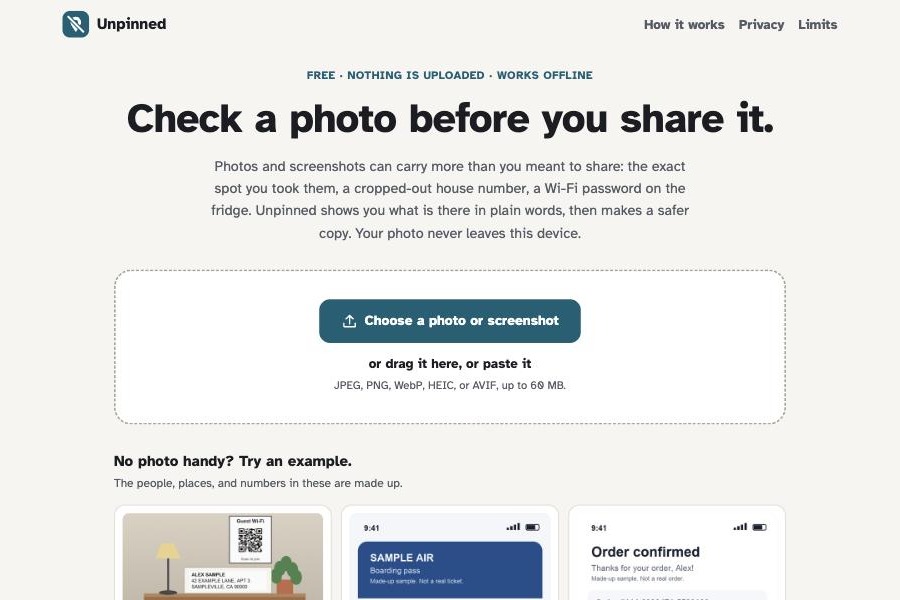
Unpinned checks a photo or screenshot entirely in the browser, then makes a safer copy.
- Add a photo: choose, drop, or paste it, or share it from the Android share sheet once installed.
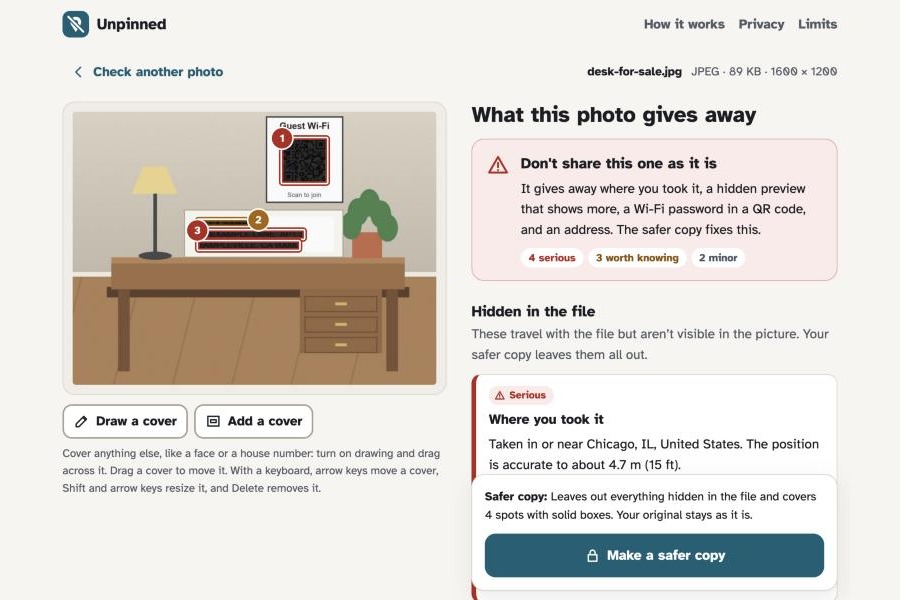
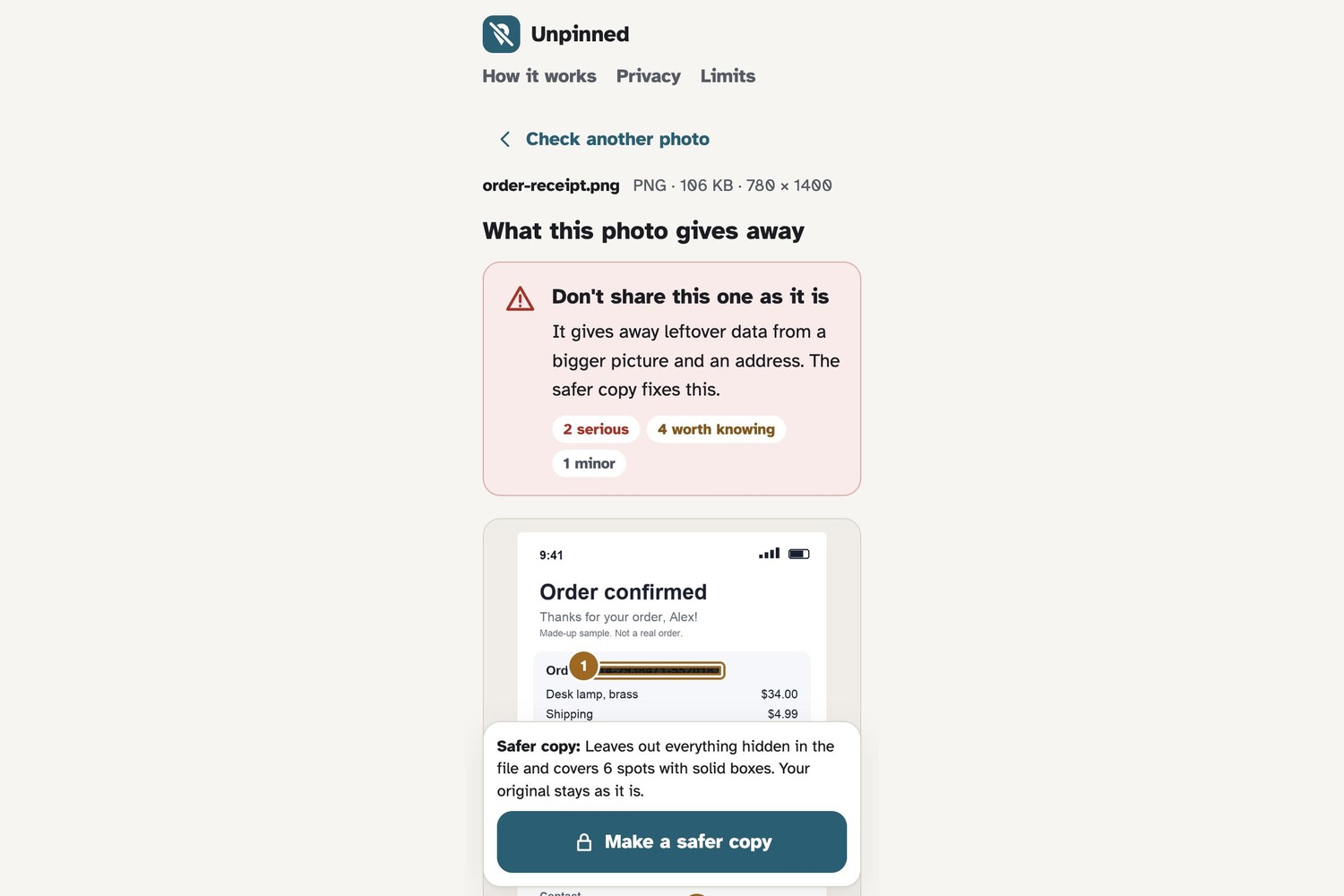
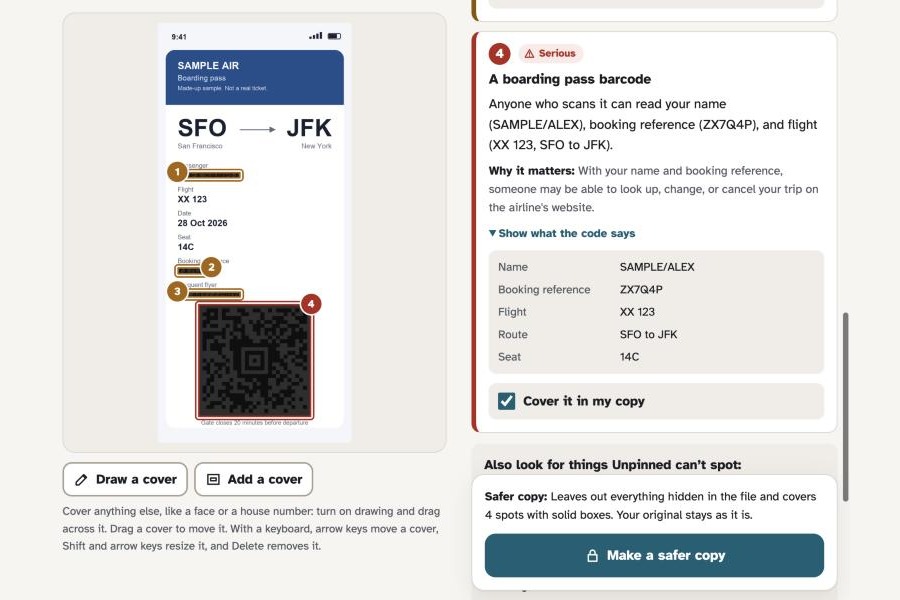
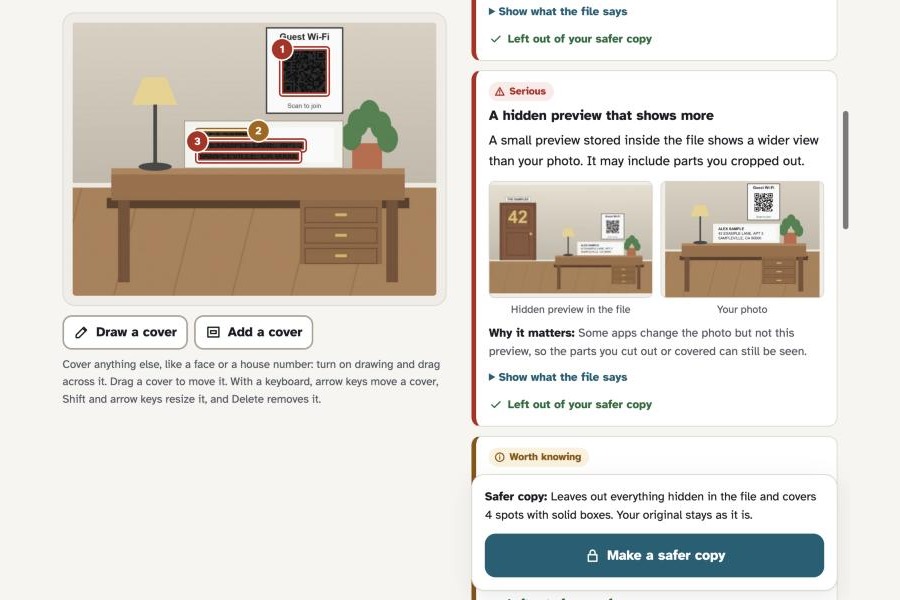
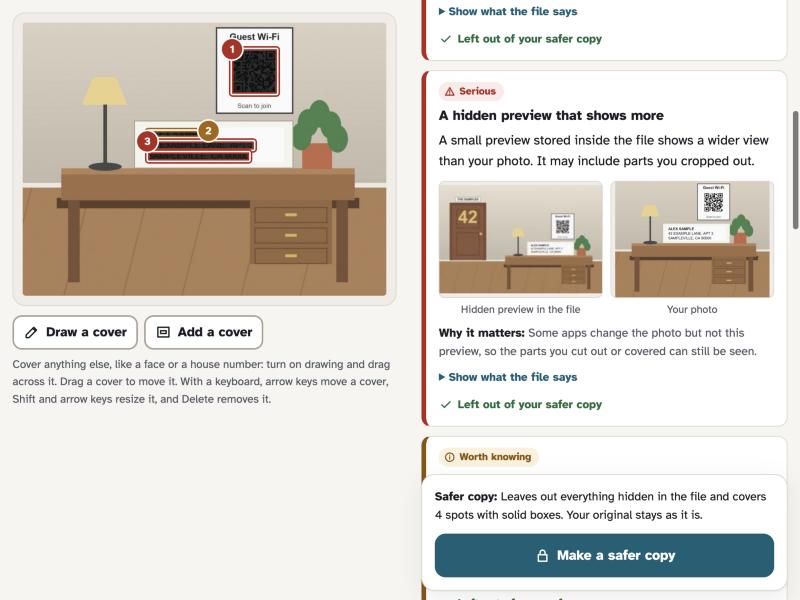
- Read the report: a one-line verdict ("Don't share this one as it is"), then findings labeled Serious, Worth knowing, or Minor, each saying what was found and why it matters. Numbered boxes on the photo match the findings.
- Hidden in the file: location ("in or near Chicago, accurate to about 4.7 m", from a built-in town list, never a map service), date and time zone, phone and serial numbers, names, captions, editing history, hidden previews (shown next to the photo), motion-photo video, and leftover data after the end of the image.
- Visible in the picture: addresses, card numbers (Luhn-checked), IBANs, Social Security numbers, phone numbers, emails, names, booking numbers, and QR codes and barcodes, including boarding passes, Wi-Fi passwords, two-step login setup codes, and contact cards.
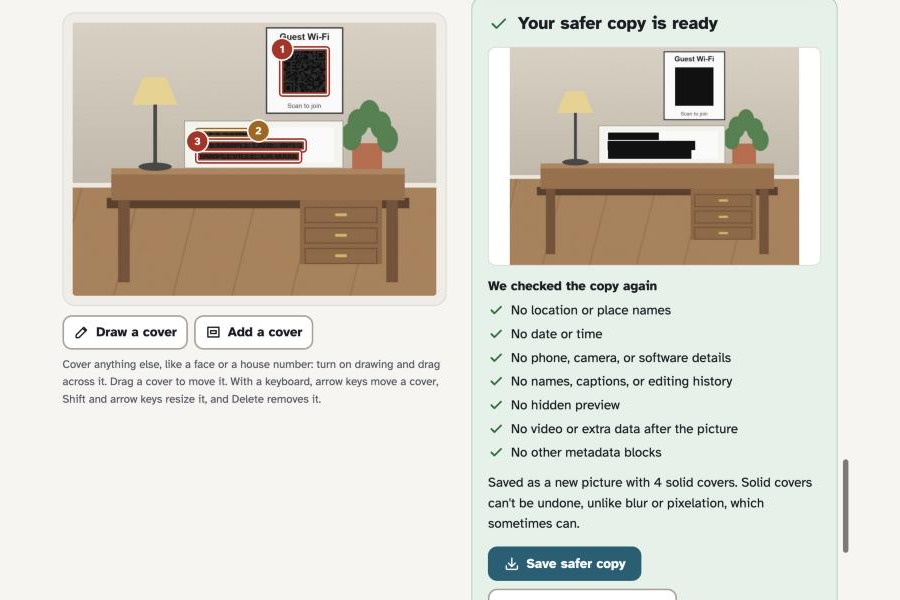
- Make a safer copy: everything hidden in the file is left out. Ticked items, and anything you draw over with a mouse, touch, or the keyboard, get solid boxes. With nothing covered, the picture data is kept byte for byte.
- See that it worked: the copy is re-read with the same checks. The original is never changed, so it can still be kept as evidence.
Who it's for: people who share pictures with people they don't know well, like marketplace listings, renting out a room, community groups, or photos for a landlord, school, or insurer. It matters most for anyone whose location needs protecting, and for the advocates who help them.
One safer outcome
The "Selling a desk" example is a listing photo. Before: the file holds a GPS position in Chicago accurate to 4.7 m, the date and time, the phone model, a unique photo ID, and a hidden preview that still shows the cropped-out front door with house number 42. The picture shows a guest Wi-Fi QR code (with its password), the name "Alex Sample", and an address on an envelope. After: the safer copy has none of the hidden details, the QR code, name, and address are under solid boxes, and all seven re-checks pass.
How we built it
A static TypeScript web app built with Vite, with no framework and no backend, deployed to GitHub Pages.
- File readers written for this project walk JPEG segments and PNG and WebP chunks to find metadata blocks, embedded previews, motion-photo video, and data after the end of the image. exifr decodes EXIF, XMP, and IPTC.
- Hidden previews are compared with the photo by shape and a 24 × 24 grayscale fingerprint, so the app can tell when a preview shows more than the photo.
- Tesseract.js (in a Web Worker) reads text and ZXing (WebAssembly) reads codes. Detectors validate numbers (Luhn, mod 97), join address lines, and parse IATA boarding passes and Wi-Fi codes.
- Lossless cleaning rebuilds JPEG, PNG, and WebP files keeping only image data, the color profile, and orientation. Covers are drawn on a canvas, and the result is cleaned again.
- A service worker keeps the app working offline and receives photos from the Android share sheet. 39 Vitest unit tests cover the readers, cleaning, re-checks, and detectors.
Trust and responsible design
- Nothing leaves the device: no server, accounts, analytics, or cookies. A Content Security Policy (
connect-src 'self') makes the browser itself block connections to other sites. The text reader, its English model, the barcode reader, and the font are all served from the same site. - Solid covers, never blur or pixelation, which can sometimes be reversed.
- Careful display: card, bank, and Social Security numbers are masked on screen. Wi-Fi passwords and two-step login secrets are never shown.
- Honest about uncertainty: low-confidence text is flagged, and if the picture couldn't be fully checked, the report says so instead of "nothing found".
- Accessible: the Atkinson Hyperlegible font, severity in words and icons (not color alone), full keyboard support including drawing covers, screen-reader announcements, and light and dark themes.
- Not an emergency service: the page says so and points people to their local emergency number.
Challenges we ran into
- exifr can't fully read PNG or WebP metadata, so the app finds each block itself and passes it to exifr separately.
- Keeping JPEG picture data byte-for-byte identical while removing everything else, and still keeping the photo the right way up.
- Making text and barcode reading work offline under a strict security policy, with every file served from the same site.
- Writing findings that are specific ("4.7 m", "in or near Chicago") without sending a location to a map service.
What we learned
Most of the risk in a shared photo is invisible, and a privacy tool earns trust by showing its work: what it found, what it changed, what it re-checked, and what it can't see.
One limitation
Unpinned can't recognize faces, house numbers on buildings, street signs, landmarks, license plates, or what's in reflections and on screens. Its text reader works in English and can miss small, blurry, angled, or handwritten text. The report reminds people to look for these and lets them draw covers, but it can't promise a photo is safe, or take back a photo that's already been shared.
What's next
On-device suggestions for faces, house numbers, and license plates that people confirm; more languages; showing the leaked part of an "aCropalypse" screenshot; and checking several photos at once.
Built during the event, and credits
Everything in the repository was written during SafeSpace Hacks: the file readers, detectors, cleaning, checks, interface, examples, and tests. The pre-existing parts are open-source libraries and data: exifr (MIT), tesseract.js and tesseract.js-core (Apache 2.0), the tessdata English model (Apache 2.0), barcode-detector and zxing-wasm (MIT), ZXing-C++ (Apache 2.0), GeoNames town data (CC BY 4.0) via all-the-cities (MIT), and the Atkinson Hyperlegible font (SIL OFL). Full notices are in the repo.
AI assistance: built with substantial help from Claude Code (Anthropic's AI coding assistant), which wrote much of the code, tests, and text.
Data: every example picture and test file is synthetic. All names, addresses, booking codes, card numbers, and networks are made up, and the example GPS position is a public sculpture, not a home.
Built With
- atkinson-hyperlegible
- canvas
- css3
- exifr
- geonames
- github
- github-actions
- html5
- javascript
- pwa
- service-workers
- tesseract-ocr
- tesseract.js
- typescript
- vite
- vitest
- web-share-api
- web-workers
- webassembly
- zxing

Log in or sign up for Devpost to join the conversation.