-
-

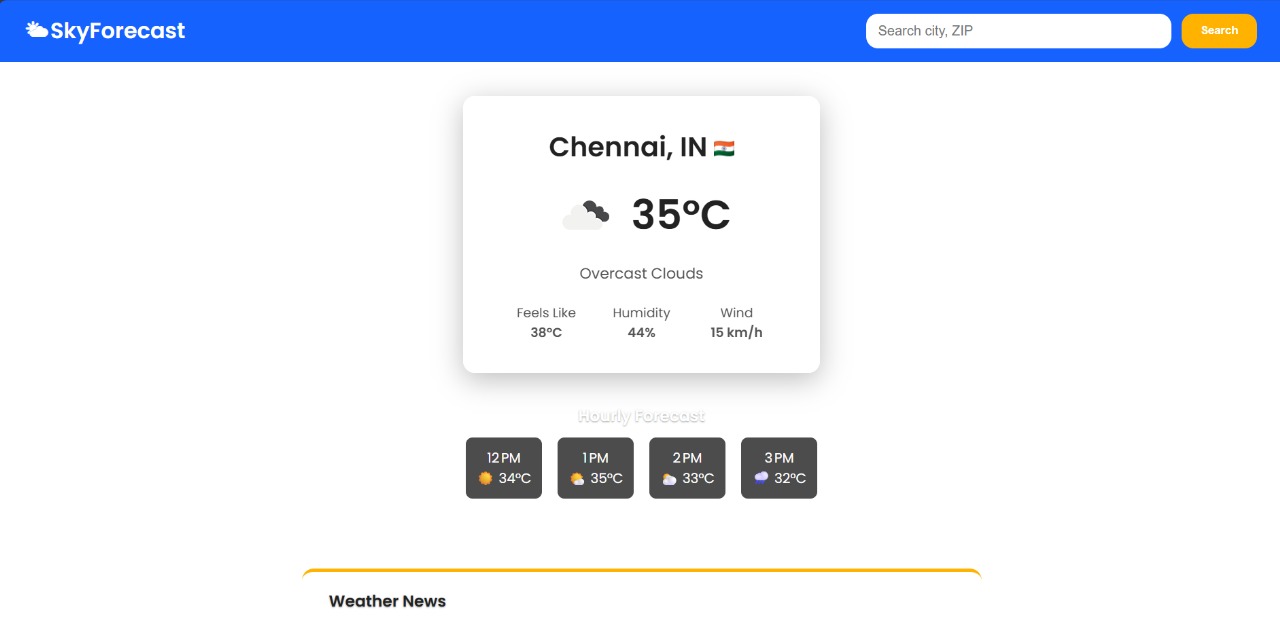
Main Page
-
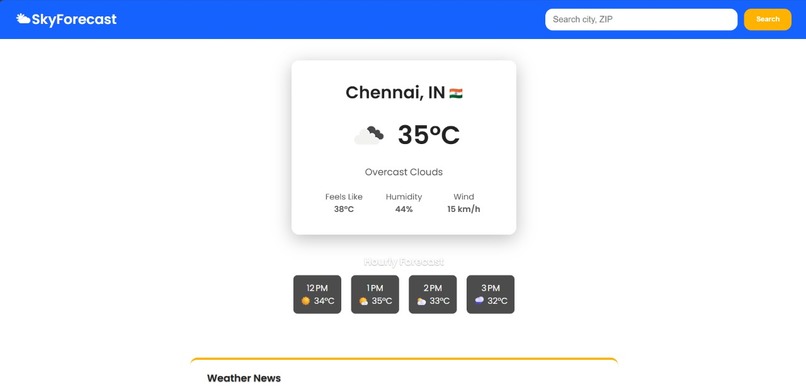
actually work as a weather website
-
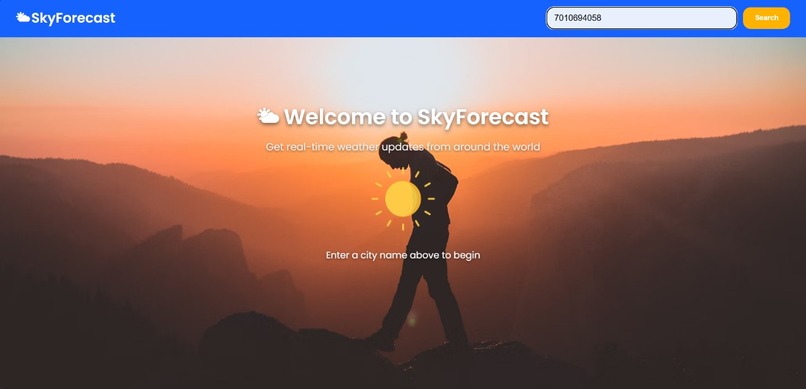
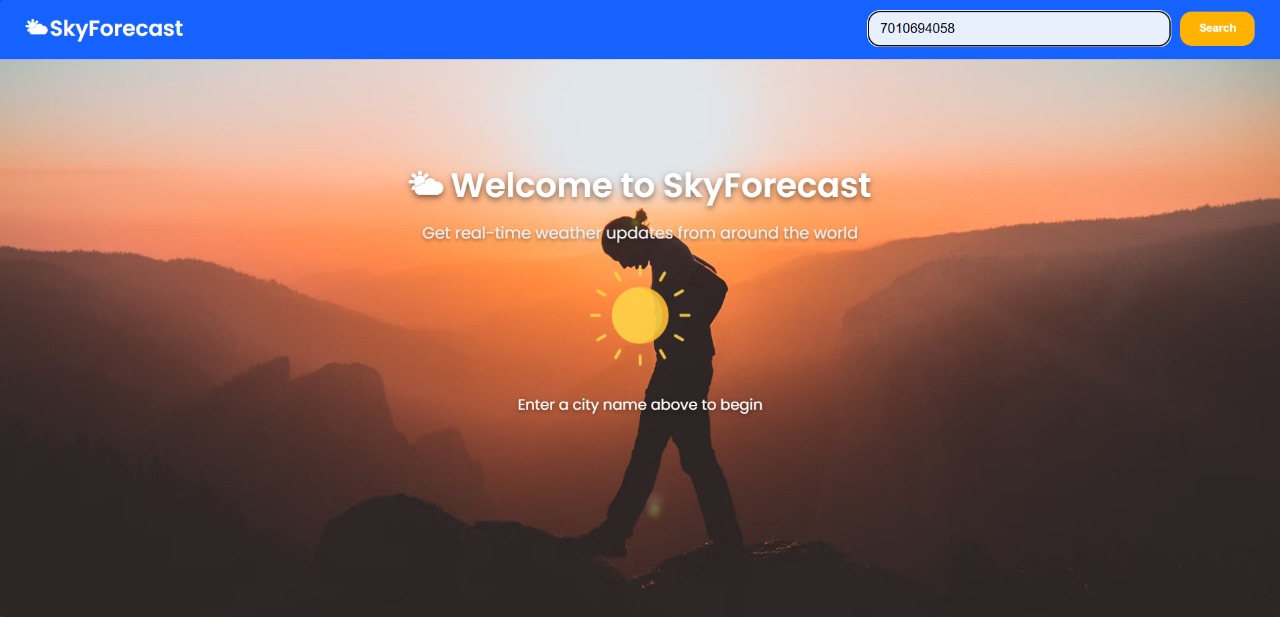
enter trusted person phone number pr ` to trigger SOS
-
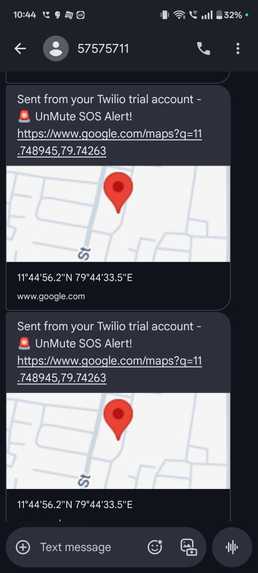
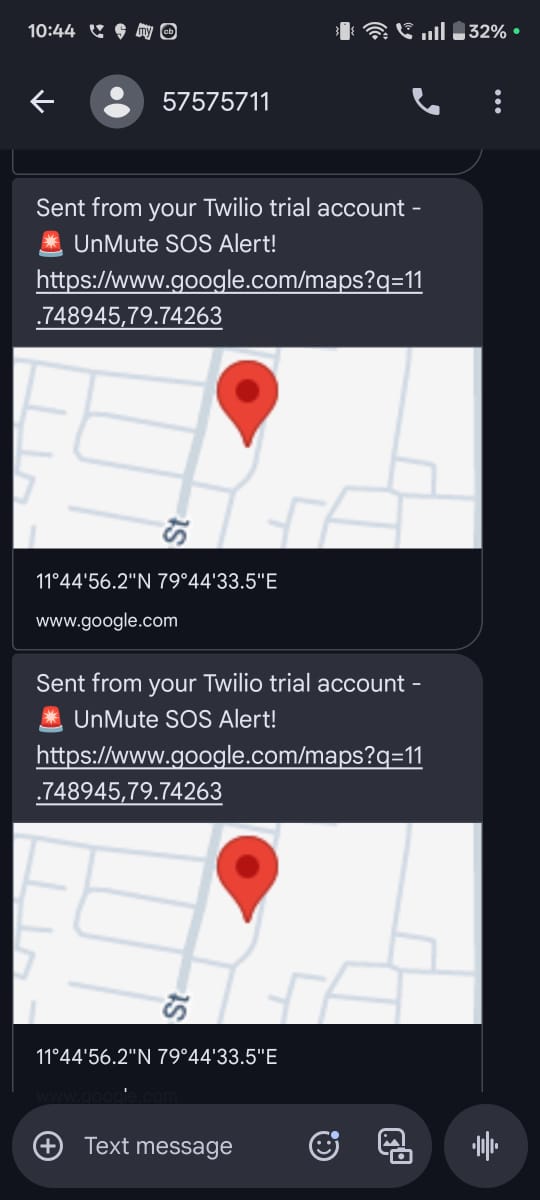
get notification like this like this
-

get a call with actually inform with lattitdude and longitude
-
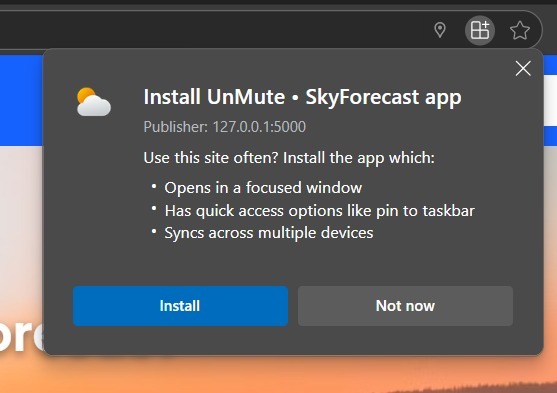
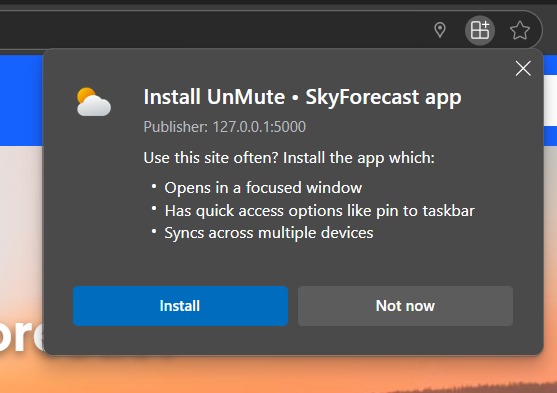
can be downloaded as PWA app
-

App works in similar Way



Inspiration:
India continues to grapple with rising cases of rape, domestic violence, stalking, and gender-based abuse. From the gut-wrenching 2012 Nirbhaya case to countless recent incidents of harassment in public transport, schools, and even homes — we saw a pattern:
Victims often can't speak, can't dial emergency services, and can't alert anyone without putting themselves at greater risk.
We asked ourselves:
“What if victims could raise an alarm without saying a word?”
That's how UnMute was born — a stealth web app that looks like a normal weather website, but allows a user to send a silent SOS alert using secret gestures, keystrokes, or face gestures, even when someone is watching them.
What it does:
When a scream can't be heard, a whisper needs to be smart enough to call for help.
UnMute is not just a weather app — it's a lifeline disguised as a forecast.
Built for victims of rape, abuse, stalking, domestic violence, and human trafficking, UnMute helps them send an SOS silently — when making a call or even unlocking a phone could put their life in danger.
🕵️♀️ The Disguise: A Normal Weather Website From the outside, it’s just another weather forecast page — search bar, temperature, radar maps, and weather alerts. But behind the UI lies a hidden escape route that can silently summon help.
⚠️ The Hidden Triggers — Silent but Powerful 🔢 1. Trusted Contact Trigger (Search Bar Entry) Victims can type a trusted phone number into the search bar (instead of a city name). This silent action immediately:
🚨 Sends an SOS message and AI-generated voice call to the entered number.
📍 Attaches live GPS coordinates.
📞 Simultaneously alerts:
100 (Police) via AI voice call with full location details.
Nearby NGOs and verified volunteers, pulled from a preloaded database.
No one around the victim hears or sees a thing. But help is already on the way.
⌨️ 2. Emergency Key Trigger — One Tap, Life Saved When there’s no time to type, the victim can just press the ` key in the search bar — the most subtle key on the keyboard.
This instantly:
Triggers alerts to 100, NGOs, and volunteers.
Skips alerting trusted contacts to avoid suspicion.
Still includes live location + AI-generated SOS voice message.
It’s designed for victims under tight surveillance — where even seconds can decide fate.
🧠 AI With a Conscience Our AI module ensures:
The SOS messages are clear, urgent, and non-panic-inducing.
Voice calls use human-sounding speech synthesis for legitimacy.
GPS data is converted to approximate street addresses so that police or volunteers can act fast.
Example message to 100:
"Emergency alert: A person is in danger. Location: 12.91°N, 80.25°E, near Vellachery, Chennai. Immediate assistance required."
💥 What Makes This Revolutionary Works under cover — no visible app, no suspicious icons, no alarms.
Offline fallback ready — cached data & local logs ensure emergency scripts can run even if net goes down mid-operation.
One line of defense — in the disguise of a simple weather check.
UnMute gives power back to the powerless — silently, smartly, and safely.
How we built it:
⚙️ 1. Frontend — A Weather App with a Secret Heart Built using HTML, CSS, JavaScript, and Bootstrap, the interface looks like any harmless weather forecast website.
The search bar is fully functional for weather queries — but is also our hidden trigger system.
User interactions are silently monitored to detect specific emergency cues (e.g. number entry or ` key press).
🔐 2. SOS Trigger Mechanism — Stealth Mode in Action We built conditional input triggers using JavaScript:
If a phone number is typed → Trusted contact gets SMS + AI voice call.
If the ` key is pressed alone → Bypasses trusted contacts, only 100 + NGOs are alerted.
All this happens with zero visual feedback — no pop-ups, no alerts, no sound.
📡 3. Backend Magic — Python Flask + Twilio + AI The backend is powered by Python (Flask), connecting the frontend to emergency response services.
Twilio API:
Sends real-time SMS alerts to trusted numbers and NGOs.
Places AI-generated voice calls with location and situation details to 100.
AI Module:
Converts coordinates to human-readable addresses.
Uses text-to-speech to generate intelligent, clear, human-like SOS messages on the fly.
Future upgrades include gesture recognition and voice pattern triggers via TensorFlow.js or Mediapipe.
🧭 4. Location Intelligence — Real-Time GPS in Seconds We used the Geolocation API (via the browser) to extract:
Latitude & Longitude
City and region
This data is automatically bundled into the SOS messages — no manual input needed.
🧑🤝🧑 5. Volunteer & NGO Network Integration Built a sample JSON-based database of local NGOs and verified volunteers.
On SOS trigger, the app scans for nearby helpers using location radius.
In future phases, this will be powered by Firebase or MongoDB with real-time availability status.
💾 6. Offline Tolerance & Fail-Safes Built-in error handling and caching:
If the user is offline, cached data logs their intent and GPS.
Once the internet is restored, delayed SOS dispatch is automatically triggered.
Ensures resilience even in areas with poor connectivity.
🧠 7. Human-Centered Design Principles Every feature we added was based on real-world survivor stories, like:
“I couldn’t even unlock my phone without him watching.”
“All I needed was one chance to tell someone.”
So we built for:
Speed
Simplicity
Stealth
Challenges we ran into:
🔐 Secret Management & GitHub Security While pushing to GitHub, our Twilio API credentials triggered GitHub’s push protection due to potential secret leakage. We had to:
Revert commits using git rebase -i and git reset
Move secrets to a secure .env file
Rebuild trust with GitHub's security scanning
This reinforced how critical secure credential handling is in real-world apps.
🧠 Balancing Stealth & Functionality Designing a stealth SOS app disguised as a weather site was uniquely challenging. We had to:
Hide the emergency input inside a fake search bar
Prevent any obvious signs like red buttons or loud alerts
Ensure triggering an SOS doesn’t raise suspicion even in close surveillance
It took several UI/UX iterations to get this right without compromising functionality.
🌐 Connectivity & Offline Behavior Real emergencies often come with poor or no internet. We had to:
Make the app a PWA for offline resilience
Pre-cache weather data and allow gesture-based offline triggers
Queue messages or fallback to local alerts when internet is down
📍 Accurate Location in Critical Time Getting precise geolocation during stressful moments was tricky:
Users might deny permission or have GPS off
Some phones return outdated coordinates We handled this with smart fallbacks and real-time permission prompts.
🧪 Testing Emergency Flows Without Triggering Real Alarms Simulating a system that calls police (100), volunteers, NGOs, and trusted contacts is risky. We created:
Dummy sandbox environments for Twilio
Mock contacts to safely simulate real-world flows without sending actual alerts
🤖 Generating Human-Like Emergency Calls Auto-generated voice calls must be:
Urgent but not robotic
Clear under pressure We tuned the AI message system to deliver natural language, adding dynamic user data like name, coordinates, and situation.
Accomplishments that we're proud of:
🚨 Creating a Real-World Life-Saving Tool We didn’t just build a project — we built a silent safety net for people in danger. The ability to send an SOS alert without saying a word, without unlocking a phone, and without raising suspicion is something we’re truly proud of.
💡 Innovating Beyond Conventional Panic Buttons Instead of a loud emergency button or app, we disguised our system as a weather site — an app no one would question. This level of stealth innovation is rare and essential in domestic abuse and kidnapping cases.
🧠 Triggering Alerts with Just One Key Designing a system where simply pressing the ` key inside a weather search bar could send emergency signals, auto-call 100, notify NGOs, and alert nearby volunteers — without touching the phone again — is something we engineered with care and pride.
📦 Built as a PWA (Progressive Web App) Our app is installable, works offline, and even loads during bad network conditions. Emergencies don’t wait for strong signals, and neither should safety apps.
🗣️ AI-Powered SOS Voice Calls We generated AI-driven natural voice calls that sound human, not robotic — sharing the user’s name, live location, and threat type in seconds, which is crucial when every moment counts.
🔐 Passing GitHub Security With Clean Code After hitting push protection for containing API keys, we learned, adapted, and configured a secure environment — a real-world experience in secure coding and deployment discipline.
👥 Built With Empathy and Impact Every line of code was written with the thought: “What if someone’s life depends on this?” That mindset changed how we think about UI, backend logic, error handling, and privacy. It’s not just a project. It’s a mission.
What we learned:
🛠️ Designing for Real-World Emergencies Is Deeply Challenging This wasn’t just a coding project — it was about understanding the psychology of fear, helplessness, and urgency. I had to think like a victim: “What if I had only one second? What if I couldn't speak?” This shift in mindset changed how I approached design and functionality.
🌐 Building a Progressive Web App (PWA) That Works When the Internet Doesn’t I learned how to make a web app that functions offline, is installable on any device, and loads instantly — because safety tools should never fail just because of poor network. Mastering PWA technology was a turning point.
💡 Minimal UI, Maximum Impact One of the hardest things was creating a simple and believable interface that hides life-saving features in plain sight. Designing a search bar that silently accepts a phone number or triggers SOS with a single backtick (`) key — that took thoughtful planning and user-first thinking.
🧠 Using AI for Voice-Driven SOS Alerts I explored how to use AI-generated speech to call emergency numbers with natural, urgent messaging. Learning to synthesize voice alerts with real-time location and intent taught me how impactful and human-like technology can become in life-or-death moments.
🔐 Secure Coding & DevOps When GitHub flagged my push due to secret keys, I realized how serious security in deployment is. I learned how to handle environment variables, avoid leaking credentials, and apply best practices for secret protection and code hygiene.
🧪 Simulating Real Emergencies Safely Testing emergency flows — like calls, SMS, and alerts — without triggering real panic was a delicate task. I had to build mock environments, simulate responses, and ensure everything was safe, reversible, and reliable under stress.
💪 Building Alone — Every Decision Was Mine Working solo meant I had to wear every hat: frontend developer, backend engineer, security specialist, UX designer, and tester. It was intense, but incredibly rewarding. I now understand how to take an idea from concept to execution entirely on my own — and that’s a skill I’ll carry forever.
What's next for UnMute – Stealth Emergency Alert System:
🌍 Multi-Language Voice Alerts Expanding AI-generated SOS calls in regional languages, so victims can get help in the language they’re most comfortable with — crucial in a diverse country like India.
🤝 Integration with National Safety Networks Collaborating with NGOs, women safety helplines, and local law enforcement to automatically route alerts to the nearest, fastest responders, reducing time-to-action dramatically.
📦 Disguised Installation & Hidden Exit Working on stealth features like camouflaged app icons, disguised as a weather or news app, and panic-exit gestures — to keep the user safe even if someone else checks their phone.
📡 Offline GPS Tracker & Bluetooth Beacon Mode Future versions will use low-energy Bluetooth beacons to emit distress signals in areas with no GPS or network — helping nearby volunteers detect and assist.
🧠 AI-Powered Risk Prediction Using behavioral patterns and movement data (with user consent), UnMute could predict dangerous patterns — like sudden stops, detours, or being followed — and prompt preemptive alerts.
🔐 Military-Grade Encryption & Audit Logs Enhancing data security and user privacy with full encryption, while maintaining audit logs (accessible only to the user) so they can see when, how, and where an alert was sent.

Log in or sign up for Devpost to join the conversation.