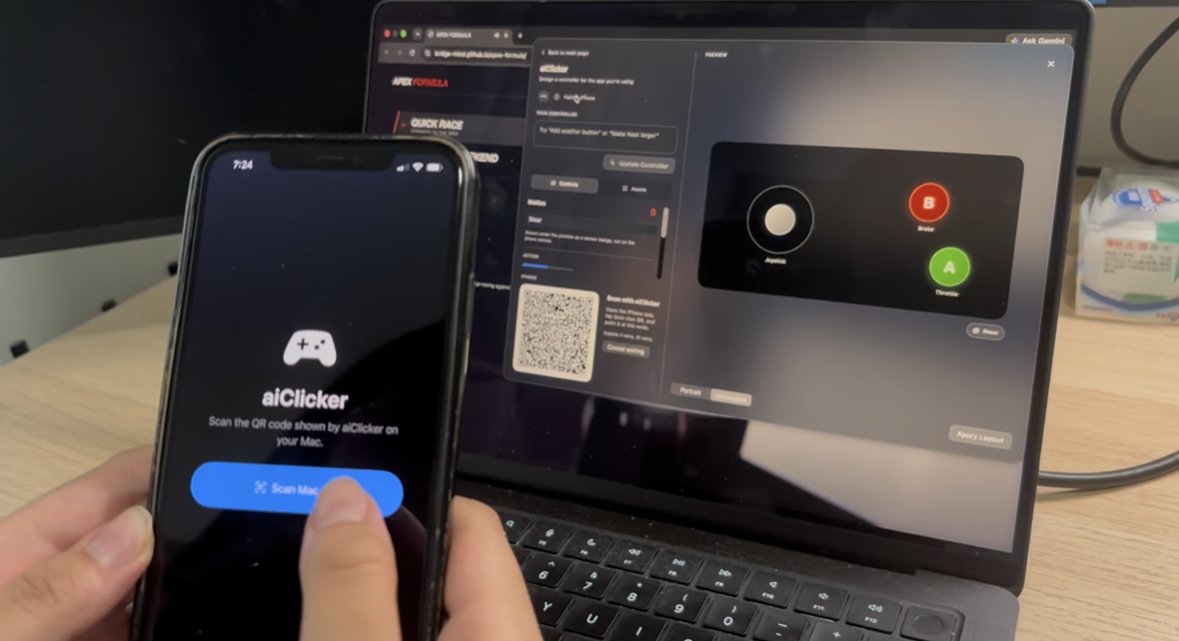
Inspiration & What it does
We do many different things on a computer, but most of them still rely on the same keyboard and mouse. Presenting, editing video, controlling music, playing games, or working in 3D all benefit from very different types of controls.
aiClicker turns your phone into a custom controller for whatever you’re doing on your computer. You describe what you need, and it generates a control layout on your phone using buttons, touch, gestures, motion, tilt, and other inputs.
That means your phone can become a presentation remote, a steering wheel, a media controller, a 3D navigation tool, or something completely custom depending on the task.
The idea is simple: instead of adapting yourself to the interface, the interface adapts to what you need.
How we built it
We built a Mac app and an iPhone app that speak the same controller format.
On the Mac, you open a menu-bar overlay while you’re in another app. You describe the controller you want; we capture that app’s window and use AI to propose a layout from a built-in set of controls — buttons, D-pad, stick, tilt, drag pad — wired to keyboard and mouse actions. You can tweak the layout and mappings, then pair an iPhone with a QR code over the local network.
The phone draws whatever controller you designed and sends your touches, gestures, and motion back to the Mac. AI only helps design the controller; once you’re using it, every input goes straight to the target app.

Log in or sign up for Devpost to join the conversation.