-
-
How we combined everything into one for accessibility
-
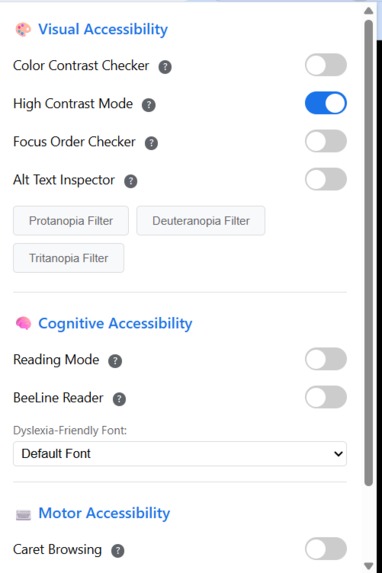
The menu
Kia ora from New Zealand!
A bit about me: I am a recent IT graduate from Open Polytechnic here in New Zealand. I founded a charity, Community Bridge Technologies Charitable Trust of New Zealand (CB Tech NZ). We build apps for children with special needs, we create games around inclusiveness, and we are out in the community supporting the most vulnerable individuals, senior citizens, and low-income households.
Inspiration
I currently work with senior citizens in the field, assisting and educating them on how to use technology. Accessibility has always been at the forefront of my designs, but now we can turn the page into how we want to read it, especially for things that are lesser catered for, like dyslexia.
What It Does
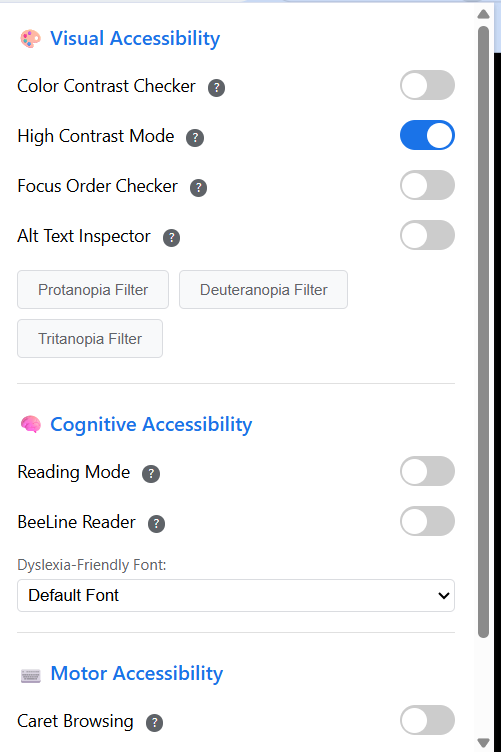
I wanted something that was so simple to use and had a toggle on/off for most of the options. Pressing buttons can often be difficult for the groups that I work with. They can leave this pinned to their task bar and just pull down the menu whenever they require it.
This is quite obviously a Minimum Viable Product (MVP), so more accessibility features will continue to be added, but these were all relevant to the clients I see daily. There is a lot of adult dyslexia out there, and I thought this was also a discrete way of assisting.
How We Built It
We built it with Kiro. I wrote down everything I wanted the extension to do, including which accessibility features were chosen and the specific features I wanted. I did a bit of research on which tools weren't overly accessible or ones that were a little bit more niche and may very well not be covered. Hopefully, by adding tags, consumers will be able to find us.
Challenges We Ran Into
I added the tooltips because it wasn't obvious some of the time what the controls were doing. The Alt Text feature never really came up with anything useful on its own, so I ended up asking Kiro to use the MCP Server to create descriptions for the Alt Text if there was none present.
Accomplishments That We're Proud Of
This will be an extension that is simply free for everyone—inclusive, accessible, and with the ability to really engage with all the necessary and more niche accessibility needs.
What We Learned
Kiro has some amazing features. I actually really liked the automations so that's going to make the documentation so much easier. And all the other little agents I got going are going to make replication of the code so much easier for other people to build on.
What's Next for Universal Accessibility Toolkit - Chrome Extension
I want to make this so easy to clone the repo and use that I will make a series of youtube videos and ask what they would users would like and add features as users request.
🚀 Installation and Testing (Chrome Extension)
Code Repository: https://github.com/girlb0ss1990/KIRO
To test the Universal Accessibility Toolkit, please follow these steps:
- Download the Code: Go to the repository link above. Click the green Code button and select Download ZIP, or clone the repository locally.
- Unzip the file to a location you can easily find.
- Open Chrome: Go to
chrome://extensions/in your Chrome browser. - Enable Developer Mode: Toggle the "Developer mode" switch (usually in the top right corner) to ON.
- Load the Extension: Click the "Load unpacked" button.
- Select the Folder: Navigate to and select the unzipped
KIROfolder. - Run the Extension: The Universal Accessibility Toolkit should now appear in your list of extensions and be accessible by clicking its icon in the browser toolbar.
Built With
- agent-hooks
- and-javascript-(the-standard-stack-for-content-scripts-and-popups-in-chrome-extensions)-apis-(implied):-chrome-extension-apis-(e.g.
- and-spec-driven-development)-ai-integration:-model-context-protocol-(mcp)-server-(used-specifically-to-generate-descriptive-alt-text)-core-languages-(implied):-html
- chrome-extension-(manifest-v3)
- chrome.storage-for-persistence
- chromeextensionapis
- css
- html
- javascript
- kiro
- model-context-protocol-(mcp)-server
- steering-docs

Log in or sign up for Devpost to join the conversation.