-
-
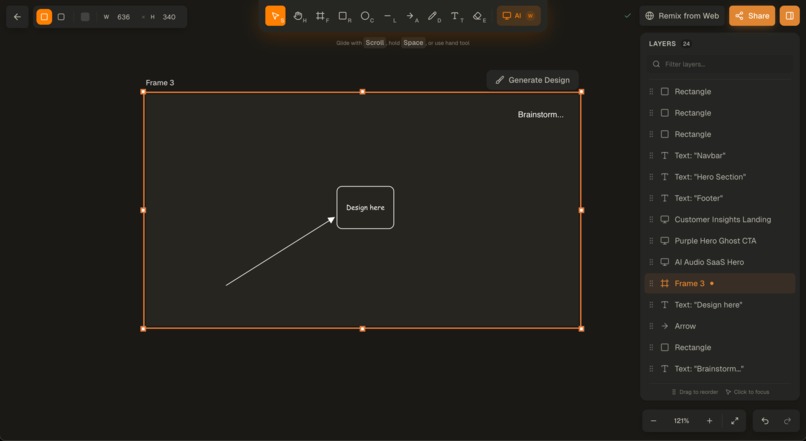
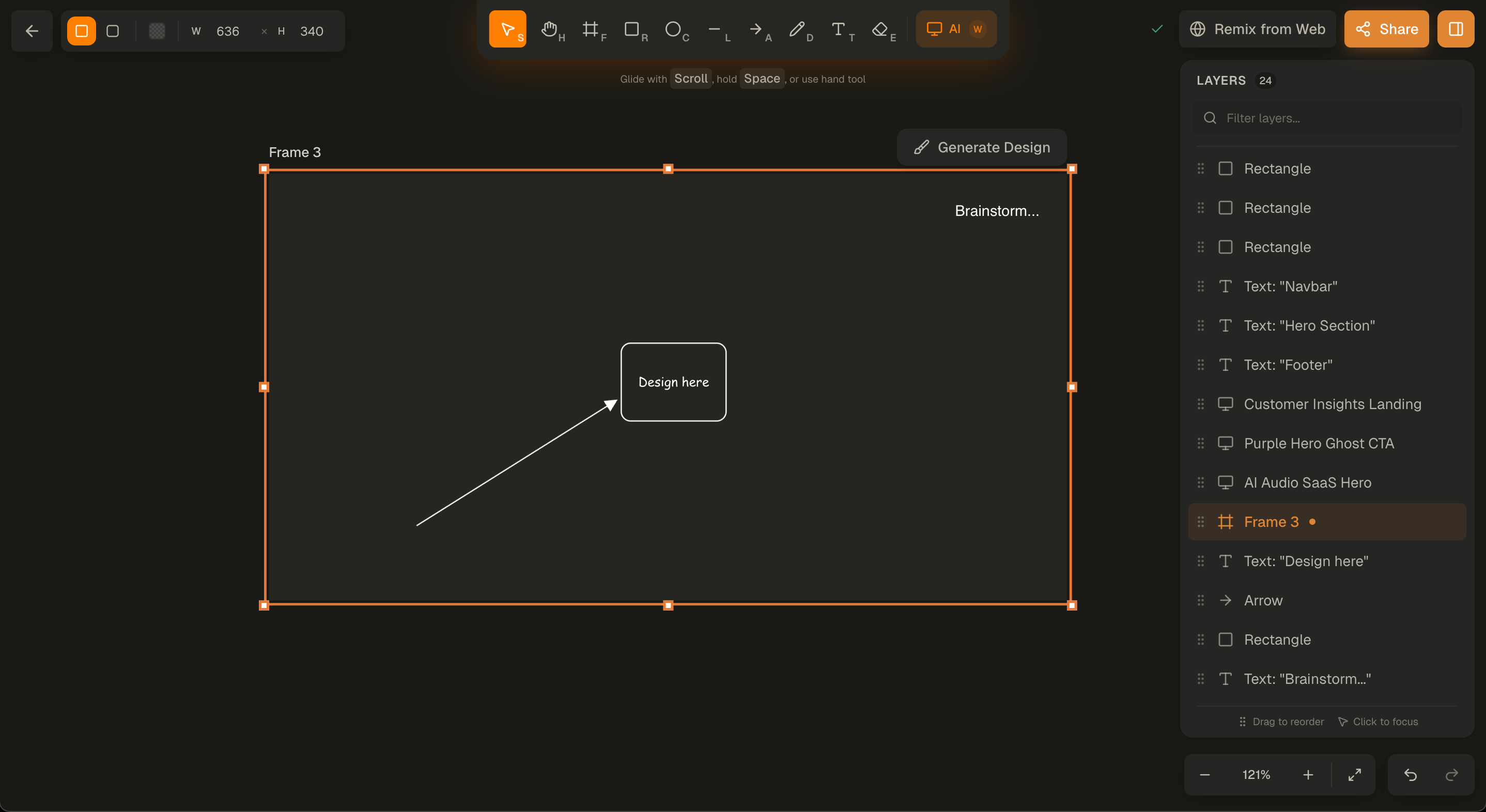
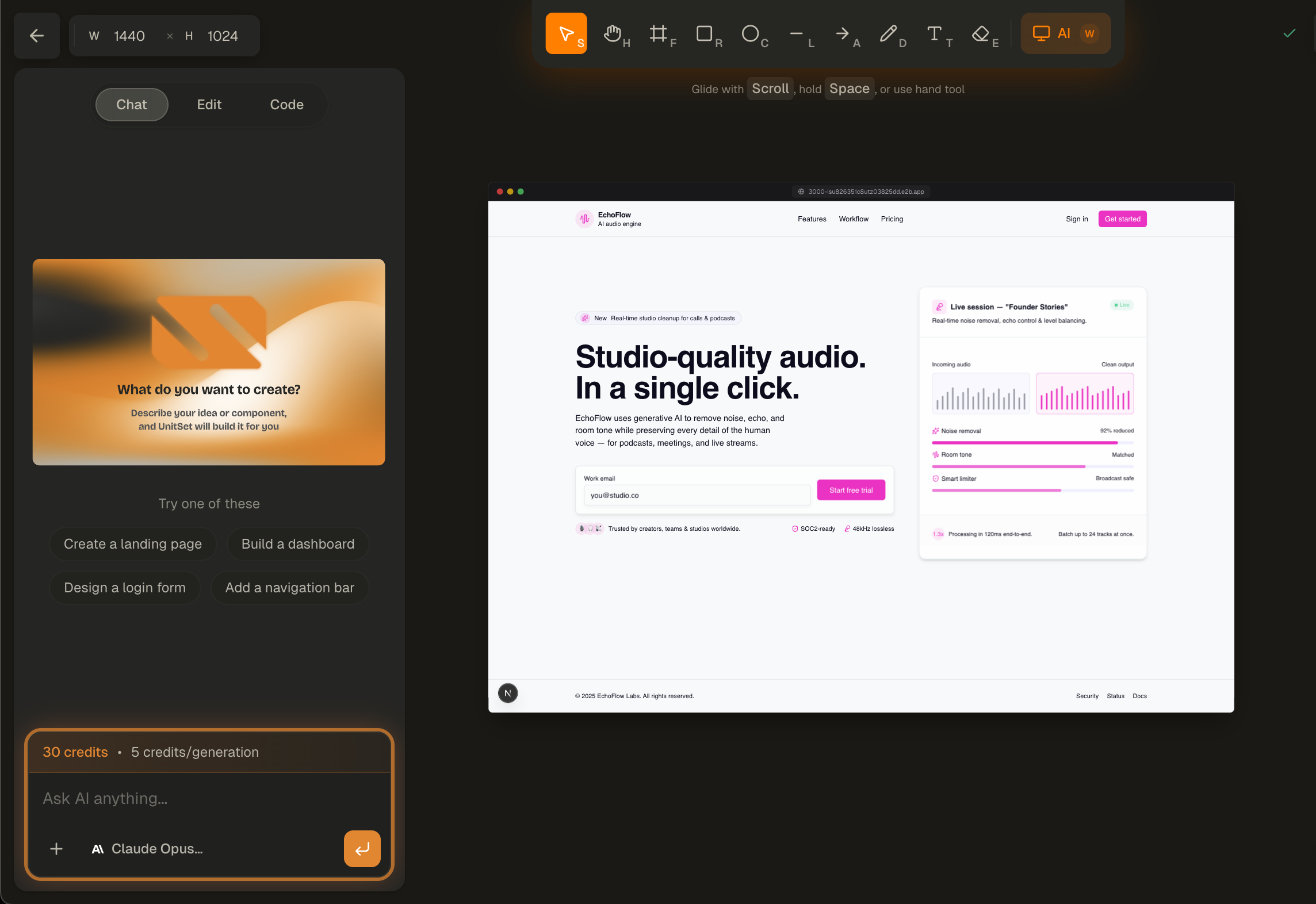
Infinite Canvas
-
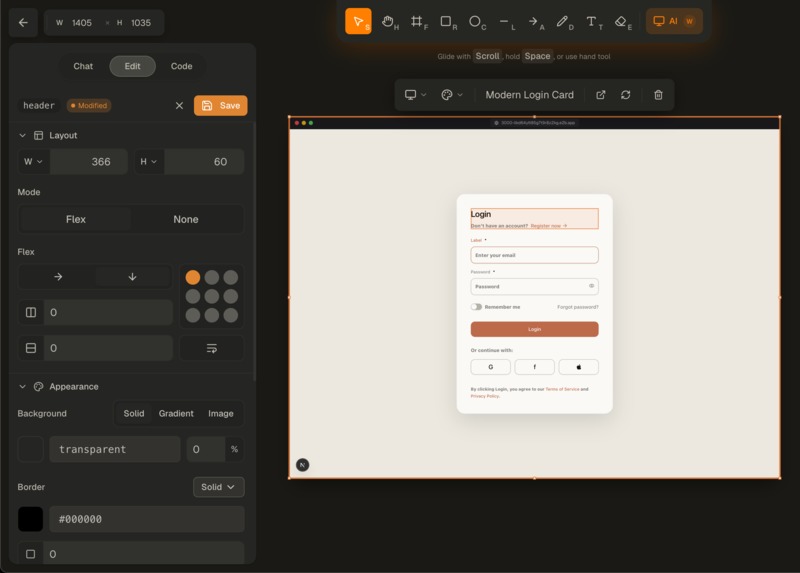
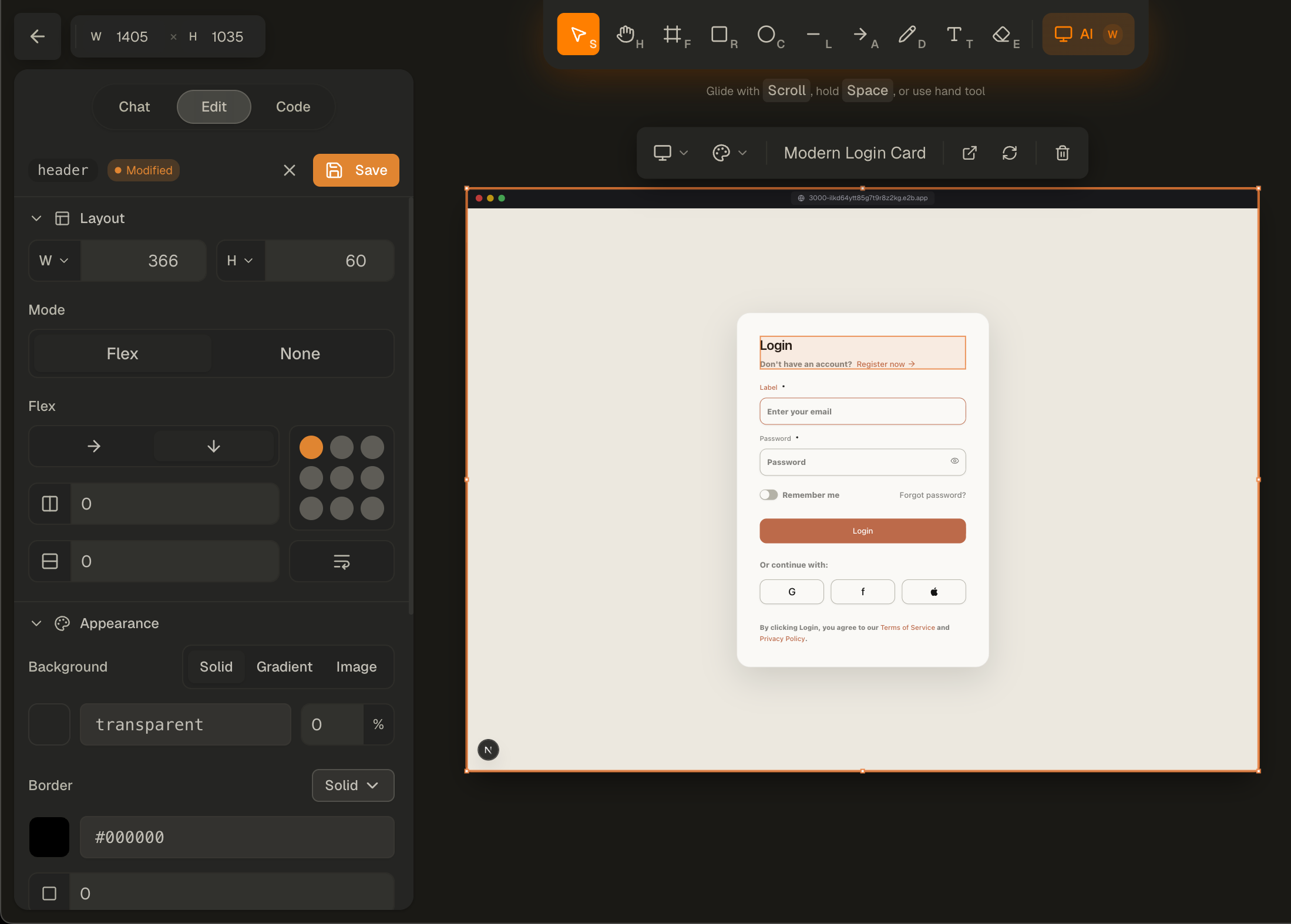
Visual Editor
-
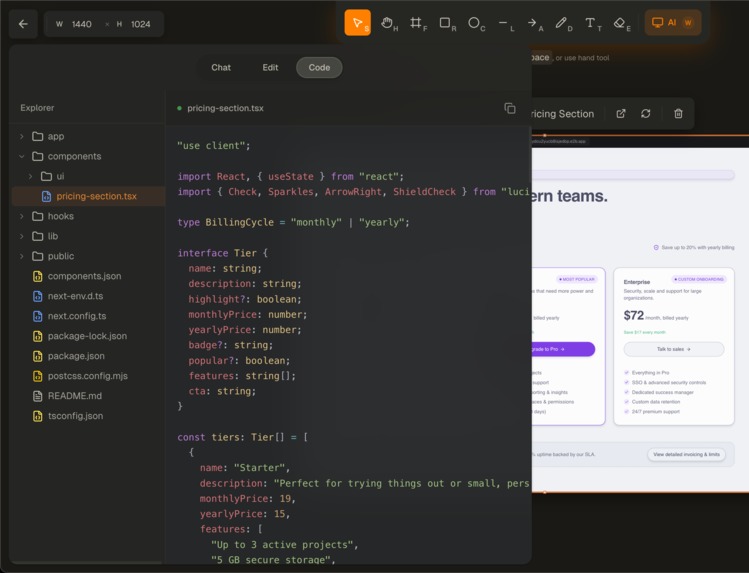
Code Explorer
-
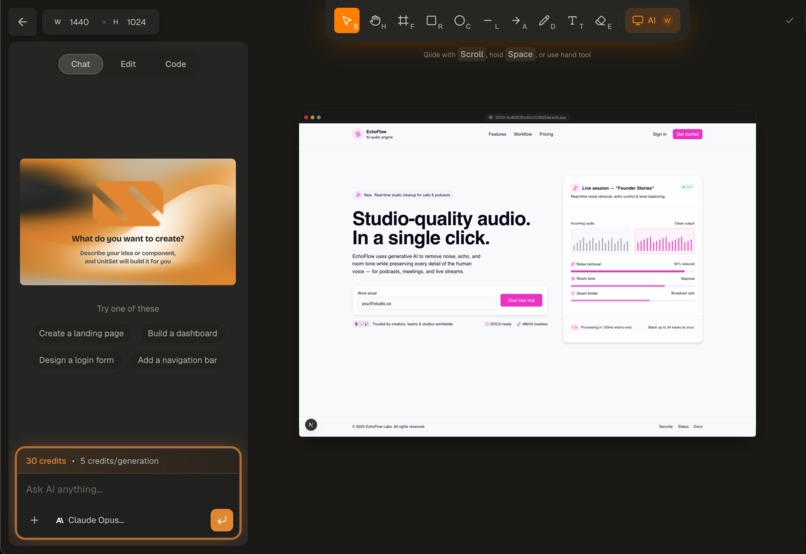
AI Chat
-
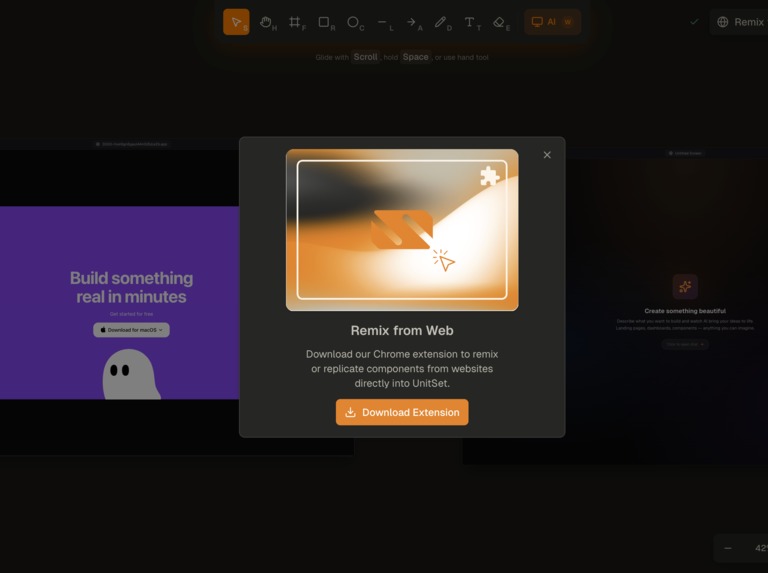
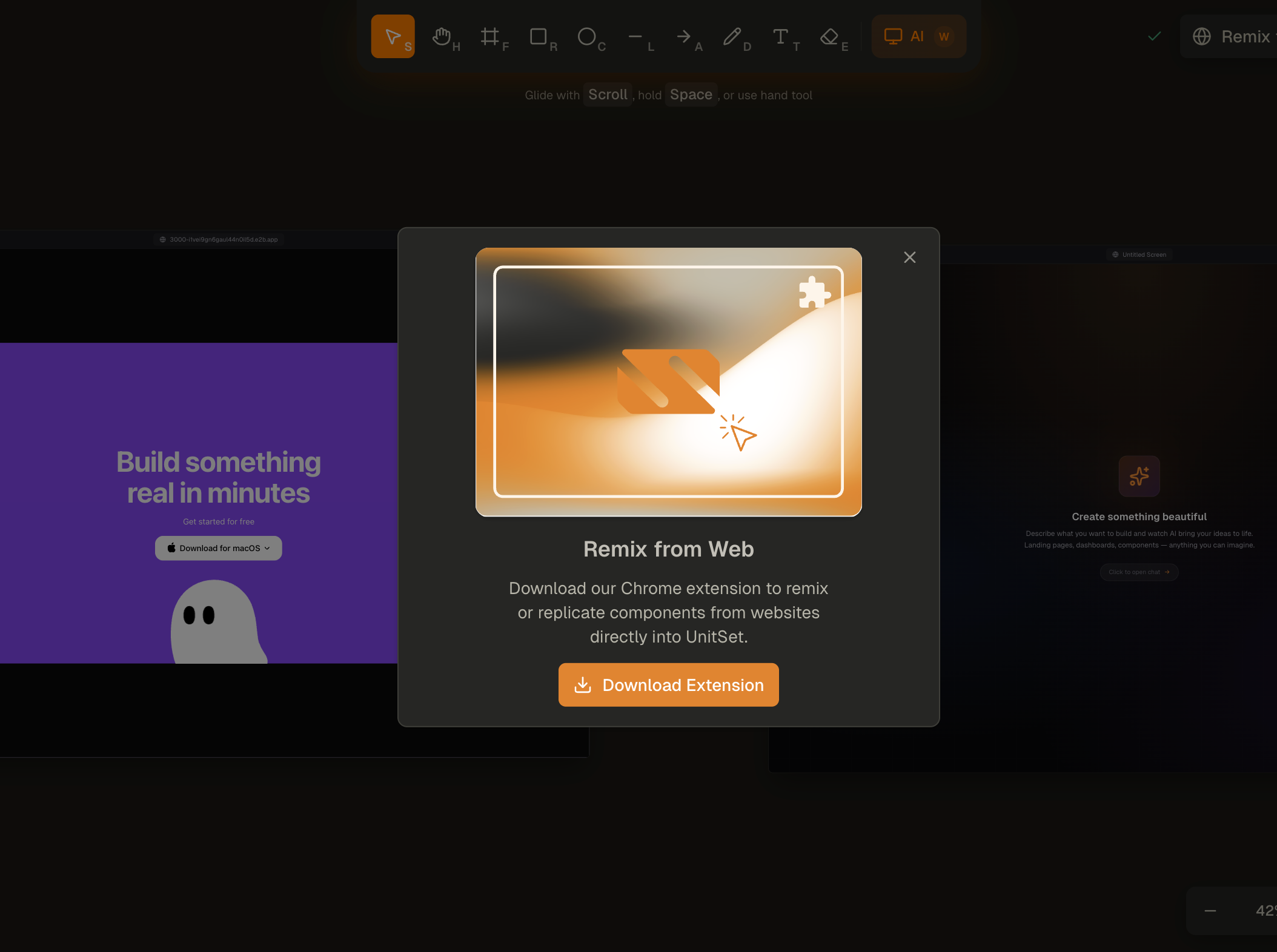
Remix Extention
-
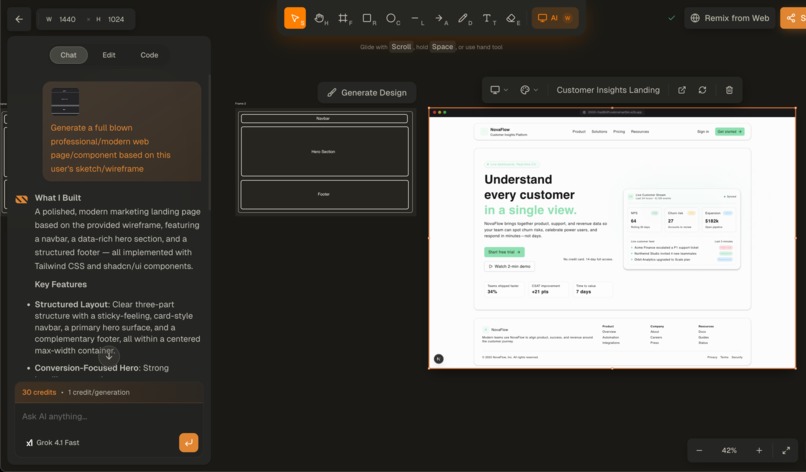
Frame to Design


🧟♂️ UnitSet — The Frankenstein of Frontend Design
.png)
💡 Inspiration
Designing UI today feels like stitching body parts together from different worlds : Figma for mockups, IDE's for code, online sandboxes for previews, AI tools for snippets, scraping, screen-capturing, copying CSS for inspiration or remixing.
We realized developers deserve one living creature that brings all of these scattered parts to life. A vibe design tool built specifically for developers, where sketching, generating, remixing, editing, and shipping components happens in one unified environment.
UnitSet was born as a chimera of technologies: part Figma, part AI agent, part Lovable, part Chrome Extension, part sandbox engine, all stitched together into a single powerful creation.
A true Frankenstein of frontend.
⚡ What It Does
UnitSet is an AI-powered design-to-code platform with a full canvas, live sandboxes, vision-powered generation, a browser extension, and a professional visual editor.
In one sentence:
Sketch it, describe it, or capture it from any website — UnitSet stitches it all into production-ready code.
Key abilities
- 🎨 Infinite canvas with drawing tools: frames, shapes, freehand, text
- ✏️ Wireframe → UI generation with AI agents
- 🤖 Chat-based component/page creation (GPT-5.1, Claude, Gemini, Grok)
- 🖼️ Vision reference support (upload any screenshot)
- 🔁 Live sandboxes (Next.js dev servers running per-screen)
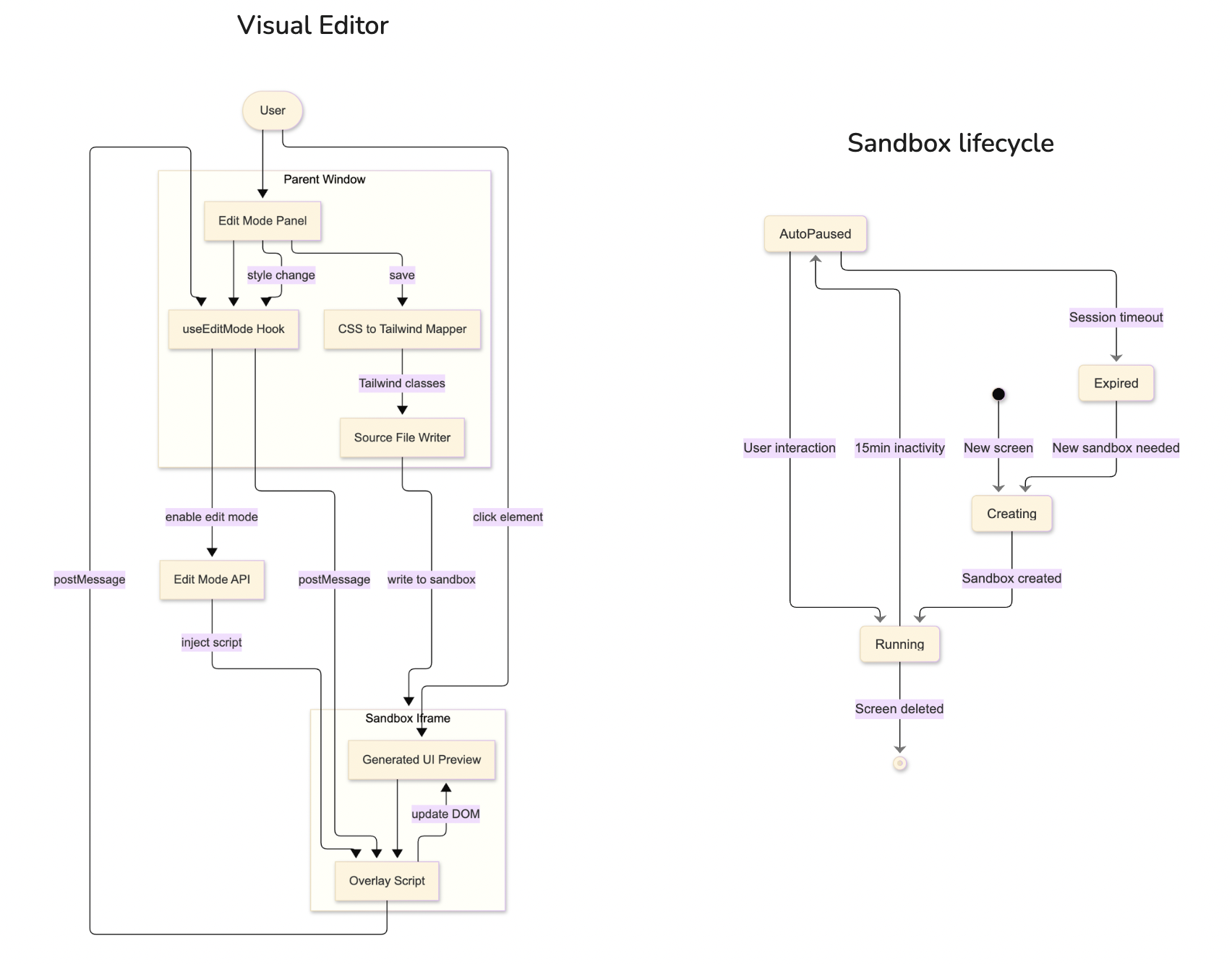
- 🧰 Visual edit mode with click-to-style + Tailwind mapping
- 💻 Code explorer with full project structure
- 🧩 Remix the Web browser extension — select any element on any site and replicate it inside UnitSet
- 📨 Collaborative sharing, screen-by-screen
- 🎨 Theming engine for generated UI (Vercel, Cyberpunk, Claude, etc.)
UnitSet replaces 6 different tools — and unifies them without the bloat.
🧱 How We Built It
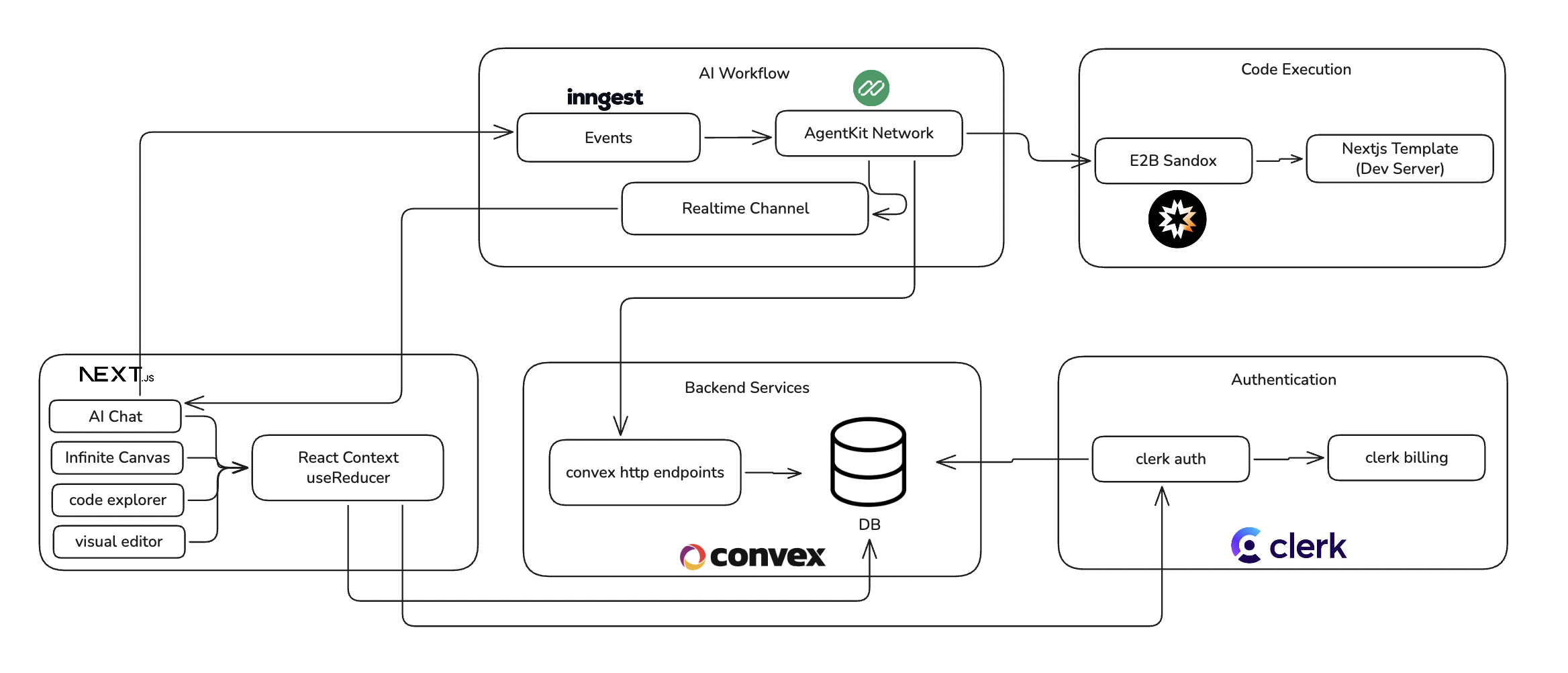
High-Level Architecture
Core Systems & Tech Stack
- Next.js 16 + React 19 for the full application
- Convex for real-time sync, projects, screens, and messages
- E2B sandboxes to host per-screen dev servers
- Inngest + AgentKit for our multi-step, tool-using AI workflow
- Clerk for authentication and credit-based billing
- ShadCN + Radix for consistent UI
- Tailwind 4 for clean utility-first styling
- Custom canvas engine built using reducers, refs, and RAF-throttling
- Browser extension (Manifest v3) for DOM capturing
- CSS → Tailwind mapper built in-house for the visual editor
Our AI workflow
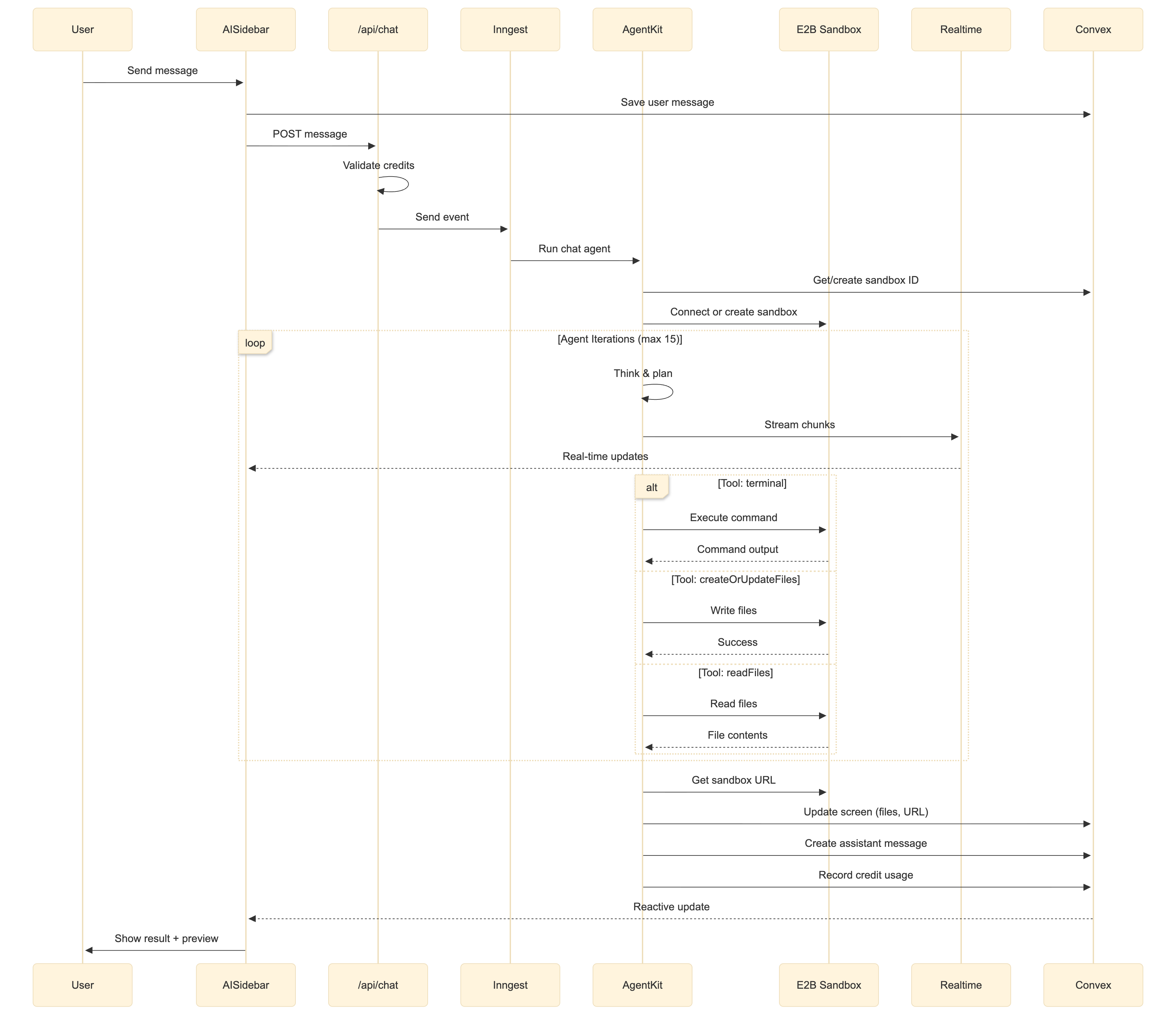
Each screen has its own sandbox, file system, chat history, and live preview.
Sandbox lifecycle & Visual Editor Architecture
Browser Extension
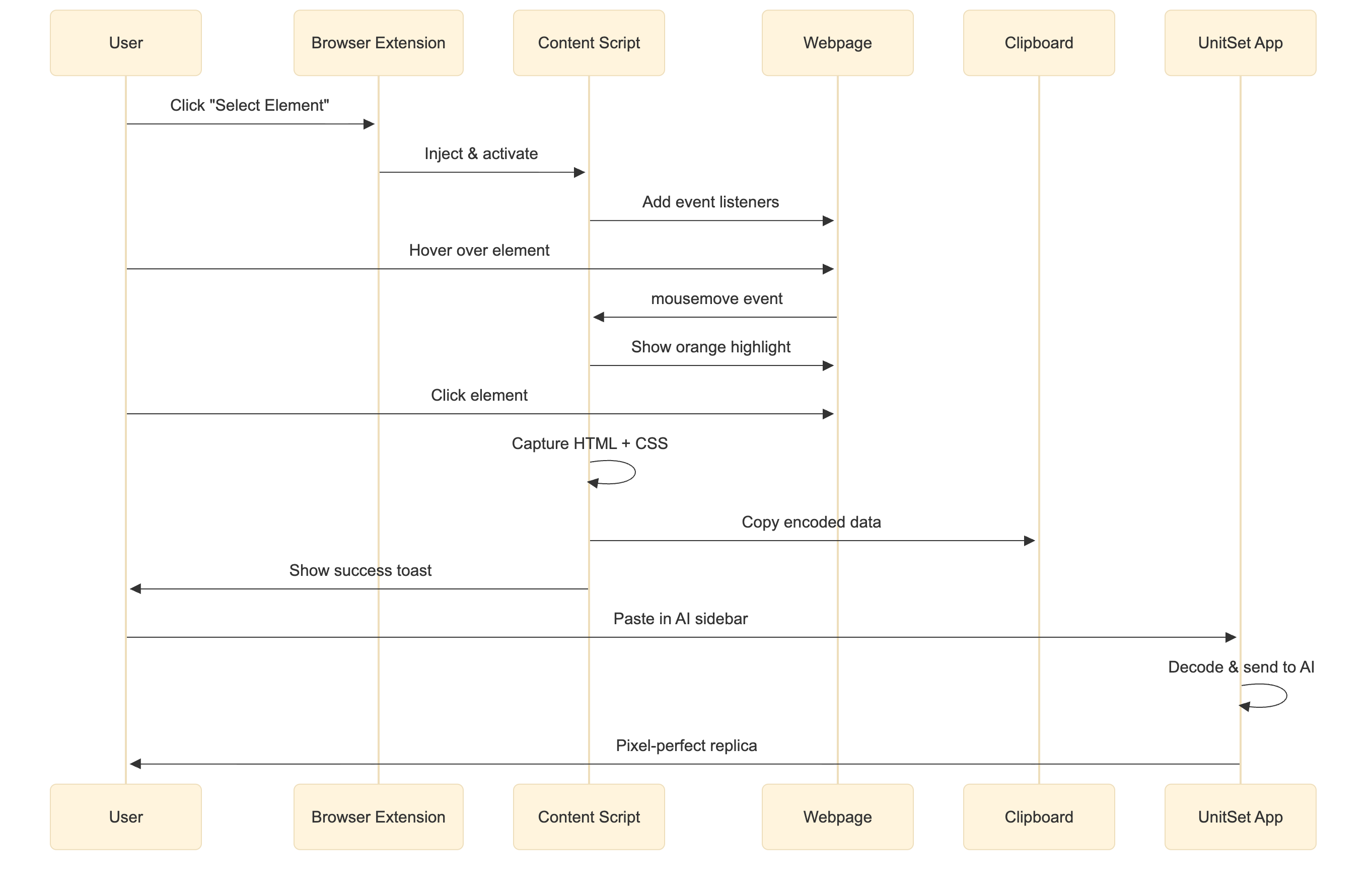
The UnitSet Browser Extension allows you to capture any HTML element from any website and replicate it using AI.
Features
- Visual Element Selection: Hover over elements to highlight them with an orange outline
- One-Click Capture: Click to capture the element's HTML, computed CSS styles, and metadata
- Auto-Copy to Clipboard: Captured data is automatically encoded and copied
- Size Validation: Elements over 100KB show a warning to select smaller components
- Keyboard Support: Press Escape to cancel selection mode
How It Works
🩼 Challenges We Ran Into
🧠 1. Stable Vision → Code Generation
Getting multi-model support with consistent results across GPT-5.1, Claude 4.5, Gemini 3, and Grok was wildly difficult. We solved it by:
- Multi-pass prompting
- System-level constraints
- Sanitizing UI structure before writing files
🧩 2. Stitching Sandboxes Into the Canvas
Running multiple concurrent Next.js dev servers, each isolated, each synced with AI output — and embedding them back into the canvas — required custom runtime overrides and build hooks in E2B.
🖌️ 3. Re-render Bottlenecks on Canvas
Freehand drawing was laggy at first. We fixed this with:
- RAF throttling
- State normalization
- Reducer segmentation (viewport vs shapes)
- Separate refs for interaction state
🔌 4. Browser Extension DOM Extraction
Capturing outerHTML + computed CSS for all descendants while keeping size under 100 KB required:
- Tree traversal optimizations
- Style deduping
- Custom encoder for clipboard sharing
🧵 5. Visual Editor Sync
Updating styles inside the iframe and writing the correct Tailwind classes back to source files was tricky. We built a custom mapping layer

🚀 How We Leveraged Kiro IDE to Build UnitSet
UnitSet is a complex, multi-system AI design-to-code platform with an infinite canvas, visual editor, live E2B sandboxes, a browser extension, AI chat, and a full code explorer. Building such a system required a disciplined workflow, stable architecture, and deep integration with various tools.
Kiro IDE became the backbone of our development process.
Below is a detailed breakdown of how we used Specs, Steering Docs, Hooks, MCP servers, and Vibe sessions to design, plan, iterate, and maintain UnitSet from start to finish.
📘 Specs — Structuring Every Major Feature
UnitSet consists of many large, interconnected subsystems: the canvas engine, screen generation, AI chat pipeline, visual editor, extension, billing, sandboxes, shape architecture, undo/redo history, and more.
To build these cleanly, we created over 21 detailed Kiro Specs, including:
- ai-chat-streaming
- ai-model-selection-image-upload
- canvas-state-management
- canvas-autosave
- canvas-custom-cursors
- canvas-layers-sidebar
- canvas-interaction-improvements
- screen-ai-chat-persistence
- shape-properties-bar
- visual-element-editor + visual-element-editor-v2
- html-element-selector-extension
- code-explorer
- convex schema workflows
- clerk billing & credits … and many more.
What Specs gave us
Each Spec guided development through Kiro’s structured Requirements → Design → Implementation phases. This ensured:
- Clear acceptance criteria
- Architecture planning (reducers, entities, UI flows, API boundaries)
- Well-defined file structures
- Detailed tasks.md for incremental, consistent implementation
- No ambiguity across large subsystems
- A coherent roadmap even as the system grew
Specs allowed us to safely build complicated parts like:
- Our canvas reducer architecture
- The shape model (entities, refs, viewport separation)
- Sync logic between canvas & Convex
- Visual editor bidirectional communication with the sandbox iframe
- AI workflow & streaming system
- Browser extension capture format
- Tailwind style mapping
- Persistent screen-level AI chat sessions
Without Kiro Specs, coordinating these systems would have been significantly more difficult.
📚 Steering Docs — High-Quality Context for Better AI
Kiro’s Steering Docs became the long-term knowledge base for UnitSet.
We maintained 15 steering docs, covering:
product.md— vision, goals, user categoriestech.md— Next.js 16, React 19, Convex, Inngest, Tailwind v4, E2Bstructure.md— folder conventions, file classification, naming rulescanvas.md— architecture of the canvas enginedesign_and_ui_practices.md— UI/UX, spacing, motion, consistencyai-workflow.md— agent flow, tools, message shapesagentkit.md— tool usage rules, creation/writing guidelinesreact19.md— server components, boundaries, conventionstailwind_v4.md— style mapping rules, constraintsmcp_usage.md— documentation pulling, MCP usage patternsauth.md— Clerk integration rulesuseAgent-patterns.md— how to structure multi-step AI tasks … and many more.
Why steering was critical
Kiro’s AI output quality depends heavily on context. By writing and maintaining high-quality steering docs, we ensured:
- Consistent code generation across all vibe and spec sessions
- Correct usage of our tech stack (React 19, Convex, Inngest, E2B)
- Reduced hallucination due to accurate internal documentation
- Architecture alignment as the project evolved
- The AI understood our design language and development patterns
- Seamless transitions between different parts of the project
We regularly used Context7 MCP to pull authoritative documentation and convert it into new steering docs. Over time, these steering files became the foundation on which the entire codebase was built.
🔧 Hooks — Automated Agents for Code Quality & Stability
We created 9 hooks — some automatic, some manual — to automate tedious processes, enforce consistency, and maintain quality.
Some key hooks:
1. Code Review + Linear Ticketing (Manual)
Performed deep code reviews → generated Linear tickets for bugs, vulnerabilities, or improvements.
2. Component Import Cleanup (On File Delete)
Scanned the codebase when a component was deleted → removed stale imports → prevented runtime errors.
3. Component Scaffolder (On File Create)
Auto-generated a functional React component with typed props, imports, and skeleton based on file + folder structure.
4. Convex Schema Sync Checker (On Save)
Ensured Convex schema changes propagated to all dependent UI components, queries, mutations.
5. Documentation Lookup (Manual, MCP-driven)
Triggered Context7 MCP to fetch latest docs → greatly improved accuracy for Next.js, Convex, Tailwind, Clerk, shadcn/ui.
6. Pre-Commit Check (Manual)
Full project audit: TS errors, leaks, bugs, lint issues → with Linear ticket generation.
7. Sync DevTools UI Changes (Manual)
Using Chrome DevTools MCP, it captured UI changes from the live browser and synchronized them back into source files.
8. Auto-Documentation Update (On Save)
Updated README + steering docs whenever important project files changed.
9. UI Screenshot Capture (Manual)
Captured snapshots of the current browser via the DevTools MCP → helpful for reviews and debugging.
Why Hooks mattered
Hooks gave us:
- Automated quality control
- Accurate documentation
- Safety against breaking changes
- Faster refactoring cycles
- A reliable safety net while building rapidly
- Real-time awareness of schema, components, UI, and state
Hooks acted like additional AI developers working quietly in the background.
🔌 MCP Integrations — Extending the IDE Beyond Itself
We integrated 4 MCP servers into Kiro:
1. Chrome DevTools MCP
Allowed the AI to:
- Inspect live DOM
- See styles, compute CSS, measure layout
- Review console/logs/network
- Capture screenshots
- Adjust UI based on what it visually saw
This was particularly valuable for our visual editor and canvas UI — the AI could validate and refine the final output.
2. Context7 MCP
Pulled fresh documentation:
- Next.js
- Tailwind
- Convex
- Clerk
- Shadcn
- Inngest
We converted these into steering docs, dramatically improving model grounding and accuracy.
3. Linear MCP
Enabled automated:
- Bug creation
- Feature tasks
- Pre-commit reporting
- Schema sync corrections
- Review workflows
4. @21t-dev/magic MCP
Provided a curated library of high-quality open-source UI components. The AI used it to integrate ready-made components into screens — speeding up development and enabling AI-driven remixing.
💬 Vibe Sessions — Rapid Iteration and Exploration
Kiro’s vibe mode was used for:
- Quick architectural decisions
- Prototype UI components
- Experimental agent tasks
- Live debugging
- Reviewing inconsistent code sections
- Trying different layouts or interactions
- Asking questions about our own codebase
Because all steering docs and specs were active, vibe sessions remained consistent and context-aware.
🧩 How These Systems Worked Together
A typical workflow looked like this:
- Write or update steering docs to define architecture or standards
- Start a Spec for a major feature → define requirements & design
- Use vibe sessions to iterate rapidly on implementation
- Use Hooks to maintain stability, generate documentation, sync schema, and create tickets
- Use MCPs to pull documentation, inspect UI, refine components
- Keep steering docs updated as the system evolves
This combination allowed us to build UnitSet in a structured, predictable, high-quality way — despite its complexity.
📌 Final Summary
Kiro IDE wasn’t just a coding companion — it became the orchestration engine for the entire development lifecycle of UnitSet.
- Specs gave us structure and clarity
- Steering Docs ensured consistent, aligned output
- Hooks automated quality and maintenance
- MCPs extended Kiro’s capabilities into the browser, documentation, UI libraries, and task management
- Vibe sessions enabled fast, iterative development
Through this workflow, we were able to build a large, sophisticated, multi-module AI product with stability, reliability, and speed.
🏆 Accomplishments We're Proud Of
🧟 1. Truly Frankenstein Architecture
UnitSet perfectly fits the Frankenstein theme — it combines:
- A canvas engine
- An AI agent
- Multiple LLMs
- Live sandboxes
- A browser extension
- A visual Tailwind editor
- A real-time backend into one coherent product.
⚙️ 2. Developer-First Design Philosophy
UnitSet avoids the “AI slop” of bloated design tools — it focuses purely on clean, intentional design-to-code generation.
👁️ 3. Vision-Powered UI Creation
Drawing a rough sketch and seeing it transform into a real UI is magical.
🧩 4. Remix-the-Web Extension
Selecting a button from Amazon or a card from Spotify and instantly reconstructing it in UnitSet is game-changing.
🚀 5. End-to-End Workflow
Sketch → Generate → Edit visually → Inspect code → Export → Share. All inside one environment. No tool switching.
📚 What We Learned
- AI agents become dramatically more reliable when paired with tool networks instead of raw text output.
- Developers don’t want bloated “do everything” tools — they want focused tools that do one part exceptionally well.
- Vision is far more powerful when combined with canvas semantics (knowing shapes/types gives models more structure).
- Building a full design tool pushes the limits of React performance — careful reducer design matters.
- Running multiple Next.js dev servers is surprisingly hard — but extremely powerful once stable.
🔮 What’s Next for UnitSet
- 🧭 Multi-user live collaboration (like Figma multiplayer)
- 📦 Marketplace for AI-generated components
- 🧪 Automated UI testing generation
- 🎥 Timeline panel for design history / AI diffs
- 🧱 Export to React Native / SwiftUI
- 🧠 Local-first AI model support for private generation
- 🌐 Chrome extension → “full page to component library” mode
UnitSet is just getting started — our Frankenstein creation is alive, learning, and evolving.
Built With
- agentkit
- canvas
- clerk
- convex
- e2b
- inngest
- nextjs
- react
- react-context
- sevalla
- shadcn
- tailwind
- tweakcn
- typescript


Log in or sign up for Devpost to join the conversation.