-
-
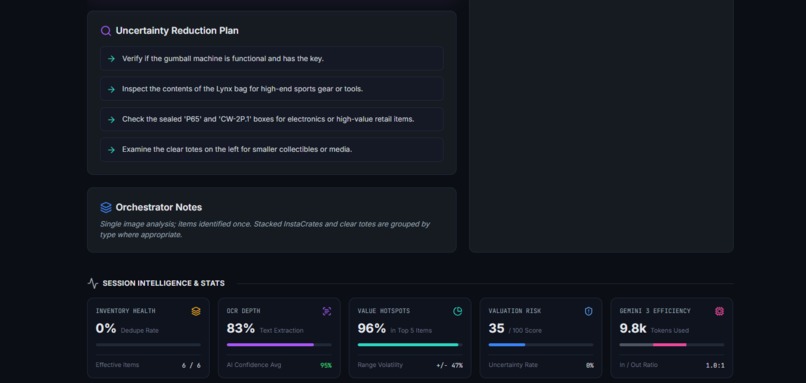
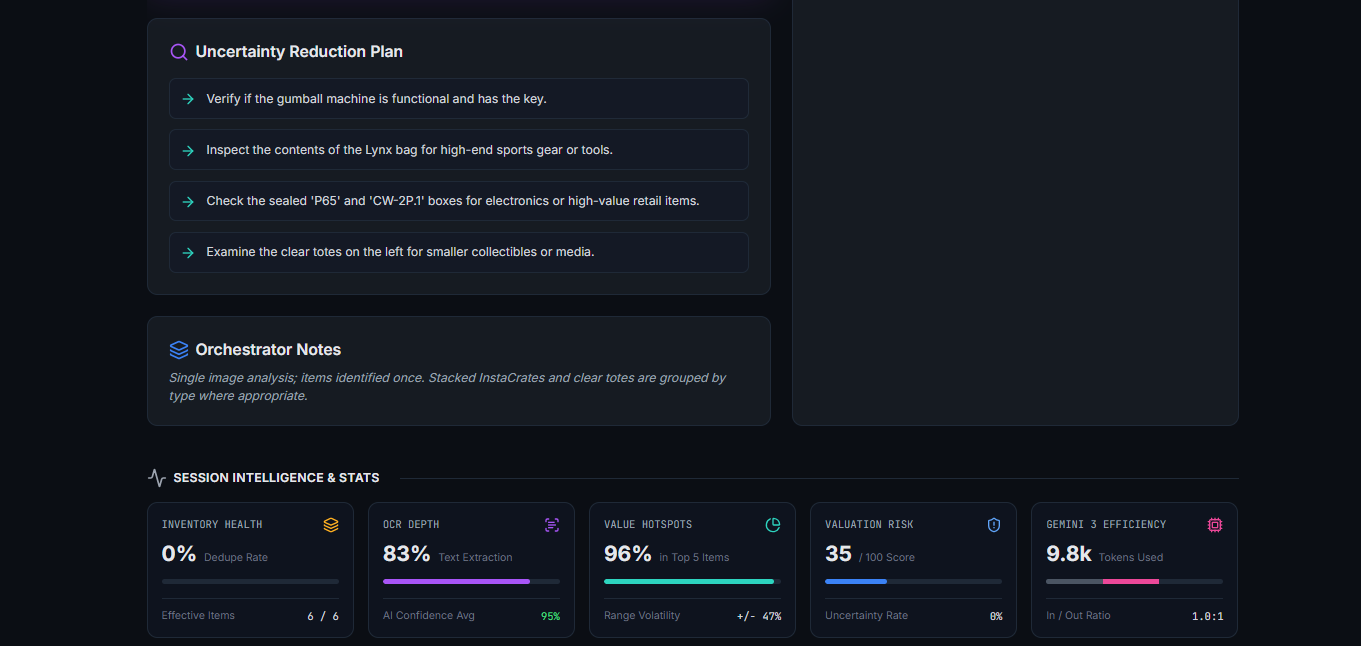
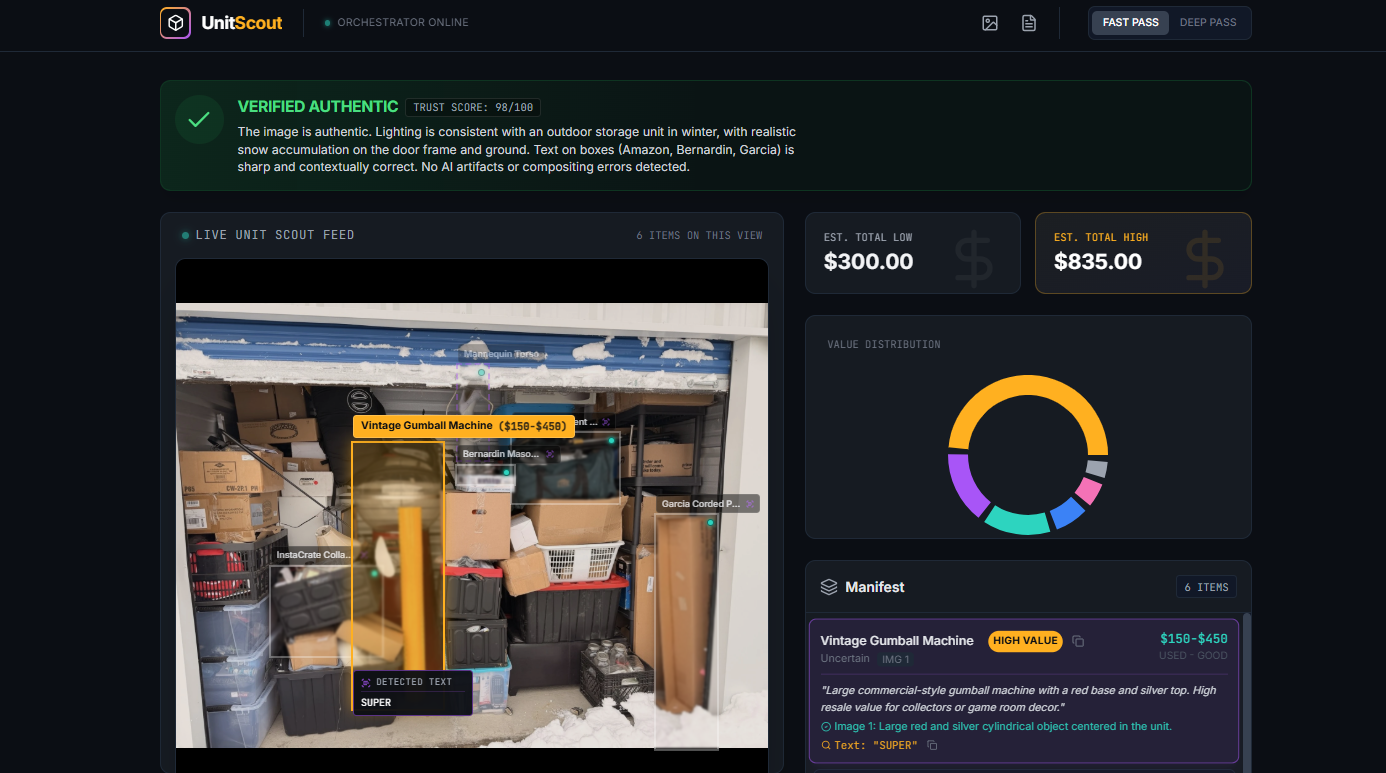
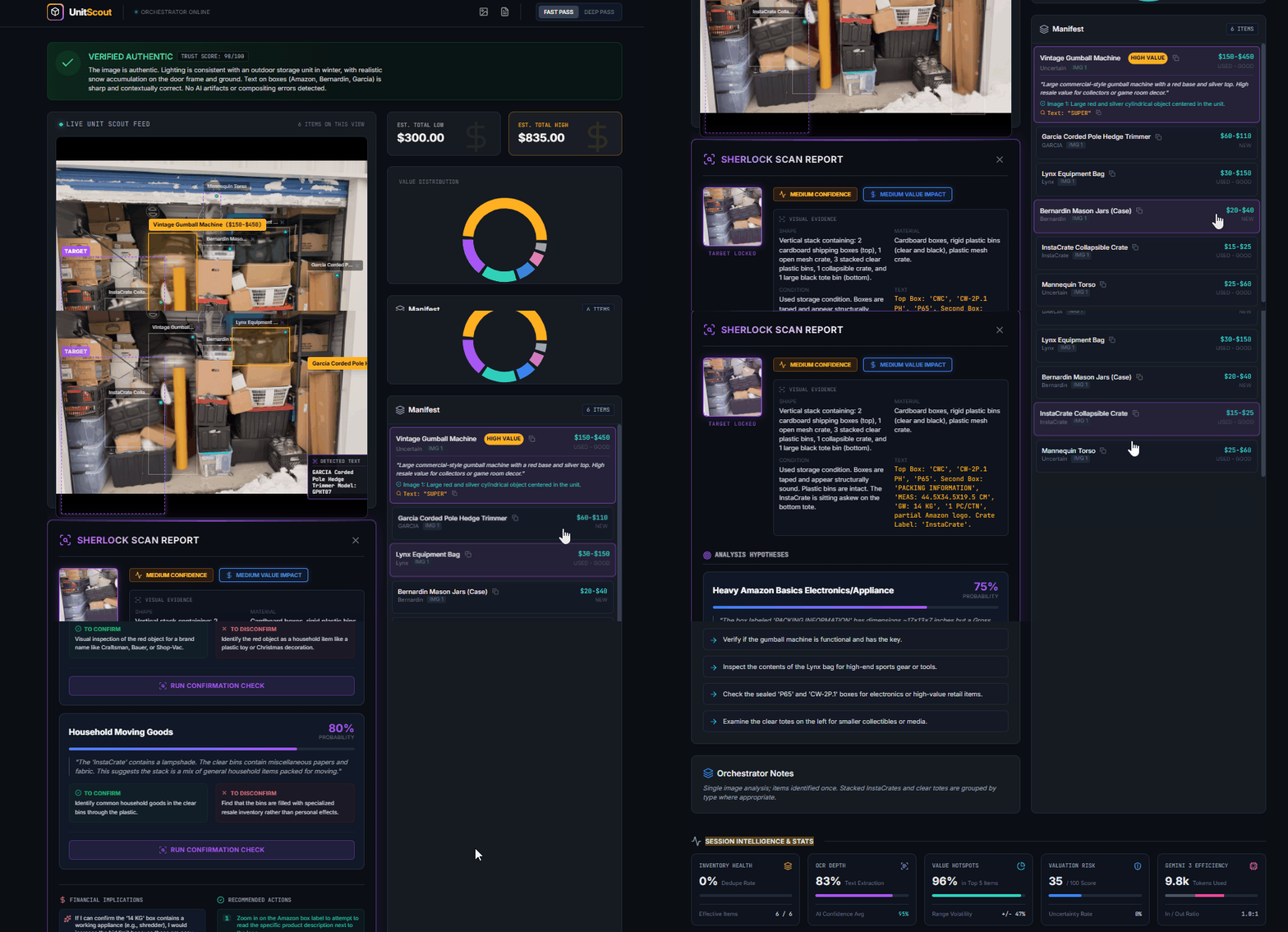
UnitScout - Intelligence and Stats section
-
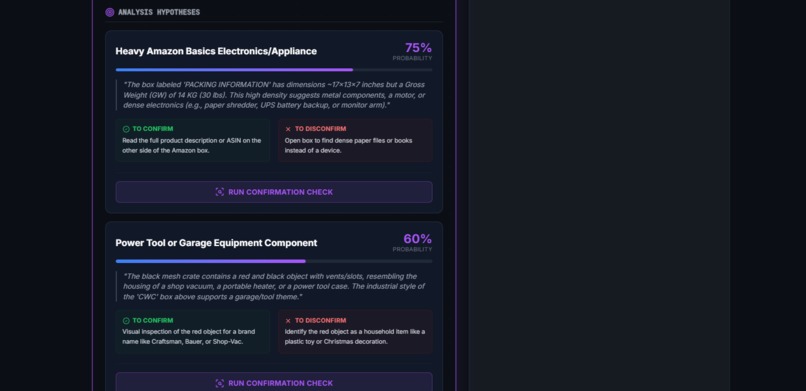
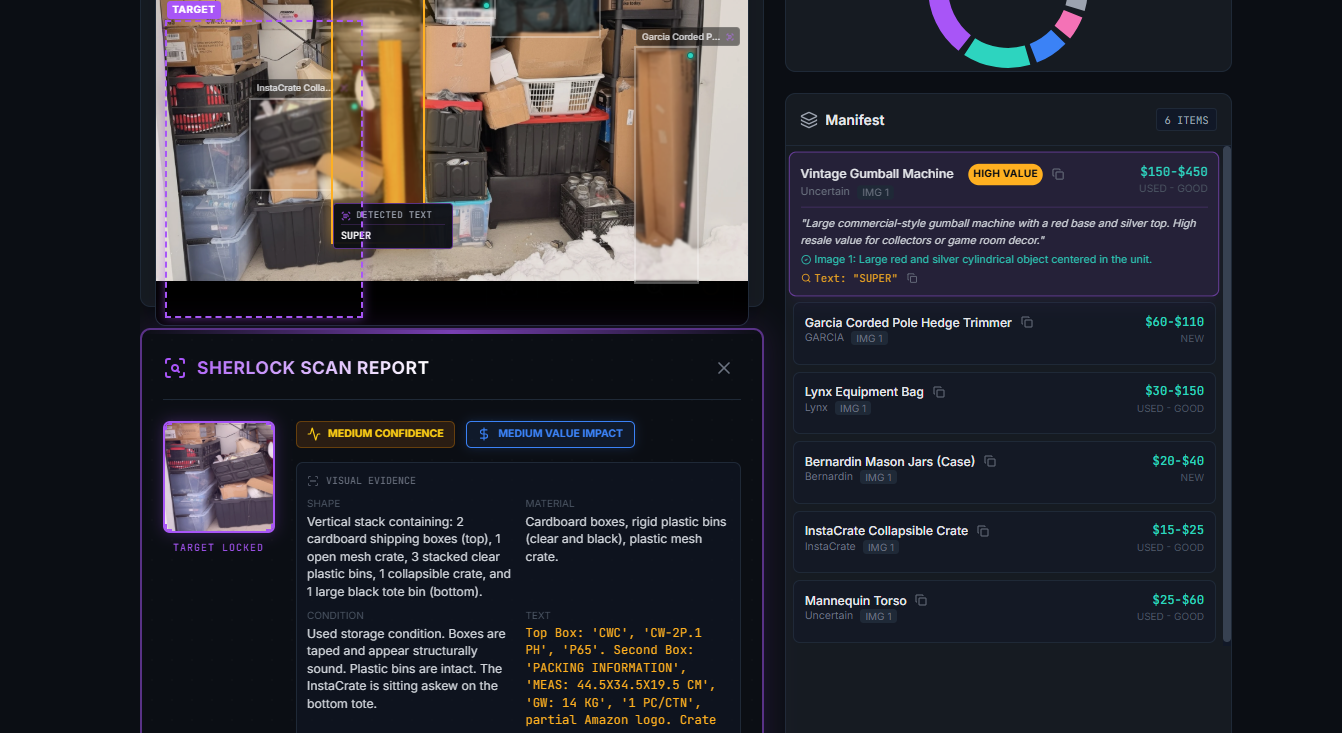
UnitScout - Sherlock Findings in the selected Target Area
-
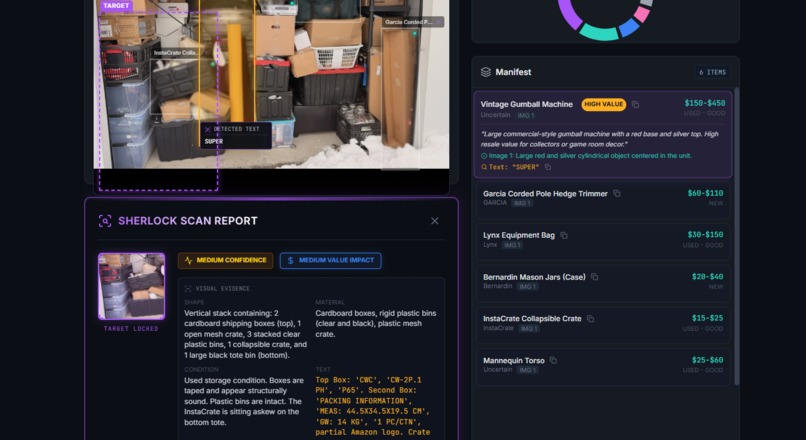
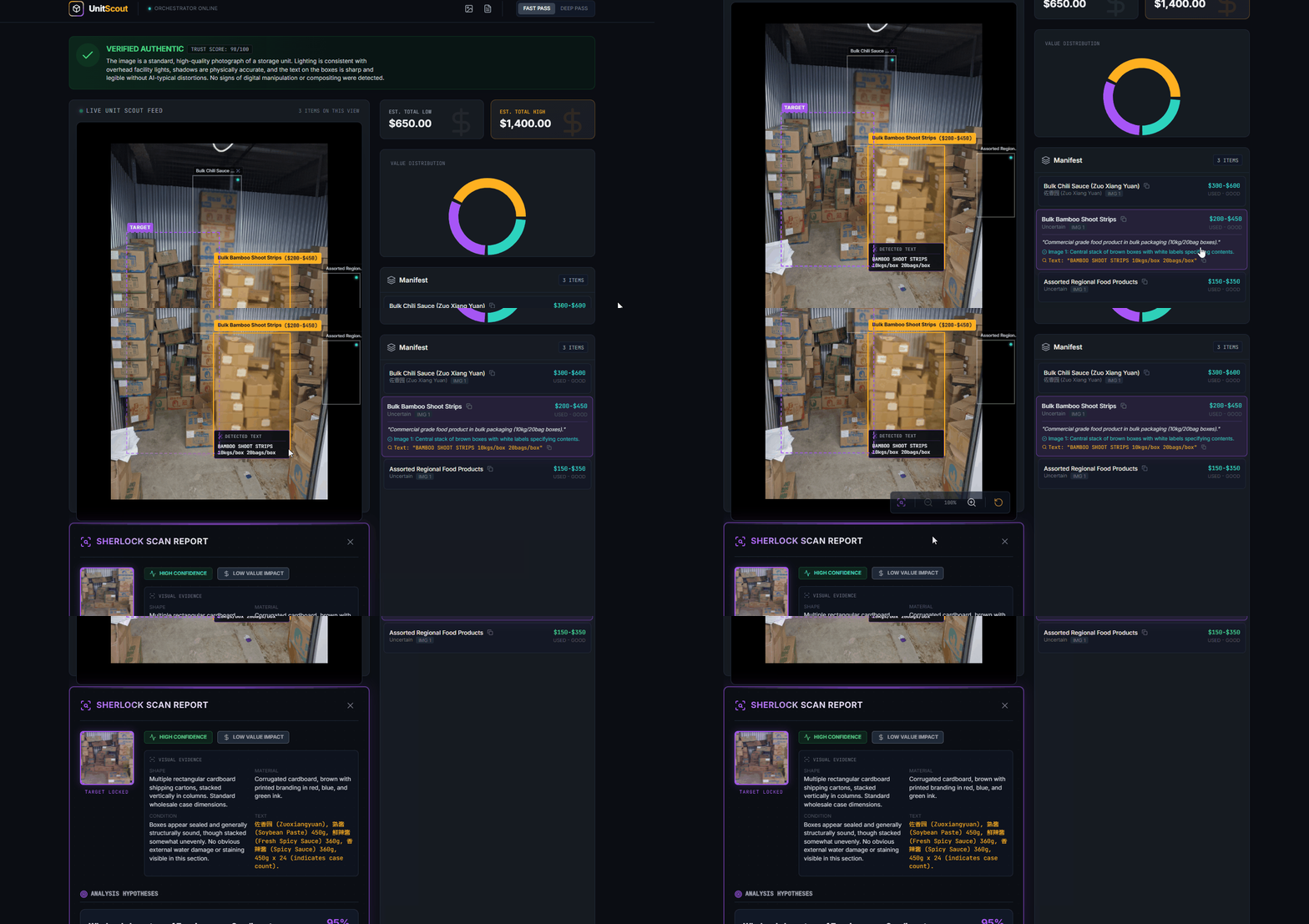
UnitScout - Sherlock Mode Activated and First Results
-
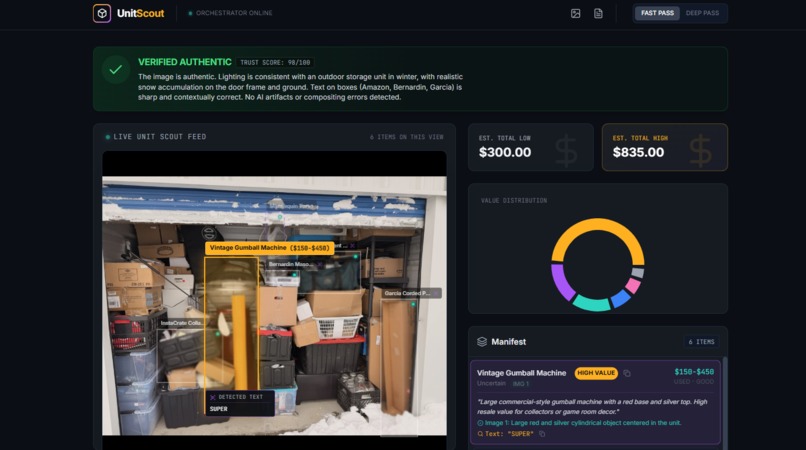
UnitScout - Upper Side of the Application
-
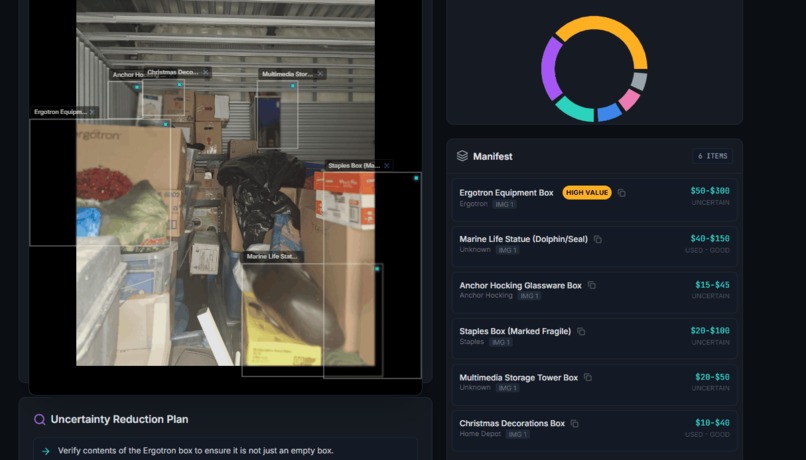 GIF
GIF
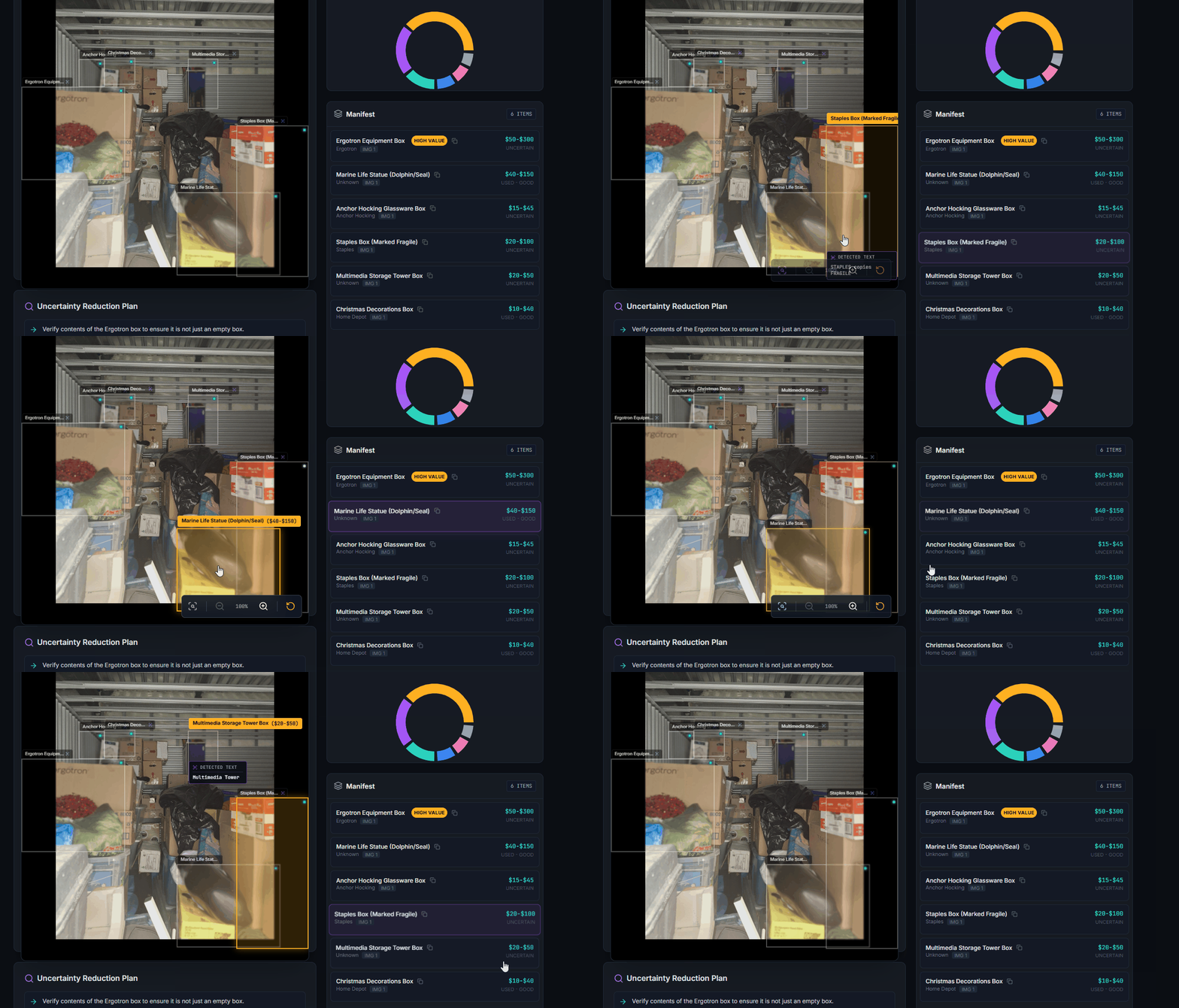
UnitScout - It is a Doplhin.... (I didn't see that right away)
-
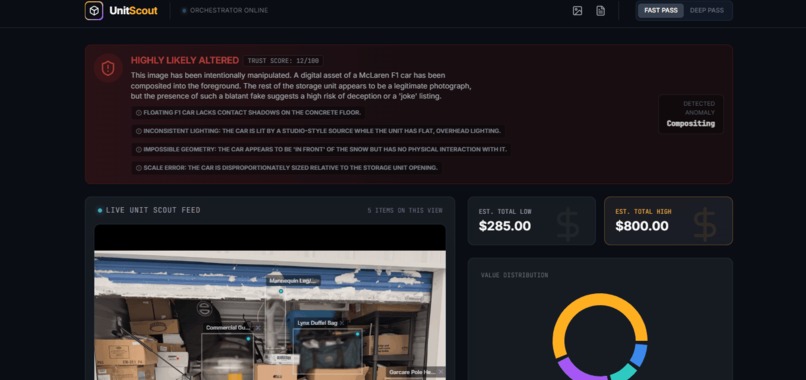 GIF
GIF
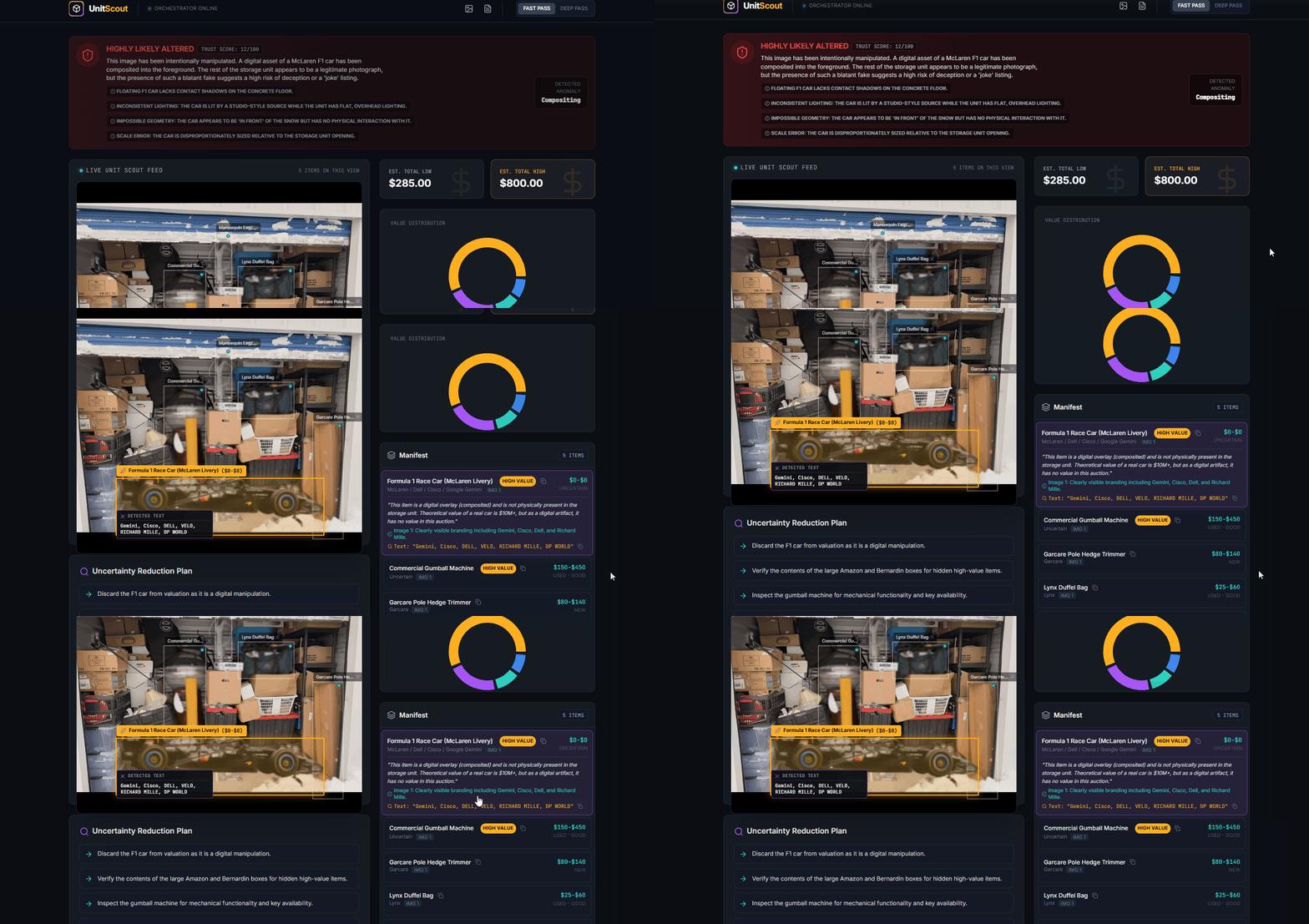
UnitScout - Altered Images detection with explanations on why and 0$ Value assignment
-
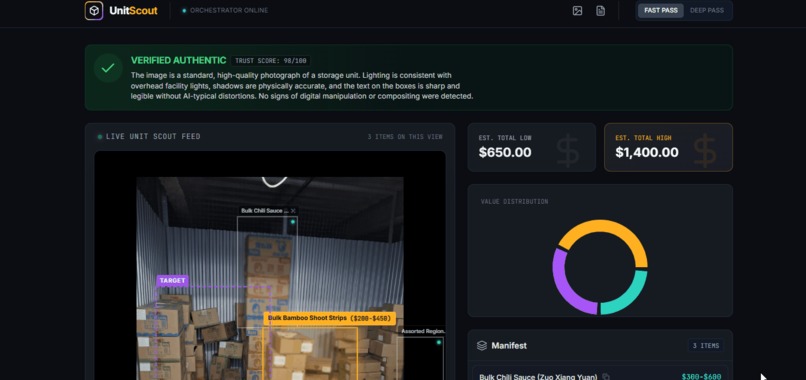 GIF
GIF
UnitScout - Translation from any Language and Explanation of the text
-
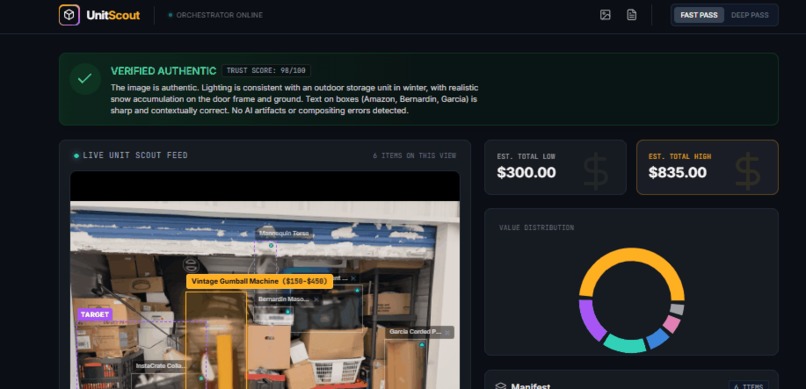 GIF
GIF
UnitScout - Interactivity on rectangles selection and Tokens spend per session
-
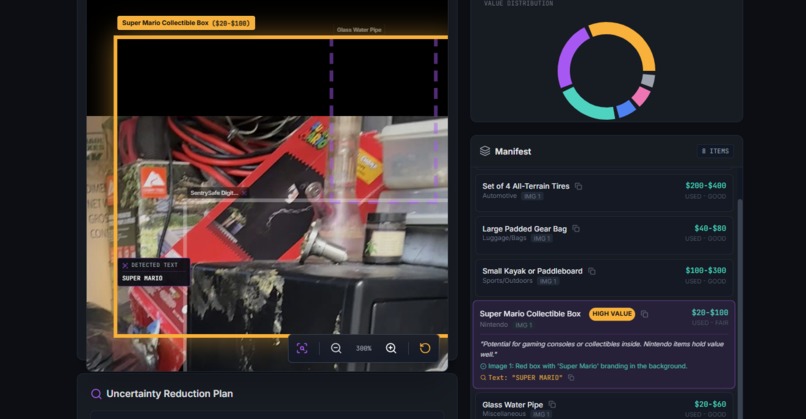
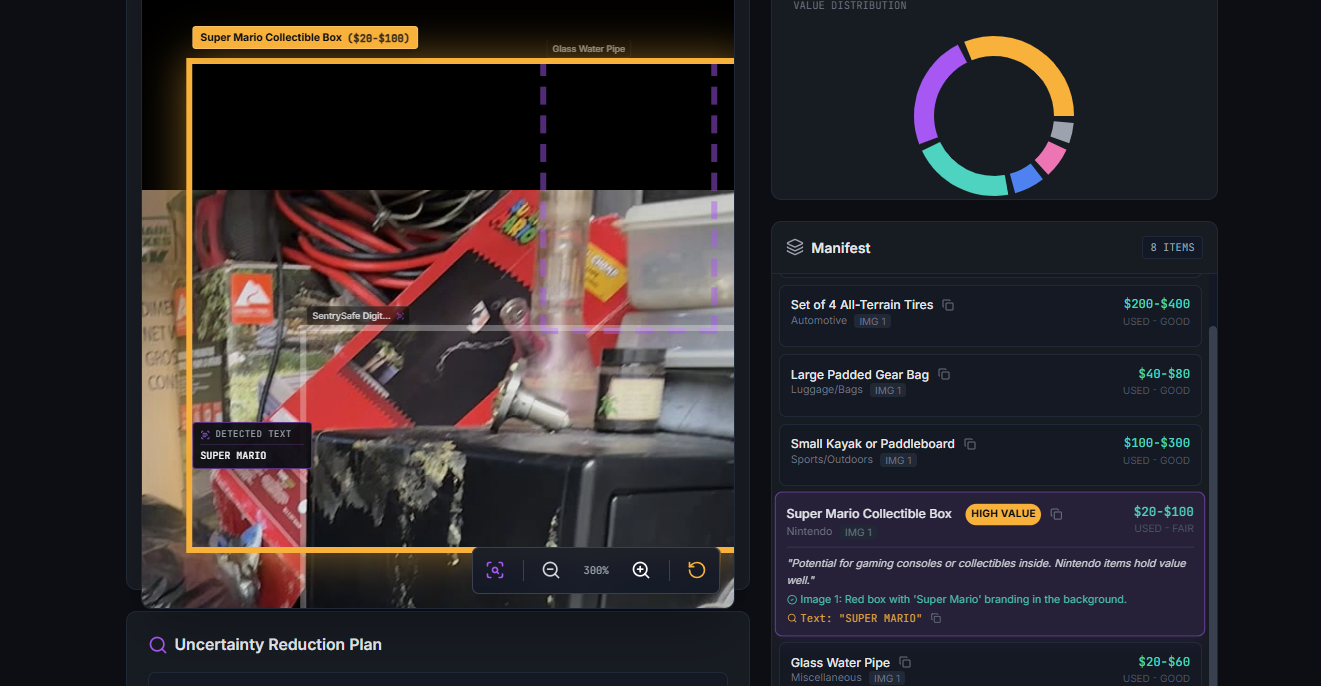
UnitScout - Collectables found - Super Mario!
Inspiration
Storage unit auctions are basically mystery boxes. You get a handful of photos, a quick description, and then you’re suddenly bidding like you know what’s in there. I watched an unhealthy amount of storage-auction videos on YouTube (the algorithm is working when it sees me). One person hits a jackpot - collectibles, antiques, jewelry, silver, even cash - while someone else walks away with a unit full of junk and in the end they have to pay for the garbage to be recycled or weight it at the garbage place. And the pattern is always the same: people gamble because they don’t have enough info or they don't have enough experience (usually those with experience know what they are looking for and where to sell it as this would be the main reason). Even experienced resellers miss small clues (they were watching after the images with that "aha" moment and "yep, it is right here and why I didn't see it?", misread what’s inside sealed boxes, or overestimate what they can sell on Facebook Marketplace or eBay and the experience is the key more than ever and I was just watching an unit that will expire in 12h and the bid rose to 1112$ and after 5 minutes I saw the price of the unit 5102$, which is insane after UnitScout found 2 safes (to be honest I'd not even bother as those were at the entrance... right? ). That’s where UnitScout came from: what if AI could inspect and zoom in and "reconstruct" the part of those auction photos better than we can and quickly tell you what’s likely there? What if it could estimate a realistic value range and call out the risks before you place a bid?
What it does
UnitScout is an AI-powered “money value hunter” for online storage auctions. You upload one photo - or multiple angles of the same unit - and it gives you a decision-ready breakdown: Inventory Manifest (what’s visible): It detects items in the photos, draws rectangles around them (boxes, electronics, furniture, bins, cases), and builds a structured list of what appears to be in the unit and mostly for those things that are visible as we don't want the app to advice on "assumptions" and we buy an expensive "garbage" unit.
Preservation: It is checking the feeling of the unit. It is important to understand if this is a good unit where the previous owner kept his things and not just took the best things and left the cheapest ones or even boxes filled with garbage with the intention of not paying (so the Storage company will initiate the auction on this unit).
Money Value Ranges: It estimates a resale range per visible item (assuming “used” unless the photo clearly shows otherwise), then totals the unit’s potential value (low vs. high). For sure, based on our experience, we need to keep in mind garbage utilization, U-Haul rent, our precious time, coffee, water, clothes etc...
$$$ Object Finder: It flags items that might be collectibles, antiques, jewelry, or art based on signals like labels, packaging, shapes, and context—without pretending it can see any things inside of the boxes which is valuable most of the time.
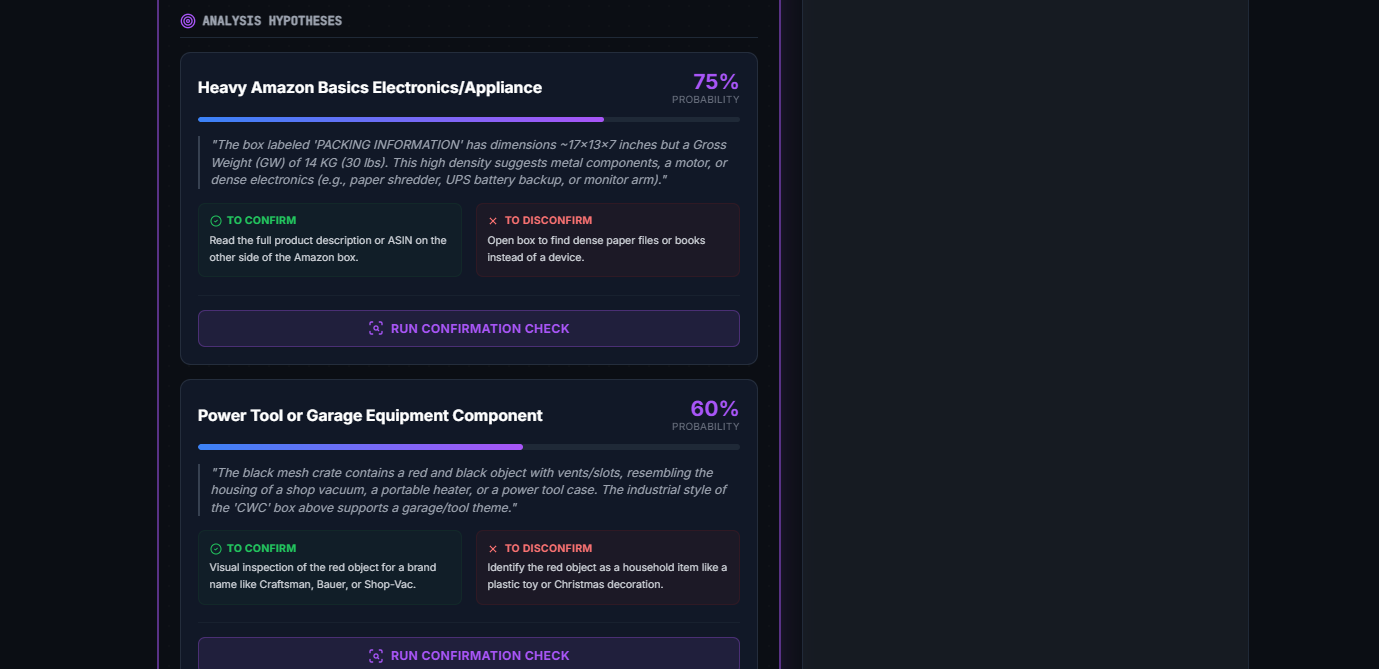
Sherlock Spot (clue finder): Click a rectangle and ask “What is this?” UnitScout returns: OBSERVED vs INFERRED Top 3 guesses + confidence The best next close-up to confirm Value/risk impact tier (High/Medium/Low) “What would change my recommendation if this is confirmed?”
Uncertainty Reduction Plan: A short, prioritized list of what to verify in person (mostly for Human Learning).
Bid Advisor: A practical max-bid recommendation based on the analysis and even sorted based on money.
Auto Translation: Detects labels in other languages and translates them (very common in Canada).
Image changes and alterations check: Flags signs that photos might be AI-altered, edited, or suspiciously “missing” important details. In short: UnitScout turns “guess and hope” into a data-driven bid in seconds.
How we built it
I built UnitScout in Google AI Studio using Gemini 3 as the core engine—no external vision models, and not just a “prompt-only wrapper.” I wanted it to feel like a real product with a real workflow which has in the background tons of paramaters/rules and uses them when it sees an image of a storage unit. Multimodal input (single or multi-image): Initially it was one photo, but soon I realized that multimodal is the key and added as input multiple images which is turning the identification from multiple angles of the same unit and we're getting a better view (even ED-ish). Some of the online auctions have videos even, but that could be even more expensive in the analysis and usually those are lower resolution. The app keeps the “unit context,” so follow-up questions and new photos build on what was already found, so it keeps everything in mind and acts with that logic to identify. Two-pass flow (Fast Pass -> Deep Pass) as we need sometimes faster results to justify what we see and Deeper Pass only when there is a need or we need to confirm and make another bid if we see the price is too high and the risk also.
Fast Pass (low latency): Quick scan for obvious objects + label text (OCR-style). OCR was an interesting approach as we need to identify what text is on the boxes, which can be a handwritten style (Christmas toys) or some text we are not even aware what it is and we need to have the possibility to copy the text and Google it. Outputs rectangles and early low/high totals. Amazed by the default interaction we saw and short text and the descriptions on the right hand side.
Deep Pass (more reasoning): Zooms in only on the highest value or highest uncertainty objects and this one would be creat to spend like 0.15$ just in case we already bid on something and we want to be sure on To Bid or Not To Bid. Tightens price ranges, improves identification, and produces risk logic + the bid recommendation even if it is very estimative, we NEED this in the last 10-15 minutes before the end of the auction. Usually we'd go: "OK, UnitScout is saying that this is min 250$ which is good and we have on top of that some boxed that cannot be checked and even in the back there are some boxes and even if those are empty we can get min 250 for this",
Structured outputs (so the UI stays consistent) Gemini 3 API returns a clean format: manifest rows, value ranges, confidence, risk notes - so the interface can reliably show:
- object list + value ranges
- flags (HIGH VALUE / UNCERTAIN)
- totals
- uncertainty plan (just in case we need to educate ourselves)
Sherlock Spot as a dedicated mode When you select a rectangle, it triggers a focused analysis that:
- isolates that region (found a monitor in a shaded area)
- separates observed vs inferred
- offers 3 hypotheses + how to confirm (one of my favourite feature especially when it is 90% up)
- explains how confirmation changes bid/value/risk
Token + latency strategy Fast scan first, deep reasoning only where it matters, and context reuse for follow-ups instead of re-processing everything from scratch and this feature is working Amazing as in most of the time we need to keep a lot of things in the context.
Challenges we ran into
Ambiguity is the default: Photos are cluttered, dark, half-blocked (small part of it visible), or it can be a tool which is broken. A lot of “objects” are just mystery boxes, but we usually know what the overall feeling is about this unit. I had to push the model to look for handwriting and tiny label clues. As an example UnitScout showed me a purple rectangle right next to the door with the label "Ford Label" and next to them I could see tires and it was an instant "aha" moment.
Hallucination risk: A valuation tool can’t “guess confidently.” The strict OBSERVED vs INFERRED split was non-negotiable, especially for sealed containers with the logic that usually if it would be total garbage, people would not pay the unit rent to keep it.
Deduping across multiple photos: The same item shows up from different angles. Preventing double-counting meant careful grouping logic and consistent object IDs and you can see it only one time in the Manifest section.
Pricing reality: Condition and missing parts aren’t always visible, so the ranges needed to reflect real-world risk instead of fantasy numbers. Usually the way I am thinking here is that if you check your basement you'd see a lot of clothes, tools and accessories and when you recall you actually spend hundreds of $$$ for each thing, so sometimes we need to use our experience.
Speed vs cost: Deep reasoning is great, but bidders won’t wait. The Fast/Deep split was essential. Anyway the Deep Pass is under 1 minute and usually this check and conclusions occur well before the end of the auction, so we are well prepared and useAI only where we need it.
Restore: I had to use the “restore” button because sometimes you need to roll back and try a different prompt path when results drift.This is more of an AI Studio functionality, but sometimes we need to start playing with the format and resize the browser or other functionality and I used the Annotation button few times and it worked like a magic (feels like you're explaining to a software engineer what to fix and where it should be fixed - just this one will fixe it within 1-2 minutes no matter of the complexity. WOW)
Accomplishments that we're proud of
A real workflow (not a prompt wrapper): Fast Pass -> Deep Pass balances speed, quality, and token cost, all the possible parameters the app has along each API request based on the image.
Actionable output, not a wall of text: The Uncertainty Plan + Bid Advisor turns analysis into an actual help for the best decision and more information details.
**Sherlock Spot* is the “wow” feature: Clicking a region and getting a focused investigation feels like having an AI partner on-site which is working for you and sees more than you.
Multi-image support: Uploading multiple angles significantly improves completeness and confidence as it sees the Unit as a 3D angle. Of course, not every time as sometimes "not on purpose" they are using older phones with lower photo resolution which cannot be resized easily etc.
Trust-first design: Confidence levels, uncertainty handling, and “verify this next” steps - no fake certainty, not reducing the quality in some parts and no AI intervention to make people bid more.
What we learned
The best AI products aren’t just smart answers — they’re smart workflows. Orchestration matters as much as the model. Transparency beats confidence. OBSERVED vs INFERRED is what makes it usable for real money decisions.
Uncertainty is a feature. Showing the highest-ROI checks makes the output practical. Pay if you need or if you want to be sure or if you can see that you can take advantage of this specific lot.
Token efficiency comes from focus. Deep reasoning should be reserved for the true value/risk drivers. We don't want to add too many unnecessary things that will replace our actions and use AI there, so we use AI only where it is reasonable and we cannot use our experience.
What's next for UnitScout - Never gamble online on a storage locker again.
Stronger multiple images fusion + better dedupe: Fewer duplicates, better grouping, clearer evidence links. Interactive “Ask the Unit” chat: A persistent Q&A that references the manifest, risk score, and Sherlock Spot.
Market comps (optional): Evidence-backed comps for top items (exact/partial/generic match quality).
Video walkthrough mode: Short video input for a more realistic “inspection.”
Personal bidding profiles: Conservative vs aggressive modes, fee assumptions, and profit targets, maybe identifying scams from the auction sites (not all of those auctions sites are fair).
UnitScout’s goal is simple: turn storage auctions into informed decisions - fast, transparent, and genuinely fun.
Geo analysis - sometimes people are not willing to go too far and maybe include person's location (I live in Ontario, Canada and I remember I was looking for top fishing spots in Ontario and #1 was 1,800Km when I tried to check the location and this was the moment when I realized the size of the province I am living in).
Unit Weight - if it is full with boxes, there are more chances to find more $$$ value, but if you have a simple car you will not be able to carry all of it and you might need to rent a U-Haul (and pay the gas). So, as you can see there is a lot of math in place and AI Studio is great at adding these features to our app and using it.
And if someone asks: “Can UnitScout connect to bidding sites, scan all auctions, and sort the best ones?” My answer is: it could… but that’s not the point. In most of the cases there are a few photos of the unit and taken from the Front side, which reduce the visibility. We just need the AI to do the "due-dilligence" check for us so we know these are real photos and we have an overall "feel" of the unit.
Let AI handle the thinking, and let humans handle the clicking. No need to fight with bidding site licenses or burn tokens doing simple browsing. People do their jobs and AI just helps them do it smarter.
Happy bidding and thank you so much for the AI Studio. Adrian
Built With
- aistudio
- annotations
- api
- gemini3


Log in or sign up for Devpost to join the conversation.