Inspiration
9:25 AM, New Haven, CT. Ian was in math class, trying and failing to type his notes in LaTeX. Sida in Linguistics class, struggling to juggle paying attention with typing IPA symbols in his notes. Eric was working on web dev, and wished he had a tool to help him with colors and hex numbers. Millions of people around the world were swiping, trying to find that one perfect emoji they wanted to use.
Why do different symbols require different input methods? Why do you need specialized softwares and tools to do simple text transformations and replacements? Enter Unikeyboard, the last input method any STEM major—and anyone—will ever need.
What it does
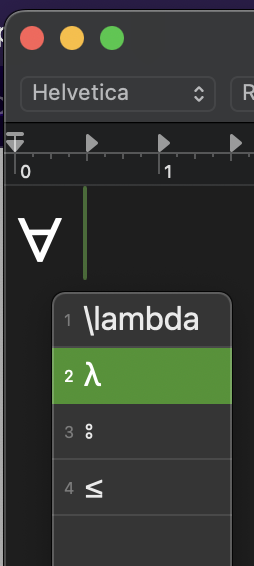
Entering Unicode has never been easier. Now, you can type STEM notes directly into Google Docs or Word, without having to use a LaTeX editor or other specialized program. Out of the box, we support LaTeX symbols, International Phonetic Alphabet, emojis, and more.
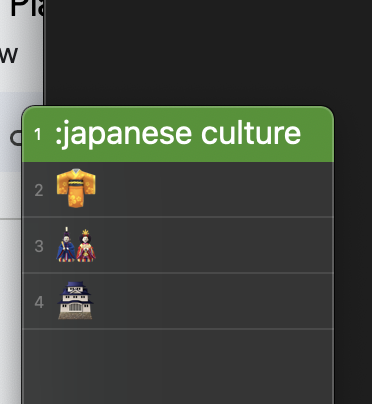
With smart semantic search, Unikeyboard knows exactly which Unicode character you want, even if you forgot its exact name. Type ":japanese culture:" and get a plethora of related emoji. Or, type "\union" and the correct LaTeX symbol (which is called "\cup") will come up.
If you're a developer, Unikeyboard is for you. Any text conversion you needed a specialized website for, you can now directly perform it as you type—from RGB/HSV to binary/hex/decimal, convert them hassle-free.
How we built it
- Unikeyboard is a native macOS application built with Swift and the macOS IMK (InputMethodKit) SDK.
- Our semantic search powered by a BERT model hosted on Cloudflare AI.
- Our strong search function is driven by a collection of open data, including Emojipedia, open-source Github repos, and a keyword database sourced from GPT, Wikipedia, and more.
Challenges we ran into
Our biggest challenge, ultimately, is that all three of us had never done Swift before this hackathon. We decided to make this experience a learning experience that reaches beyond our comfort zone into something we are passionate but uneducated about. And it turns out that native development is much more challenging than web development. The first issue we ran into was the very limited and outdated Apple documentation for the IMK SDK. After extensive research, we realized we were one of maybe five public projects that used the SDK, and there's very scarce guidance to navigate through the APIs. We also ran into issues with Apple Code Sandbox, and had to change our approach to loading semantic data from the server. We are especially grateful for CloudFlare's super-easy-to-deploy Worker AI product that helped us set up a production-ready API in 30 minutes, after we battled with CoreML, PyTorch, sandboxes, and whatnot for 6 hours.
Accomplishments that we're proud of
First of all, we make a really cool tool that we will actually use in class. We are the first users of our own product and our own experience will help driving it forward. Looking back, we are especially proud that we persevered, even though Google and StackOverflow were little help with the poorly documented SDKs. Within 36 hours, we went from absolute ignorance about Swift and macOS development to somewhat fluent app developers who can turn ideas into code. Finally, we are proud to have integrated many different aspects of technology—native app, web scraping, self-hosted model, ChatGPT API, etc.—into a single and coherent product, in a way that proves to work and works well.
Built With
- chatgpt
- cloudflare
- huggingface
- python
- swift

Log in or sign up for Devpost to join the conversation.