UniFind
Overview:
Course: COMPSCI 2XB3
Lab Section: L02
Group: 3
Team Members:
1) Jiwoo Lee - leej229 - 400182530
2) Jennie Li - lij416 - 400204743
3) Zoe Ning - ningh4 - 400183343
4) Cynthia Liu - liuy363 - 400172720
5) Jeehyun Yoon - yoonj13 - 400134040
Description:
UniFind is an Android app that implements searching/sorting algorithms to find and rank universities and their programs in Ontario. The university application process is undoubtedly one of the most stressful times of highschool years. Most students spend hours trying to find related information and statistics on the university/program they desire and try to conceptualize their relative choices based on the information they find off the web. This process can be highly inefficient and time consuming, so UniFind aims to organize this process into a more effective and manageable one by providing algorithmic solutions in sorting Universities and their programs by categories such as ranking, admission average, tuitions, using related datasets.
Demo:

Also look at ~/cs2xb3-final/Report/Demo/demo.mp4
Features:
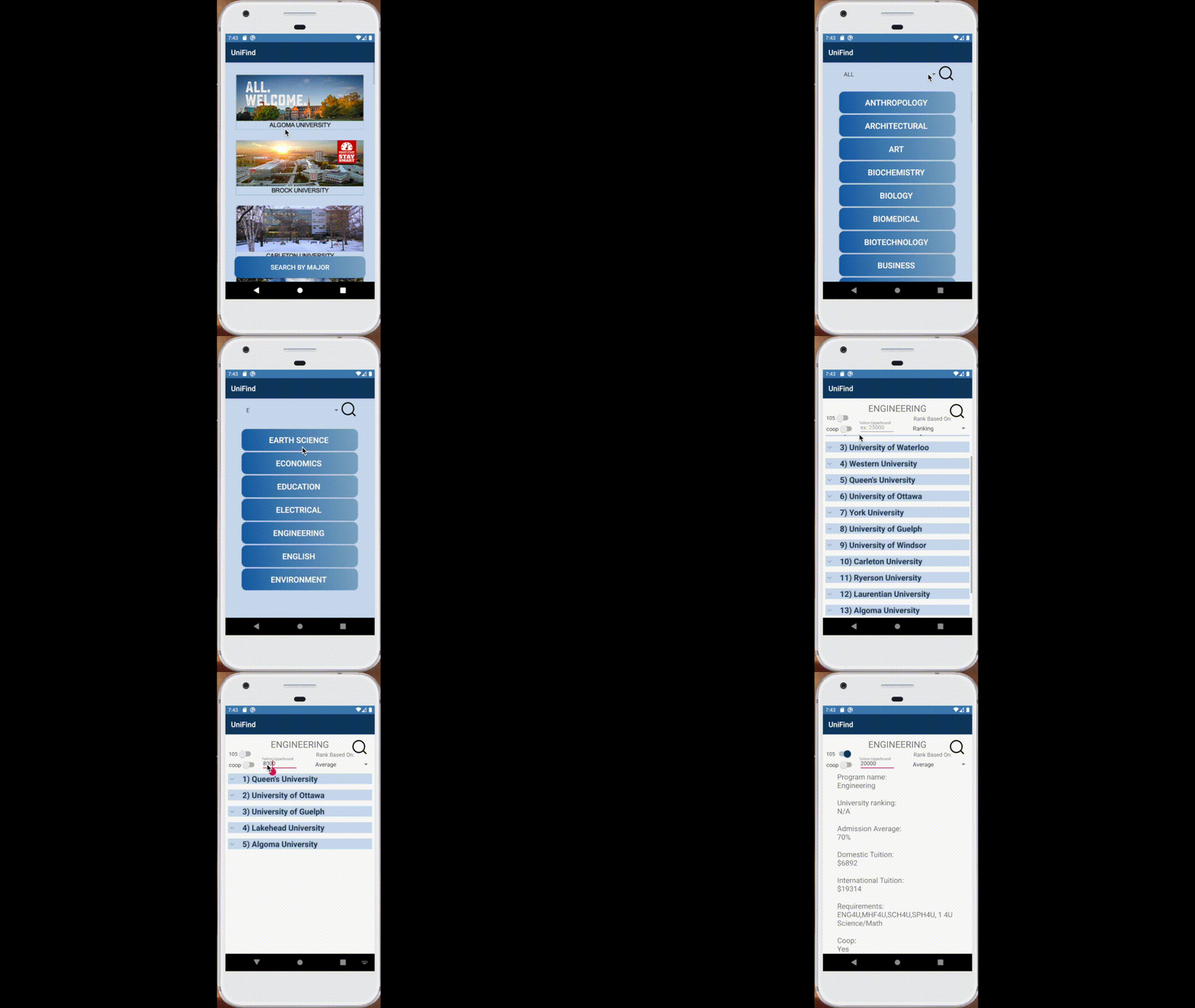
First Page: Displays information of all universities in Ontario in alphabetical order. If you click on one of them it navigates to that university's official admission website. It also has a button on the bottom to navigate to the next page (MajorActivity.java)
Second Page: Has buttons that corresponds to the major the user wants to search/sort for. For example, if user selects "Computer Science" button, the page navigates to the next page and displays the ranking of all universities that have computer science programs. It also has a filter function where you can search for specific button that starts with the desired character. For example, if user selects "C" it will only show buttons that has names that start with a "C".
Third Page: This is the class(page) where algorithms come in to play. In this class, using csv reader methods, we obtain the information from our ~20 csv files from raw directory and organize them into Program/University objects. We save this whole data into ArrayList as a state variable. Upon creation, this page displays the major the user chose in the previous page according to “ranking” in decreasing order. To customize sorting/filtering options, there are the following functionalities:
1) 105 Switch = turn on to focus on international tuition (when sorting based on tuition or apply max bound on tuition)
2) Coop Switch = turn on to filter programs for only programs that have coop
3) Tuition Upperbound Text Field: input the upper bound on tuition of that program (if input is 10000, the app will filter for programs whose tuition (domestic/international depending on 105 switch status) is less than or equal to the input.
4) Rank Based On Spinner: select one of “ranking”, “admission average”, “tuition”. For example, when ranking is chosen, the app will sort the programs depending on the university’s world ranking, in increasing order. For admission average, it will sort in decreasing order, and for tuition, it will sort in increasing order
5) Refresh button – the changes made by the above functionalities will hold effect only after the refresh button is pressed. When it’s pressed, the app will filter/sort through the programs again and generate a new list view that corresponds to the filter/sorting result
Prerequisites/How to Run this Project:
1. Android Studio - run the android app with full functionalities. Import the Android Project ~/cs2xb3-final/UniFind on Android Studio and run simulator.
2. (OR) Eclipse- run the terminal app that demonstrates the core functionalities of the app with limited choices. Unzip the file and Import the Eclipse Project ~/cs2xb3-final/2XB3GR03FinalProject

Log in or sign up for Devpost to join the conversation.