-
-
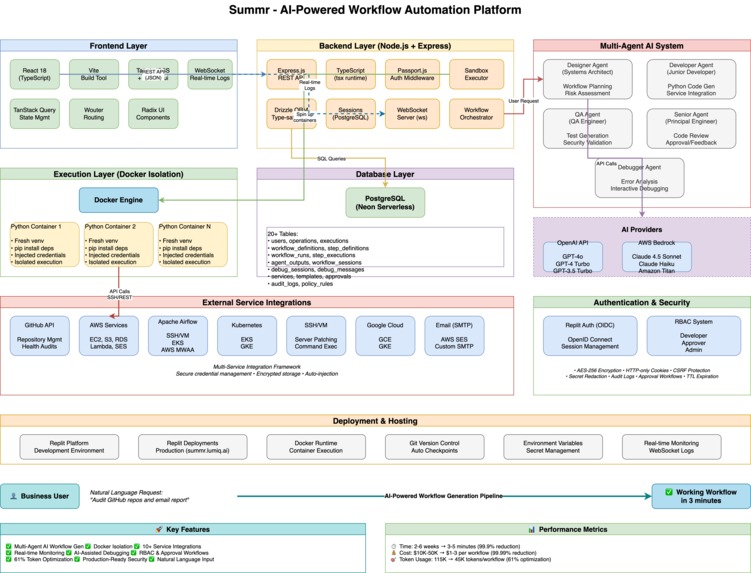
Architecture Diagram
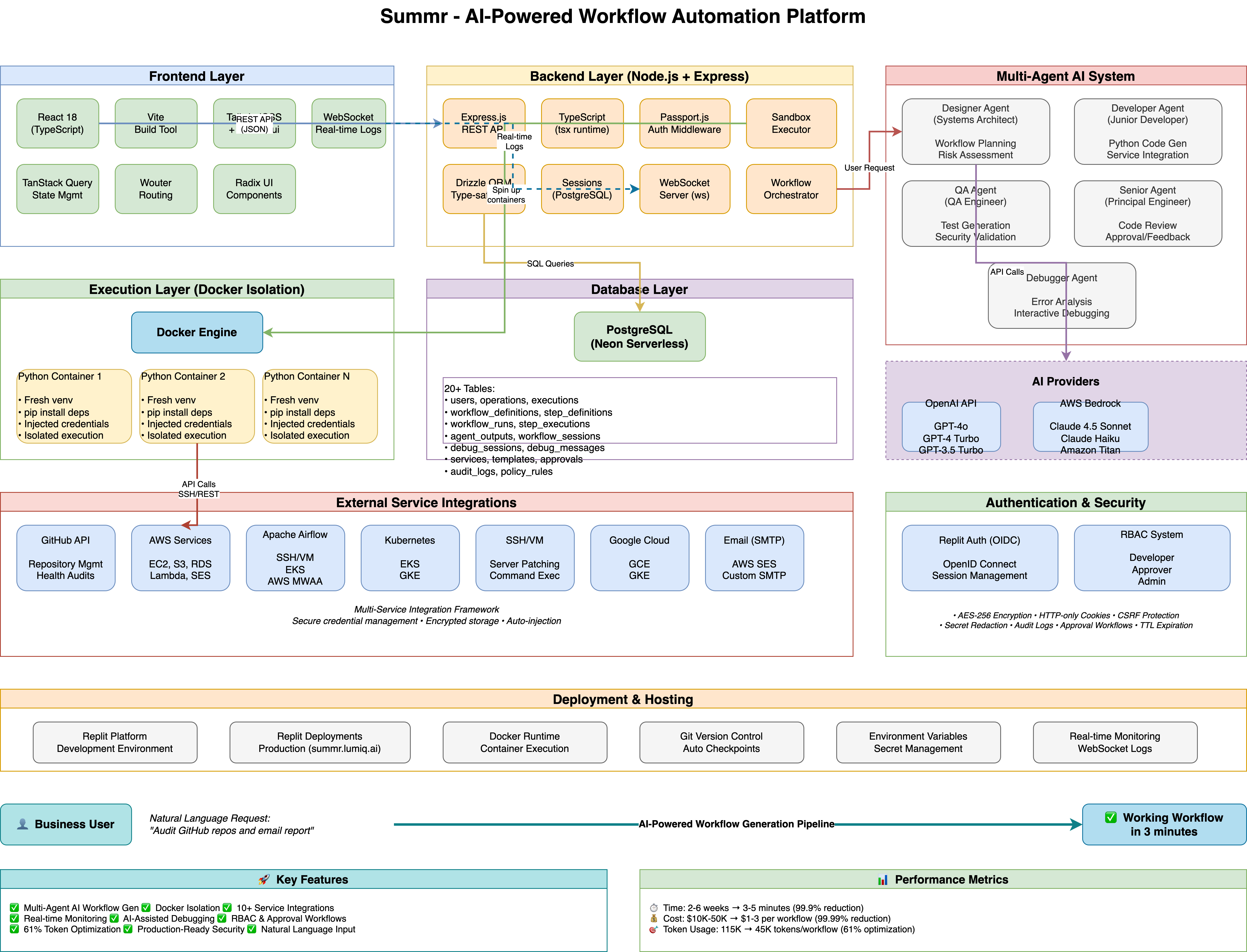
Summr - AI-Powered Workflow Automation Platform
The Problem
In traditional enterprise environments, the journey from a business user identifying an automation need to a working solution is painfully slow and expensive:
- Business User: "We need to monitor our Airflow DAGs and auto-restart failed ones."
- Dev Team: "Sure, we'll add it to the sprint backlog. ETA: 2-3 weeks, $15K-30K in dev costs."
- Business User: "But the DAG is failing right now..."
This cycle repeats across every operational task: patching servers, auditing GitHub repositories, monitoring databases, responding to incidents. Each automation requires:
- Requirements gathering (days)
- Development & testing (weeks)
- Security review (days)
- Deployment & training (days)
- Total cost: $10K-50K per workflow
- Total time: 2-6 weeks
The fundamental question: Why does it take weeks and tens of thousands of dollars for a developer to write what amounts to a Python script?
The Vision: Summr
Summr flips this model on its head. Business users describe what they want in plain English, and AI generates production-ready, secure, multi-step workflows in minutes—not weeks.
"GitHub repository health audit with email reports" → Working workflow in 3 minutes
How We Built It
Architecture: Multi-Agent AI Team
Instead of a single AI trying to do everything, we built a 4-agent engineering team:
Systems Architect (Designer Agent)
- Analyzes user request
- Designs multi-step workflow with dependencies, branches, error handling
- Assigns risk scores and safety guardrails
- Outputs: Workflow architecture blueprint
Junior Developer Agent
- Implements each step as isolated Python code
- Handles service integrations (AWS, GitHub, SSH, Airflow, etc.)
- Manages credentials securely via environment variables
- Outputs: Production Python code for each step
QA Engineer Agent
- Generates comprehensive test code
- Validates inputs, outputs, error handling
- Checks for security issues (credential leaks, unsafe operations)
- Outputs: Test suite with assertions
Principal Engineer (Senior Agent)
- Reviews all code from Developer and QA
- Provides feedback on quality, security, best practices
- Approves or requests improvements
- Outputs: Go/No-go decision with detailed feedback
Iterative Refinement
The agents work in iterations (max 3 automatic, unlimited manual):
User Request → Designer creates plan →
  For each step:
    Developer writes code → QA writes tests → Senior reviews both →
    If issues found: Developer improves based on feedback →
  End loop →
Final approval → Deploy workflow
Isolated Execution: Docker Sandboxes
Every workflow runs in an isolated Docker container with:
- Fresh Python environment per execution
- Automatic dependency installation (
pip install) - Secure credential injection (no hardcoded secrets)
- Complete isolation (no cross-contamination)
- Full logs captured for debugging
AI Provider Flexibility
We support OpenAI and AWS Bedrock:
- OpenAI: GPT-4o, GPT-4 Turbo, GPT-3.5 Turbo
- AWS Bedrock: Claude 4.5 Sonnet, Claude Haiku, Claude 3.x, Amazon Titan
Token Optimization: We reduced token usage by 61% (115K → 45K tokens per workflow) through:
- Context summarization (Designer plan condensed for other agents)
- Filtered feedback (only relevant step feedback in iterations)
- Lazy-loaded policies (send names, not full rules)
- Removed redundant service configs
What We Learned
1. Multi-Agent > Single Agent
Our first attempt used a single AI to generate entire workflows. Results: Inconsistent quality, poor error handling, security issues.
Solution: Specialized agents with clear responsibilities dramatically improved output quality. Just like real engineering teams, specialization works.
2. Context is Expensive
Sending the full Designer plan to every Developer call (5 steps × full plan = 5× duplication) wasted ~50K tokens per workflow.
Solution: Summarize the plan, send only current step details + dependencies. Savings: ~70K tokens/workflow.
3. Iteration Policy Matters
Early versions auto-iterated endlessly, burning through API credits.
Solution:
- Automatic mode: Max 3 iterations
- Manual mode: Unlimited iterations, user-triggered
- QA auto-regeneration for critical issues (max 2 attempts)
- Clear quality gates: Block finalization if critical issues remain
4. AI-Assisted Debugging is Essential
When workflows fail, users need help understanding why.
Solution: Built an AI Debugger Agent that:
- Analyzes workflow code, errors, logs, and outputs
- Provides interactive chat-based debugging
- Suggests fixes with code snippets
- Maintains debug session history
5. Docker Isolation is Non-Negotiable
Running arbitrary Python code on the host system? Recipe for disaster.
Solution: Every execution gets a fresh Docker container. Security, isolation, and reproducibility.
Challenges We Faced
Challenge 1: "Failed to create isolated Python environment"
Problem: Docker container creation failing on production deployments.
Diagnosis: Production environment lacked Docker daemon access or proper permissions.
Solution: (In progress) Verify Docker availability, implement fallback mechanisms, improve error messages.
Challenge 2: Branch Condition Type Mismatches
Problem: Workflow orchestrator used [] as default for all variable types when evaluating branch conditions.
Error: TypeError: '<' not supported between list and int
Example:
if retry_count < 3: # retry_count defaulted to [] instead of 0
Solution: Implemented type-aware defaults:
switch (outputType) {
  case 'number': return 0;
  case 'string': return '';
  case 'boolean': return false;
  case 'array': return [];
  case 'object': return {};
  default: return null;
}
Challenge 3: GitHub Token Naming Mismatch
Problem: AI-generated code used personalAccessToken, but system injected credentials as github_token.
Error: NameError: name 'personalAccessToken' is not defined
Solution: Updated AI agent prompts to use correct variable names matching system injection schema.
Challenge 4: Database Import with Foreign Keys
Problem: Importing production data into dev database failed due to foreign key constraints.
Error: ERROR: update or delete on table violates foreign key constraint
Solution: Used TRUNCATE CASCADE to handle all foreign key dependencies atomically:
TRUNCATE TABLE debug_messages, debug_sessions, ... CASCADE RESTART IDENTITY;
Challenge 5: Token Costs at Scale
Problem: Each 5-step workflow consumed 115K tokens (~$2-3 per workflow generation).
Impact: 100 workflows/day = $200-300/day in API costs.
Solution: Aggressive optimization (summarization, filtering, deduplication) → 61% reduction.
New cost: ~$0.80-1.20 per workflow. $80-120/day for 100 workflows.
Key Technical Achievements
1. Service Integration Framework
Built a multi-service connector system supporting:
- AWS (EC2, S3, RDS, Lambda, etc.)
- Google Cloud Platform
- Kubernetes (EKS, GKE)
- GitHub
- Apache Airflow (SSH, EKS, AWS MWAA deployments)
- Slack
- Generic SSH/API endpoints
Each service has secure credential management with encryption at rest.
2. Apache Airflow L1/L2 Auto-Remediation
Implemented Connector Interface Contract (CIC) for multi-environment Airflow support:
interface AirflowConnector {
  probe(): Promise<AirflowHealth>;
  diagnose(dagId: string): Promise<DiagnosisResult>;
  executeAction(action: RemediationAction): Promise<ActionResult>;
  verify(): Promise<VerificationResult>;
}
Supported connectors:
- EKS Connector: Kubernetes-based Airflow
- AWS MWAA Connector: Managed Airflow
- SSH/VM Connector: Self-hosted Airflow
AI understands Airflow specifics and generates intelligent remediation scripts.
3. Production-Grade Security
- Replit Auth (OIDC) with PostgreSQL-backed sessions
- RBAC: Developer, Approver, Admin roles
- Encrypted credentials (AES-256)
- Audit logs for all operations
- Approval workflows for high-risk operations
- TTL-based operation expiration (auto-cleanup)
- Secret redaction in API responses
4. Real-Time Workflow Monitoring
Built comprehensive monitoring with:
- Real-time execution logs (WebSocket streaming)
- Step-by-step execution tracking
- Agent output inspection (Designer, Developer, QA, Senior)
- Execution history with filtering
- Debug session management
Impact & Results
Time Reduction
| Traditional Approach | Summr |
|---|---|
| 2-6 weeks | 3-5 minutes |
| Reduction: 99.9% |
Cost Reduction
| Traditional Approach | Summr |
|---|---|
| $10K-50K per workflow | $1-3 per workflow |
| Reduction: 99.99% |
Business User Empowerment
- No coding required
- Natural language input
- Instant preview of workflow
- Self-service automation
- Full audit trail and governance
Use Cases Delivered
1. GitHub Repository Health Audit
- Scans all repos for best practices
- Generates health scores (0-100)
- Identifies stale branches, missing files
- Sends HTML email reports
2. Airflow DAG Auto-Remediation
- Triggers and monitors DAG executions
- Auto-retries failed DAGs
- Sends success/failure notifications
- Full execution history
3. Linux Server Patching with Docker
- SSH-based system updates
- Docker container state management
- Pre/post-patching validation
- Automatic container restart
- Email reports on success/failure
Future Vision
Summr is on a path to become the enterprise L1/L2 auto-remediation platform:
- Expanded Service Integrations: Datadog, PagerDuty, Jira, Terraform
- Incident Response Automation: Auto-triage, auto-remediate, auto-escalate
- Natural Language Playbooks: "When CPU > 80%, scale workers and notify team"
- Learning System: Improve workflows based on execution history
- Multi-Tenant SaaS: Org-level isolation, team collaboration
The Bottom Line
Summr proves that business users don't need to wait weeks or spend tens of thousands of dollars for automation. With AI-powered multi-agent workflow generation, what used to take a development team weeks now takes minutes.
The future of operations is conversational, self-service, and AI-native.
Tech Stack
- Frontend: React, TypeScript, Vite, TailwindCSS, shadcn/ui
- Backend: Node.js, Express.js, TypeScript
- Database: PostgreSQL (Neon serverless)
- ORM: Drizzle ORM
- AI Providers: OpenAI (GPT-4o), AWS Bedrock (Claude 4.5 Sonnet)
- Execution: Docker (isolated Python sandboxes)
- Auth: Replit Auth (OIDC)
- Email: AWS SES via SMTP
Built with ❤️ by the Summr team

Log in or sign up for Devpost to join the conversation.