-
-
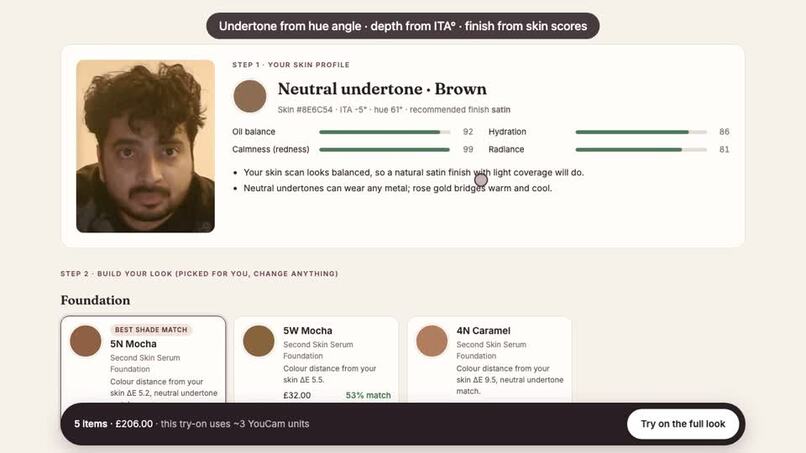
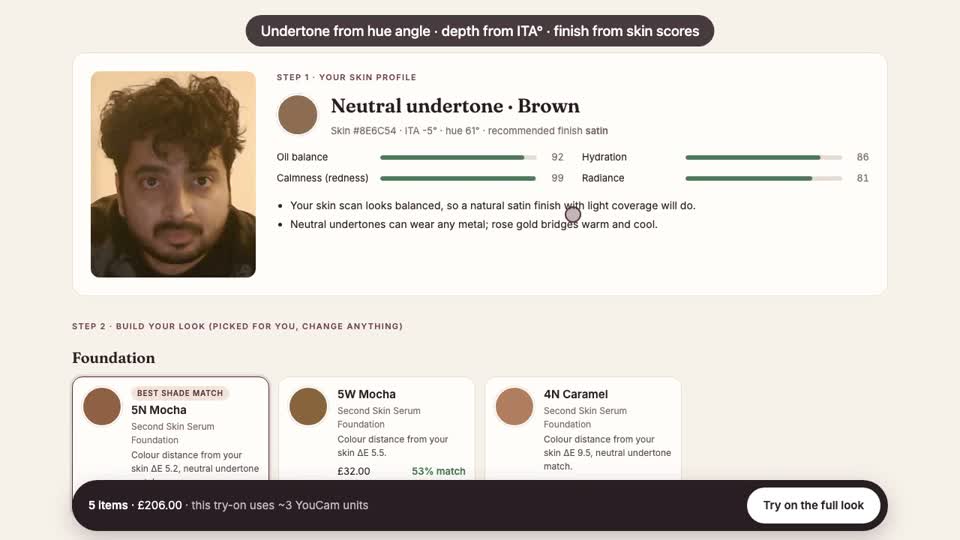
Skin profile from YouCam Skin Tone Analysis + Skin Analysis (live API)
-
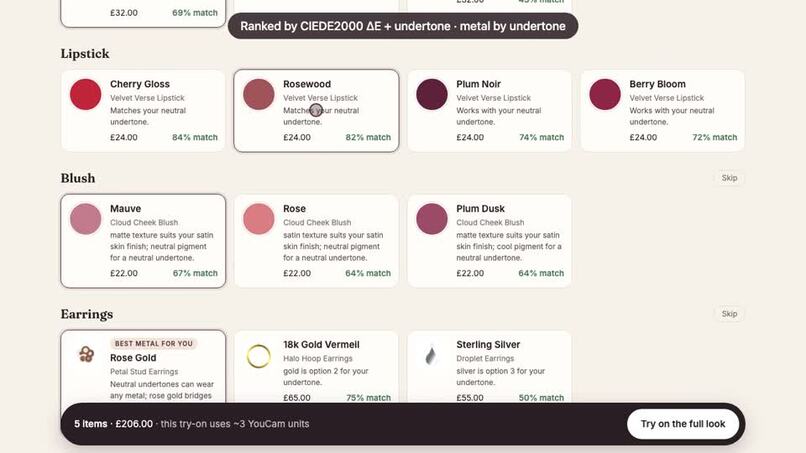
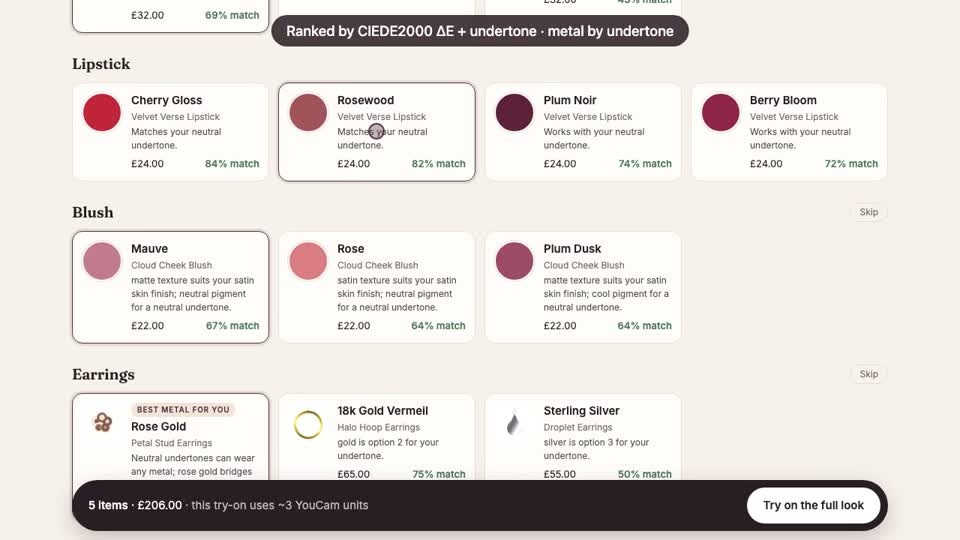
Lipstick, blush and earrings ranked by CIEDE2000 and undertone, each with a reason
-
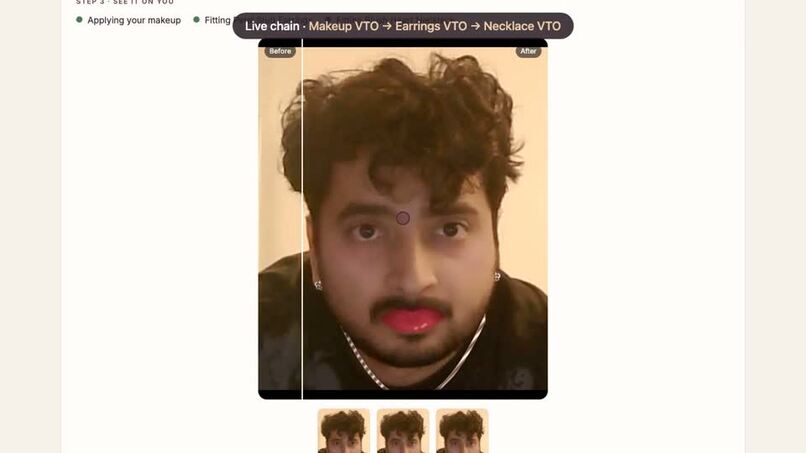
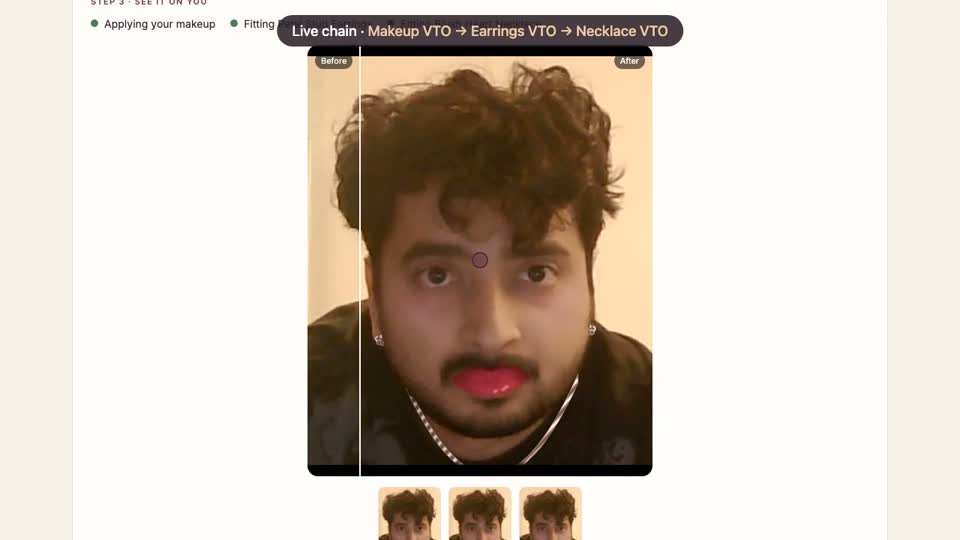
Live chain: Makeup VTO, then Earrings VTO, then Necklace VTO in one image
-
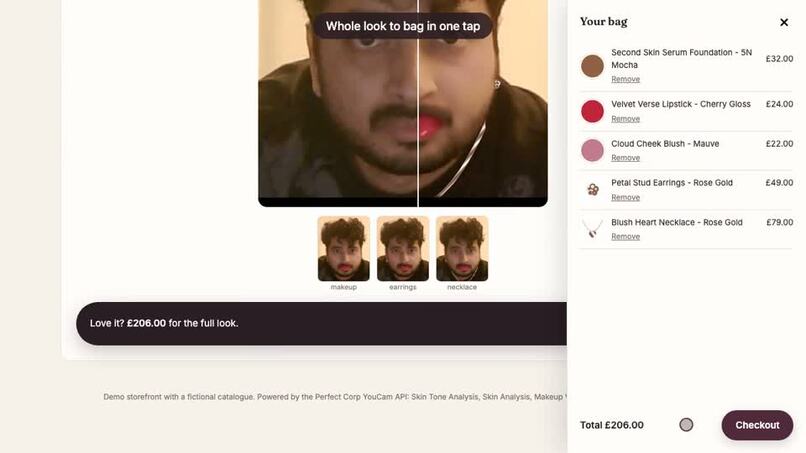
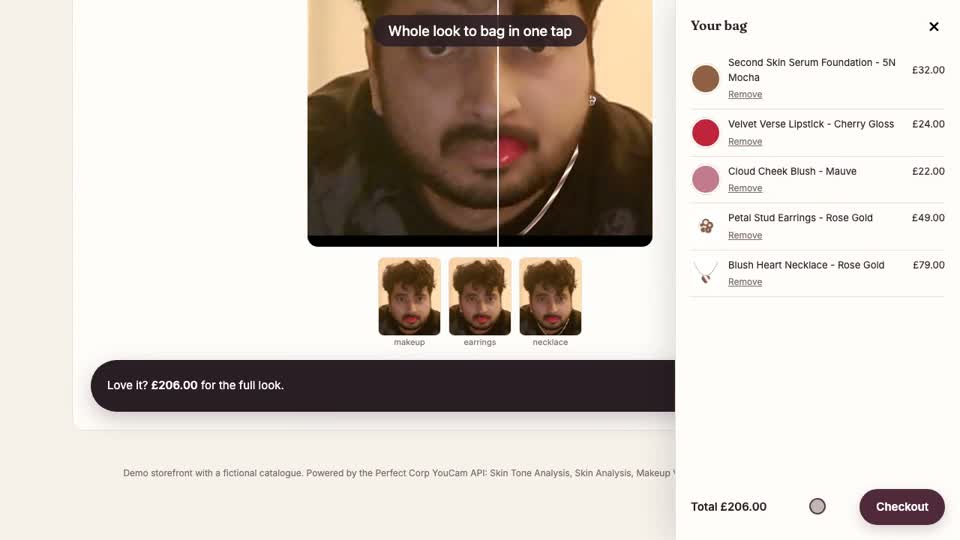
The whole look added to the bag in one tap
Inspiration
Shade matching is the hardest part of buying complexion makeup online, and a wrong shade is a guaranteed return. Undertone, the thing that makes a shade look "orange" or "ashy", also decides whether gold or silver jewellery flatters you. Yet beauty and jewellery are sold in separate aisles with separate try-on tools, and nothing connects them to the shopper's actual skin. I wanted one moment, in front of the mirror and before checkout, where your skin data drives the whole basket.
What it does
Undertone is a storefront experience for a beauty and jewellery retailer:
- Scan. The shopper uploads or takes a selfie. Two YouCam APIs run at the same time:
- AI Skin Tone Analysis returns skin, lip, eye and hair colours.
- AI Skin Analysis returns oiliness, hydration, redness and radiance scores.
- Understand. The skin colour is converted to CIELAB.
- The hue angle gives the undertone (cool, neutral or warm).
- The ITA° (Individual Typology Angle, a dermatology scale) gives the depth.
- The skin scores set the foundation finish: matte for oily skin, dewy for dry, more coverage when there is redness and more glow when radiance is low.
- Each decision is explained in plain English.
- Recommend across categories. Foundation shades are ranked by CIEDE2000 colour distance with an undertone-mismatch penalty. Lipsticks get a "your lips, but better" badge when they're close to the shopper's natural lip colour as YouCam measured it. Blush is matched to undertone and finish. Earrings and necklaces are ranked by the metal that suits the undertone. Every product shows a match score and a reason.
- Try on the whole look. One tap chains Makeup VTO → Earrings VTO → Necklace VTO. Each step uses the previous result as its input, so the final image shows the shopper wearing the foundation, blush, lipstick, earrings and necklace together. The skin scan's finish and coverage go straight into the makeup-vto foundation effect. A before/after slider shows the change, and "Add the look to bag" adds the whole basket in one go.
Consumer value: confidence in shade and metal before buying, and a full look instead of five separate guesses. Retail value: a whole look added in one tap rather than single items, fewer shade-mismatch returns, and "why this suits you" copy that can be reused for clienteling.
How we built it
- Frontend: React + Vite, mobile-first, with camera capture.
- Backend: a Node/Express proxy keeps
YOUCAM_API_KEYon the server. A typed YouCam client implements the v2.0 flow (File API → PUT to the pre-signed URL → create task → polltask_status, with timeouts and error mapping). Request bodies follow Perfect Corp's published OpenAPI specs, including thesource_info/object_infosshape for 2D jewellery VTO. - Async try-on job: each VTO step reports progress to the UI; product reference images are uploaded once and their file IDs cached.
- Colour science (in-house): sRGB→CIELAB, CIEDE2000 (unit-tested against the Sharma et al. reference data), ITA°, and an LCh-defined foundation range so "warm/neutral/cool" means the same thing in the catalogue and in the classifier.
- Mock mode: an in-process emulator of the YouCam REST API is wired in as the client's
fetch, so the whole pipeline runs end to end without a key; with a key, the same code calls the live API (as in the demo video). - Tests: 29 Vitest tests covering the colour maths, profile rules, recommender, makeup-vto payload schema, the YouCam client (upload, poll, error, timeout) and the HTTP API end to end.
Challenges we ran into
- Undertone calibration. Hand-picked shade hex codes disagreed with my own classifier, so a "cool" shade measured as neutral. Defining every shade in CIE LCh fixed it, plus a test that checks every catalogue shade classifies correctly.
- Chaining VTO calls. Makeup, earrings and necklace are separate tasks, so each result URL is passed in as the next task's
src_file_urlto build one composite image. - Photo framing. Skin Analysis needs the face to fill more than 60% of the image width, while jewellery VTO needs the ears and neck visible. The app falls back to a neutral finish with a retake tip instead of failing.
Accomplishments that we're proud of
- A single flow that joins Skin AI and VTO for both beauty and jewellery, where the skin scan visibly changes the try-on.
- Every recommendation is explainable: a ΔE number, the undertone and the finish rule behind it.
- The repo runs end to end without a key, and the same code path calls the real API when a key is set.
What we learned
- How the YouCam v2.0 async task model, units and file retention work.
- Why undertone is better treated as a hue angle in a perceptual colour space than as RGB.
What's next
- A "your shade over time" view that re-scans after skincare use.
- Retailer catalogue import (shade hex from PIM data), so recommendations match a real product range.
- Hair colour and eyewear VTO from the same profile.
- An agent that builds looks for occasions ("wedding guest, gold jewellery, budget £150") on top of the same ranking functions.
Built With
- ciede2000
- cielab
- express.js
- node.js
- perfect-corp
- react
- typescript
- vite
- vitest
- youcam-api

Log in or sign up for Devpost to join the conversation.