-
-
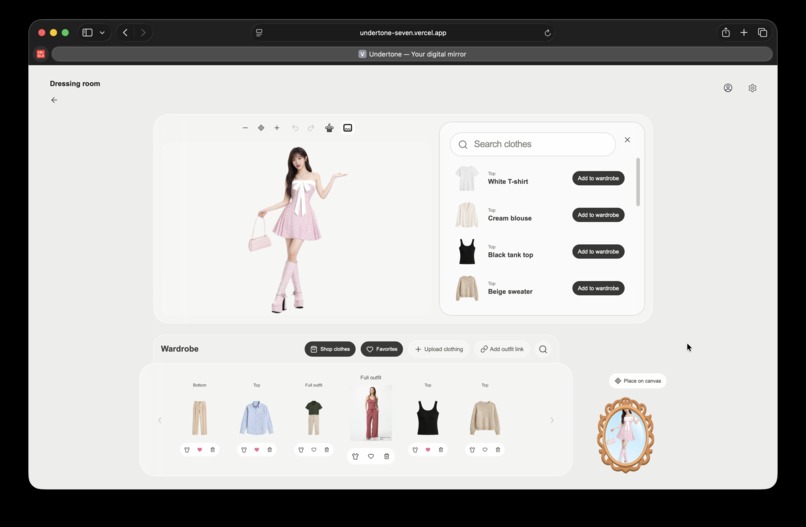
dressing shop
-
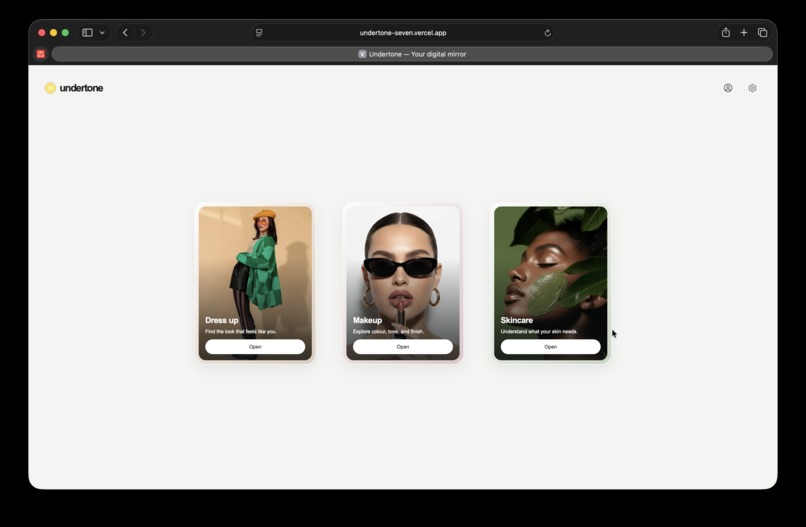
homepage
-
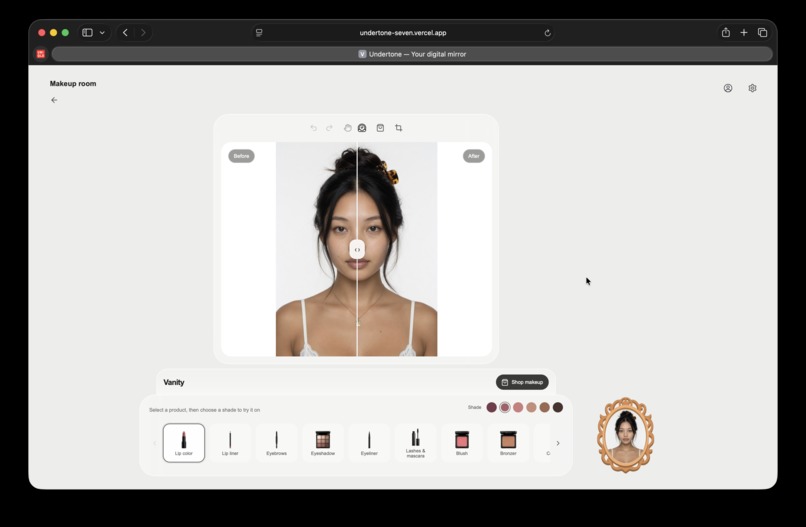
makeup kit
-
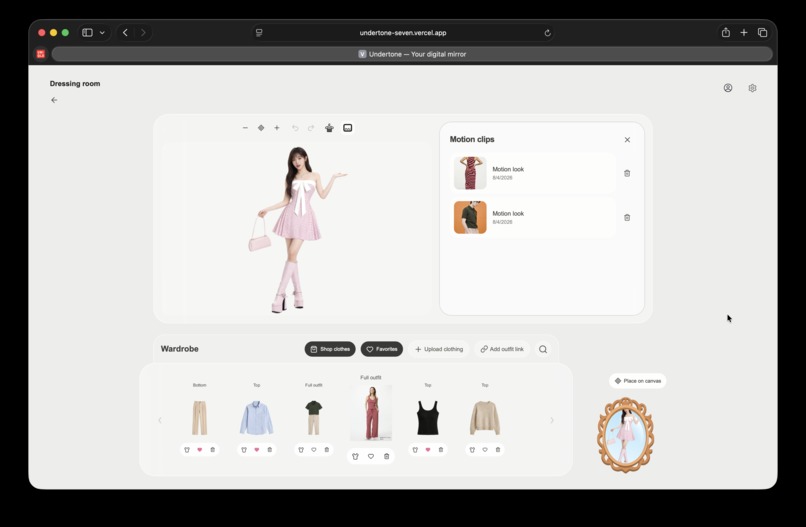
motion dressup
-
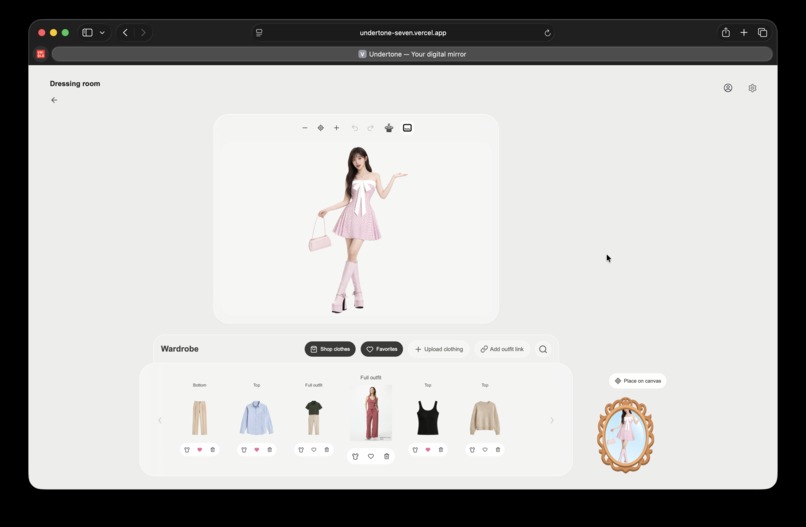
wardrobe
-
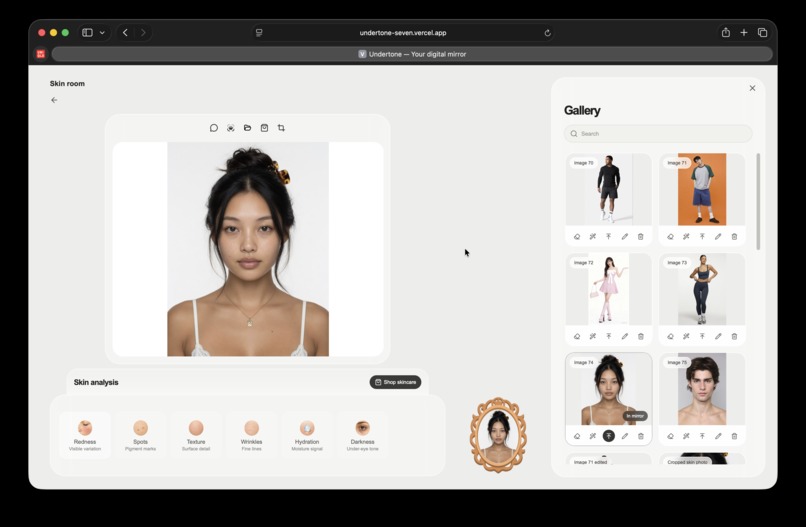
-
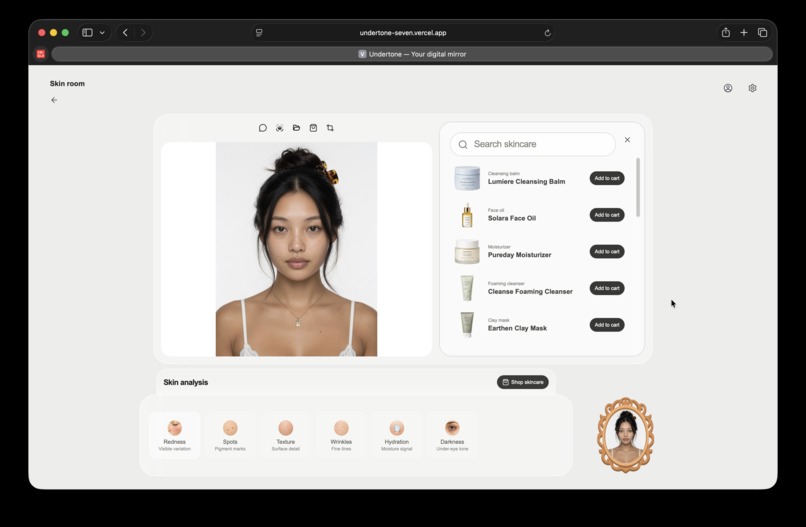
skincare shop
-
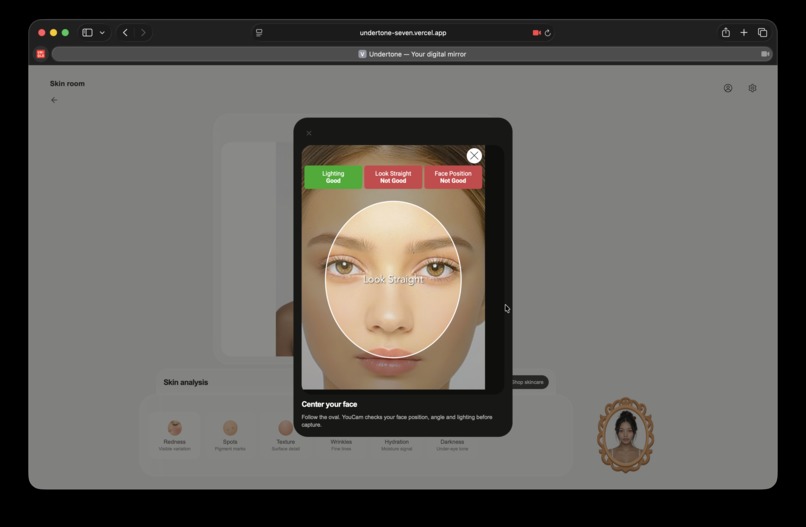
youcam camera kit
Undertone
Undertone is a personal beauty and fashion workspace for skin analysis, skincare guidance, makeup try-on, clothing and shoe try-on, and motion previews of a finished outfit.
Built for the YouCam API Skin AI & Apparel VTO Hackathon.
Inspiration
Online shopping gives people more choice while removing the part of shopping that makes many beauty and fashion decisions possible: seeing the product on themselves.
A product page can describe a foundation shade, show a dress on a model, or list the ingredients in a moisturizer. It cannot answer the personal questions underneath the purchase:
- How does this look on my face?
- Does this outfit work on me rather than on the model?
- What should I focus on in my skin before choosing another product?
- Does the complete look still work when it moves?
The cost of that uncertainty is visible across retail. The National Retail Federation and Happy Returns projected $890 billion in US retail returns in 2024, while 76% of consumers said free returns were an important factor in deciding where to shop (NRF, 2024). Returns are not one problem with one cause, but the scale shows how much purchasing still happens before the customer is confident in the decision.
Research into augmented shopping explains why trying a product in context matters. Hilken and colleagues found that simulated physical control and embedding a product in the customer’s environment increase the perceived value of an online service. The resulting sense of spatial presence also predicts decision comfort. Their studies included virtual mirrors for eyewear and makeup, then extended the analysis to purchase decisions (Journal of the Academy of Marketing Science, 2017).
The opportunity is larger than adding a try-on button to a product card. Beauty and fashion decisions develop through comparison: understanding a skin concern, testing a shade, trying an outfit, changing a shoe, and deciding whether the complete result works. Undertone brings those decisions into three focused rooms:
Understand skin
      -> discuss what the result means
      -> test makeup and complete looks
      -> try clothing and shoes
      -> inspect the final look in motion
Skin AI, Makeup VTO, Apparel VTO, and Image-to-Video support the full process from exploration to a confident product decision.
What it does
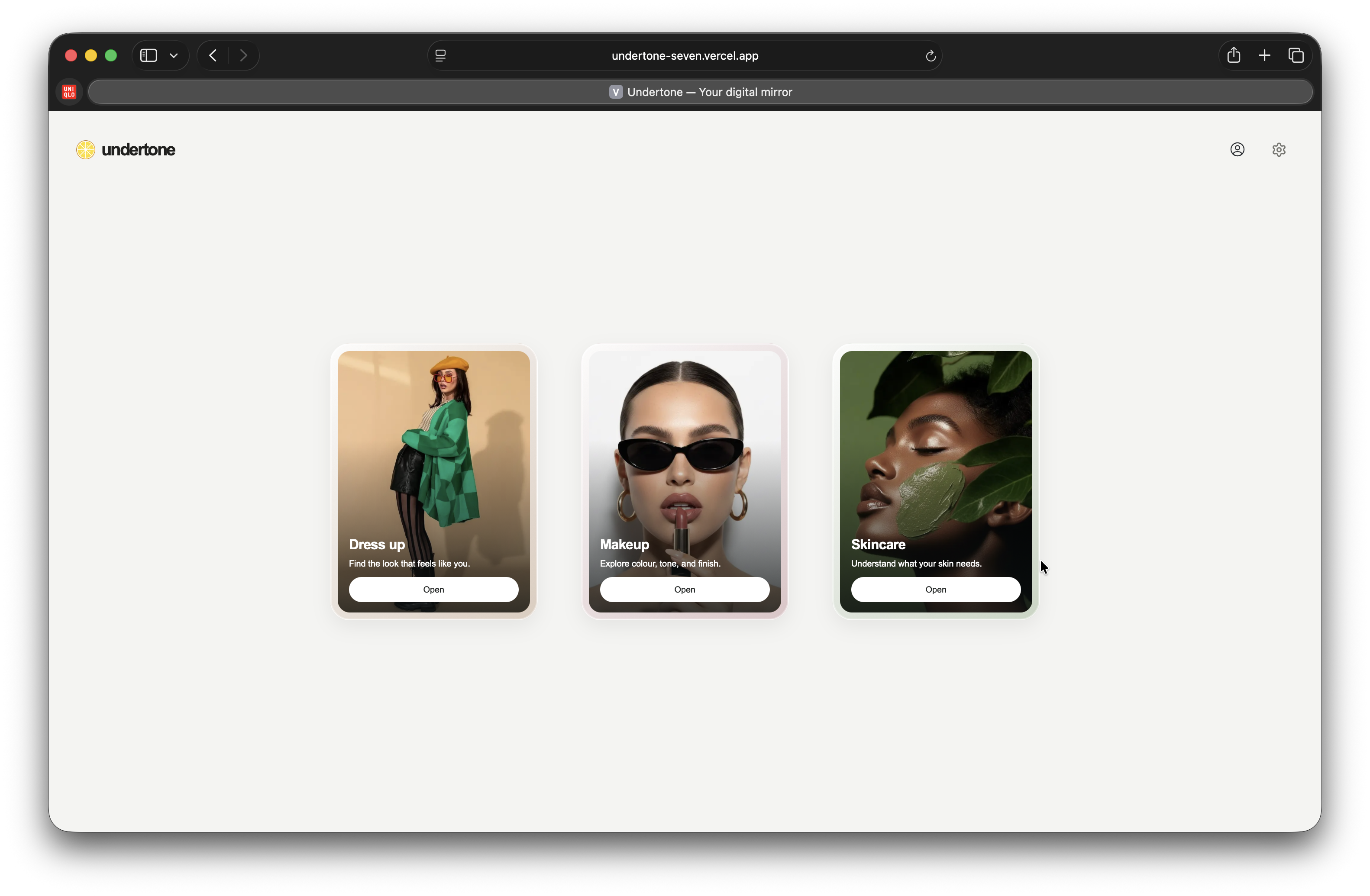
Undertone gives users three dedicated spaces for clothing, makeup, and skincare, supported by a gallery for capturing, preparing, and managing their photos.
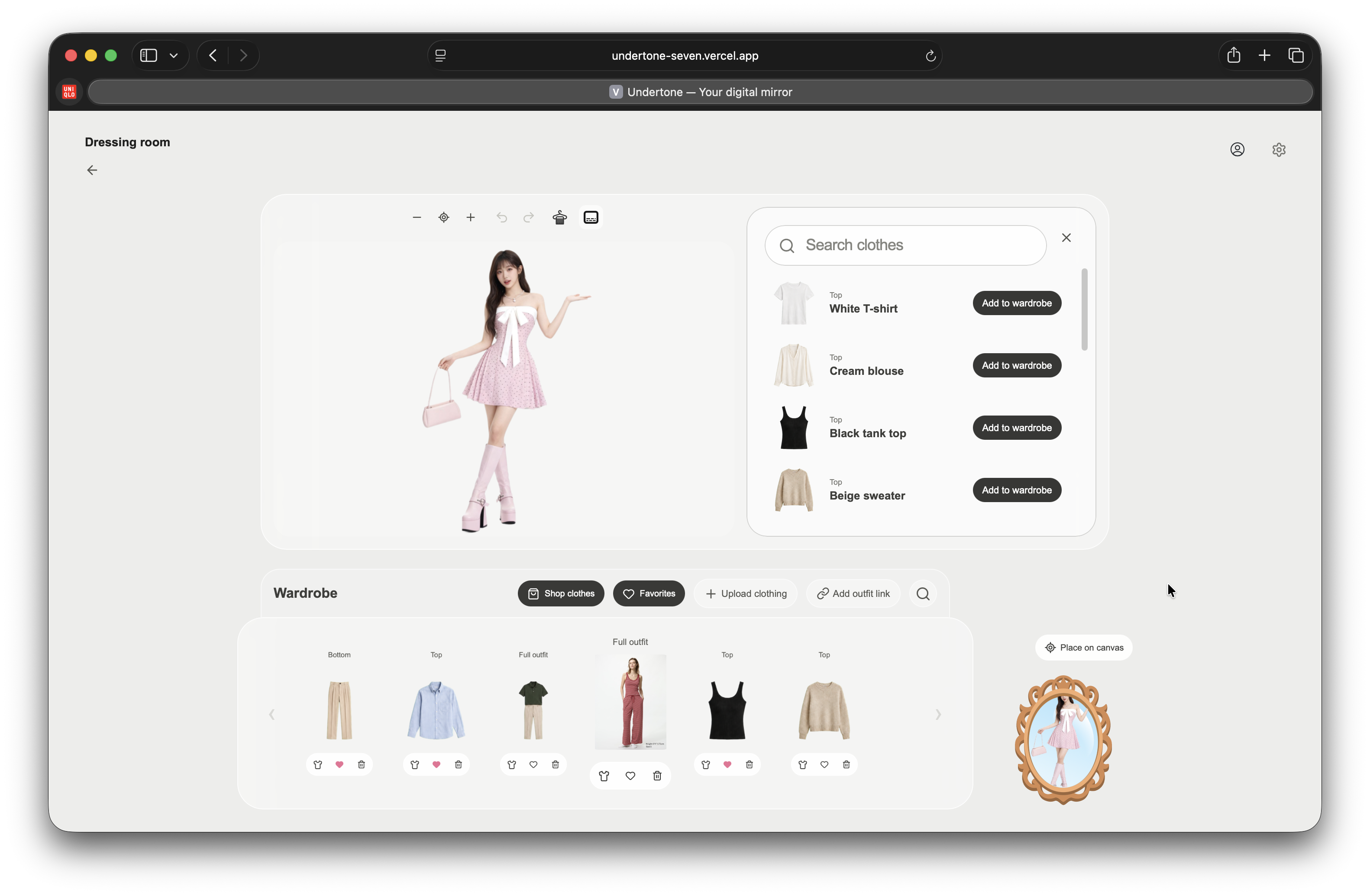
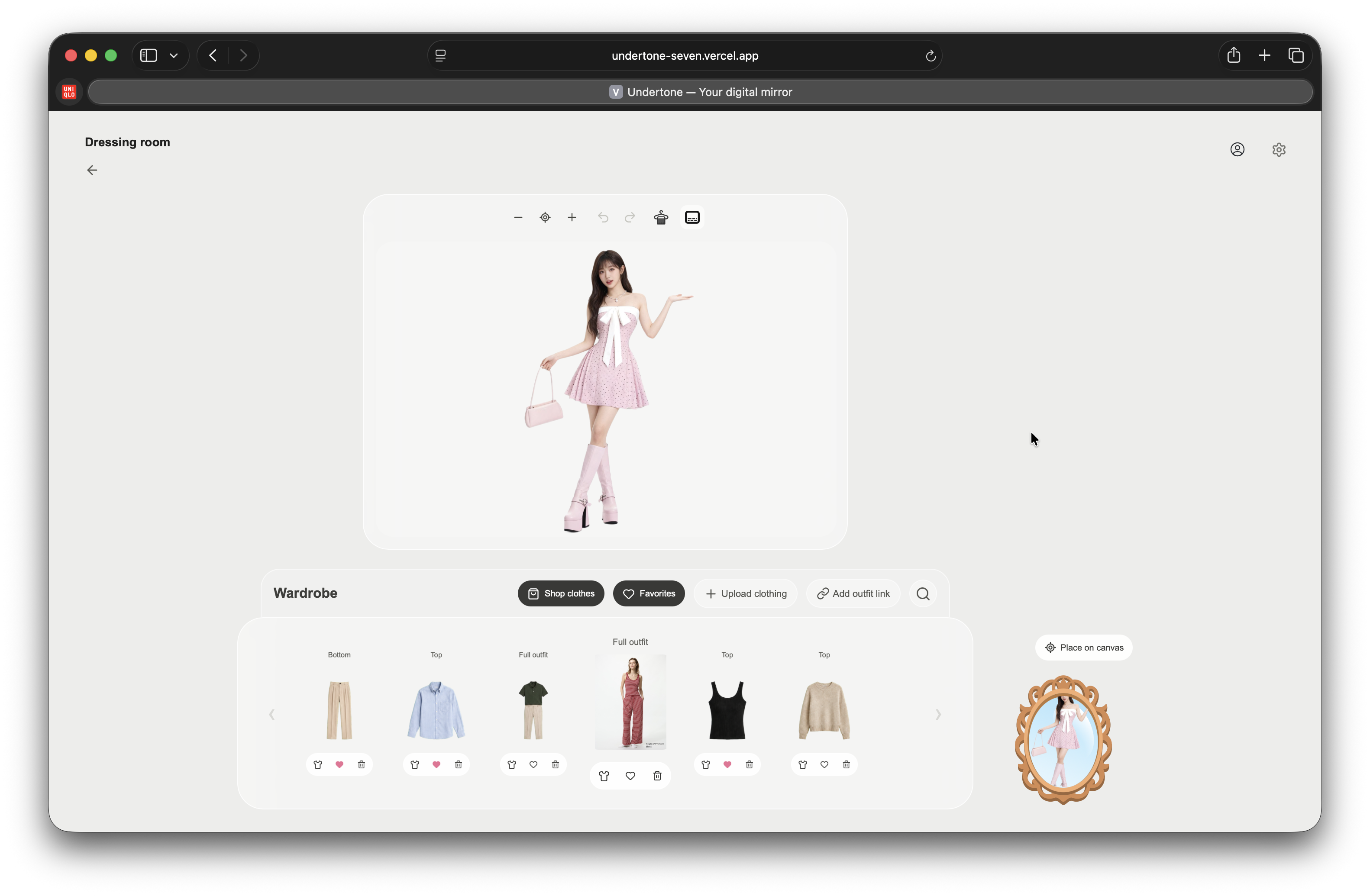
Dressing Room
The Dressing Room lets the user build and inspect an outfit on their own image.
They can:
- upload clothing from their device;
- add an item from a public image URL;
- add products from the clothing shop;
- rename, search, tag, favorite, and delete wardrobe items;
- classify clothing as upper body, lower body, full body, or shoes;
- confirm or correct an automatically suggested garment category;
- choose a shoe fit before applying Shoes VTO;
- try an item on through YouCam Apparel VTO;
- drag, zoom, undo, and redo the resulting canvas;
- reopen favorite wardrobe pieces;
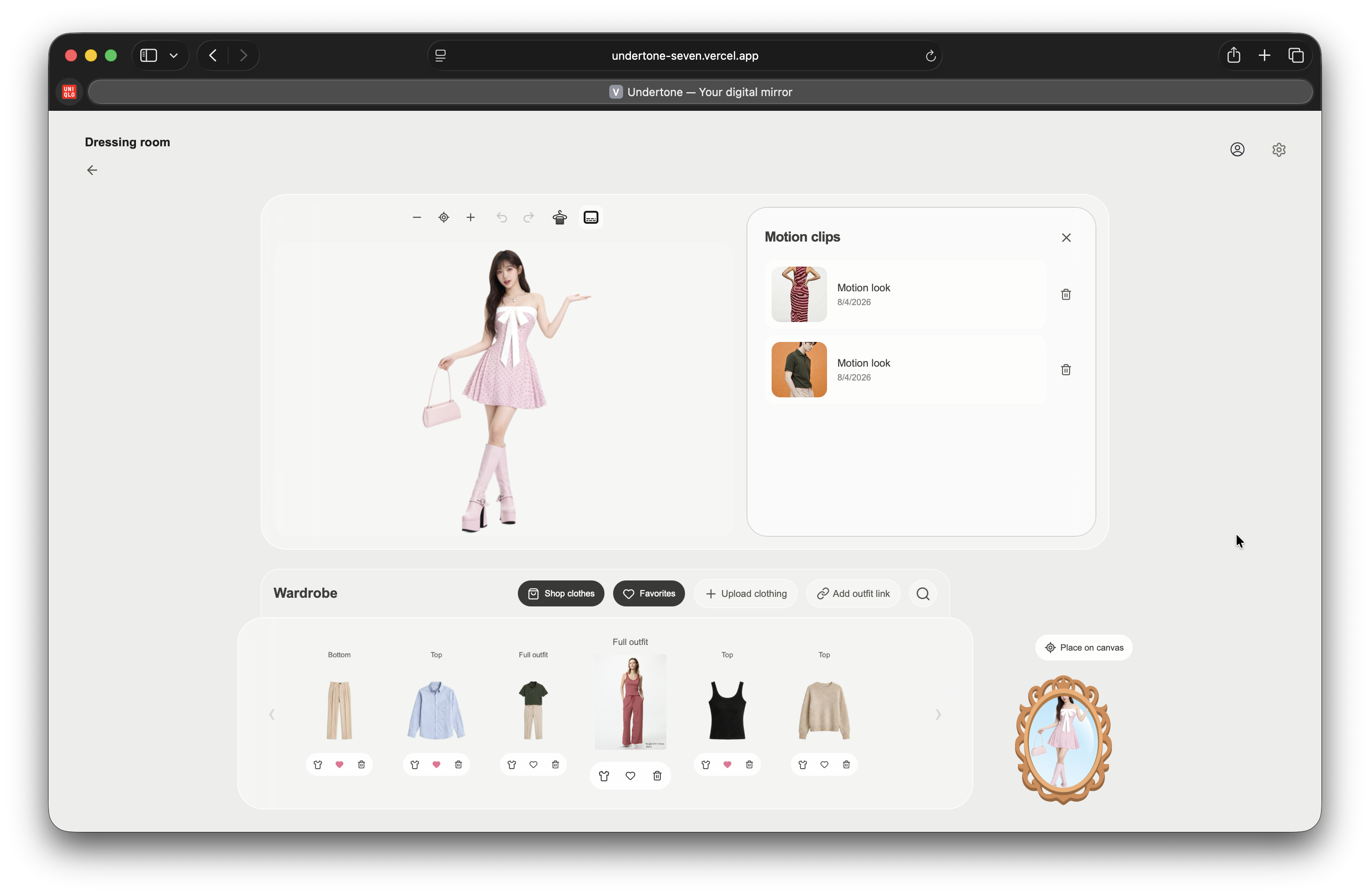
- turn the current outfit into a five-second motion look; and
- open or delete saved motion clips from a dedicated library.
Clothing and shoes are not sent through the same generic call. Undertone maps confirmed garment categories to YouCam Cloth v3 or Shoes VTO, supplies the required operation-specific fields, downloads the generated image, stores it, and records it against the exact person image and wardrobe item.
Repeated try-ons with the same source image and item return the saved result. A different person image or garment creates a new result.
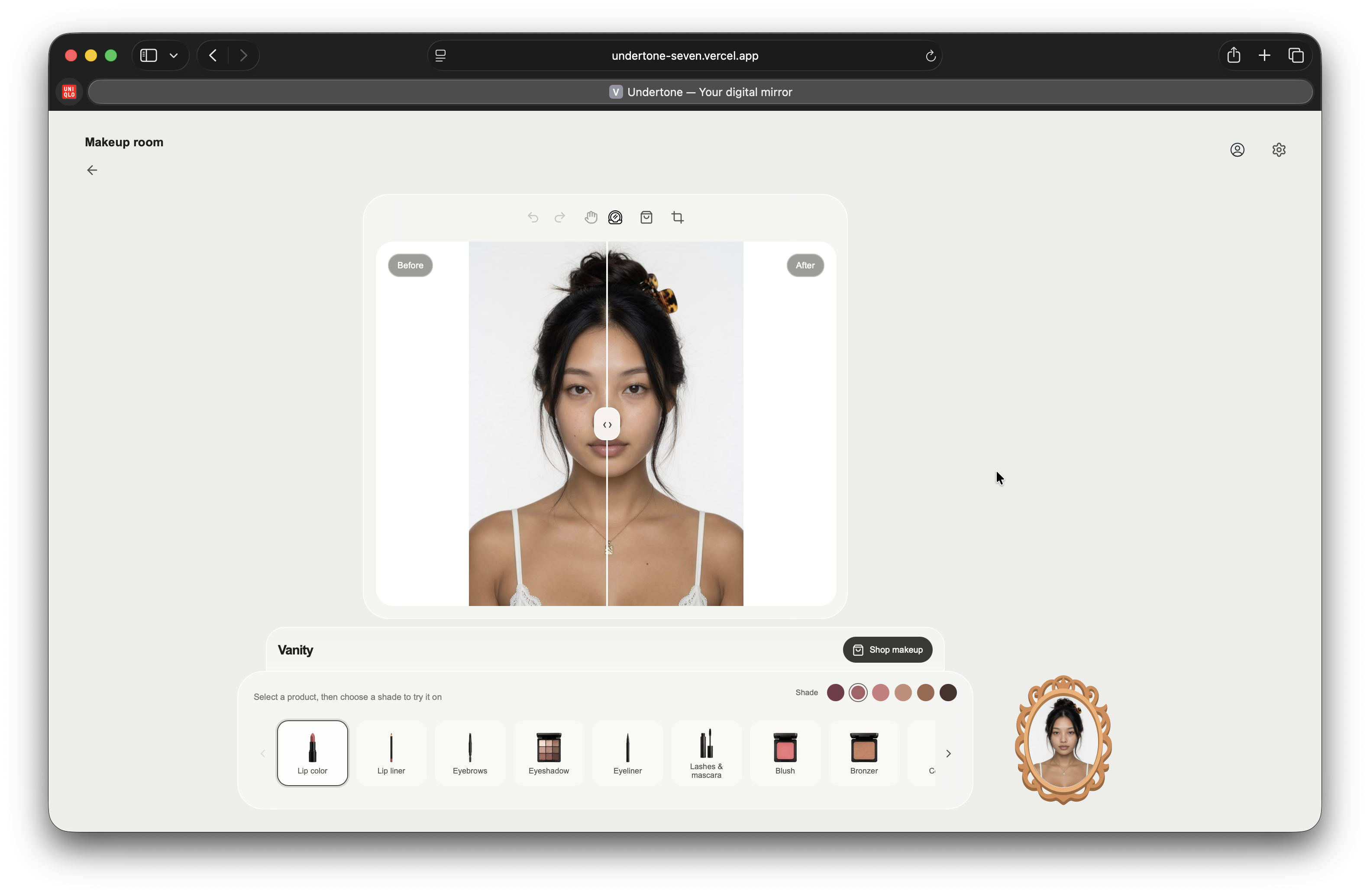
Makeup Room
The Makeup Room supports both individual effects and complete looks.
The vanity includes lip color, lip liner, eyebrows, eye shadow, eye liner, eyelashes, blush, bronzer, contour, highlighter, foundation, and concealer. The user selects an effect and shade, and Undertone constructs the corresponding YouCam Makeup VTO effect schema rather than treating every product as the same color overlay.
The makeup shop combines a local product catalogue with hosted YouCam Look VTO templates. Hosted looks retain their YouCam template IDs and can be applied as complete makeup combinations.
The room includes:
- sequential makeup application;
- undo and redo history;
- a controlled before-and-after split;
- a draggable result view;
- the same face crop workflow used by the profile system;
- a searchable makeup shop;
- products that can be added to the vanity; and
- a room cart for selected products.
Every makeup output is downloaded into Undertone storage. The next effect can use the current output as its source, so the user can build a complete look one operation at a time.
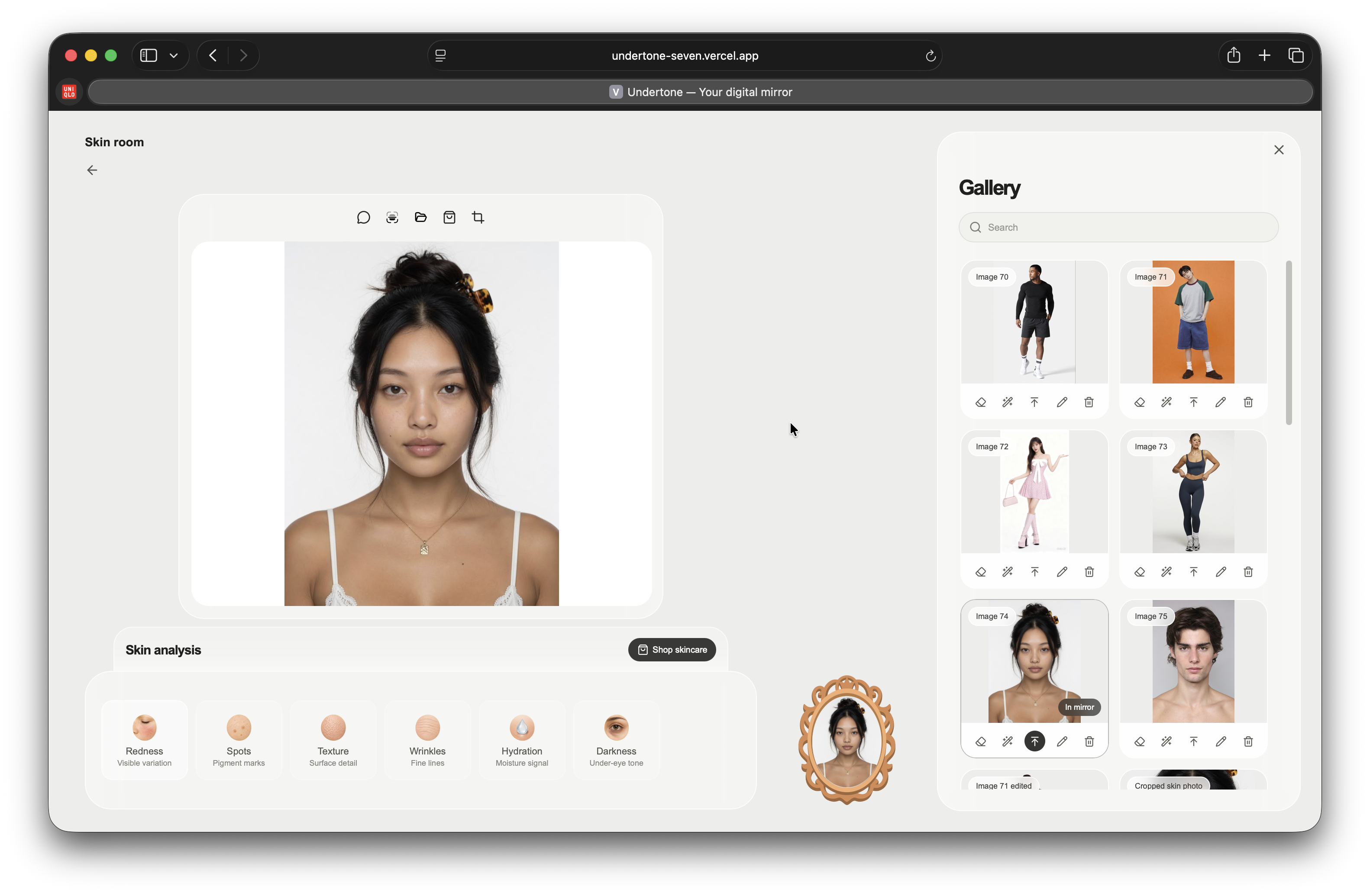
Skin Room
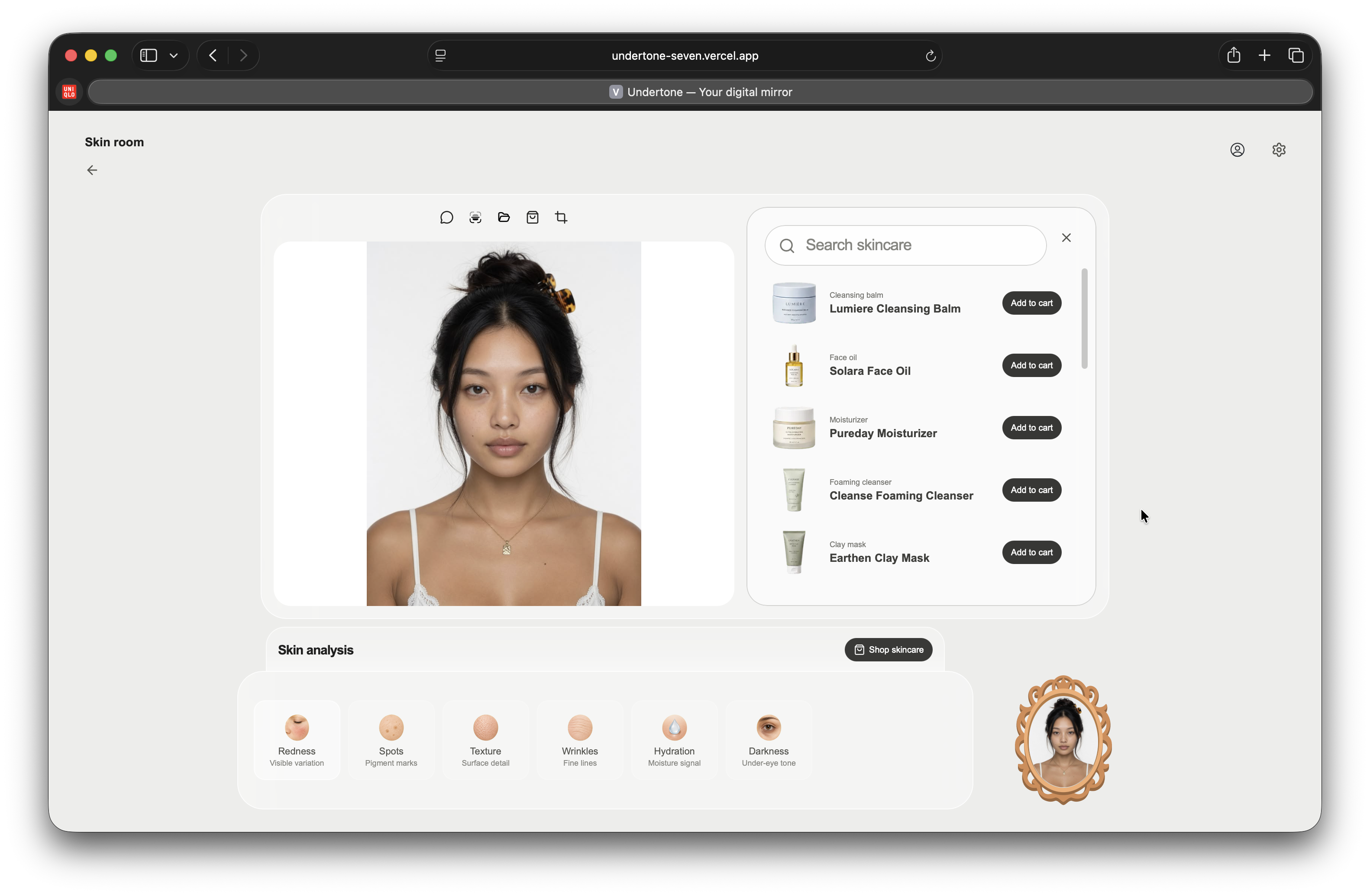
The Skin Room combines guided image capture, YouCam Skin AI, saved analysis, an agentic skincare guide, and a skincare catalogue.
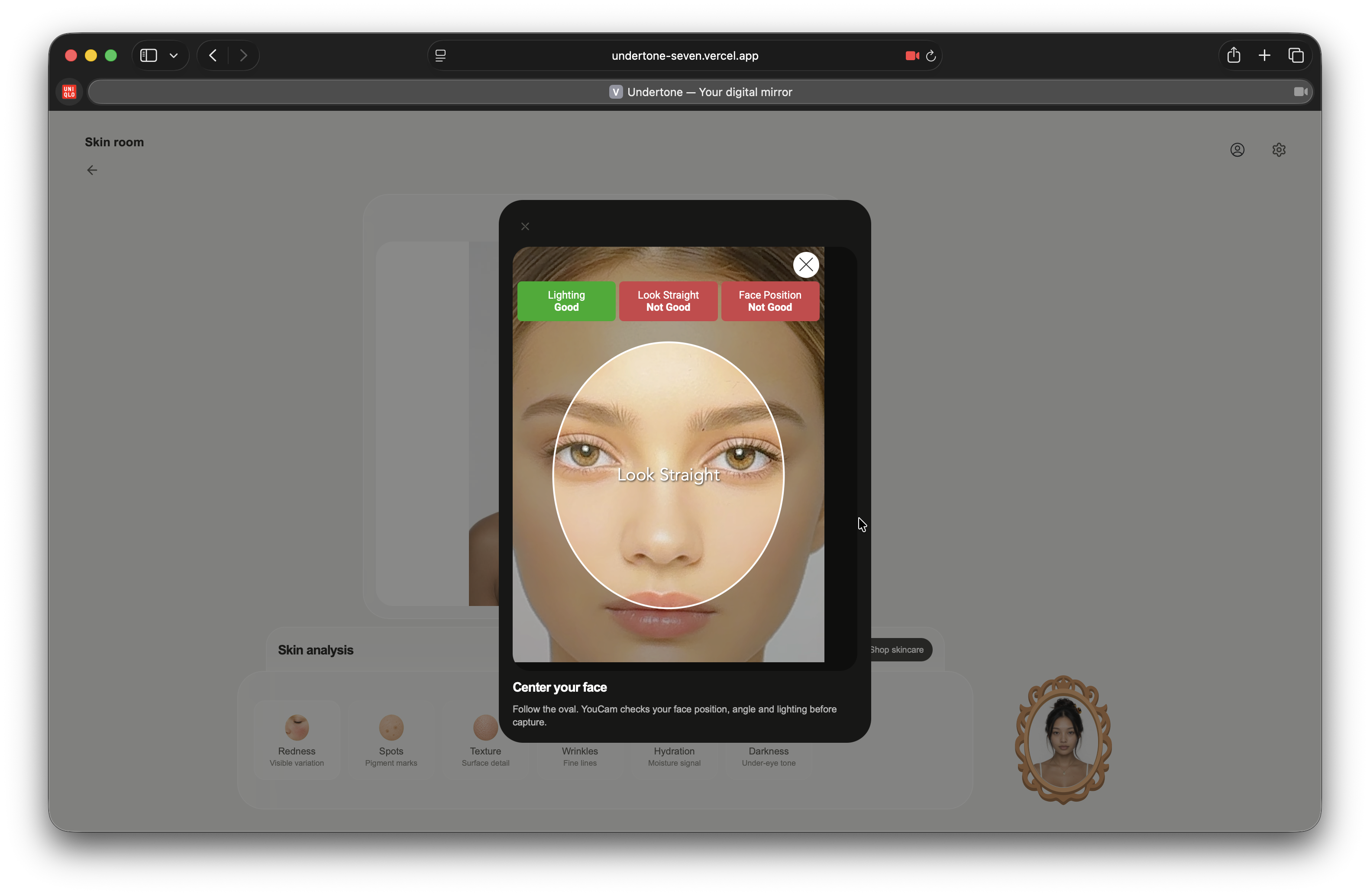
The user can open YouCam Camera Kit directly from the room. Camera Kit runs in skincare face-detection mode and checks the face position, angle, and lighting before returning the captured frame. Undertone saves that image to the user’s gallery and makes it available to the rest of the application.
Skin Analysis supports:
- redness;
- spots;
- texture;
- wrinkles;
- hydration; and
- under-eye darkness.
Undertone inspects the active image before creating the scan. A valid image uses the SD action map, while an image with a shortest side of at least 1080 pixels uses the HD action map. Completed provider results are saved against the exact active image.
The user can run a scan manually, inspect the scores, open scan history, ask about a saved result, or delete it. During an active scan, the image displays a camera frame, grid, and scan line driven by the real scan state.
The skin guide is a Google ADK agent running Gemini 3.1 Pro Preview. It can:
- check whether the active image already has a completed scan;
- run a new YouCam scan when no cached result exists;
- run a fresh scan when the user explicitly requests one;
- explain supported metrics without inventing scores;
- distinguish an observation from a recommendation;
- build a practical non-prescription routine; and
- recommend up to three relevant products from the current skincare catalogue.
The agent does not receive unrestricted database or provider access. It has two account-bound tools: one to check the scan attached to the active image and one to run supported Skin AI concerns. Tool calls, tool results, reasoning summaries, content, errors, and suggestions stream into the interface as separate events.
Gallery and image preparation
The gallery gives users control over the images used throughout Undertone. They can capture or upload photos, rename them, crop and reposition a face, enhance image quality, remove a background, save an edit as a new image, replace the source, or delete an image. Prepared images can then be selected for scanning, makeup application, or virtual try-on.
How we built it
Undertone uses Next.js 16 and React 19 for the product surface, FastAPI for authenticated application and provider operations, PostgreSQL for production metadata, Google Cloud Storage for media, and Google Cloud Run and Vercel for deployment.
YouCam task pipeline
Most server-side YouCam features use the same explicit lifecycle:
resolve account-owned image
      -> request operation-specific upload target
      -> upload bytes to signed URL
      -> create YouCam task with returned file IDs
      -> poll success, error, or failure
      -> download generated result
      -> save result in Undertone storage
      -> persist account-scoped metadata
We implemented separate contracts for:
| Capability | YouCam operation |
|---|---|
| Skin metrics | Skin Analysis SD and HD |
| Upper, lower, and full-body clothing | Cloth v3 |
| Shoes | Shoes VTO |
| Individual cosmetic effects | Makeup VTO |
| Complete hosted makeup looks | Look VTO |
| Outfit video | Image-to-Video with youcam-video-v2 |
| Profile cleanup | SOD background removal |
| Profile quality | Image enhancement |
| Guided face capture | Camera Kit 2.5 |
The YouCam API key remains inside Cloud Run. The browser receives only Undertone URLs and account-scoped results.
Skin Analysis and Google ADK
Skin concerns are mapped to provider actions instead of being passed through as arbitrary language:
| Concern | SD | HD |
|---|---|---|
| Redness | redness |
hd_redness |
| Spots | age_spot |
hd_age_spot |
| Texture | texture |
hd_texture |
| Wrinkles | wrinkle |
hd_wrinkle |
| Hydration | moisture |
hd_moisture |
| Under-eye darkness | dark_circle_v2 |
hd_dark_circle |
The ADK agent receives the latest completed result for the active image, the current skincare catalogue, and the user’s question. It never receives a score that does not exist in the provider result.
The skin scan itself uses blocking HTTP upload and task polling. We run that work through asyncio.to_thread, keeping the ADK event loop and server-sent event stream responsive while YouCam processes the image. A provider error returns as a structured tool result, allowing the agent to tell the user exactly what must be corrected without fabricating a successful analysis.
Wardrobe classification
Apparel VTO depends on the correct garment contract. Undertone uses Gemini 3 Flash Preview to classify uploaded wardrobe imagery into a structured response containing vto_type, supported garment categories, and an optional shoe gender.
The application validates that response against its own category set. A low-confidence or multi-category result remains visible for user confirmation. VTO runs only after one compatible category is selected.
Imported links also pass a network boundary before they become wardrobe items. Undertone rejects local, private, loopback, link-local, and multicast destinations, verifies content type and response size, then stores the accepted image inside the user’s media namespace.
Persistent result contracts
Provider delivery URLs are temporary. Undertone does not expose them as the application record.
Generated bytes are downloaded into Google Cloud Storage in production and local media storage during development. PostgreSQL retains the relationship between the account, source image, operation, and stored output.
The core records are:
- profile gallery images and one active image per account;
- pending profile edits awaiting save or replacement;
- wardrobe items, category provenance, fit, and favorite state;
- skin analyses associated with the exact image ID;
- apparel VTO results keyed by account, source image, and wardrobe item; and
- motion tasks with pending, complete, or failed state and a durable MP4 reference.
The same database code runs against SQLite locally and PostgreSQL in production through one query adapter. The same media code runs against local files or Google Cloud Storage through one storage adapter.
Authentication and media ownership
Passwords use PBKDF2-HMAC-SHA256 with a random salt and 210,000 iterations. A successful sign-in creates a bearer session token.
Every mutation repeats ownership validation. Profile routes query by account and image ID. Wardrobe routes query by account and item ID. Canvas operations accept only stored images owned by the account. Makeup chains accept the account’s profile images or makeup outputs created for that same account. Motion clips are read and deleted by account and clip ID.
These checks keep uploaded and generated media private to the account that created it.
Product architecture
Next.js on Vercel
      │
      ├── profile and gallery UI
      ├── Dressing Room
      ├── Makeup Room
      ├── Skin Room
      └── streamed ADK event renderer
      │
      ▼
FastAPI on Cloud Run
      │
      ├── authentication and ownership
      ├── YouCam upload/task/result workflows
      ├── Google ADK skin agent
      ├── Gemini wardrobe classification
      ├── PostgreSQL metadata
      └── Google Cloud Storage media
The production application runs at undertone-seven.vercel.app. The complete source and technical setup are available in the Undertone repository.
Challenges we ran into
Making several YouCam systems behave like one product
Skin Analysis, Cloth v3, Shoes VTO, Makeup VTO, Look VTO, Image-to-Video, SOD, Enhance, and Camera Kit do not share one request shape. They have different upload endpoints, task payloads, result structures, and required parameters.
We built operation-specific adapters around one application contract: resolve an account-owned image, upload it correctly, create the task, observe explicit provider state, download the result, persist it, and return an Undertone URL.
This made the product coherent without flattening the APIs into an unsafe generic request.
Keeping generated media attached to the right source
Passing image URLs between features was not enough. A deleted photo, replaced edit, or generated try-on could leave a scan, makeup chain, or wardrobe result pointing to stale or unowned media.
We resolve every source through the authenticated account. Crops become new gallery objects, provider edits wait for an explicit save decision, and generated outputs remain tied to the operation that created them.
Preserving a live agent stream during Skin AI
YouCam Skin Analysis uses synchronous upload and task polling, while Google ADK streams an asynchronous run. Running the scan directly inside the agent tool blocked the event loop. Local development could finish the request, but the deployed stream could appear stuck and delay unrelated API work.
We moved the blocking scan into a worker thread while preserving the exact tool arguments and returned provider result. ADK now receives the real success or failure and continues the same run. The browser uses the actual analyze_skin tool events to start and stop the scan overlay.
Mapping natural clothing into strict VTO categories
A wardrobe image does not arrive with a reliable upper_body, lower_body, full_body, or shoes field. A language model can describe the item well and still produce a category the provider cannot accept.
We constrained Gemini to structured output, validated the result, preserved tag provenance, exposed ambiguous suggestions, and required a confirmed compatible category before VTO.
Making long-running motion feel immediate
Image-to-video is not an immediate image response. The first interface treated generation state as a single loading action, which made a completed clip easy to miss and a pending task difficult to distinguish from a frozen request.
We persisted the task immediately, represented its state explicitly, polled one clip at a time, refreshed the library, and switched to the player as soon as the durable video arrived. The library remains the source of truth for opening and deleting previous motion looks.
Handling image quality as part of the feature
Skin AI can reject a technically valid image when the face is too small. Camera capture, crop, resolution, active-image selection, and provider error handling therefore had to operate as one workflow.
Undertone added Camera Kit capture, a guided cropper, a 480-pixel minimum, HD selection at 1080 pixels, visible scan state, and direct provider failure messages. The user can correct the image instead of waiting on a scan that cannot succeed.
Accomplishments that we're proud of
We integrated YouCam across the complete personal look
Undertone does not stop at one Skin AI score or one garment render. It combines Skin Analysis, guided camera capture, individual makeup effects, complete makeup looks, clothing, shoes, image enhancement, background removal, and outfit motion.
The integrations remain technically distinct while the experience remains visually and operationally connected.
We made the agent accountable to the scan
The skincare guide can use a completed scan, create one when needed, or run a new one when explicitly requested. It sees tool failures, cannot invent unsupported metrics, and recommends only products present in its loaded catalogue.
The conversation is useful because it is attached to a real image, a real provider result, and a bounded set of actions.
We made provider results durable
Apparel renders, makeup images, profile edits, Skin AI payloads, and motion videos do not disappear with a provider URL or browser refresh. Undertone downloads media, stores it, and records ownership and source relationships.
That persistence enables wardrobe caching, scan history, motion libraries, gallery editing, and repeatable demonstrations.
We built a complete consumer interface
The product includes authentication, profile setup, a gallery, three dedicated rooms, shops, carts, favorites, search, crop tools, history controls, comparisons, scan history, agent chat, motion playback, and explicit failure states.
The result is a working product with a clear first action and a complete path through skin, makeup, and fashion.
We deployed the full stack
The Next.js product runs on Vercel. FastAPI runs on Google Cloud Run with PostgreSQL, Google Cloud Storage, secret-bound provider credentials, production CORS, and health checks for the API, database, and storage layer.
What we learned
Product structure should follow the decision being made
The Dressing Room, Makeup Room, and Skin Room need different controls because they solve different problems. Clear room boundaries made each workflow easier to understand, while common gallery, history, storage, and account controls kept the application predictable.
Input preparation is part of AI quality
Face size, image resolution, garment category, shoe fit, and account-owned source selection directly determine whether a provider task can produce a useful result. Capture, crop, validation, and error recovery are part of the AI feature itself.
Provider completion is not application completion
A successful provider task still has to be downloaded, validated, stored, associated with the right account and source, and exposed through a durable URL. We treat that complete sequence as the operation.
Agent tools need the same boundaries as application routes
The skin agent is helpful because it can act, but its tools resolve the account and active image rather than accepting arbitrary media or database identifiers. The model chooses whether to inspect or scan; deterministic code owns authorization, provider execution, and persistence.
Visible state creates trust
Users need to know whether the application is classifying, scanning, generating, waiting, complete, or failed. Tool indicators, scan overlays, pending motion records, explicit error messages, and saved histories make asynchronous AI operations understandable.
What's next for Undertone
Retail catalogue connections
Connect retailer product feeds to the existing wardrobe, vanity, skincare, and cart contracts. A product will keep its merchant identifier, live availability, price, shade or category metadata, and checkout destination while using the same try-on operations already implemented.
Personal progression
Turn image-scoped Skin AI history into a controlled progression view. The user will compare the same supported concern across selected dates and images, with capture guidance that keeps comparisons meaningful.
Durable task execution
Move long-running YouCam scans, VTO, edits, and motion tasks into queue-backed workers. The existing pending, complete, and failed contracts become durable across Cloud Run restarts and reconnecting clients.
Stronger image preflight
Add client-side resolution, framing, and quality checks before spending a provider task. Camera Kit remains the guided capture route; uploaded images receive the same immediate preparation feedback.
Complete-look planning
Allow users to save a named look containing a selected photo, makeup result, worn wardrobe items, relevant Skin AI context, and motion clip. A saved look becomes a reusable unit for comparison, sharing, and shopping.
Retailer-facing analytics
Aggregate privacy-safe operation outcomes around product categories: which items reach try-on, which looks are saved, where image preparation fails, and which combinations lead a user from exploration to cart. This gives retailers product-level evidence without exposing personal images.

Log in or sign up for Devpost to join the conversation.