-
-
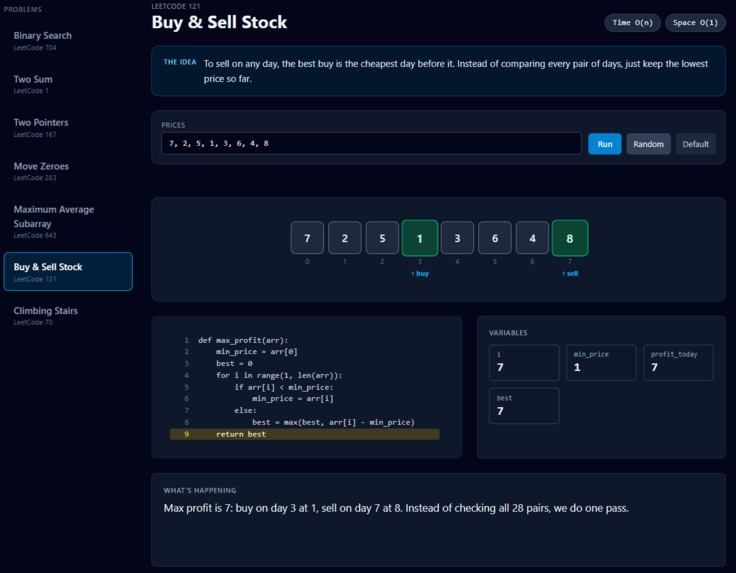
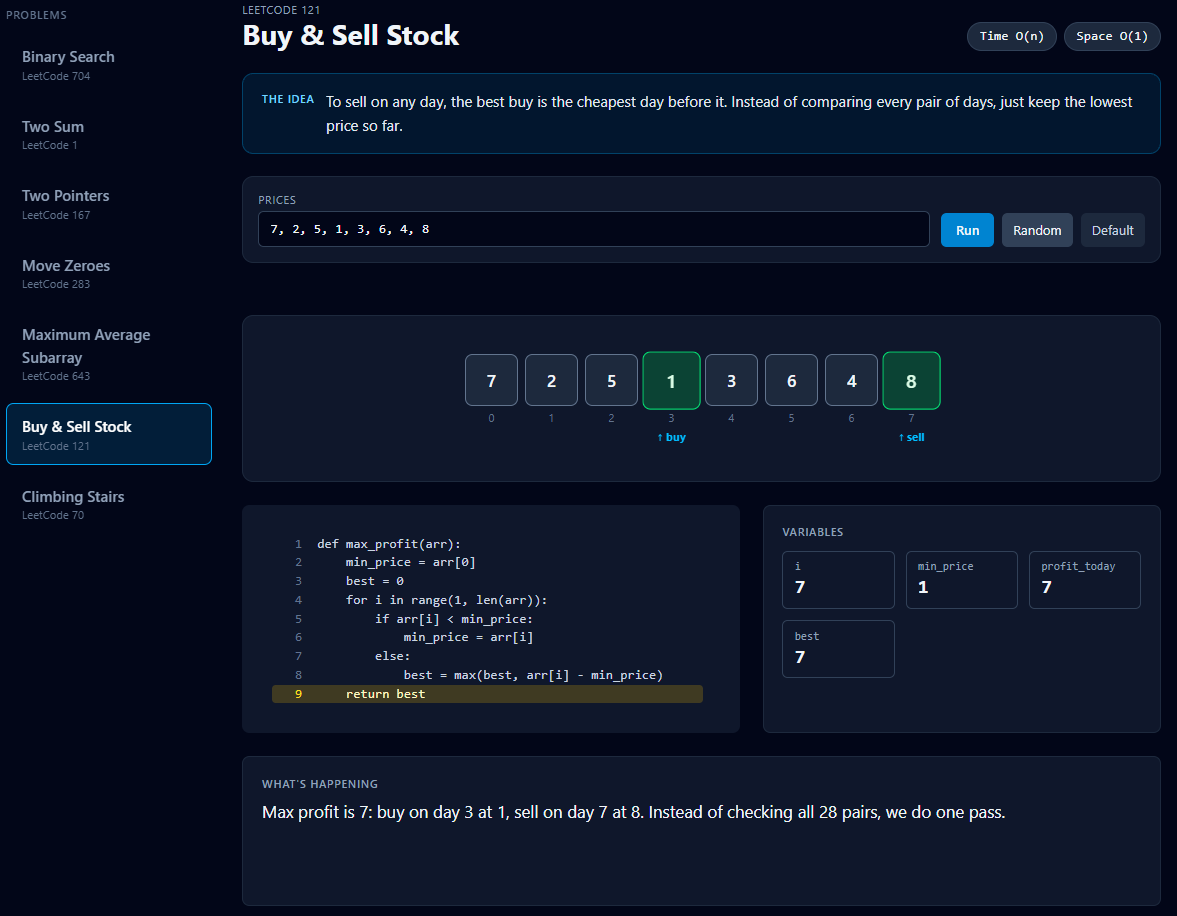
A completed algorithm, giving the answers in green and showing what is returned.
-
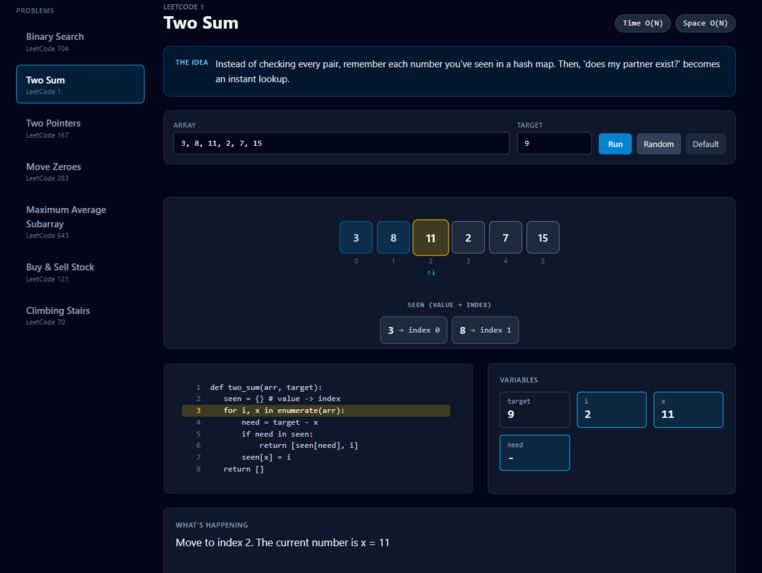
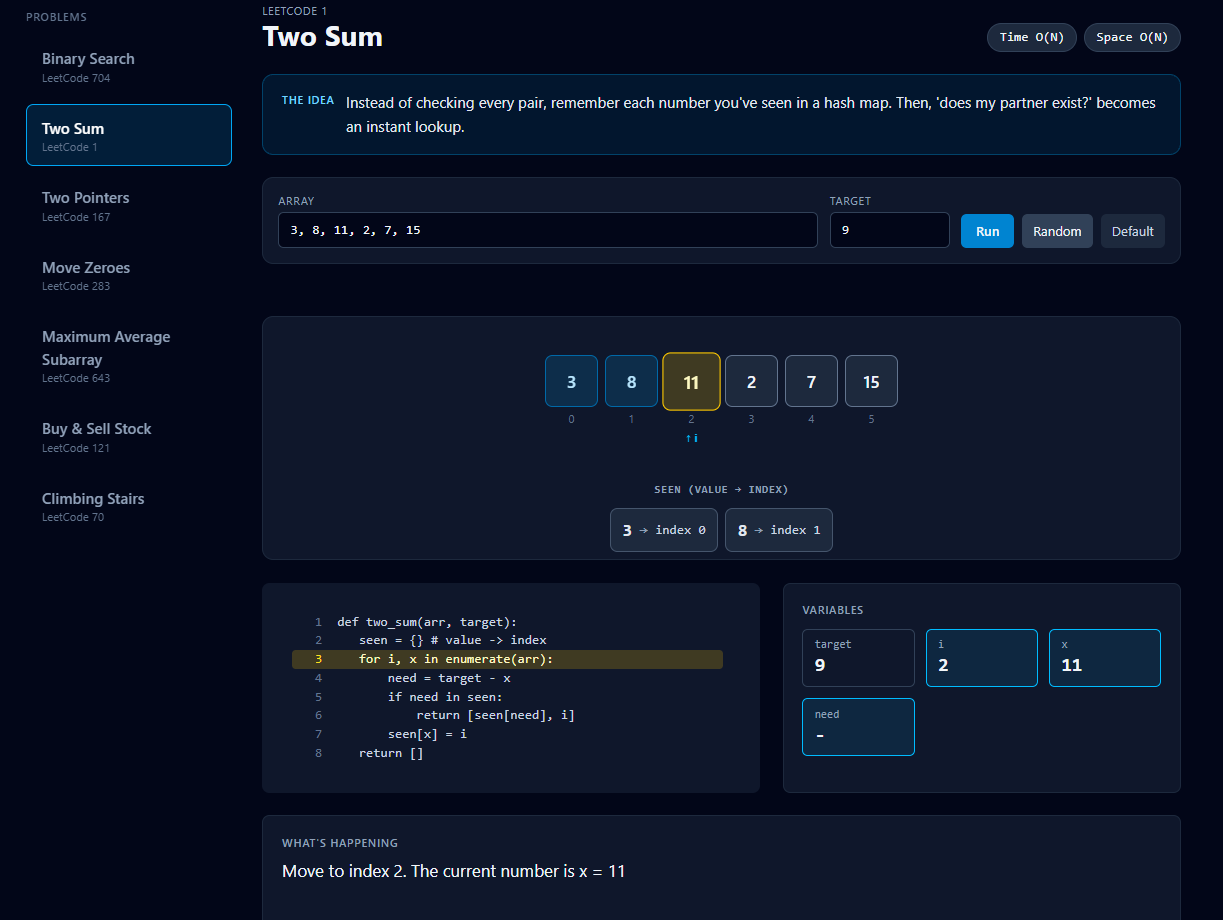
Halfway through the solution of TwoSum, displaying the current seen HashMap and our current index.
-
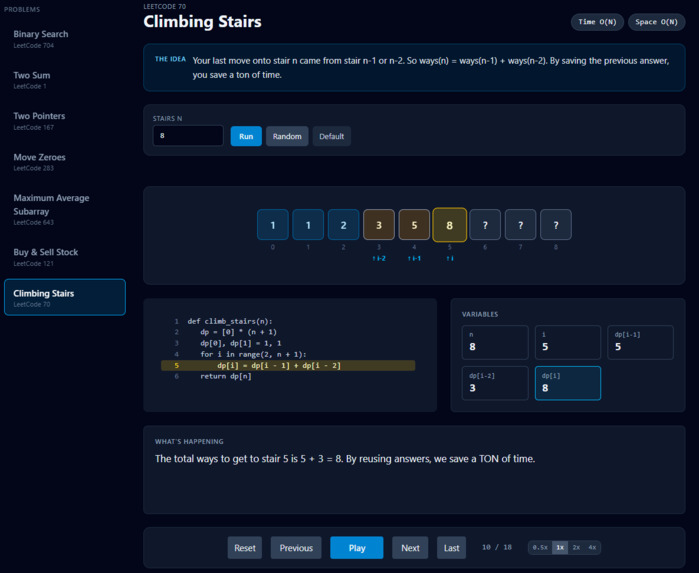
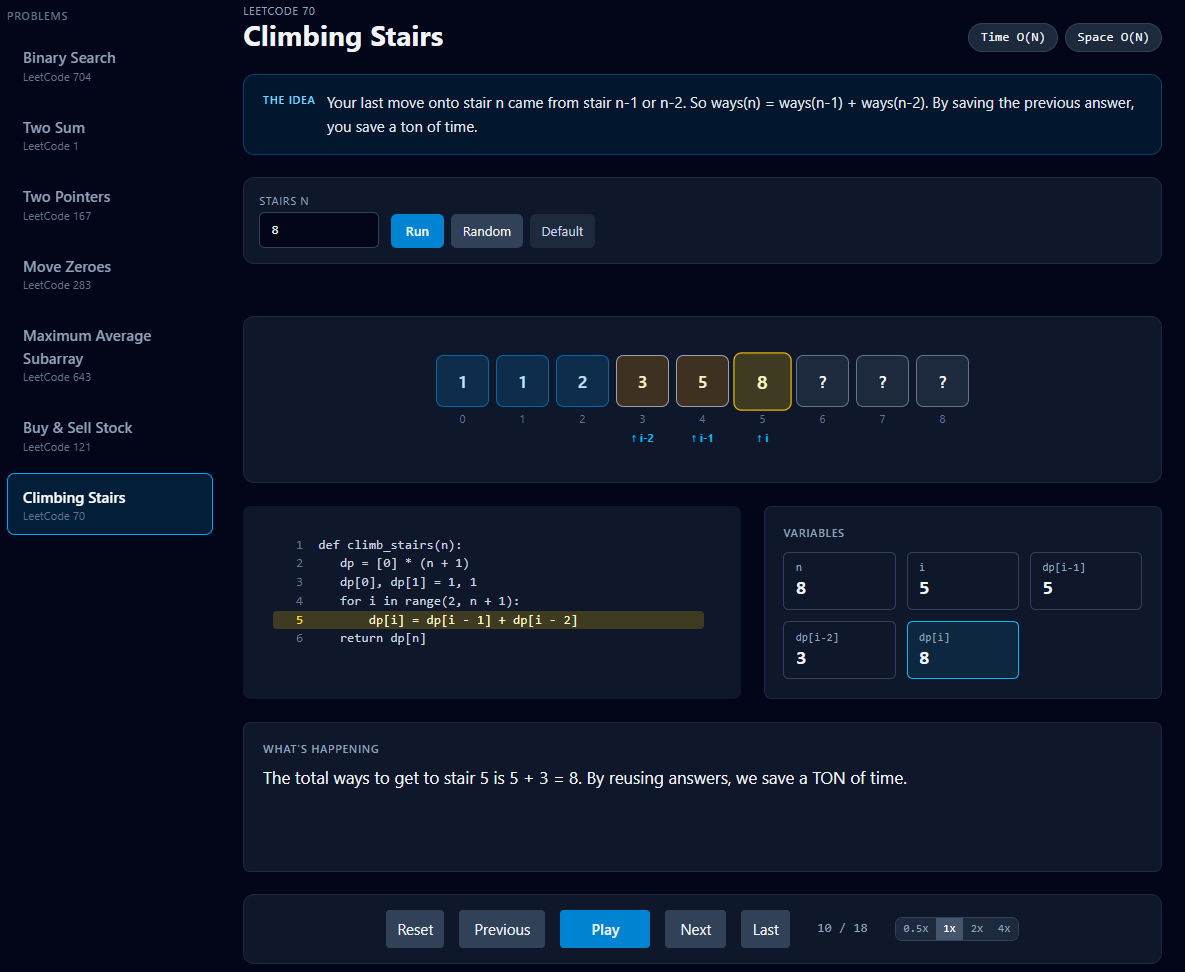
Halfway through Climbing Stairs, with the unknown values still left as a ?
-
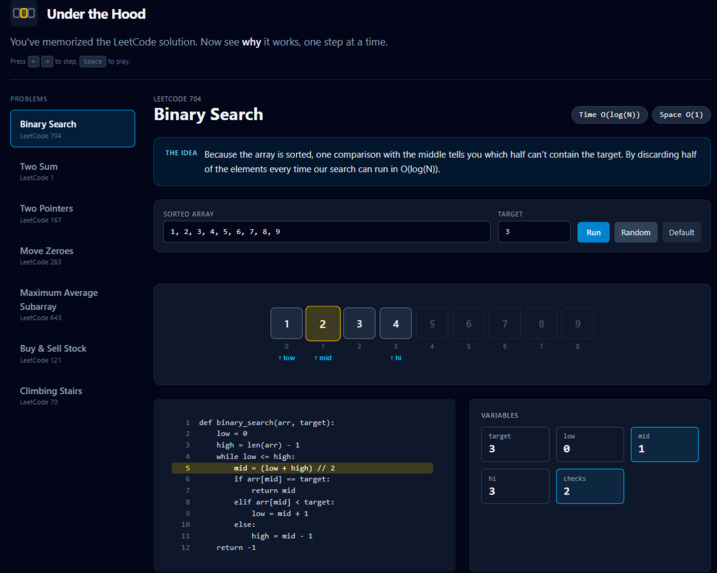
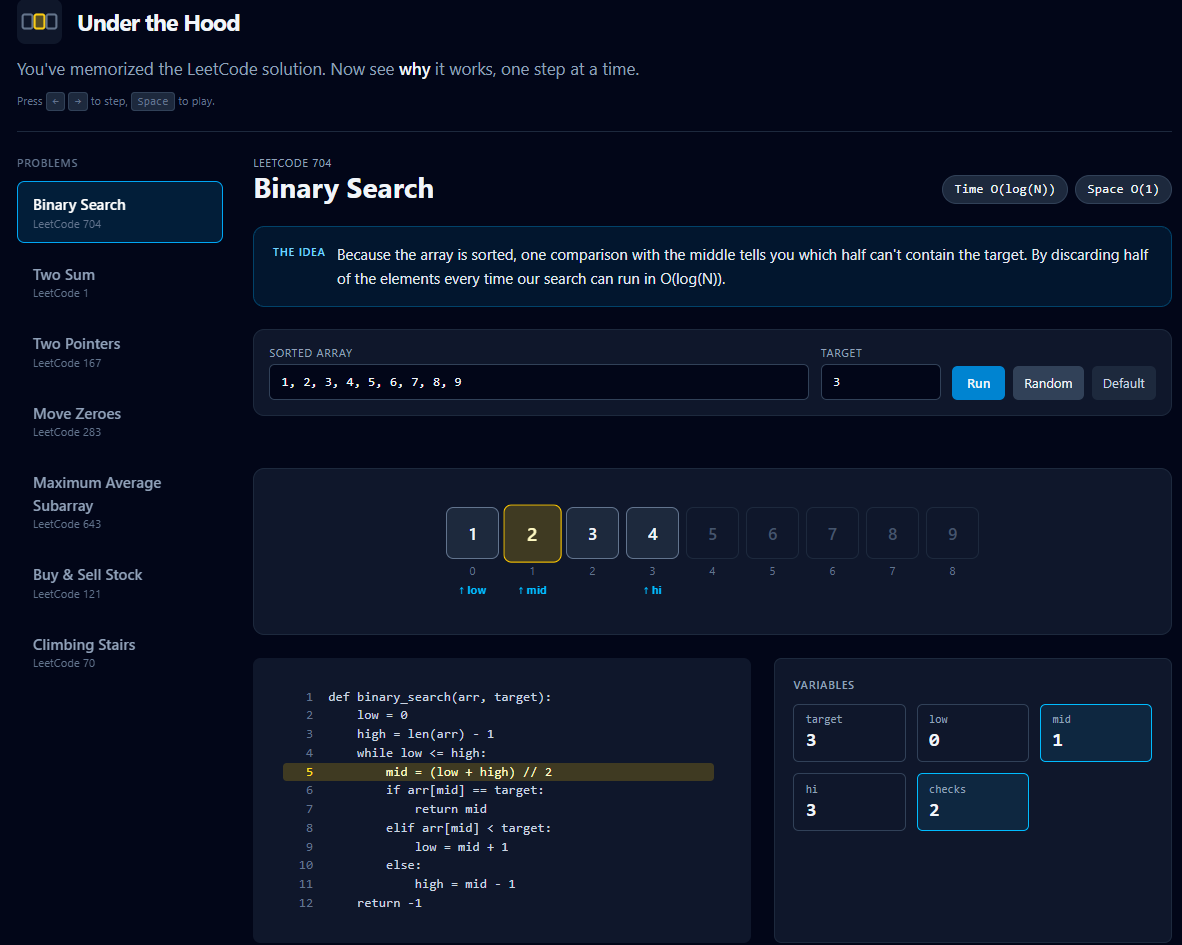
Halfway through binary search, half of the array cut off and our new mid found.
Under the Hood
You memorized the solution. Now see why it works. Overall: 24 hours, 1,500+ lines of code, almost 500 mg of caffeine consumed.
Links: Live demo: https://under-the-hood-blue.vercel.app/ · Code: https://github.com/max-dean05/under-the-hood Demo video: https://youtu.be/s_XWYPU49vA Submitted to: HackTX 2026 · Tracks/prizes: Best use of SpaceXSI Team: Maxwell Dean
Inspiration
Most of us have been there: you grind a LeetCode problem, memorize the pattern, and get the green checkmark, but if someone asked why the solution works, you couldn't really say. Why does binary search only need log N steps? Why is Two Sum fine with one pass? Why does a sliding window beat recomputing the sum? Explanations online are usually a wall of text or a finished code block, and a static answer can't show you what's happening to the variables as the code runs.
Under the Hood is built for people who can write the solution but don't yet understand it. As a freshman in CS, I've been told that grinding LeetCode 75 is a strong way to get good at solving interview problems, but that can lead to prioritizing solving the problems over learning the problems. Under the Hood helps you do BOTH.
What it does
Under the Hood is an interactive, step-by-step algorithm visualizer for common LeetCode problems. Pick a problem from the sidebar and you get:
- The idea in plain English, a short "why this works" summary for each problem, plus its time and space complexity.
- The actual code (Python), with the line currently executing highlighted as you step.
- A live visualization of the data: array cells that color-code what they're doing (comparing, found, eliminated, visited, in the window, leaving the window), labeled pointers like
low,mid,hi, and a hash-map view for problems that use one. - A running explanation ("What's happening") written for each step, in words, so you see the reasoning and not just the movement.
- A variables panel that highlights which values changed on the latest step.
- Your own input. Type in your own array/target, hit Run, or click Random. Input is validated (e.g. binary search requires a sorted array, numbers are capped to keep the visualization readable) and shows a friendly error instead of breaking.
- Playback controls: step forward/back with ← →, play/pause with Space, and 0.5x / 1x / 2x / 4x speed.
Problems covered (7): | Problem | LeetCode # | Core idea shown | |---|---|---| | Binary Search | 704 | Discard half the array with each comparison, O(log N) | | Two Sum | 1 | Hash map of seen values turns "find my partner" into a lookup | | Two Pointers (sorted pair sum) | 167 | Too small? Drop the left. Too big? Drop the right. | | Move Zeroes | 283 | A write pointer swaps non-zeros forward, in place | | Maximum Average Subarray | 643 | Sliding window: add one element, drop one, O(1) update | | Buy & Sell Stock | 121 | Track the cheapest price so far instead of comparing every pair | | Climbing Stairs | 70 | DP table: ways(n) = ways(n-1) + ways(n-2), and a note comparing it to naive recursion call counts |
Some explanations go beyond "what" to "why it's fast": for example, Two Sum compares the single pass against the number of pair comparisons brute force would need, and Climbing Stairs shows how many calls plain recursion would make for your input.
How I built it
- Frontend: React 19 + Vite, styled with Tailwind CSS v4. Deployed on Vercel. The app is JavaScript (no backend); everything runs in the browser.
- A shared "step recorder" engine. Every algorithm is a self-contained module that runs the real algorithm once and records a snapshot at each meaningful moment: which code line is active, a plain-English explanation, the array state, pointers, highlight roles, hash-map contents, and variable values. The UI then simply plays those snapshots back, which makes stepping backward as easy as stepping forward.
- Reusable view components:
ArrayView(animated cells + pointer labels),HashMapView,CodePanel(line-highlighted code),VarsPanel, andInputEditor. - Module registry: each problem exports its code, default input, step generator, complexity, idea text, input fields, validator, and random-input generator. Adding a new problem is one new module file plus one line in the registry.
- Input engine: shared parsing and validation helpers (sorted-check, length limits, value range) so each module's input rules are small and consistent.
Use of Cursor/Grok Bot (for SpaceXSI challenge)
I found that by integrating Grok Bot for fully smoke testing my website allowed me to massively speed up my workflow and exhaustively test my website while fixing based on feedback simulatenously. Also, by using Cursor to analyze the patterns of my modules, I could write new modules much faster and more efficiently.
Challenges I ran into
- Designing one recording format flexible enough for very different algorithms (pointers, windows, hash maps, DP tables).
- Making the UI stable as input changes, e.g. reserving space for error messages so the page doesn't jump, and dimming the visualization/navigation when the input is invalid.
- Writing explanations that are actually clear and short enough to read while the animation plays.
- Layout/polish: keeping code gutter numbers fixed, moving problem tabs to a sidebar.
Accomplishments that I'm proud of
- This is my first time using react, tailwind, vite, vercel, etc. and also my first time at a hackathon so I wasn't sure what to expect going in. After this hackathon, I feel much better and I'm eager to keep doing them in the future.
- Seven problems spanning seven distinct patterns (binary search, hash map, two pointers, in-place write pointer, sliding window, running minimum, 1-D DP), all running through one shared engine.
- Every step is explained in words and tied to a highlighted line of real code, so the visualization teaches the reasoning, not just the motion.
- Fully interactive: bring your own input, randomize, scrub backward and forward, change speed, keyboard shortcuts.
- Live and shareable at a public URL with no sign-up.
What I learned
I learned a lot about React, Vercel, Vite, and using AI as a teammate rather than a tool. I found that refactoring my step recorder as a globalized object made my program much easier, and overall I am satisfied with the results. I am eager to continue working on this and I would love to do more hackathons in the future.
What's next for Under the Hood
- More problems and patterns (linked lists, trees/graphs with BFS/DFS, heaps, backtracking, more DP).
- Visualizations beyond arrays and hash maps
- Support for more languages in the code panel (currently Python only).
- A "predict the next step" quiz mode, and shareable links to a specific problem + input.
- Integration with a GenAI model that can test your knowledge about certain algorithms or test your overall knowledge.
Built With
- JavaScript
- React 19
- Vite
- Tailwind CSS 4
- HTML / CSS
- Vercel (hosting)
- ESLint
- GitHub
Built With
- react
- tailwind
- vite

Log in or sign up for Devpost to join the conversation.