-
-

Smart Log Logic
-
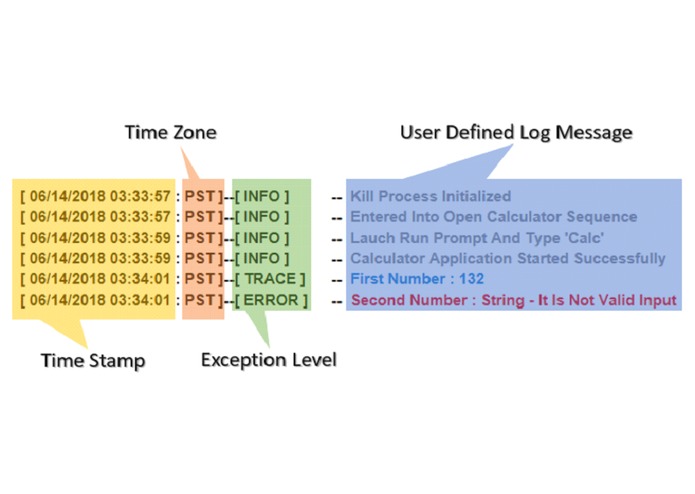
Smart Log Format
-

Smart Log Level Attribute
-
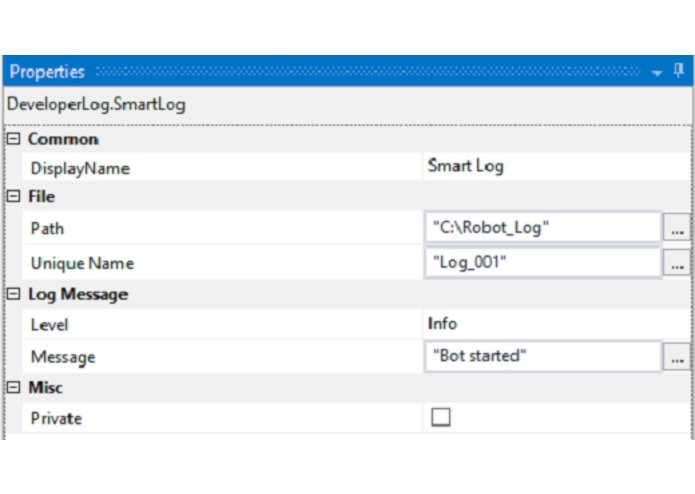
Smart Log Attribute
-

Smart Log Logo



Inspiration
To Build an Custom Activity which would satisfy low budget client without UiPath Orchestrator and also to help developer in backtracking the process issue.
What it does
Create a custom log for a unit transaction in a process with enhanced user readability.
Logs are classified and maintained in separate directories. (i.e. Healthy and Quarantine)
The log file will be in HTML format and responsive to end-user screen size.
How I built it
Have done R&D and gathered the use case.
Have found the optimal logic.
Have given life to the logic with C# (C-Sharp).
Challenges I ran into
While brainstorming logic for isolating the successful transaction log from unsuccessful transaction log.
Accomplishments that I'm proud of
Finally, I have transformed my thoughts and struggles which I have faced during automation into an fully working custom activity.
What I learned
Learned to build custom activity
Learned to gather User cases
What's next for Uipath Smart Log Activity - Custom Activity
In upcoming version (Smart Log V 2.0):
Dashboard activity will be included
It will list and track the logs(no.of success/failure,Export as Excel/PDF, statistics,etc)
Built With
- c#-net
- nuget
- visual-studio


Log in or sign up for Devpost to join the conversation.