-
-
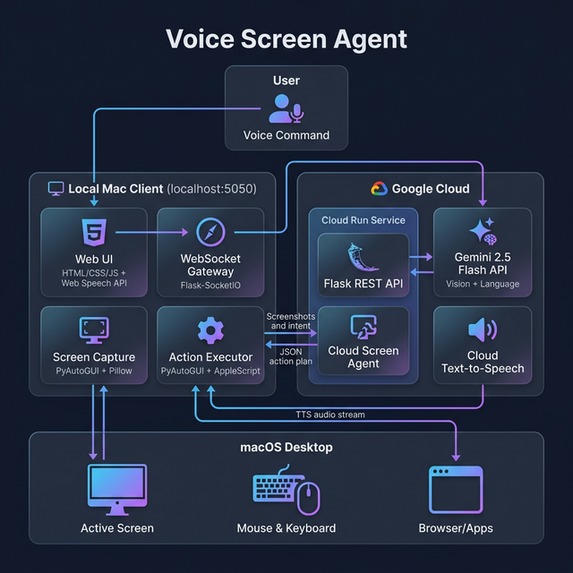
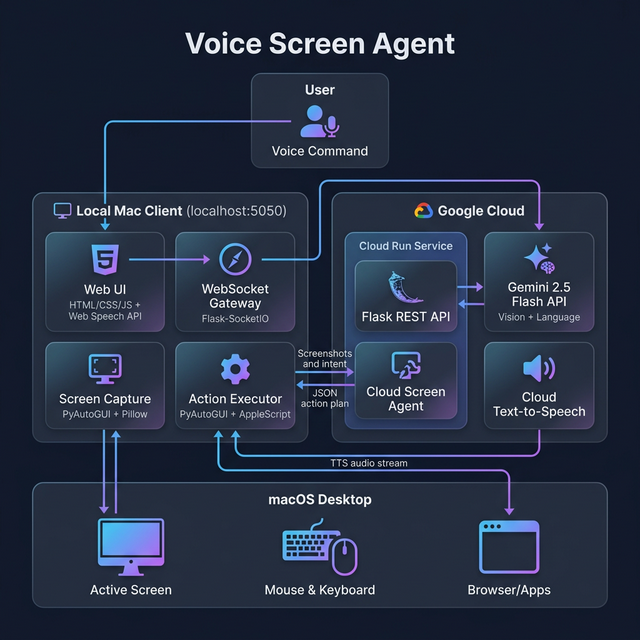
User speaks → UI sends screenshot + intent to Cloud Run → Gemini plans pixel-perfect actions → Local Python client executes physical clicks.
Inspiration
The inspiration for Voice Screen Agent stems from a fundamental need for accessibility in modern computing. For individuals with motor impairments or those who require hands-free interaction, traditional voice control systems often fall short. They typically rely on rigid, pre-programmed commands or struggle to understand the dynamic, visually rich nature of modern interfaces. We wanted to build a system that doesn't just hear commands, but literally sees and understands the screen just as a human does—bridging the gap between spoken intent and pixel-perfect physical execution.
What it does
Voice Screen Agent is a hands-free computer control system powered by multimodal AI. You simply speak a command (e.g., "Open YouTube and search for black holes"). The agent captures your screen, uses Gemini 2.5 Flash to visually analyze the UI, plans a precise sequence of actions, and physically executes them on your machine (moving the mouse, clicking, and typing). It can also narrate what's on your screen, acting as a visual assistant. It’s like Siri combined with human-level visual understanding.
How we built it
We engineered a split-architecture system to maximize both intelligence and performance:
- The Cloud Brain (Google Cloud Run): We host the heavy multimodal workloads in the cloud. The core intelligence is powered by Gemini 2.5 Flash, which analyzes high-resolution screenshots to understand UI elements, read text, and plan logical actions.
- The Local Hands (Python Client): A lightweight client runs locally on the user's Mac. It captures the screen, sends it to the cloud brain, and executes the returned physical actions (mouse clicks, keyboard strokes, scrolling) using
PyAutoGUI. We integrated AppleScript to ensure browser windows are properly focused before actions are taken. - The Voice Interface: The user interacts through a sleek, web-based control panel built with Flask and the Web Speech API, styled with modern dark glassmorphism. It communicates with the local executor via WebSockets for real-time responsiveness.
Challenges we ran into
- Coordinate Precision on High-Resolution Displays: One of our biggest hurdles was mapping the coordinates returned by Gemini to the physical pixels on a Mac Retina display. Retina displays use scaling that causes a mismatch between logical screen coordinates and physical pixels. We had to implement a dynamic scaling calculation in our local executor to ensure the AI's clicks landed exactly where intended.
- Latency vs. Capability: Processing high-resolution screenshots and planning complex UI interactions requires significant compute. Balancing the need for Gemini to "see" clearly with the necessity of near-instantaneous execution meant carefully optimizing image payloads and leveraging the speed of the 2.5 Flash model over heavier alternatives.
- Component Dependencies on Google Cloud: While deploying our cloud backend, we ran into severe cold-start crashes caused by conflicting package dependencies (
google-genaivsgoogle-generativeai) and transitive dependencies in the Google ADK. We had to carefully prune and align our requirements to get a stable, scalable Cloud Run deployment.
Accomplishments that we're proud of
- Single-Shot Visual Planning: We successfully merged intent parsing and visual action planning into a single prompt for Gemini, allowing it to see the screenshot and the user intent simultaneously for much higher pixel accuracy.
- True OS-Level Automation: Unlike browser extensions, our agent controls the actual OS cursor and keyboard, meaning it works across any application, not just web pages.
- Zero-Mockup Execution: Delivering a system that actually parses intent, figures out coordinates, and moves the mouse in real-time without hardcoded scripts or mocked flows.
What we learned
Building Voice Screen Agent taught us the immense potential of multimodal Large Language Models (LLMs) outside of traditional chat interfaces. By giving an LLM "eyes" (vision capabilities) and "hands" (local scripting), it transforms from a text generator into a capable, intelligent operator. We learned deep lessons about UI structure, the intricacies of OS-level automation cross-platform (and specifically on macOS), and how to architect a hybrid cloud-local system for optimal performance in AI applications.
What's next for UI-NavigatorV3
- Multi-Step Goal Execution: Currently, the agent executes single complex intents. The next step is giving it memory and recursive planning so it can accomplish long-running tasks ("Book me a flight to NYC on Friday") by iteratively checking the screen and acting until the goal is met.
- Cross-Platform Support: Expanding the local executor to fully support Windows and Linux out-of-the-box, ensuring native window focus and scaling handlers for PC environments.
- Personalized UI Memory: Training the agent to recognize and remember a user's specific applications and layouts to speed up interactions and reduce token usage for frequently visited screens.
Built With
- applescript
- flask
- gemini-2.5-flash-api
- google-cloud-run
- google-cloud-text-to-speech
- google-generativeai-sdk
- pyautogui
- python
- socket.io
- web-speech-api

Log in or sign up for Devpost to join the conversation.