-
-
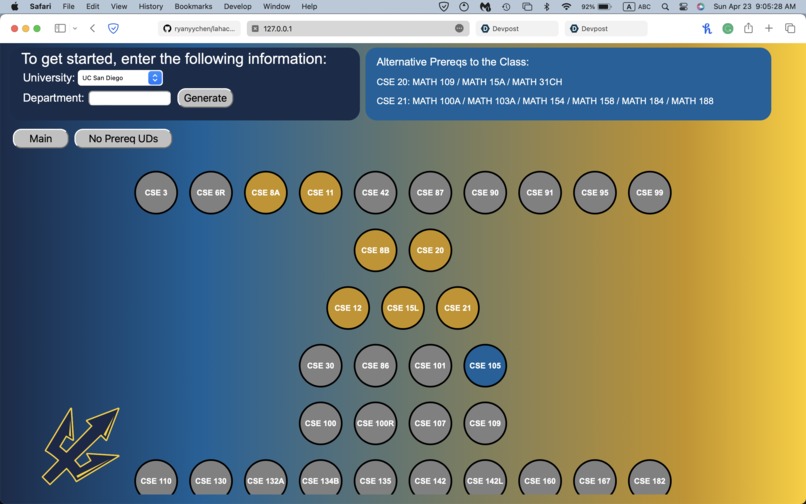
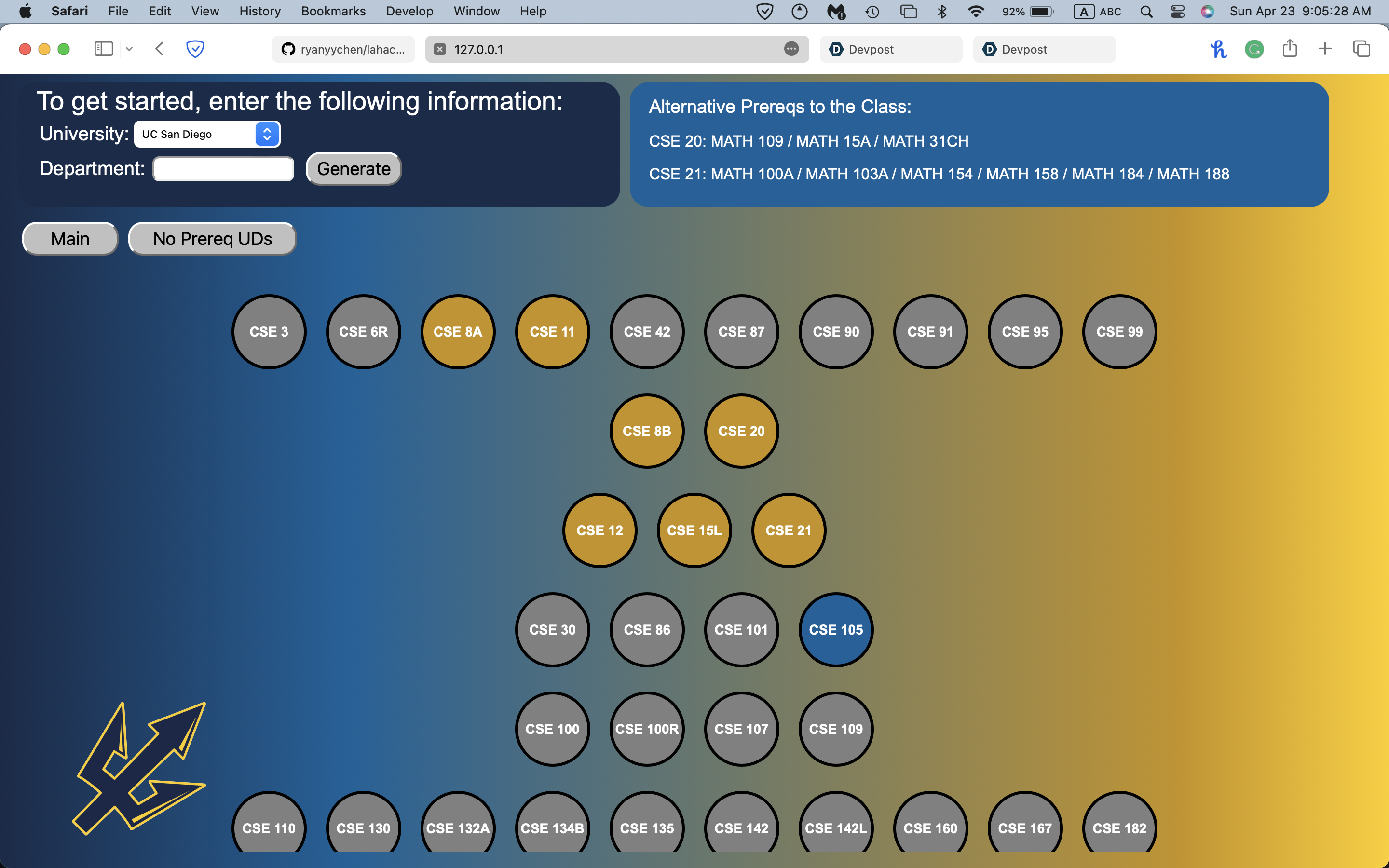
Screenshot of website
Inspiration
It can get confusing when signing up for classes because there are so many classes and dependencies to see and keep track of. We even know some people that ended up wasting some of their time and money taking classes that they will eventually replace. Would it not be convenient to visually see course dependencies in order to easily plan your academic career plan?
What it does
Given a department, our web app will display a tree-like structure of all courses under that department. When users hover over a node, that course's dependencies will highlight, including implicit dependencies through its direct dependencies.
How we built it
Front-End; We started with a barebone HTML file that reflected the structure that we wanted our website to have. We then put in the functions one by one, starting with the top left corner and then the actual visualization of the tree. We decided later on to add the two buttons 'Main' and 'No Prereq UDs' because there was too much clutter all in one tree. We used a combination of CSS and JavaScript to implement different dynamic functions to the website.
Back-End: We created a custom web scraper with Python that parses UCSD's course catalogs. Additionally, we used json to make the data easily readable by JavaScript.
Challenges we ran into
Front-End;
- It was incredibly difficult to try to draw lines in between nodes and their prerequisites, so we decided to instead use hovering and color-coding to display such relations.
- A challenge was iterating through the given list of arrays and assigning them to the proper nodes and layers to display the tree structure. We also had to recursively access prerequisite nodes in order to color them appropriately.
- We tried to call the webscraping Python script from JavaScript using Flask, but wasn't able to figure it out due to our lack of experience (certainly not lack of effort).
Back-End:
- The course catalogs all have the same general format but differ in the .html file. Each catalog is of a Department ID followed by .html (i.e. CSE.html). Finding a list of Department IDs was difficult as they were not obviously apparent online. We encountered a list that overestimated UCSD's amount of departments, so we decided to store them into a CSV file and create a small program that would parse the CSV file and check its validity as a course catalog link.
- Another problem was the inconsistencies of the .html formatting by UCSD. Sometimes they would swap the parent and child of important tags we kept track of to locate prerequisite courses. Our solution was to use a regular expressions library in order to generalize the important information (courses in the form of CSE 100R and others).
Accomplishments that we're proud of
We were able to exceed our expectations and prior limits through exploration in various fields such as design and data science. We believe that we made a decently novel idea, especially compared to what have worked on in classes.
What we learned
We learned more about the tools available to us, such as BeautifulSoup for web scraping, JavaScript for manipulating HTML/CSS elements, and better GitHub practices.
What's next for UCSTreependencies
Since we are roommates and still plan to be, we might look into even more project opportunities such as hackathons.


Log in or sign up for Devpost to join the conversation.