Inspiration
Building a schedule for university means juggling spreadsheets, Rate My Professors tabs and a lot of trial and error, only to find out your DGD clashes with your lab. Existing tools can make a conflict-free timetable, but none let you just say what you want, and none tell you what you're giving up.
What it does
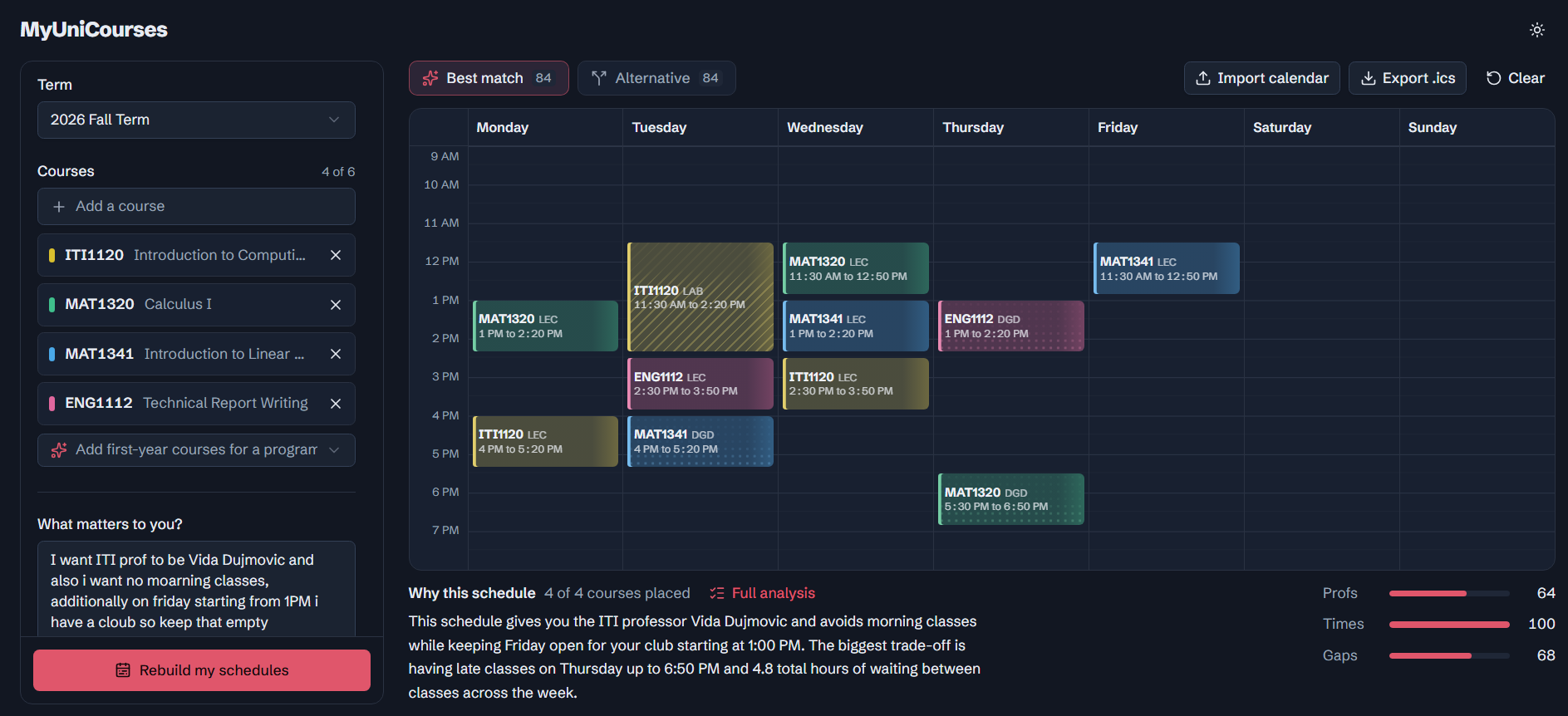
myUni.courses builds your class schedule from plain English. Type something like "no classes before 10, Fridays off, good profs matter most" and it:
- turns that into settings you can see and adjust
- builds a Best match and a genuinely different Alternative
- shows professor ratings and review summaries on hover
- explains each schedule's trade-offs, like long days, gaps, waitlists and missed preferences
- tells you why a course didn't fit, and how to fix it
- exports to your calendar, skipping reading week
How we built it
A React and TypeScript frontend, and a Node and Express backend that pulls course data from uoEnroll. The schedules come from a search algorithm, It tries every combination of sections, drops anything that overlaps, and scores what's left on professors, times and gaps using your priorities. Five courses can mean thousands of possible weeks, so it skips dead ends early.
Gemini reads your preferences and writes the explanations, but it only sees facts our code already calculated, so it can't make things up. Auth0 handles sign-in and connects Google Calendar.
Challenges we ran into
- Making the Alternative actually different. The second-best schedule was usually the same week with one lab moved, so we changed it to pick the most different schedule that still scores close.
- Auth0 and Google permissions. Plenty of dashboard settings to get right.
- Hitting Gemini's free-tier limit mid-testing. The app kept working thanks to its built-in fallback.
Accomplishments that we're proud of
- Watching the sliders move to match what you typed
- Honest explanations: every number comes from code, and the AI only writes the sentences
- A calendar that feels polished, with animated highlighter strokes and hover that lights up a whole course
- It never crashes. With no AI, no login or no internet, it still works.
What we learned
AI works best explaining decisions, not making them. We also learned that small UX details, like a class time disappearing, change how much people trust a tool.
What's next for myUni.courses
The name says it: your university, not just ours. Next up is Carleton, then cross-registration between uOttawa and Carleton with travel time between campuses. After that: official prerequisite data, and saving schedules to your account.
Built With
- auth0
- express.js
- javascript
- motion
- node.js
- react
- shadcn-ui
- tailwindcss
- typescript
- vite


Log in or sign up for Devpost to join the conversation.