-
-
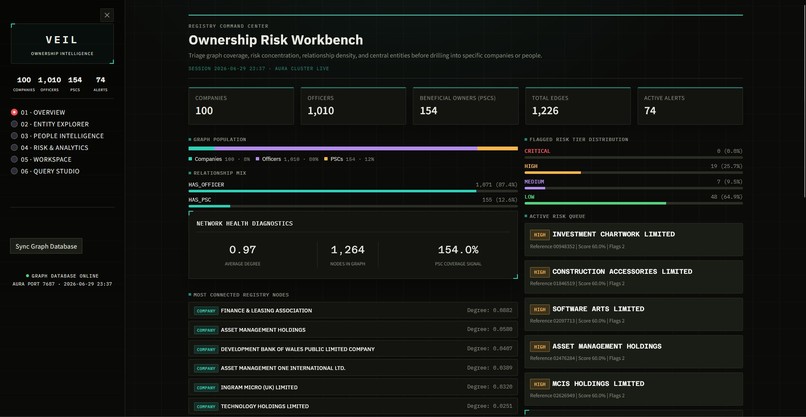
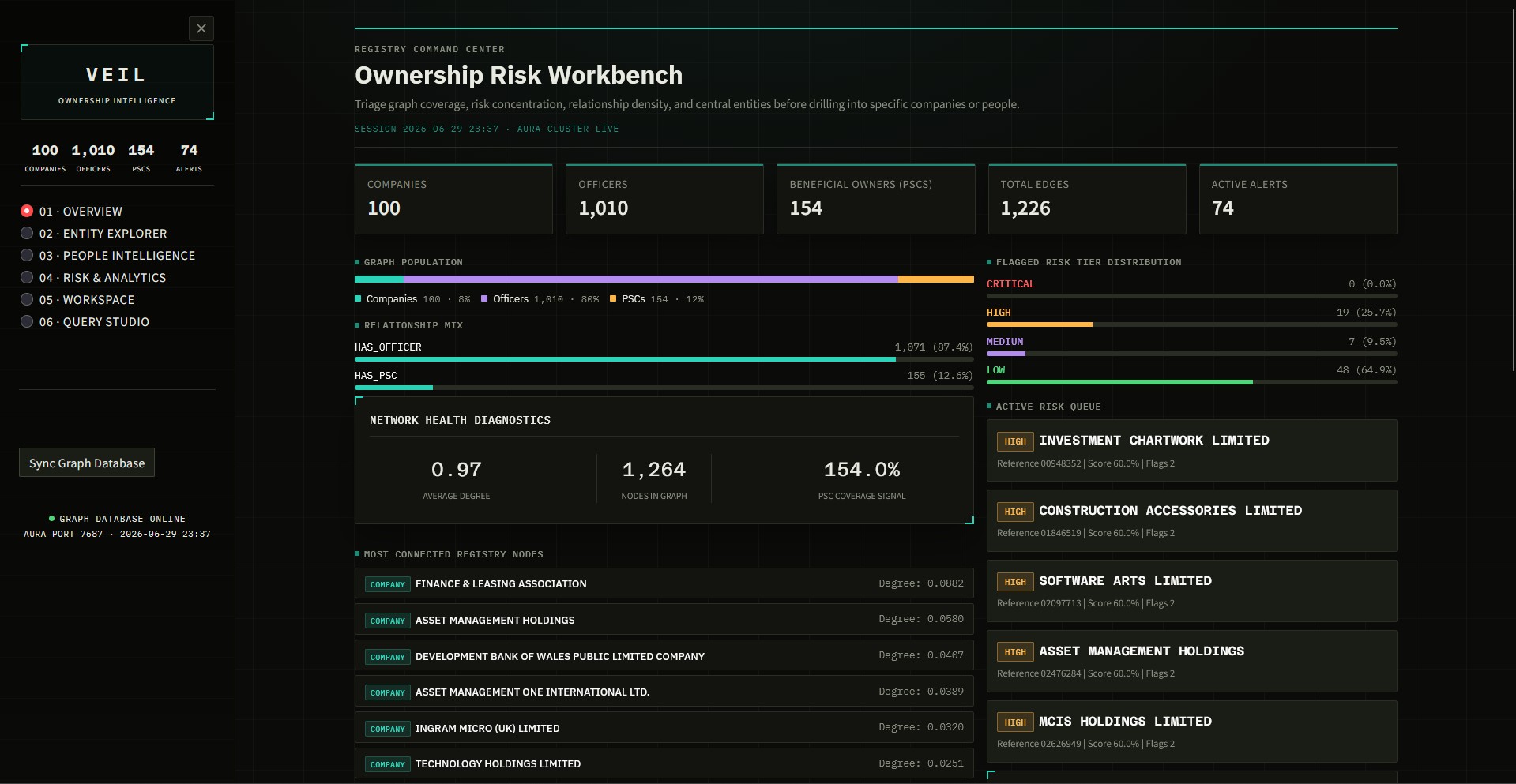
figure1 - Overview
-
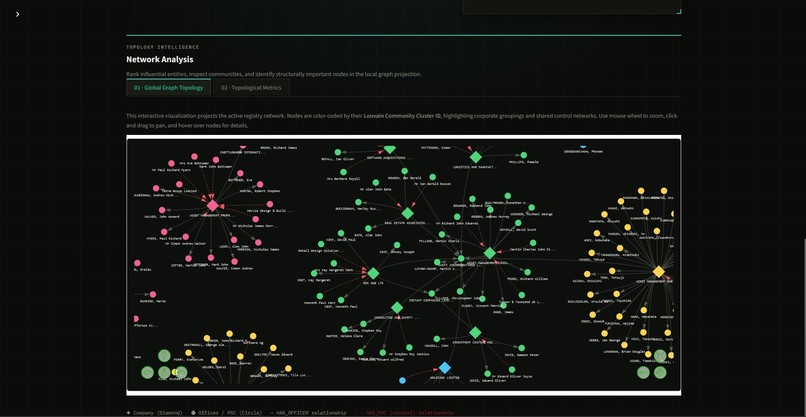
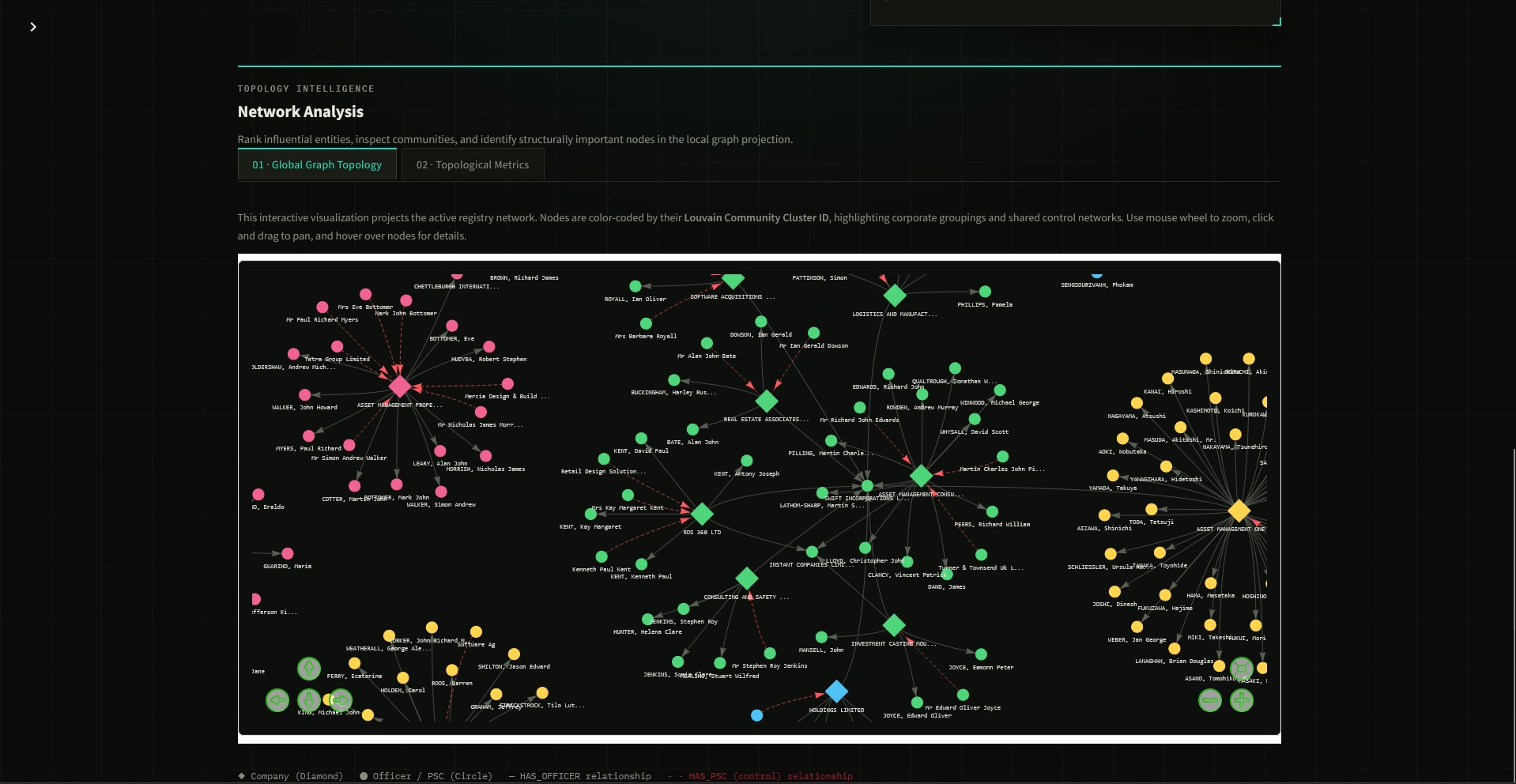
figure 2 - Network Analysis Global Graph Topology
-
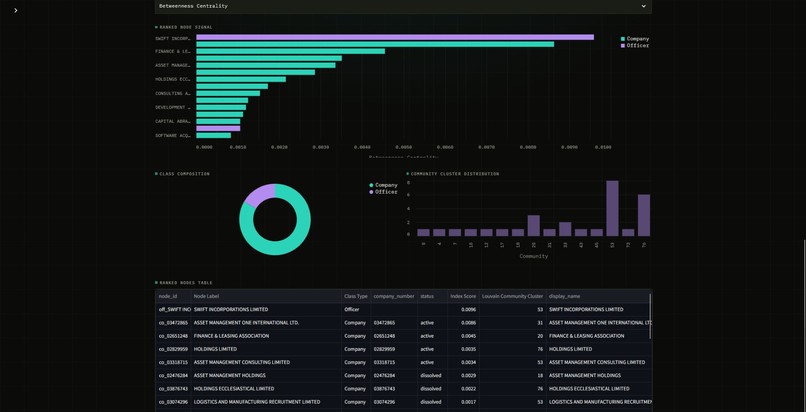
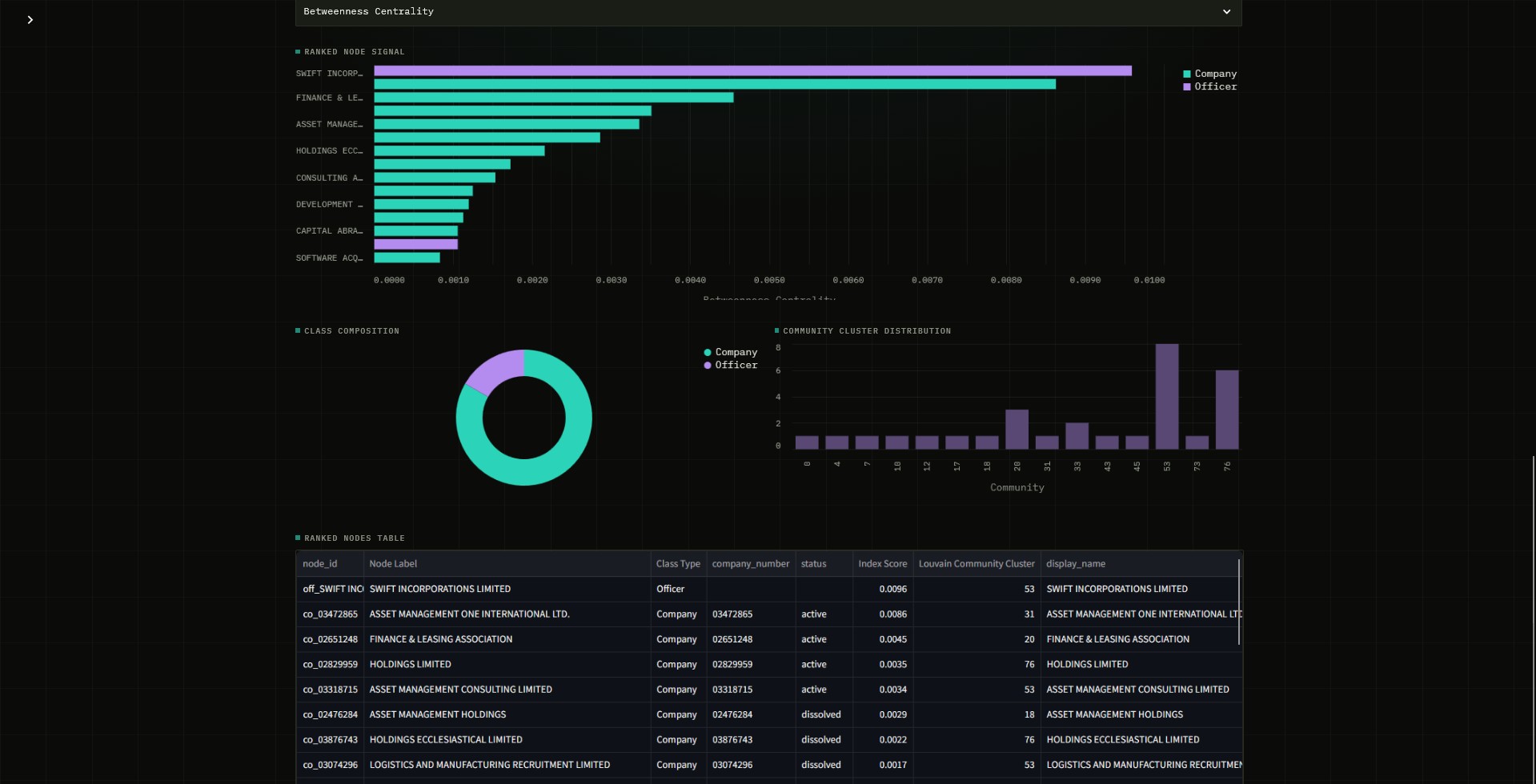
figure 3 - Network Analysis Topological Metrics
-
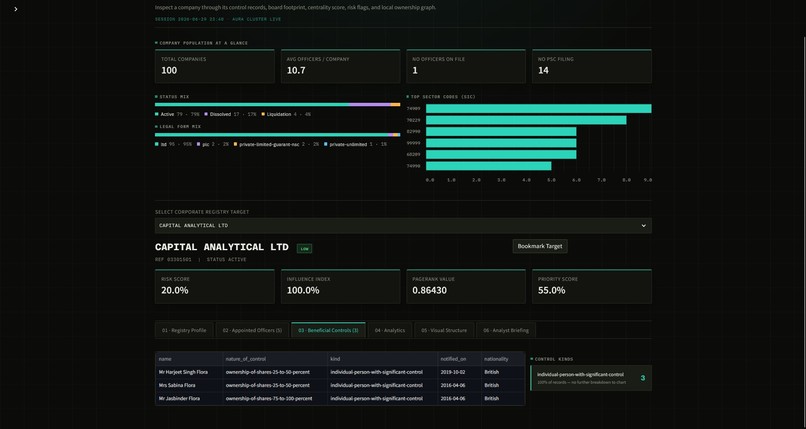
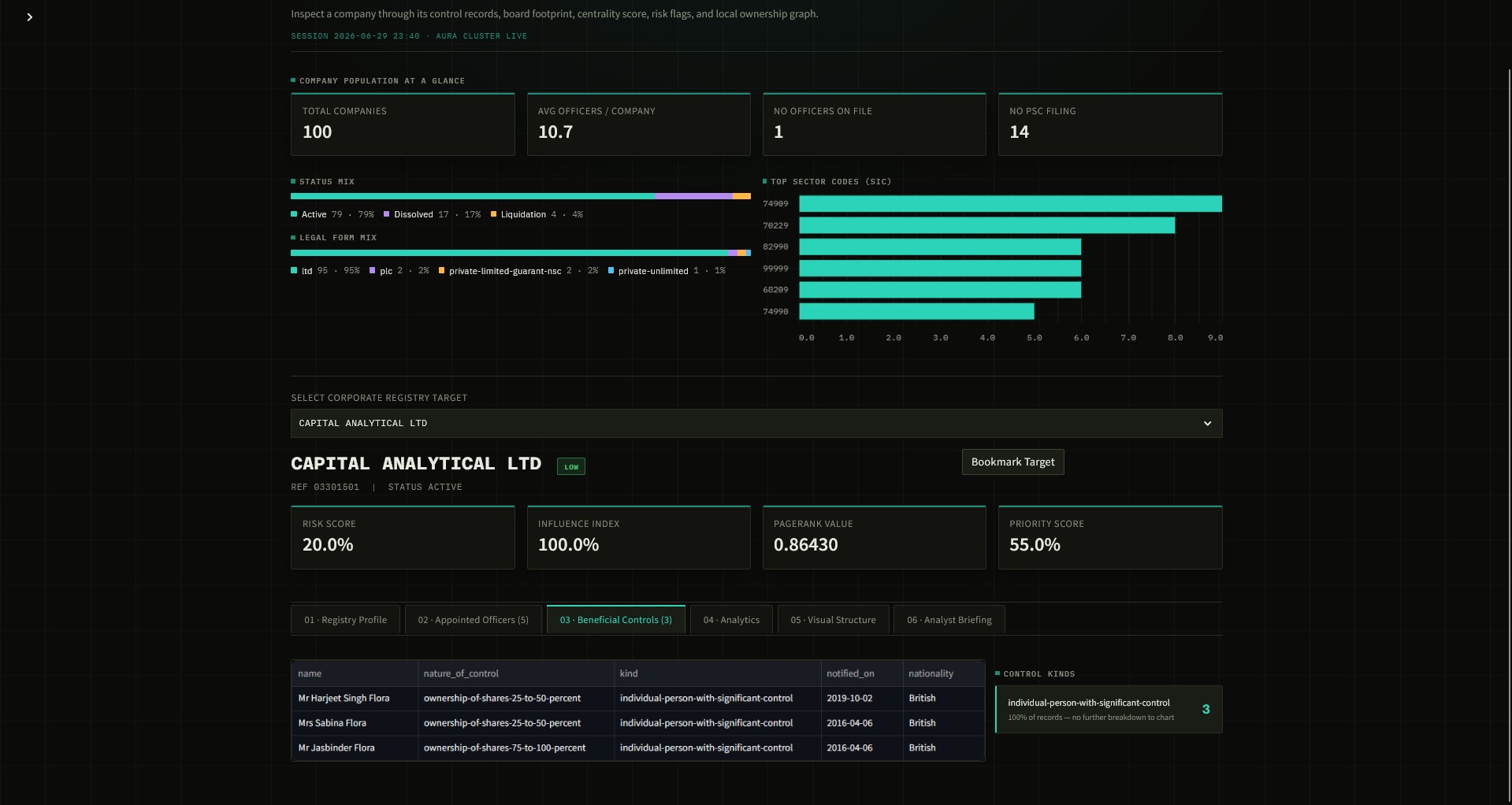
figure 4 - Entity Explorer
-
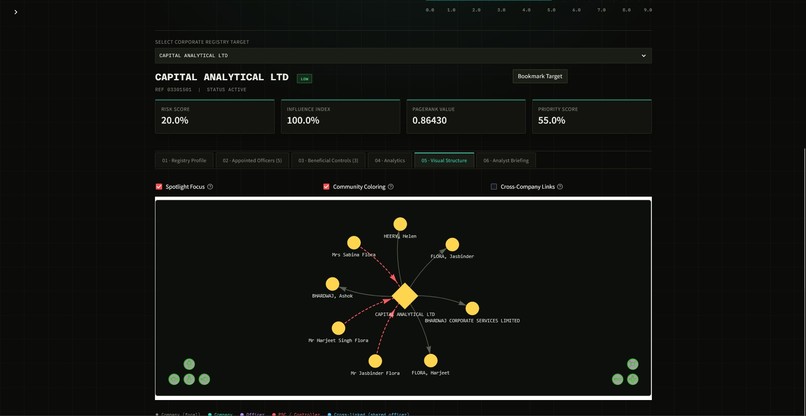
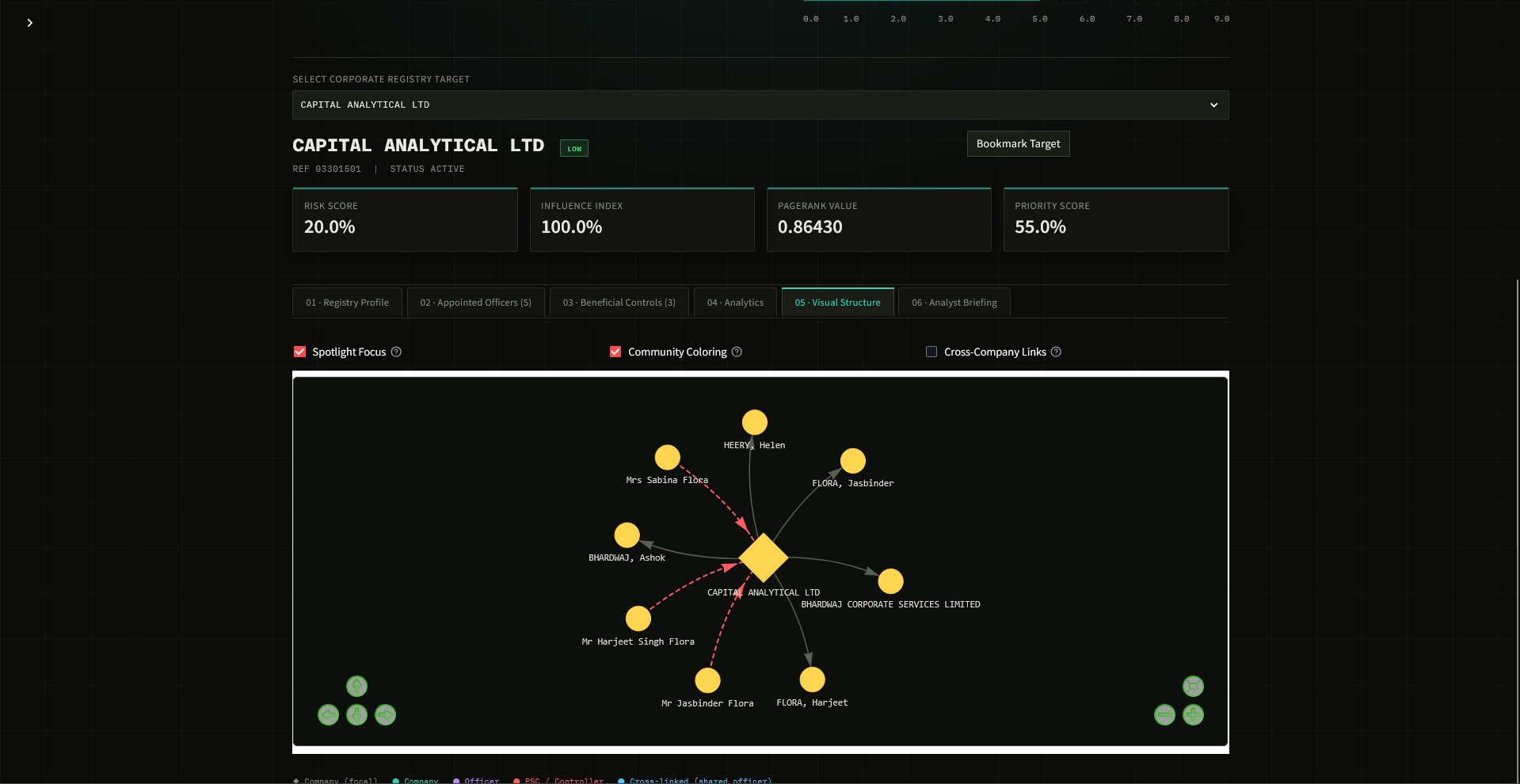
figure 6 - Entity Explorer Visual Structure Graph
-
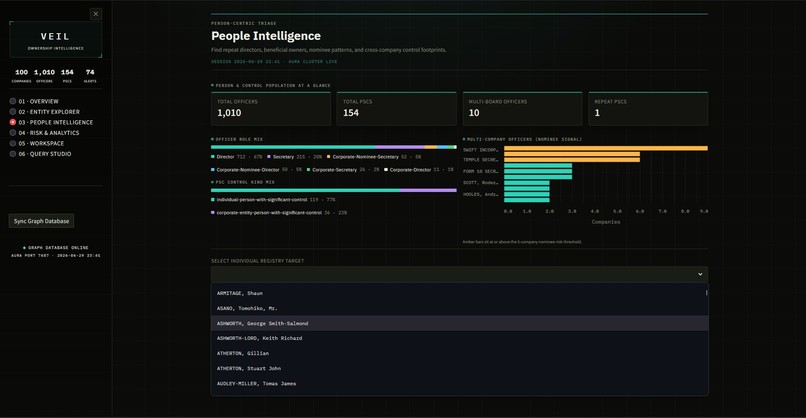
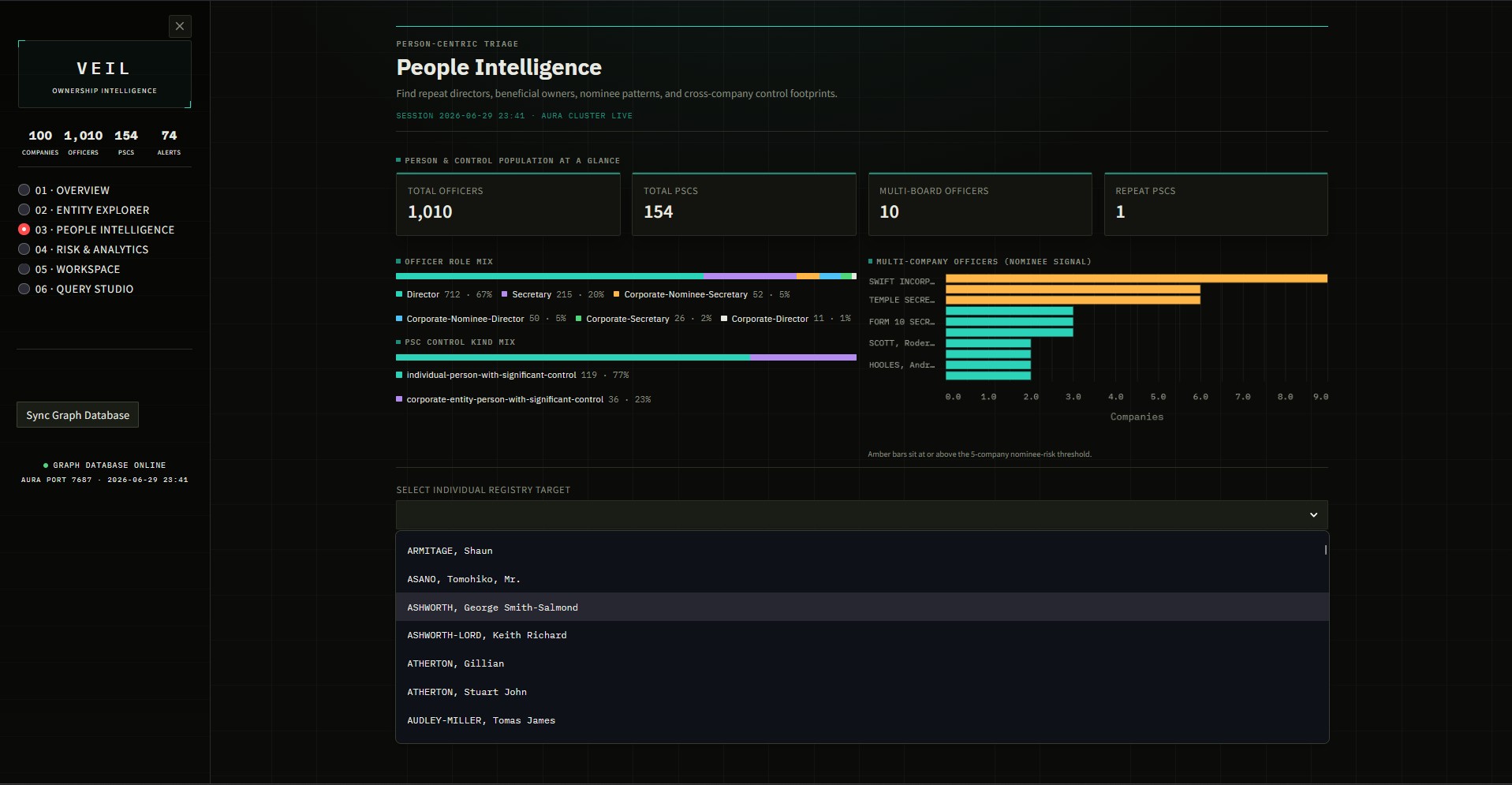
figure 7 - People Intelligence
-
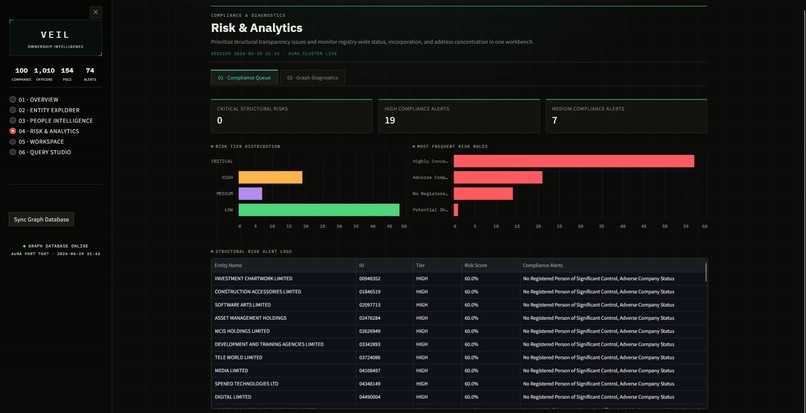
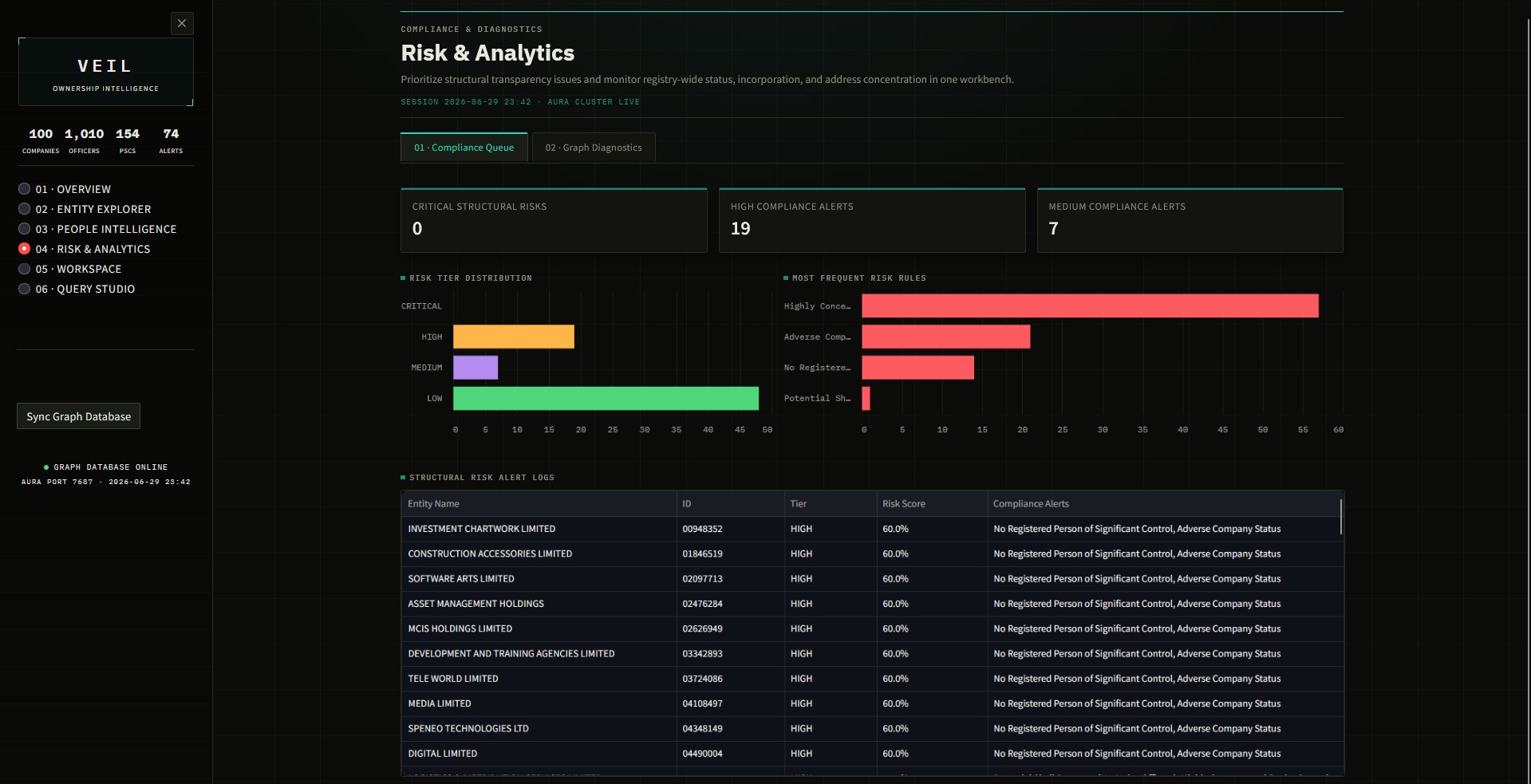
figure 8 - Risk & Analytics
-
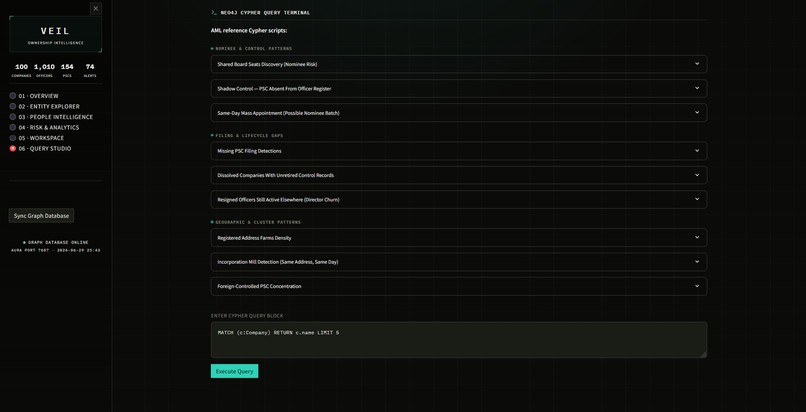
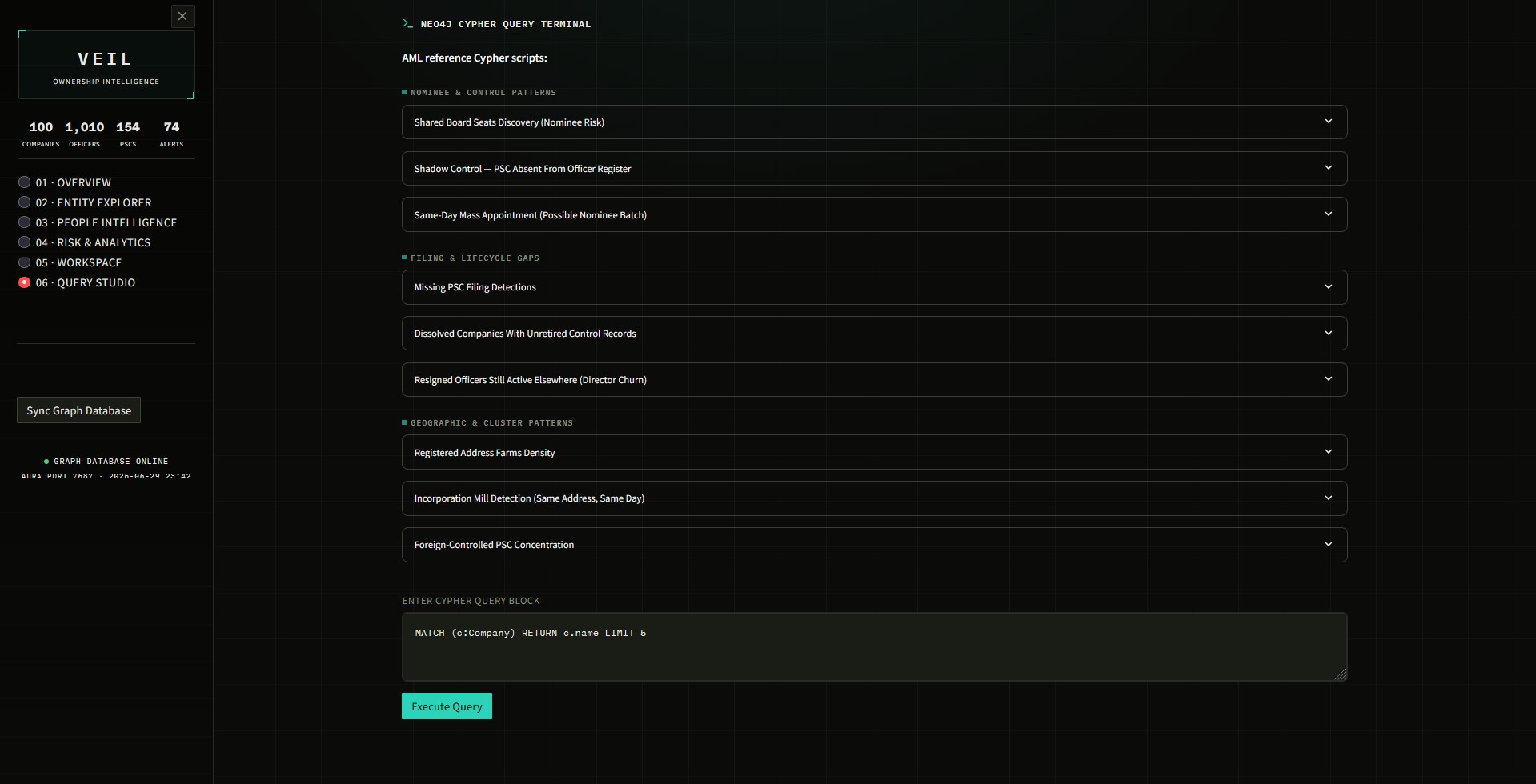
figure 9 - Cypher Query Studio
UBO Knowledge Graph 🕸️




A Neo4j graph database & Streamlit intelligence workbench for mapping UK corporate ownership structures, built on the UK Companies House API.
Table of Contents
- What Is This?
- Video Showcase
- Graph Schema
- Project Structure
- Prerequisites
- Quick Start
- Detailed Setup
- How to Run
- Inside the Dashboard
- Visual Structure Graph Features
- Risk Engine
- Rate Limits
- Troubleshooting
- GraphAcademy Cup Challenge
- Licence
Video Showcase 🎥
Check out the capabilities and a walkthrough of the dashboard in action:

What Is This?
The Ultimate Beneficial Ownership (UBO) Knowledge Graph answers the question: "Who ultimately owns and controls this company?"
It fetches real-world data from the UK Companies House REST API and models it as a property graph in Neo4j:
(:Company)-[:HAS_OFFICER]->(:Officer)
(:Company)-[:HAS_PSC]->(:PSC)   // Person of Significant Control
With it, you can:
- Inspect any company's directors, beneficial owners, risk flags, and PageRank influence score.
- Trace cross-company ownership networks to uncover nominee directors and shared PSCs.
- Detect AML/KYC risk patterns with an automated, rule-based risk engine.
- Visualise the ownership graph interactively, with community coloring and cross-company links.
- Run and save your own Cypher investigations from a built-in query terminal.
Graph Schema
(:Company)-[:HAS_OFFICER]->(:Officer)
(:Company)-[:HAS_PSC]->(:PSC)
| Label | Key Properties |
|---|---|
| Company | company_number, name, status, company_type, address, sic_codes, incorporation_date |
| Officer | name, role, nationality |
| PSC | name, kind, nature_of_control, nationality |
Relationship properties carry the dates that make timeline-based queries possible: appointed_date / resigned_date on HAS_OFFICER, and notified_on on HAS_PSC.
[!IMPORTANT] Name-Collision Caveat (Known Limitation): Officer nodes are merged on
{name, role}and PSC nodes on{name}alone. Two distinct individuals who share the same name (and, for officers, the same role) will be collapsed into a single node, which can produce false-positive cross-company links and inflated risk flags at scale. A production fix would use a composite key of name + date-of-birth month/year — fields the Companies House API already exposes — to disambiguate people. This trade-off is intentional for the scope of this demonstration.
Project Structure
ubo-knowledge-graph/
├── config.py                  # Environment variable loader & validation
├── companies_house_client.py  # Companies House API wrapper (iterative retry, exponential backoff)
├── data_collector.py          # Orchestration: search → fetch → save JSON
├── import_to_neo4j.py         # JSON → Neo4j (MERGE nodes + relationships, --limit flag)
├── network_analytics.py       # NetworkX graph: PageRank, Louvain communities, centralities
├── risk_engine.py             # Batch risk scoring engine (AML/KYC rule flags)
├── scoring_engine.py          # Influence, control, and investigation priority scores
├── workspace_manager.py       # File-based session state: bookmarks & search history
├── queries.cypher             # Standalone annotated Cypher query library (reference only —
│                               #   not wired into Query Studio; see note below)
├── requirements.txt           # Python dependencies
├── run_dashboard.bat          # One-click launcher (Windows)
├── icon.ico / icon.png        # App branding assets
├── .env.example                # Secrets template (safe to commit)
├── .env                         # YOUR secrets (never commit this)
├── .gitignore                  # See "what to ignore" below
├── dashboard/
│   ├── app.py                  # Streamlit intelligence workbench — "VEIL" (6 pages)
│   └── theme.py                # CSS design system & SVG icon library
├── tests/
│   └── test_engines.py         # Unit tests for the scoring & risk engines
├── docs/
│   └── screenshots/             # Dashboard screenshots (referenced in README)
├── data/                        # Raw JSON company files (auto-created, gitignored)
│   ├── company_09243948.json
│   └── ...
└── workspace_cases.json         # Saved bookmarks & comparisons (auto-created, gitignored)
queries.cyphervs. Query Studio: these are two separate things.queries.cypheris a standalone reference file; the dashboard's Query Studio page has its own independent set of templates defined directly indashboard/app.py. Keep that in mind if you add queries to one and expect them to show up in the other — they won't, unless you copy them over by hand.
What to ignore
Make sure your .gitignore covers all of the following — only the first two ship by default:
.env
/data/

# generated at runtime — not source, don't commit
workspace_cases.json
__pycache__/
.venv/
If you're on an older copy of dashboard/app.py, you may also see a lib/ folder appear at the
project root after viewing any ownership graph. That's pyvis
copying its JS assets into the current working directory by default — current app.py sets
cdn_resources="in_line" so this no longer happens. If you still see it, you're on an older
version of the file; safe to delete, and worth adding /lib/ to .gitignore as a backstop.
Prerequisites
| Tool | Where to get it | Cost |
|---|---|---|
| Python 3.10+ | python.org | Free |
| Neo4j AuraDB Free | console.neo4j.io | Free |
| Companies House API key | developer.company-information.service.gov.uk | Free |
Quick Start
For anyone who just wants to get running and will figure out the details as they go — full walkthrough is in Detailed Setup below.
git clone https://github.com/xlr8-source/ubo-knowledge-graph.git
cd ubo-knowledge-graph

python -m venv .venv
source .venv/bin/activate          # macOS/Linux — see below for Windows

pip install -r requirements.txt
cp .env.example .env                # then fill in your real keys — see Step 5

python config.py                    # sanity-check your .env
python data_collector.py            # pull companies from Companies House
python import_to_neo4j.py --clear --limit 50   # import into Neo4j

streamlit run dashboard/app.py
Detailed Setup
Step 1 – Create a Python virtual environment
python -m venv .venv
Activate it — the command depends on your OS and shell:
# Windows (PowerShell)
.venv\Scripts\Activate.ps1

# Windows (Command Prompt)
.venv\Scripts\activate.bat

# macOS / Linux
source .venv/bin/activate
Windows PowerShell users: if you get a "running scripts is disabled" error, run
Set-ExecutionPolicy -Scope CurrentUser RemoteSignedonce, then retry.
Step 2 – Install dependencies
pip install -r requirements.txt
Step 3 – Get a Companies House API key
- Go to https://developer.company-information.service.gov.uk/
- Register for a free account and create a new "live" application.
- Copy the API key (used as an HTTP Basic-Auth username).
Step 4 – Get your Neo4j AuraDB credentials
- Log in to https://console.neo4j.io/
- Create a Free instance.
- Copy your URI (starts with
neo4j+s://), username (neo4j), and password.
AuraDB Free instances pause automatically after a period of inactivity. If
config.pyor the dashboard suddenly can't connect, log into the console and resume the instance first.
Step 5 – Create your .env file
cp .env.example .env       # macOS/Linux
copy .env.example .env     # Windows
Fill in your real values:
COMPANIES_HOUSE_API_KEY=abc123yourkeyhere
NEO4J_URI=neo4j+s://xxxxxxxx.databases.neo4j.io
NEO4J_USERNAME=neo4j
NEO4J_PASSWORD=yourpassword
Step 6 – Test your configuration
python config.py
This should confirm your .env values load correctly and that Neo4j is reachable before you go
any further.
How to Run
1. Collect data from Companies House
python data_collector.py
Edit the SEARCH_KEYWORDS list in data_collector.py to control what companies are fetched.
Data is saved as JSON files in /data/. Each run skips companies already on disk.
2. Import into Neo4j
# Standard import (merge into existing data)
python import_to_neo4j.py

# Wipe the database first, then import fresh with a 50-company limit
python import_to_neo4j.py --clear --limit 50

# Import everything you've collected
python import_to_neo4j.py --clear --limit 0
The --limit N flag (default 0 = no limit) slices the JSON file list before import — useful
for fast local testing before committing to a full import.
3. Run the unit test suite
python -m unittest tests/test_engines.py
Verifies the scoring and risk engines independently of any live Neo4j connection.
4. Launch the dashboard
streamlit run dashboard/app.py
Or double-click run_dashboard.bat on Windows.
Streamlit opens your browser at http://localhost:8501 — you should land on VEIL's Overview
page with your live registry stats in the sidebar.
Inside the Dashboard
VEIL is organized into six pages:
| Page | What it shows |
|---|---|
| Overview | Registry-wide triage — population stats, relationship mix, network health, top connected nodes, active risk queue — plus the full network topology view (interactive global graph and ranked centrality metrics) on the same page |
| Entity Explorer | A company-wide analytics panel (status mix, legal form mix, top SIC sectors) above a six-tab drilldown for any one company: Registry Profile, Appointed Officers, Beneficial Controls, Analytics, Visual Structure, Analyst Briefing |
| People Intelligence | A person-wide analytics panel (officer role mix, PSC control-kind mix, multi-company officers ranked against the same 5-company threshold the risk engine flags) above per-person board appointments, controls, and risk flags |
| Risk & Analytics | Compliance Queue (risk tier distribution, most frequent rule triggers, full alert log) and Graph Diagnostics (status distribution, incorporation timeline, type mix, address density) as two tabs on one page |
| Workspace | Bookmark targets, side-by-side company comparison, dossier export |
| Query Studio | A live Cypher editor with 9 grouped AML reference templates — nominee & control patterns, filing & lifecycle gaps, geographic & cluster patterns — plus CSV export |
Overview

Network Analysis (within Overview)


Entity Explorer


People Intelligence

Risk & Analytics

Workspace
Query Studio

Visual Structure Graph Features
The Visual Structure tab in Entity Explorer (and the Global Graph Topology view in Overview) support:

- Spotlight Focus — fades nodes not directly connected to the selected company
- Community Coloring — colors each node by its Louvain community cluster
- Cross-Company Links — expands the graph to show other companies sharing the same officers or PSCs, with weighted edge labels for the number of shared links
- Hover tooltips — node type, name, and community assignment
- Diamond focal node — the selected company renders larger and distinctly shaped
- Auto-centering — the camera fits itself to the graph once physics settles, so it never opens zoomed into empty space
Risk Engine
RiskIntelligenceEngine evaluates companies with batch Cypher queries and applies rule-based
flags:
| Flag | Trigger | Weight |
|---|---|---|
| Potential shell structure | Active company with zero active directors | 35 |
| Adverse company status | status ∈ {dissolved, liquidation, receivership} |
30 |
| Shared address hotspot | Registered address shared by 5+ companies | 25 |
| No registered PSC | Company has no beneficial ownership filings | 30 |
| Highly concentrated ownership | Single PSC holds 75–100% control | 20 |
Risk tiers: CRITICAL (≥75) · HIGH (≥50) · MEDIUM (≥25) · LOW (<25)
Query Studio's templates are designed to be additive to this rule set, not a re-derivation of it — surfacing patterns like director churn, shadow control, and incorporation mills that aren't already covered by a fixed-weight flag.
Rate Limits
| Limit | Value |
|---|---|
| Requests per 5 minutes | 600 |
| Configured delay | 0.6 s between calls |
| Effective throughput | ~100 req/min |
| Rate-limit backoff | Iterative loop with 60 s sleep (non-recursive) |
Troubleshooting
| Symptom | Likely cause | Fix |
|---|---|---|
config.py can't connect to Neo4j |
AuraDB Free instance paused from inactivity | Resume it from console.neo4j.io |
| PowerShell refuses to activate the venv | Script execution policy | Set-ExecutionPolicy -Scope CurrentUser RemoteSigned, then retry |
data_collector.py is slow or throttled |
Companies House rate limit | Expected — see Rate Limits. Let it run; it backs off automatically |
A lib/ folder appears at the project root |
Older app.py using pyvis's default local-asset mode |
Update to the current app.py (uses cdn_resources="in_line"); safe to delete the folder |
| Dashboard opens with no data | Import step skipped, or pointed at the wrong Aura instance | Re-check .env, then re-run import_to_neo4j.py |
Key graph concepts demonstrated:
- Property graph modelling of real UK corporate registry data
- Variable-length path traversal for ownership chain analysis
- MERGE-based idempotent data loading
- PageRank, Louvain community detection, and centrality scoring via NetworkX
- Anti-money-laundering (AML) and KYC compliance pattern detection
- Documented entity-resolution trade-offs (officer/PSC name-collision caveat and composite-key mitigation path)
Licence
MIT – free to use, modify, and share.
Built With
- batchfile
- cypher
- python

Log in or sign up for Devpost to join the conversation.