-
-
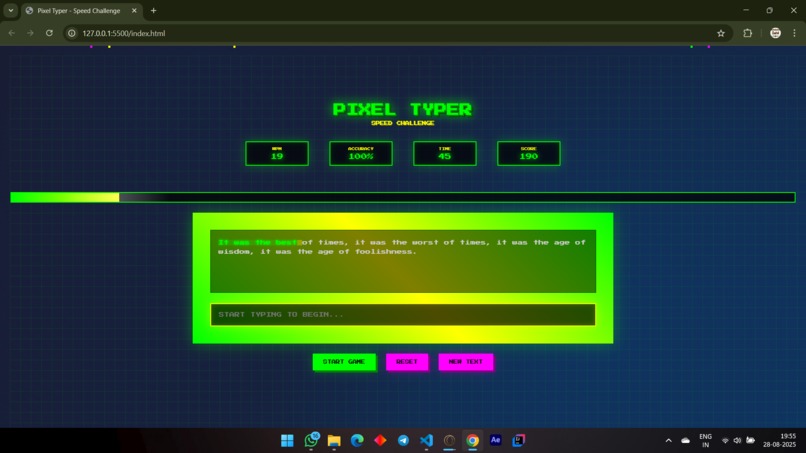
The game UI
Inspiration
The idea stemmed from a blend of nostalgia and utility. I've always been fascinated by retro aesthetics, particularly the low-resolution charm of old-school video games. At the same time, I wanted to create something practical that could help people improve a fundamental skill. I wanted to combine the playful, visual appeal of pixel art with the functional purpose of a typing test. The goal was to make a tool that wasn't just useful but also enjoyable to interact with.
What it does
Typing Speed Checker (Pixel Version), is a web-based application designed to help users measure and improve their typing speed.
It functions by presenting a block of text for the user to type. As the user types, the application:
Tracks their keystrokes: It compares what they type against the provided text.
Calculates speed and accuracy: It calculates their typing speed in Words Per Minute (WPM) and also tracks the number of errors.
Presents results: Once the user finishes, it provides a summary of their performance.
The unique "pixel version" aspect means the entire user interface—including the font, keyboard, and graphical elements—is styled with a retro, 8-bit pixel art aesthetic, making it visually distinctive and nostalgic.
How we built it
I built the Typing Speed Checker project using standard web development technologies: HTML, CSS, and JavaScript.
- HTML: This was used to create the basic structure of the application, including the text area where the user types, a display for the timer, and a section to show the calculated words per minute (WPM).
- CSS: I used CSS to style the entire project. The key part was applying a pixel art theme by using specific fonts and a limited color palette to give it a retro feel.
- JavaScript: This was the core logic of the project. I wrote scripts to:
- Load random text for the user to type.
- Handle keyboard inputs and track the user's progress.
- Calculate the typing speed (WPM) and accuracy in real time.
- Update the on-screen display dynamically.
Challenges we ran into
When building the project, I faced a few key challenges:
- Typing Error Logic: It was difficult to create a robust system for accurately detecting typing errors. You had to work on the logic to handle various scenarios, such as typos, incorrect words, and the use of backspace, to make the application more user-friendly.
- Aesthetic Consistency: I had to put in extra effort to ensure the pixelated aesthetic was consistent across all parts of the application. This involved experimenting with CSS properties and finding the right pixelated fonts.
- Real-Time Performance: Making sure the timer and WPM calculations updated smoothly without any lag was a challenge. I had to optimize the JavaScript code to ensure a responsive and efficient user experience.
Accomplishments that we're proud of
- Successfully Combining Aesthetics and Functionality: I was able to blend the nostalgic charm of a pixelated aesthetic with the practical utility of a typing speed checker.
- Overcoming Technical Challenges: I successfully navigated complex issues like creating robust error detection logic and ensuring a consistent pixel art theme across the application.
- Developing Key Skills: I honed my skills in core web development, specifically in front-end development, event handling (for keyboard inputs), and designing an efficient algorithm for calculating WPM.
- Creating a Unique User Experience: My project stands out from other typing checkers by offering a unique and engaging visual experience that makes a standard utility fun and memorable.
- Building from Concept to Reality: I took an initial idea—combining retro gaming visuals with a practical tool—and turned it into a fully functional application.
What we learned
Front-End Development: I gained a deeper understanding of HTML, CSS, and JavaScript, learning how to manipulate the DOM to create a dynamic, real-time application.
Event Handling: I became proficient in handling keyboard events to accurately capture key presses and manage the user's typing experience.
Algorithm Design: I learned how to design and implement an algorithm to calculate the Words Per Minute (WPM) score.
Problem-Solving: I had to overcome challenges related to robust error detection logic and ensuring a consistent pixelated aesthetic, which strengthened your overall problem-solving skills.
What's next for Typing speed checker.(Pixel Version)
The "Speed Checker (Pixel Version)" is a typing test application with a retro pixel art theme. I built it using HTML, CSS, and JavaScript to measure typing speed and accuracy while providing a unique, nostalgic aesthetic.


Log in or sign up for Devpost to join the conversation.