-
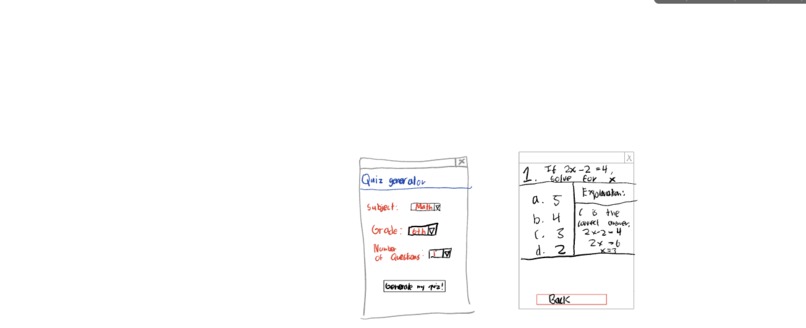
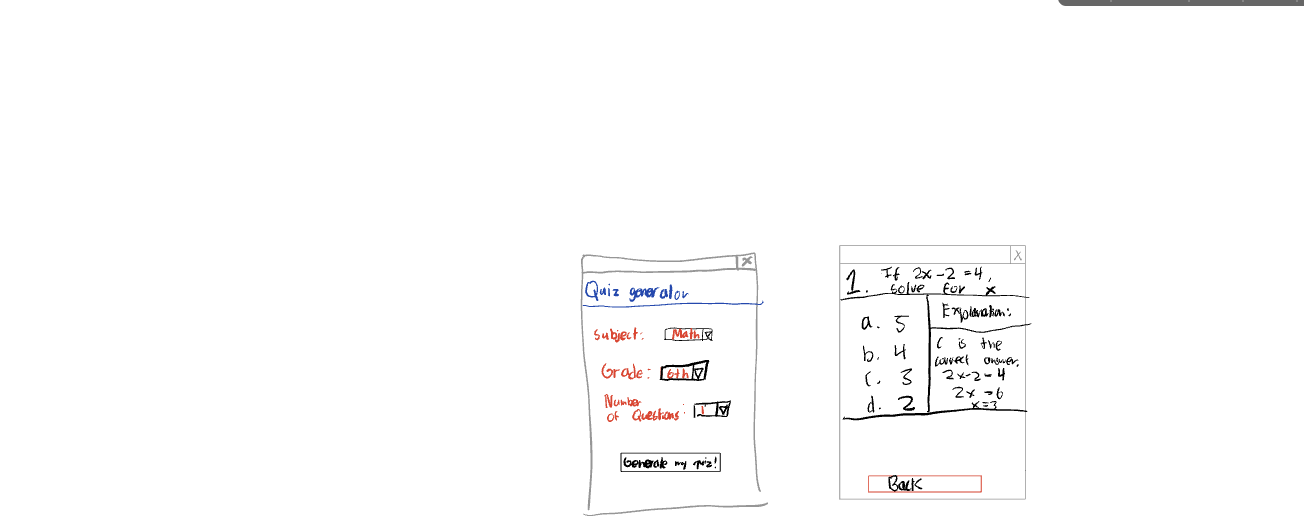
This is my web UI design(my drawing skills suck).
Inspiration
It came from the motivation of helping teachers make quizzes easier, and faster.
What it does
It asks you for the subject, grade(can only be middle school), and number of questions(max 5).
How we built it
I built this using python and html. init.py: This file creates the app, by disabling autoescape(for formatting), and returns the app. openai_test.py: This file uses my API key to include OpenAI in my code. I give it a prompt and the format it should print it in, store the answer in the variable and return the variable. pet.py: This file is the main file. It makes routes to two pages, "ask" and "answer". We use the returned variable from the function and use the next html file to format it. html files: they make the dropdown menu and all the text. One is the main html file that organizes the other two, and the other two are for the two pages: "ask" and "answer".
Challenges we ran into
It was always running into an error and not running the page, but I realized the API key was wrong the whole time(lots of time wasted).
What we learned
I learned many new things, such as including AI into your code, and html forms.
What's next for Teacher's Pet
We will also make an attendance page, and more detailed input conditions.
Note: This was purely handmade by me and since there wasn't that much time, I couldn't make a css file.


Log in or sign up for Devpost to join the conversation.