

Twitching👀
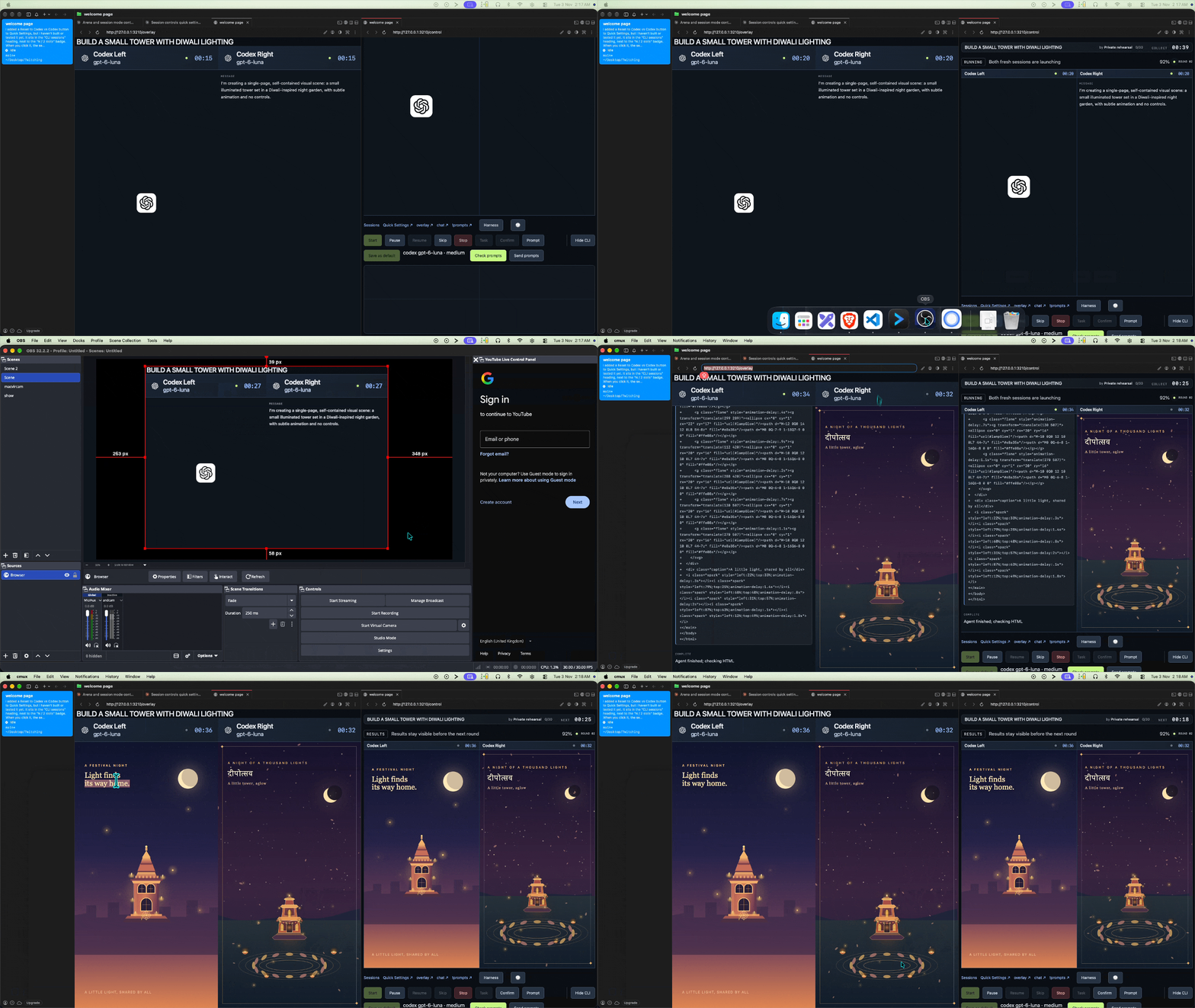
Share what a coding CLI such as Codex is doing without screen sharing.
- Show multiple codex sessions in one scene
- See chats from multiple platforms on one page (youtube , twitch , kick) .
- select what to show (tools use , file name , commands , edits, model name, etc..)
- use it with OBS (Browser source)
- viewers can prompt to harness from comment box and jev will filter. when viewer comment with "!prompt".
- Run agents in a Docker sandbox.
- TypeSafe Jev filters prompts and chats according to your preferences.
- Play music and visuals when the Codex account quota runs out.
- assign goal timer .
- Prompt arena: fight between harness and models
- supports twitch and codex .
- add breaks between live_streams .
- show chats from multiple platforms using OBS Browser source
Session Mode publishes existing coding sessions as live timelines, separately from the Prompt Arena round flow. Choose up to eight sessions for an overlay; one session fills the output, while multiple sessions share a grid.
Quick setup
Clone the repository and enter its directory:
git clone https://github.com/mayank-devac/Twitching.git
cd Twitching
- Run setup (once)
./setup.sh
then
start_sessions
open the local host links on terminal and Welcome to the welcome page . OBS: add http://127.0.0.1:3210/overlay as a 1920×1080 Browser Source
Challenges and What I Learned
- Platform APIs: Learned how Twitch, Kick, and YouTube APIs work, including how to connect to each platform and receive live chat messages and events.
- SQLite with TypeScript: Gained experience managing a SQLite database from TypeScript, including storing and retrieving application data.
- Express 5 and Node.js: Used Express 5 for the first time. It runs the server, handles HTTP requests and API routes, and connects the web interface to backend features.
- WebSocket optimisation: Learned how WebSockets support real-time updates and explored ways to make live communication more efficient and reliable.
- Checking untrusted data and Keeping secrets safe: Learned to check every chat message and every outside response with zod . Learned to keep keys on the server only. Codex helped in learning this a lot .
- Splitting big code : Learned to break big files written by agents into small modules, and to keep one list for things like CLIs and chat platforms so a change happens in one place.
- Thinking how app will behave on real use and finding edge cases with agents
- Understanding Jev decision model API : Choice, Score, and Noul.
- Creating docker sandbox using Colima. and setuping with docker files , compose.yml.
- OBS and overlays: Configuring OBS WebSocket and getting browser-source layouts to display correctly.
- Project structure: Following how the launcher, server, coding agents, and many small files fit together.
- Live data: Understanding how chat messages, rounds, sessions, and WebSocket updates move through the app with help of codex.
- Privacy: Knowing what information is safe to show in the host interface and on stream.
- Shared types and data: Making changes that work across the server, browser, and SQLite database.
- Understanding tests made by agents and What purpose they serve.
- Turning codex activity into WEB UI, symlink , handling codex login in sandbox, filtering bad words , chat feed from multiplatform with filters and tags , stopping codex session from web ,previewing agent html outputs , first stream in twitch checking and testing , youtube.proto........

Log in or sign up for Devpost to join the conversation.