Inspiration
When you're studying or working with others to prepare for a project or exam the last thing you need to do is get sidetracked to find a tutor. To help students focus and stay on track, the Tutorator helps students request highly-skilled tutors right within Cisco Spark, with whom students can work remotely, via Preply, an online tutoring marketplace (which offers 20% referral commissions!). This bot was inspired by the hackathon's education category challenges.
What it does
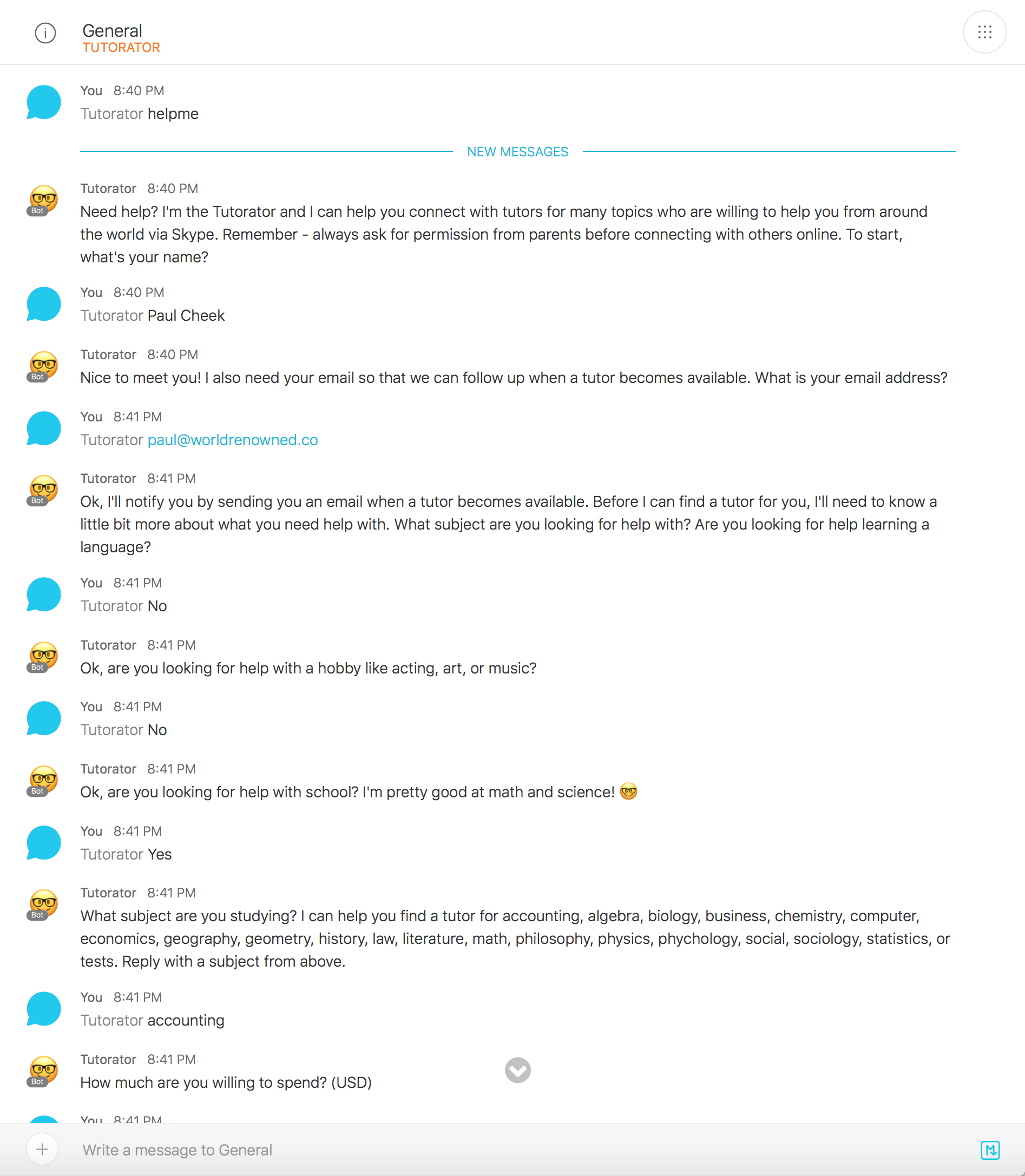
The bot asks you questions in a conversational format about what you need help with and how much you're willing to spend on a tutor. It takes this information and creates a new tutor request in the Preply system. The Preply system relays the request to qualified tutors and follows up with the Cisco Spark user directly.
How I built it
I used BotKit to create a bot that asks all of the questions needed to send a tutor request via Preply. I built a skill files to send a request to an endpoint on the Preply servers once the bot has all of the information it needs.
Challenges I ran into
Preply does not have an API, so I had to reverse engineer a feature on their website to connect the bot with their system.
Tutorator
It's okay to ask for help! With the Tutorator bot you can get help learning languages, studying for school, and with your hobbies from within Cisco Spark. Getting started is easy, just add [email protected] to your space and ask @Tutorator "Can you help?". The Tutorator will ask you about what you need help with. Once Tutorator has enough information it will send your needs to private tutors who are available at affordable prices. With the Tutorator you can join thousands of students who have already saved time by taking lessons online.
Tutorator tutors marketplace powered by Preply.com
Try It
To use, add the Tutorator Bot ([email protected]) to your Cisco Spark team. Invite the Tutorator Bot to a space and send the Bot a message like so: @Tutorator lookup. Or, open a private message with the Tutorator Bot and say lookup. The Tutorator Bot will then prompt you for the email address to look up.
Getting Started
There are a few steps to get started on working with the Tutorator bot:
Installing Tutorator
Clone this repository:
git clone https://github.com/pcheek/tutorator.git
Install dependencies, including Botkit:
cd tutorator
npm install
Environment Setup
You need to define these environment variables:
access_token
public_address
secret
studio_token
Botkit Setup
You need to import the Botkit script named 'helpme' into Botkit Studio. You can find the export in: /scripts.json
Usage
To use, add the Tutorator Bot ([email protected]) to your Cisco Spark team. Invite the Tutorator Bot to a space and send the Bot a message like so: @Tutorator lookup. Or, open a private message with the Tutorator Bot and say lookup. The Tutorator Bot will then prompt you for the email address to look up.
Todos
- More input validation and error handling needed!
About Tutorator
Tutorator is a project for the Cisco Spark Industry Challenge


Log in or sign up for Devpost to join the conversation.