Inspiration
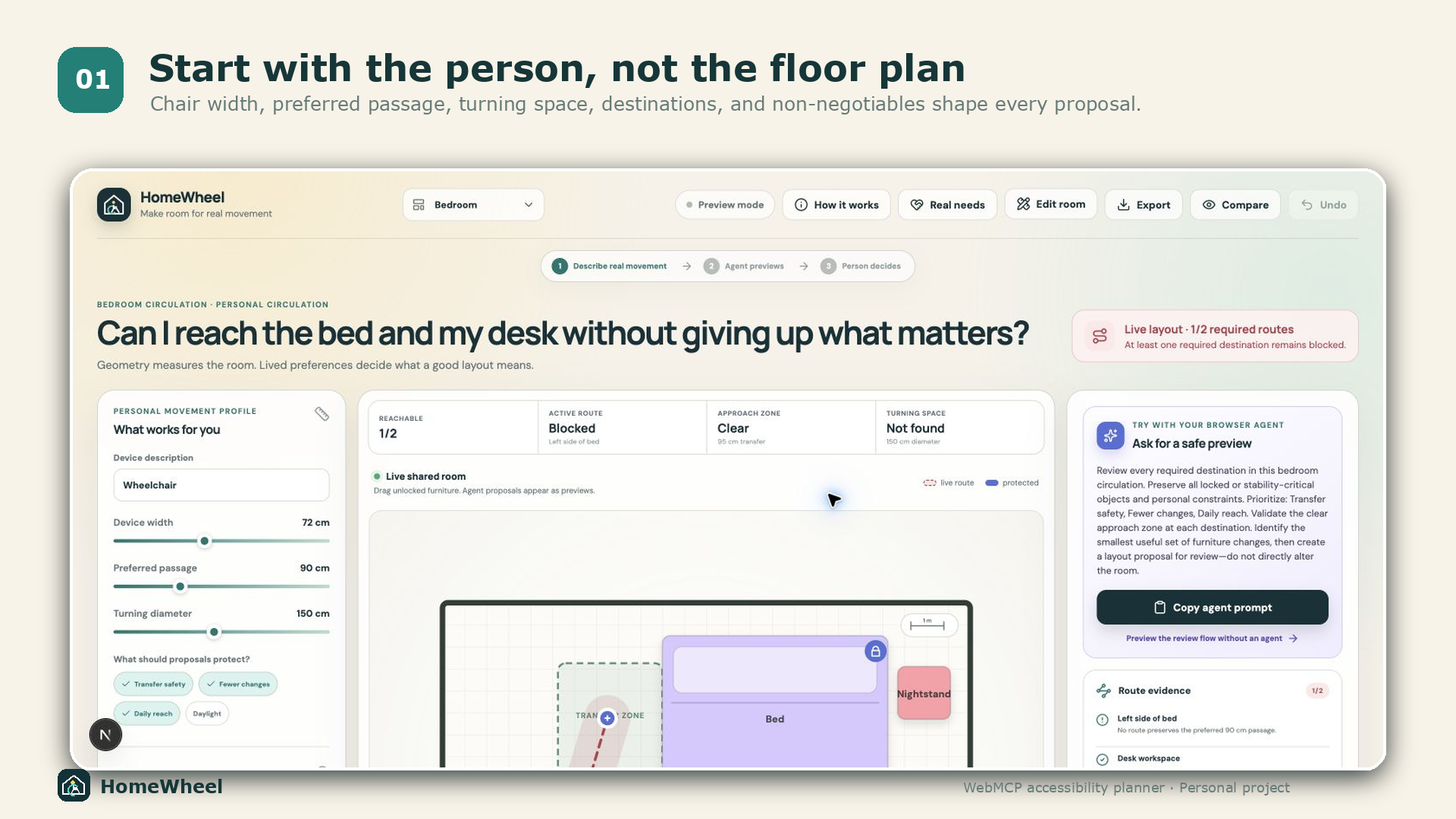
Room-layout advice often sounds simple: move a dresser, rotate a table, clear a path. For someone who uses a wheelchair, however, a few centimeters can decide whether a bed, desk, or storage area is usable. The technically shortest route is not automatically the right answer. Daily routines, transfer sides, outlets, light, reach, and personal preference matter too.
We wanted to build an agent experience where those lived constraints are not treated as edge cases. They are the decision-making authority.
Evidence-grounded user stories
The prototype includes composite user stories derived from public evidence, not invented customer testimonials:
- A wheelchair user needs the bed-transfer side and furniture stability preserved, even if another arrangement produces a clear route.
- A person needs the simulation to use their actual chair and transfer technique because access needs are not one-size-fits-all.
- A person adapting their home needs authority over trade-offs involving independence, safety, reach, light, storage, and daily routines.
Those stories became testable requirements. HomeWheel now validates an explicit approach zone at each transfer, work, or reach destination; calculates it from the person’s movement profile; refuses to move stability-critical furniture; and shares the person’s priorities with the agent before any proposal is created.
Research basis: United Spinal’s accessible studio account, wheelchair transfer focus groups, and a qualitative study of home usability.
What it does
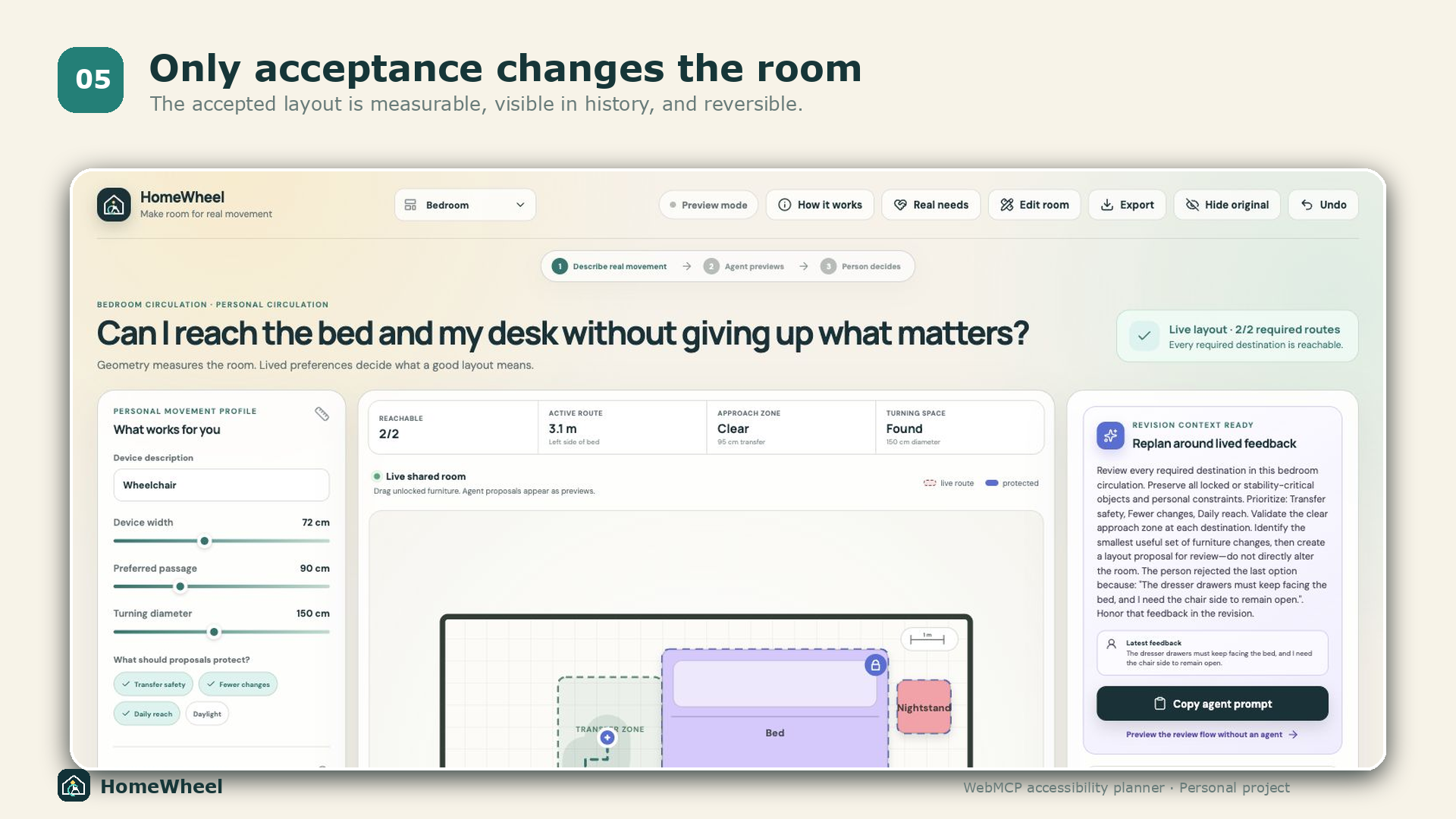
HomeWheel gives a person and a browser agent the same editable floor plan. The person sets a personal movement profile, marks required destinations and their transfer, work, or reach zones, chooses what proposals should prioritize, and protects furniture positions that matter. The agent can:
- read the complete room and personal constraints;
- simulate all required and optional routes;
- identify movable barriers;
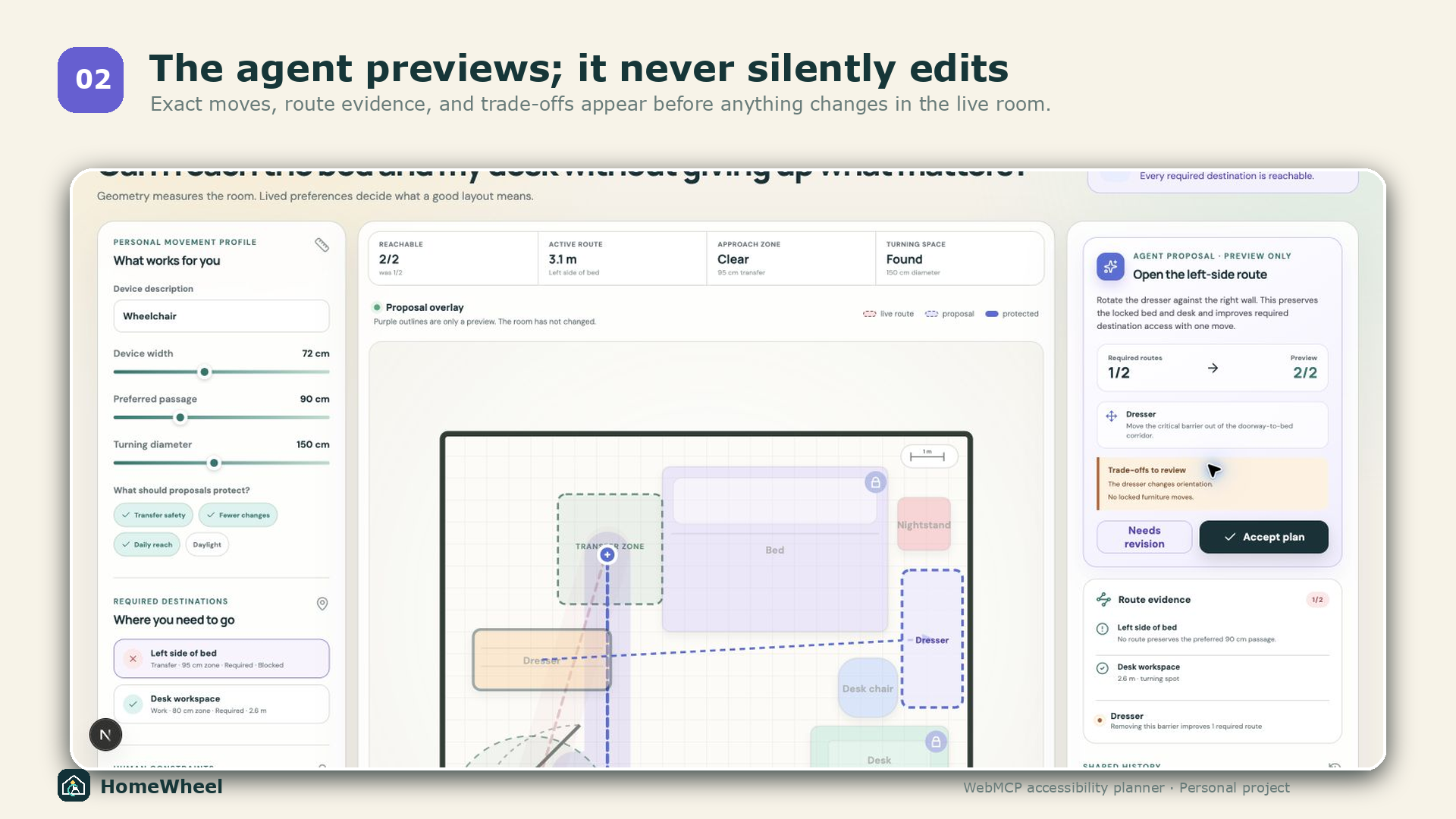
- create an exact, collision-checked proposal;
- compare the proposal with the live layout; and
- restore a baseline or previous state.
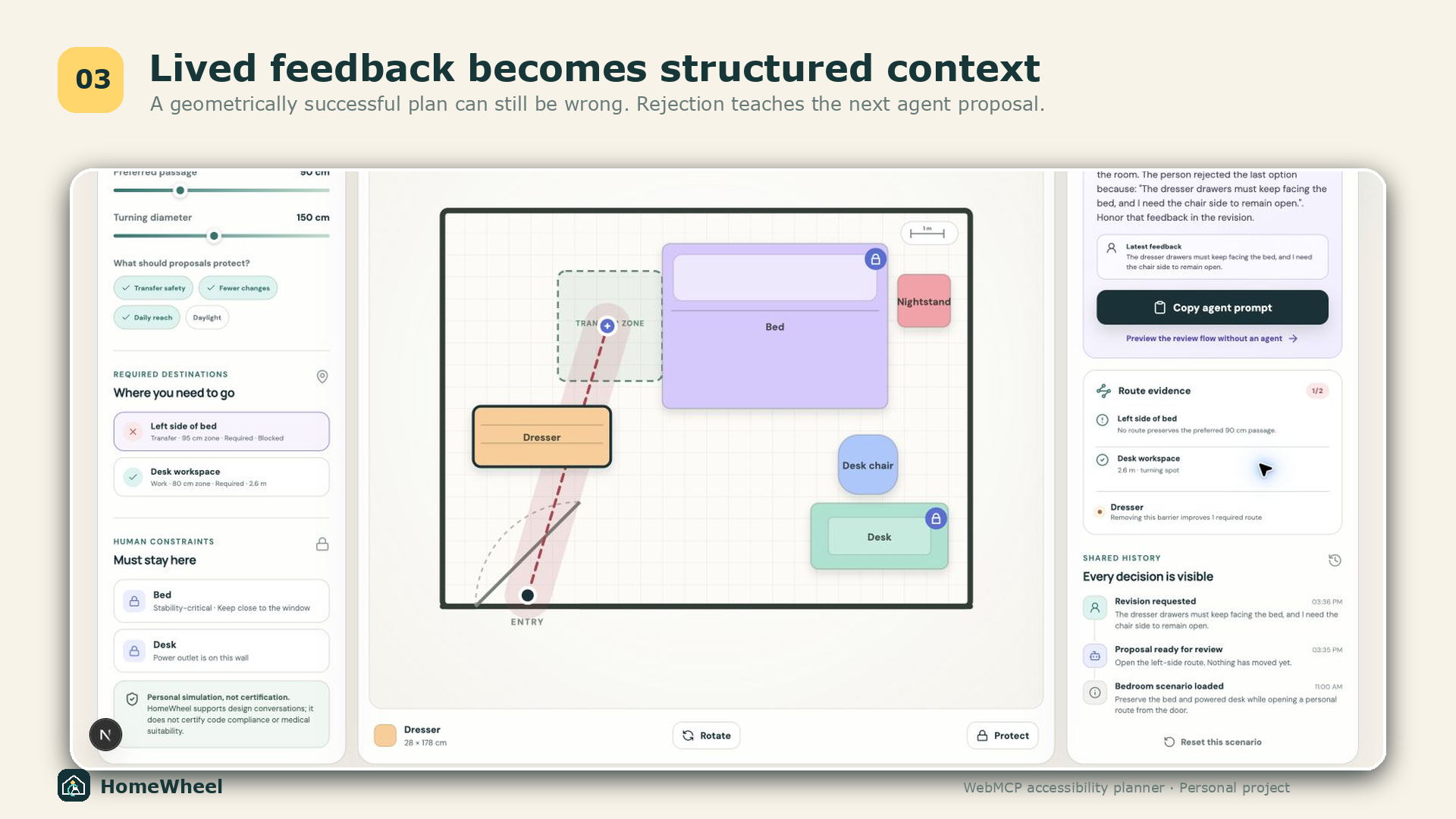
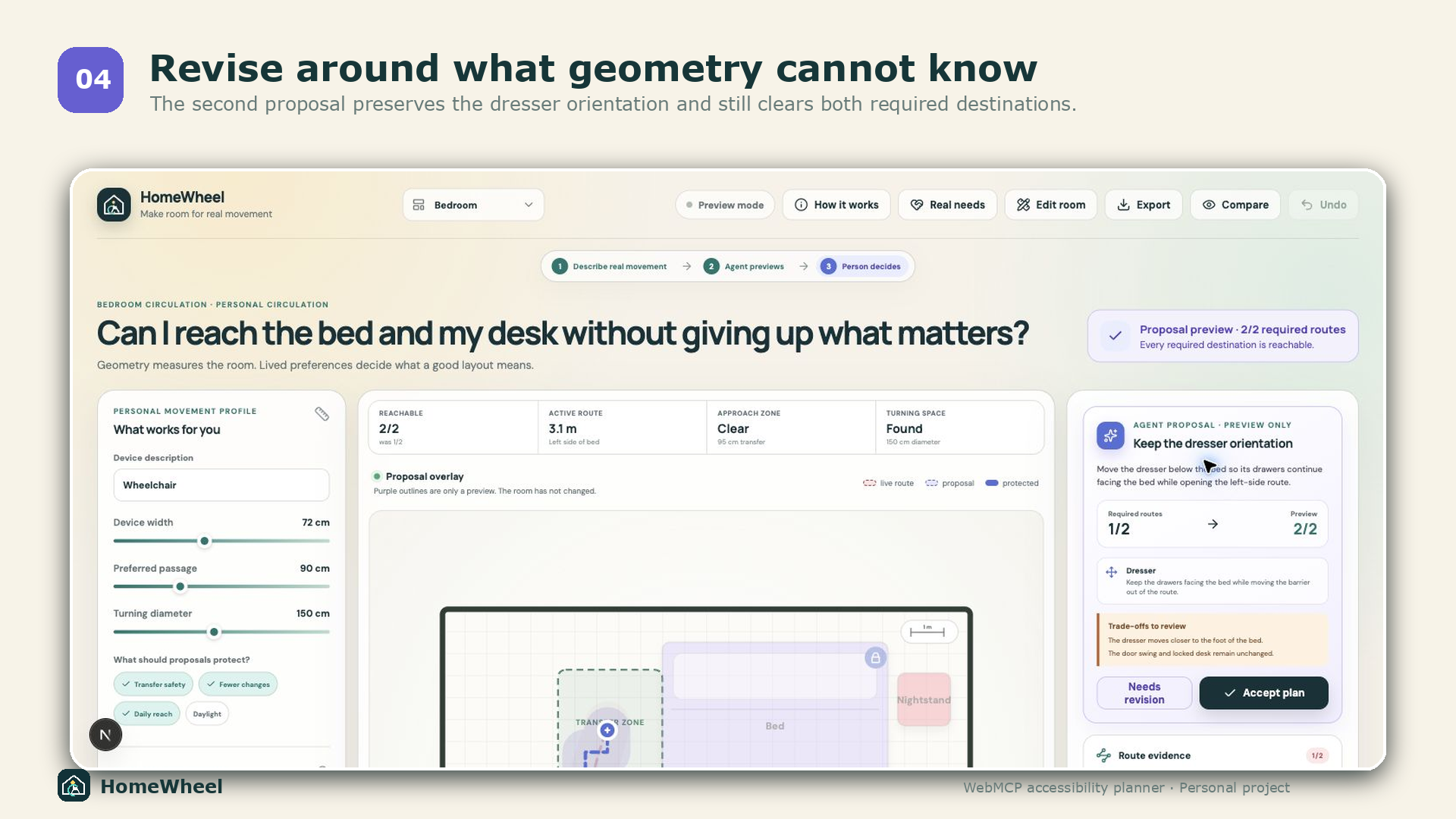
Every proposal appears as a purple overlay with route evidence, exact moves, and trade-offs. Nothing moves until the person clicks Accept. If the proposal misses a lived detail, the person can reject it and explain why. The next agent sees that feedback in the workspace state and can produce a targeted revision.
How we used WebMCP
WebMCP is the bridge between agent reasoning and the application’s actual
state. HomeWheel registers eight tools directly from the page:
get_workspace_state, set_mobility_profile, simulate_routes,
find_barriers, create_layout_proposal, set_object_constraint,
compare_layouts, and restore_layout.
The key design choice is that the agent has a proposal tool, not an “automatically rearrange my room” tool. WebMCP gives the agent precise capabilities while the interface preserves human consent and makes every change inspectable.
How we built it
HomeWheel is a static Next.js and TypeScript application. It uses browser-side A* pathfinding over an obstacle grid, personal clearance envelopes, purpose-specific approach zones, collision-checked furniture geometry, multi-destination metrics, and turning-space detection. State is shared between direct manipulation and WebMCP tools, stored locally, and exportable as JSON.
Challenges
The most important challenge was not pathfinding; it was deciding where agent authority should stop. Direct mutation made the demo faster but weakened the product. We redesigned the workflow around preview, explicit acceptance, structured rejection, and feedback-aware revision.
We also had to make geometric evidence understandable without pretending it was professional certification. HomeWheel clearly separates personal simulation from building-code or medical claims.
Accomplishments
- The agent and person operate on the same live room state.
- Locked human constraints are enforced at the tool-validation layer.
- Stability-critical furniture cannot be moved by the person or the agent without first releasing that protection.
- Transfer, work, and reach zones are visible and validated separately from the route leading to them.
- Personal priorities are part of live WebMCP state rather than hidden prompt context.
- A proposal cannot silently mutate the room.
- Rejection feedback persists and is available to the next agent turn.
- The prototype supports authored scenarios and fully editable rooms.
- Public evidence is visible inside the product without being presented as fabricated user validation.
- The complete experience works without a backend or user account.
What we learned
Human-in-the-loop design becomes much more meaningful when feedback is part of the tool state, not just a chat message. The agent can optimize geometry, but the person defines what “better” means.
What is next
A production version could add measured floor-plan import, richer door and wall geometry, collaboration with occupational therapists, uncertainty ranges, and optional checks against local accessibility guidance. Those features would remain advisory and would continue to require real-world validation.
Built With
- a*
- cloudflare
- next.js
- typescript
- webmcp


Log in or sign up for Devpost to join the conversation.