-
-
Thumbnail
-
Project Architecture
Inspiration
This week outlook went down. One of the biggest software companies in the world, and one failure deep in its infrastructure was enough to break things across the globe. The systems we rely on are deeper and more fragile than we ever see, and most of us have no map of what's running underneath. A penatration test is the most direct way to learn about what an attacker could reach on your network. It's also expensive, slow and done by specialists, so most small teams (like student projects) never get one. Automated scanners fill some of this gap, but they hand you a wall of output with no sense of where you are or how things are connected. We wanted to know whether an AI agent could do the methodical part of a pentest: map what's there, decide what to probe next, confirm or rule out issues, and write it up. And we wanted it to stay legible to a person while it works. The theme, "Let's Dig In," gave us the picture: every host, service and endpoint is a chamber underground, and you watch the agent tunnel to each one as it decides to look deeper.
What it does
You give B.O.B a scope, it runs a bounded security assessment on its own and you watch the whole thing happen in a cave system.
- You set the scope. Pick the target, ports, time, budget and request budget on the start screen. The agent can't leave that box.
- The agent decides what to dig into. It maps the host, then services, then applications and endpoints choosing its next tool call based on what it's seen so far.
- Every discovery becomes a chamber. The first host takes over the starting chamber. Each new service, app or endpoint is carved out as a connected chamber, spreading sideways like a graph.
- The miner shows you where the agent is. It walks the walkways, climbs ladders and tunnels to whichever node the agent is probing, at a pace you can follow.
- Glow shows you what it's found. Red means confirmed vulnerability and green means checked with no particular findings. We never label anything as "safe," because a lack of findings isn't proof for safety.
- Click any chamber for details. You get the asset's info, the tool calls run against it, and its findings.
- A report organised by node. When the run ends you get a write-up with one section per node. Hovering or clicking a chamber highlights its section, and the PDF export matches the on-screen report.
How we built it
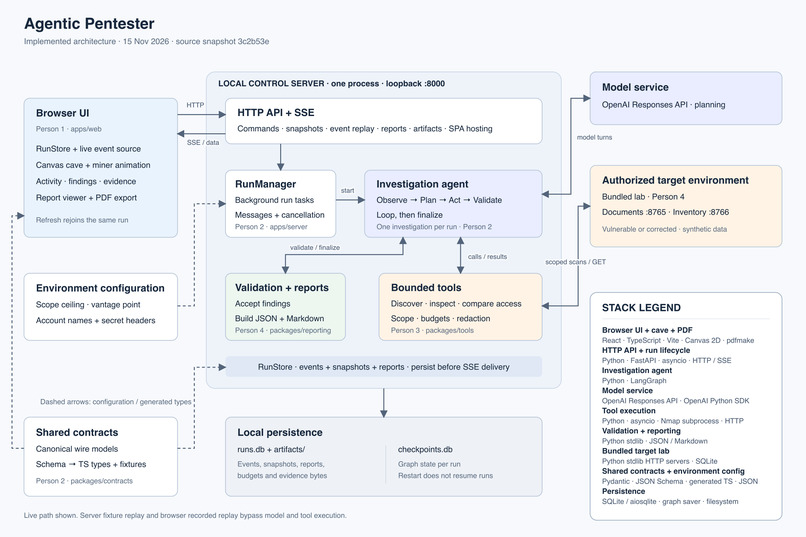
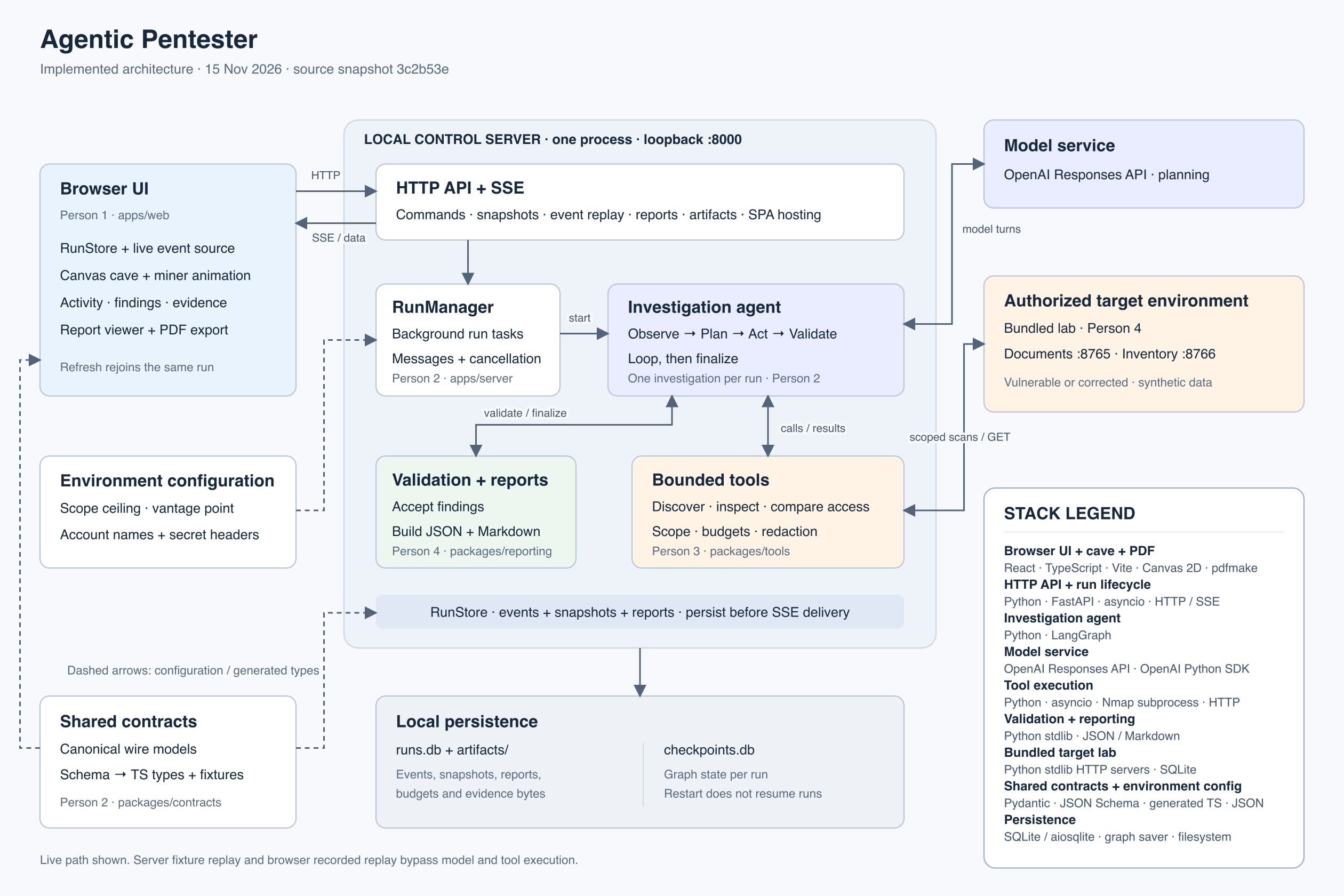
Our app is split into three primary components:
- Web interface on the frontend
- Agentic harness that runs on the backend
- A test lab with a dummy web application that has intentional vulnerabilities
We initially focused our efforts on the agent harness and built the rest of the project around that core engine. We gave it access to several pen-testing tools that let it probe a system (with a defined authorized scope) to find vulnerabilities. To make sure we weren't blocking frontend development for too long at the start, we made a pre-recorded probe sequence on the server that the frontend could query and display.
Challenges we ran into
Going from our lab to any system. We first built B.O.B against our own test environment, where we knew every host and weakness in advance. Generalising it to any system a user specifies meant it had to map an unfamiliar network from scratch and choose its next probe from what it actually found, all while staying inside the user's scope and budget. A UI that's readable without being cluttered. An assessment produces a lot of hosts, tool calls and findings, but users still need everything required to fix what B.O.B finds. We settled on the cave: the network's structure becomes the picture, colour carries status, and each chamber's details and report section sit one click away.
Accomplishments that we're proud of
- An agent that runs a real, bounded assessment end to end, from an empty scope to a finished report, with no human in the loop.
- A cave renderer built from scratch in Canvas 2D, with procedural chambers, pathfinding, lighting and live layout, and no game engine or UI kit.
- One click links any chamber to its section of the report, and the PDF matches the screen exactly.
- Four people building in parallel against one generated contract, then merging cleanly.
What we learned
- Guardrails are architecture, not prompting. Telling a model to stay in scope isn't enough. The scope and budget checks have to sit where the network calls happen.
- Visualising an agent is a design problem. An agent's speed and its bursts of work are the enemy of understanding, so pacing and ordering mattered more than visual polish.
What's next for Tunnel B.O.B
- Configurable scopes with explicit sign-off. Let users set their own targets, gated behind a written authorisation step.
- More tool coverage. Add TLS checks, authentication flows and dependency fingerprinting, each with its own coverage record.
- Diffing runs. Show what changed between two assessments of the same network: new chambers, glows that changed colour.
- Replay and share. Export a recorded run so someone else can watch the dig without re-running it.
- Human-in-the-loop mode. Pause before any active probe and let the user approve the next tunnel.
Built With
- fastapi
- langgraph
- python
- react
- typescript


