-
-
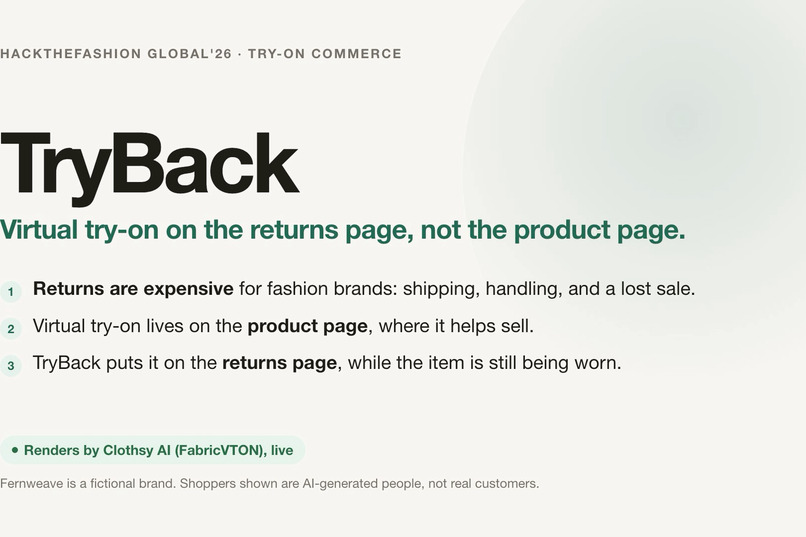
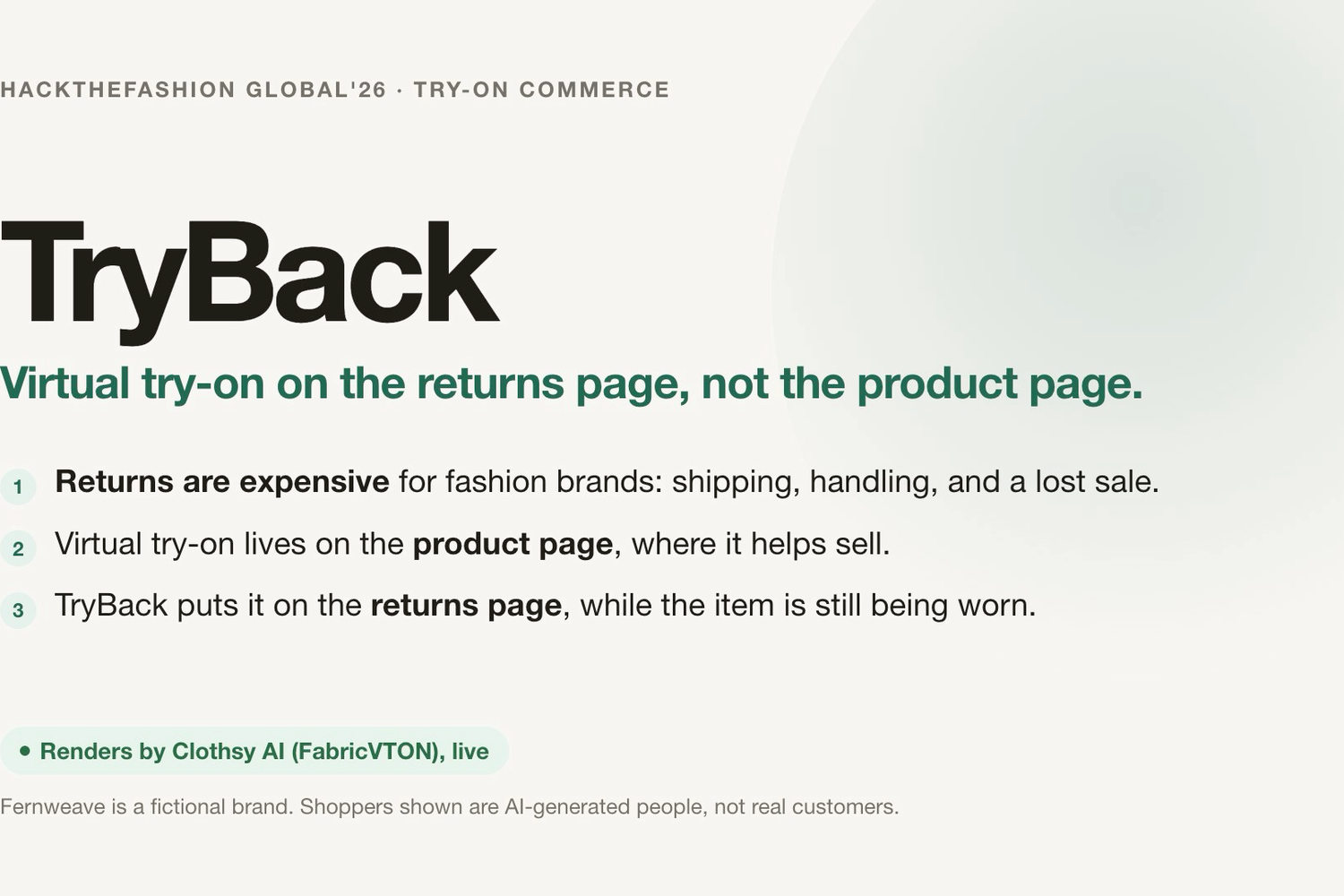
TryBack: virtual try-on on the returns page, not the product page.
-
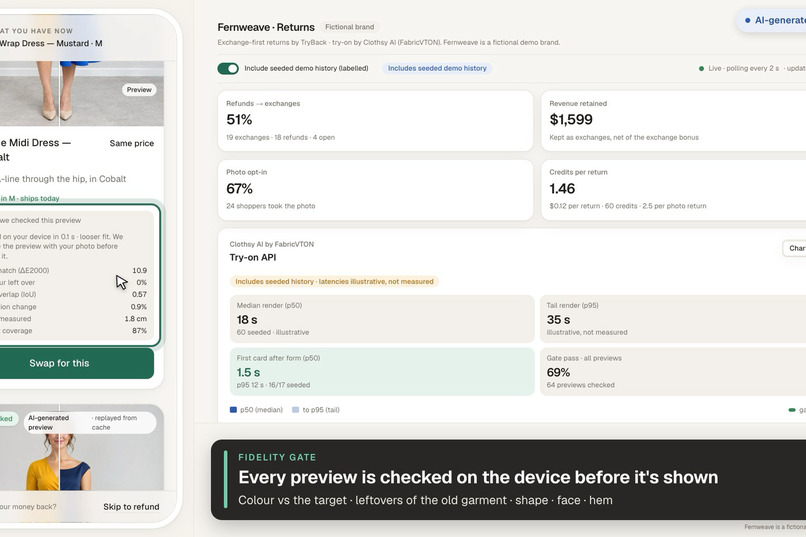
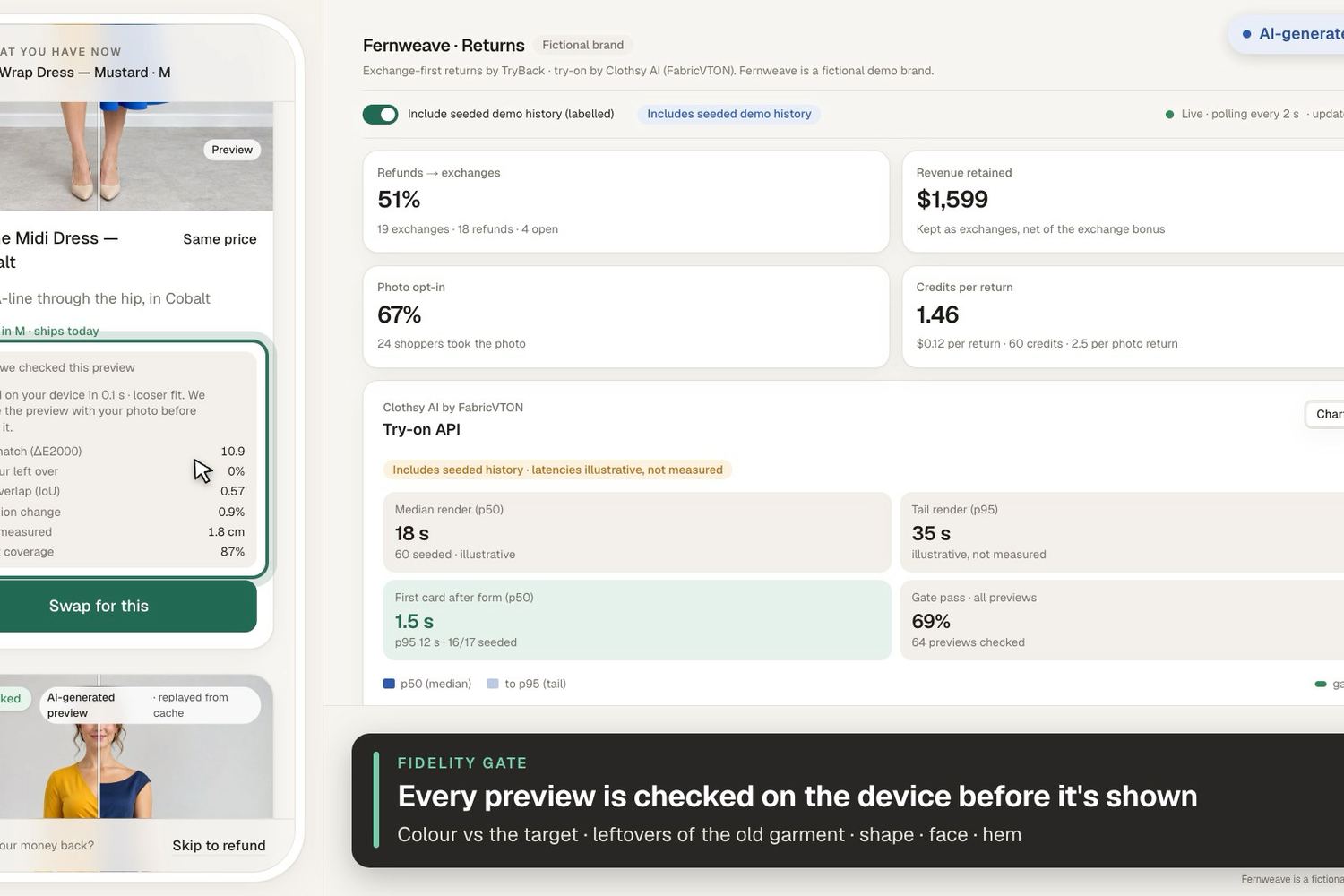
The on-device fidelity gate: colour ΔE, leftover colour, shape, face and hem, checked before any preview is shown.
-
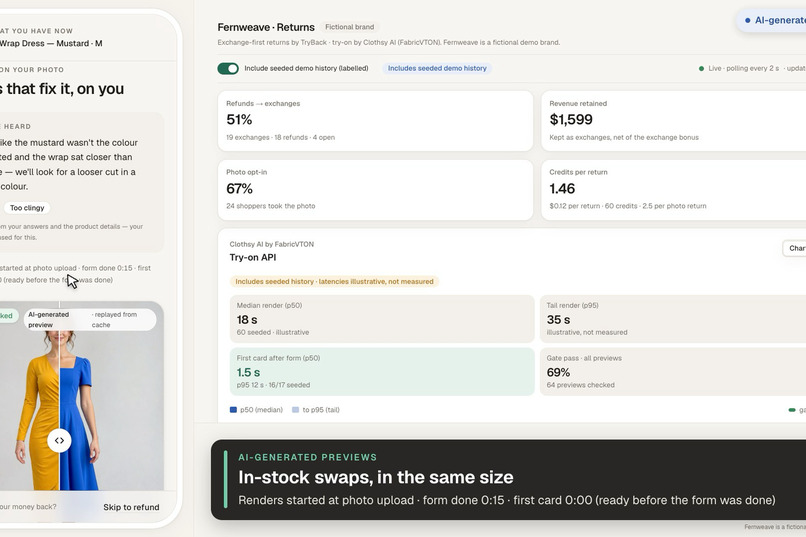
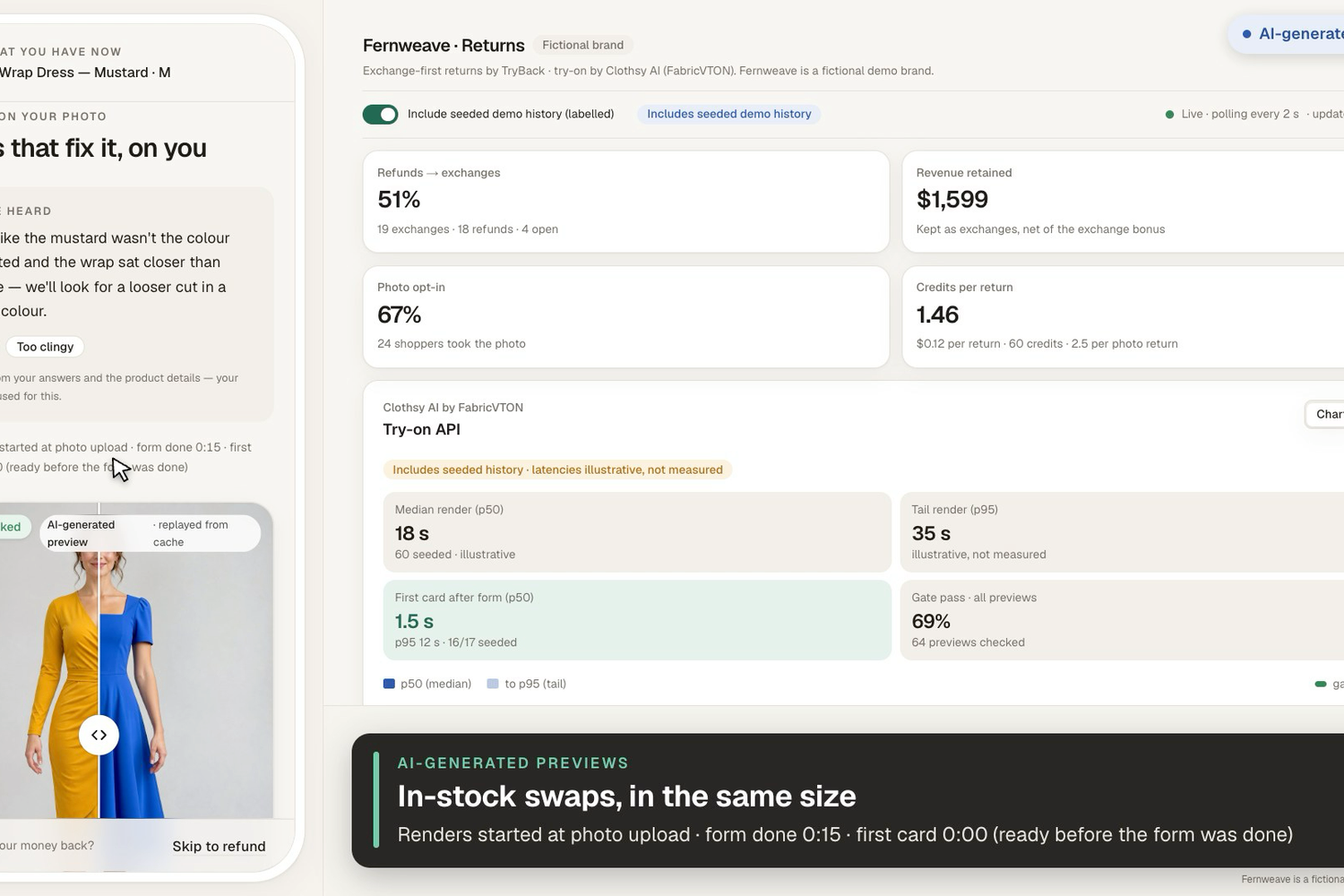
In-stock swaps rendered by Clothsy AI on the returning shopper's photo (AI-generated shopper), next to the live dashboard.
-
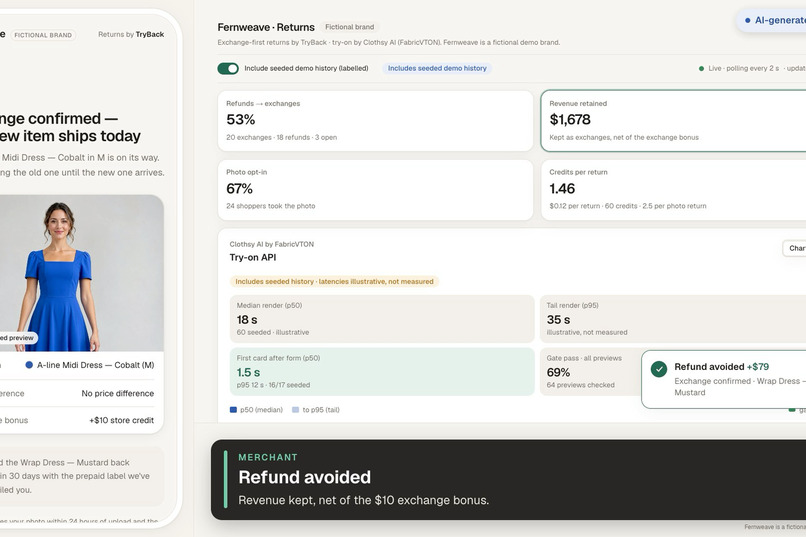
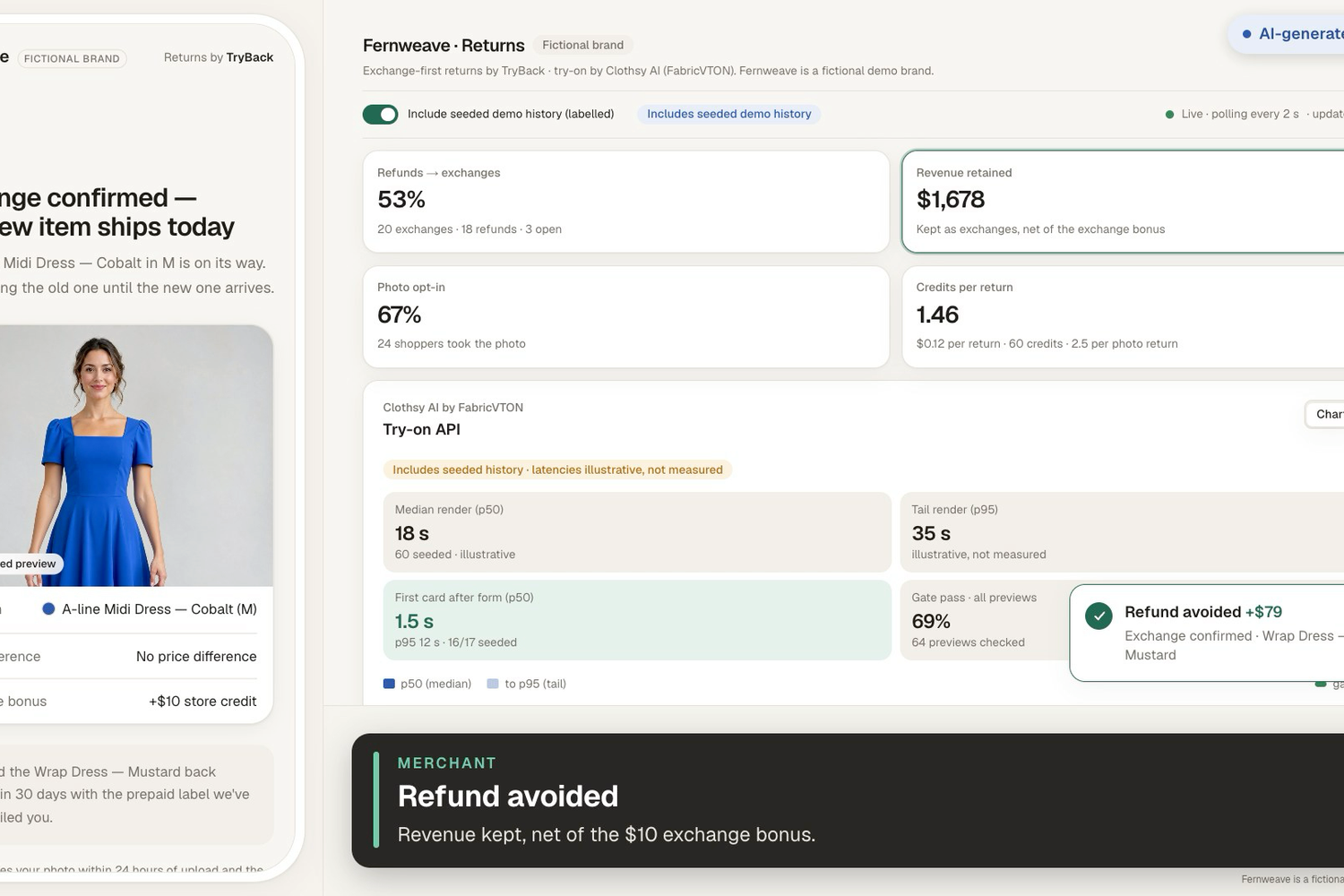
One tap turns the refund into an exchange; the dashboard counts the revenue kept.
-
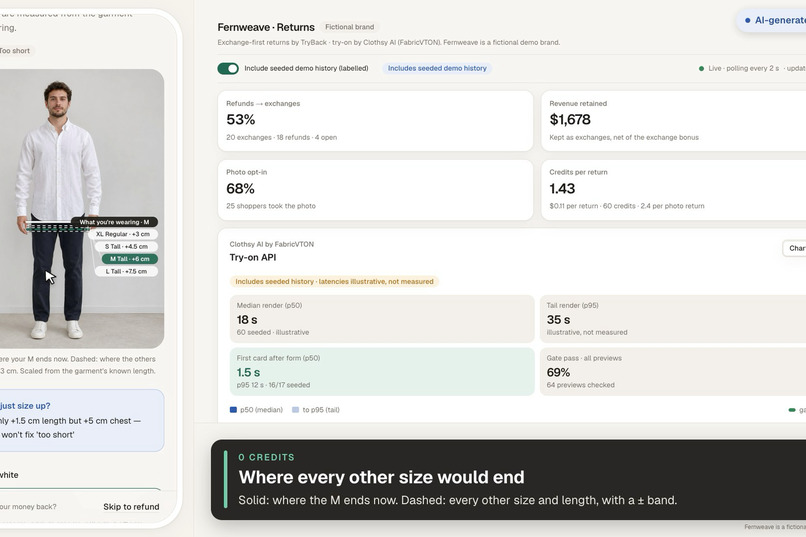
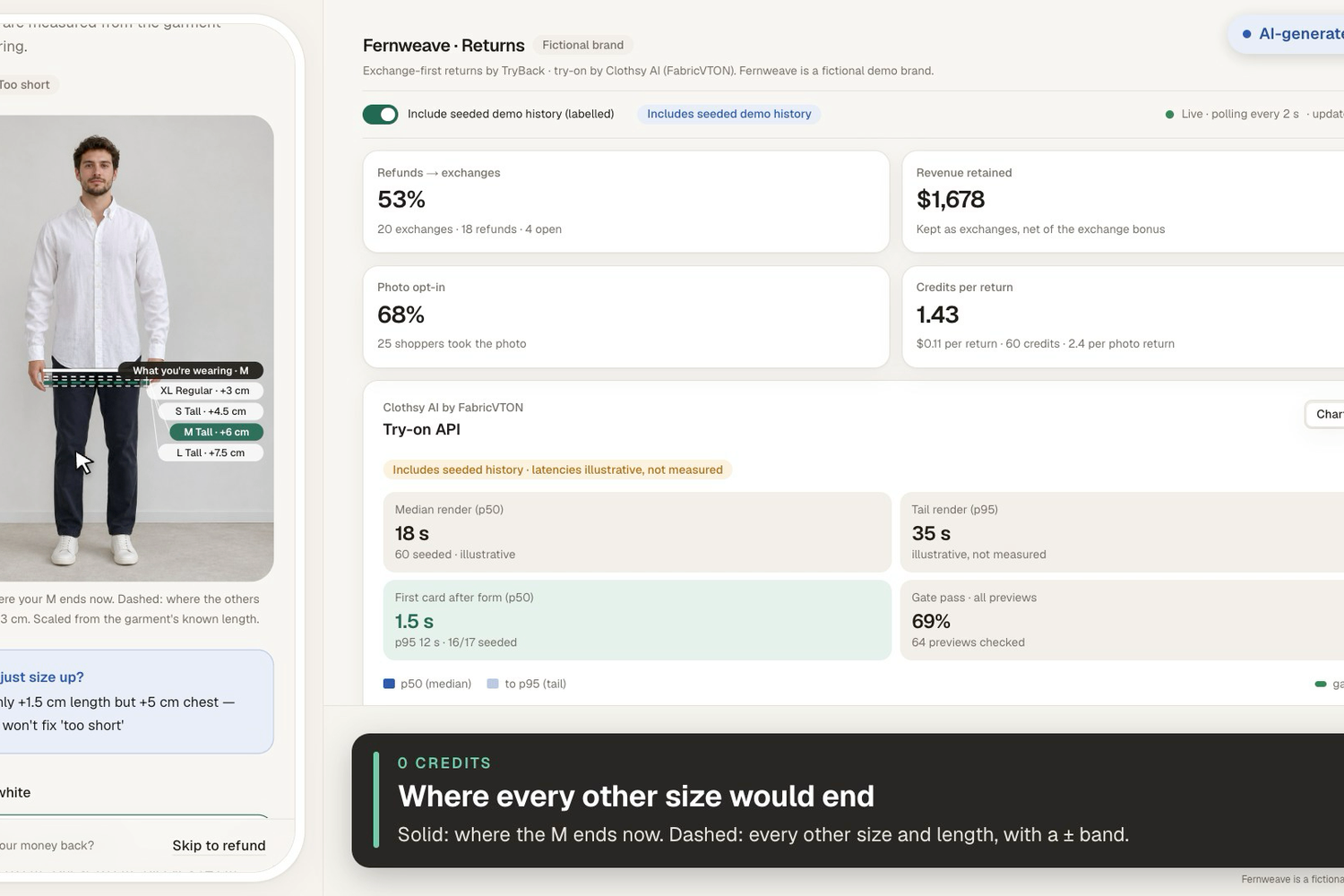
Size returns at zero credits: the returned shirt is a ruler, so every other size's hem is drawn on the photo.
-
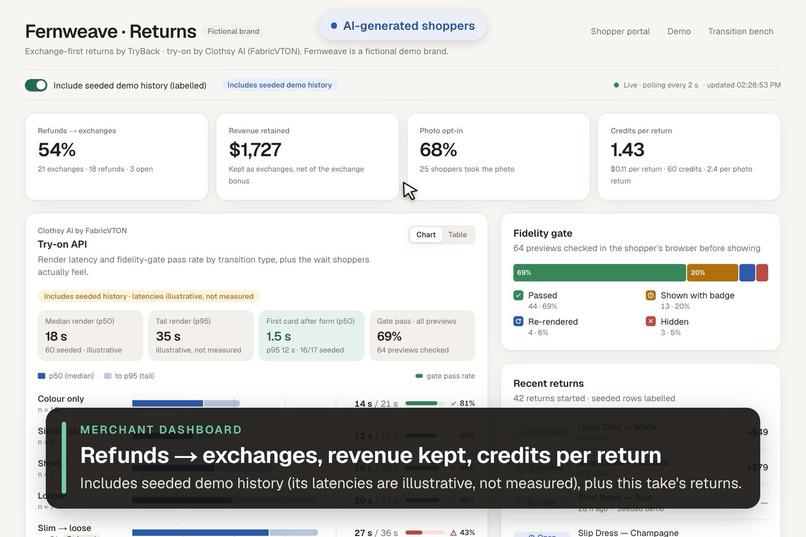
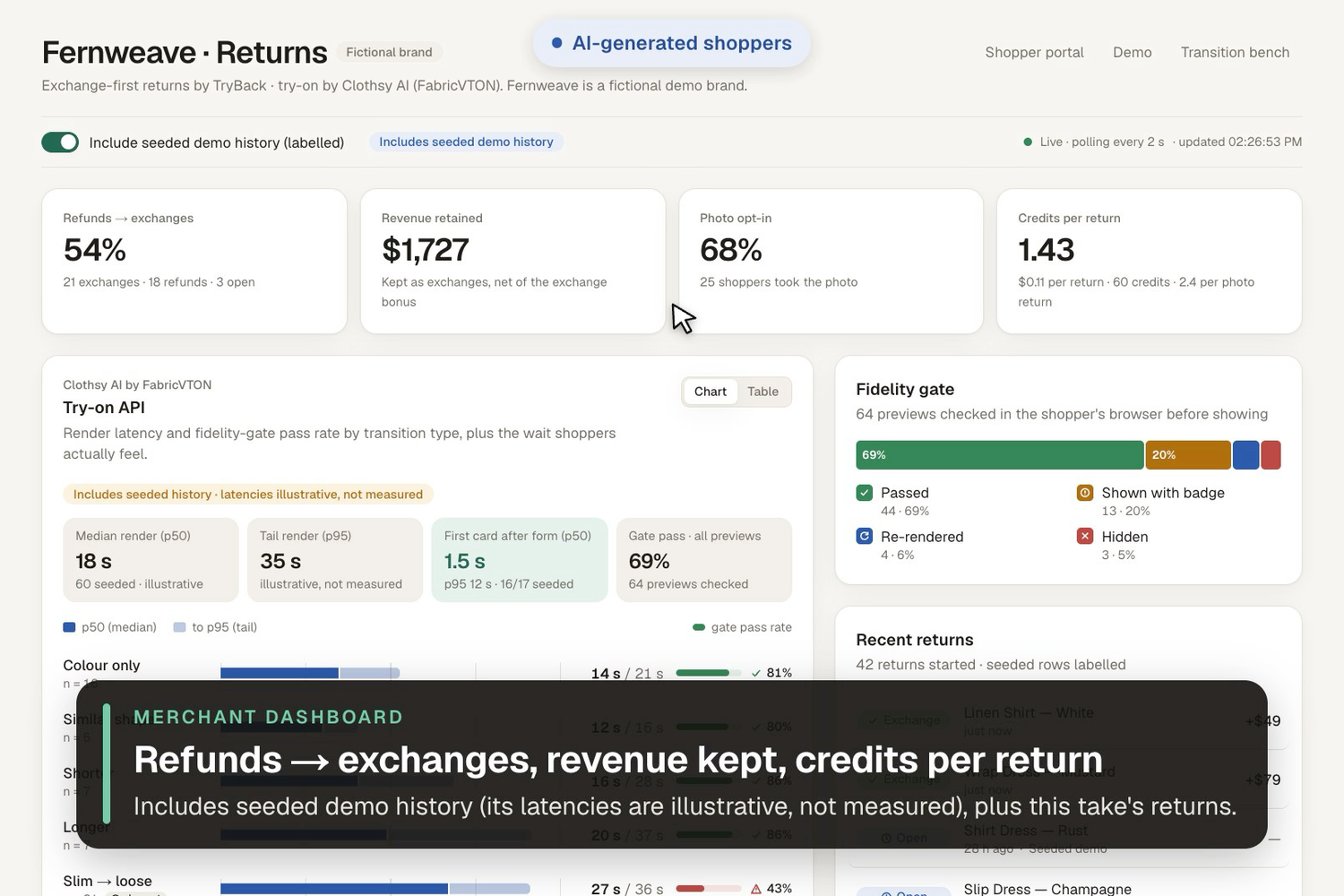
Merchant dashboard: refunds to exchanges, revenue retained, credits per return, try-on latency and gate pass rate.
Inspiration
Every virtual try-on we've seen lives on the product page. Its job is to convince someone to buy. But the moment a shopper is actually wearing the garment, in their own light, with their own body and their own opinion of it, is when they decide to send it back. That's also when a retailer is about to lose the sale.
Returns flows today offer a refund, maybe a generic "exchange for another size" dropdown, and nothing else. A shopper who returns a mustard wrap dress because "the colour isn't me" might have kept an emerald one, or an A-line in cobalt, but nobody shows them. So we moved try-on to the returns page.
What it does
For the shopper (mobile-first returns portal):
- Look up the order and pick the item. Choose a reason: Style or colour, Fit or size, or Something else.
- Style or colour: opt in to one photo wearing the item ("See 3 swaps on you, about 20 seconds, +$10 exchange bonus"). An 18+ consent checkbox comes first. A live pose coach and preflight checks run on the device so the photo is usable the first time.
- Two renders start the moment the photo uploads, while the shopper tells us what didn't work (chips like "Colour isn't me", "Too clingy", plus a note). By the time they submit, the first card is usually ready or close. An honest clock says exactly how long it took, e.g. "Renders started at photo upload · form done 0:24 · first card 0:27 (3 s after form)".
- Results: their real photo is pinned as "What you have now". Next to it are in-stock alternatives ranked against the diagnosed problem, each with a compare slider, a one-line "why", the price difference, a quality badge, and an "AI-generated preview" label. One tap swaps the refund for an exchange.
- Fit or size: no AI needed. The returned garment's known length is a ruler on the photo, so we draw where the hem would land in every other size and length variant, with ± bands, at zero credits. We also say plainly when sizing up won't help: "L adds only +1.5 cm length but +5 cm chest — sizing up won't fix 'too short'". A Tall or Petite variant is often the real fix. "Preview on me" (1 credit) is optional.
- "Skip photo" and "Skip to refund" are always one tap away.
For the retailer (merchant dashboard): refunds turned into exchanges, revenue retained, photo opt-in rate, credits per return and cost per return, per-SKU return diagnoses (e.g. "Wrap Dress — Mustard: colour 41%, too clingy 38%"), and a Try-on API panel with p50/p95 latency and gate pass rate per transition type (the seeded demo history's latencies are marked illustrative, never passed off as measurements). A transition benchmark page shows, for each kind of change (colour only, similar silhouette, shorter, longer, slim→loose, loose→slim), how fast and how reliable the try-on was.
How we used the try-on API
We integrated the Clothsy AI try-on API (FabricVTON) over its documented REST endpoints, server-side only:
- Uploads.
POST /images(multipart) for the shopper photo and the garment product shot. Uploads are free, so image ids are cached by SHA-256 and reused until an hour before their 24 h expiry. OnINVALID_IMAGE_IDwe drop the cached id, re-upload, and try once more. - Try-ons.
POST /tryonswith{ personImageId, garmentImageId, title, consent: true }. Thetitleis a precise garment description from the catalogue (e.g. "Women's knee-length wrap dress, V-neck, long sleeves, tie waist, fitted, emerald") to help placement and fit. - Idempotency. Each render's
Idempotency-Keyis derived from a content-addressed cache key (person photo hash × SKU × garment shot × pipeline version). A retry after a timeout can't double-charge, and the same photo + SKU never costs twice: it replays from our render cache. We detect an API-side replay from a documented signal (a new try-on always startspending, sosuccesson the first start is a replay), and the probe's--check-replaymeasured on our account whether it was free: free (credits 14 → 14). It also showed that a replayed start comes back without the result URL, a bug we fixed with one follow-up GET. - Polling.
GET /tryons/{id}every 2.5 s, giving up at 150 s. On success we downloadresultUrlimmediately (it expires after 24 h) and store it byte-for-byte, which keeps the API's embedded AI-content label.status: "failed"maps to a non-retryable error (the credit is refunded). - Rate limits and retries. Process-wide sliding-window limiters allow at most 10 try-on starts, 25 uploads and 50 status polls in any 60 s (the account limits are 12, 30 and 60; four renders in flight would otherwise poll 96 times a minute). 429/500/502/503 and network errors are retried with the same key, backing off 1 s → 2 s → 4 s and honouring
Retry-After. 4xx validation errors are not retried. - Account.
GET /account(free) shows the credits left. Ournpm run doctorreadiness check uses it, and the probe refuses to start if its worst case would exceed the balance. - Speculative scheduling. Renders are scheduled with Next.js
after()so the upload response returns at once and rendering overlaps the form. - A second garment shot. Every dress and the trench have an alternate product shot. When our fidelity gate asks for a retry, we re-render once with that shot instead of re-rolling the same inputs. (The wrap, A-line and slip dresses have a separate flat-lay shot; for the three photographed families it's the same photo mirrored and re-framed.)
- Labels. Every result is labelled "AI-generated preview" in the UI.
- Cost controls. Per-return cap (5 renders, retries included), a daily live cap, replay mode for public links, and an access code for live renders on the shared deployment.
- Day-1 probe.
npm run proberuns a matrix of person photos × SKUs through the live API (ours were AI-generated people). It refuses to upload without an explicit--i-have-consentor--ai-peopleflag, checks the balance first, enforces a hard--max-credits, and writes a report: latency and status per render, output size and padding, the account response shape, and whether a replayed request was free.npm run tunethen recalibrates the gate thresholds on those renders with the same browser code shoppers run, at 0 credits. On our 6 probe renders (6/6 succeeded, p50 17.7 s), the hand-set thresholds would have re-rendered 4 good previews; the tuned ones re-render none and still catch every synthetic failure.
The fidelity gate (why "source-aware" matters)
A try-on API on a product page renders onto any photo. On the returns page we know more: what the shopper is wearing (the SKU being returned) and what the render should show (the target SKU). So before a card is shown, the browser checks:
- Colour (CIEDE2000 vs the target colour, corrected for the photo's lighting using the returned garment as a reference).
- Residue: how much of the old garment's colour survived.
- Silhouette leakage: a "new" A-line that kept the old wrap's outline.
- Identity drift in the face region.
- Hem position in cm, when the photo is calibrated.
- Garment coverage.
Each render gets a verdict: pass, an honest badge ("Colour preview · silhouette approximate"), one retry with the alternate shot, or drop (hidden behind "1 preview didn't pass our quality check").
Why the Try-On Commerce track
Try-on is usually pitched as a conversion tool. We think its most measurable commercial value is at the return:
- the shopper has already paid and the item is in their hands;
- the retailer can see exactly which revenue is at risk;
- the photo is better than any product-page selfie, because the shopper is wearing the actual product, which gives a lighting reference, a fit reference and a ruler.
Every exchange TryBack produces is revenue retained that a refund would have lost, and the dashboard shows the credits it cost. That makes try-on a line item a retailer can justify.
Value
For shoppers
- Alternatives they'd actually consider, seen on themselves, in their size, in stock, in about the time it takes to fill the return form.
- Honest previews: quality-checked, labelled, and never claiming to show fit when they can't.
- Size answers without guesswork: the hem lines show what a different size or a Tall variant changes, with no AI involved.
- No pressure: refund is always one tap away, and no photo is needed to see alternatives.
For retailers
- Refunds turned into exchanges, counted on the dashboard (our scripted demo returns both ended in exchanges; that is a demo, not a user study).
- Revenue retained per exchange (the original order value) and the price difference.
- Unit economics up front: a style return with a photo used 5 credits in our demo (2 speculative renders, 2 after the form, 1 quality-gate retry); size returns use 0.
- Return reasons as data: per-SKU diagnoses ("too clingy", "colour") feed merchandising and product pages.
- Try-on reliability by transition type, so they know which swaps to offer with confidence.
How we built it
- Next.js 16 (App Router) + React 19 + TypeScript strict + Tailwind v4. Route handlers validate with zod, and background renders use
after(). - MediaPipe Tasks Vision in the browser: Pose Landmarker for the live coach and keypoints, and the selfie multiclass segmenter for garment masks. Preflight, size lines and the fidelity gate all run on the device.
- Claude (
@anthropic-ai/sdk, structured outputs) turns chips + free text + product attributes + two measured numbers into a diagnosis. It never sees the photo, and its prompt forbids judgements about skin tone or bodies. Deterministic rules take over on any failure or refusal. - sharp for image normalisation, a clearly watermarked dev double ("Simulated preview", 0 credits) used for UI development, and a catalogue importer: one product image per garment family (an openly licensed photo or an AI-generated product shot), background removed, scaled to the catalogue's measured lengths and recoloured in CIELAB to every colourway (credits in
public/catalog/CREDITS.md). Five families use AI-generated product images; the demo shoppers are AI-generated people, never real customers. - Operations:
npm run doctor(readiness checklist using only free endpoints), a scripted video recorder that drives the real app in headless Chrome, and a Docker image for one always-on server with a persistent volume, rate limits and an hourly retention sweep. - A JSON-file store with serialised atomic writes and a content-addressed render cache, so the demo runs anywhere.
- vitest suites for the pure parts: colour science (CIEDE2000 against the Sharma et al. test data), geometry, gate decisions, retrieval and size options, metrics, the try-on client's retry and idempotency behaviour, and the API routes.
Challenges we ran into
- Try-on can't show size. Rendering a size L looks like rendering a size M. Instead of faking it, we built the garment-as-ruler path: the returned garment's known measurements calibrate the photo, and size becomes geometry. It also showed us how often "size up" is the wrong advice for "too short".
- Latency. Our 11 live renders took 18.2 s at the median and 28.5 s at p95 (16.5–28.5 s). A spinner that long kills a returns flow, so renders start at photo upload and overlap the form. Then we had to be honest about the result instead of claiming "instant".
- The garment being replaced is on the person. The source garment's colour and outline can leak into the result. We measure residue and silhouette IoU against the known source garment. In practice Clothsy was cleaner than we feared: all 11 live renders had zero leftover mustard. The harder problem turned out to be the opposite one: our first hand-set thresholds would have retried 4 of 6 good probe renders (a wasted credit each), because Clothsy renders our emerald 12–15 ΔE brighter than the catalogue colour. Tuning on labelled real renders plus 63 synthetic failures took the retry rate on good renders to 0 % while still catching every synthetic face edit, colour residue and missing garment.
- Credits. Free credits run out fast when you iterate on UI. A labelled dev double, a content-addressed cache, idempotency keys and hard caps meant 11 credits covered the live probe and the demo video (9 of the 20 free credits are left for judges).
- Product photos for a brand that doesn't exist. Fernweave is fictional, so there was no product photography. We built an importer that turns one product image per garment family into every colourway on a consistent frame and scale, with credits. Three families are openly licensed museum/Commons photos; for the other five we generated product images with AI, and the demo shoppers are AI-generated people too (labelled as such in the app video and here). Clothsy rendered the AI-generated product shots cleanly on all 11 tries.
Accomplishments that we're proud of
- A size path that answers the most common return reason at zero credits, and tells the truth about grading.
- A gate that turns "AI said so" into "checked: colour ΔE 10.9, 0 % old colour left, face unchanged", retries once on another product shot, and hides what fails.
- An honest clock: it reports when the first card was ready relative to the form, and says "replayed from cache" when a render wasn't live, instead of claiming speed it didn't have.
- Privacy decisions we can defend: adults only, consent before capture, on-device vision, no photo to the LLM, and labels on every image.
Measured results
From our own runs only (seeded demo history excluded).
| Metric | Value | Source |
|---|---|---|
| Live try-ons run (probe + demo) | 11 (6 probe + 5 demo), 11 succeeded | probe/results.jsonl, /bench |
| Latency p50 / p95 | 18.2 s / 28.5 s | /bench, Try-on API panel |
| Gate verdicts in the demo take: pass / badge / retry / drop | 3 / 0 / 1 (passed on the alternate shot) / 0 | /bench |
| Credits spent in total | 11 (probe 6, demo 5; the replay check cost 0) | dashboard |
| Credits per style/colour return | 5 in the demo take (2 speculative + 2 post-form + 1 gate retry) | dashboard |
| Test returns that ended in an exchange | 2 of 2 demo returns (AI-generated shoppers, not a user study) | dashboard |
What we learned
- Clothsy handled both a colour-only swap (mustard → emerald wrap) and a silhouette change (wrap → A-line midi) cleanly on all six probe renders, with faces untouched and no leftover colour. The weakest point was length: one A-line hem landed 9.3 cm off the catalogue length, which is exactly why TryBack answers size with geometry, not try-on.
- The gate's first job turned out to be not wasting credits: tuned on real renders, it stopped retrying good previews (4 of 6 → 0 of 6) and still caught every synthetic failure.
- Being honest about latency, labels and size made the product feel more trustworthy, not less.
What's next for TryBack
- Real catalogue integration: Shopify product and inventory sync, with photographed product and alternate shots per SKU.
- Merchant accounts and retention settings: today an admin token guards the wipe and retention endpoints, and an hourly sweep deletes photos within 24 hours and previews within 14 days. A real deployment needs merchant logins and per-merchant retention.
- Postgres + object storage behind the existing store interface, and a job queue for renders.
- Gate calibration on more data:
npm run tunealready proposes global thresholds from labelled probe renders; next is per-transition thresholds and a garment mask that copes with prints. - Returns-platform integration with existing returns tools (label generation, instant exchange, refunds) rather than a standalone portal.
- Merchant feedback loop: per-SKU diagnoses surfaced back onto the product page ("runs short; consider Tall").
Responsible AI and privacy
- Adults only (18+ attestation), with consent before any capture. The server rejects uploads without it.
- The photo is processed on the device for pose and segmentation. The try-on API is the only third party that receives it, called with
consent: true, and the consent text names it (Clothsy AI) and its 35-day deletion. - The photo is never sent to the LLM. Diagnosis is text only, with emails and phone numbers redacted from the note.
- Photos are deleted within 24 hours of upload and previews within 14 days, by an hourly sweep that deletes anything due before the next sweep, as the consent text says.
- No skin-tone or body judgements, in copy, prompts, diagnosis or quality badges.
- Every real render is labelled "AI-generated preview", and simulated ones "Simulated preview".
- Fernweave is a fictional brand. The shoppers in our demo, video and probe are AI-generated people, never real customers, and are labelled as such.
Built With
- anthropic
- claude
- clothsy-ai
- fabricvton
- fly.io
- mediapipe
- nextjs
- node.js
- react
- sharp
- tailwindcss
- typescript
- vitest
- zod

