-
-
-
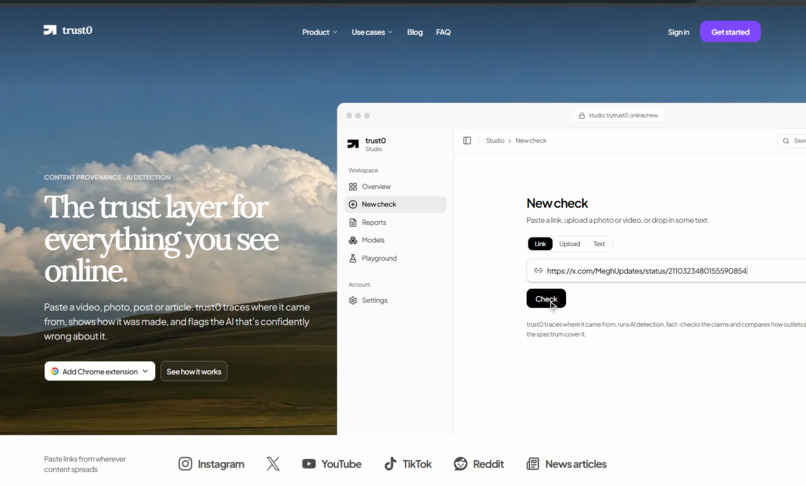
site
-
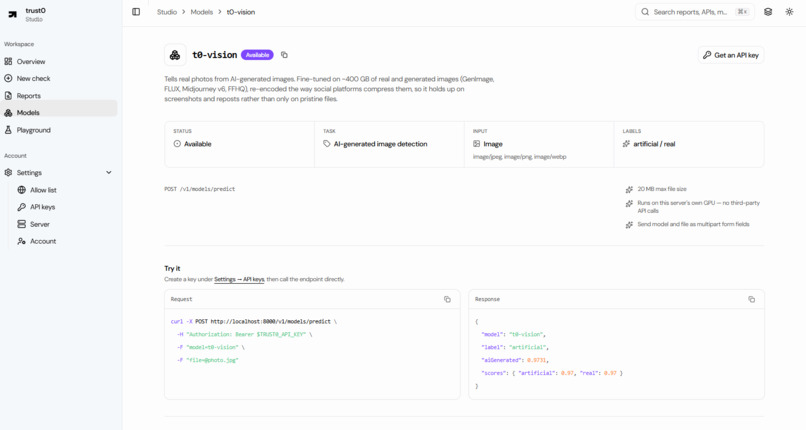
model: t0-vision-1 - image classifier
-
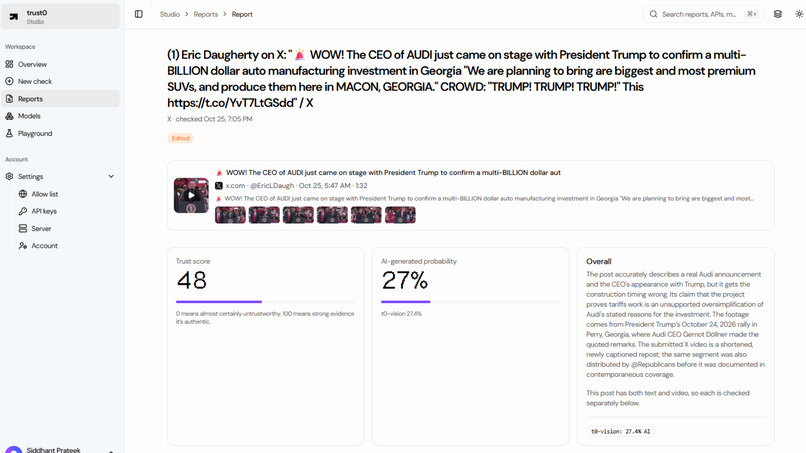
Report
-
Report - Spread Path
-
Report - Media Bias
-
Report
-
-
-
-
The trust layer for everything you see online.
Inspiration
I just wanted to know if the things I see online are real.
More and more, I couldn't tell. A Midjourney image on Instagram looked exactly like a photo. A 3-year-old flood video on X was going around as breaking news. A forward in a WhatsApp group quoted a ChatGPT answer that was confidently wrong. Every time I had the same question, can I trust this, and no quick way to answer it.
Checking one post properly means a reverse image search on Google Lens (then another on a second engine), scrolling back through reposts to find who posted it first, reading 2 or 3 fact-check sites that may not have covered it, and then guessing. That's about 20 minutes for something I'd scroll past in 4 seconds. So I almost never did it, and I doubt many people do.
Making convincing content got cheap over the last few years, while checking it stayed slow and manual. I wanted one tool that answers a single question about anything I see online, how much should I trust this, right where I'm already looking and in 1 click.
What it does
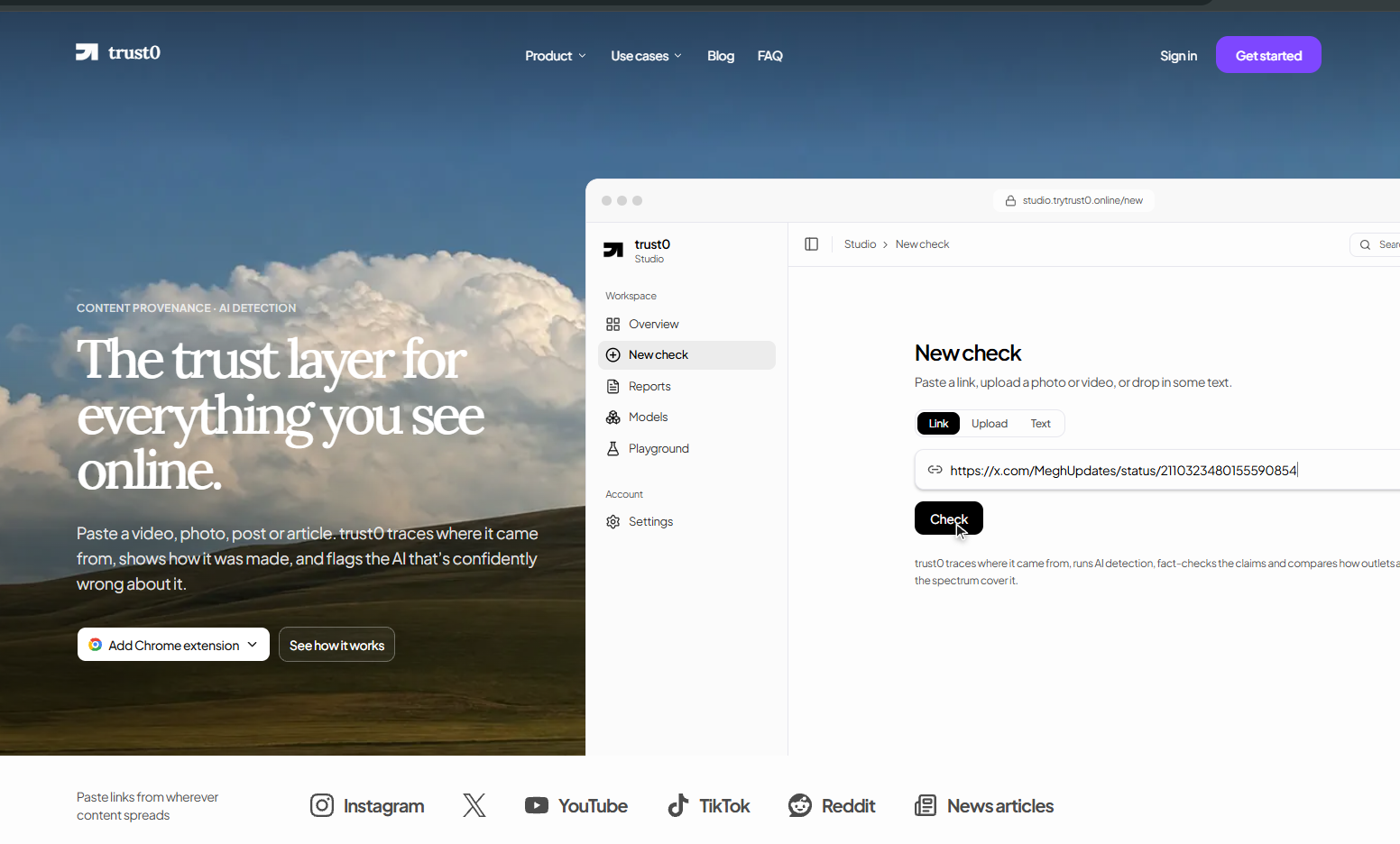
Paste a link, upload a photo or video, or drop in some text. About a minute later you get:
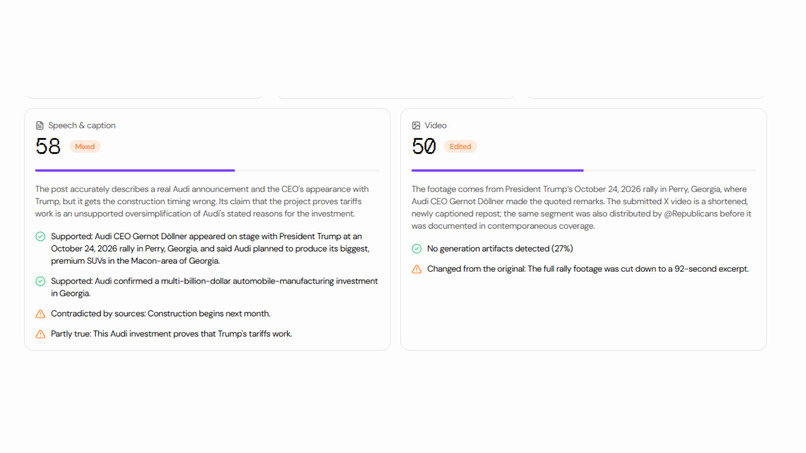
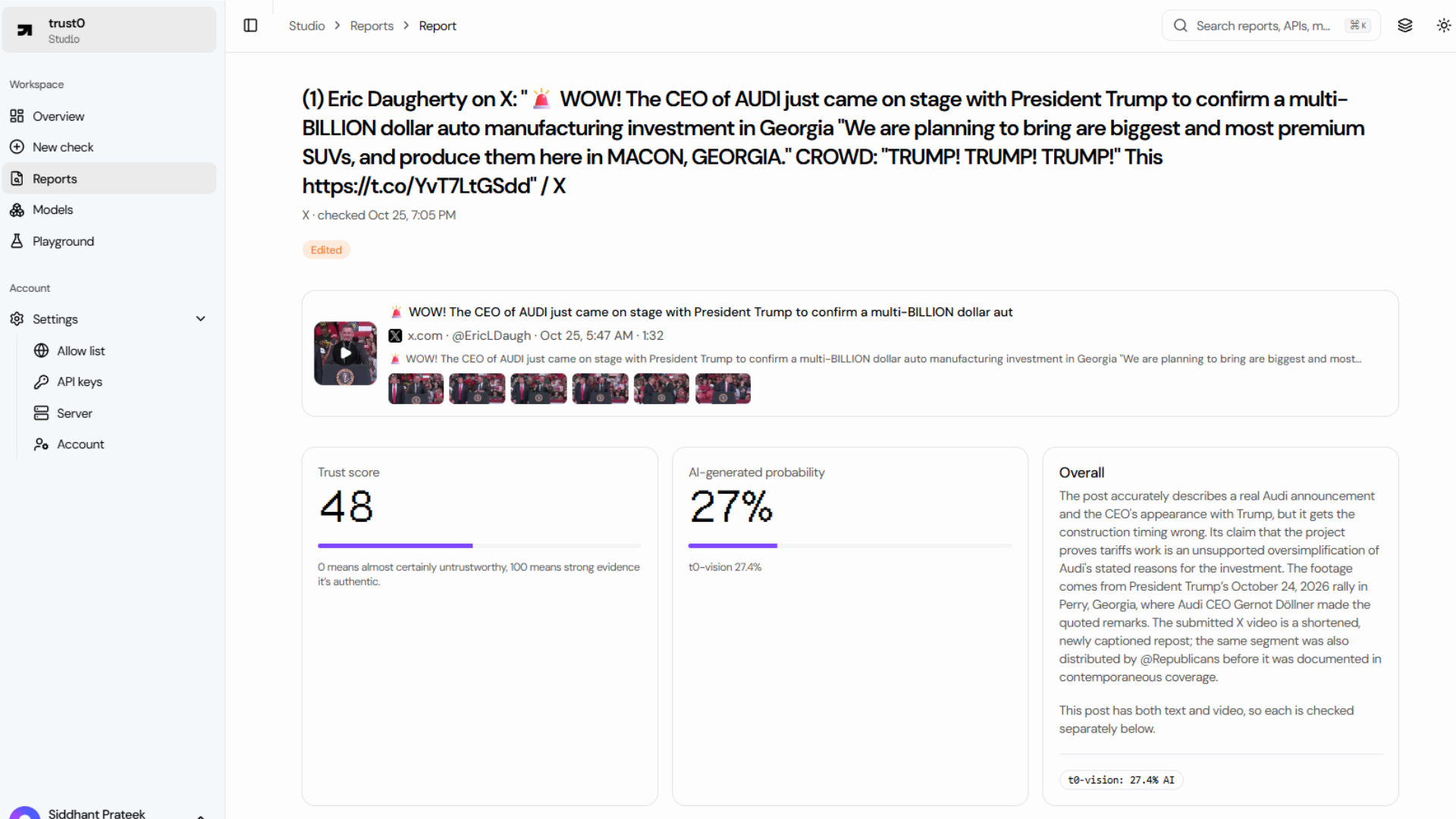
| A verdict and a 0-100 trust score | Authentic, edited, likely AI-generated, accurate, mixed, inaccurate or unverified |
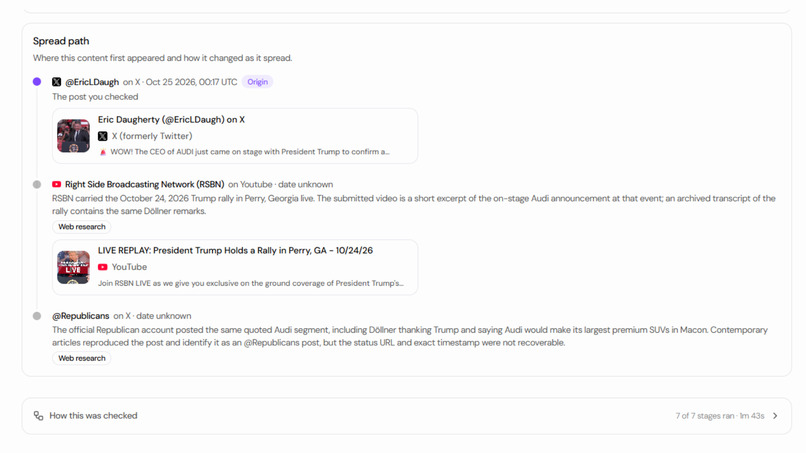
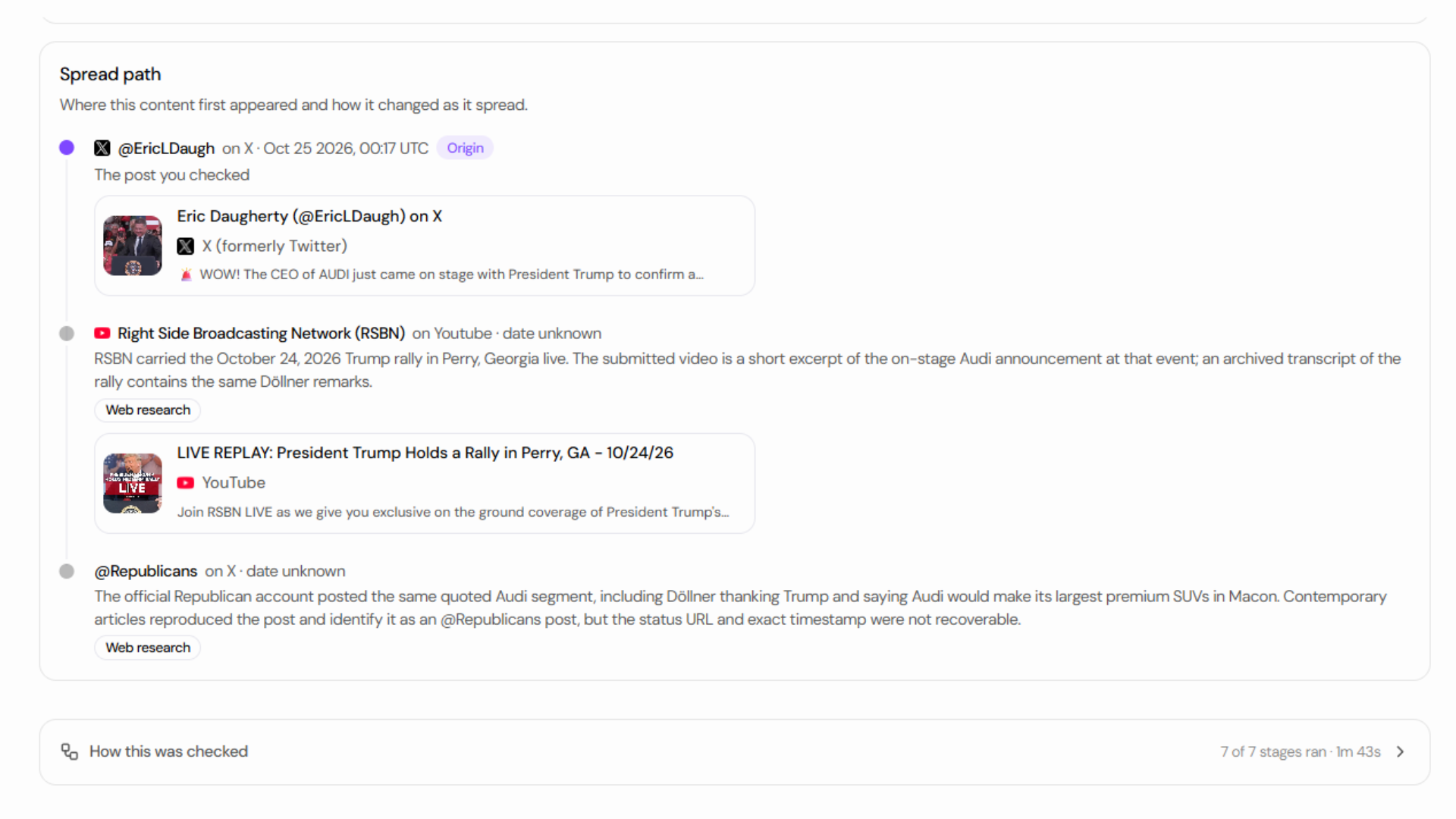
| The spread path | Where the content first appeared and how it got to the post you're looking at: original poster, reuploads, edits |
| AI-generated media check | My own detector, t0-vision, plus a second opinion. Two signals have to agree before I say "likely AI" |
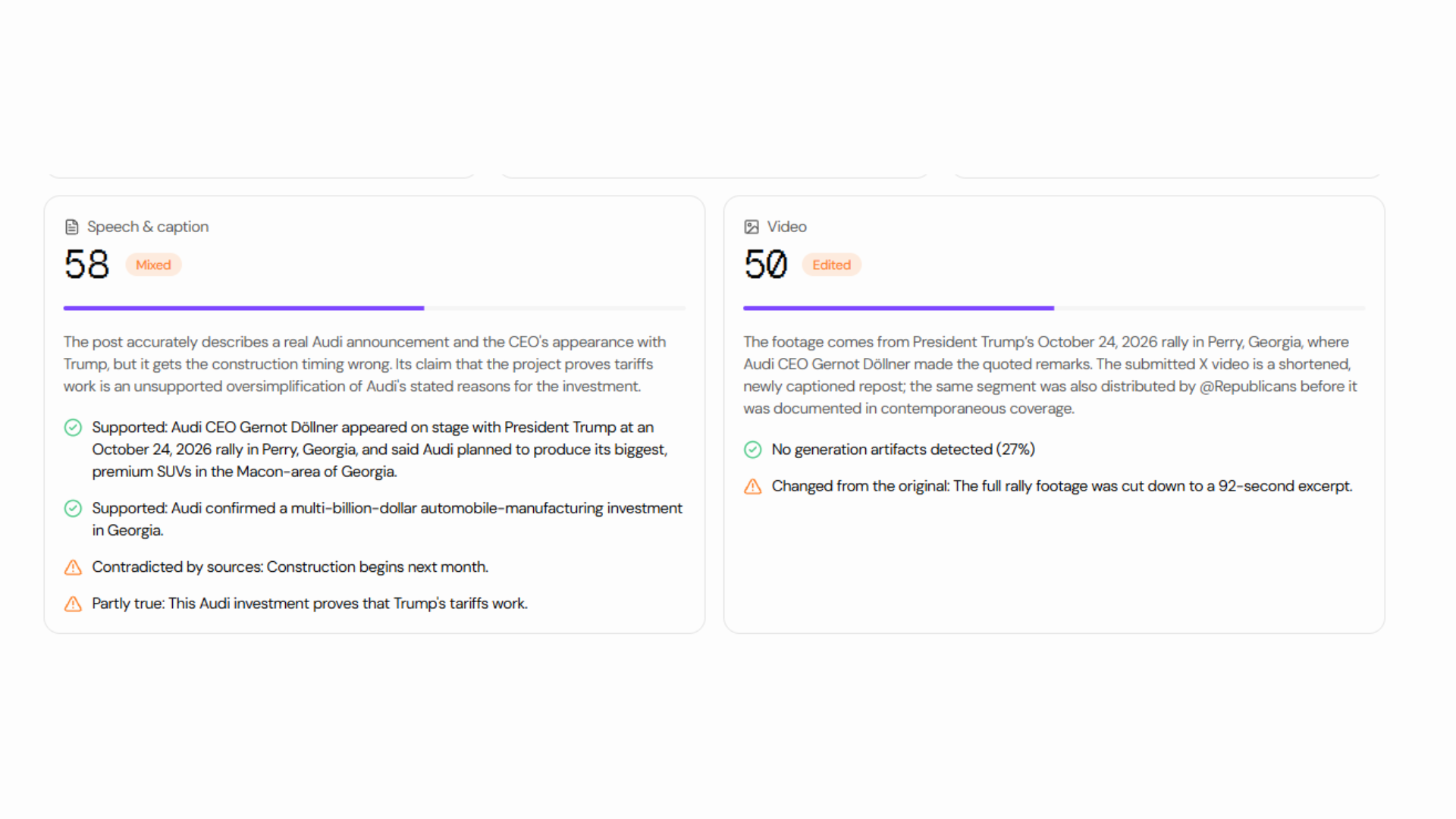
| Fact check | The claims in the post, each checked against sources on the live web, with links |
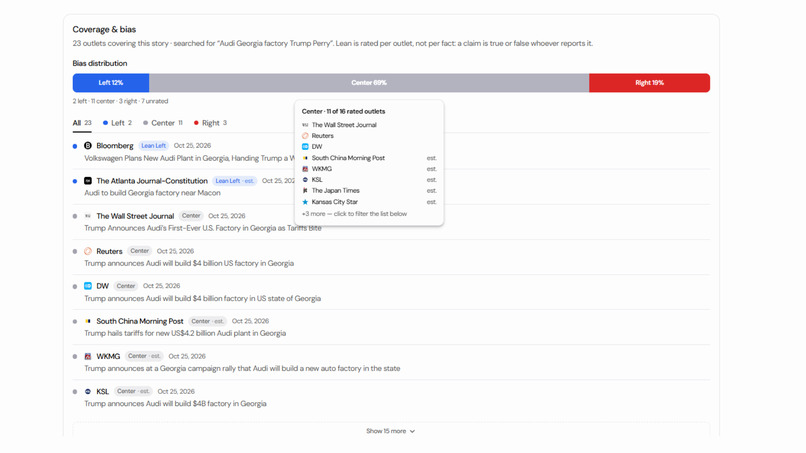
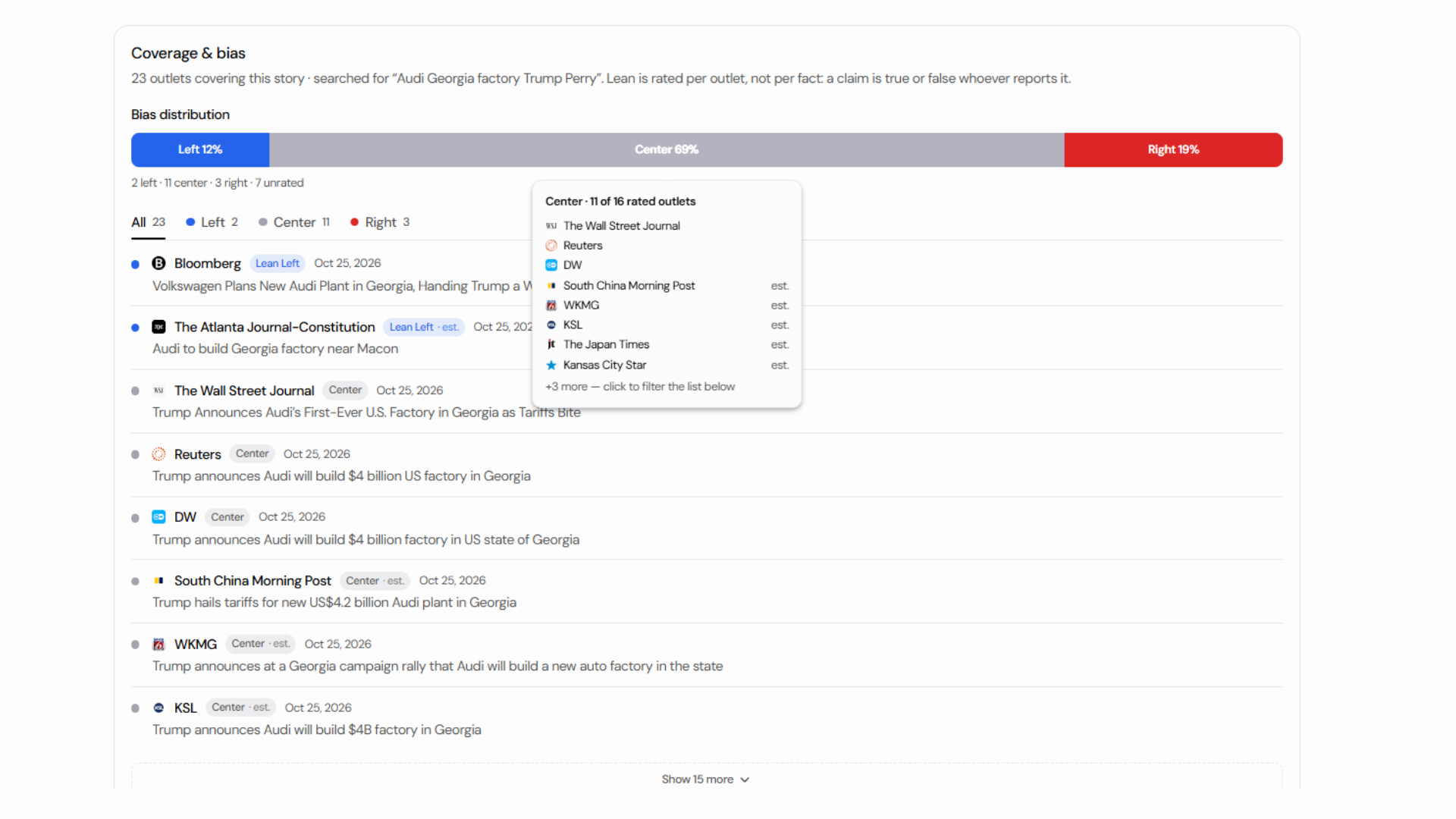
| Coverage and bias | For news, how outlets across the spectrum are covering the story and what's missing |
| Reasons in plain English | Every point added to or removed from the score maps to a check you can see |
It works on Instagram reels, X videos, TikTok, YouTube, Reddit, news articles, photos and plain text.
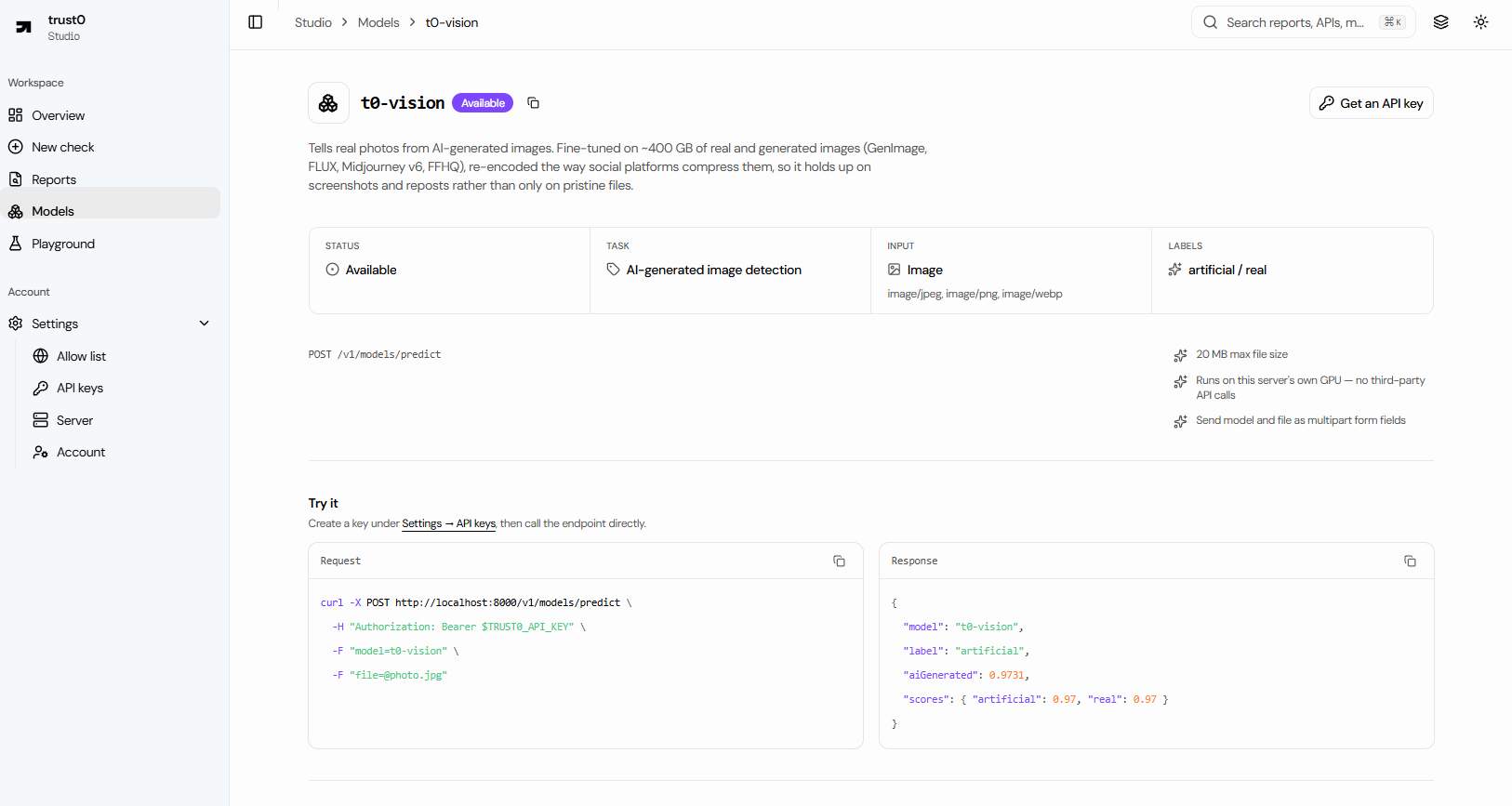
You can use it in three places. The browser extension puts a small trust chip on ChatGPT, Claude, Gemini and Perplexity answers, on X, Instagram, Reddit and LinkedIn posts, on WhatsApp Web messages, and on YouTube and TikTok; click it to see the verdict, or right-click anything and choose Check with trust0. The studio is a dashboard where you run checks, read full reports with the spread path and sources, and pick which sites the extension scans automatically. And the public API takes an image and returns the probability that t0-vision thinks it's AI-generated.
How we built it
The pipeline
Every check runs through the same stages:
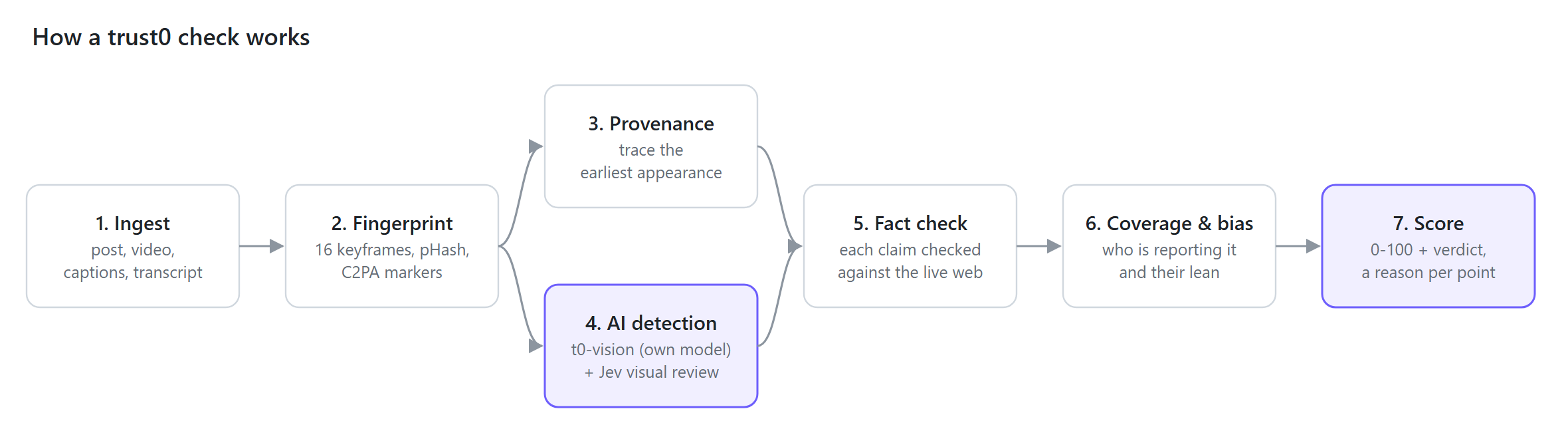
- Ingest. yt-dlp reads the post and downloads the video. When it can't, fxtwitter, Reddit OAuth, trafilatura and Open Graph tags take over. Videos without captions get transcribed with local Whisper.
- Fingerprint. ffmpeg samples 16 keyframes and gives each a perceptual hash. Those hashes survive re-encoding, cropping and compression, so a reupload hashes close to the original. I also look for C2PA "AI-generated" content credentials.
- Provenance. I build the spread path from evidence, strongest first: visual matches, platform metadata, reverse image search and web research.
- AI detection. t0-vision (my own model) and C2PA markers, plus a visual second opinion from TypeSafe's Jev.
- Fact check. An LLM through OpenRouter (or OpenAI or Claude directly) pulls out the claims and checks each one against the live web.
- Coverage and bias. Google News results for the story, filtered to articles that are about it, with each outlet's lean.
- Score. Plain rules rather than a model, with a reason attached to every point.
The system
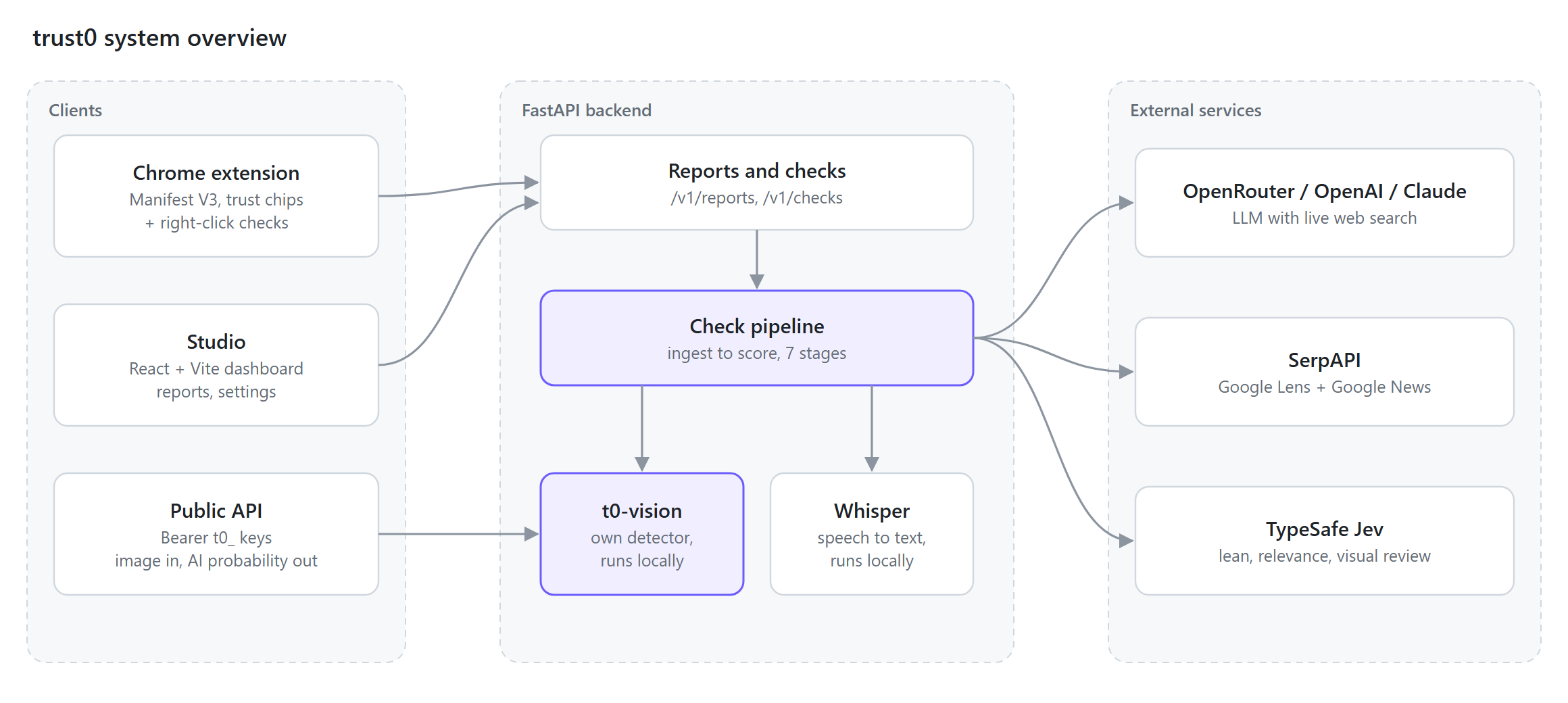
I made every API key optional. If one's missing, that stage gets skipped and the report tells you so. You can run trust0 with a single LLM key and still get a useful answer.
My own model: t0-vision
I started with off-the-shelf AI-image detectors. When I tested them on images that looked like real posts, they didn't hold up.
Most detectors are measured on clean files straight from a dataset. By the time a picture reaches you, a platform has resized it and recompressed it as a JPEG, and often someone has screenshotted and reposted it. That throws away most of the fine detail detectors look for.
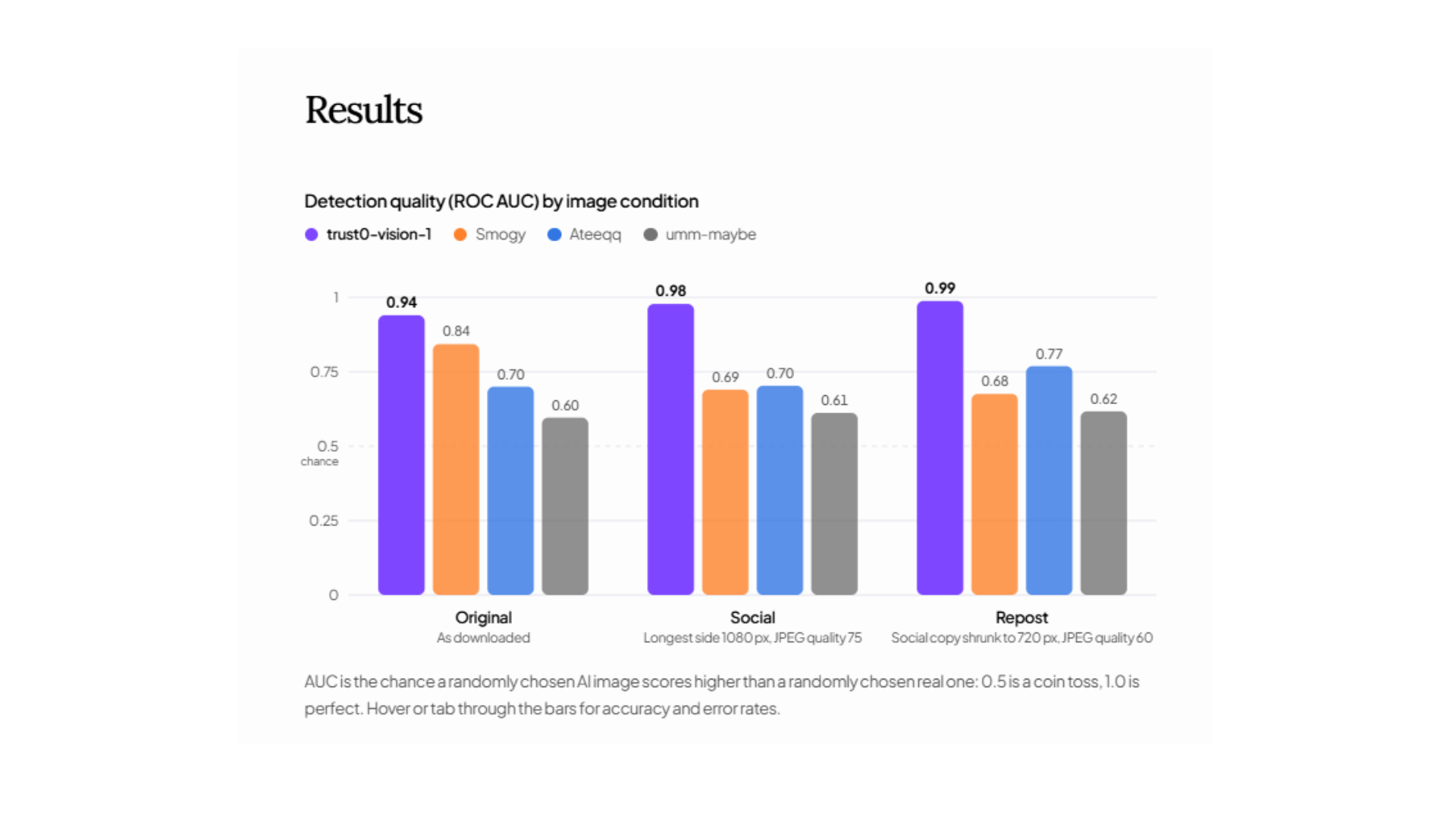
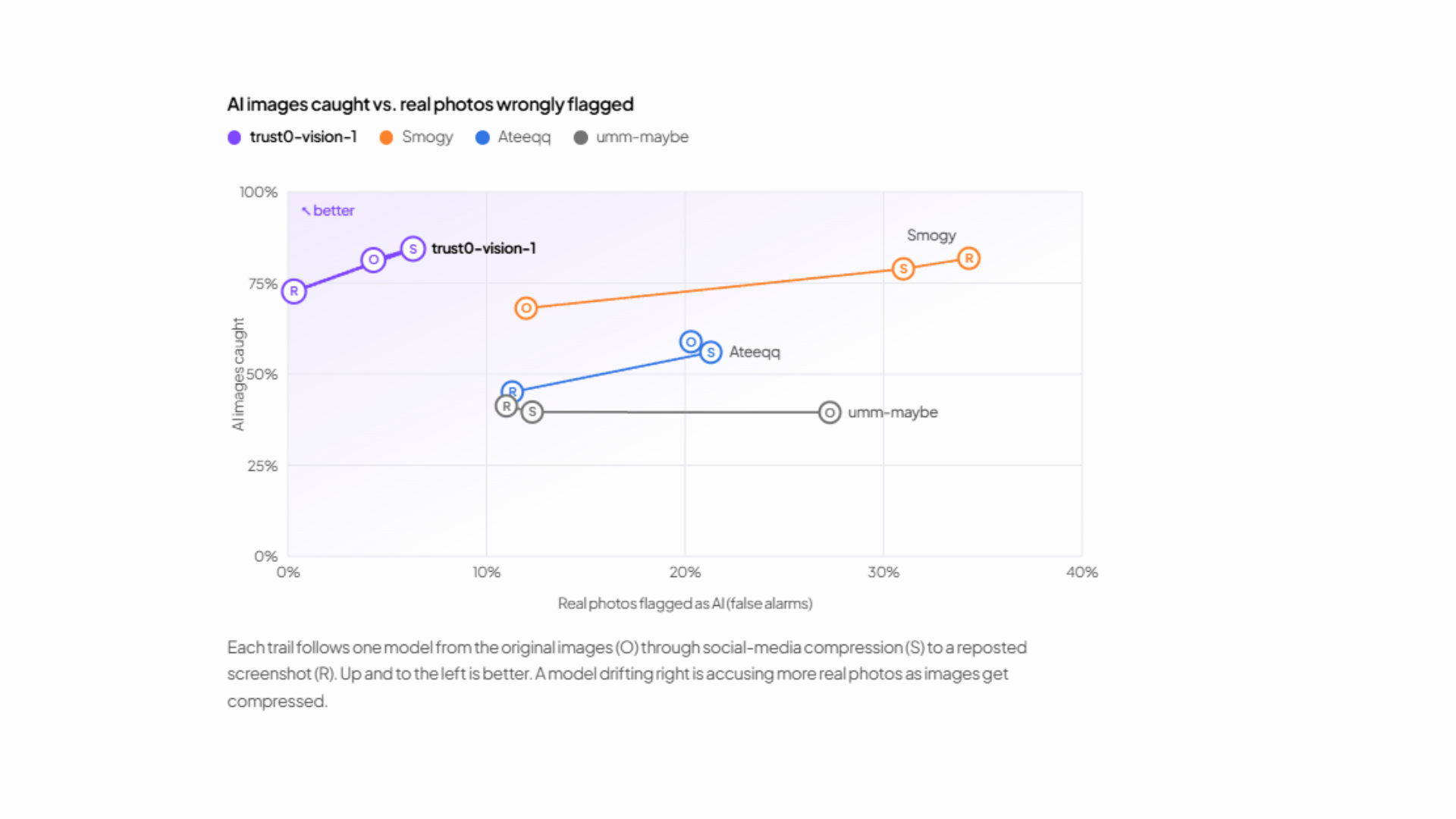
So I built a test set closer to what people actually see: 1,380 images, 450 real (300 ImageNet photos, 150 FFHQ faces) and 930 AI from 11 generators. Every image is scored three ways:
- original, as downloaded;
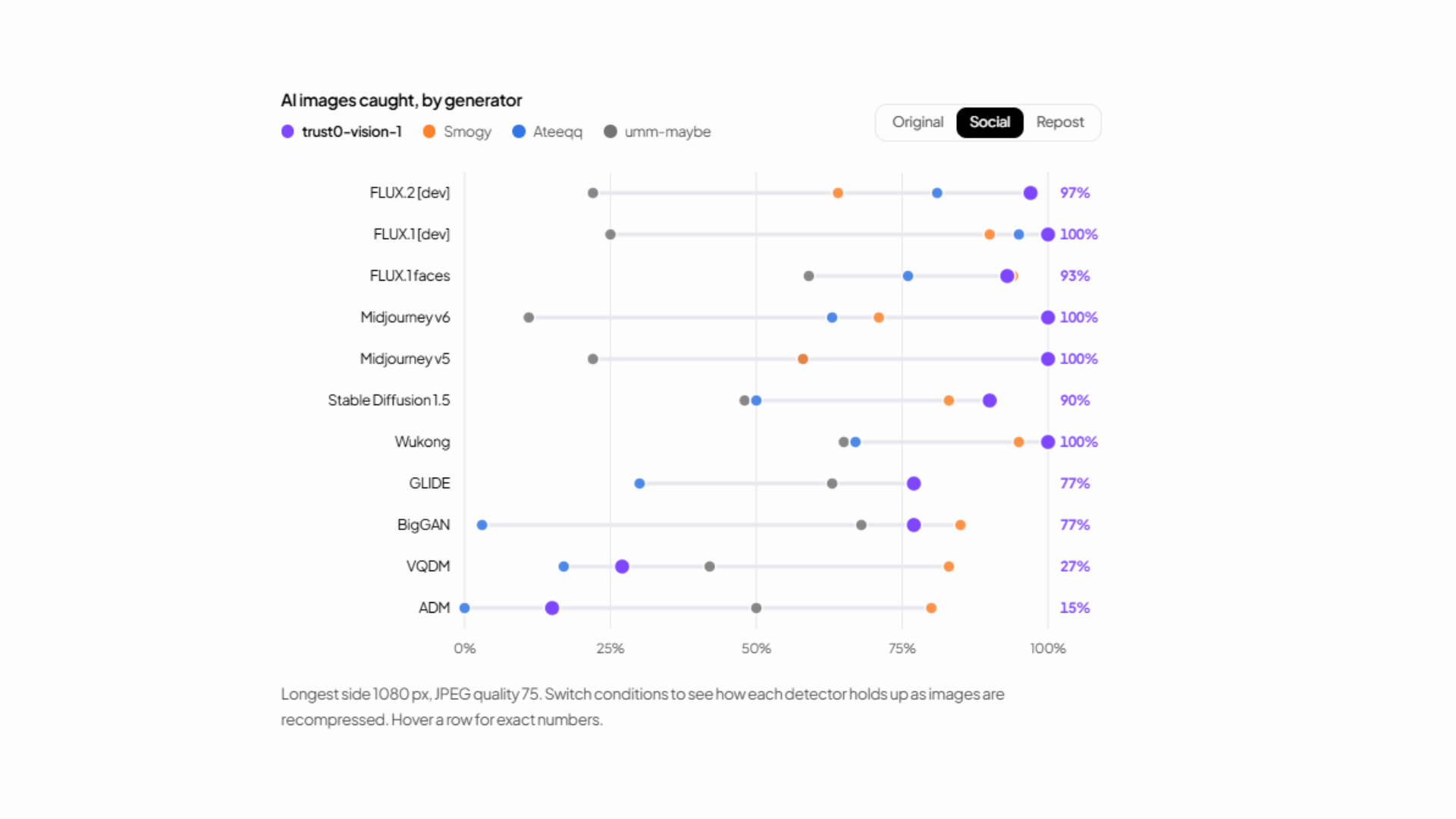
- social, 1080 px at JPEG quality 75, roughly what X and Instagram do on upload;
- repost, shrunk to 720 px and recompressed again, like a screenshot of a repost.
The recompression also removes a shortcut in GenImage, where the real images are JPEGs and the fakes are PNGs. A detector can score well there just by noticing the file format.
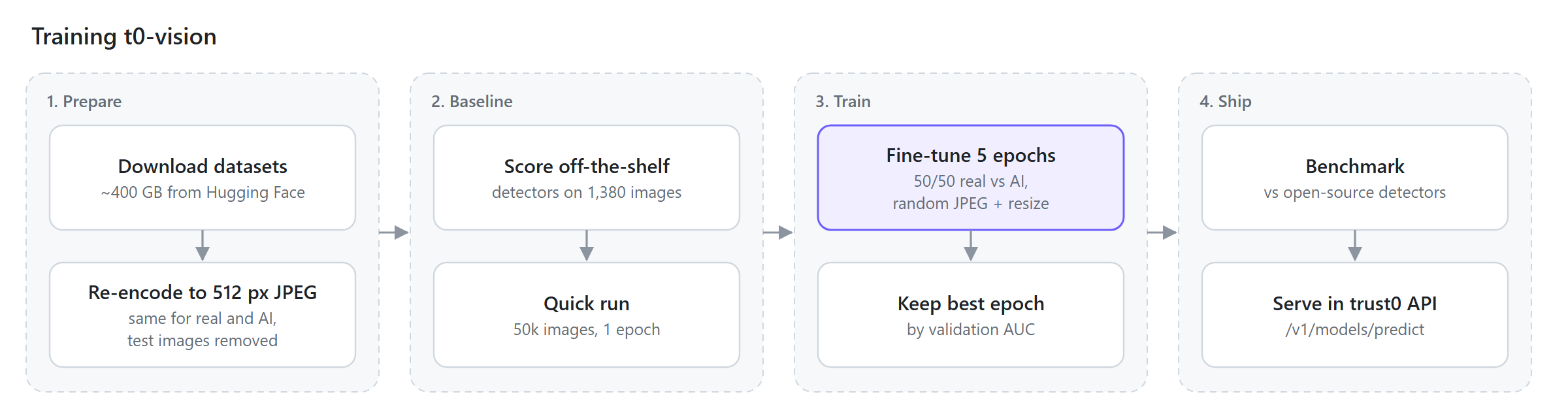
I then fine-tuned a SwinV2 detector, haywoodsloan/ai-image-detector-deploy, which was the best starting point I tested. Training ran on about 400 GB of real and AI images on one RTX 3080 laptop GPU. Every training image was randomly JPEG-compressed, downscaled and cropped, so the model learns from images as they look in a feed.
Benchmarks
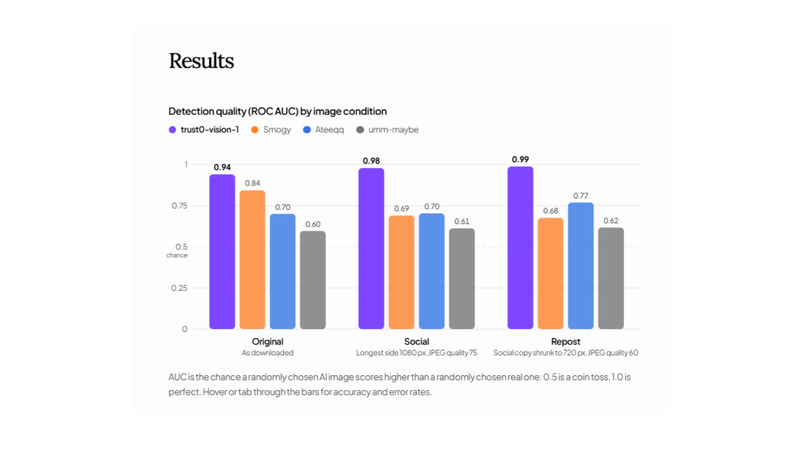
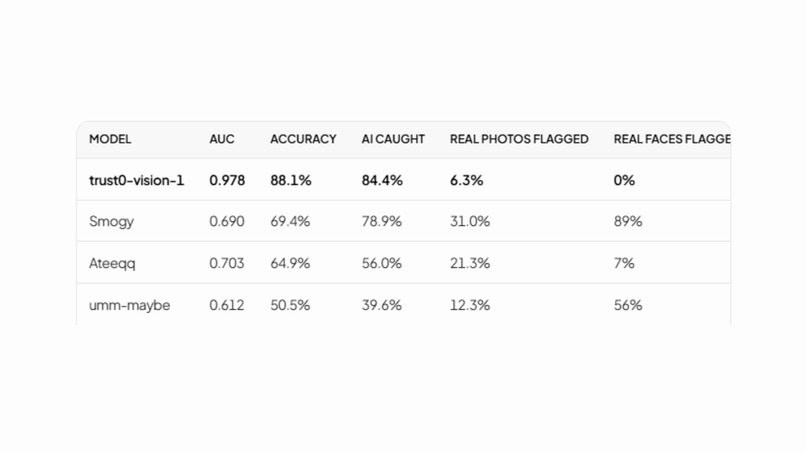
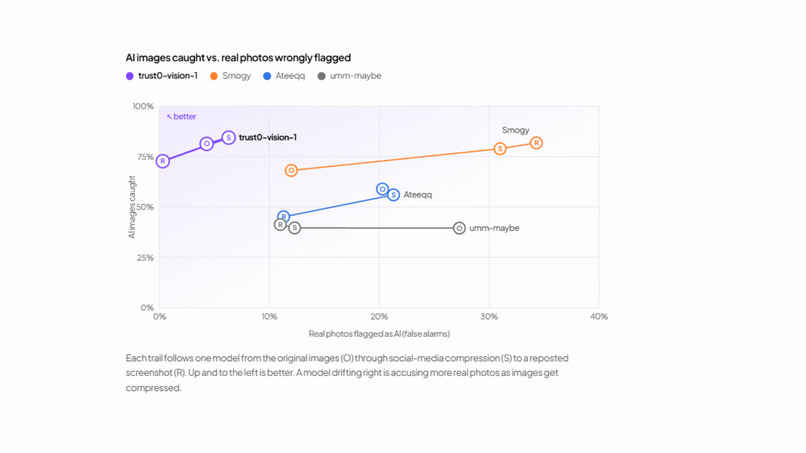
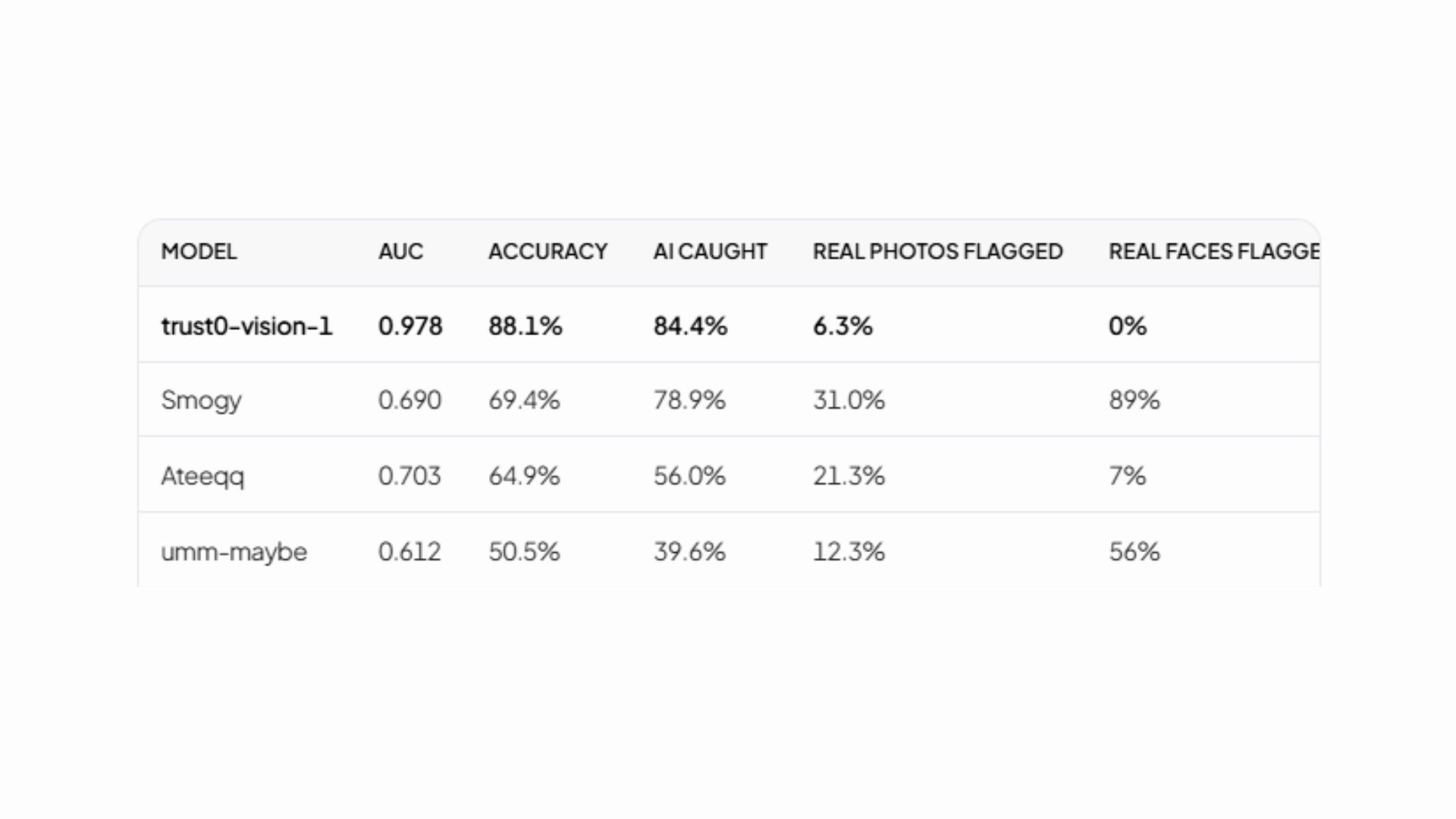
Measured on an RTX 3080 Laptop on 2026-10-05. AUC of 0.5 is a coin toss and 1.0 is perfect. "Caught" and "flagged" use a 0.5 threshold on the social condition.
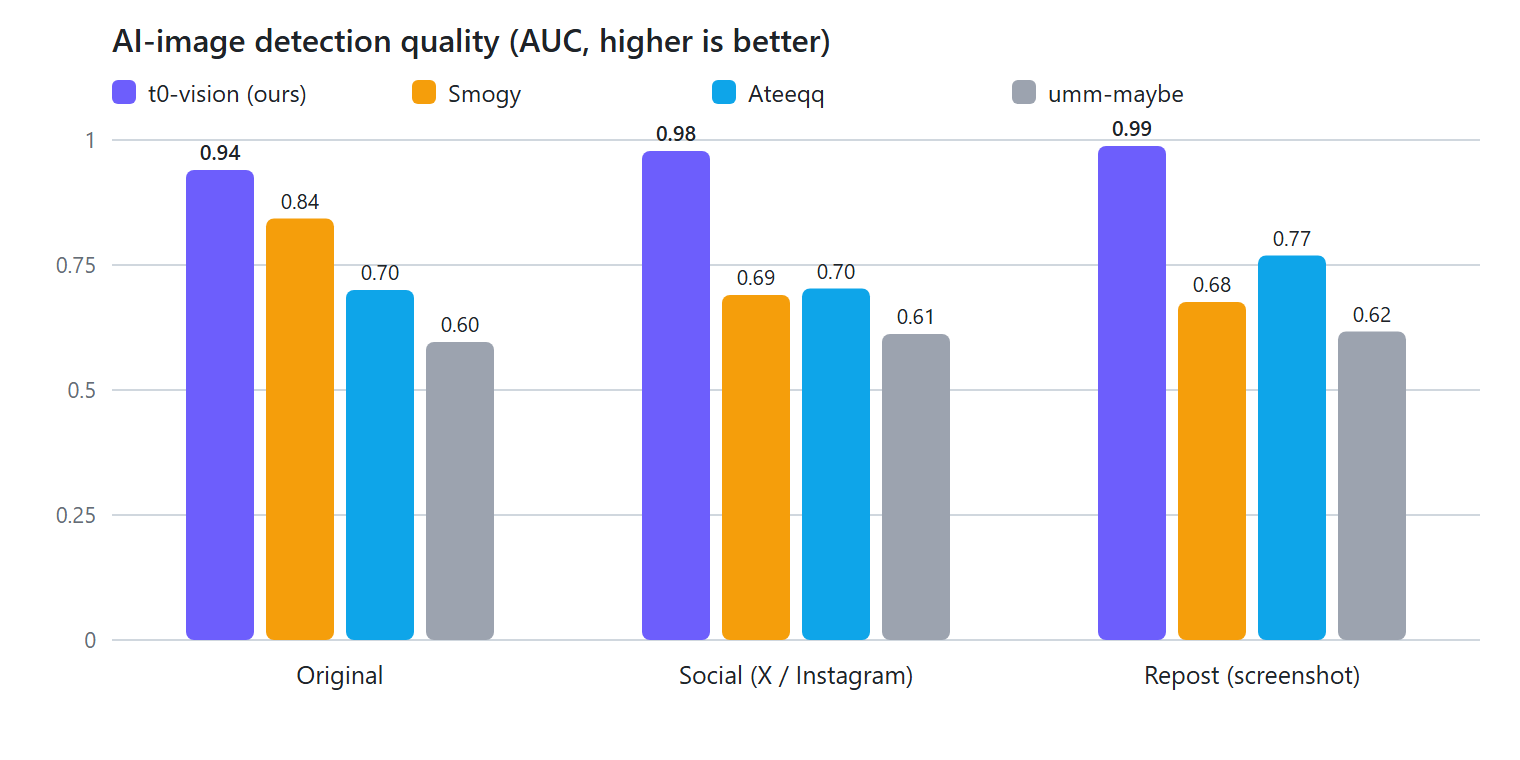
| Model | AUC original / social / repost | AI caught | Real flagged as AI | ms/img |
|---|---|---|---|---|
| t0-vision (ours) | 0.94 / 0.98 / 0.99 | 84% | 6% | 22 |
| Smogy/SMOGY-Ai-images-detector | 0.84 / 0.69 / 0.68 | 79% | 31% | 9 |
| haywoodsloan/ai-image-detector-deploy (my base) | 0.83 / 0.83 / 0.84 | 50% | 5% | 22 |
| Ateeqq/ai-vs-human-image-detector | 0.70 / 0.70 / 0.77 | 56% | 21% | 8 |
| umm-maybe/AI-image-detector | 0.60 / 0.61 / 0.62 | 40% | 12% | 9 |
t0-vision's AUC goes up as images get more compressed, from 0.94 on originals to 0.99 on reposts. Every other detector I tested got worse or stayed flat.
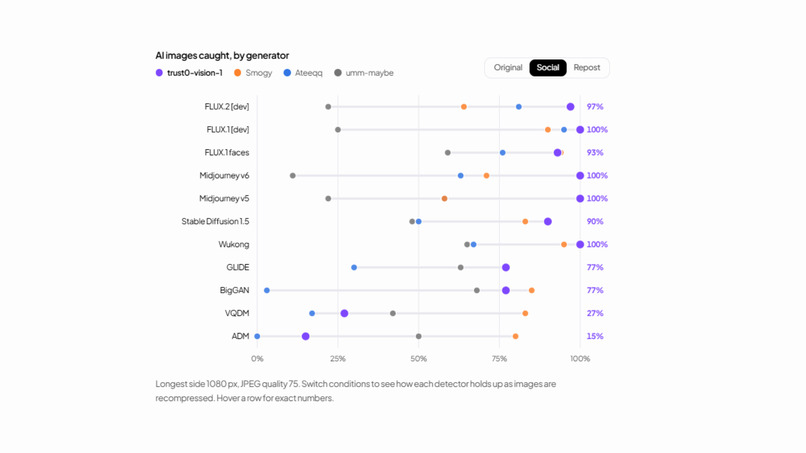
Detection rate by generator, social condition:
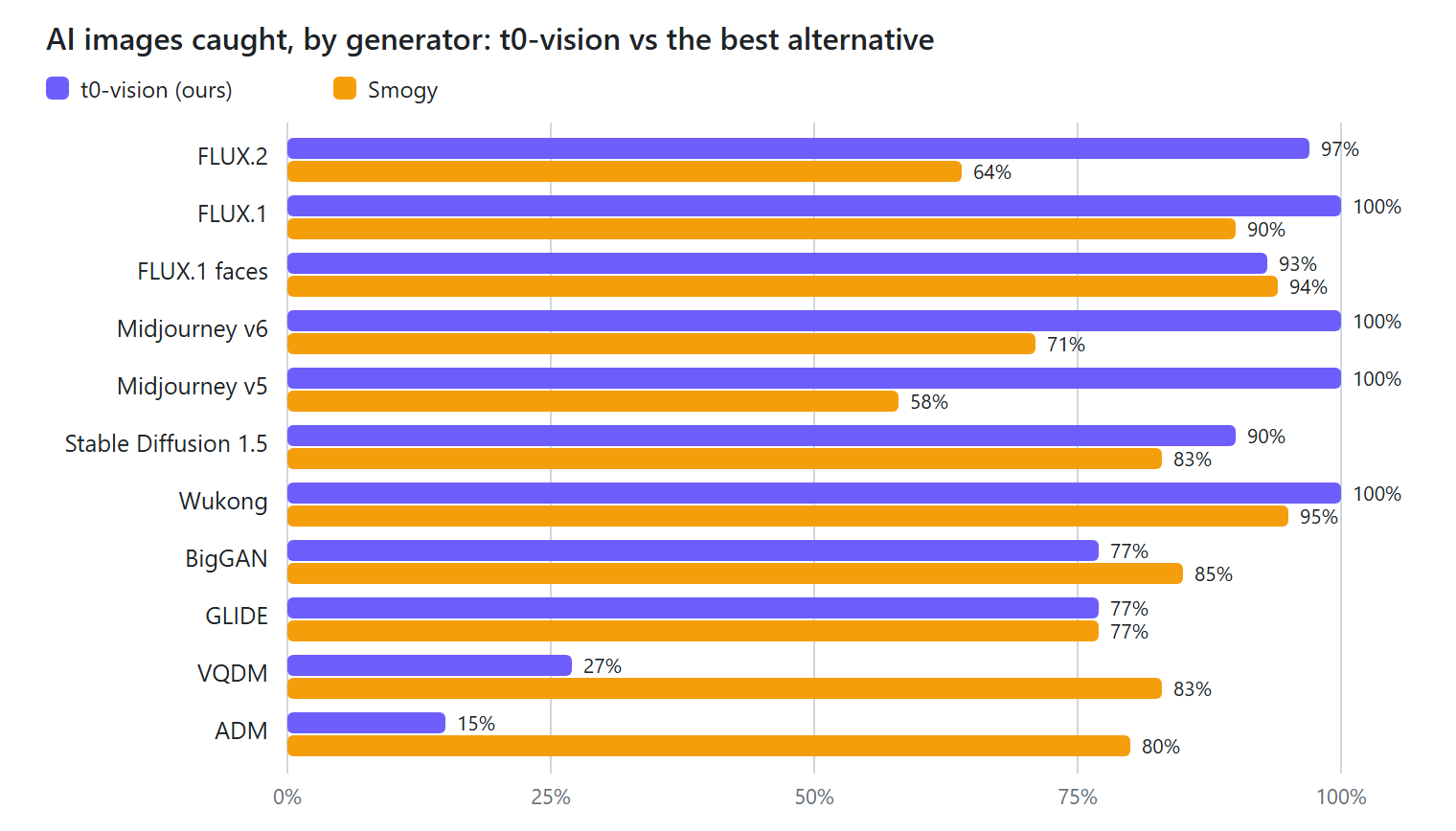
| Generator | t0-vision | Smogy | Ateeqq | umm-maybe |
|---|---|---|---|---|
| FLUX.2-dev | 97% | 64% | 81% | 22% |
| FLUX.1-dev | 100% | 90% | 95% | 25% |
| FLUX.1-dev faces | 93% | 94% | 76% | 59% |
| Midjourney v6 | 100% | 71% | 63% | 11% |
| Midjourney v5 | 100% | 58% | 58% | 22% |
| SD 1.5 | 90% | 83% | 50% | 48% |
| Older (ADM, BigGAN, GLIDE, VQDM, Wukong) | 15-100% | 77-95% | 0-67% | 42-68% |
Real photos wrongly flagged as AI (lower is better):
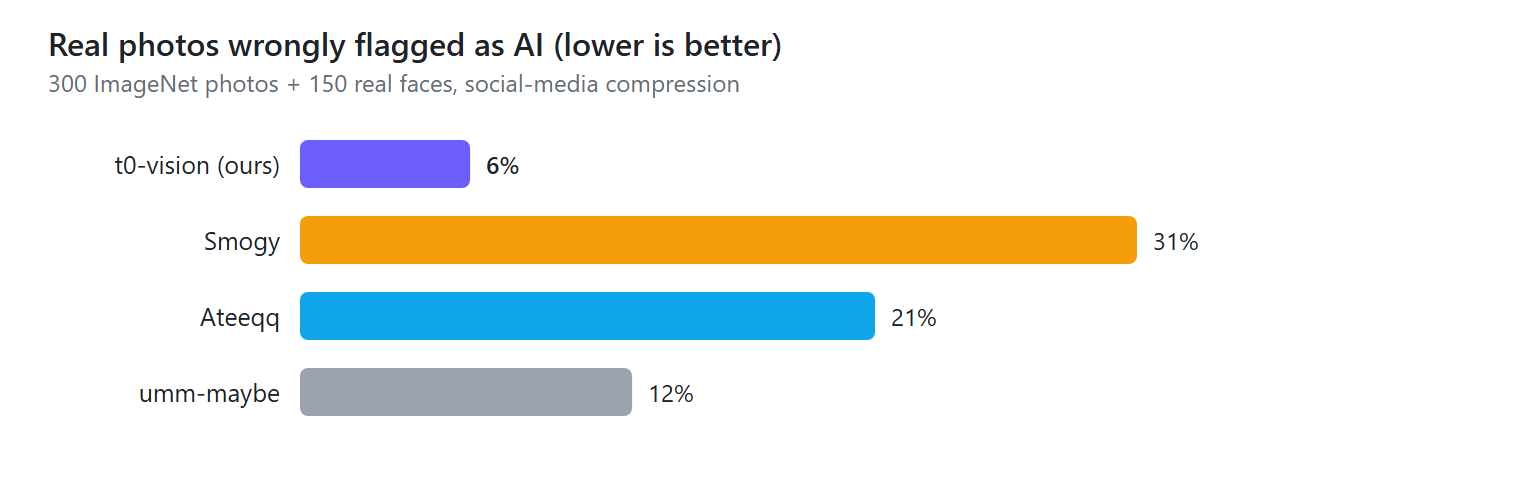
| t0-vision | Smogy | Ateeqq | umm-maybe | |
|---|---|---|---|---|
| Real faces flagged as AI | 0% | 89% | 7% | 56% |
Smogy catches a lot of AI images, but it also calls 89% of real faces AI, so much of its catch rate comes from flagging nearly everything. A detector that keeps raising false alarms teaches people to ignore it, which is why I track false alarms as closely as catches.
The limits: this is a sanity check rather than a formal benchmark. The set is small and the real photos are mostly ImageNet. t0-vision is weakest on a few older research generators (ADM, VQDM), which rarely show up in real posts.
Built with
- t0-vision, my own AI-image detector: a SwinV2 model fine-tuned with PyTorch and Hugging Face Transformers, run locally in the API
- FastAPI for the backend and check pipeline, with SQLite to store reports
- yt-dlp to read posts and download videos from X, Instagram, TikTok, YouTube, Reddit and Facebook, with trafilatura for articles
- ffmpeg to pull keyframes, and imagehash to fingerprint them so reuploads still match
- Whisper, run locally, to transcribe videos that have no captions
- OpenRouter (or OpenAI / Claude directly) as the LLM that extracts claims, fact-checks them and researches provenance with live web search
- SerpAPI for Google Lens reverse image search and the Google News results behind coverage and bias
- TypeSafe Jev for outlet lean, coverage relevance and the visual second opinion on AI media
- React, Vite, Tailwind, shadcn/ui and Clerk for the studio dashboard and sign-in
- A Manifest V3 Chrome extension for the trust chips and right-click checks
Challenges we ran into
1. My own detector called a real video AI
Someone checked a reel of a misty Meghalaya landscape, real footage shot on a camera, and trust0 called it likely AI.
It came down to one number. t0-vision averaged 0.72 over the frames, just past my 0.70 line. A live-action Figma dance commercial, also real, scored 0.97. t0-vision was trained on still photos and generator outputs, and soft landscapes, studio sets and color-graded ads look like nothing in that data. Moving the threshold wouldn't have fixed it. One score from one model wasn't enough evidence to tell someone their video is fake.
So I added an independent second signal. Four keyframes go to TypeSafe's Jev with one narrow question: was this made by a camera, an AI generator, or graphics tools? Code then makes the call:
| Detectors | Visual review | Verdict |
|---|---|---|
| ≥ 0.70 | agrees (≥ 0.50) | likely AI |
| ≥ 0.70 | disagrees (< 0.50) | unverified, both numbers shown |
| 0.70-0.90 | none | unverified, "no second signal to confirm it" |
| < 0.40 | < 0.50 or none | can be authentic |
The review on its own can never call something AI. Its job is to stop a single detector from doing that alone. When the two disagree, trust0 says unverified and shows both numbers.
Results on a small sample, 2026-10-16:
| Media | t0-vision | Review | Before | After |
|---|---|---|---|---|
| Landscape reel (real) | 0.72 | 0.19 | likely AI | unverified |
| Protest reel (real) | 0.45 | 0.12 | unverified | unverified |
| Figma dance ad (real) | 0.97 | 0.60 | likely AI | likely AI (still wrong) |
| Midjourney v6 image (AI) | 1.00 | 0.91 | likely AI | likely AI |
| FLUX 2 image (AI) | 1.00 | 0.89 | likely AI | likely AI |
Across 20 real photos, the review picked "AI-generated" zero times. The Figma ad still fools both models. Raising the review's bar would fix that one, but in my sample it would also have left 3 of the 20 AI images as unverified, so I kept the threshold and recorded the miss.
2. Coverage that wasn't about the story
A news search for a loose phrase returns a lot besides the story. When someone checked a company's launch video, the "outlets covering this" list included stock analysis, a tool comparison and a programming course.
I fixed it in two places. Coverage cards now only show up for news events, and every candidate article has to pass a relevance check before it counts. On the launch video, that dropped all eleven off-topic results. On a protest story, all thirty real articles stayed.
3. Rating outlets nobody has rated
Big outlets have published bias ratings, but regional papers, foreign sites and new outlets mostly don't. For those, an LLM researches what the raters say, and a second model reads only that write-up and picks a lean, with "unrated" listed first. If it isn't confident, the outlet stays unrated and doesn't tilt the bar.
I never show the second model the first model's label. If I did, its answer would partly measure whether it agrees with what it was handed.
4. Getting the content in the first place
X hides image posts behind logins, Reddit blocks anonymous API calls, Instagram needs cookies, and YouTube needs a JavaScript runtime just to read a page. I kept hitting walls, so ingest became a chain of fallbacks, and I added each one after something broke.
5. Training on a laptop
I had one RTX 3080 laptop GPU with 16 GB of VRAM and two drives for about 400 GB of data. Every step had to be resumable, because something always interrupted it. Then Windows Smart App Control blocked PyTorch's unsigned DLLs, so I moved part of the work to WSL.
Accomplishments that we're proud of
I'm proudest of t0-vision. It beat every open-source detector I tested, with 0.98 AUC on social-media-compressed images and no real faces flagged in that test.
It works where I already am: one right-click on a post, an AI chat answer or a WhatsApp Web message.
trust0 won't call something AI on one signal. "Likely AI" needs two signals that agree, and when they don't, the report says so.
You can see which check moved the score and why. And I don't keep your media: it's deleted when a check finishes, and only anonymous hashes stay.
What we learned
Let the model judge and let code decide. When a model made the final call, I got burned. When I asked a model one narrow question and let plain rules decide what to show, results got better and were much easier to debug.
Test on the data people will actually see. The off-the-shelf detectors looked fine to me on clean images and fell apart on compressed ones, and compressed images are what we all scroll past.
I didn't expect it, but saying "unverified" turned out to be one of the most useful things trust0 does. Showing both numbers when the signals disagree tells people more than a confident guess would.
Making every API key optional meant anyone could run trust0 locally in minutes, and it forced every stage to fail cleanly.
What's next for trust0
- A labelled set of real social videos, especially the ones t0-vision gets wrong, to retrain on video frames and tune the review thresholds.
- Visual evidence for "likely AI": pointing to the garbled sign or malformed hand in the frame.
- trust0 models for video and audio, not only images.
- A Chrome Web Store release for the extension.
- A job queue so checks survive restarts, a faster hash index for matching at scale, and rate limiting on the public API.
Built With
- fastapi
- huggingface
- jev
- openai
- openrouter
- react
- runpod
- vercel

Log in or sign up for Devpost to join the conversation.