Inspiration
We build Trisgine, our own game engine, and its desktop editor. Every time we made something for VR, we did the same loop: edit on a monitor, put on the headset, take it off, nudge a value, put it on again. Positions, scale and shape are spatial decisions, and a mouse is a poor tool for them.
So we asked a simple question: what if the editor lived in the headset, and your hands were the tools? No controllers to find, no menus far away, just reach out and shape the world you are standing in.
What it does
Trisgine VR is a scene editor you use with your hands. You start in a small studio, with a work table of sculpting blocks in front of you and a physics table behind you.
- Place objects. Turn your left palm toward you and an asset palette appears on it. Tap a cube, sphere, cylinder, capsule, wedge, quad or rock, and it appears in front of you.
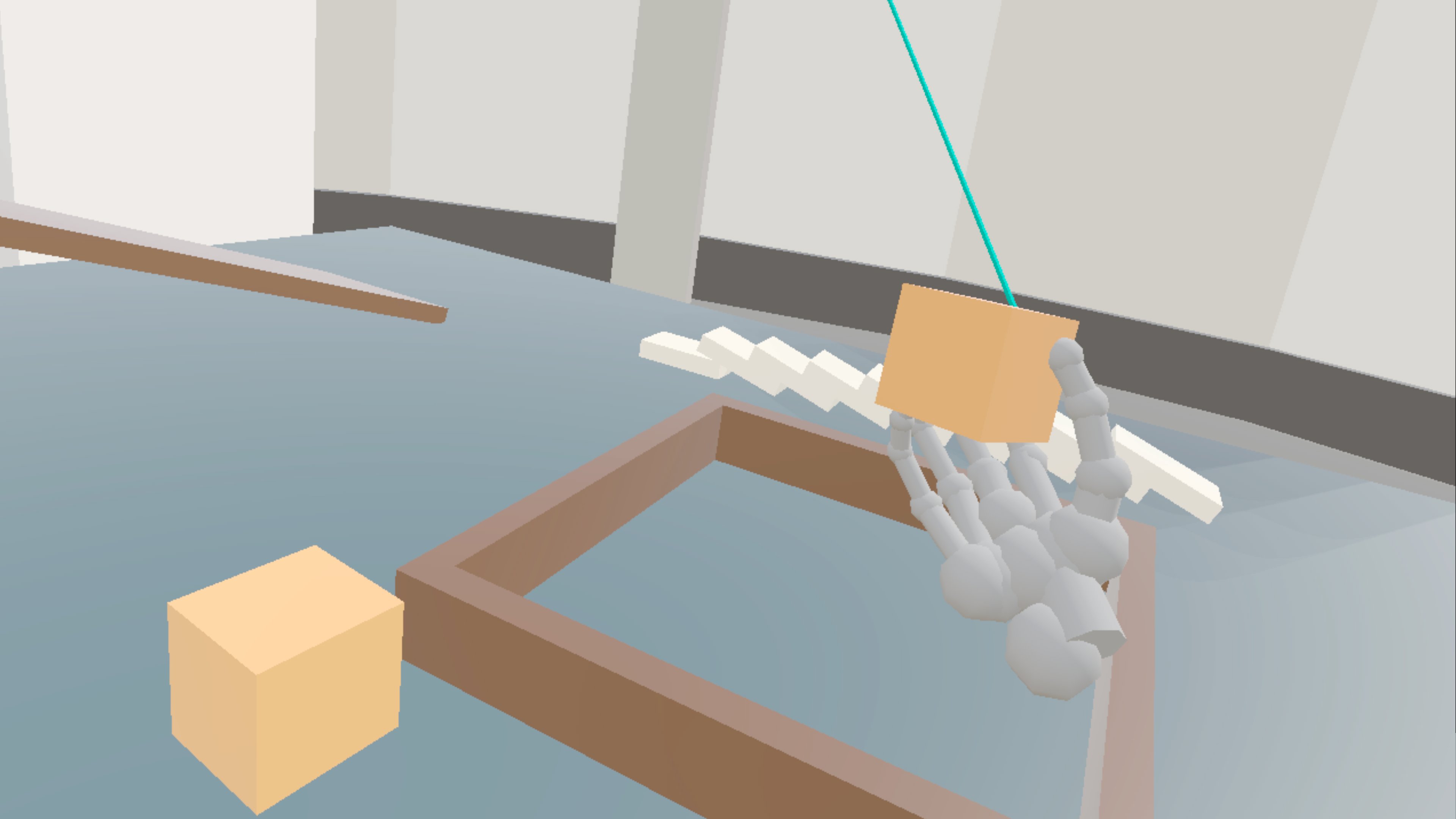
- Select, carry and scale. Point and pinch to select. Close your fist on an object to carry it; it follows your hand and turns with your wrist. Close your other fist too and pull your hands apart to scale it.
- Sculpt. Press Edit on your palm and pick a brush: Grab, Inflate, Smooth, Invert, or Vertex for single points. Pinch on the surface, or simply touch it with your fingertips, and drag. You can change the brush radius, subdivide for more detail, and undo and redo strokes. Either hand can sculpt.
- Cut. Press Knife and your flat hand becomes a blade. Sweep it through an object and it splits along the plane of your hand.
- Play with physics. Turn around and push, tip and stack the blocks on the play table. Your hands are physical bodies.
- Move the world. Make a fist in empty space and pull to move the scene. Two fists scale and turn it.
- Duplicate and delete from the palm menu, with a confirmation before anything is deleted.
- Work together. Sign in on the palm, open a shared project, and everything you place, move, sculpt and delete appears for your teammates, whether they are in another headset or in the Trisgine web editor. Your hands are visible to them live.
- Settings for sound, the laser pointer, and a left-handed mode that swaps the roles of your hands. Your local scene is saved when you leave and reopened when you return.
Try it with the web editor. You can watch and edit the same scene from a browser while someone works in the headset.
- Open https://vr-start-comp-2026.trisgine.com in a desktop browser.
- Click Account at the top right and sign in with login TestAccount and password 12345678.
- Leave the sync server as it is (
wss://test-sync.trisgine.com/sync/v5), click Connect, and open a shared project, or create a new one.
Sign in on the headset.
- Turn your left palm toward you and tap Sign in on the palette.
- In the Sign in to Trisgram panel, tap Username or e-mail and type TestAccount on the Quest keyboard.
- Tap Password, type 12345678, and tap Sign in.
- Your projects appear in the panel. Tap the same project that is open in the browser, or tap New project to create one. Once you're signed in, the palette button reads Projects.
Objects you place, move, scale, sculpt, duplicate or delete in the headset appear in the browser, and changes made in the browser appear in the headset. While the headset is connected, the browser shows its hands moving live.
How we built it
Trisgine is a C++ engine we write ourselves: a data-oriented ECS, a Vulkan renderer, a physics engine and an OpenXR layer. Trisgine VR runs it natively on the headset as a standalone Android app, with no PC and no third-party game engine.
- Hand tracking comes from OpenXR's
XR_EXT_hand_tracking. From the 26 joints of each hand we derive pinch strength, fist strength, a pointing pose, palm orientation and an aim ray. - The interface is world-space panels rendered by the engine's own UI system, anchored to the left palm or floating in front of you. Text fields open the Quest system keyboard.
- Sculpting and cutting run on an editable mesh with brush falloff, Catmull-Clark subdivision, undo history, and a plane cut that keeps the mesh closed.
- Hand physics builds a set of colliders for each hand that follow the tracked joints, so hands push real rigid bodies.
- Collaboration uses our sync server: each change is sent as a small intent, and sculpted meshes are uploaded as assets the moment you stop sculpting.
- Feedback sounds are synthesized at run time, so there are no audio files to ship.
It was developed and tested on Quest 3S and Quest 3 [and Quest 2].
Challenges we ran into
Trisgine already had a desktop editor, a physics engine, a material node editor and a sync server. Almost none of it survived first contact with a headset unchanged.
- Physics was a play-mode feature. In the desktop editor, physics only runs when you press Play; the editor itself is a frozen scene. In the headset there is no Play button: you edit the same world you are standing in, so physics had to run live inside the editor, next to sculpting, undo and saving, without the simulation fighting the edits.
- Hands are not controllers, and not rigid bodies either. Our physics had no notion of a hand. We build 37 small colliders per hand that chase the tracked joints, and had to make them push objects without tunnelling through the table or launching things across the room. Getting a grip to feel right took the longest: touching an object must not pick it up, squeezing it from two sides must, any two fingers should work, and a thrown object has to leave the hand instead of colliding with the fingers that just released it.
- Hands that push everything. Physical hands are fun until they knock away the object you are sculpting. The object under edit moves into its own collision group, so your hands and the knife pass into it while everything else stays solid.
- Our mesh cut produced geometry you could not keep sculpting. The engine's boolean cut was built for level blockouts. Run on a sculpted mesh it left slivers and broken caps. We wrote a direct plane cut that keeps the mesh closed, re-triangulates the cut face evenly, and hands the result straight back to the sculpt brushes.
- A node editor made for a mouse. Our material node editor is a desktop panel with small pins, drag-wires and keyboard shortcuts. For the headset we rebuilt it as a node map docked to your palm menu: nodes you drag with a pinch, wires you connect by dragging dot to dot, value steppers you can hold, and a live preview. The shader recompiles on the headset as you edit.
- The engine and OpenXR disagree about left and right. Trisgine is left-handed, OpenXR is right-handed. Every pose, every rotation and every tool attached to a hand had to be mirrored consistently, or the knife pointed out of the back of your hand.
- One hand, many jobs. The same hand points far away, taps nearby buttons, carries objects and holds a knife. We gave every gesture a single owner at a time, so a drag on a panel never also moves the object behind it. The ray fades out the moment your fingertip is close enough to touch.
- Pointing far is hard. A raw hand ray shakes, and small distant objects are hard to hit. We added adaptive smoothing that stays steady when you hold still and responsive when you move fast, plus a small assist cone that picks the object nearest the ray.
- A desktop editor's UI does not exist on the headset. The desktop editor is built on a debug UI library that never ships in a game. Every panel in Trisgine VR is built on the engine's runtime UI instead, in world space, readable against a bright scene: opaque, high contrast, large enough to hit with a fingertip.
Shipping a custom engine to the Store. No Gradle and no Unity: we build the APK with the Android SDK tools directly, and had to meet every store requirement ourselves.
What we learned
Hands need different interaction rules than controllers. Hysteresis, short holds and clear ownership of a gesture matter more than raw tracking accuracy.
The best interface is often on your own body. A menu on your palm is always within reach and never in the way.
Small feedback is what makes it feel solid: outlines on hover, a click, and the sound of the brush.
What's next
- Guided onboarding inside the app, more hand tools, undo for placing and moving, and passthrough so you can sculpt on your real desk.
- Fully feature support already existing systems in Trisgine - Scripting(visual for VR) in Lane that compiles directly to native machine code/shaders. (https://lane.trisgram.com/)
- Polish node material editor for VR use and add particle editor for VR.
- Post processing settings tweaking directly in headset.
- Add fully featured level design tools for all stages of development. (Blockout-> full level design from asset libraries)
- The full dream is developing games and apps fully inside the VR environment.


