Inspiration
When we first got the hackathon prompt around sense, we knew there were so many directions we could take it. We explored a lot of ideas at first, especially around health and body signals, but none of them felt fully us. We kept coming back to one question: what is a sense that shapes our everyday lives, but still feels strangely unsupported by modern technology?
That led us to sight, and more specifically, to reading.
Reading is one of the most important visual and cognitive experiences in daily life, yet the interfaces we use for it have barely evolved. Most reading tools still assume that everyone processes text the same way, at the same pace, in the same format. But that is just not true. Some people skim and retain nothing. Some reread the same sentence over and over. Some readers with ADHD need more pacing support. Some readers with dyslexia benefit from spacing, chunking, and a completely different visual rhythm.
At the same time, the rest of our digital world has become hyper-adaptive. Short-form content is optimized to the second. Feeds respond to us instantly. Everything is built to match our attention. Reading has not kept up.
We were especially inspired by the format of short-form story videos, where text often appears one thought at a time. That idea stuck with us because it feels intuitive and native to the way people consume content now. There is also research suggesting that reducing the amount of text visible at once can improve reading speed and reduce overwhelm for some readers. That made us wonder: what if reading itself could become more adaptive, responsive, and humane?
That question became Flowstate.
What it does
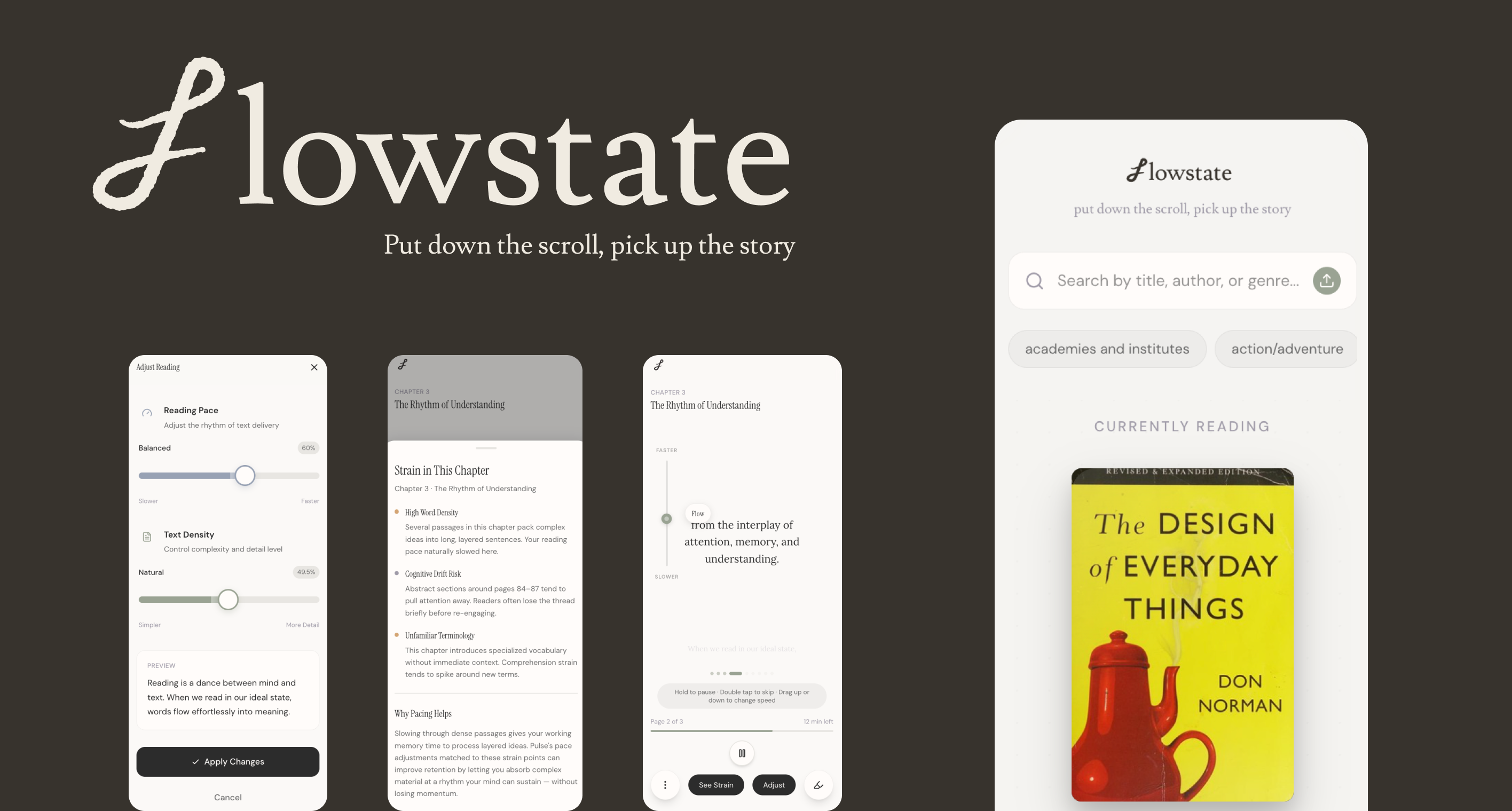
Flowstate is a reading tool that helps people read in a way that matches their pace, focus, and comprehension style.
At its core, Flowstate takes long-form text and turns it into a more adaptive reading experience. Users can browse books from a built-in library, upload their own reading material, or eventually connect content from the platforms they already use. Once a text is inside Flowstate, the platform transforms it into a more readable, customizable experience.
Some of the things Flowstate can do include:
- Chunking text into smaller, more readable units so users are not overwhelmed by walls of text
- Letting readers adjust pacing, so they can slow down for deeper comprehension or speed up for lighter reading
- Allowing users to tune the conciseness and density of what they are reading
- Offering audio support, so a text can shift into audiobook-like listening when visual reading becomes tiring
- Supporting annotations and note-taking, so readers can actively engage with what they are reading rather than passively consume it
- Tracking reading progress, including how much has been read and where readers experienced more strain or slowdown
- What makes Flowstate different is that it is not trying to make people read faster just for the sake of speed. It is trying to make reading feel more in sync with the person reading.
- Instead of treating reading like a static page, Flowstate treats it as a dynamic sensory experience.
How we built it
We built Flowstate as a three-person team, and early on, we divided the project into three major tracks so we could move quickly while still going deep.
One of us focused on UX research and product thinking. That role involved diving into how people read, what causes reading strain, how pacing affects comprehension, and what kinds of interventions would actually feel supportive rather than distracting. This helped us define the core problem, narrow the feature set, and keep the product grounded in a real human need.
Another person focused on UI and design systems. They used tools like Cosmos, Claude, and Figma Make to generate visual directions, refine the interface, and build a design language that felt calm, intelligent, and supportive. A huge part of this work was making sure the interface visually reinforced the message of Flowstate: that reading should feel adaptive, readable, and human-centered.
The third person focused on development and implementation, especially around getting the app to actually work as a demo. That meant prompt engineering, debugging, connecting our Figma Make output to a Supabase backend, pulling in book data, and making sure the product logic reflected the ideas from both the UX and UI sides.
A lot of the build process was collaborative and messy in the best way. Research informed design, design informed interaction, and development constantly pushed us to simplify, rethink, and make sharper decisions. We were not just making screens, we were trying to make a believable future for reading.
Challenges we ran into
The biggest challenge was, honestly, Figma Make.
It is powerful, but it is also extremely sensitive. Small wording changes in prompts could completely change the output, and getting something polished and functional required a lot more precision than we initially expected. There were many moments where we realized that Figma Make could get us part of the way there, but not all the way.
That meant we had to step in with our own design and product instincts constantly. Our UI designer had to build parts of the design system by hand, pull in fonts manually, and refine the visual hierarchy beyond what the tool could generate. Our UX researcher had to keep tweaking flows and components to make sure the experience was not just visually cool, but actually understandable and usable. On the development side, getting everything to work together with the backend and keeping the product coherent was a challenge in itself.
Another big challenge was balancing innovation with cognitive simplicity. Since our whole project is about reducing reading strain, we had to be really careful not to create an interface that felt over-designed or mentally taxing. We wanted Flowstate to feel futuristic and fresh, but not in a way that overwhelmed the user. That tension, between making something innovative and making something calm, shaped almost every decision we made.
There was also the challenge of scoping. We had a lot of ambitious ideas: adaptive pacing, annotations, audio, personalized reading modes, social features, better libraries. But we had to constantly ask ourselves: what is the clearest version of this idea that still tells the story well in a demo?
Accomplishments that we're proud of
The thing we are most proud of is that we made the idea real- and honestly, we would use Flowstate too.
Flowstate started as a question, a very speculative one, about whether reading could become more adaptive to the person reading it. By the end of the hackathon, we had a fully functioning demo that brought that vision to life in a way people could actually click through, understand, and imagine using.
We are also really proud that this is not just a concept we thought sounded smart. It is something we would genuinely use ourselves. That matters a lot to us. It means the project came from a real place, not just from wanting to satisfy the brief.
We are proud of the level of craft that went into the product, especially in a short amount of time. We built a visual system, a story, a working experience, and a product direction that feels emotionally resonant and practically useful.
And honestly, we are proud that we kept pushing past the first idea. We did not settle for a generic health tracker or a surface-level reading app. We kept refining until we found something that felt distinct, human, and worth building.
What we learned
We genuinely learned SO much from this process.
First, we learned how much of modern prototyping is really about prompt engineering. Not just writing prompts, but learning how to think precisely, structure constraints, iterate intentionally, and translate abstract design goals into something AI tools can actually execute.
We also learned a lot about how to connect tools and workflows together. That included working with Supabase, thinking through integrations, pulling inspiration from places like Cosmos and Pinterest, and using tools like ChatGPT and Claude to shape our design and development process in smarter ways.
But beyond the technical side, we learned something bigger: building with AI still requires very human judgment. AI helped us move faster, but it did not replace taste, empathy, systems thinking, or product clarity. If anything, it made those things more important.
This project also felt meaningful because it connected directly to what we are learning in school. We are currently taking classes around AI and UX, and Flowstate became a way to apply those ideas in a real, messy, creative environment. It made those concepts feel much more tangible. We were not just talking about the future of design tools or adaptive interfaces in class, we were actually building one.
What's next for Flowstate
We see this as the beginning, not the end.
The next step for Flowstate is making it more fully functional and more deeply integrated into the reading ecosystems people already use. We would love to build out a stronger backend so Flowstate can pull from a much wider range of books and texts through live APIs, rather than a more limited demo library.
We also want to expand the annotation experience. Right now, it shows the direction, but there is so much more we could do with richer note-taking, smarter highlights, and more meaningful ways to reflect on what you have read.
Another huge next step is multilingual support and broader media support. Reading strain and pacing are not just issues in English, and Flowstate could become even more powerful if it understood different languages, formats, and reading contexts.
We also want to integrate with platforms people already rely on, like Kindle, Audible, and other book ecosystems, so the app can fit naturally into real reading habits rather than asking people to start from scratch.
And beyond the individual reading experience, we are excited about making the library itself more social and expressive. Reading is personal, but it is also communal. We want to explore better ways for users to display, organize, and share their collections in a way that feels beautiful and identity-driven.
At the end of the day, our goal with Flowstate is simple:
We want to help build a future where reading is no longer a static interface people have to force themselves through, but a responsive, supportive experience that actually adapts to the way humans learn.
Because reading should not just be digital. It should be human-aware.
Built With
- chatgpt
- claude
- cosmos
- figma
- supabase


Log in or sign up for Devpost to join the conversation.