Inspiration
Emotional well-being plays a crucial role in our everyday lives. Each of us is different, with our own unique sensitivities, fears, and challenges. With the abundance of video content on the internet, it's easy to unexpectedly stumble upon disturbing scenes.
The inspiration for this project came from a website, DoesTheDogDie, which is a community-driven platform providing trigger warnings for movies and TV shows. I wondered: what if, instead of relying on users to identify potential triggers, we could use AI with video understanding and tailor it to each person's unique sensitivities?
This is how an idea for SafeWatch came to life - a tool designed to help people enjoy video content with greater peace of mind.
What it does
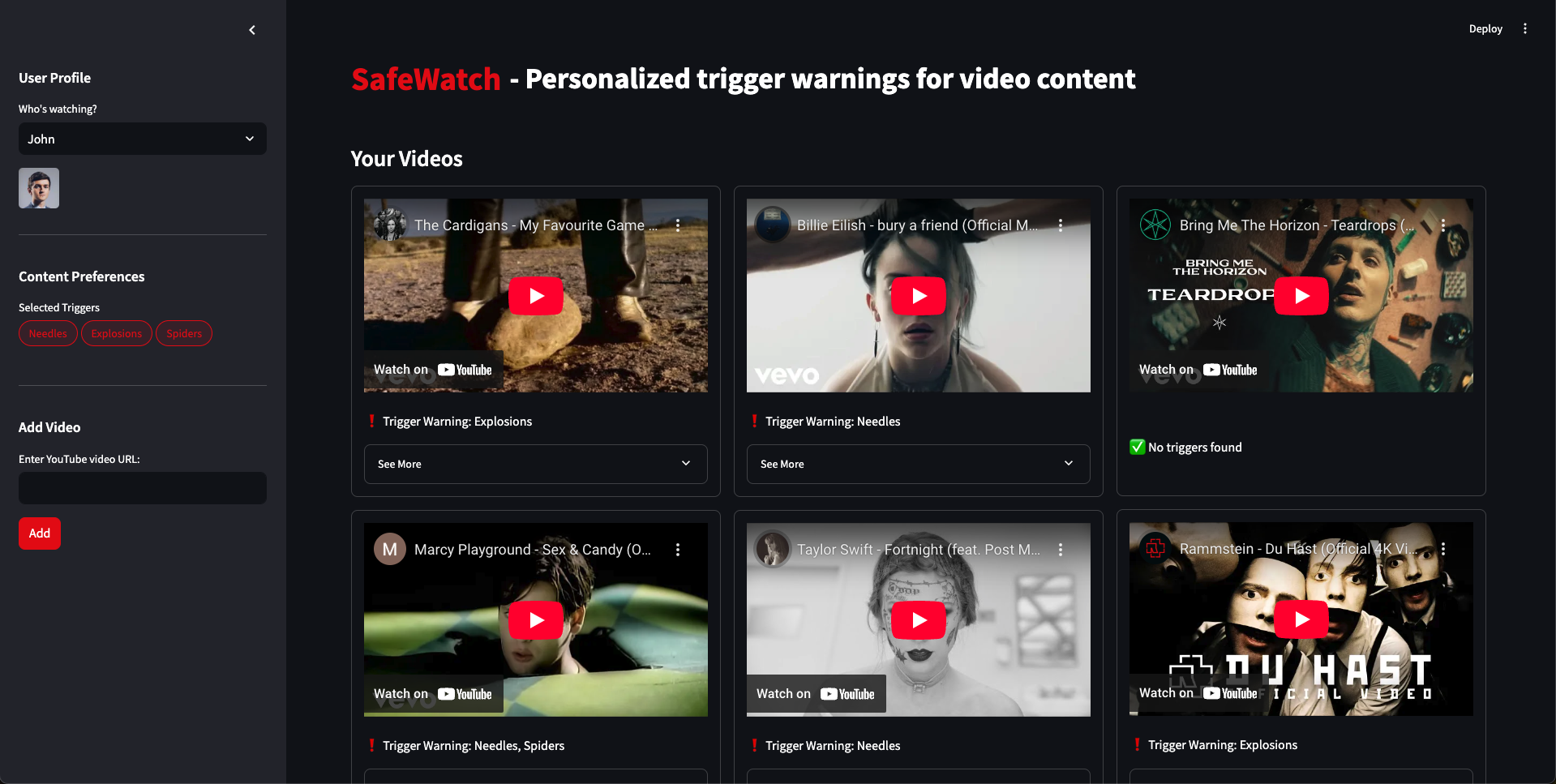
SafeWatch is an app where users can personalize their content experience by specifying emotional triggers - events or objects they want to avoid about in videos. These triggers reflect individual sensitivities and can range from medical imagery, like needles and pills, to scenes involving car crashes or fires.
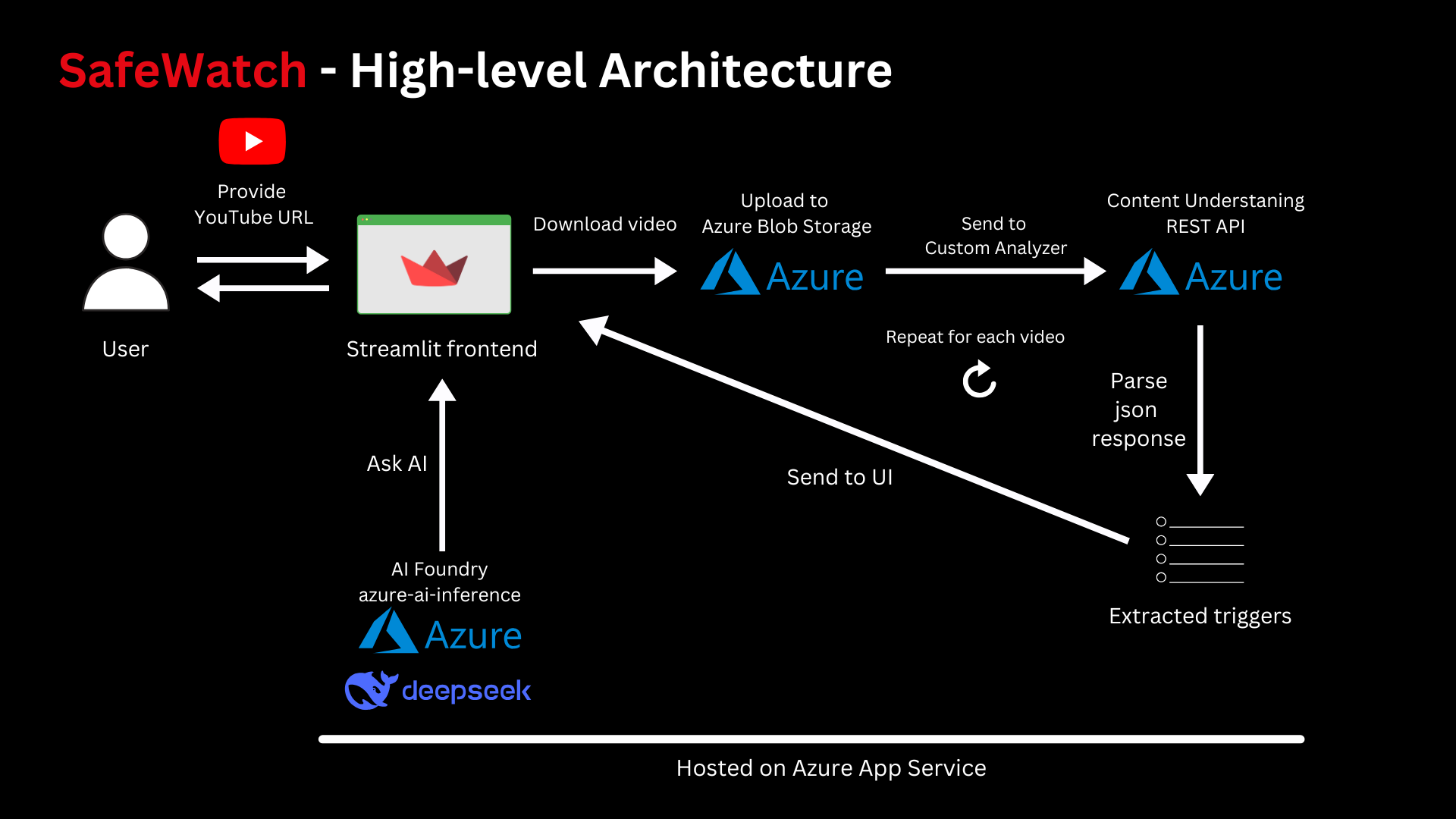
To use the app, a user provides a link to a YouTube video they intend to watch. The AI then analyzes the video, identifying any scenes that match the selected triggers. Videos containing one or more triggers are flagged with a "trigger warning," along with detailed information, including timestamps showing when the disturbing content appears. This allows users to make an informed choice before watching.
Additionally, users can ask the AI why a specific video might be unsettling for them. The model responds based on its understanding of the video's content and the user's personalized preferences.
How we built it
Azure AI Content Understanding – Accessed via REST API to create a custom analyzer and extract specific events or objects (i.e., emotional triggers) from a video. The structured response provides a comprehensive analysis of all video frames, along with timestamps indicating when each object appears.
Azure Blob Storage – Serves as interim storage for videos before they are sent to the analyzer.
Azure AI Foundry – Provides API access to the DeepSeek-R1 reasoning model through the Python library azure-ai-inference. This model powers the "Ask AI" feature, explaining why a particular video might be disturbing for the user.
Streamlit – A Python library used for building the app's front end.
yt-dlp – A Python library used to download YouTube videos, which are then temporarily stored in Azure Blob Storage.
Visual Studio Code with AI Copilot – An IDE with AI assistance via chat and Copilot edits, which proved to be a game-changer during the development phase.
Challenges we ran into
I faced a few challenges during the hackathon that I had to overcome:
Ask AI Model Selection
Initially, I planned to use the gpt-4o-mini model from Azure AI Foundry for the Ask AI feature. Although I successfully deployed the model, it returned an error during inference, stating that I had exceeded my quota limit. This was likely because I was using an Azure "net new" account with free credits instead of a pay-as-you-go setup. I switched to the DeepSeek-R1 model, which not only worked without issues but also turned out to be better suited for my use case.
Handling DeepSeek-R1 Responses
A related challenge involved how DeepSeek-R1 returns its reasoning, enclosed within ... tags. Since I didn't want to display this reasoning to users, I had to implement an additional function that filters out the section and streams only the relevant response tokens to the frontend.
Azure App Service Deployment
I encountered a few issues while deploying to Azure App Service via GitHub Actions. The environment didn't recognize the libraries listed in my requirements.txt file and couldn't properly execute the startup command, streamlit run app.py. To resolve this, I had to troubleshoot the issue and add a startup.sh file to my repository to force the necessary commands to run.
Request Body Formatting
I encountered a minor issue with the correct formatting of request_body.json when creating a custom analyzer. Fortunately, I quickly resolved it with the assistance of GitHub AI Copilot.
Accomplishments that we're proud of
I'm proud of designing and developing an app in a relatively short time that has the potential to help many people and offer a safer content-watching experience!
What we learned
I had never worked with Azure before, so this was my first time learning how to use its services. The experience turned out to be very positive and straightforward! I especially enjoyed working with the new Content Understanding service, which I believe has the potential to be the foundation of powerful AI applications.
What's next for SafeWatch - Personalized trigger warnings for your videos
I already have many ideas for SafeWatch's roadmap. For the hackathon demo, the app analyzed YouTube music videos for emotional triggers. However, I believe the true potential lies in expanding to movies and TV shows. Imagine a Netflix-like app that not only displays the genre and common disclaimers, such as warnings about sexual content or violence, but also provides personalized warnings based on user-specific triggers. While this remains a long-term goal, I have a few other features in mind for the app's future development:
- User authentication and profile creation
- The ability for users to add triggers to their profiles
- The option to modify videos by blurring or muting the scenes where triggers appear


Log in or sign up for Devpost to join the conversation.