About the Project
TRC is an AI-orchestrated communication middleware designed for DevOps, SRE, and Edge engineering teams. In an era where technical teams are overwhelmed by cross-channel noise, TRC transforms raw technical relays into an intelligent Mission Control Center. It’s a "Beyond Chat" experience where Gemini 2.5 Flash acts as an active technical guardian, project manager, and proactive incident responder directly in the terminal.
Inspiration
Our inspiration came from a simple observation: modern chat platforms are built for socializing, but technical teams need situational awareness. We looked back at the simplicity of IRC (Internet Relay Chat)—its low latency, headless potential, and multi-channel nature—and wondered: "What if IRC had a brain?" We wanted to move past the "Procedural Bot" era (Command -> Response) into the "Agentic Orchestrator" era. TRC was born from the desire to create a tool that doesn't just sync messages, but reasons over them to protect the system.
What it does
TRC acts as an intelligent layer over technical chat streams. It allows users to:
- Orchestrate across Channels: Gemini maintains a cross-channel context, allowing it to reason about how an event in #git affects a log in #prod.
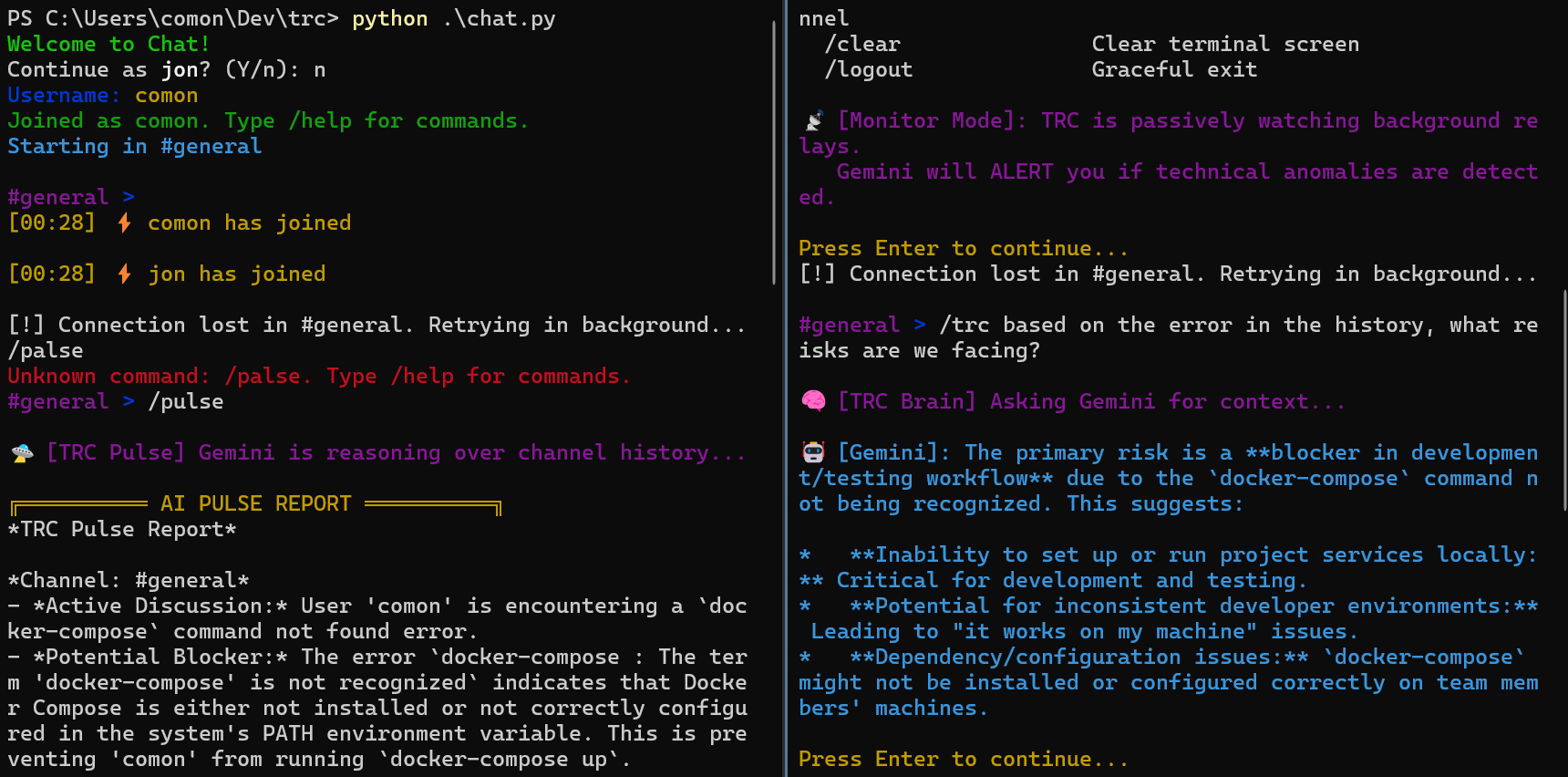
- Proactively Guard: The "Monitor Mode" batches background messages and alerts the team to technical anomalies using high-visibility ASCII TUI alerts.
- Analyze Multimodal Data: Engineers can send screenshots of terminal errors directly to the AI for instant visual diagnosis via /analyze.
- Manage Mission Context: Use /topic to set an objective that the AI brain adopts as its primary goal, shaping its technical reasoning and tool usage.
How we built it
TRC is built on a high-performance Intelligence Loop: Listen (Real-time Relay): Powered by PubNub's pub/sub architecture for globally distributed low-latency relays. Remember (Technical Memory): A native SQLite persistence layer ensures that every technical event is stored for cross-session reasoning. Reason (The Brain): Integrated with Gemini 2.5 Flash. Act (Agentic Tools): We empowered the AI with "Relay Tools"—the ability to read/write local project files, query its own technical history, and perform multimodal diagnosis on terminal screenshots. The entire system is written in Python, optimized for edge-native deployment on devices like the Raspberry Pi to ensure a "Zero-Footprint" mission control. ( we still
Challenges we ran into
The biggest challenge was managing the synergy between Real-time Streams and Agentic Reasoning.
- API Constraints: Early in development, we hit "400 Bad Request" errors when trying to combine Gemini's internal search capabilities with our custom technical tools. We had to pivot our architecture to a "Tool-First" strategy, ensuring the AI relies on our vetted technical relays for ground truth.
- Proactive vs. Intrusive: Designing the "Proactive Monitor" required a delicate balance. We didn't want the AI to spam the chat; we wanted a Silent Guardian. We implemented a batching-and-analysis logic that only triggers a high-visibility terminal alert when a high-severity technical risk is detected.
Some video: -> not that important
Accomplishments that we're proud of
- True "Beyond Chat" Integration: We moved beyond simple Q&A bots. TRC’s AI has "hands" (file system tools) and "memory" (SQLite persistence), making it a real collaborator.
- Edge-Ready Resilience: Building a system that can run headless on a Raspberry Pi while maintaining high situational awareness was a significant architectural achievement.
- Zero-Latency Orchestration: Leveraging PubNub for real-time relays ensured that the AI's presence in the chat feels instant and integrated, not like an external plugin.
How to Try It (Judges' Guide) While TRC is designed for 24/7 edge deployment on a Raspberry Pi, judges can experience the full "Mission Control" suite in minutes on any standard machine:
The Docker Experience (Recommended)
git clone https://github.com/C-o-m-o-n/trc.git
cd trc
docker-compose up -d
docker attach trc-mission-control
The Local Python Quickstart
- Ensure you have a
.envfile withGEMINI_API_KEY. - Run
pip install -r requirements.txt. - Run
python chat.py.
The Test Flight
- see the command help
/help - Once in the app, set a mission:
/topic Optimizing the relay. - Join the diagnostic stream:
/join #logs. - Test the Brain:
/trc What is our current mission?.
What we learned
We learned that Context is the true currency of DevOps. A chat app that knows your code, remembers your history, and watches your relays is fundamentally different from a messenger. We discovered that by embedding the AI directly into the TUI (Terminal User Interface), we could create a workflow that feels native to engineers, turning the terminal from a static tool into an active collaborator.
What's next for TRC
- Autonomous Patching: Enabling the AI to not only identify anomalies but propose and apply code patches to edge devices in real-time.
- Voice-to-Command: Integration of Gemini's voice capabilities for eyes-free "Hands-on-Hardware" engineering scenarios.
- Fleet Management: Scaling TRC to manage thousands of edge nodes, with Gemini acting as a global cluster orchestrator.
- Find best deployment option, (Honestly this has been driving me crazy)
_TRC represents the future of technical coordination: where communication is not just synchronized, but orchestrated. _


Log in or sign up for Devpost to join the conversation.