-
-
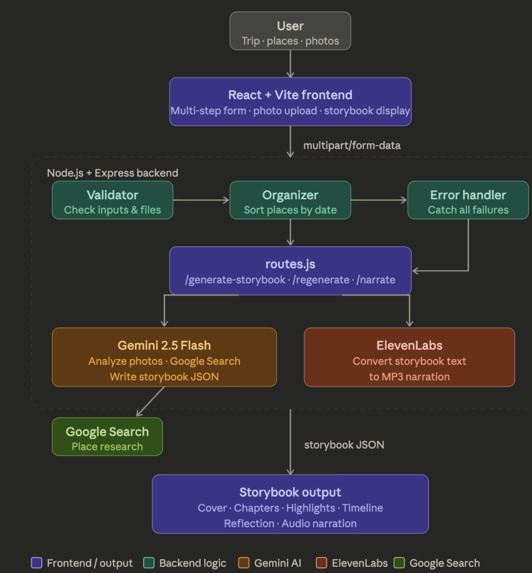
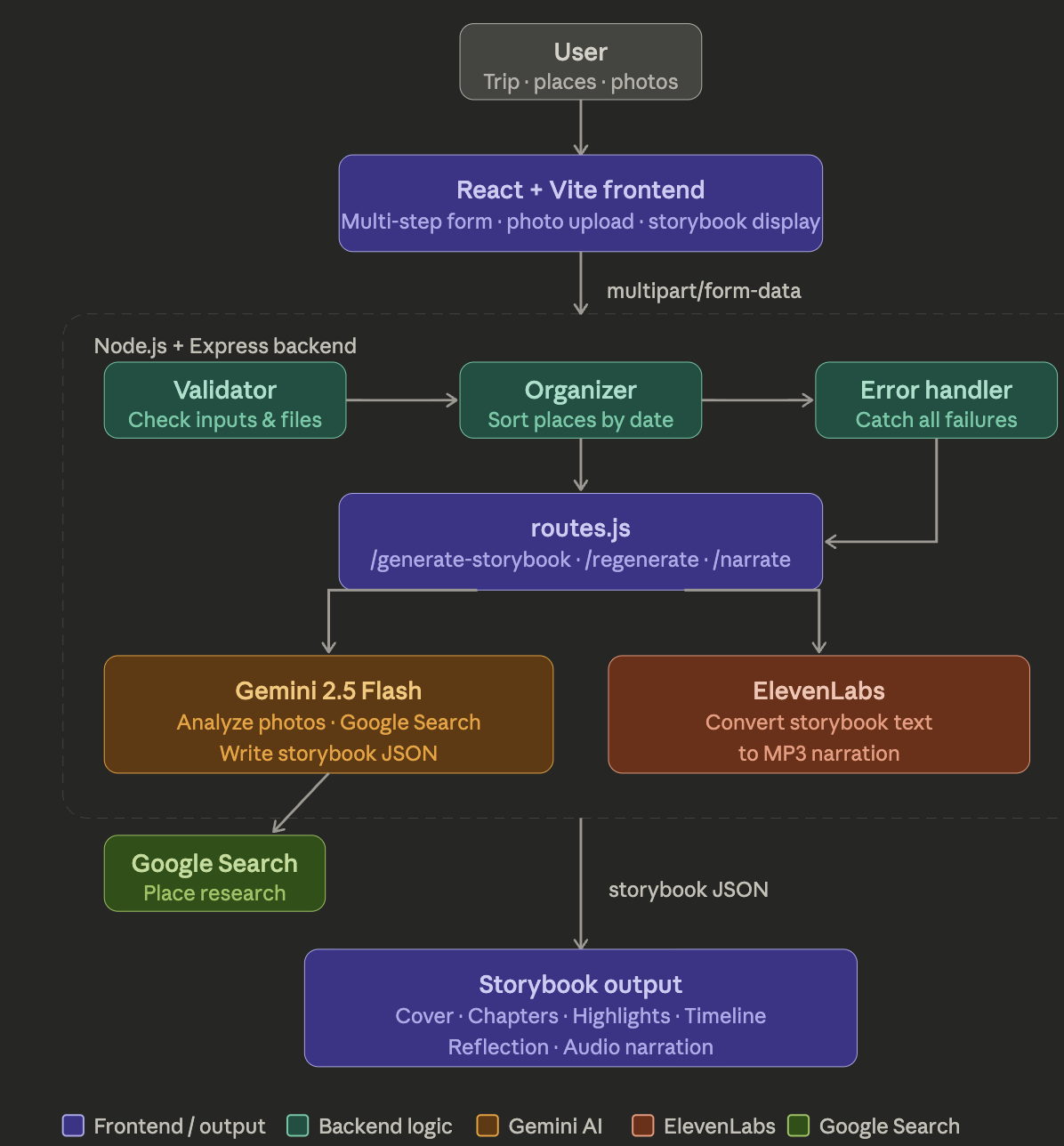
Diagram explaining how the app works
Inspiration
We both love traveling. However, every trip ends the same way. We come back with hundreds of photos of sunsets, cafés, streets, and other small moments, but over time, those memories fade into a camera roll.
What if your travel photos could tell your story back to you?
So we built the AI Travel Storybook & Memory Engine. It's for busy people who don't get time to organize photos after traveling, people who want to document their trip but aren't good at writing, and travelers who love storytelling through photos.
What it does
Our web app turns a user's travel photos and place visits into a beautiful, literary storybook, powered by Google Gemini 2.5 Flash.
A user inputs a trip title, multiple sub-places with dates, up to 5 photos per place, a mood for each place, and any optional notes or memories.
The user then receives a storybook containing a creative cover title and poetic subtitle, an opening introduction that sets the scene for the whole trip, one chapter per place with narrative prose and specific photo captions, a Trip Highlights section, a Memory Timeline, and a closing reflection on the journey as a whole.
The finished storybook can be narrated aloud via ElevenLabs, shared via link, or exported as a PDF.
How we built it
Frontend: React + Vite
The frontend is a five-screen flow: Landing, Upload, Format Picker, Processing, and Result. The Upload walks users through naming their trip, adding place cards (each with a name, date, mood pills, description, and up to 5 photos), and writing overall memories. A live palette switcher lets users pick from six color themes, Fiesta, Tropicool, Retro Pop, Citrus, Night Market, and Safari, that transform the entire UI instantly. The Result screen renders the storybook as polaroid-style photo cards with alternating prose layouts, a highlights grid, a memory timeline, and a custom NarrationPlayer with a waveform visualizer, seek bar, and MP3 download.
Backend: Node.js + Express
The backend receives trip data and photos via multipart/form-data, uses Multer to handle multi-place uploads, and sorts places chronologically before sending to Gemini. It connects to Gemini 2.5 Flash via the official Google Generative AI SDK with Google Search grounding enabled.
For every request, Gemini searches the web for real information about each place visited, analyzes every photo to identify the exact scene, cross-references photo observations with place research, weaves everything into one chronological narrative, and reflects each place's individual mood throughout.
The narration endpoint sends the assembled story script to ElevenLabs and streams the MP3 back to the frontend.
Challenges we ran into
Prompt engineering was harder than expected. Getting Gemini to return clean structured JSON every single time, across wildly different trip lengths, photo counts, and place combinations, took many iterations. Early versions would wrap responses in markdown fences, mix up photo indices, or collapse all places into one chapter. We solved this with strict output rules, explicit photo index mapping, and a cleanup step before parsing.
Photo index alignment. Gemini receives all photos as a flat array, but the storybook needs each photo mapped to the correct place and scene. We built a global image mapping system that tracked every photo's origin and communicated it to the model via an image guide string in the prompt.
ElevenLabs character limits required us to build a lean narration script builder that assembles only the essential text rather than dumping the entire JSON object.
Getting the tone right took real work. Early story drafts sounded like hotel brochures. We added an explicit style guide to the prompt with a banned word list and a mandate to write like a real person: specific, occasionally funny, and honest about touristy moments.
Accomplishments that we're proud of
Gemini's Google Search grounding produces real, accurate information about every place visited, not hallucinated details, woven naturally into each chapter alongside photo analysis.
The photo captions are genuinely specific. Given a photo of a beachfront pier or a side-street mural, Gemini identifies the exact scene rather than writing something generic.
The full stack is clean and modular, split across gemini.js, narration.js, organizer.js, validator.js, and routes.js.
ElevenLabs narration works end-to-end with a fully custom audio player built from scratch using the Web Audio API and requestAnimationFrame.
The UI is engaging with six color palettes, floating stickers, polaroid-style photo cards, confetti on completion, and smooth animations throughout.
What we learned
Prompt engineering is a first-class engineering discipline as demanding as writing any complex piece of backend logic. Every constraint, example, and output rule in the prompt affects quality in ways that are hard to predict without testing.
Multimodal AI is genuinely powerful when used intentionally. Sending photos alongside structured metadata and letting Gemini reason across both produced far richer output than any text-only approach could have.
Structured JSON from LLMs requires defensive coding. We learned to always strip markdown artifacts, wrap JSON.parse in try/catch, and validate required fields before rendering.
State management across a multi-step upload is easy to get wrong. Managing trip data, place arrays, photo file objects, and palette state across five screens taught us to be deliberate about where state lives and how it flows.
What's next
Real PDF and video export: The UI is already built, next is wiring it to Puppeteer-generated PDFs and FFmpeg-compiled MP4s with ElevenLabs narration as the voiceover.
Persistent storage with Snowflake: Every storybook will gets permanent shareable URL and will be stored in the database so that users can return to their stories months later.
Collaborative trips: multiple travelers can contribute photos and notes to the same storybook.
Style presets The regenerate endpoint already accepts a new_style field (cinematic, poetic, journal, documentary, minimalist). We want to expose this in the UI so users can rewrite their story in a different voice with one click.
Multiple Templates Users can choose between different UI themes for their storybook, instead of just one type that we have now.

Log in or sign up for Devpost to join the conversation.