-
-
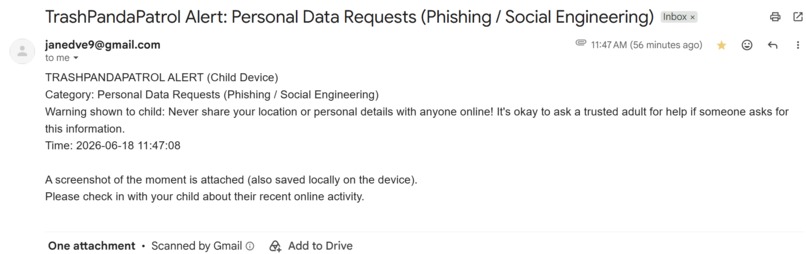
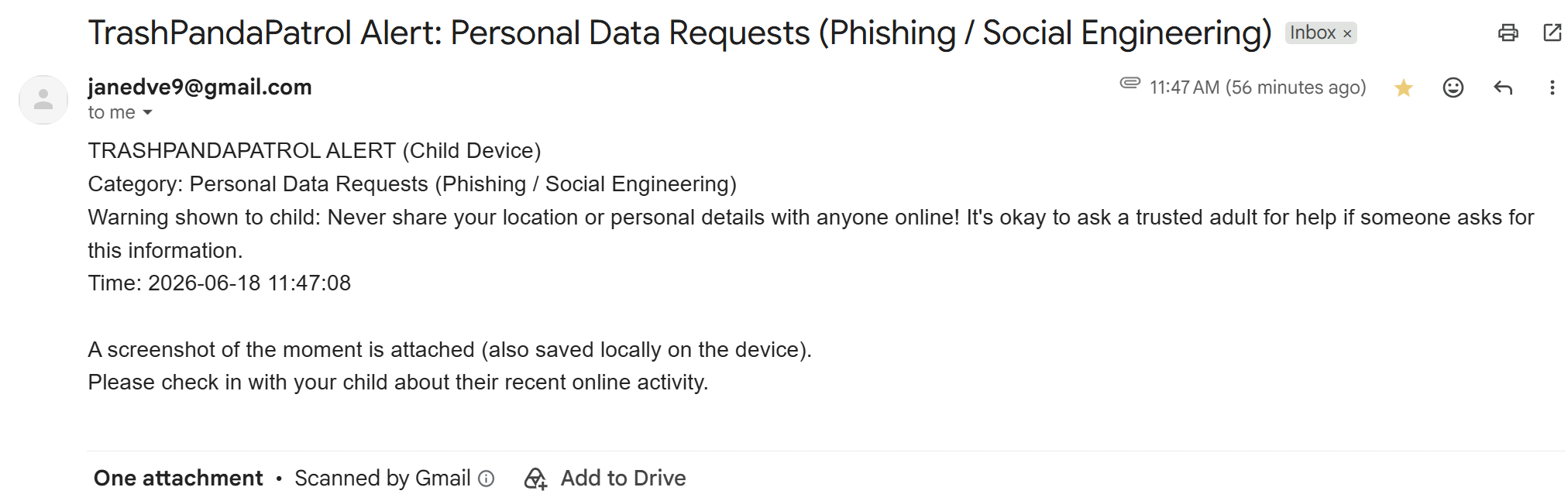
Example email alert - Email attachment image is not included in this Devpost for privacy
-
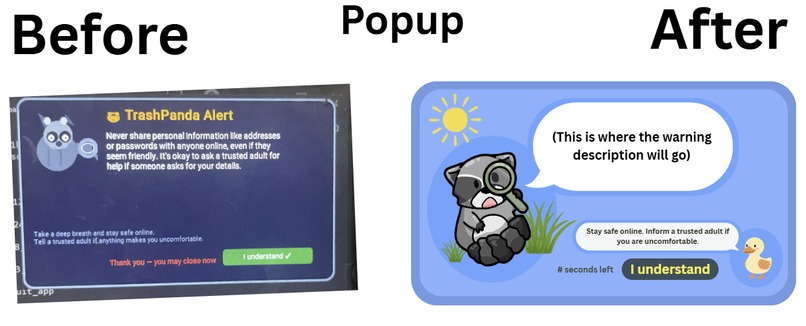
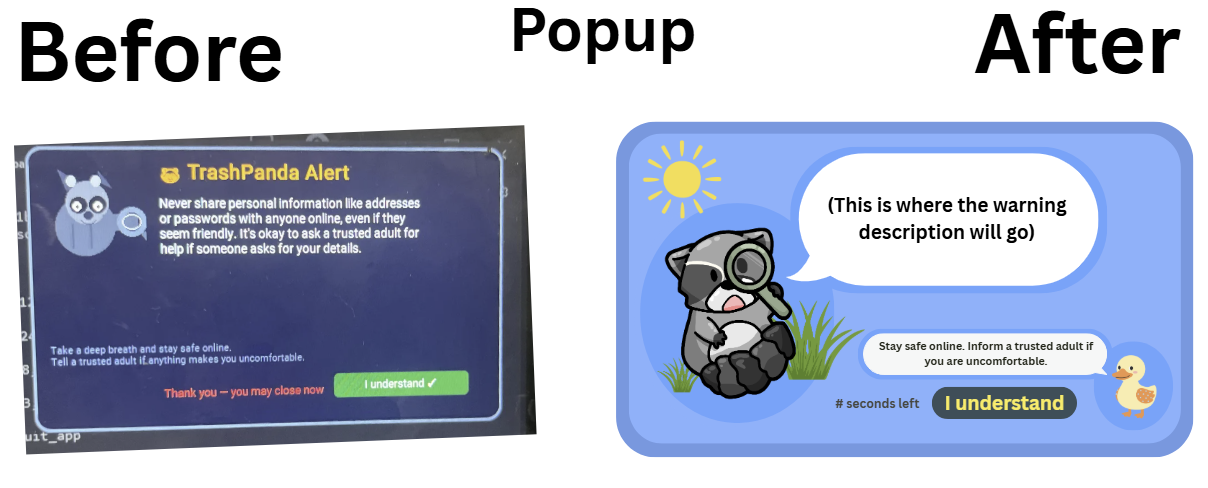
Before and after image of the popup
-
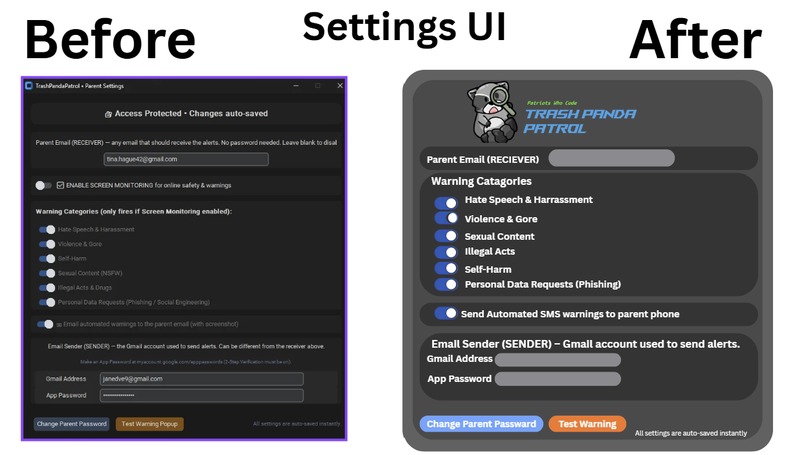
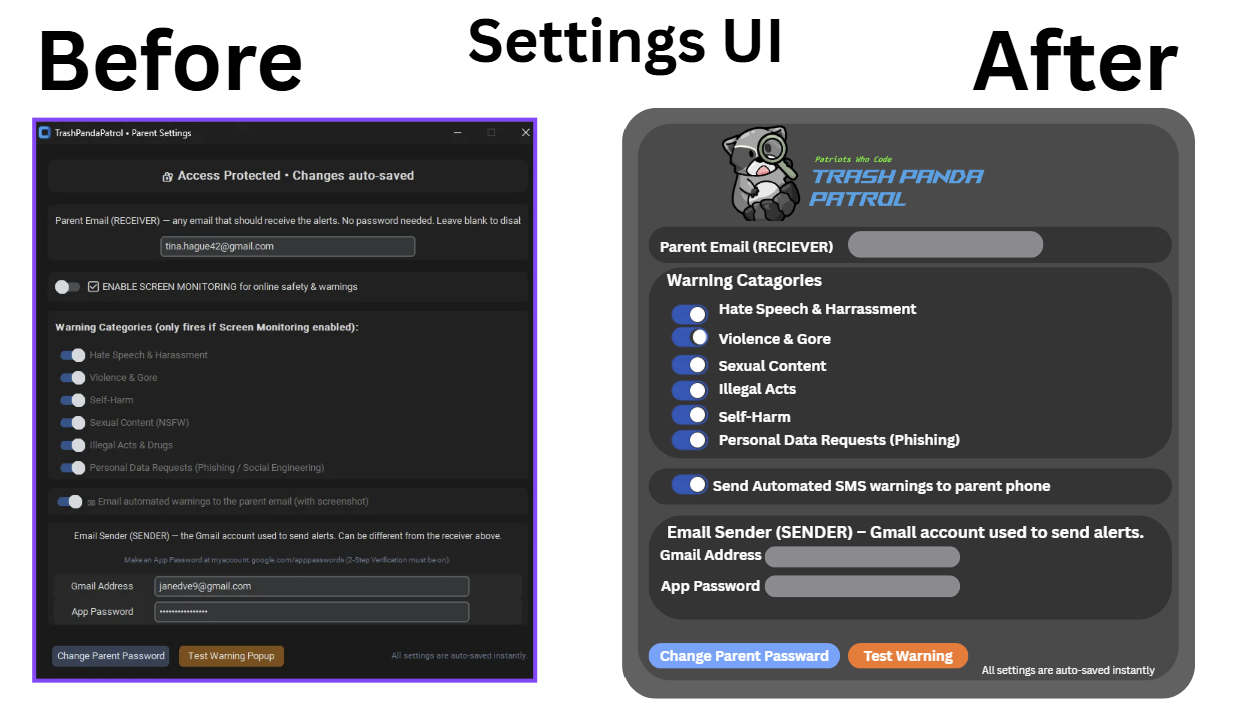
Before and after of settings UI
-
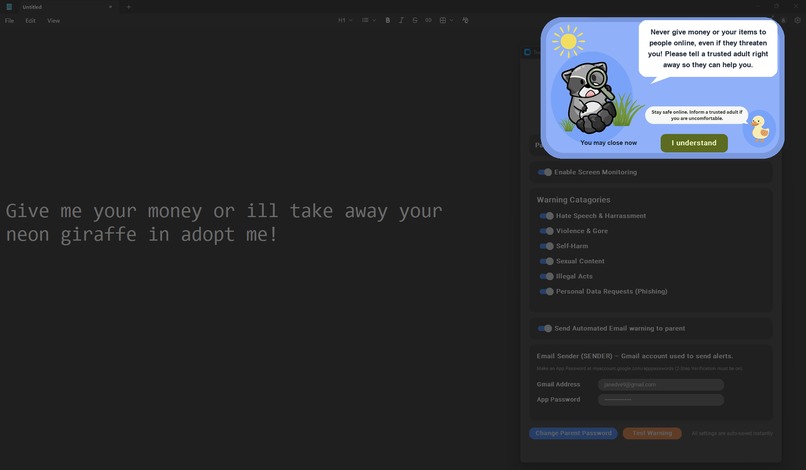
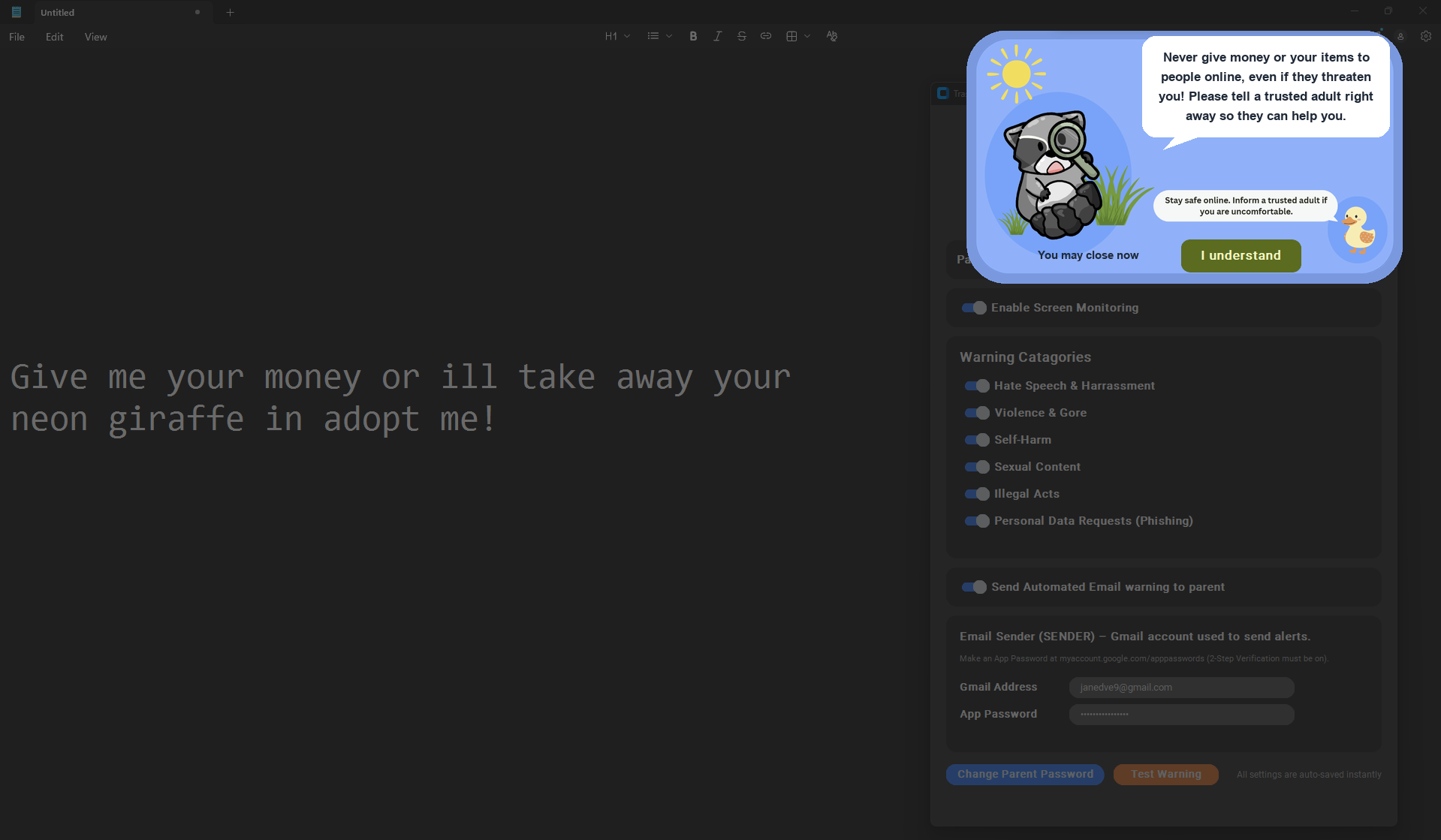
Popup activation triggered by social engineering message
-
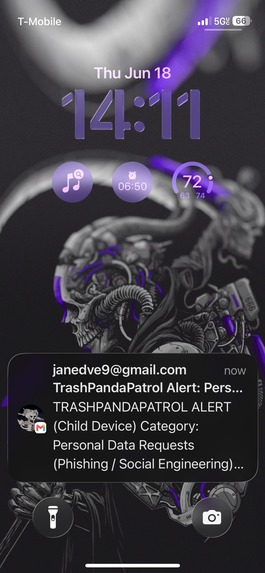
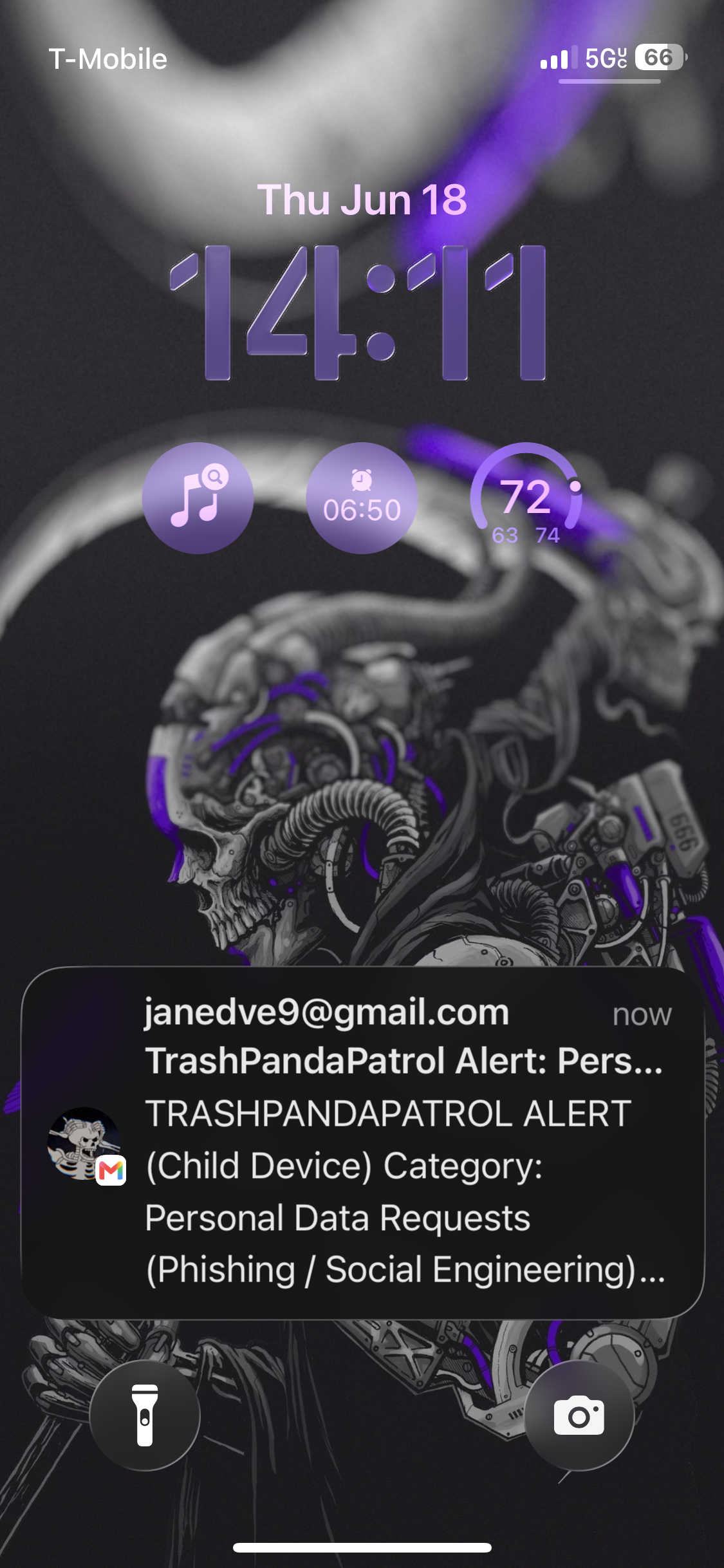
Screenshot of the parent notification on phone
-
Trash Panda Patrol Logo
Inspiration
When researching cybersecurity threats, there is often concern for the elderly being taken advantage of through fishing, or concerns about major company security. We began to think about the opposite end of the age spectrum and thought about cybersecurity threats that target kids. We personally remember times when we may have seen scam attempts when playing games like Roblox or Minecraft when we were kids. Now that kids are getting exposed to the internet at a younger age, and understanding how to use it is becoming increasingly crucial, it is important that kids learn how to use it safely without being blocked off from the internet.
What it does
The Trash Panda Patrol is an alternative to traditional restrictive parental controls that allows children to have a safely guided experience on the internet. The Trash Panda Patrol monitors the user's screen for inappropriate content, and alerts the parent of the child's activity with screen-shotted evidence. Furthermore, the user will receive a short warning message of why their activity was flagged, this will educate them on the reasons why they were blocked to promote safe activity online and guide child users not to fall for social engineering schemes. A screenshot is taken every 60 seconds and sent to the OpenRouter AI, we are using Gemini, and then analyzed for phrases that fall into these categories:
- Hate Speech & Harassment
- Violence & Gore
- Self-Harm
- Sexual Content (NSFW)
- Illegal Acts & Drugs
- Personal Data Requests (Phishing / Social Engineering)
Parents can choose which categories to monitor in the app settings. If a phrase that is associated with one of the categories above is detected, a popup with a friendly reminder to be safe online along with a response that is tailored to the context of the flagged text will be displayed. The UI is supposed to be fun and has our club’s mascot. The screen around the popup is dimmed and it can be dismissed after 5 seconds, ensuring the child user’s attention is drawn to the message.
This app is located in the Windows tray and requires a parent password to access the settings. The password can be set upon initial setup and can be changed later in the settings. If enabled in the app settings, a screenshot of the child user’s screen will be sent in an email to the parent’s email. For security, this screenshot is not saved anywhere besides in the parent’s inbox and the device with the application.
How we built it
Developing the project with agentic AI: We used the OpenRouter extension in VSCode to switch between Grok and Claude when coding. We used Claude for complex thinking and reasoning needed for debugging while we used Grok for creating code using Claude’s analysis in the gap.md file. This allowed us to be efficient with token usage since Claude had more powerful thinking than Grok.
Creating the UI design: We designed the UI in Canva then showed Claude pictures for it to redesign the UI. We also included icon and template images in the assets folder for Claude to refer to and utilize. The before and after images are attached.
Challenges we ran into:
Our initial project was a cookie manager was realistic, but a lot of it’s functions weren’t necessary for the average person. Furthermore, their wasn’t a real issue being solved besides making your data more secure. Since the screen around the popup is dimmed, but not fully hidden, the warning popup would periodically show up multiple times and get stacked on top of the previous one. This made it impossible to close out of the popup using the mouse so we would have to open Task Manager and end the Trash Panda Patrol task. We instructed Claude not to show a popup if there was already one on the screen and not to show a popup for the same message more than once.
We initially wanted to send SMS messages to the parent’s phone. We tried using Twilio Authy to send messages, however, the free trail on Twilio was not enough to achieve this. Instead, we decided to switch to sending emails to the parent email, which required a parent email (the recipient) and the sender email (another gmail that we had to make an app password specifically for Trash Panda Patrol for in the Google security page).
Accomplishments that we're proud of
- We were very excited when the popup message correctly showed up on the screen when there was suspicious text. We were able to get this working at the end of Day 1.
- We were also very excited when we were able to send messages that alerted the parent about suspicious content seen on the child user’s device. We accomplished this on Day 2.
What we learned
This project both taught us how to compete in a hackathon, this is our first hackathon, and how to use agentic AI to create a usable project. Using AI also helped us learn about Python libraries like Tkinter and how to use AI API keys in a project. We also learned about different ways that kids are targeted online through phishing, scams, and social engineering.
What's next for Trash Panda Patrol
Trash Panda Patrol can move forward to monitor Voice chats where the AI can detect explicit language, mature themes, hate speech, and aggressive behavior. We can program the AI to detect certain key words that are harmful for a young child .Furthermore, we can create a version of Trash Panda Patrol for Older people to steer away from suspicious messages while improving their digital literacy.

Log in or sign up for Devpost to join the conversation.