-
-
Screenshot
Inspiration
Language learners often rely on external tools like Google Translate or dictionary websites, constantly switching tabs and losing context. We wanted to create a way to learn languages naturally while reading, without leaving the page — a seamless blend of translation and education. That idea became TransLearn: a Chrome extension that turns any webpage into an interactive language lesson.
What it does
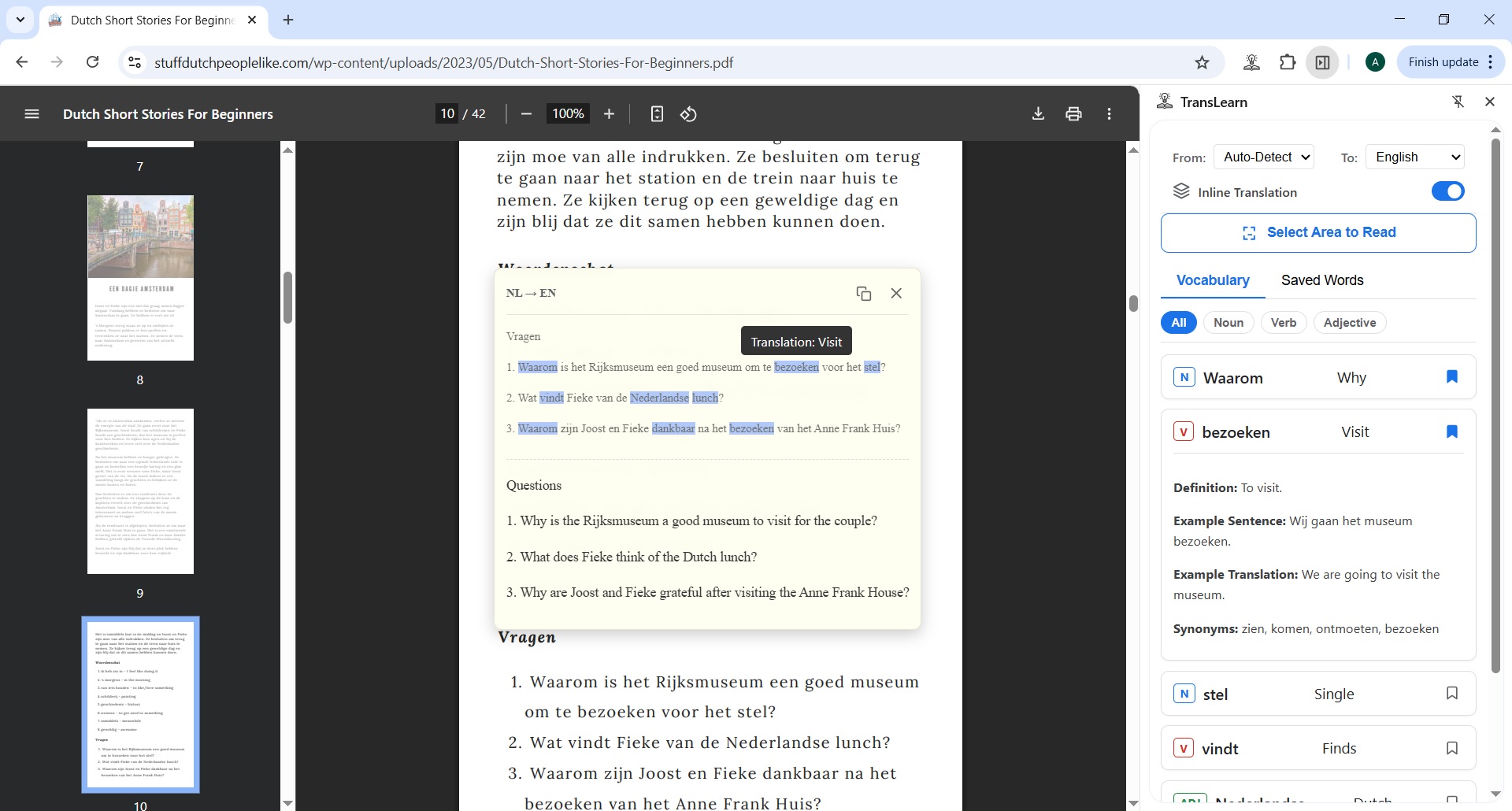
TransLearn is a language learning assistant built directly into the browser. When a user selects text on any webpage, TransLearn provides an instant, contextual translation in a semi-transparent overlay. But its real power lies in its proactive "AI Tutor" feature: It automatically identifies the most important vocabulary words for a learner in the selected text. It dynamically highlights these words in both the original text and the translation, creating a "live analysis" effect. It provides a deep dive on any word with a single click, showing definitions and examples in an organized side panel. It can read anything on the screen using OCR, making even images and PDFs learnable. It helps you remember by allowing you to save any word to a persistent, filterable "Saved Words" collection.
How we built it
TransLearn is built entirely using Chrome’s Built-in AI capabilities:
The Prompt API powers local, private analysis for vocabulary extraction and contextual understanding. The Translator and LanguageDetector APIs handle fast, high-quality translations. Tesseract.js runs inside an offscreen document for OCR, making image and PDF text selectable and analyzable under Manifest V3.
Challenges we ran into
We faced several technical and design challenges:
AI Reliability: Early on, a single, complex AI prompt resulted in frequent "hallucinations" and incorrect data formatting. We overcame this by re-architecting our AI client to use a multi-step prompt chain, breaking the complex task into a simple "Extractor" prompt and a focused "Analyzer" prompt. This dramatically improved reliability. UI Race Conditions: The interactive nature of the overlay led to several tricky race conditions. For example, double-clicking a word or clicking the "Copy" button would sometimes cause the overlay to close unexpectedly. We solved this by implementing a state-aware event listener system with flags (isMouseDown, isInteractingWithOverlay) to make our global listeners smarter and prevent them from firing at the wrong time. OCR Paragraph Detection: Tesseract.js is excellent at detecting lines but has no concept of a paragraph. We had to write our own algorithm from scratch that analyzes the vertical spacing and content of the OCR output to intelligently group lines into meaningful paragraphs and lists.
Accomplishments that we're proud of
The "Live Analysis" Highlighting: We are incredibly proud of the dynamic highlighting system. Seeing the AI identify, analyze, and highlight words in both the source and translated text in real-time is the "magic moment" of the app. It feels like a true AI assistant working alongside you. The Robust Event-Driven Architecture: We built a clean, scalable system that can handle complex, asynchronous tasks (like multiple streaming AI requests) while remaining perfectly responsive to the user. The use of AbortController to instantly cancel stale AI requests is a key part of this. Solving the OCR Paragraph Problem: Developing the algorithm to turn a flat list of text lines into structured, readable paragraphs was a significant challenge that we are proud to have solved. It makes the OCR feature genuinely useful.
What we learned
Throughout this hackathon, we learned a great deal about the practicalities of building with on-device AI. The most important lesson was in prompt engineering: breaking a complex problem down into a chain of simpler, focused prompts yields far more reliable results than one "do-it-all" prompt. We also gained a deep appreciation for robust UI state management and the importance of handling race conditions to create a smooth, professional-feeling user experience.
What's next for TransLearn
TransLearn has a strong foundation, and we're excited about its future. Our next steps would be to build out the complete learning loop: Flashcard Review Mode: Create a dedicated "Study" mode within the "Saved Words" tab, allowing users to review their vocabulary with spaced repetition. Deeper AI Integration: Use the AI to generate quizzes (e.g., "fill in the blank" exercises) based on the user's saved words and the original text context. Expanded Language Support: Carefully add support for more languages, including creating custom logic to handle non-space-delimited languages for highlighting. User Accounts & Sync: Allow users to sync their saved words across different devices.


Log in or sign up for Devpost to join the conversation.