-
-
translaytor
Pillar
Best Entertainment
Inspiration
Put a finger down if you have ever been doomscrolling on tiktok and become perplexed by language that fills up the comment section of a viral post? Put another one down if your parents asked you what is a ‘hip way to say cool in new gen terms’ and you were absolutely mortified to the point you forgot all the slang. Well that’s two down for me. Having to rely constantly on an Urban Dictionary to translate the latest fads in words gets tiring, and this is the same sentiment my teammates also share. So we decided to create a GenZ translator.
What it does
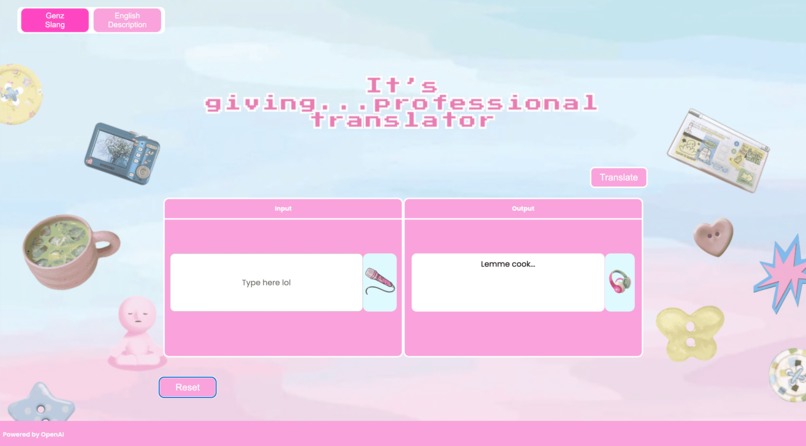
Our Gen_Z translator works as any normal translator would. You input a slang word you want translated, and it will output the meaning of said in formal terms. Vice versa also works. If you want to translate a normal phrase in Genz slang terms, all you have to do is write your word/phrase and it will produce a Genz slang term equivalent to the written word/phrase.
How we built it
Our project was developed entirely in Visual Studio Code, and our tech stack includes HTML, CSS, JavaScript, Python, and Flask. We used HTML and CSS to structure and style the layout of the website, while JavaScript was implemented to add interactivity and functionality to the buttons. JavaScript also powers the speech-to-text (microphone) and text-to-speech (speaker) features, as well as connects the front-end with our Python backend through the app.py file. The core logic of the generator was built in Python using a primary dictionary, and we integrated OpenAI’s API through a Flask API to translate words and phrases that were not listed in our dictionary. The UX design was created using Canva and Figma, ensuring a user-friendly and visually appealing experience.
Challenges we ran into
Some challenges we faced included making the dictionary work both ways — so that users could translate slang to normal English and vice versa seamlessly. We also struggled with integrating images into our layout structure without breaking the design. Another major issue was getting our HTML file to update in real time with the CSS. We solved this by running the program through the terminal and using a web link to view live changes. We also faced collaboration issues sometimes the program wouldn’t run properly, we’d get randomly logged out, or our Git repository wouldn’t merge correctly. Additionally, we ran into difficulties fetching the API and using the key, as well as connecting the JavaScript and Python files to ensure the correct mode (slang or normal) was applied.
Accomplishments that we're proud of
Building this website came with its fair share of challenges, but overcoming them made every solution even more rewarding. We’re proud of achieving our desired outcome and, more importantly, of how we learned to work through problems together as a team. Throughout the process, we gained valuable skill, such as using Flask, connecting a Python backend to our frontend, debugging issues, and managing version control with GitHub. We’re also especially proud of implementing the text-to-speech and speech-to-text features, which not only made our project more interactive but were also really fun to build. These features, along with our creative layout that showcases Gen Z culture through familiar iconography, made the project both exciting and meaningful for our team.
What we learned
We learned a lot throughout this project, from improving website structure and layout design to optimizing our translation system using AI. Since AI integration was a new area for our team, we gained valuable experience working with APIs and understanding how they help websites and apps access data more efficiently. The core logic of our generator was built in Python using a primary dictionary, and we integrated OpenAI’s API through a Flask API to translate words and phrases not listed in our dictionary. We also learned how to connect the backend with the frontend, securely fetch and manage API keys, and protect those keys when publishing our code to GitHub. Using Flask for the first time taught us useful features such as live mode, which allowed us to automatically reload our project while developing. Additionally, our UX design was created using Canva and Figma, ensuring a user-friendly and visually appealing experience.
What's next for TranSLAYtor
For our GenZ Slang-Translator, we hope to add more features to the website, such as adding features for user customization, such as being able to upload their own backgrounds, or being able to toggle a different color scheme if the default didn’t suit their taste. If we had more time, we would like to venture our website further in the form of a chrome extension, so users could keep a pocket-sized translator wherever they surf the web.
Built With
- api
- css
- flask
- html
- javascript
- openai
- python


Log in or sign up for Devpost to join the conversation.