-
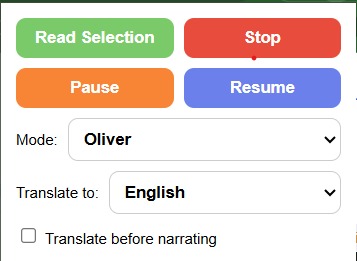
UI of the Chrome extension
Inspiration
We wanted to combine the utility of text to speech services with language translation into a single functional extension.
What it does
The extension allows you to highlight text and either through the context menu, popup menu, or keyboard shortcut (CTRL + SHIFT + Y) it will read the text aloud with an ElevenLabs voice. The popup menu also has additional features such as pausing, resuming, and stopping; with an in development translation selection option.
How we built it
We initially setup a barebones variant of the project just supporting Chrome's default TTS. We then elaborated on this adding API features and refining the UI to not be basic HTML.
Challenges we ran into
Because we decided to work on the project in JavaScript due to a tight deadline there were a few issues we ran into that took some time to solve that wouldn't have been an issue if we had decided to use TypeScript instead (Missing a new parameter we added in while revising and adding features but not getting an error).
Accomplishments that we're proud of
We're happy we managed to develop a working extension that utilizes Eleven Labs for TTS with multiple voice options as well as the various ways users can utilize our extension (Popup, context menu, hotkey).
What we learned
Our team had never worked on making a web extension before so we gained a better understanding of how the development process works for one as well as the actual linking functionality.
What's next for TranslateTTS
We're working forward to adding in translation to various languages the user can select from the popup menu; this will utilize Google's API for translation.
Built With
- elevenlabs
- google-cloud-translate
- html
- javascript


Log in or sign up for Devpost to join the conversation.