-
-
TMM — Track My Mailbox: Logo (MVP Version 1)
-
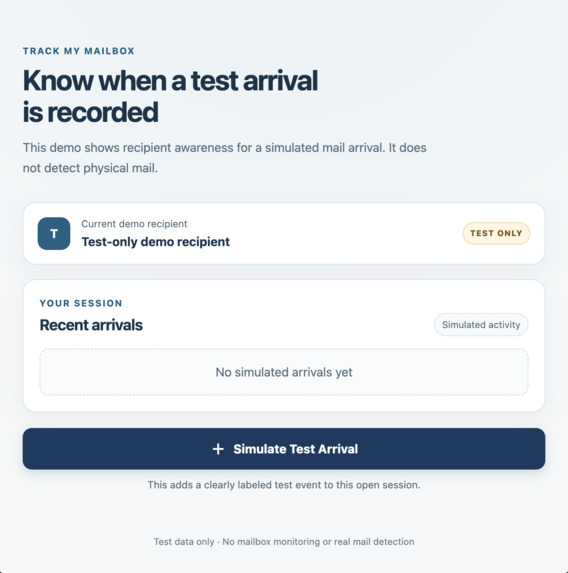
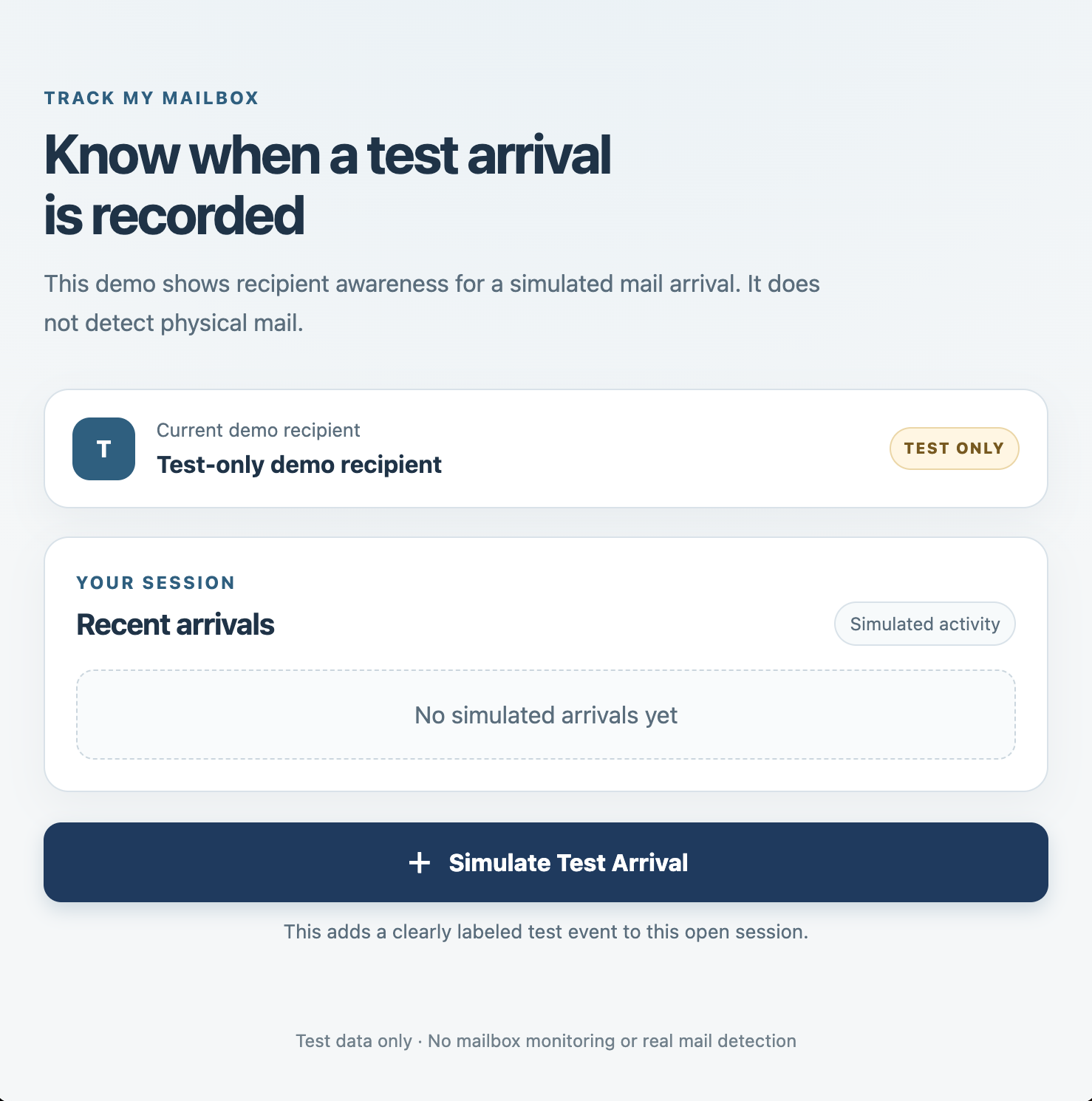
Screenshot 1 — Main Application (MVP Version 2)
-
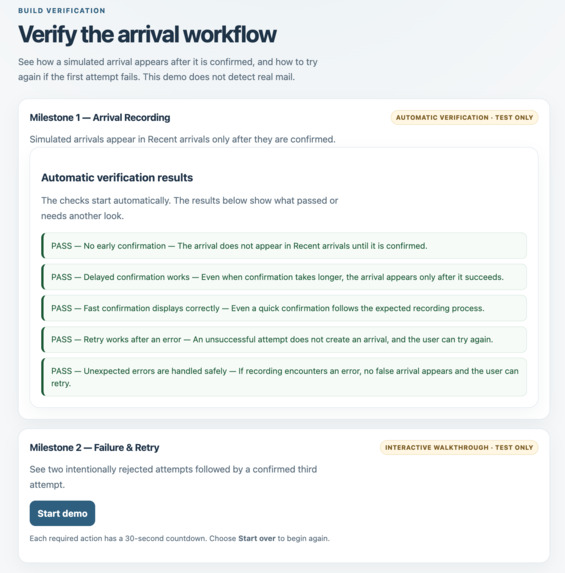
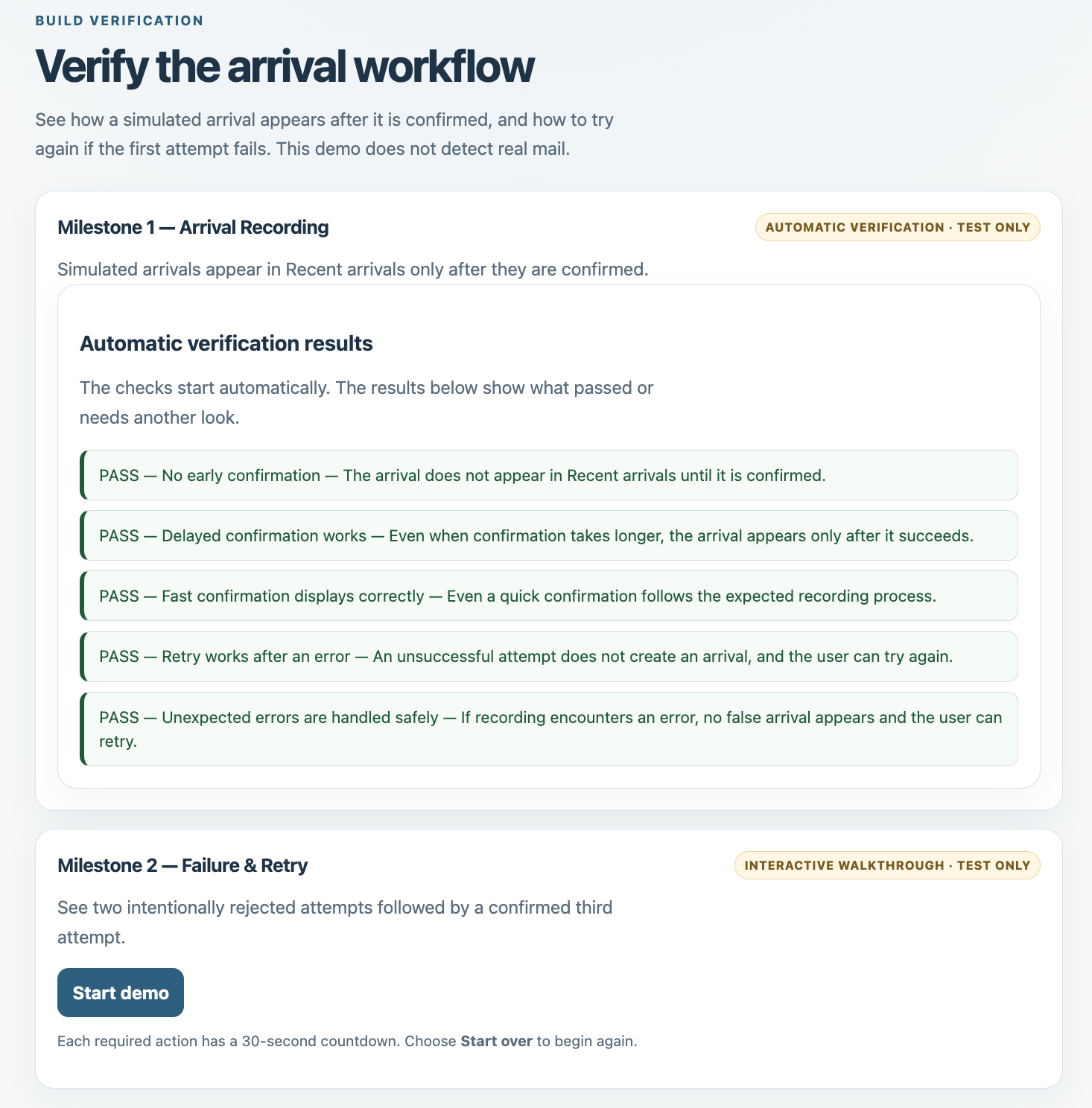
Screenshot 2 — Interactive Walkthrough (MVP Version 2)
Track My Mailbox (TMM)
Inspiration
Track My Mailbox (TMM) was inspired by a common challenge in shared households: not knowing whether your mail has arrived without physically checking the mailbox or asking someone else.
The idea is to explore a simpler way to give recipients visibility into incoming mail without monitoring other household members.
As a participant in the Build With AI: Basics challenge, I also wanted to explore how AI-assisted development could help turn an everyday problem into a working proof of concept.
What It Does
Track My Mailbox Version 2 (TMM_mvp) is a lightweight, browser-based prototype that demonstrates how a recipient can view a simulated mail arrival after it has been recorded.
The MVP focuses on one demonstration recipient, temporary in-memory data, and two milestones.
Milestone 1 — Arrival Recording
The recipient selects Simulate Test Arrival to initiate a test request.
While the request is processing, the interface displays its progress. Once the arrival is accepted, the screen updates automatically with a confirmation, timestamp, and TEST · SIMULATED label, without requiring a page refresh.
This milestone validates the core arrival-awareness workflow.
Milestone 2 — Failure & Retry
The second milestone focuses on reliability and recovery when a request fails.
The verification walkthrough intentionally rejects the first two attempts. After each failure, the recipient receives an error message and can select Try Again without restarting the workflow.
On the third attempt, the request remains pending until the test explicitly accepts it.
Confirmation appears only after acceptance, helping prevent premature success messages and duplicate submissions.
Together, these milestones demonstrate the essential recipient experience: initiate an arrival request, receive a clear status update, and recover from an unsuccessful attempt.
How I Built It
I explored AI-assisted development using OpenAI Codex throughout both versions of Track My Mailbox.
Version 1 — Initial Exploration
Version 1 began as a more complex prototype using Next.js, React, Supabase, and supporting services.
This initial development experience helped me explore implementation, troubleshooting, testing, and the practical challenges of building a broader application with AI assistance.
However, the scope was more extensive than necessary for validating the core idea within the challenge timeline.
Version 2 — TMM_mvp
I restarted the project as Version 2, focusing on a smaller, testable browser-based proof of concept aligned with the Learn Skill Pack workflow.
The Version 2 application was developed using:
- HTML for page structure.
- CSS for interface styling.
- JavaScript for interactive functionality, simulated arrival handling, and browser-based tests.
- Python 3 for local development-support and verification automation.
- OpenAI Codex for AI-assisted development, troubleshooting, code review, testing support, and documentation.
- Git and GitHub for version control and publishing the source code.
The application uses a simple browser architecture without a production backend or persistent database.
I used Codex throughout development while reviewing its recommendations, checking results, and making decisions about project scope and implementation.
The completed Version 2 source code, tests, and supporting documentation have been committed and published to GitHub.
Challenges I Faced
One challenge was managing the scope of the project. Version 1 explored a broader implementation, but Version 2 required focusing on the smallest workflow that could demonstrate the core concept.
Another challenge involved maintaining reliable interface behavior during failed requests. I needed to ensure that the system displayed clear error messages, preserved retry availability, prevented overlapping submissions, and confirmed success only after acceptance.
I also encountered a limitation in my available Codex usage, which was paused until November 15. To continue working within the challenge timeline, I subscribed to ChatGPT Plus for one month while restarting Version 2.
Browser verification presented another challenge. The application and walkthrough were manually verified in Google Chrome desktop, while an unresolved Safari issue affecting the automatic verification page was deferred to a future iteration.
Finally, I learned the importance of maintaining accurate development records. The original milestone work was not captured in separate sequential Git commits. This remains documented in the project checklist rather than reconstructing historical commit history.
What I Learned
This project reinforced the importance of defining a clear MVP, managing scope, and validating user workflows before introducing additional functionality.
Working with Codex across both versions helped me understand how AI can support development while still requiring human judgment, technical verification, and clear decisions.
I also gained practical experience with browser-based testing, failure recovery, Git workflows, project documentation, and iterative development.
One of my key takeaways was the importance of following a structured process rather than skipping steps, especially when working independently under a deadline.
What's Next
Version 2 establishes a foundation for exploring more advanced recipient-awareness capabilities.
Potential future enhancements include physical mail detection, appropriate mail-service integrations, persistent storage, and notifications delivered to recipients' devices.
These capabilities are outside the current MVP.
Current scope: Track My Mailbox is a simulated-only prototype using temporary in-memory data. It doesn't yet detect physical mail, connect to USPS, or send real notifications to recipients' devices.

Log in or sign up for Devpost to join the conversation.